Table of Contents
AI has turned email marketing from a manual, hit‑and‑miss activity into a fine‑tuned growth engine. With the right tools, you can generate on‑brand copy, segment audiences with precision, optimize send times automatically, and keep deliverability healthy without bloating your team. In this article, we’ll explore six of the best AI tools for email marketing, unpack their strengths and limitations, and give you clear pricing tables you can drop straight into your blog.
1. HubSpot Marketing Hub – AI + CRM Powerhouse
HubSpot is more than an email platform; it’s a full CRM‑centric marketing suite where AI sits on top of rich customer data. That makes it especially powerful for lifecycle marketing, complex B2B journeys, and revenue‑driven campaigns. Its AI capabilities span content creation, predictive lead scoring, send‑time optimization, and reporting, but you pay for that power through higher‑tier plans and add‑ons.
Key features and strengths
HubSpot’s AI assistant can draft subject lines, email copy, and CTAs in your preferred tone, helping teams move faster while staying on brand. The platform uses predictive lead scoring and send‑time optimization to push the right message to the right person at the right moment. Because email, CRM, and sales tools live together, it shines when you need multi‑touch nurturing, detailed attribution, and tight alignment between marketing and sales.
The main trade‑offs are cost and complexity. Pricing climbs quickly as contacts and features grow, and non‑technical marketers may find the breadth of options overwhelming at first. HubSpot works best for B2B SaaS, agencies, and mid‑to‑large companies that see email as part of a broader revenue engine, not just a broadcast channel.
HubSpot pricing overview
| Plan | Typical Monthly Cost (Approx.) | What You Get in Context of AI Email |
| Free | 0 USD | Basic email tools, forms, limited CRM, no serious AI features |
| Starter | ~15–25 USD+ | Core email marketing, simple automation, limited AI assistance |
| Professional | ~800 USD+ | Advanced automation, A/B testing, better reporting, more AI features unlocked |
| Enterprise | ~3,600 USD+/month | Enterprise‑grade automation, custom reporting, full CRM and AI at scale |
| AI Add‑on (per user) | ~20 USD+/user/month | Additional AI assistance and advanced capabilities layered on top |
2. Mailchimp – Friendly AI for Small Businesses

Mailchimp remains a popular entry point into email marketing for creators, bloggers, and small businesses. It offers a familiar drag‑and‑drop editor, attractive templates, and an increasingly useful layer of AI for copy suggestions and send‑time optimization. While it doesn’t go as deep as enterprise suites, it’s more than enough for most early‑stage and small ecommerce use cases.
Key features and strengths
Mailchimp’s AI helps with subject line ideas, content suggestions, and picking better send times to improve open rates. Its interface is intuitive, which makes it ideal for teams that don’t have a dedicated marketing ops person. With large integration support for ecommerce platforms, ad networks, and CMSs, it works well as a central email hub for small brands.
The limitations show up when you need very advanced AI, multi‑touch B2B nurturing, or intense segmentation logic—those features are either basic or gated behind higher‑tier plans. Mailchimp is best suited to creators, solopreneurs, small ecommerce brands, and SMEs who want approachable AI without a steep learning curve.
Mailchimp pricing overview
| Plan | Typical Monthly Cost (Approx.) | What You Get in Context of AI Email |
| Free | 0 USD | Very basic email, small list limits, minimal AI |
| Essentials | ~13 USD+/month | Core campaigns, basic templates, modest AI help |
| Standard | ~20 USD+/month (for small lists) | Better automation, more advanced segmentation and AI |
| Premium | ~350 USD+/month | High list limits, advanced testing, strongest AI and analytics |
3. ActiveCampaign – Automation‑First AI Engine
ActiveCampaign is built for marketers who live and breathe automation. It combines email, CRM‑style features, and powerful workflows with AI elements like predictive sending and enhanced lead scoring. Instead of just “sending campaigns,” you design complex journeys that adapt to user behavior.
Key features and strengths
Where ActiveCampaign really stands out is its visual automation builder, which can run intricate sequences across email and other channels. AI‑powered predictive sending chooses the best time per contact, while behavior‑based triggers and dynamic content enable deep personalization. For funnel‑driven businesses—especially those selling courses, info products, or high‑touch services—this level of control can significantly lift conversions.
On the flip side, the same complexity can scare beginners. To get real value, you need to invest time in building and maintaining workflows, and its AI is most effective when those flows are already robust. ActiveCampaign is ideal for growth‑focused SMBs and marketers who see email as a sophisticated funnel, not just a newsletter.
ActiveCampaign pricing overview
| Tier (By Contact Volume) | Typical Monthly Cost (Approx.) | What You Get in Context of AI Email |
| Entry‑level plans | Varies by list size | Core automation, standard email features, limited AI |
| Mid‑tier plans | Higher, scales with contacts | Strong automation, predictive sending, better segmentation |
| Advanced/Enterprise | Quote‑based / higher range | Full automation suite, advanced AI features and reporting |
4. GetResponse – All‑in‑One With AI Assistant
GetResponse positions itself as a full online marketing suite: email, SMS, landing pages, funnels, and even webinars. Its AI assistant (often branded as an “AI marketing assistant” or similar) helps generate content, advise on campaigns, and optimize sending, making it attractive for lean teams that want a single platform.
Key features and strengths
The standout elements are its “Perfect Timing” send optimization and AI‑assisted content generation. Combined with landing page and funnel builders, this lets you create end‑to‑end journeys without stitching together multiple tools. It’s especially useful for coaches, course creators, and digital product sellers who want email and landing pages in one ecosystem.
The downside is that not every AI feature feels as mature as the most advanced enterprise stacks, and the broad feature set can feel heavy if you only need simple campaigns. GetResponse works best for online businesses that care about full funnel control—from opt‑in page to nurture sequence to webinar—rather than email alone.
GetResponse pricing overview
| Plan Tier | Typical Monthly Cost (Approx.) | What You Get in Context of AI Email |
| Basic / Entry Plans | Lower range, list‑based | Standard email campaigns, basic automation, limited AI |
| Mid‑Tier (e.g., Marketing Automation) | Mid‑range, scales with list | Advanced automation, “Perfect Timing”, more AI support |
| Higher / MAX / Enterprise | Quote‑based / higher end | Full funnel suite, advanced AI assistant, dedicated support |
5. Brevo – Budget‑Friendly AI for Multi‑Channel
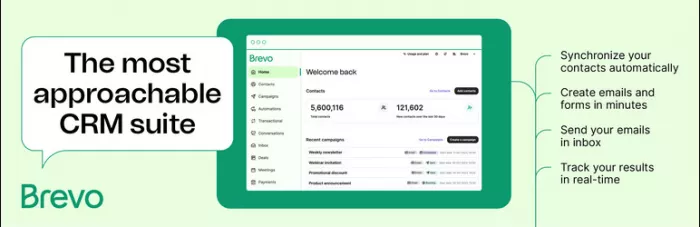
Brevo (formerly Sendinblue) focuses on affordability and multi‑channel messaging—email, SMS, and more,making it appealing for cost‑conscious teams. Its AI features are still evolving but already bring value in content assistance and smarter automation, especially at a lower price point than many incumbents.
Key features and strengths
Brevo offers a straightforward automation builder for email and SMS, along with tools for deliverability and list hygiene. Its pricing structure tends to be more forgiving for growing lists and high send volumes, which is crucial for startups and SMEs. Emerging AI capabilities add further optimization without dramatically increasing cost.
Because its AI layer isn’t as deep as some premium suites, advanced marketers may eventually outgrow it or need supplemental tools. Some high‑volume or niche features require moving into more expensive tiers as well. Brevo is best suited to small and mid‑sized businesses that want “good enough” AI and automation without enterprise‑level budgets.
Brevo pricing overview
| Plan Tier | Typical Monthly Cost (Approx.) | What You Get in Context of AI Email |
| Starter / Lite | Lower range, volume‑based | Core email sending, basic automation, limited AI |
| Business / Plus | Mid‑range, higher volumes | Stronger automation, better segmentation, more AI use |
| Enterprise / Custom | Quote‑based | High‑volume sending, premium support, advanced features |
6. Seventh Sense – AI Send‑Time Specialist
Seventh Sense is a different kind of tool: it doesn’t replace your email platform, it sits on top of it. Designed to integrate deeply with providers like HubSpot and Marketo, it uses AI to determine the ideal send time and frequency for each individual recipient.
Key features and strengths
Instead of asking “When should we send this campaign?”, you let Seventh Sense model each contact’s engagement history and decide. The result is hyper‑personalized send‑time optimization, reduced subscriber fatigue, and potentially higher open and click‑through rates. This is especially powerful for large lists, where even small percentage lifts translate into big revenue swings.
However, it is not a full ESP, you’ll still need HubSpot, Marketo, or another platform for content, segmentation, and automation. Its value also depends on having enough volume and consistent sending to train its models. Seventh Sense suits mid‑market and enterprise teams that already run serious email operations and want to squeeze incremental performance from them.
Seventh Sense pricing overview
| Plan / Integration | Typical Monthly Cost (Approx.) | What You Get in Context of AI Email |
| Base plans (HubSpot/Marketo) | Varies by list size and integration | Core send‑time optimization and analytics |
| Higher‑tier / Custom | Quote‑based | Advanced analytics, enterprise support, tailored setup |
Conclusion
Ultimately, there’s no single “best” AI email tool, only the one that fits your size, stack, and goals. Smaller creators and ecommerce brands are usually better off starting with simpler, affordable options like Mailchimp or Brevo, then graduating to ActiveCampaign or GetResponse as automation and funnels become more central to revenue. For teams already running on a CRM and measuring everything against pipeline, HubSpot (optionally boosted by a specialist optimizer like Seventh Sense) makes the most sense. The key takeaway for readers: start lean, then upgrade your AI toolkit only when your list, complexity, and ROI clearly justify the jump.
Comments