Table of Contents
- The Problem: Haircuts Are Permanent, Regret Is Free
- Meet BarberGPT AI: A Virtual Barber With Commitment Issues
- The Ritual: How a Virtual Haircut Actually Happens
- The Engine Room: What BarberGPT Is Actually Good At
- Interface: A Tool, Not a Theme Park
- Output Quality: Where BarberGPT Impresses (and Where It Doesn’t)
- Money Talk: Credits, Not Chains
- Privacy: “Upload Your Face” Is a Big Ask
- Where BarberGPT Really Shines
- The Fine Print: Limitations You Shouldn’t Ignore
- Where It Stands Among Hairstyle Apps
- Who Actually Gets the Most Value Out of BarberGPT?
- What People Are Saying (Without the Marketing Gloss)
- If BarberGPT Grows Up, What Could It Become?
- Final Take: Is BarberGPT AI Worth Your Time?
The Problem: Haircuts Are Permanent, Regret Is Free
You know the script.
You describe your dream cut in painful detail. The barber nods. Twenty minutes later, you are staring at a mirror wondering whose head that is. The issue isn’t always skill, it’s imagination. Most of us simply cannot see the new haircut until it’s too late.
BarberGPT AI steps into that gap. It doesn’t cut hair; it runs a simulation. You upload a photo, highlight your hair, and let the AI play “what if” with fades, buzzes, crops, and longer looks before a single strand hits the floor.
Meet BarberGPT AI: A Virtual Barber With Commitment Issues
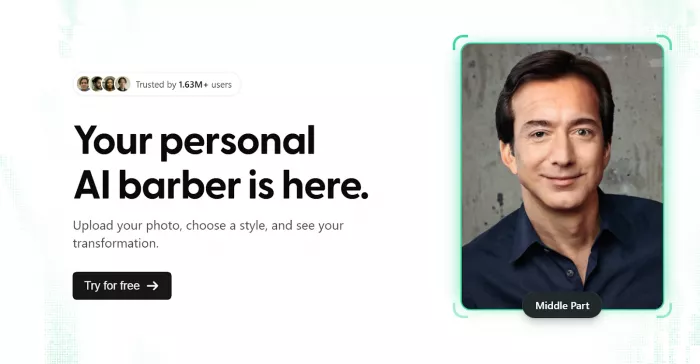
BarberGPT is a web-based, men‑only “virtual barber” that lives in your browser. No app store, no bloated installer, just a website that takes your selfie and gives you haircut previews in seconds.
It’s not a beauty filter with cartoon hair stickers. Under the hood, BarberGPT uses generative AI to replace the hair region in your photo while protecting everything else: your face, lighting, shadows, and expression stay intact. The result: images that look more like “post‑barber selfie” and less like “Instagram filter from 2017.”
Quick snapshot:
● What it does: Lets men try realistic hairstyles on their own face before a real cut.
● Where it runs: Any modern browser on desktop or mobile.
● How you pay: Credits, not subscriptions, with a few free tries to test the waters.
● Who it’s for: Men, barbers, style‑curious users, dating‑profile optimizers, and anyone haircut‑shy.
The Ritual: How a Virtual Haircut Actually Happens
Let’s walk through a realistic session because this is where most people decide whether a tool is “nice idea” or “I’m actually going to use this.”
Step 1: You, a Browser, and a Selfie
You land on BarberGPT’s site, hit the “Create” button, and it doesn’t demand your life story. It just asks for a clear, front-facing photo where your hairline is visible and the lighting isn’t a crime.
If you’re serious about results, you use a desktop: bigger screen, sharper view, fewer mistakes.
Step 2: Point At What You’re Willing To Change
Next, BarberGPT asks you to highlight your hair. You literally paint over the hair region: the top, sides, fringe, whatever you’re okay with the AI messing with. This mask becomes the sandbox.
It’s precise enough that you can say, “Change the top, but leave the sides.” It’s also the step where rushing will absolutely come back to haunt your results.
Step 3: Hit Generate and Watch the Future Load
With your mask set, you send the image off to the AI. A few seconds later, you get versions of yourself with different men’s cuts like fades, buzz cuts, textured tops, longer styles rendered directly on your face.
Short and medium cuts usually look eerily plausible; long or very complex textures still show the occasional artifact.
Step 4: Save, Roast, or Send to Your Barber
You can save the generated images and download them. Some people send them to their barber (“I want this, not what you think I mean”), others use them to A/B test profile pictures with friends.
The tool’s real power isn’t just “looking cool”; it’s eliminating ambiguity.
The Engine Room: What BarberGPT Is Actually Good At
BarberGPT is built around one big idea: do fewer things, but do them very well.
Men’s Hairstyles, Not Everything Under the Sun
The focus is unapologetically male. BarberGPT concentrates on men’s cuts—fades, crops, buzzes, and longer “still clearly male” styles.
This narrow scope means the model doesn’t get distracted by makeup, lashes, or fantasy hair colors; it’s here to answer “Will this cut suit my head?” not “Can I become an anime character?”
Realistic Hair Replacement Rather Than Stickers
Instead of slapping pre‑rendered hair on top of your photo, BarberGPT reconstructs the hair inside your highlighted region. It keeps:
● Your facial structure and proportions
● The original lighting and shadows
● The perspective and head angle
That’s why reviewers keep calling out how “photo‑like” the final images feel, especially for short and mid‑length cuts.
Manual Masking: Freedom With a Catch
Masking gives you control over exactly what changes—and that’s both a feature and a friction point.
● Good news: You can experiment with just the top, only the fringe, or a full overhaul.
● Bad news: If you’re sloppy with the mask, the AI will obediently generate something sloppy too.
Curly, very dense, or long hair requires more patience, and rushed masks are almost guaranteed disappointment.
Fast Enough To Use Minutes Before Your Appointment
Performance matters when you’re running late. BarberGPT generates previews in seconds, not minutes. That makes it realistic to run a handful of tests the night before or even while you’re in the waiting area at the barbershop.
Interface: A Tool, Not a Theme Park
BarberGPT’s UI is refreshingly boring and that’s a compliment.
● You hit the site, see a clear pitch, and a single obvious button to get started.
● You upload, mask, and generate in one linear flow; no side quests, no gamified points.
● Navigation stays minimal i.e. Create, My Styles, Upgrade, Sign In.
On desktop, it feels clean and controlled; on mobile, it works but loses some finesse. Masking on a small screen and judging detail on a phone is noticeably harder, and reviewers consistently rate the desktop experience as the “real” version.
Output Quality: Where BarberGPT Impresses (and Where It Doesn’t)
Speed vs Realism
The tool hits a sweet spot between speed and realism. You’re not staring at a loading spinner, but you’re also not trading away quality for instant results.
● Short and mid‑length men’s cuts: usually very convincing and “Instagram-ready.”
● Long or complex styles: more prone to artifacts, slightly odd edges, or texture mismatches.
The Catch: Your Input Is Half the Result
Two things determine whether BarberGPT looks “magic” or “meh”:
● Your photo: bad lighting, weird angles, and low resolution will hurt realism.
● Your mask: careful, precise highlights give the AI something coherent to work with.
If you treat it like a serious preview tool and not a throwaway toy, the outputs reward that effort.
Money Talk: Credits, Not Chains
BarberGPT goes for something most people quietly prefer: pay for what you use, and that’s it.
Free Credits for First Impressions
New users typically get a small batch of free credits to run a few hairstyles before paying. That’s enough to see how your face and hair play with the model and whether it’s worth spending money.
When You Decide It’s Worth Paying
Once you’re in, you buy credits via the upgrade page. External reviews have surfaced three main tiers:
● Starter – 7 credits for about 1 USD, enough for a quick “Should I really buzz this?” session.
● Hobbyist – 50 credits for about 5 USD, for people who like to experiment or test multiple looks over time.
● Professional – 300 credits for about 15 USD, tailored to barbers, creators, or heavy users, sometimes with early access perks.
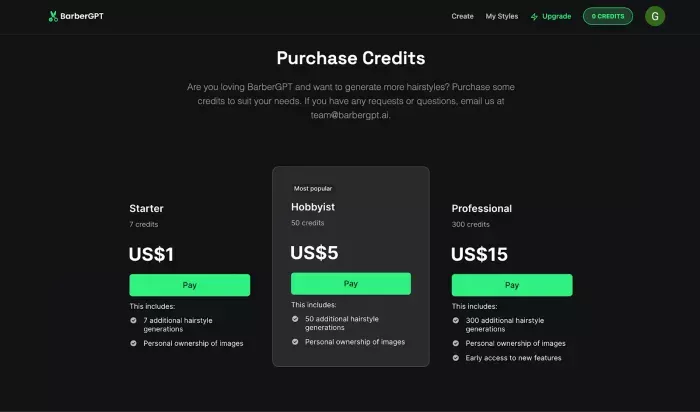
No subscriptions, no recurring charges, just credits you burn when you generate new hairstyles.
Prices can move, so the only safe sentence in your article is: “Check the upgrade page for the latest pricing.”
Privacy: “Upload Your Face” Is a Big Ask
Any tool that wants your face has to earn your trust.
Low‑Friction, Low‑Identity Onboarding
One big plus: you can test BarberGPT without immediately giving away your full identity. Early flows let you try looks without a heavy sign‑up process. That alone puts it ahead of a lot of “log in with everything” photo apps.
What They Get Right
Public information and reviews highlight that:
● Your photos are treated as personal data and not casually sprayed across third parties.
● You retain control of your images with options to remove them from your account.
That doesn’t make it privacy perfect, but it does make it more privacy‑aware than most “free” face filters.
What’s Still Fuzzy
Two transparency gaps are worth mentioning:
● How long images are kept server-side, especially after deletion.
● Whether your photos feed back into future training.
If you write for a privacy-savvy audience, call this out plainly: BarberGPT is better than average, but still not as explicit as a security‑first platform would be.
Where BarberGPT Really Shines
You can sum up the upside in four big ideas.
1. Men-first, not afterthought : It’s built for men’s hair, not women’s filters with a “guy mode” checkbox.
2. Fast, simple, and web-based : No app, no learning curve, just browser + photo + result.
3. Communication tool for barbers and clients : A realistic picture beats a vague “short on the sides, not too short on top” conversation every time.
4. Low-risk experimentation : For a handful of dollars, you can test dozens of “what if” scenarios instead of gambling on one irreversible cut.
For many users, that combination alone justifies trying the free credits.
The Fine Print: Limitations You Shouldn’t Ignore
An honest review doesn’t stop at the good news.
It’s Mostly a Men’s Club
BarberGPT’s focus is its strength—but also a hard boundary.
● Women’s hairstyles: not its territory.
● Makeup, filters, glam edits: nope.
● Hair color experimentation: not a core feature yet.
If readers want full beauty editing, they should skip BarberGPT and look at broader virtual makeover apps.
Masking Is Work, Especially on Mobile
The manual mask step is where many casual users stumble.
● On desktop, you can be precise and get crisp edges.
● On mobile, your finger is a blunt instrument, and the results show it.
If someone expects “two taps and perfection,” they will be disappointed—especially with curly or complex hairlines.
Not Free for Endless Play
The credit system is fair but not infinite.
● Occasional use: pricing feels very reasonable.
● Constant experimentation: costs can creep up unless you commit to the larger bundle.
It’s more realistic to think of BarberGPT as a decision tool, not a nightly entertainment app.
Where It Stands Among Hairstyle Apps
Zoom out for a second: AI hairstyle and beauty apps are everywhere. Here’s where BarberGPT lands in that crowd.
● Focus: Men’s haircut previews vs. full beauty suites (hair, makeup, filters).
● Tech style: Photorealistic hair replacement vs. AR camera filters.
● Pricing: Credits vs. subscriptions, ads, and in-app grinding.
● Feature set: Limited but deep vs. wide but shallow.
You don’t pick BarberGPT instead of a makeover app. You pick it before a haircut, as a dedicated preview tool.
Who Actually Gets the Most Value Out of BarberGPT?
If you want to see this tool at its best, use it in the scenarios it was clearly built for.
Perfect fits:
● Men thinking about a big change: buzz cuts, new fades, growing it out.
● Barbers who want to show clients visuals, not guesswork.
● People optimizing their profile photos or content image, trying to see which haircut “plays” best.
Good-but-not-core:
● Teenagers experimenting with trends without committing.
● Creators who need different “looks” for thumbnails and campaigns.
Probably not for you if:
● You’re primarily interested in makeup, filters, or full glam edits.
● You need industrial-grade editing or bulk processing.
What People Are Saying (Without the Marketing Gloss)
If you peel back the official copy and look at independent reviews, a fairly consistent picture emerges.
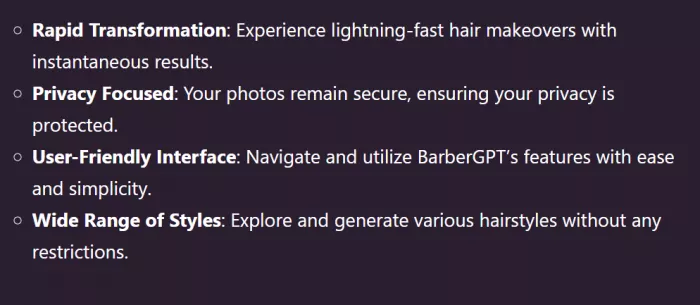
People like:
● How easy it is to go from “I found the site” to “I have a new hairstyle preview.”
● How real the images look compared to most beauty filters.
● The sense that their photos aren’t being casually exploited.
● The fact that a few dollars legitimately help avoid major haircut regret
People complain about:
● Masking on small screens and the weaker mobile experience overall.
● Mixed results for certain curly or highly textured hair.

● The fact that it’s basically “men only” for now.
Reviews that assign a score often land around 4.5/5, docking points mainly for scope and mobile polish rather than the core idea.
If BarberGPT Grows Up, What Could It Become?
You can see the future roadmap even if it’s not officially published.
Natural next steps include:
● Expanding into women’s hairstyles and longer cuts.
● Adding beard and facial hair simulations for full grooming experiments.
● Supporting hair color changes and more advanced control over texture.
● Layering on face-shape analysis and “recommended cuts” instead of just previews.
● Connecting with booking tools so you can go from “this haircut looks good on me” to “I have an appointment on Saturday.”
Right now, BarberGPT is a sharp, single‑purpose tool. With these additions, it could evolve into a virtual grooming platform rather than “just” a preview engine.
Final Take: Is BarberGPT AI Worth Your Time?
As it stands in 2026, BarberGPT is one of the most practical uses of consumer AI: it solves real, everyday anxiety with a small, controlled dose of generative magic.
If you’re a man debating a new haircut, a barber who’s tired of miscommunications, or someone who wants to test a look before committing, the mix of free credits, realistic outputs, and low-friction web access makes BarberGPT an easy recommendation.
If you want filters, glam, or full beauty transformations, it’s the wrong address for now.
Comments