Table of Contents
- Living With Cutout.Pro: The Day‑to‑Day Experience
- Background Removal: The Workhorse at the Core
- Enhancement, Restoration, and Making “Almost Useless” Media Usable
- Creative Tools: When You Need “Something Visual” Right Now
- E‑commerce and ID Photos: Where It Quietly Earns Money
- Video & XR: Useful Sidekicks, Not Full Replacements
- API and Automation: Cutout.Pro as a Hidden Backend
- Pricing and Credits: Where the Model Helps and Where It Hurts
- Security, Trust, and Reliability: The Less Glamorous Questions
- How Cutout.Pro Compares to Other Tools
- Who Gets the Most Out of It?
- Where It Lives in a Modern Visual Stack
- Verdict: A Quietly Essential Engine for Visual Work
Cutout.Pro is the kind of tool that quietly embeds itself into your routine. At some point, you stop thinking “I’m going to that AI site” and start thinking “I’ll just run this through Cutout.Pro and move on.” To deserve that trust, any visual AI platform has to answer three questions: does it save you real time, does it fit into your stack, and can you rely on it, not only in quality, but also in security, stability, and business terms.
Here we will take a full‑circle view of Cutout.Pro: features, workflow impact, pricing, who wins the most, how it compares to other tools, and the less glamorous but crucial topics of security, trust, and long‑term reliability.
Living With Cutout.Pro: The Day‑to‑Day Experience
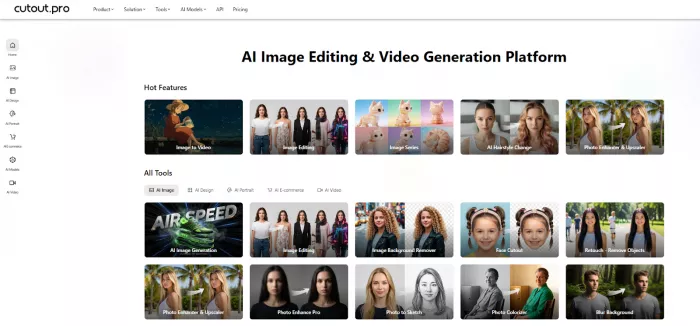
Open Cutout.Pro and it doesn’t greet you with one big hero feature. Instead, you see a grid: Remove Background, Enhance, Colorize, Cartoon Selfie, Headshot, Passport Photo, Posters, Memes, Video Background, Photo Animer, and more. It feels like a tool shelf rather than a single app.
In practice, that’s exactly how you end up using it. You might start by removing the background from a product shot, then immediately enhance the image, then generate a quick promo poster from that same asset. Or you clean up a selfie, convert it into a professional headshot, and then turn a variant into a cartoon avatar for social. You’re not constantly switching websites; you’re chaining actions inside one environment.
The learning curve is almost flat. There are no intimidating panels or timelines. You drag, you drop, you pick a function, and you wait a few seconds. It’s designed for store owners, marketers, and content teams as much as it is for designers. That simplicity is deliberate and it defines both what the tool is excellent at and where its limits are.
Background Removal: The Workhorse at the Core
Background removal is the gravitational center of Cutout.Pro.
On clean product shots, it behaves like a skilled retoucher on autopilot. Foreground separation is crisp, edges are tight, and the resulting PNG usually needs little or no manual cleaning for typical web use. This is especially true for e‑commerce style images, where the background is relatively simple and the subject is clearly defined.
Things get more interesting with “difficult” content—hair, fur, intricate fabrics, semi‑transparent materials. This is where many one‑click tools fall apart, leaving jagged edges or strange halos. Cutout.Pro doesn’t magically solve every edge case, but it consistently lands in that sweet spot where 80–90% of results are directly usable, and the remaining few only need light correction rather than a full manual re‑mask.
Batch processing turns this from a neat demo into an indispensable tool. Instead of editing images one by one, you upload dozens or hundreds, let the system process them in bulk, and then download a folder of cleaned assets. For any business managing catalogs, seasonal collections, or large content drops, that kind of throughput changes the economics of visual production.
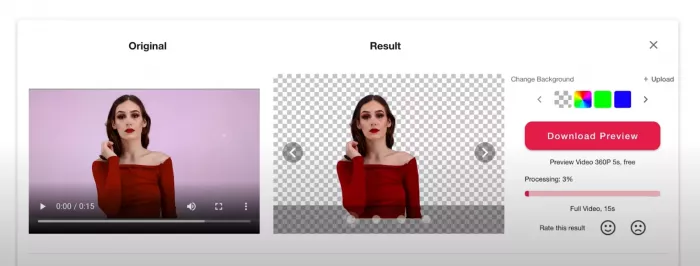
On the video side, background removal extends the same philosophy to moving images. It can remove backgrounds from talking‑head clips, simple product videos, or social snippets without a green screen. The results will not replace professional compositing for film or high‑end ads, but they are more than good enough for platforms where attention spans are measured in seconds, not frames. Technical caps on resolution, frame rate, and file size make it clear that this is aimed at short‑form content, not long‑form editing.
Enhancement, Restoration, and Making “Almost Useless” Media Usable
Every creator and business has a stash of imperfect assets: slightly blurry product photos, compressed screenshots, old scans, low‑light clips. Cutout.Pro’s enhancement and restoration tools are aimed squarely at that pile.
The photo enhancer/upscaler is essentially a “rescue mode” for images. Soft or low‑res photos come back sharper, cleaner, and more detailed. For most web and social contexts, the difference between “before” and “after” is obvious even to non‑designers. It won’t perform miracles on truly broken images, but it pushes a surprising number of borderline assets back into the “publishable” category.

Restoration tools handle things like scratches, dust, and age damage on older photos. Combined with the colorizer, they’re particularly effective for personal archives and historical images. The colorizer is not meant to be forensic; it’s meant to be evocative. For many users, that’s enough.
Object removal and blemish retouching are best when used with realistic expectations. Removing a small logo, a stray object, or minor imperfections works smoothly. Asking it to reconstruct large missing areas or radically alter complex scenes will quickly reveal the limits of the underlying models. For fast cleanup, though, it’s reliable and much faster than manual editing.
Creative Tools: When You Need “Something Visual” Right Now
Cutout.Pro’s creative tools exist for the moments when you have a message but no visual.
The AI art generator focuses less on avant‑garde experimentation and more on producing usable illustrations, abstract backgrounds, and simple hero visuals you can drop into websites, blogs, and social posts. If you’re a marketer trying to avoid stock photo sameness, it’s a handy way to get unique support imagery without spending hours in a dedicated art tool.
The headshot generator takes basic portraits and pushes them toward a more polished, professional look. It’s not a substitute for a properly lit studio shoot, but for LinkedIn profiles, team pages, or quick client decks, it significantly upgrades everyday selfies and webcam shots.

Cartoon selfies and anime styles play a different role. They’re perfect for community spaces, lighthearted campaigns, or personal branding where a stylized avatar is more on‑brand than a formal headshot. The speed is what makes them valuable, you can try multiple styles, pick one that fits your tone, and move on.

Poster and meme tools occupy the “we need this today” slot in a workflow. They give you semi‑designed layouts where you can plug in images and text and quickly produce usable graphics. You may still refine them in a full design suite, but the first 70% of the work is handled in minutes instead of hours.
E‑commerce and ID Photos: Where It Quietly Earns Money
In e‑commerce, visuals are not a nice‑to‑have; they are the storefront. Cutout.Pro fits this world almost too naturally.
A typical product pipeline might look like this: raw photos from a basic shoot go into Cutout.Pro for background removal; weaker assets are passed through the enhancer; final selections are dropped into simple product poster layouts or exported directly to marketplaces. That pipeline replaces a chunk of manual desk work or outsourced clipping and retouching with a mostly automated assembly line.
The ID/passport photo tools operate in a different domain regulation‑heavy, format‑specific, and unforgiving. Here, Cutout.Pro’s value isn’t creativity, it’s compliance. You provide a portrait; the tool adjusts crop, background, and proportions to match common specifications. For visa services, schools, HR departments, and local documentation providers, that means fewer rejected photos and less time spent explaining obscure rules to confused users.
These use cases product imagery and ID photos are where the platform often moves from “nice tool” to “operational dependency.” They tie directly into revenue and official processes, which is why security, trust, and reliability matter so much.
Video & XR: Useful Sidekicks, Not Full Replacements
On the video front, Cutout.Pro’s role is clear: it accelerates clean‑up and light polishing rather than replacing full editing suites.
AI video enhancement helps salvage clips that are slightly soft, noisy, or shot in poor lighting, making them more presentable for social platforms and websites. Video background removal can create simple “talking‑head on brand background” looks without the logistics of a green screen. Combine the two and you get a practical toolkit for content creators and marketers working at speed.
But the tool deliberately draws a line: caps on resolution, frame rate, and file size indicate that extended narratives, multi‑camera edits, and cinematic work should still live in proper NLE software. Cutout.Pro is there to prepare and clean videos, not to orchestrate complex edits.
API and Automation: Cutout.Pro as a Hidden Backend
When you step back from the interface and look at Cutout.Pro as an API, it reveals another layer of its strategy.
Most core functions like background removal, face cutout, passport photos, retouching, enhancement, colorizing, cartoon conversion, AI art are exposed via endpoints that accept files or URLs and return processed outputs. This means you can plug the same capabilities you use in the browser into your own product, internal workflows, or custom tools.
For developers, that’s significant. You can offer your users background removal, automatic IDs, or one‑click enhancement without ever training a model or maintaining heavy infrastructure. For businesses, it means you can standardize how images are processed across platforms by routing them all through the same backend, whether a human is clicking or a script is calling an API.
Pricing and Credits: Where the Model Helps and Where It Hurts
In daily use, Cutout.Pro’s credit system is impossible to ignore.
Image‑based actions consume credits; heavier or more complex actions consume more. Video features use minutes instead of credits, and those minutes are shared across background removal, enhancement, and other video functions. Subscription plans reduce the per‑unit cost as you commit to a higher monthly volume; pay‑as‑you‑go bundles are more expensive per credit but require no ongoing commitment.
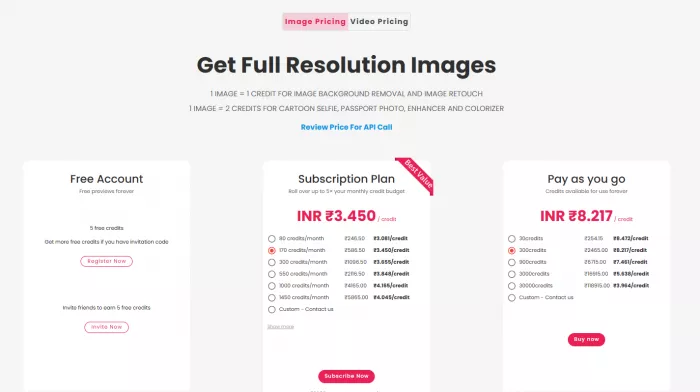
For businesses that process hundreds or thousands of assets per month, the subscription model is where the tool starts to look financially attractive compared to freelancers or a patchwork of separate apps. One processed image costing a few cents is easy to justify when that image directly supports sales or campaigns.
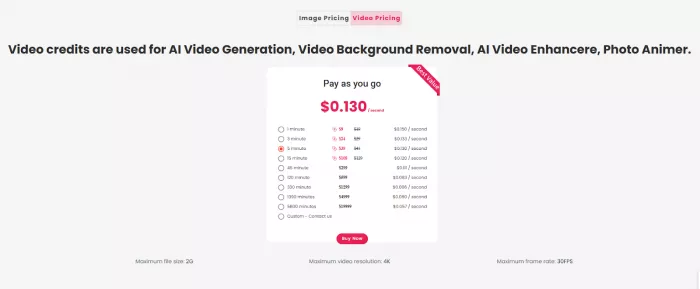
However, for light users, the same system can feel punishing. The free tier is intentionally narrow enough to test quality, not enough to build a workflow on. Pay‑as‑you‑go pricing means each experiment has a visible cost. It’s a model designed for ongoing, operational use rather than for casual tinkering.
Occasional “lifetime” type promotions and special bundles change the economics for early adopters, but they are exceptions, not the baseline. For most users, the choice will be between staying small and paying a premium per action, or committing to a higher volume plan to bring the per‑asset cost down.
Security, Trust, and Reliability: The Less Glamorous Questions
Because Cutout.Pro processes images and videos often of people, products, and documents questions of security and trust aren’t optional.
From a structural standpoint, it operates like a modern cloud service: uploads are processed on remote servers; access to programmatic features is controlled by keys and encrypted transport; and there are explicit terms of service and privacy policies that describe how data is handled. That’s the basic expectation for any SaaS platform in this category.
Trust is built less by marketing and more by consistent behavior over time. Users look for three things:
1. Data handling transparency
Are retention periods, usage rights, and model‑training policies clearly explained? Is there a straightforward way to understand whether your assets are stored, for how long, and for what purpose? The more explicit a provider is, the easier it is for businesses to clear internal compliance hurdles.
2. Operational stability
Can you depend on the service being up, responsive, and predictable? For an e‑commerce store feeding daily product updates through Cutout.Pro, an outage isn’t just an inconvenience; it’s delayed listings and campaigns. Reliability here is about uptime, but also about consistent performance as workloads scale.
3. Business‑side reliability
Are subscriptions and billing predictable? Are there horror stories of surprise charges, or are issues resolved cleanly? Is customer support responsive enough when something breaks or when there’s a dispute? This matters because once you build the tool into your workflow, extracting it is costly.
We have to acknowledge that any cloud‑based AI tool will have trade‑offs. By design, your images leave your local environment; by design, you are entrusting a third party with part of your production pipeline. For run‑of‑the‑mill marketing assets and product photos, many businesses accept that risk. For highly sensitive material, some will still prefer local or on‑premise solutions, regardless of convenience.
Cutout.Pro, in other words, behaves like a serious SaaS: powerful and efficient, but ultimately one link in a chain where your own policies and risk tolerance still matter.
How Cutout.Pro Compares to Other Tools
The AI background removal and visual editing space is crowded. Cutout.Pro doesn’t exist in a vacuum, and its value becomes clearest when you position it next to the major archetypes.
Here’s a high‑level comparison to typical alternatives:
| Category | Typical Strengths | Where Cutout.Pro Has the Edge | Where Others May Win |
| Single‑purpose background removers (e.g., remove.bg) | Top‑tier cutout quality; sharp focus on background removal at scale. | Much broader toolkit (enhancement, restoration, passports, creative, video, API). | Pure, high‑volume bg removal only. |
| All‑in‑one design suites (e.g., Canva) | Layouts, branding, typography, team collaboration, templates. | Faster bulk cleanup, better restoration/ID flows, stronger utility focus. | Complex design systems and team workflows. |
| Mobile‑first photo apps (e.g., Photoroom) | Great phone UX; social templates; direct marketplace/social posting. | Heavier batch processing, automation, and more “utility” tools in one place. | On‑device editing and instant publishing. |
| DIY/local tools (e.g., A1111 SD UI) | Full data control; no SaaS; deep model customization. | No infra or GPU to manage; simpler, pay‑as‑you‑go visual processing. | Strict data‑locality or custom model stacks. |
The pattern is clear: Cutout.Pro is strongest when you treat it as the “clean‑up and prep engine” that feeds other tools and platforms. It’s rarely the only tool, but it’s often the one that quietly removes the most friction.
Who Gets the Most Out of It?
Different personas “click” with Cutout.Pro for different reasons:
● E‑commerce and marketplace sellers : They care about consistency, speed, and cost per image. Batch background removal, enhancement, and auto‑poster generation are directly aligned with their daily problems. For them, Cutout.Pro is close to a core operational service.
● Content teams, social media managers, YouTubers: They need to turn ideas into visuals quickly—thumbnails, hero images, memes, promo graphics. Having one place to clean up assets, create headshots, generate quick posters, and output platform‑ready visuals shortens the gap between “we should post this” and “it’s live.”
● Agencies and freelancers: They use it as leverage. It handles first‑pass cleanup, background removal, and basic enhancements, leaving human designers to focus on conceptual work and high‑touch retouching. It doesn’t replace craft; it clears the runway for it.
● Developers and SaaS builders: They treat Cutout.Pro as infrastructure. The web UI is almost incidental; the API is what matters. It lets them offer powerful visual features in their own products without building an ML stack, while keeping cost and complexity manageable.
Where It Lives in a Modern Visual Stack
If you map a modern visual workflow from capture to publication, Cutout.Pro sits comfortably in the middle.
● It doesn’t replace cameras or capture tools.
● It doesn’t pretend to be a fully fledged design or editing suite.
● It dominates the “cleanup, standardize, and quickly prototype visuals” stage.
Raw assets come in, they go through Cutout.Pro for background removal, enhancement, restoration, and simple compositions, and then they either ship as‑is or move into more specialized tools for final branding and layout. That role—owning the messy middle is both strategically smart and practically useful.
Verdict: A Quietly Essential Engine for Visual Work
Cutout.Pro is not a showpiece tool you open to be dazzled; it’s a workhorse you open to get things done.
Its core strengths are fast, accurate background removal; genuinely useful enhancement and restoration; practical creative tools; e‑commerce and ID photo workflows; and a solid API solve everyday problems for people who live with a constant stream of images and short videos. Its pricing model rewards high‑volume, operational use, and its cloud‑based nature makes it easy to adopt but demands a level of trust and risk acceptance common to modern SaaS.
It won’t replace high‑end editors, grant infinite free usage, or satisfy organizations that require strict on‑premise processing. But if your reality is catalogs to update, social calendars to fill, clients to impress, and products to ship, Cutout.Pro fits naturally as the engine that turns raw media into ready‑to‑use assets.
The tools that truly matter in a visual workflow are often the ones you stop noticing, because they simply work. Cutout.Pro is aiming squarely for that category and for many teams, it has already landed there.
Comments