Table of Contents
Flashka AI is an AI‑powered flashcard and quiz platform that turns your PDFs, lecture slides, typed notes, and even photos into structured flashcards, quizzes, and mock exams. It then organises your revision using a built‑in spaced repetition system and an AI tutor, aiming to become a “study copilot” rather than just another card app.
The app is available on iOS, Android, and desktop/web, and follows a freemium model: you get a limited number of AI credits daily on the free tier, while paid plans unlock higher usage and a more comfortable experience for heavy learners. Its core promise is clear: it reduces the time you spend building cards and increases the time you spend actually learning.
Why AI Flashcards Matter Now
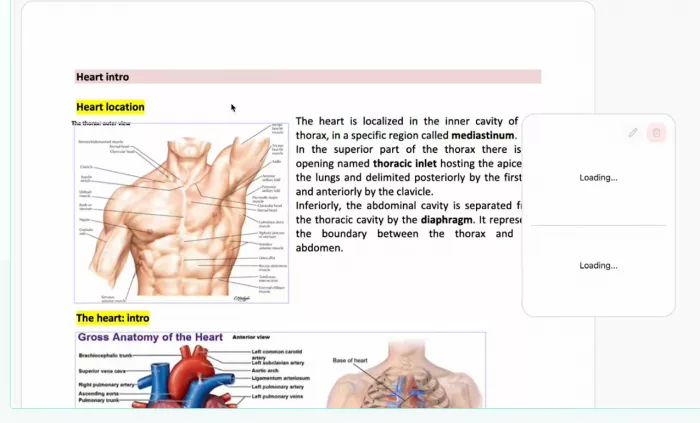
Most students know flashcards work, but very few maintain them consistently over a full semester. Typing every card by hand from long PDFs or coaching notes is exhausting, and many learners abandon the process despite knowing the benefits of active recall and spaced repetition.
Flashka sits directly on this pain point. It automates the extraction of questions and answers from your existing materials and schedules reviews with a forgetting‑curve‑aware algorithm. On top of that, an AI tutor layer can explain concepts, generate extra practice questions, and simplify dense text. For exam‑heavy systems, whether medical entrance, engineering, boards, or language tests, this combination can change your workflow from passive reading to structured, measurable revision.
Onboarding and User Experience
Getting started with Flashka is uncomplicated. You create an account, choose your platform, and are guided into generating your first deck within a few taps or clicks. The interface is modern and clean, with a focus on subjects, decks, and daily review tasks, so your study pipeline is visible at a glance.
Uploading material feels similar to using a cloud drive or note app: you attach PDFs, slides, or images of notes, and Flashka’s AI processes them into flashcards and quizzes. Sections like “Generate Flashcards”, “Review”, “Quiz/Exam Mode”, and the AI tutor (“Professor Ka”) are clearly separated, which reduces cognitive load for first‑time users.
A typical first experience might be this: you add a 40‑page lecture PDF, wait briefly while Flashka analyses it, and then see a structured deck organised by topics, complete with a suggested review schedule. Many app‑store reviews specifically praise how this workflow lowers the barrier to actually starting spaced repetition, especially on mobile.
Deep Dive into Key Features
AI Flashcard Generation
Flashka’s main value lies in its AI generation engine. You can feed the app clean PDFs, exported lecture slides, or photos of textbooks and handwritten notes, and it attempts to identify key points and convert them into question–answer style cards. In practical terms, this compresses hours of manual card creation into minutes of review and editing.
On well‑structured documents with headings, bullet points, and clear explanations, the AI usually produces coherent cards that only need light refinement. On dense academic writing or very technical material, you will notice some typical weaknesses: repeated buzzwords may be over‑represented, subtle distinctions can be missed, and multi‑step reasoning often gets simplified into shallow prompts. The best results come when you treat the AI as a drafting assistant and spend time merging, rewriting, and aligning cards with your exact syllabus.
Image Occlusion for Diagrams
For visual subjects, Flashka includes image occlusion, which lets you mask labels or regions on diagrams and reveal them during review. This is particularly useful in anatomy, engineering, geography, and any topic where labelled images are central.
Instead of manually writing “Name structure X in this diagram”, you draw a mask over the label and Flashka turns it into a question card. During revision, the label is hidden and you have to recall it from memory before revealing the answer. This feature brings Flashka closer to specialised tools used by medical and technical students, while keeping the workflow approachable.
Spaced Repetition System (SRS)
Flashka’s SRS is designed for learners who want the benefits of algorithmic scheduling without wrestling with advanced configuration. After seeing each card, you rate how well you remembered it for example “Again”, “Hard”, “Good”, or “Easy” and the system adjusts future intervals so that difficult cards show up more often and easy ones appear less frequently.
This structure implements the forgetting curve in a simple way: instead of reviewing everything every day, you only see items at the point where you are about to forget them. Compared to a power tool like Anki, Flashka’s SRS is less customisable but significantly easier for beginners to understand and maintain. For most students, that trade‑off is acceptable; advanced users who want to tweak interval multipliers and algorithms might still prefer Anki‑style control.
Quizzes and Mock Exams
Where Flashka moves beyond traditional flashcard apps is in its quiz and exam modes. From your decks, you can generate quizzes in multiple‑choice or short‑answer formats and run them under optional time limits. The app then provides a score summary, topic‑wise breakdown, and a view of which questions or subtopics you consistently miss.
Missed questions can feed back into your flashcard queue, creating a loop where quizzes directly identify and strengthen weak areas. For exam‑oriented learners, this “cards → quiz → targeted review” cycle is one of Flashka’s most practical strengths, particularly a few weeks before tests when you need realistic practice rather than just passive recall.
AI Tutor “Professor Ka”
The in‑app tutor, often referred to as “Professor Ka”, turns Flashka into more than just a database of cards. You can ask the tutor to explain a concept in simpler language, provide additional examples, or generate alternative phrasings and practice questions.
This feature is especially helpful when you hit a confusing card during review; instead of leaving the app to search the web, you can ask the tutor for an explanation in context. However, like any general‑purpose AI, it is not perfect on niche or highly specialised content, so cross‑checking critical concepts with textbooks or instructors remains important.
Multilingual and Localisation
Flashka supports multiple languages and has been steadily improving its language and localisation settings through product updates. You can create decks in different languages, and in many cases, configure the AI to respond in your preferred language, which is valuable for non‑English‑medium students and language learners. As the changelog shows, language control and region‑aware experiences are on the active roadmap rather than an afterthought.
Performance and Accuracy in Real Use
What matters to students is not just feature checklists, but how well Flashka handles real study material. Analyses and user reports suggest that the tool performs strongly on clean, well‑structured PDFs and slide decks, where key points are clearly marked and explanations follow a predictable pattern. In those cases, the majority of generated cards are usable with light edits.
The limitations become more visible when you push Flashka into dense academic papers, poorly formatted notes, or subjects where depth of reasoning matters more than definitions. The AI can compress multi‑step logic into oversimplified prompts or skip nuance that may be essential for exam answers. Scanned images and messy handwriting can also introduce OCR errors that you will need to correct manually.
Quick Performance Snapshopt
| Category | Performance on clean PDFs/slides | Performance on dense/complex content | Notes |
| Key‑point extraction | 4.5 / 5 | 3.0 / 5 | Very good on structured notes; may miss nuance in research‑style text. |
| Card clarity (Q/A phrasing) | 4.0 / 5 | 3.0 / 5 | Mostly clear; complex logic often oversimplified. |
| Coverage of syllabus topics | 4.0 / 5 | 3.5 / 5 | Captures most headings; sub‑topics sometimes under‑represented. |
| Logical depth of questions | 3.5 / 5 | 2.5 / 5 | Strong for definitions; weaker for multi‑step reasoning. |
| OCR accuracy (images/handwritten) | 4.0 / 5 | 2.5 / 5 | Good on clean scans; noisy or messy handwriting needs manual fixes. |
| Overall “edit effort” required | 3.5 / 5 (low–moderate effort) | 2.5 / 5 (moderate–high effort) | Works best as a speed‑up layer plus human curation. |
Because of this, Flashka works best when you view it as a speed‑up layer rather than a fully autonomous content creator. You generate cards quickly, then curate them against your syllabus, discard weak ones, and add your own fine‑tuned prompts where precision matters.
Pricing, Plans and Value
Flashka follows a familiar “free plus subscription” structure. The free tier provides roughly 50 AI credits per day that you can spend on generating cards, running AI‑driven quizzes, or using the tutor. You also get access to the spaced repetition engine and basic quiz features, which means casual learners can meaningfully use the app without paying.
Paid plans raise these limits and add comfort. Entry‑level monthly pricing is reported around 4 USD, with higher‑usage tiers in the 7–8 USD per month range depending on promotions and region. Yearly plans offer the same feature sets at a discounted effective monthly rate, aimed at committed users who plan to rely on the tool across multiple semesters or exam cycles.
Flashka Plans at a Glance
| Plan / user type | What you get | Typical price (USD) | Best for |
| Free tier | ~50 AI credits/day, core SRS, basic quizzes | $0 | Casual learners, first‑time users |
| Monthly subscription | Higher AI limits, frequent generation, heavier quiz usage | Starts around $4–$7.90/mo | Students in active exam season |
| Yearly subscription | Same features, lower effective cost per month | Around $48/year (approx.) | Med/engineering/competitive exam aspirants |
For light learners or those experimenting with AI flashcards, the free tier is workable but can feel tight once you start relying on daily AI generation. For students facing high‑stakes exams, the time saved by automating card creation from long PDFs often justifies the subscription cost, especially when compared to the hours you would otherwise spend typing.
User Feedback, Trust and Reliability
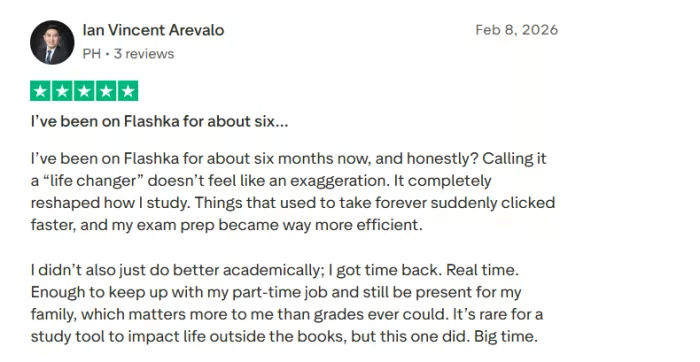
Public ratings on the App Store and review platforms show that many users value how quickly Flashka converts raw materials into ready‑to‑review decks. Terms like “easy to use”, “fast to get started”, and “great for exam prep” recur in user comments, and the mobile experience is often highlighted as smooth and responsive.
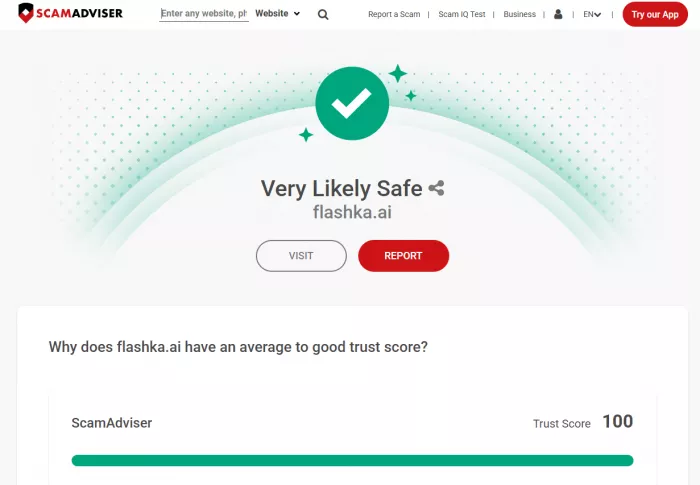
On the trust side, independent domain checks classify flashka.ai as legitimate, with standard security markers and no obvious scam signals. That said, Flashka is a cloud‑based service, so it is wise to avoid uploading highly sensitive corporate or personal data, especially in regulated environments.
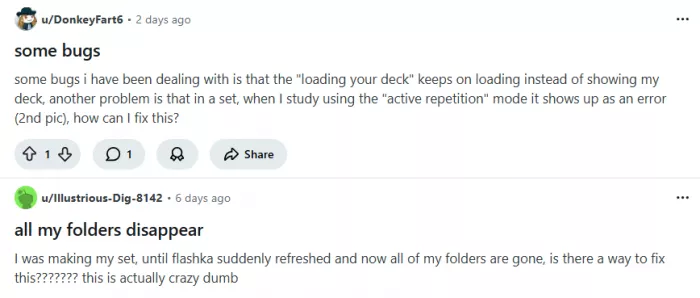
Criticisms cluster around a few themes: occasional technical glitches or sync issues under heavy use, frustration with free‑tier credit limits during intense exam periods, and the need to double‑check AI‑generated content for accuracy before relying on it in high‑stakes contexts. These issues are not unusual for a fast‑evolving ed‑tech tool, but they are important caveats to mention in a balanced review. reddit
Flashka vs Anki, Quizlet and RemNote
Any serious evaluation of Flashka has to place it alongside Anki, Quizlet and RemNote, the three names that dominate flashcard discussions. Each tool has a different philosophy: Anki prioritises absolute control and longevity, Quizlet emphasises ease and shared decks, RemNote blends note‑taking with SRS, and Flashka leans into AI‑first generation and exam simulation.
High‑Level Comparison
| Tool | Creation speed | SRS quality | AI integration | Best for |
| Flashka | Very fast from PDFs/images via AI | Strong, beginner‑friendly | Built‑in (cards, tutor, quizzes, exams) | Students who dislike manual card creation |
| Anki | Slow, mostly manual (plus add‑ons) | Excellent, highly tunable | External via scripts and add‑ons | Power users, med students, long‑term mastery |
| Quizlet | Fast via UI and shared decks | Decent, less SRS‑focused | More limited AI vs dedicated AI tools | Casual learners, vocab drills |
| RemNote | Fast from structured notes and outlines | Excellent, tightly integrated | Built‑in AI on top of note‑taking | “Second brain” users, note‑centric learners |
Flashka stands out on speed and convenience: if your world is dominated by PDFs and slides, its ability to ingest documents and output usable decks is hard to match. It also offers a more integrated AI experience than Anki and Quizlet, bundling card generation, an in‑app tutor, and exam simulation into one environment.
Where it lags is depth of customisation and ecosystem. Anki still wins if you want precise control over card templates, scheduling algorithms, and plugins, while Quizlet and Anki benefit from years of community‑built shared decks and workflows. Flashka is catching up, but users who love tweaking and scripting may find it opinionated and somewhat closed by comparison.
Use‑Cases and Ideal Personas
Flashka is not a generic “everyone should use this” tool; it shines brightest in specific scenarios. Medical and engineering students, for example, often juggle heavy, concept‑dense textbooks and a constant stream of lecture slides. For them, Flashka can quickly draft decks from institutional notes, use image occlusion for diagrams, and generate topic‑wise mock tests that reveal weak areas before internal or board exams.
Competitive exam aspirants (JEE, NEET, UPSC, similar national tests) face enormous syllabi and intense time pressure. Flashka helps by transforming coaching material into multi‑chapter decks, ensuring spaced repetition keeps older topics in circulation, and providing simulated quizzes to test recall under time constraints. In such high‑stakes contexts, however, careful proofreading of AI‑generated cards and a solid conceptual foundation remain essential.
Language learners can use Flashka to build vocabulary lists, phrase cards, and example‑sentence exercises in multiple languages, while professionals preparing for certifications can convert vendor whitepapers and documentation into daily revision decks they can review on commutes or breaks. In both cases, the low friction of generation plus mobile‑friendly reviews makes it easier to sustain long‑term habits.
Strengths and Trade-offs
Flashka’s strengths are clear. It dramatically speeds up deck creation from PDFs, slides and images, couples that with a friendly spaced repetition engine, adds image occlusion for visual subjects, and wraps everything in quizzes, mock exams and an AI tutor that lives inside the same interface. Its multilingual support and visible development activity make it feel like a modern, evolving platform rather than a static app.
The weaknesses are equally important to acknowledge. AI‑generated cards can be inaccurate or overly shallow on complex topics and always require human review. Free‑tier AI credits are tight for heavy exam use, making a subscription almost mandatory for serious students, and the system is less customisable than Anki for users who want to fine‑tune every parameter. Its dependence on cloud processing also means it is not ideal for highly confidential material.
Verdict
Flashka is an excellent fit for learners who are drowning in PDFs and slides and know they should use spaced repetition but never manage to sustain manual flashcard workflows. Used thoughtfully as an accelerator and organiser rather than a replacement for critical thinking, it can significantly shorten the journey from “I got new notes today” to “I have an exam‑ready revision system,” which is exactly what most modern students need.
Comments