Table of Contents
Goth AI has quickly become one of the most talked‑about AI homework helpers among school and college students, promising instant step‑by‑step solutions and a full AI study companion in your pocket. This in‑depth review looks at Goth AI from every angle—features, accuracy, UX, pricing, ethical concerns, and real‑world use cases—to help you decide if it deserves a place in your study toolkit.
Introducing Goth AI

Goth AI is an AI‑powered study and homework assistant that lets you scan questions, get detailed step‑by‑step solutions, and chat with an AI tutor across multiple subjects. It’s available primarily as a mobile app on iOS (and in some regions under variants like “Goth AI – Math Problem Solver” and “Goth AI: AI Study Companion”), targeting middle school, high school, and early college learners.
At its core, Goth AI combines three pillars: photo‑based problem solving, a structured math engine with explanations, and a general‑purpose AI chat interface that can handle math, science, languages, writing, and more. The pitch is simple: take a picture of your homework, and Goth AI shows not just the answer, but how to get there.
Who Goth AI Is For
● Students who want to check their solutions and understand steps, especially in math and science.
● Learners revising for tests who need quick clarification on specific concepts or question types.
● Users who want an all‑in‑one homework helper plus general AI assistant instead of juggling multiple apps for math, writing, and study tasks.
Parents and teachers, meanwhile, mostly encounter Goth AI as yet another AI tool that can be used for learning—but also misused for copying answers, which we’ll address in detail later.
Goth AI at a Glance
| Aspect | Details |
| Product type | AI homework helper and study companion app. |
| Platforms | iOS (regional variants: “Math Problem Solver”, “AI Study Companion”). |
| Core use cases | Scan‑to‑solve math and science, step‑by‑step explanations, AI chat tutor, study tools. |
| Target users | Middle school, high school, early college students; some support for general learners. |
| Pricing model | Free tier with usage limits; Pro subscription with higher limits and enhanced features |
Features Deep‑Dive
Goth AI is more than a single‑purpose “math solver”; it’s structured as a mini study suite. Below is a breakdown of the major capabilities and how they work in practice.
1. Scan‑to‑Solve (Photo Solver)
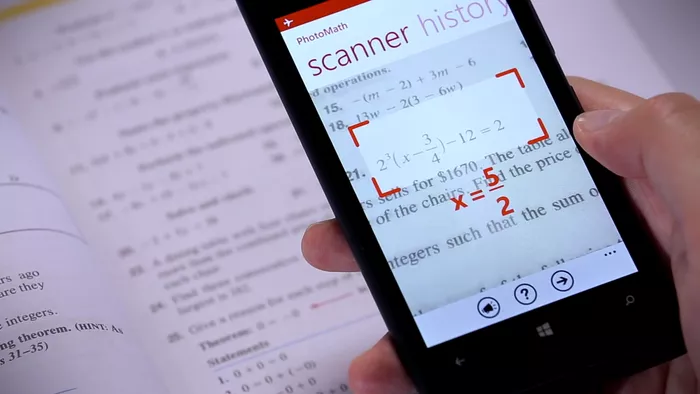
The scan‑to‑solve feature is the entry point for most users: you open the camera, snap a picture of a question, and Goth AI detects, crops, and interprets the problem. It supports printed text, many textbook‑style questions, and a decent amount of handwritten content if it’s reasonably neat.
In everyday use, this means the system performs well when reading clear textbooks, worksheets, and simple handwritten equations. However, it may occasionally misread content when equations are cluttered, span multiple lines, or include diagrams and mixed formatting.
2. Step‑by‑Step Math Solver
Once a problem is scanned or typed in, Goth AI offers a structured solution path broken into steps rather than just dumping the final answer. The math coverage includes:
● Arithmetic and pre‑algebra
● Algebra and equations
● Functions and graphing
● Calculus (limits, derivatives, integrals in many cases)
● Word problems and some geometry questions
This step‑by‑step engine is particularly helpful for basic to intermediate math, where the logic chain is clear and each step is justified. On more advanced, multi‑step reasoning questions especially word problems that require interpretation—the explanations can become shallow or occasionally skip logical transitions.
3. All‑Topic AI Chat Tutor
In addition to scanning, Goth AI includes a chat interface where you can ask questions in natural language. This opens it up beyond pure math into:
● Physics, chemistry, and biology explanations.
● Literature and language arts: summaries, explanations of themes, grammar help.
● Language learning support and general Q&A across subjects.
● Coding/technical questions at a basic level.
The chat experience feels like having a general AI assistant embedded inside a homework app: you can paste a problem, ask for clarification, request an alternative solution approach, or ask follow‑up questions to deepen understanding. It’s effective when you already have some context and need targeted help, but it’s not equivalent to a human tutor who tracks your long‑term progress.
4. Study Toolbox and Question Generator
Several Goth AI builds include auxiliary tools that turn it into more of a study “operating system” rather than just a solver. Key utilities include:
● Question generator (often branded via OpExams Question Generator): create MCQs, true/false, fill‑in‑the‑blank, and open‑ended questions from a given text.
● Reading and summarization: paste or scan text and get simplified explanations or summaries to support revision.
● Writing improvement: grammar checks, rephrasing, and clarity suggestions for essays and short answers.
This toolbox makes Goth AI more useful for exam prep: students can generate practice sets from their notes or textbooks and then use the solver/chat to work through them.
Feature Landscape
| Area | What Goth AI offers | How it works in practice |
| Scan & Solve | Camera‑based OCR for math and homework questions. | Strong on clear text; struggles more with messy multi‑line or heavily contextual problems. |
| Step‑by‑Step Solver | Detailed, multi‑step math explanations for many topics. | Very helpful for basic/intermediate math; less consistent on complex reasoning. |
| AI Chat Tutor | Multi‑subject chat for Q&A, explanations, and guidance. | Great for quick clarifications; not a full replacement for a human tutor. |
| Study Tools | Question generator, summaries, writing checks, calculators. | Turns Goth into a revision and practice companion, not just an answer engine. |
Accuracy, Performance, and Reliability
For any homework helper, accuracy and speed matter as much as feature lists. Goth AI markets itself as highly accurate, and independent write‑ups suggest strong but not flawless performance.
Accuracy on Different Problem Types
Sources analyzing Goth AI note that:
● On straightforward, single‑step problems (standard algebra, basic calculus, procedural questions), accuracy is very high.
● On multi‑step word problems where the tool must interpret the scenario, choose the right formula, and maintain consistent logic, accuracy drops.
● Conceptual questions—“explain why…”, “compare and contrast…”, or proof‑style tasks—are where AI explanations can become generic or incomplete.
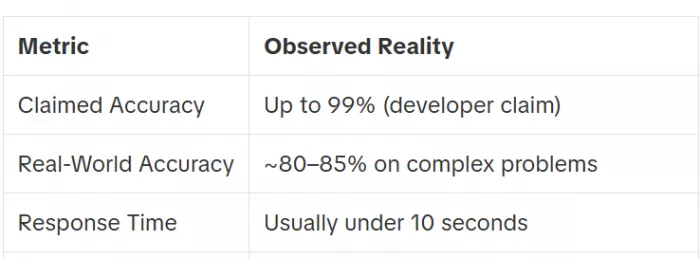
Some reviewers estimate that, while marketing sometimes implies near‑perfect accuracy, real‑world performance on complex problems is closer to the low‑80s percentage‑wise, with clear failure modes in interpretation and step justification.
Speed and Responsiveness
The typical scan-to-answer time is often under about 10 seconds for standard problems, depending on network conditions and server load. The chat interface generally responds within a few seconds per answer, making it comparable in speed to other consumer AI assistants.
For students working through problem sets, this speed is fast enough to maintain flow without feeling sluggish or frustrating.
Reliability and Edge Cases
Goth AI works reliably when the input is clear and well-formatted, and when problems follow common textbook templates in subjects such as algebra, calculus, and physics. It performs best on straightforward, neatly presented material where the structure of the problem is easy to interpret.
However, it struggles more with images that combine dense diagrams, labels, and text, as well as with handwriting that is messy, faint, or partially obscured. It may also have difficulty with problems requiring multi-step reasoning across different concepts where each step depends on subtle interpretation. For responsible use, students should treat Goth AI as a strong first pass and verify the reasoning rather than blindly trusting any single solution.
User Experience and Learning Value
Beyond raw accuracy, the real question is: does Goth AI actually help students learn, or does it just make it easier to copy answers? The answer depends heavily on how it’s used.
Onboarding and Interface
App store descriptions highlight a simple, student‑friendly interface with clear entry points for scanning, chatting, and accessing tools. Onboarding typically:
● Introduces core functions in a few screens.
● Offers quick access to camera, history, and chat.
● Surfaces the study tools (question generator, summaries) in a secondary panel.
This low‑friction design means first‑time users can get from install to first solved question in under a minute, which is ideal for adoption but also makes it easy to use purely for instant answers.
Learning Orientation
From a learning perspective, Goth AI offers several genuinely helpful features. It provides clear step-by-step math breakdowns that show intermediate transformations rather than just the final answer. Users can ask follow-up questions in chat such as requesting a simpler explanation of a specific step or asking for an alternative method which supports deeper understanding. Additionally, it allows users to generate practice questions from their own notes and then solve and review them, reinforcing learning through active practice.
However, commentators point out that nothing in the app forces students to engage with the steps; it is entirely possible to scroll straight to the final answer and move on. That’s where teacher and parent guidance becomes important.
Example Use Case: Smart Revision
A realistic productive workflow might look like this: a student completes their algebra homework on paper, then uses Goth AI to scan each question, compare steps, and spot mistakes. They might then ask the chat to explain a confusing concept more simply or generate a few extra practice questions on the same pattern to reinforce understanding. Used this way, Goth AI acts as a personalised checker and explainer instead of a shortcut.
Pricing, Plans, and Subscription Model
Goth AI follows the increasingly common freemium + subscription pattern.
Free Tier
The free tier generally includes:
● A limited number of daily scans or questions.
● Access to step‑by‑step solutions for many problems.
● Basic chat capabilities and some study tools.
Limits are designed to give enough usage to test the app and handle light daily homework, but heavier users will quickly bump against caps.
Goth AI Pro Subscription
Goth AI Pro unlocks:
● Higher or unlimited daily question and scan limits.
● Faster responses and priority access to more advanced problem‑solving modes.
● In some builds, additional tools or premium features (e.g., enhanced explanation modes or increased chat capacity).
Subscriptions are auto‑renewing, as is standard on the App Store, and renew until cancelled in account settings.
Pricing Overview (Indicative)
| Plan name (as listed) | Billing period | Price (USD) | Notes |
| Weekly subscription | Weekly | 6.99 | Recurs every week unless cancelled. |
| Monthly subscription | Monthly | 9.99 | Standard monthly plan. |
| Monthly subscription | Monthly | 39.99 | Higher‑tier monthly; likely extended limits or premium tier. |
| Half‑year subscription | 6 months | 29.99 | Medium‑term option; lower effective monthly price. |
| Annual subscription | 12 months | 59.99 | Best long‑term value on a per‑month basis. |
Subscription Concerns
Some write‑ups and user‑focused analyses warn about:
● Students or parents starting a trial and forgetting to cancel, leading to unexpected charges.
● Confusion over what exactly is included in the free tier versus Pro, especially when app store pages and in‑app prompts emphasize upgrading.
Pros, Cons, and Best‑Fit Use Cases
Key Advantages
1. Strong scan‑to‑solve experience for standard textbook‑style math questions.
2. Step‑by‑step solutions that can genuinely help students see the process when they choose to engage with it.
3. Multi‑subject support via AI chat, making it more than a pure math solver.
4. Study tools like question generation, summaries, and writing support that turn it into a broader learning companion.
5. Fast and convenient: response times are generally quick enough for real‑time homework sessions.
Main Limitations
1. Accuracy drops on complex reasoning tasks, multi‑step word problems, and highly conceptual questions, which can mislead students who don’t double‑check.
2. Over‑reliance risk: very easy for students to treat Goth AI as an answer vending machine instead of a learning tool.
3. Subscription friction: free tier limits can feel tight, and auto‑renewing subscriptions may surprise less tech‑savvy parents.
4. Not a true tutor replacement: lacks the long‑term diagnostic feedback and adaptive teaching a human tutor or structured course can provide.
Best and Worst Use Cases
Goth AI is best suited for checking homework and exploring alternative solution methods for problems you have already attempted. It is also useful for last-minute clarification before an exam when you need quick, targeted explanations, and for generating extra practice questions around topics you are actively studying.
However, it is a poor fit when used as the sole learning resource for a completely new topic without support from textbooks, notes, or teacher guidance. It is also less reliable for complex, proof-style, or highly conceptual assignments in advanced mathematics or theoretical subjects.
Ethics, Cheating, and School Perspective
Any honest Goth AI review must tackle academic integrity. Tools like Goth AI sit at the intersection of powerful AI assistance and temptations to outsource thinking.
How Easy Is It to Cheat with Goth AI?
In practical terms, it is trivially easy for a student to:
● Scan a homework sheet.
● Copy the final answers directly into their notebook.
● Never read the steps or explanations.
This risk mirrors what schools have already seen with similar tools: when used without oversight, AI solvers can enable “shadow cheating” where the homework looks fine, but the student’s understanding is hollow.
Responsible Use Guidelines
Parent and educator guides recommend reframing tools like Goth AI as a checker and explainer, not a primary source of answers. Reasonable guardrails include:
● Only using Goth AI after attempting problems yourself.
● Focusing on the steps and asking the AI to explain confusing parts in simpler language.
● Using the question generator to create extra practice—not to auto‑solve graded test prep assignments.
Schools may also set clear policies around whether AI tools are allowed for homework, revision, or projects, and require students to disclose when they use AI assistance.
Positioning Goth AI Among Alternatives
While this article focuses on Goth AI itself, context matters: students and parents often compare it with other tools like Photomath, Mathway, Chegg, or generic AI chatbots.
At a high level:
● Compared to pure math solvers (e.g., Photomath, Mathway), Goth AI leans more into a multi‑subject, AI‑assistant style experience with extra study tools.
● Compared to broader platforms like Chegg or general LLMs, Goth AI is more tightly tuned for scan‑based homework solving and student workflows rather than open‑ended research or essay generation.
This means Goth AI fits best if they want a phone‑first homework helper with strong math focus plus general AI chat rather than a full academic service with live tutors and human‑written solutions.
Verdict: Should You Use Goth AI?
Goth AI is a powerful, student‑friendly homework companion that successfully combines photo solving, step‑by‑step math explanations, multi‑subject AI chat, and practical study tools like question generation and summarisation. It delivers high convenience and strong accuracy on typical textbook‑style problems, making it excellent for checking work and clarifying doubts.
However, it is not magic: accuracy drops on complex reasoning tasks, and its educational value depends heavily on how students use it either as a learning amplifier that clarifies and reinforces concepts, or as a shortcut to avoid thinking. With mindful use, clear boundaries around cheating, and realistic expectations (it’s not a full tutor replacement), Goth AI can be a valuable addition to a modern student’s toolkit.
Comments