Table of Contents
- The Student Freelance Economy in 2026: The Numbers
- ChatGPT: The All-Purpose Workhorse
- Claude: The Reasoning and Long-Form Specialist
- GitHub Copilot: The Coding Co-Pilot
- Midjourney and AI Image Generation
- Canva with Magic Studio
- Jasper and Copy.ai
- Notion AI: The Project Management Layer
- ElevenLabs: The Voice and Audio Frontier
- Pricing Comparison: What Students Actually Pay
- How Students Actually Build Pre-Graduation Freelance Careers
- Conclusion: The Window Is Now
Somewhere between attending a 9 AM lecture on linear algebra and pretending to enjoy hostel mess food, a quiet revolution has been happening in college dorm rooms. Students are no longer waiting for graduation, an unpaid internship, or that mythical first job to start earning. They are opening their laptops, talking to a chatbot, and quietly billing real clients in real currency.
AI has lowered the barrier to professional output in ways the previous generation could not have predicted. According to Upwork's 2025 data, AI-enabled freelancers earn approximately 40 percent more per hour than peers without AI tools and save an average of eight hours per week. This guide examines the tools driving that shift, with verified ratings from G2, Capterra, and other major review platforms, so any student reading this can decide which combinations create real earning leverage before the cap and gown ever come out.
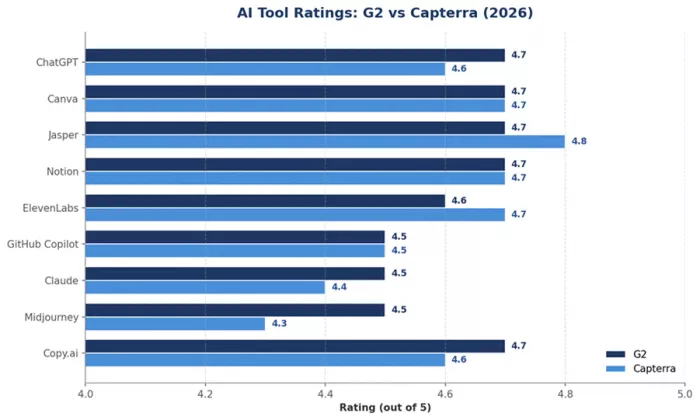
Figure 1: Aggregate ratings for the top student-freelance AI tools across G2 and Capterra (2026)
The Student Freelance Economy in 2026: The Numbers
MBO Partners places the U.S. independent workforce at 72.9 million in 2025, while Upwork's broader survey puts the figure at 76.4 million, representing roughly 38 percent of the workforce. Within that pool, Gen Z is overrepresented and aggressive: 53 percent have freelanced at some point, and 53 percent of those treat it as full-time rather than side income. The same generation is dramatically more likely to have AI training, with 71 percent of Gen Z Upwork freelancers reporting AI skills training compared with just 21 percent of boomers.
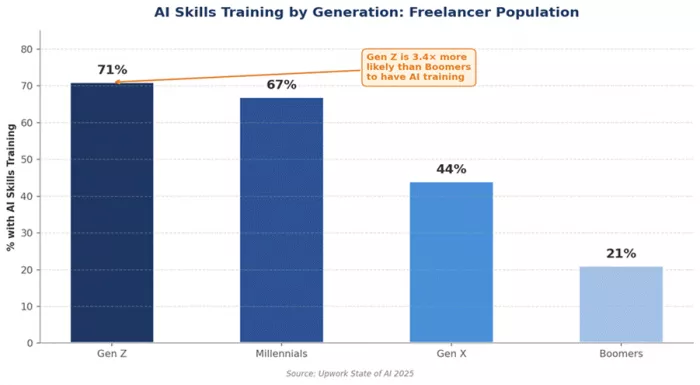
Figure 2: AI skills training penetration by generation among freelancers
The earnings premium is substantial. A 2024 industry survey found that 50 percent of freelancers reported earning more as a direct result of AI adoption, while 92 percent of highly-skilled tech freelancers said AI tools increased their productivity. Freelancers who explicitly market AI-augmented services command 15 to 20 percent rate premiums.
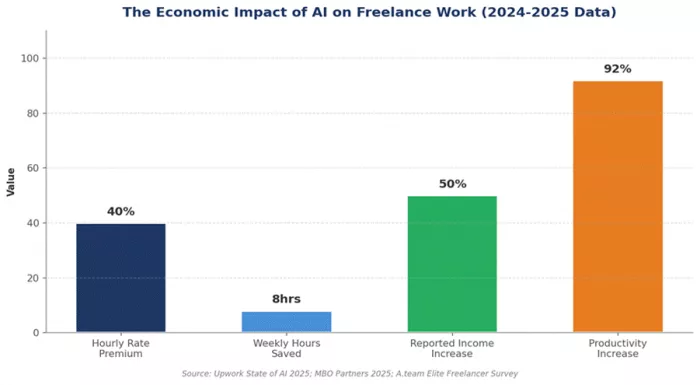
Figure 3: Measured productivity and earnings outcomes for AI-using freelancers
There is a counter-current students should understand. Research published in the Journal of Economic Behavior and Organization (Teutloff et al., 2025) found that demand for substitutable skills like generic writing and translation declined by 20 to 50 percent on freelance platforms after ChatGPT's release. The students thriving are those treating AI as a force multiplier on top of an actual skill, not a replacement for one.
ChatGPT: The All-Purpose Workhorse
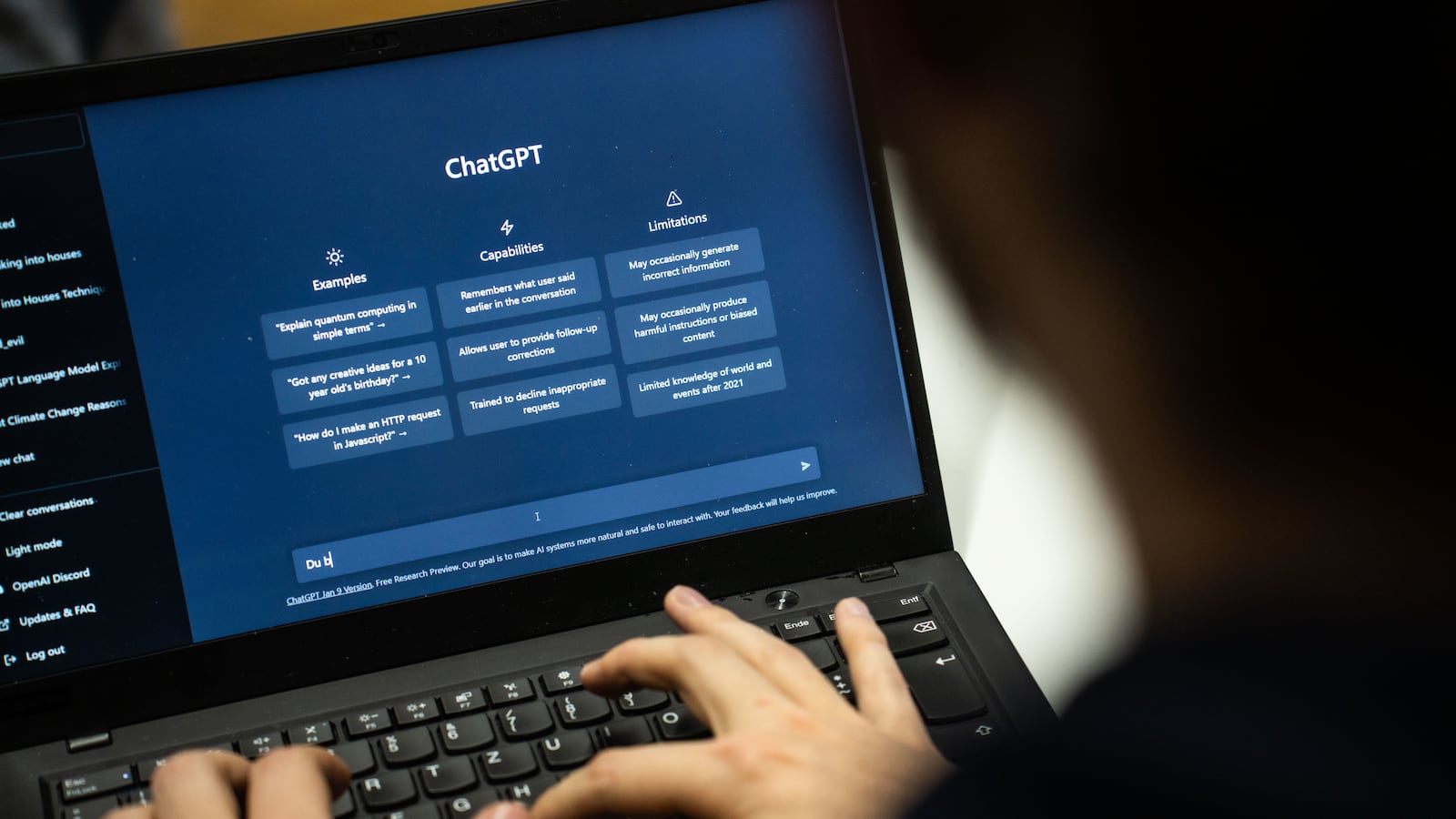
ChatGPT remains the single most adopted AI tool among student freelancers. By mid-2025, it crossed 700 million weekly active users across all plans, and Statista's brand-level data consistently places it as the most-used AI tool in the United States. For a student running a freelance operation out of a dorm room, ChatGPT functions as a junior associate who never sleeps.
Reviews and Platform Ratings
| Review Platform | Rating | Verified Reviews | Top User Sentiment |
|---|---|---|---|
| G2 | 4.7 / 5 | 700+ reviews | Praised for ease of use, time savings, broad capability |
| Capterra | 4.6 / 5 | 1,800+ reviews | Strong on writing and ideation; some flag hallucinations |
| Trustpilot | Mixed | Varies | Power users very positive; casual users dislike limits |
| Gartner Peer Insights | 4.5 / 5 | 180+ reviews | Cited for productivity gains and versatile output |
Features and Functionality
Anchored on GPT-5.5 since April 2026, the Plus tier includes extended thinking modes, ChatGPT Images 2.0, voice mode, Codex for coding, Deep Research for multi-source synthesis, Agent Mode for browser-based task execution, and a context window large enough to handle roughly 320 pages of text per conversation. Free users get GPT-5.3 with a 10-message-per-five-hour cap.
Key Benefits for Student Freelancers
ChatGPT compresses the time between client brief and usable first draft from hours to minutes, whether the deliverable is a landing page, press release, or Python script. It serves as a tireless brainstorming partner, generates portfolio case studies, and handles the unglamorous administrative work that eats into billable time. Plus subscribers report 10 to 26 times the effective capacity of free users.
Limitations and Drawbacks
ChatGPT hallucinates citations, fabricates statistics, and occasionally produces confident-sounding nonsense in technical domains. Its knowledge cutoff means current events require explicit web search. The 10 Deep Research runs per month on Plus is the limit most heavy users hit first.
Real-World Use Case
A third-year marketing student takes on a $400 blog package for a SaaS startup. ChatGPT generates 15 topic ideas, drafts SEO-optimized outlines for the three approved pieces, produces first drafts the student edits for voice and accuracy, and writes meta descriptions and outreach pitches. A 12-hour project becomes a 4-hour project. Ideal target: any student in writing, marketing, research, business, or general-purpose freelancing.
Claude: The Reasoning and Long-Form Specialist

Claude has emerged as the preferred tool for student freelancers handling work that requires careful reasoning, long document analysis, or large codebases. Where ChatGPT often wins on feature breadth, Claude tends to win on depth. Pro at $20 per month sits at parity with ChatGPT Plus, while Max at $100 targets power users.
Reviews and Platform Ratings
| Review Platform | Rating | Verified Reviews | Top User Sentiment |
|---|---|---|---|
| G2 | 4.5 / 5 | 120+ reviews | Praised for clear structured output and reduced hallucination |
| Capterra | 4.4 / 5 | 200+ reviews | Strong on writing and analysis; users flag message limits |
| Gartner Peer Insights | 4.4 / 5 | 172 reviews | 47% rate it 5 stars; cited for coding and reasoning |
| Anthropic on G2 (overall) | 4.5 / 5 | 122 reviews | Highest praise for accuracy and document handling |
Features and Functionality
Claude's defining technical advantage is its context window, which on higher tiers handles entire books, full codebases, or hundreds of pages of legal or research documents in one conversation. The Artifacts feature renders code, documents, and interactive React applications inline. Claude Code, the terminal-based agent, is widely cited by developer freelancers as a serious productivity tool.
Key Benefits for Student Freelancers
For analytical and writing-heavy work, Claude produces drafts that need less editing. Law students drafting contract summaries, finance students building investment memos, and computer science students reviewing pull requests report meaningfully better results on these structured tasks. The Projects feature pins reference materials to a workspace, useful for retainer client consistency.
Limitations and Drawbacks
Claude lacks native image and video generation. Voice mode and agentic browser features are less mature than ChatGPT's. The most consistent user complaint across G2 and Capterra is message limits on Pro that frustrate heavy work sessions.
Real-World Use Case
A computer science senior accepting a $1,200 contract to refactor a Node.js application pastes the entire codebase into Claude, gets a structural critique and migration plan, then uses Claude Code to execute the refactor file by file. A three-day professional task becomes a long-weekend deliverable. Ideal target: students doing analytical writing, research, technical writing, coding, or any task with long documents.
GitHub Copilot: The Coding Co-Pilot
GitHub Copilot is the dominant AI coding assistant inside the IDEs where student developers actually work. It is offered free to verified students through the GitHub Student Developer Pack, which on its own makes it the most cost-effective AI tool on this list.
Reviews and Platform Ratings
| Review Platform | Rating | Verified Reviews | Top User Sentiment |
|---|---|---|---|
| G2 | 4.5 / 5 | 227 reviews | 74% rate 5 stars; praised for IDE integration and productivity |
| Capterra | 4.5 / 5 | 590+ reviews | Strong with students; concerns about occasional inaccurate code |
| Gartner Peer Insights | 4.4 / 5 | 172 ratings | 92% give 4 or 5 stars; high marks for integration |
| GitHub (publisher) | 4.6 / 5 | 2,800+ overall | Aggregate rating across all GitHub products on G2 |
Features and Functionality
Copilot integrates natively into VS Code, JetBrains IDEs, Neovim, and Visual Studio. It offers real-time inline completion, multi-line suggestions, a chat interface, and increasingly agentic features like Copilot Workspace for multi-file changes and Copilot Edits for refactoring. The Stack Overflow Developer Survey found 76 percent of developers were using or planning to use AI tools, with Copilot consistently the most-cited.
Key Benefits for Student Freelancers
GitHub's research, replicated by an MIT trial, found developers using Copilot completed coding tasks 55 percent faster. For a freelance student developer, this is the difference between accepting one client per semester and accepting four. The free Student tier also includes GitHub Pro, providing private repositories essential for client work that cannot be public.
Limitations and Drawbacks
Copilot writes plausible code but not always correct code. It can suggest deprecated APIs, hallucinate library functions, and generate solutions that compile but fail at runtime under edge cases. Some clients in regulated industries explicitly forbid its use due to ongoing training-data debates.
Real-World Use Case
A second-year engineering student lands a $2,500 freelance project to build an internal dashboard for a logistics company. With Copilot, the student scaffolds a Next.js application in an afternoon, generates the database schema and TypeScript types, builds the UI components with inline suggestions, and writes the test suite using Copilot Chat. The student delivers ahead of schedule. Ideal target: any student writing code for clients in web development, data, mobile, or scripting.
Midjourney and AI Image Generation
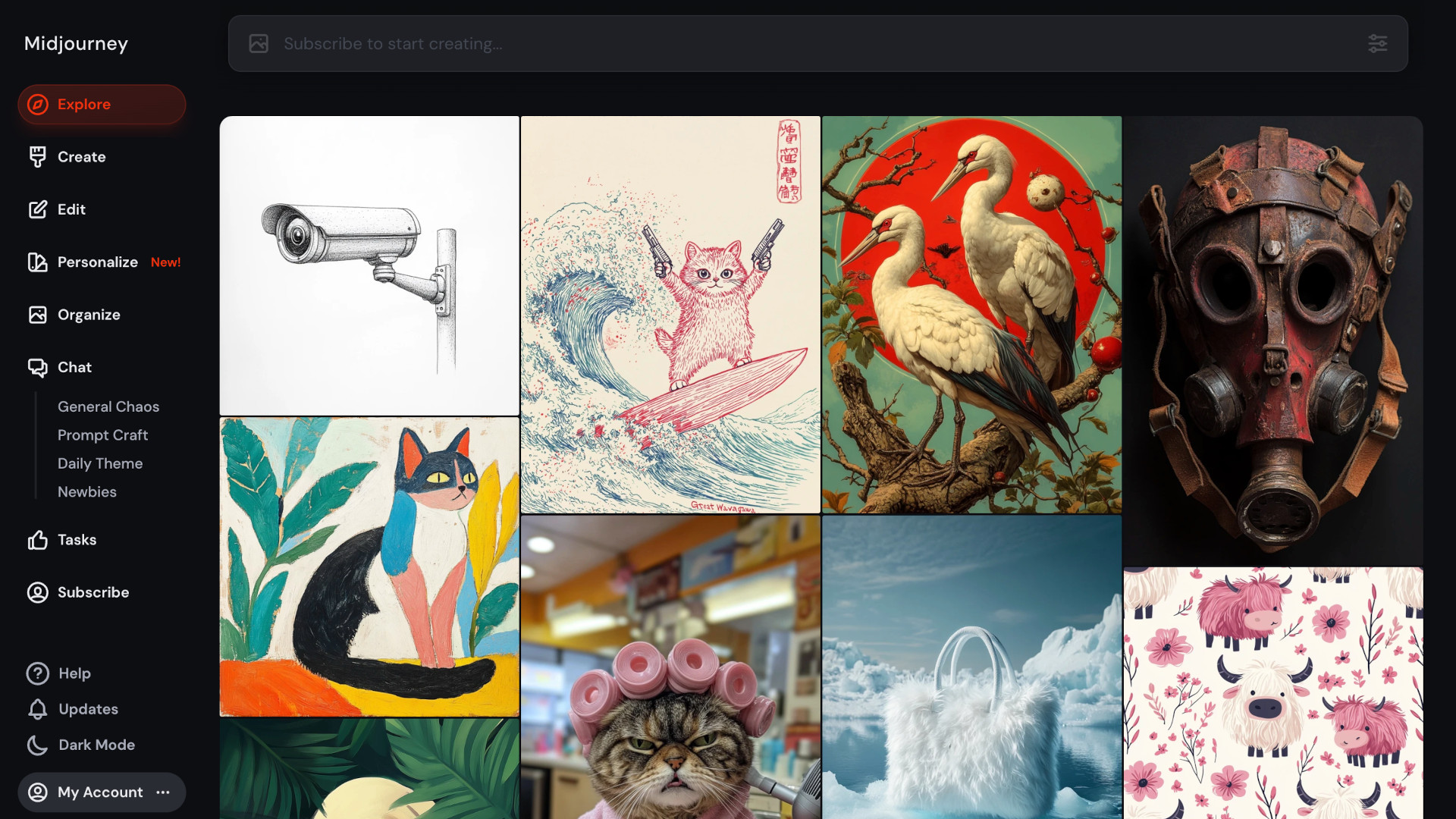
Midjourney has become synonymous with high-quality AI image generation. For student freelancers in design, illustration, social media management, or any client-facing visual role, Midjourney unlocks output volume and stylistic range that would be impossible to produce by hand at student rates.
Reviews and Platform Ratings
| Review Platform | Rating | Verified Reviews | Top User Sentiment |
|---|---|---|---|
| G2 | 4.5 / 5 | 55+ reviews | Praised for industry-leading aesthetic quality |
| Capterra | 4.3 / 5 | 120+ reviews | Strong on visuals; users note text rendering weakness |
| Trustpilot | Mixed | 346 reviews | Power users love output; some criticize billing and Discord UX |
| SimilarLabs Editorial | 4.5 / 5 | Hands-on test | V7 cited as gold standard for artistic AI imagery |
Features and Functionality
Midjourney generates images from text prompts with industry-leading aesthetic quality, particularly for stylized illustration, conceptual art, and atmospheric photography. The platform supports image-to-image prompting, character and style references, inpainting through Vary Region and Pan, and high-resolution upscaling. Pricing starts at $10 per month for Basic, scales to $30 for Standard with unlimited relaxed mode, and reaches $60 Pro and $120 Mega for heavy commercial users.
Key Benefits for Student Freelancers
Midjourney compresses concept ideation, mood boarding, and final asset production into one tool. A freelance student designer pitching a brand can generate a dozen logo direction concepts in 15 minutes. For social media management contracts, students can produce visually consistent post graphics across an entire month in an afternoon.
Limitations and Drawbacks
Midjourney still struggles with text rendering inside images, precise typography, brand-locked color matching, and complex compositional control. Hands and complex anatomical detail remain inconsistent. Some clients require a contractual statement that no AI was used, which closes off Midjourney entirely.
Real-World Use Case
A design student takes on a $600 contract to deliver 30 social media posts for a wellness brand over a month. Using Midjourney with consistent style references, the student generates a coherent visual library, finishes each image with brand text in Figma, and delivers in three working days rather than three weeks. Ideal target: students in graphic design, illustration, social media, marketing, and content creation. Adjacent tools include DALL-E (in ChatGPT), Adobe Firefly, and Stable Diffusion.
Canva with Magic Studio
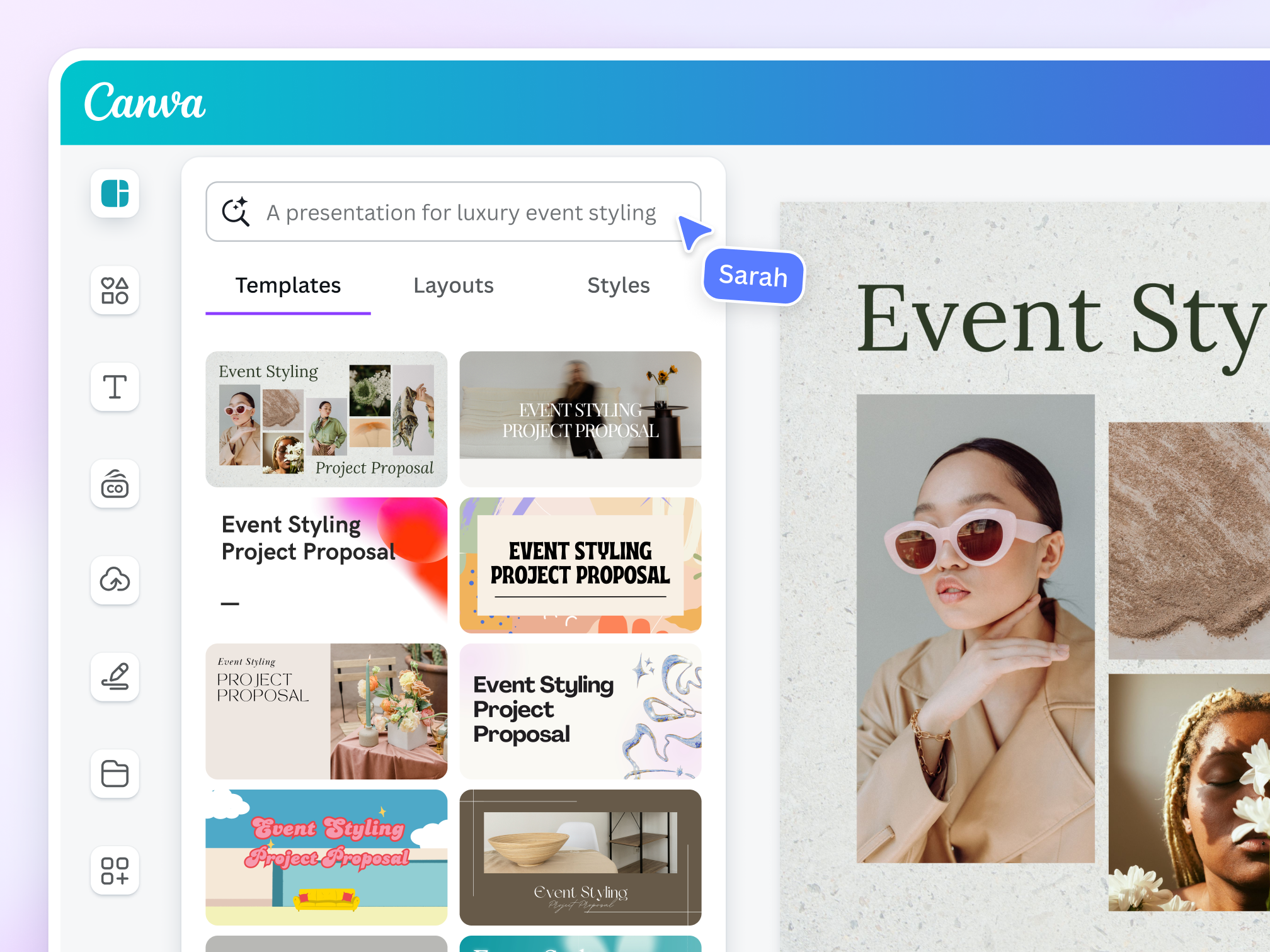
If Midjourney is the high-end specialty tool, Canva with Magic Studio handles 70 percent of the day-to-day design work most student freelancers actually deliver. Canva reached over 220 million monthly active users in 2024 and has aggressively integrated AI features.
Reviews and Platform Ratings
| Review Platform | Rating | Verified Reviews | Top User Sentiment |
|---|---|---|---|
| G2 | 4.7 / 5 | 12,000+ reviews | Among the highest-rated design tools on G2 |
| Capterra | 4.7 / 5 | 12,500+ reviews | Praised for ease of use and template library |
| Trustpilot | 4.0 / 5 | 13,000+ reviews | Generally positive; some complaints on subscription billing |
| G2 Magic Design (AI) | 4.7 / 5 | Aggregated | Cited as best for non-designer beginners in 2026 reviews |
Features and Functionality
Magic Studio includes Magic Design for generating templated designs from a prompt, Magic Write for in-canvas copy, Magic Edit for object replacement, Magic Eraser, Magic Resize for instant multi-platform resizing, and Magic Animate. The platform offers tens of thousands of templates, a stock asset library, and increasingly capable video editing. Pro at roughly $15 per month, or about $7 with the student discount where available, unlocks the full Magic Studio toolkit.
Key Benefits for Student Freelancers
The speed-to-deliverable for non-specialist design work is unmatched. A student handling social media for three small business clients can knock out a month of content in a single working day using Magic Resize and brand kits. The collaborative review system means clients comment directly on drafts, eliminating email-and-attachment churn. Templates also serve as a quality floor that prevents amateur-looking output.
Limitations and Drawbacks
Canva is not a replacement for Adobe Creative Suite at the high end. Print-grade output, complex multi-page editorial design, and advanced typography eventually push freelancers toward InDesign or Affinity Publisher. The template-driven aesthetic can also produce work that looks visibly Canva-built to other designers.
Real-World Use Case
A second-year student offering a $300 monthly social media retainer for a local restaurant uses Canva to maintain a brand kit, generates weekly post variations through Magic Design, repurposes each visual via Magic Resize, and writes captions through Magic Write. Total weekly time is under three hours, with roughly 25 finished assets per month delivered. Ideal target: students in social media management, small business marketing, content creation, or general-purpose design.
Jasper and Copy.ai

While ChatGPT and Claude handle general writing well, dedicated AI copywriting platforms like Jasper and Copy.ai offer marketing-specific workflows that streamline conversion-focused copy production. The combined user base exceeds two million across pricing tiers.
Reviews and Platform Ratings
| Review Platform | Rating | Verified Reviews | Top User Sentiment |
|---|---|---|---|
| Jasper on G2 | 4.7 / 5 | 1,270+ reviews | Praised for brand voice and marketing templates |
| Jasper on Capterra | 4.8 / 5 | 1,860+ reviews | Among the highest in AI writing category |
| Copy.ai on G2 | 4.7 / 5 | 180+ reviews | Strong reviews for workflow automation |
| Jasper on Gartner | 4.5 / 5 | 95 reviews | Enterprise teams cite ROI on consistent output |
Features and Functionality
Jasper offers marketing templates for over 50 use cases including AIDA and PAS frameworks, Facebook ads, LinkedIn posts, and SEO blog outlines. Brand Voice trains on a client's existing content for stylistically consistent output, and Campaigns ties multi-asset projects together. Pricing starts at $39 per month for Creator. Copy.ai targets a similar use case with a free tier and a Pro plan at $36 per month.
Key Benefits for Student Freelancers
For students who niche into copywriting or email marketing, the structured templates flatten the learning curve. A student can produce professional-grade ad copy without having read every direct-response classic, simply by following the proven frameworks. Brand Voice is particularly valuable for retainer clients, ensuring consistency across deliverables. Both platforms integrate with SEO tools like Surfer.
Limitations and Drawbacks
ChatGPT or Claude with a well-crafted prompt can produce equivalent output for the price of one subscription. The marketing-specific frameworks are templates any student can replicate manually with general-purpose tools. For students starting out, paying $39 per month on top of a ChatGPT subscription is hard to justify unless income is already substantial. Sophisticated marketing clients can sometimes detect the recognizable patterns in output.
Real-World Use Case
A communications major specializing in email marketing uses Jasper to draft welcome sequences, abandoned cart flows, and weekly newsletter editions for three e-commerce clients. Brand Voice trained on each client's existing emails produces drafts needing only light editing. The student bills $1,500 per month per client for roughly six hours of weekly work. Ideal target: students focused on direct-response copywriting, email marketing, advertising, or content marketing as a niche.
Notion AI: The Project Management Layer
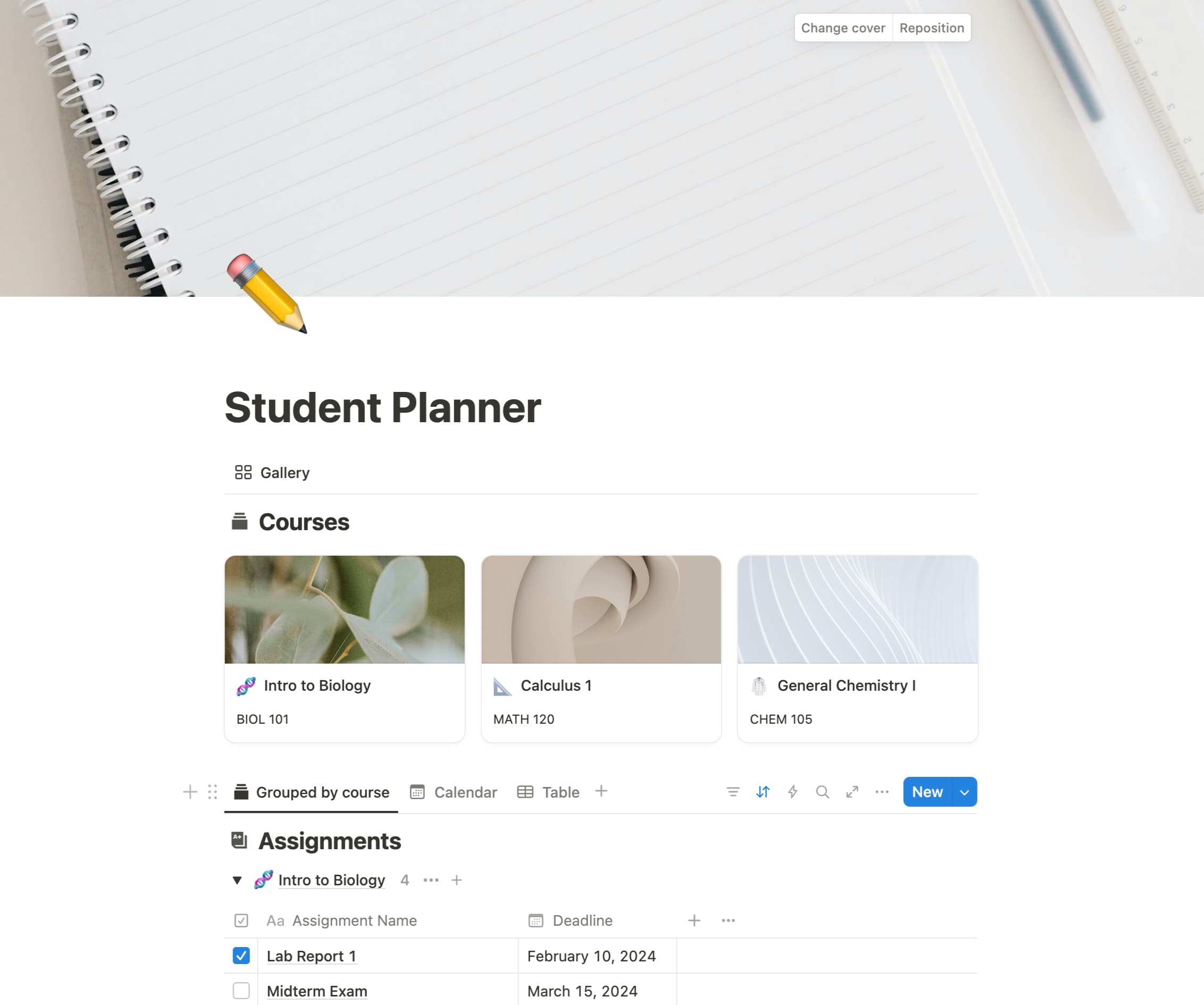
Behind every successful student freelance operation is a system for tracking clients, deadlines, deliverables, and notes. Notion has become the default knowledge and project management platform for solo operators, and Notion AI transforms the workspace into something closer to a personal chief of staff.
Reviews and Platform Ratings
| Review Platform | Rating | Verified Reviews | Top User Sentiment |
|---|---|---|---|
| G2 (Notion) | 4.7 / 5 | 10,150+ reviews | Highly rated for flexibility and AI integration |
| Capterra | 4.7 / 5 | 2,650+ reviews | Praised as central source of truth |
| Notion AI specifically | 4.6 / 5 | Subset | Cited for summarization and Q&A across docs |
| G2 Knowledge Mgmt category | Top 5 | Aggregate | Notion ranks among top knowledge tools |
Features and Functionality
Notion AI offers cross-database question answering, automatic summarization of meeting notes and pages, content generation inside any block, translation, and increasingly capable autonomous research. Q&A surfaces direct answers from the user's own notes rather than just links. The AI add-on is $10 per user per month, or bundled into the Business plan. Notion offers free Plus tier access to students with verified .edu email addresses.
Key Benefits for Student Freelancers
The compounding value of Notion AI grows with the size of the freelancer's knowledge base. A student with six months of client meeting notes, project briefs, and templates can ask questions like "What payment terms have I used with similar clients?" or "Summarize all the feedback from Client X this quarter" and get sourced answers. This institutional memory is what separates students who stay scattered from those who scale.
Limitations and Drawbacks
Notion AI is generally less capable than ChatGPT or Claude for raw content generation. The $10 monthly cost adds up alongside other subscriptions. Outputs occasionally hallucinate connections that do not exist in the underlying database. The platform is also heavy: students who only need a simple to-do list will find Notion's flexibility excessive.
Real-World Use Case
A senior managing four concurrent freelance clients uses a Notion workspace with a master client database, project pages, a CRM view, and a personal dashboard. Notion AI summarizes weekly progress per client into update emails, drafts new project briefs from short verbal notes, and answers cross-client questions. The student saves an estimated five to seven hours per week on operational overhead. Ideal target: any student handling multiple concurrent clients or building a freelance business they intend to scale.
ElevenLabs: The Voice and Audio Frontier

Audio is the fastest growing category in the AI tools landscape, and ElevenLabs has emerged as the dominant platform. The company crossed a billion-dollar valuation in 2024 and has become the default for podcast production, video voiceover, audiobook narration, and game audio.
Reviews and Platform Ratings
| Review Platform | Rating | Verified Reviews | Top User Sentiment |
|---|---|---|---|
| G2 | 4.6 / 5 | 180+ reviews | Praised for industry-leading voice realism |
| Capterra | 4.7 / 5 | 260+ reviews | Strong on multilingual support and voice cloning |
| Trustpilot | 4.0 / 5 | Mixed | Quality praised; users flag credit-burn pricing |
| AI Tools roundups | Top 1 | Editorial | Cited as gold standard for AI voice in 2026 |
Features and Functionality
ElevenLabs offers high-fidelity text-to-speech in over 30 languages with hundreds of pre-made voices, Voice Clone for creating a custom voice from a short sample, sound effect generation, video dubbing that preserves the speaker's voice, and conversational AI agents. Pricing scales from a free tier with 10,000 characters per month, through Starter at $5, Creator at $22, Pro at $99, and higher enterprise tiers. Creator is the practical sweet spot for active freelance use.
Key Benefits for Student Freelancers
The economics of audio freelance work shift completely. A student offering podcast editing services can now also offer narration. A YouTube content service can include voiceover production without studio time. Dubbing services for international clients become viable for a single student operator. Voice clone is particularly valuable for repeat work with creators who want consistent narration across episodes.
Limitations and Drawbacks
ElevenLabs voices, while excellent, can sound subtly synthetic in long-form emotional contexts. Ethical and legal questions around voice cloning are unresolved, and many platforms now require explicit disclosure when AI voices are used. The Pro tier is necessary for commercial licensing terms that protect freelancers in client work, raising the cost. The most common review complaint is the credit-based pricing model burning out heavy users mid-month.
Real-World Use Case
A film production student takes on a $1,500 contract to produce ten short YouTube videos for an educational channel, including scripting, editing, and narration. Using ElevenLabs, the student bypasses voiceover recording bottlenecks, generates consistent narration across all ten videos, and dubs three into Spanish for international reach as an upsell. Ideal target: students in video production, podcast production, content creation, or audiobook services, particularly those working with international clients.
Pricing Comparison: What Students Actually Pay
A student who tries to subscribe to every tool on this list will spend over $200 per month, which is unsustainable on early freelance income. The chart below maps the entry tier and pro tier of each tool against current pricing, accurate as of May 2026.
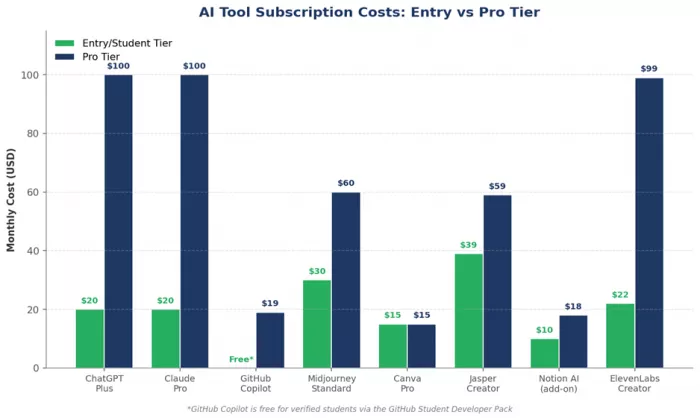
The realistic starting stack for most student freelancers is ChatGPT Plus at $20, GitHub Copilot free through the Student Pack, Canva Pro at $15, and a free tier of Notion. Total monthly investment is around $35, which is recoverable on the first reasonable client invoice of the month. From there, students typically add Midjourney or ElevenLabs based on their specific niche.
Strategic Trade-Offs at a Glance
| Advantages | Limitations and Risks |
|---|---|
| AI-enabled freelancers earn approximately 40 percent more per hour than peers without AI tools (Upwork, MBO Partners 2025). | Demand for substitutable skills like generic writing and translation declined 20 to 50 percent on freelance platforms after ChatGPT's release. |
| AI saves an average of eight hours per week, freeing time for higher-value client work or coursework. | Hallucination, factual errors, and confident-sounding mistakes in AI output remain serious risks for client deliverables. |
| Students can offer professional-grade output across writing, design, code, audio, and video without years of prior experience. | Some clients in regulated industries explicitly prohibit AI-assisted work, closing off otherwise lucrative opportunities. |
| Freelancers who explicitly market AI-augmented services command 15 to 20 percent rate premiums. | Subscription costs add up quickly; uncoordinated tool stacks can exceed $100 per month before any client work is billed. |
| Free or discounted student tiers exist across most major platforms including GitHub Copilot and Notion. | Entry-level work is shrinking fastest; novice freelancers in commodity niches face the steepest competition. |
How Students Actually Build Pre-Graduation Freelance Careers
Tools alone do not produce careers. The students who successfully convert AI access into pre-graduation income tend to follow a consistent four-phase pattern.
Phase One: Niche and Skill Foundation
Students earning real money in 2026 are not generalist freelancers competing on price. They are specialists. AI accelerates output inside a niche but does not create a niche on its own.
Phase Two: Portfolio and Proof
Without industry experience, students need portfolio pieces demonstrating capability. AI dramatically reduces the time cost of producing portfolio work. A design student can build a cohesive 10-piece portfolio in two weekends. A developer can deploy three production-quality side projects in a month.
Phase Three: First Clients
The first paying client almost always comes through one of three channels: an existing personal network, a freelance platform like Upwork or Fiverr where the student's niche has demand, or direct outreach to small businesses. AI helps in this phase primarily through proposal writing and personalized outreach at scale.
Phase Four: Systems and Scale
Once a student has a few clients, the constraint shifts from finding work to managing it. This is where Notion AI, automated invoicing tools, and structured workflows become essential. Students who scale past the first few clients treat their freelance practice like a small business.
Where This Is Heading
Three trends define the next two years. First, agentic AI is moving from chat interfaces to autonomous task execution. Students who learn to design and supervise these agentic workflows will pull ahead. Second, freelance platforms are restructuring around AI: Upwork has launched an AI Services hub and integrated GPT-4 powered Upwork Chat Pro, while Fiverr now lets freelancers create personal AI models trained on their own work. Third, the World Economic Forum's Future of Jobs Report 2025 identifies AI literacy, prompt engineering, and data interpretation as among the fastest growing skills, with AI prompt engineering specifically growing 240 percent year over year.
Conclusion: The Window Is Now
The picture is straightforward. Students with access to current-generation AI tools and a willingness to specialize, build portfolios, and treat freelancing as a small business can credibly earn meaningful income before graduation. The 40 percent hourly rate premium that AI-enabled freelancers command is not a marketing claim but a measurable market reality. Pick one specific skill and one specific niche where AI is a complement rather than a substitute, and study how niche sites like Timtis dissect those markets to understand what actually gets hired. Build a focused portfolio of 5 to 10 pieces using ChatGPT or Claude, GitHub Copilot if technical, and Canva or Midjourney if visual. Spend the $35 to $50 per month on the minimum viable subscription stack rather than every tool on the market. Send personalized outreach weekly while continuing to upgrade portfolio quality. Treat client work as the most important course on your transcript. AI did not invent student freelancing, but it has fundamentally changed what is possible from a dorm room with a laptop and a few subscriptions. The cap and gown are still useful for the photo. They are no longer a prerequisite for the career
Comments