Table of Contents
- Introduction
- Technical Architecture: Understanding the Engine Under the Hood
- Core Features: What PixVerse Actually Offers
- Pricing Structure: The Hidden Costs of Credit-Based Systems
- Real User Experiences: Consolidating Reviews Across Platforms
- Competitive Landscape: How PixVerse Stacks Up
- The Credit System Problem: Industry-Wide Concerns
- Privacy and Data Security: The Elephant in the Room
- Technical Limitations and Realistic Expectations
- Cancellation and Billing Issues: A Pattern of Complaints
- Real-World Use Cases: Who Actually Benefits?
- Practical Recommendations: Maximizing Value from PixVerse
- Final verdict
Introduction
PixVerse AI has become one of the most visible names in AI video creation, drawing a massive global user base with its ability to turn text and images into videos in seconds. Its rapid evolution shows strong technical ambition, but in 2026 the real picture is more balanced: PixVerse is fast, accessible, and useful for certain creators, yet its performance still depends heavily on the use case. This review looks past the hype to assess where it genuinely delivers and where it still falls short.
Technical Architecture: Understanding the Engine Under the Hood
The Omni Multimodal Foundation Model
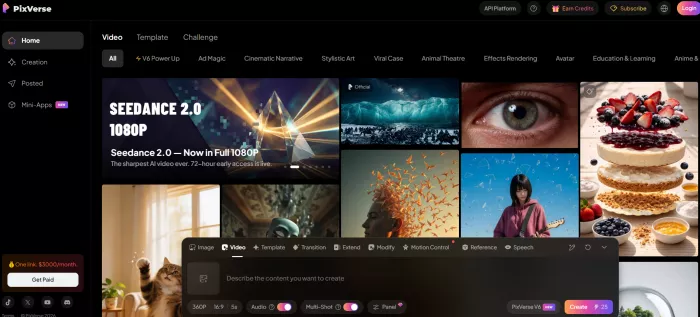
PixVerse's core innovation lies in its Omni Native Multimodal Foundation Model, which represents a departure from traditional video generation pipelines. Rather than treating text, image, video, and audio as separate inputs requiring different processing streams, the Omni model unifies these modalities into a continuous token stream. This unified representation enables the platform to accept arbitrary multimodal inputs within a single framework.
The technical advantages of this approach include:
Unified Processing: By treating all content types as part of the same token stream, the model can better understand relationships between visual and audio elements, leading to more coherent outputs where motion, lighting, and sound theoretically align more naturally.
Native Resolution Training: Unlike systems that crop or resize inputs (often introducing artifacts), PixVerse trains at native resolutions, which should preserve detail fidelity. However, user reports suggest this advantage is more pronounced at higher resolution tiers.
Physical World Understanding: The model is trained on massive corpuses of real-world video data to internalize physical laws and dynamics. In practice, users report mixed results – simple physics (gravity, basic object interaction) generally work well, but complex scenarios involving multiple moving elements or nuanced human motion still produce occasional impossibilities.
Resolution and Technical Specifications
PixVerse currently supports the following technical specifications:
● Resolution Range: 360p, 540p, 720p, 1080p (with 4K upscaling available as a premium feature)
● Frame Rates: 16 FPS (default) and 24 FPS options
● Video Duration: 5-8 seconds base generation, extendable to 30 seconds using the "Extend" feature
● Aspect Ratios: 16:9 (YouTube), 9:16 (TikTok/Reels), 1:1 (Instagram square), 4:5 (Instagram portrait)
● Generation Time: 30 seconds to 2 minutes depending on complexity and resolution
● API Support: Available for enterprise integration with documented endpoints
Reality Check from User Testing: Independent testing reveals that while PixVerse markets "4K generation," the platform actually generates at 1080p maximum natively, with 4K achieved through post-generation upscaling. This is a meaningful distinction – native 4K from competitors like Runway Gen-4 or Google's Veo 3.1 produces sharper detail than upscaled content, particularly noticeable in text overlays or fine texture work.
The R1 Model: Real-Time Generation
PixVerse's R1 research model represents their most ambitious technical push – achieving real-time 1080p video generation through an "Instantaneous Response Engine." The key innovations include:
● Temporal Trajectory Folding: Reduces sampling steps from dozens to just 1-4 iterations
● Direct Transport Mapping: Predicts clean data distribution directly rather than through iterative denoising
● Adaptive Sparse Attention: Reduces computational redundancy for faster processing
For context, traditional diffusion models require dozens of sampling steps to produce quality output. R1's compression of this process to 1-4 steps is technically impressive and enables their claimed "real-time" performance. However, as of April 2026, R1 remains in research preview with limited public access.
Core Features: What PixVerse Actually Offers
1. Text-to-Video Generation
Users describe text prompts, and the AI generates corresponding video clips. This feature performs best with clear, detailed prompts specifying camera movement, lighting, mood, and action.
Strengths:
● Fast generation times (30-60 seconds for standard clips)
● Strong performance on straightforward scenarios (landscapes, simple actions, product shots)
● Improving prompt adherence with each model iteration
Limitations from User Reports:
● Complex multi-subject scenes often contain logical inconsistencies
● Abstract or highly creative prompts may require 3-5 regenerations to achieve desired results
● Character consistency across multiple prompts remains challenging
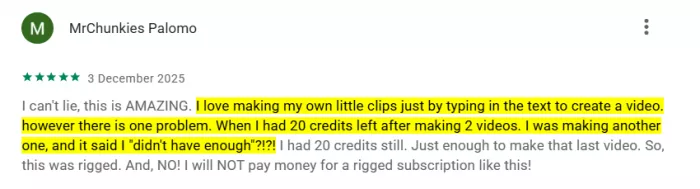
Real User Feedback: "I love making my own little clips just by typing in the text to create a video. However there is one problem. When I had 20 credits left after making 2 videos, I was making another one, and it said I 'didn't have enough'?!?!" – Google Play Store review
2. Image-to-Video Animation
Upload a static image, and PixVerse animates it with motion, transitions, and effects. This feature has garnered particular praise from mobile users.
Strengths:
● Excellent mobile performance
● Uses uploaded image as first frame (maintaining visual continuity)
● Effective for product demonstrations and portrait animation
● Good handling of 2.5D and anime-style content
Limitations:
● Complex backgrounds may shimmer or shift between frames
● Hair and fabric physics occasionally look unnatural
● Quality heavily dependent on input image resolution and clarity
Real User Feedback from Reddit: "PixVerse AI works so well on phones when converting a Picture to video and does an amazing job of animating image" – Reddit discussion
3. Viral Effect Templates
PixVerse has built significant social media traction through pre-packaged effect templates:
Popular Templates:
● AI Kiss / AI Hug (among the most viral effects)
● AI Muscle / Muscle Pro (physical transformation)
● AI Fighting
● Old Photo Revival (animating vintage photographs)
● AI Dance Revolution
● Victoria's Secret Wings and other fashion filters
The Social Media Phenomenon: These templates have generated millions of interactions across TikTok, Instagram, and Facebook. The "AI Kiss" effect alone drove massive user acquisition in late 2025, contributing to PixVerse's rapid growth to 100M+ users.
The Trade-off: While these templates drive viral adoption, professional creators note they contribute to a "seen it before" aesthetic. For brand work requiring unique visual identity, the templates are less useful than custom prompt work.
4. Advanced Features (Premium Tiers)
Multi-Keyframe Generation: Upload up to 7 images as keyframes (web version only), and the AI builds smooth transitions between them. This marks PixVerse's evolution from single-segment generation to narrative expression.
Lip Sync Capability: Added in July 2025, allows characters to speak with synchronized mouth movement. User reports indicate quality varies significantly – simple dialogue in well-lit, forward-facing shots works reasonably well, while complex multi-character scenes often drift out of sync.
Camera Movement Controls: Specify dolly in/out, pans, tilts, and zoom speeds. Testing reveals these controls work better as suggestions than strict directives – the AI interprets but doesn't always execute precisely.
Voice Input (V5 Model): Speak creative instructions rather than typing them. Recent upgrade claims "more accurate and responsive" voice recognition, though non-native English speakers report mixed accuracy.
Fusion Mode: Combine up to 3 images into a single AI-generated video, useful for merging disparate visual elements or creating composite scenes.
Pricing Structure: The Hidden Costs of Credit-Based Systems
PixVerse operates on a hybrid freemium model combining monthly subscriptions with a consumable credit system. Understanding the real cost requires looking beyond the sticker price.
Pricing Tiers (2026)
| Plan | Monthly Cost | Credits Included | Resolution | Concurrent Generations | Key Limitations |
| Basic (Free) | $0 | 90 initial + 60 daily | Lower resolutions | Limited | Heavy watermarks, reduced quality |
| Standard | $10/month | 1,200 | Up to 720p HD | 3 | Good for occasional use |
| Pro | $30/month | 6,000 | Up to 1080p | 5 | Best value for regular creators |
| Premium | $60/month | 15,000 | Up to 1080p + 4K upscale | 8 | High-volume production |
| Enterprise | $100+/month | Custom | Custom configs | Custom | API access, dedicated support |
Credit Consumption Reality
The challenge with credit-based pricing is that advertised monthly costs rarely reflect actual usage costs. Here's why:
Variable Credit Consumption:
● Base generation: 10-20 credits per video
● Higher resolution (1080p): 2-3x credit multiplier
● Audio generation: Additional credits per second
● Upscaling to 4K: Significant additional cost
● Lip sync features: Credits based on text length/audio duration
● Failed generations: Full credit charge despite unusable output
Real-World Burn Rate: Independent testing by digital marketers found that creating a single polished 4-second HD promotional video averaged 4 prompt iterations, consuming approximately 60 credits. At this burn rate, the Standard plan ($10/month for 1,200 credits) yields roughly 20 usable professional-grade videos – or just under one video per day if posting regularly.
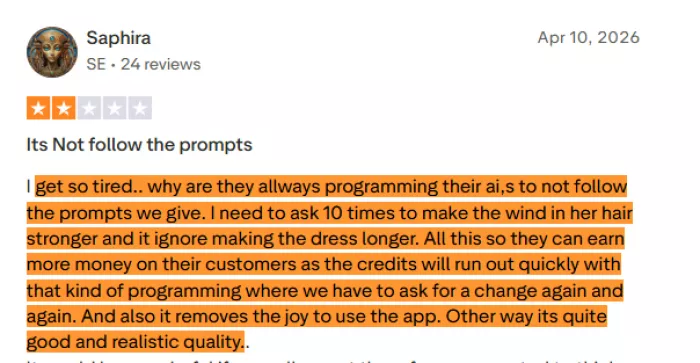
User Frustration on Trustpilot: “I get so tired... why are they always programming their AIs to not follow the prompts we give. I need to ask 10 times to make the wind in her hair stronger and it ignores making the dress longer. All this so they can earn more money on their customers as the credits will run out quickly with that kind of programming where we have to ask for a change again and again.”
The "Failed Generation" Problem
A particularly contentious issue is credit consumption on failed or unusable outputs. Users report:
● Being charged full credits even when output is clearly incorrect
● No preview-before-commit option
● No refund mechanism for technically failed generations
● Voice prompts occasionally misinterpreting requests, burning credits
The Economic Impact: For creators operating on tight budgets, unpredictable credit consumption represents a significant financial risk. One Reddit user noted: "really cool app HOWEVER I don't care for the fact that you have to pay for every single download! THAT ALONE I think is a little ridiculous."
Competitive Price Comparison
| Platform | Entry Tier | Cost Per Minute (API) | Free Tier Generosity | Best For |
| PixVerse | $10/month | Moderate | 60 daily credits (generous) | Social content, fast iteration |
| Runway Gen-4 | $15/month | Higher | 125 credits (~4-5 clips) | Professional production |
| Pika Labs | $8/month | Lower | Limited but usable | Stylized/animated content |
| Kling AI | $10/month | Moderate | Basic access | Realistic motion, sports |
| Sora 2 (deprecated) | Was $200/month | Very high | None | N/A (discontinued March 2026) |
Real User Experiences: Consolidating Reviews Across Platforms
Trustpilot Sentiment Analysis
PixVerse holds a 2.7/5 rating on Trustpilot based on 73 reviews (as of April 2026). The distribution reveals polarization:
Positive Reviews (Minority):
● Praise for creative potential and fun use cases
● Appreciation for generous free tier compared to competitors
● Recognition of improving quality with each model version
Negative Reviews (Majority):
● Privacy and Data Security Concerns: Multiple users cite discrepancies between PixVerse's "private by default" marketing and actual content handling
● Subscription and Billing Issues: "Terrible subscription/cancellation model and no response for cancellation or refund. I was charged for a standard subscription that I did not approve."
● Prompt Adherence: "Poor facial reproduction, also has difficulty following simple seeds, often wastes Credits by producing something totally different to original image."
● Support Responsiveness: Many reviewers characterize customer support as "largely unresponsive" with "automated or AI-generated templates that fail to resolve specific billing disputes"
Google Play Store Reviews (4.3 ★ from 4.2M reviews)
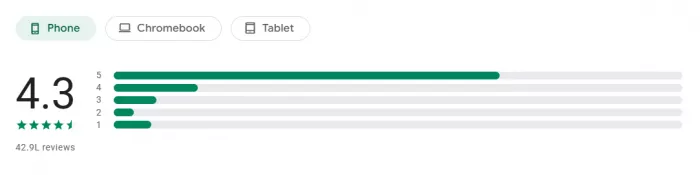
The mobile app shows significantly higher satisfaction than Trustpilot, suggesting platform-specific experiences vary considerably:
Common Praise:
● Intuitive mobile interface
● Fast generation on mobile devices
● Engaging effect templates
● Accessibility for non-technical users
Common Complaints:
● “For the most part, I love the app but as others have stated, it's too expensive and you have to continually keep buying more credits”
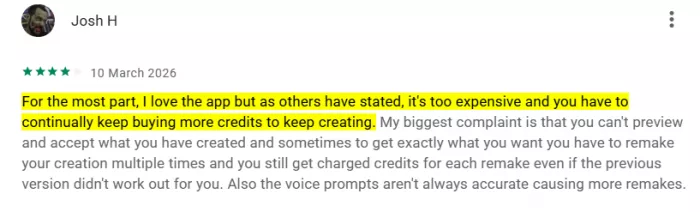
● "My biggest complaint is that you can't preview and accept what you have created and sometimes to get exactly what you want you have to remake your creation multiple times and you still get charged credits for each remake"
● "Also the voice prompts aren't always accurate causing more remakes"
● App size concerns: “The app is quite large data wise when downloading, so I'm not sure how long I'm going to keep it because I don't like having large apps using up my memory and slowing down my phone”
Competitive Landscape: How PixVerse Stacks Up
Direct Comparison Matrix
| Capability | PixVerse v5.6 | Runway Gen-4 | Pika Labs 2.5 | Kling AI 3.0 | Sora 2 (deprecated) |
| Max Native Resolution | 1080p (4K upscale) | 4K native | 720p | 1080p | 1080p |
| Max Duration | 8s base, 30s extended | 20s | 5-8s | 4-5s free, 2min paid | 25s |
| FPS | 16/24 | 24 | 24 | 30 | 30 |
| Generation Speed | 30-60 seconds | 1-3 minutes | 30-90 seconds | Fast | 5-8 minutes |
| Prompt Adherence | Good (improving) | Excellent | Good | Very Good | Excellent |
| Character Consistency | Moderate | Good | Moderate | Excellent | Excellent |
| Physics Accuracy | Moderate | Good | Fair | Excellent | Very Good |
| Free Tier | 60 daily credits (generous) | 125 credits (~4-5 clips) | Usable free tier | Limited | None |
| Entry Price | $10/month | $15/month | $8/month | $10/month | $200/month |
| Best For | Fast social clips, experimentation | Professional production | Stylized/animated | Realistic motion, sports | N/A |
The Credit System Problem: Industry-Wide Concerns
PixVerse's credit-based pricing isn't unique – it reflects an industry-wide trend that users increasingly pushback against. The fundamental issues:
Opacity and Unpredictability
Unlike flat-rate SaaS subscriptions where users know exactly what they're paying for, credit systems create:
● Unclear Cost-to-Value Ratios: How many usable videos will 1,200 credits actually produce? It depends on resolution, iterations needed, features used, and quality acceptance thresholds.
● Iteration Penalties: Since failed attempts consume full credits, users who care about quality pay significantly more than those willing to accept mediocre outputs.
● Hidden Multipliers: Higher resolution doesn't just improve quality – it often costs 2-3x more credits. Audio generation, upscaling, and advanced features add additional per-use charges.
Psychological Impact
Market research on pricing models reveals credit systems create:
● Budget Anxiety: Users constantly calculate whether a generation is "worth" the credits, inhibiting creative experimentation
● Sunk Cost Pressure: After spending credits on iterations, users may settle for suboptimal outputs rather than continue spending
● Engagement Friction: The mental overhead of credit management reduces the joy of creation
Industry Trend Toward Flat-Rate Pricing
One industry analyst noted: "Looking ahead to AI generator pricing in 2026, market trends indicate strong consumer pushback against these opaque models. Users are increasingly demanding predictable, flat-rate SaaS subscriptions over confusing token systems."
Some newer competitors have responded with unlimited generation plans at fixed monthly rates, though these typically come with usage caps disguised as “fair use policies.”
Privacy and Data Security: The Elephant in the Room
Multiple Trustpilot reviews raise serious concerns about PixVerse's data handling:
The Promise: PixVerse markets "private by default generation environment" where content isn't shared or used without permission.
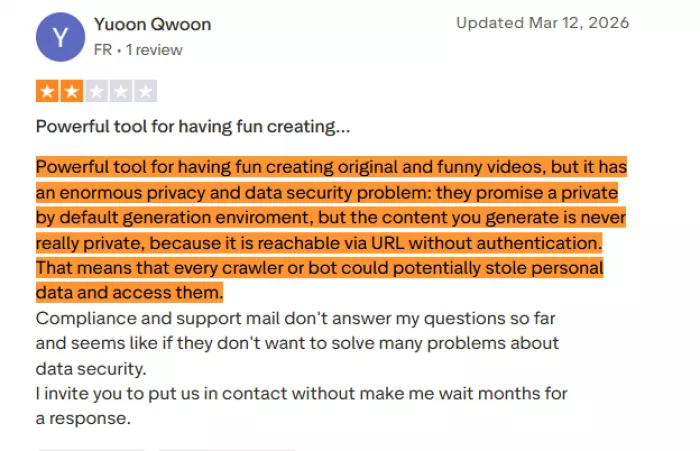
The Reality According to Users: "Powerful tool for having fun creating original and funny videos, but it has an enormous privacy and data security problem: they promise a private by default generation environment, but the content..." (review cut off but sentiment clear)
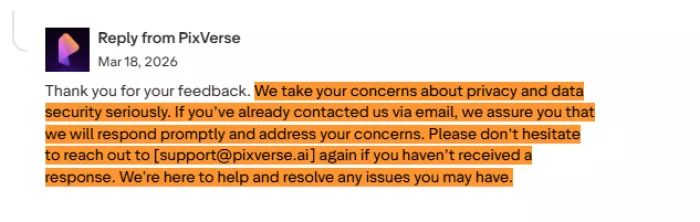
Company Response: PixVerse's official response states: "We take data security and privacy very seriously... Please rest assured that our team is reviewing your case." However, the company's privacy policy and data handling practices lack the transparency users expect.
What We Know About Data Usage
According to PixVerse's terms and privacy policy:
● Uploaded images and prompts are processed for video generation
● Content may be stored "for model improvement purposes"
● The platform shares data with third parties (types not fully specified in public documentation)
● Users should avoid uploading sensitive personal images or confidential business materials
Industry Context
Most AI video platforms use uploaded content for model training unless users explicitly opt out (and sometimes even then). The key differentiator is transparency – platforms like Runway clearly document data handling, while PixVerse's practices remain somewhat opaque.
Practical Recommendation: Treat PixVerse (and similar platforms) as inherently not private for sensitive content. For client work, brand assets, or personal photos you wouldn't want publicly visible, understand that some risk of data exposure exists.
Technical Limitations and Realistic Expectations
What PixVerse Does Well
1. Simple, Clear Scenarios: Basic prompts like "a sunset over mountains" or "a woman walking on a beach" consistently produce usable results. The AI excels when asked to generate straightforward, single-subject scenes with clear visual goals.
2. 2.5D and Anime Aesthetics: For stylized content, PixVerse's model produces appropriate aesthetics that photorealism-focused competitors struggle with. Anime-style generation particularly benefits from PixVerse's training data.
3. Speed Over Perfection: When iteration speed matters more than perfect output, PixVerse's 30-60 second generation enables rapid testing of creative concepts.
What PixVerse Struggles With
1. Complex Multi-Subject Scenes: User reports consistently cite logical inconsistencies when multiple elements interact. Examples include:
● Objects that should occlude each other instead blend incorrectly
● Multiple characters with inconsistent sizing or perspective
● Background elements that shift or morph between frames
2. Fine Detail and Text: Despite marketing 4K capability, PixVerse-generated videos struggle with:
● Text overlays (often blurry or distorted)
● Fine textures (fabric weave, wood grain, etc.)
● Small objects requiring sharp detail
3. Physics and Natural Motion: While basic gravity and movement work, complex physics fail:
● Hair and clothing physics often look "floaty" or unnatural
● Water and fluid simulation is inconsistent
● Hand and finger movements frequently produce anatomically impossible results
4. Character Consistency Across Prompts: One of the most requested features is consistent character generation across multiple videos. While PixVerse has added character reference capabilities, users report it's unreliable – subtle facial features, clothing details, and proportions often shift between generations.
The 5-8 Second Limitation
PixVerse's 8-second maximum base duration (extendable to 30 seconds with the Extend feature) represents a significant constraint for:
● YouTube creators needing longer intro sequences
● Educators creating instructional content
● Marketers building narrative ad campaigns
● Anyone telling stories requiring setup and payoff
While the Extend feature theoretically addresses this, users report that extended segments don't always maintain visual consistency with the base clip, creating jarring transitions.
Cancellation and Billing Issues: A Pattern of Complaints
A concerning pattern emerges from user reviews regarding subscription management:
The Loop Problem: Multiple users describe difficulty canceling subscriptions due to interface design that "creates a loop between user info pages and subscription management." The recommended workaround – navigate to the Subscribe page to find the cancel button, or cancel through App Store/Google Play if subscribed via mobile.
Automatic Renewals: Some users report unexpected charges: "I was charged for a standard subscription that I did not approve. And even when I logged onto the account, it didn't say I had a subscription!!!"
Account Deletion ≠ Cancellation: Simply deleting an account does NOT automatically cancel active billing. Users must explicitly downgrade to the Free plan and verify cancellation via email.
Support Responsiveness: Current user feedback characterizes the help desk as "largely unresponsive, with many inquiries receiving automated or AI-generated templates that fail to resolve specific billing disputes."
Best Practices for Users:
1. Always cancel subscriptions directly through payment platform (App Store, Google Play, or website billing page)
2. Verify cancellation with confirmation email before assuming it's complete
3. Screenshot subscription status before and after cancellation
4. Set calendar reminders before renewal dates to check status
Real-World Use Cases: Who Actually Benefits?
1. Social creators (★★★★★): Best for TikTok, Reels, and Shorts where speed, trends, and output volume matter more than polish.
2. Marketing agencies (★★★☆☆): Useful for quick concept testing and client mockups, but not reliable enough for final brand work.
3. Educators (★★★☆☆): Good for simple explainer visuals, though short clip limits and inconsistent detail reduce usefulness for serious teaching content.
4. Small businesses (★★★★☆): Strong low-cost option for promos, product videos, and social posts without hiring a production team.
5. Filmmakers and studios (★★☆☆☆): Works better for storyboards and early visual ideas than for professional-grade final production.
Practical Recommendations: Maximizing Value from PixVerse
1. Start with the free tier: Use the daily credits fully before subscribing, so you can judge whether PixVerse actually fits your workflow.
2. Write detailed prompts: Specific prompts consistently perform better than vague ones, especially when you define movement, lighting, setting, style, and action.
3. Use high-quality input images: Clear, sharp, well-lit images give noticeably stronger image-to-video results.
4. Use templates for social content: Pre-built templates are often more effective than custom prompting for fast, engagement-focused videos.
5. Calculate your real cost first: Track how many credits you actually use per usable video before choosing a paid plan.
6. Batch similar generations: Queue related prompts together to speed up iteration and make better use of generation slots.
7. Download and back up immediately: Important outputs should be saved right away in case of platform glitches or lost access.
8. Edit outside PixVerse: Use tools like CapCut, Premiere Pro, or DaVinci Resolve for trimming, audio, sequencing, and final polish.
Final verdict
PixVerse is worth it in 2026 for users who want fast, affordable AI video generation, especially for social content, experimentation, and small-scale marketing. Its biggest strengths are speed, accessibility, and a useful free tier. Its biggest weaknesses are inconsistent outputs, uneven prompt accuracy, and limited control, which make it a poor fit for professional production or brand-sensitive work.
More broadly, PixVerse reflects both the progress and the limits of AI video creation: it makes video production far more accessible, but it still works best as a support tool rather than a complete replacement for skilled editing or traditional production. For the right user, it offers real value. The smartest approach is to test the free tier first, measure the actual cost of usable results, and treat it as one tool in a wider creative workflow.
Final Recommendation: Try the free tier. Test it against your actual needs, not idealized scenarios. Calculate real costs including iteration requirements. Supplement with traditional or other AI tools where PixVerse falls short. And always, always read the fine print on billing and cancellation policies.
The future of video creation is undoubtedly AI-augmented. PixVerse is one imperfect but meaningful step in that direction.
Comments