AI video has moved from “cool demo” to a serious production tool, and both Runway (Gen-3/Gen-4 era) and Pika (2.x + Turbo) sit at the center of that shift. Runway is increasingly positioned as a professional, filmmaker‑grade suite with timelines, compositing, and precision controls, while Pika leans into fast, stylized, social-ready clips with unique physics-based effects.
If you are choosing one for client work, YouTube content, ads, or viral shorts, you need to understand how they differ in quality, control, speed, pricing, and workflow. The sections below break down both tools in detail and then bring everything together in side‑by‑side tables you can drop straight into a blog.
Platform Overview
Runway and Pika both cover text‑to‑video, image‑to‑video, and video‑to‑video, but their core philosophy is different.
What is Runway?
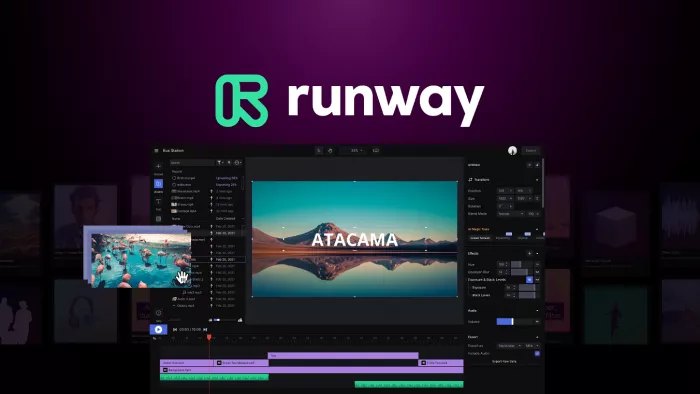
Runway (often called RunwayML) is a full creative suite built around its Gen‑3 and Gen‑4 video and image models plus a large set of “AI Magic Tools.” It gives you a timeline-based interface, editor-style UI, and tools like Motion Brush, inpainting, rotoscoping, and Director Mode, which make it feel closer to a simplified After Effects with AI under the hood.
The platform is aimed at filmmakers, agencies, and serious creators who care about cinematic consistency, fine‑grained control, and integration with existing production workflows.
What is Pika?

Pika (often called Pika Labs) is an idea‑to‑video platform focused on fun, stylized, and highly dynamic clips that work well for short‑form content and experiments. It offers multiple model versions (1.5, 2.0, 2.2, Turbo, etc.) and packs them with creative tools like Pikaffects and Pikaframes to add physics‑style animations and adjust aspect ratios per platform.
Instead of a heavy editor, Pika emphasizes minimal UI, fast iteration, and credit‑based generation, making it attractive for creators chasing trends on TikTok, Reels, and Shorts.
Core Features: Generation & Control
This is where the “director vs sandbox” difference is most visible.
Video Quality and Style
Runway’s newer Gen‑3/Gen‑4 models focus on realism, consistent motion, and cinematic framing. In many independent tests, Runway’s output looks more stable, with fewer distortions on faces and bodies, making it better for ads, narrative scenes, and brand work.
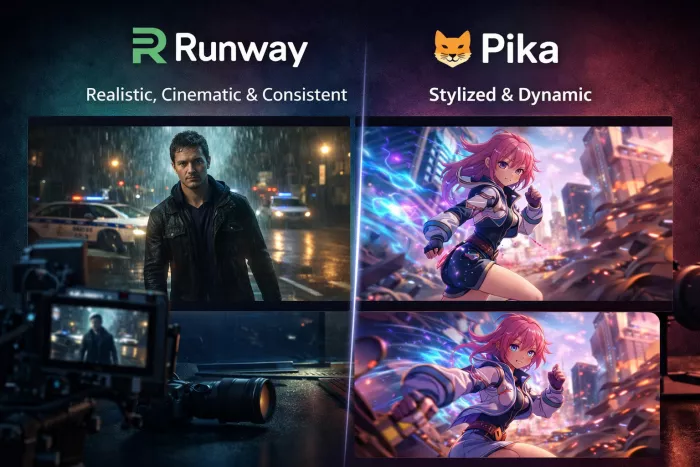
Pika’s output tends to be more stylized and experimental, often ideal for character‑driven or anime‑style content and physics-heavy effects. While realism has improved significantly in the 2.x models, the real magic is in its playful distortion and dynamic motion, which is perfect for eye‑catching social clips.
Prompting, Text‑to‑Video & Control
Runway’s text‑to‑video is powerful but can be unpredictable; small changes in wording can produce very different scenes. You then refine the shot using tools like Motion Brush (to define which regions move), Director Mode (to choreograph complex camera moves), and inpainting to fix or replace elements frame by frame.
Pika is generally better at following prompts literally: you describe what you want and typically get something close on the first try. It adds Scene Ingredients and Pikaframes to layer effects and control formats, plus straightforward camera options for pan, tilt, zoom, and rotation. The trade‑off is that you have less granular, timeline‑style control than in Runway.
Creative Effects & Editing Tools
Pika has a unique Pikaffects suite (Melt, Inflate, Crush, Pop, Explode and others) that produce physics-based, almost cartoonlike transformations. These effects are rare among competitors and are one of Pika’s biggest selling points for viral and experimental content.
Runway focuses less on flashy physics effects and more on production tools: masking, rotoscoping, object removal, background replacement, and compositing inside a timeline. For teams that already edit in Premiere or Resolve, Runway can become a serious pre‑ and post‑production assistant rather than just a “clip generator.”
Camera & Scene Controls
Runway offers advanced camera controls via Director Mode and Motion Brush, letting you define paths, parallax moves, and more cinematic camera language.
Pika supports conventional camera moves (zoom, pan, tilt, rotation) and optimizes framing via Pikaframes for different social formats (portrait, landscape, square, etc.). It’s not as deep as Runway for complex storyboarding, but it’s faster for simple, platform‑specific shots.
Feature Snapshot
| Dimension | Runway | Pika |
| Primary focus | Professional, cinematic production | Stylized, playful, social-first clips |
| Model family | Gen‑3, Gen‑4, Veo integrations | 1.5, 2.0, 2.2, Turbo models |
| Editing environment | Full timeline, Magic Tools | Lightweight UI, fast preview grid |
| Prompt adherence | Powerful but less predictable | Very literal, precise prompts |
| Special features | Motion Brush, Director Mode, inpainting | Pikaffects, Pikaframes, Pikascenes |
Performance, Speed & Workflow
Speed matters if you’re iterating dozens of times per idea.
Runway’s Gen‑3/Gen‑4 Turbo can generate short clips in around 18 seconds of model compute, but in real usage, queue times during peak hours can add several minutes. This is acceptable in a production environment where you care more about final quality than instant turnaround, but it can slow down experimentation.
Pika’s Turbo model usually renders clips in about 30–90 seconds with shorter queues on average, which, over 20–30 iterations, can save hours of waiting time. This is part of why many creators prefer Pika for fast‑paced ideation and content calendars where you need dozens of variants quickly.
On workflow, Runway’s interface is more complex, with scenes organized on a timeline, detailed controls, and more buttons overall. Beginners may find Pika’s minimalist “generate and preview” workflow easier, with fewer options but a faster path to a usable clip.
Pricing, Credits & Value
Both platforms use a mix of plans and per‑second/credit consumption, which can get confusing. Below is a simplified snapshot as of early 2026; exact prices may change, so always cross‑check official pages.
Runway Pricing (High Level)
Runway uses subscription tiers (Standard, Pro, Unlimited) plus a credit system for generations. In 2025–2026 updates, prices dropped slightly and credit allowances increased, especially for the mid‑tier plans.
Some key signals from recent breakdowns:
● Standard and Pro plans are in the roughly 12–35 USD/month band depending on billing cycle, with decreasing per‑second costs at higher tiers.
● An “Unlimited” type tier exists for heavy users, but still imposes a fair‑use cap of around hundreds of generations per month rather than truly infinite use.
● Credit cost scales by model and resolution: for example, newer analyses list around 10 credits per second for Gen‑3 Alpha and 5 credits per second for Turbo versions, with separate rates for Veo and image generation.
The bottom line: Runway is priced like a production tool, cost‑effective if you are billing clients, but less ideal if you only create a few fun clips per month.
Pika Pricing (Credit‑First)
Pika uses a very transparent credit system where real cost depends on length and resolution, not just the plan name.
Contemporary breakdowns show:
● A free/basic plan around 0 USD with ~80–150 credits, typically limited to 480p and non‑commercial or watermarked usage.
● Standard/Pro/Fancy tiers roughly at 8, 28, and 76 USD/month, giving ~700, 2,300, and 6,000 credits, respectively, with faster speeds and more rights at higher tiers.
● A 10‑second 1080p clip tends to cost around 80 credits, which means a Standard plan realistically only covers a handful of full‑HD videos per month before you need extra credits.
Analysts note that the Pro tier is the first level where you can consistently produce content at scale, while free and Standard are mainly for testing or occasional use.
Pricing Snapshot Table
| Platform | Example Plans (monthly) | Credits / Limits (indicative) | Best suited for |
| Runway | Standard, Pro, Unlimited (~12–35+ USD) | Credits per second vary by model; Gen‑3 ~10 credits/sec, Turbo ~5 credits/sec | Agencies, filmmakers, power users |
| Pika | Free, Standard (8 USD), Pro (28 USD), Fancy (76 USD) | 80–6,000+ credits; 10‑sec 1080p ≈ 80 credits | Social creators, trend‑driven content |
Use Cases: Who Should Choose What?
The “best” tool depends less on raw power and more on what you’re making week after week.
When Runway Makes More Sense
Runway shines when you:
● Work on client projects, ads, trailers, or branded content where cinematic quality and consistency matter more than stylistic craziness.
● Need timeline‑style editing, masking, rotoscoping, and detailed camera movement control in a single environment.
● Want to integrate AI into a more traditional production pipeline alongside NLEs like Premiere or Resolve.
In this context, Runway behaves like an AI‑powered production suite, not just a generator.
When Pika Is the Better Fit
Pika is ideal when you:
● Create short‑form content for TikTok, Reels, Shorts, or meme‑driven campaigns, where novelty and motion matter more than film‑grade realism.
● Want literal prompt adherence so you can describe an idea and quickly get multiple variations without deep technical tweaking.
● Love surreal, exaggerated, or physics‑bending effects (Melt, Inflate, Pop, etc.) that stand out in fast‑scroll feeds.
For solo creators, influencers, and creative marketers, Pika can become a fast, fun daily driver.
Full Side‑By‑Side Comparison
You can drop this section directly into your article to give readers a clear at‑a‑glance view.
Runway vs Pika at a Glance
| Category | Runway | Pika |
| Core identity | Filmmaker/agency‑grade AI studio | Social-first creative sandbox |
| Interface | Timeline, editor‑like, many controls | Minimal, grid previews, fast iteration |
| Text‑to‑video | Powerful but less predictable | Very literal, prompt‑faithful |
| Style | Realistic, cinematic, stable | Stylized, dynamic, experimental |
| Creative effects | Motion Brush, inpainting, compositing | Pikaffects, Pikaframes, Pikascenes |
| Camera control | Director Mode, advanced paths | Zoom/pan/tilt/rotate basics |
| Speed & queues | Fast models but longer queues at peak | Turbo 30–90s, usually shorter queues |
| Pricing model | Subscriptions + per‑second credits | Plan + credits, length‑based costs |
| Best for | Agencies, studios, serious YouTubers | Short‑form creators, social marketers |
Conclusion: How to Decide Between Runway and Pika
If your priority is professional‑grade, cinematic output with precise control over every frame, Runway will usually justify its complexity and cost, especially in client or long‑form workflows. If you live inside TikTok, Reels, or trend‑driven campaigns and want fast, playful, effect-heavy clips, Pika’s literal prompting, Pikaffects, and Turbo rendering will feel much more natural.
Most serious creators eventually use both: Pika for fast concepting and social‑first ideas, Runway for polishing, extending, and turning the winners into polished deliverables. For your blog, the most useful angle is to frame the choice around your reader’s main use case: “Are you a director, or are you a social storyteller?”
Comments