Table of Contents
- What Gizmo actually includes in 2026
- 1. The problem Gizmo AI solved for me
- 2. What Gizmo AI is to me
- 3. From chaos to flashcards: how I actually use content ingestion
- 4. What it’s like to learn through Gizmo’s quizzes
- 5. How the spaced repetition and scheduling feel in real life
- 6. My experience with the AI tutor and lecture tools
- 7. Studying with friends and public decks
- 8. How the free plan and pricing felt to me
- 9. Performance and reliability when I pushed it
- 10. What my experience has in common with other users
- 11. How Gizmo feels compared to Anki and Quizlet
- 12. How I think about privacy and data when using Gizmo
- 13. My personal pros, cons, and who I’d recommend Gizmo to
- 14. Bottom line
Gizmo AI has become the one app I open almost every day before an exam, and not because it’s perfect, but because it genuinely turned my scattered notes and PDFs into something I can actually remember. I went from “note chaos” to a structured, mostly stress‑managed routine, and this review is exactly how it felt using Gizmo in real study life.
What Gizmo actually includes in 2026
Gizmo has become broader than a basic AI flashcard generator. Its core workflow is still import → cards → quizzes → spaced review, but the current product also includes AI Tutor lessons, Practice Tests, social study features and considerably more flexible import options.
Gizmo AI at a glance, updated
| Area | Current position |
|---|---|
| Core study workflow | Turn existing material into flashcards, then study it through Memorise mode using active recall and spaced repetition |
| Magic Import | Supports PDFs, recordings, pasted notes, photos, PowerPoint files, Quizlet sets, Anki decks, spreadsheets and websites; YouTube content is also supported in current AI Tutor/import workflows |
| AI Tutor | Can teach a topic, create flashcards or notes, start step-by-step lessons and generate quizzes |
| Practice Tests | AI-generated tests using multiple choice, select-all-that-apply and written-answer questions |
| Social study | Shared/public decks, study groups, daily group quizzes and Gizmo Live competitive quizzes |
| Gamification | Hearts, XP, Coins, Levels, Leagues and Streaks |
| Free-plan friction | 15 hearts; running out pauses Memorise quizzing for 10 minutes; 20-minute wait between Magic Imports; AI Tutor limited to 5 sessions per day |
| Unlimited | Unlimited hearts, AI Tutor and hints, plus Magic Import without the free-plan waiting period |
| Paid-plan structure | Weekly “Last minute” and yearly “Long-term” plans; prices vary by platform and region |
| Platforms | Web plus iOS and Android apps |
| Exporting | Gizmo's current Help Center says deck/card export is not yet available |
One important consequence of that last point is that Gizmo is easier to get material into than to get material back out of. If portability matters to you, particularly if you are building a flashcard library you expect to keep for years, I would factor that into the buying decision.
1. The problem Gizmo AI solved for me
Before Gizmo, revision meant juggling PDFs, lecture slides, half‑baked handwritten notes, and random screenshots saved on my phone. I was constantly collecting material and almost never revisiting it properly. Tools like Anki and Quizlet were always on my radar, but Anki felt like a part‑time job to set up, and Quizlet decks didn’t always match my syllabus.
When I started using Gizmo, the pitch that it would “chew” my notes and spit out flashcards and quizzes at the right time sounded almost too convenient. After a few weeks of using it across PDFs, recorded lectures, and messy notes, the big change wasn’t that I suddenly studied more hours, but that the time I did spend actually started to feel structured and purposeful instead of chaotic.
2. What Gizmo AI is to me
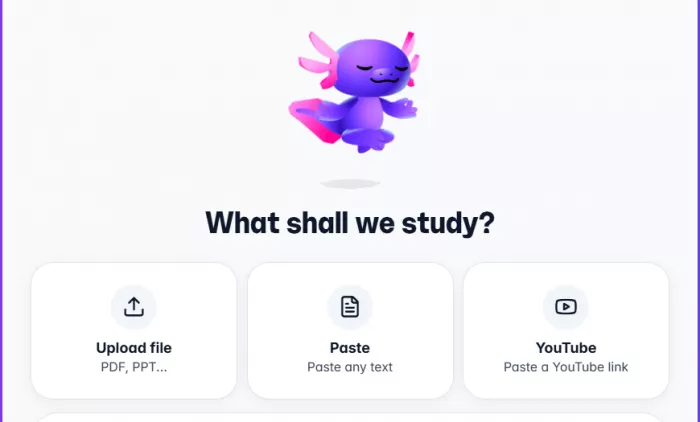
From my perspective, Gizmo AI is my “study middleman”: I feed it PDFs, notes, and videos, and it gives me back flashcards, quizzes, and explanations, then tells me what to review and when. It doesn’t replace learning the material, but it massively reduces the friction between “I have content” and “I’m actively testing myself on that content.”
I use it mainly on my phone and laptop. Everything syncs in the cloud, which is great when switching devices, but it also means I’m stuck if the internet is bad. On exam days when the network was patchy, I really felt the absence of an offline mode.
Gizmo AI at a glance
| Aspect | Details |
| Core idea | AI converts PDFs, notes, web pages, and videos into flashcards and quizzes in seconds. |
| Study science | Uses spaced repetition and active recall so concepts resurface just before they are forgotten. |
| Extra tools | AI tutor, schedule maker, performance analytics, voice recording and transcripts, public decks, and group study features. |
| Platforms | Web, iOS, Android; cloud‑based with no full offline mode. |
| Typical users | Exam‑prep students, language learners, time‑poor professionals, and visual/auditory learners using mixed media. |
3. From chaos to flashcards: how I actually use content ingestion
This is the feature that hooked me. I’ve thrown a lot at Gizmo:
● PDF chapters and lecture slides.
● Google Docs and copied notes.
● YouTube lectures and explainer videos.
● Photos of my messy handwritten pages.
● Old decks imported from other tools.
My usual flow looks like this:
1. I upload a PDF chapter or paste a link.
2. I ask Gizmo to create flashcards and quizzes.
3. Within a short time, I get a deck with questions, answers, and sometimes summary‑style prompts.
For short documents, the process feels almost instant. Once I started giving it heavier stuff 50+ page PDFs or long lecture transcripts the limits became obvious: processing took longer, sometimes felt stuck, and I learned to break big files into more manageable chunks. Still, even with that friction, it’s far faster than me manually typing everything.
What impressed me most is how much time I stopped spending on formatting. Instead of crafting every card, I now spend my time editing what Gizmo produces: deleting weak cards, refining wording, and merging duplicates. That “editor” role is much less exhausting than being the “creator” of every single item.
Example: how it changed my prep (conceptual numbers)
| Material type | Approx. cards | Manual creation time (before) | Gizmo creation time (now) |
| 20‑page PDF chapter | 80–120 cards | Around an hour of typing and formatting. | A few minutes to upload and generate, then 10–15 minutes of editing. |
| 60‑minute lecture | 60–100 cards | Easily 45+ minutes if I typed from scratch. | Time to record/upload + processing, then some cleanup. |
Even though these numbers are rough, the feeling is accurate: my “admin” time dropped, and I could redirect that energy into actual recall.
4. What it’s like to learn through Gizmo’s quizzes
Gizmo isn’t just a flashcard flipper. Most of my study sessions revolve around its quizzes.
I regularly see:
● Multiple‑choice questions.
● Fill‑in‑the‑blank items.
● Short‑answer prompts where I type my own answer first.
The part that feels different from basic flashcard apps is the explanation layer. After answering, I’m not just shown “B is correct”; I usually get a short explanation of why that answer makes sense. When I’m tired or rushing, that extra context keeps me from just memorising letter options.
Of course, not every question is brilliant. On badly formatted PDFs or slides with very little text, the generated questions can be shallow or repetitive. I learned to treat Gizmo’s first pass as a draft and prune aggressively. Once I curated the decks, the quiz sessions became much more valuable.
5. How the spaced repetition and scheduling feel in real life
One big reason I stuck with Gizmo is that it quietly manages what comes up next. It doesn’t expose algorithms the way Anki does, but from my daily use, here’s how it feels:
● Cards I answer easily show up less frequently.
● Cards I struggle with come back more often, sometimes in different formats.
● My daily queue typically mixes new cards with “due” reviews, so sessions always feel like a blend of learning and testing.
I mostly lean on the built‑in Schedule Maker. I tell it when my exams are and roughly what I want to cover, and it creates a plan where each day has a set of topics and decks to review. The biggest psychological win is that I no longer wake up thinking, “What do I even study today?” Gizmo simply shows a queue, and I follow it.
If you’re someone who loves micromanaging intervals and algorithms, this opaque approach might feel limiting. Coming from the opposite side where I previously managed nothing, having the app decide for me has been a relief.
6. My experience with the AI tutor and lecture tools
AI tutor mode in practice
The tutor mode feels like a lightweight “study buddy” that sits on top of my decks. When I get something wrong or don’t fully understand a concept, I’ll ask follow‑up questions right inside Gizmo rather than switching to a search engine or another tool.
Gizmo’s tutor works best for explaining material that is already part of my study workflow, but it is not really built as an instant homework solver. That difference becomes much clearer in a Gizmo AI vs Gauth AI comparison: Gizmo is stronger at turning material into something you remember, while Gauth is better suited to getting unstuck on a specific math or science problem.
The quality is usually good enough to untangle medium‑difficulty questions, especially in subjects like biology or social studies where understanding relationships and processes matters. For very advanced or nuanced topics, the explanations can sometimes oversimplify things. I treat it as a strong first pass, then verify with my notes or textbooks when something feels off.
Recording lectures and turning them into cards
This has been hit‑or‑miss but extremely valuable when it works. For clear lectures in quiet classrooms, I’ll record, let Gizmo transcribe, and then generate cards. It’s a powerful way to turn passive listening into active recall later.
If the audio is noisy or the lecturer speaks very quickly, the transcript quality drops, and the resulting cards inherit that mess. In those cases, I either fix the transcript first or accept that the deck will need more editing. Still, even with imperfect inputs, I ended up with more usable material than I ever had just relying on my scribbled notes.
7. Studying with friends and public decks
Gizmo’s social features changed the vibe of exam prep for me more than I expected.
I’ve used:
● Public decks for popular topics to get a head start.
● Shared decks with friends, so we’re all quizzing from the same material.
● Group sessions where we compare scores and streaks.
This definitely boosted motivation. It’s easier to sit down for a session when I know others are working on the same deck and we’re comparing progress. The trade‑off is quality: public decks range from excellent to “I would not trust this for an exam,” so I treat them like a starting point, not the final word.
8. How the free plan and pricing felt to me
I started on the free plan and very quickly hit its limits. The caps on quizzes, “lives,” and imports make sense as a business model, but from a heavy user’s perspective, it doesn’t take long before the free version feels more like a demo than a daily driver.
The premium / unlimited plan unlocks the version of Gizmo that I actually rely on:
● No worrying about running out of lives mid‑session.
● No daily quiz caps when I’m in a revision sprint.
● Full access to analytics and tutor questions.
The pricing is not cheap if it becomes just another subscription that sits unused. For me, it made sense during intense exam periods when I was using it nearly every day. Outside those seasons, I’m honestly more cautious about keeping a continuous subscription going.
Plan structure table
| Plan | Price | Best For |
| Free | $0 | Trial users, casual learners |
| Weekly | $13.99-$15.51 | Short-term exam prep |
| Monthly | $8.80 | Semester-long use |
| Yearly | $52.80-$159 (~$2.99/week) | Serious students, med school |
| Student Discount | Up to 50% off | Available on all plans |
If someone is only going to open the app once or twice a week, the price stings. When I used it as my main study hub, the value felt much more reasonable.
9. Performance and reliability when I pushed it
On normal days, Gizmo feels smooth. Cards load quickly, quizzes run well, and switching between decks is painless. The problems started when I treated it like an archive for everything:
● Very large PDFs sometimes took ages to process or felt like they got stuck.
● Huge decks made navigation slower and occasionally glitchy.
● Now and then, I hit small bugs like a session freezing or needing a restart.
I eventually changed how I work: instead of importing an entire textbook at once, I break material down by chapter or topic. That small adjustment made a noticeable difference in performance. I still see occasional hiccups, but nothing that made me walk away from the app.
The bigger limitation is connectivity. On a train with poor signal, there were multiple times I wanted to review but simply couldn’t. Offline mode would instantly fix that pain point.
Public ratings are useful, but only when the sample size and marketplace are shown beside the score. A 3.1 based on six reviews does not carry the same weight as a 4.8 based on tens of thousands.
Public rating snapshot
| Platform | Current public rating | Sample shown | How I would interpret it |
|---|---|---|---|
| Apple App Store — US | 4.8/5 | ~14,000 ratings | Large enough to be a meaningful satisfaction signal |
| Google Play | 4.8/5 | ~123,000 reviews | By far the largest public review sample in this comparison |
| Trustpilot | 3.1/5 | 6 reviews | Too small a sample to treat as representative |
The contrast is worth preserving rather than averaging these scores together. Gizmo has extremely strong ratings on the major app stores, while its Trustpilot profile is much smaller and more mixed.
Individual reviews also repeatedly surface useful caveats: users praise fast card generation and the gamified study experience, while complaints include AI mistakes, repetition, bugs and subscription friction. Those are observations worth investigating, but user reviews should not be treated as proof that every user will experience the same issue.
10. What my experience has in common with other users
Reading other reviews and comparing them with my own experience, a few patterns line up almost exactly with what I felt:
● People love the time savings from auto‑generated cards and quizzes. So do I.
● Many mention improved consistency and reduced exam stress once the Schedule Maker kicks in. That’s also been my experience.
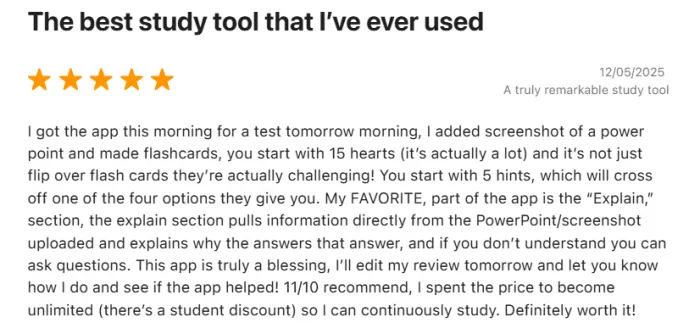
● The main complaints usually revolve around the strict free tier, subscription cost, performance with big imports, and occasional weak AI questions. I’ve hit all of those too.
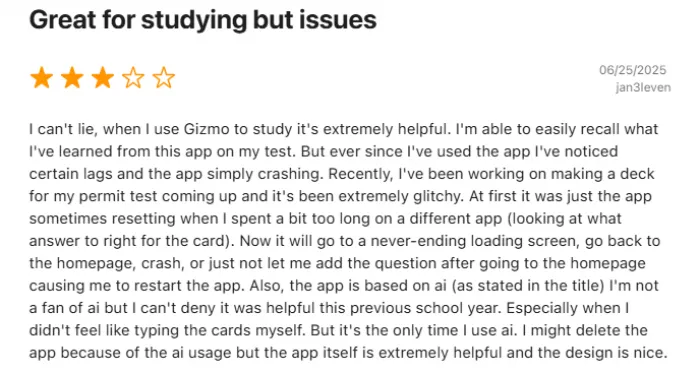
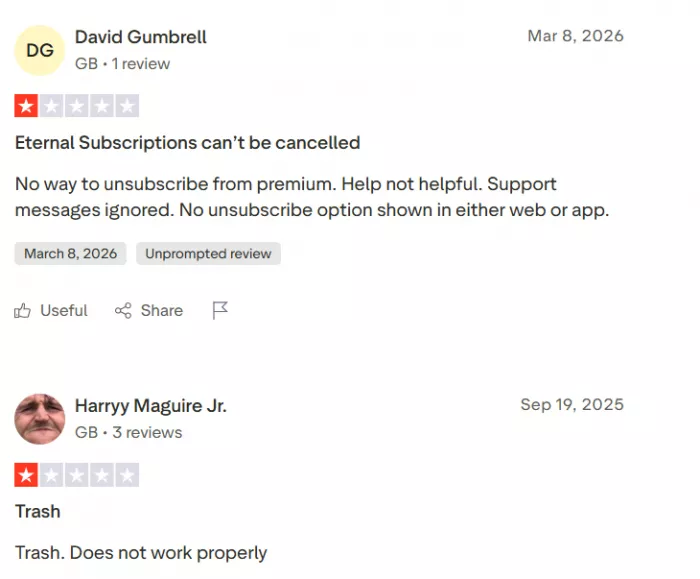
If I had to describe the sentiment in one line, it would be: “When used properly and regularly, Gizmo feels worth it; when used sporadically, the price and limitations become the main thing you notice.”
Platform Rating Breakdown
| Platform | Rating | Sample Size |
| Apple App Store | 4.8/5.0 ⭐⭐⭐⭐⭐ | 8,800+ reviews |
| Trustpilot | 3.1/5.0 ⭐⭐⭐ | 4 reviews (limited sample) |
| Google Play Store | Varied (4.0+ average) | Thousands of reviews |
Sentiment snapshot from my lens
| Theme | My experience |
| Time saved on card creation | Extremely positive; this is the single biggest reason I stayed with Gizmo. |
| Learning outcomes | I remembered more and felt less panicked in the days before exams. |
| Pricing and limits | Free tier felt too cramped; premium felt fair only when I used it heavily. |
| Stability and performance | Fine for normal use; weaker with massive imports or bad connectivity. |
11. How Gizmo feels compared to Anki and Quizlet
I’ve tried Anki and used Quizlet casually before. Gizmo sits in a very specific spot between them.
● Anki, for me, is like a powerful lab instrument: insanely capable but demanding to set up and maintain.
● Quizlet feels like a familiar, community‑driven tool with lots of decks but less intelligence built into the repetition and explanations.
● Gizmo is what I reach for when I just want to throw my materials in and start actively recalling without over‑engineering anything.
Side‑by‑side table
| Factor | Gizmo AI | Anki | Quizlet |
| Card creation | Fully AI‑assisted from PDFs, notes, web pages, and videos; imports from other tools. | Mostly manual, with powerful add‑ons and imports; steep learning curve for some. | Manual with basic AI/import options; many ready‑made decks. |
| Spaced repetition | Built‑in SRS and scheduling; less transparent and less configurable than Anki. | Strong, fully configurable SRS for long‑term retention. | Historically weaker or indirect SRS; more focused on games and practice modes. |
| AI explanations | Integrated tutor and quiz explanations, emphasising comprehension. | Depends on third‑party add‑ons or separate AI tools. | Limited AI‑driven explanations in most setups. |
| Offline capability | Cloud‑based, online‑only. | Full offline use on supported devices. | Mostly online, some offline options via apps. |
| Ideal user | Time‑poor learners who want “done‑for‑you” cards and structured, gamified study. | Power users and long‑term learners who want fine‑grained control. | Casual learners, classroom sets, and those relying on community decks. |
I still respect what Anki can do, and there are cases where I’d recommend it over Gizmo, especially for super long‑term, deep retention projects. But in my actual weekly routine, the tool I open most often is the one that demands the least overhead and that’s been Gizmo.
12. How I think about privacy and data when using Gizmo
I’m careful about what I upload to any cloud‑based tool. With Gizmo, I treat it like this:
● Lecture slides, my own notes, and publicly available resources go in without much hesitation.
● Sensitive or restricted materials get more scrutiny; I sometimes summarise them myself before importing.
● I double‑check what’s public and what’s private, especially when sharing or using group decks.
Because everything syncs across devices, I get convenience but accept that my study data lives on external servers. If someone is in a context where course materials are strictly controlled, I’d expect them to be cautious with any similar app, Gizmo included.
13. My personal pros, cons, and who I’d recommend Gizmo to
What keeps me using Gizmo
● It slashes setup time. I don’t spend my evenings typing cards anymore; I edit and refine instead.
● It bakes good study habits in by default. Spaced repetition and active recall run in the background; I just show up.
● It feels modern and motivating. Streaks, lives, and bite‑sized quizzes make it easier to start a session when I’m tired.
● The tutor is there when I’m stuck. Being able to ask “why” on the spot matters more than I expected.
What still annoys me
● The free tier is too tight for serious exam prep. It’s great for testing, not great for living in.
● The subscription isn’t cheap if I’m not using it almost daily.
● Performance dips with huge imports remind me not to treat Gizmo like a dumping ground.
● AI isn’t perfect. I need to stay alert, delete bad cards, and correct the occasional shallow explanation.
Who I’d tell to try it
● Students drowning in PDFs and mixed media who just want a sensible way to convert it into active recall.
● Learners who know they won’t manually configure SRS but still want the benefits of it.
● People who thrive on small, gamified, daily study bursts instead of long, manual sessions.
Who might be better with something else
● Hardcore Anki fans who love tweaking intervals and studying offline.
● Learners or institutions with strict data‑handling rules that frown on uploading course materials.
● Those who need a free‑forever solution and are unwilling to pay, even during exam season.
Those limitations do not necessarily mean giving up on AI-assisted studying altogether. The better option may simply depend on whether you want stronger spaced repetition, a larger flashcard library, more generous free access or better handling of large course materials. The current Gizmo AI alternatives range from traditional tools such as Anki and Quizlet to newer AI-first options such as Knowt and StudyFetch.
14. Bottom line
Gizmo AI hasn’t magically made studying easy, but it has removed a lot of the friction that used to stop me from starting. Instead of drowning in PDFs and vague intentions, I now live in a cycle of: import → auto‑cards → quizzes → spaced review.
When I use it consistently, I feel calmer going into tests and less guilty about wasted prep time. When I stop using it regularly, the subscription starts to feel like a luxury. For anyone currently stuck in that “I have too much content and no system” phase, a focused trial with Gizmo two seriously used weeks, not just a casual glance will quickly reveal whether it deserves a permanent place in their study routine.
Comments

Bexico Wallerstein
1 month agoThe first thing I did with Gizmo AI was dump in a biology lecture PDF I had been avoiding for days. A few minutes later I had a full flashcard deck and started quizzing myself straight away which was honestly way more satisfying than spending an hour making cards manually. Some questions were a little repetitive so I deleted a few and kept going. What really got me was opening it again the next day and having the cards I struggled with come back for another round. That made revision feel much less messy and a lot easier to stick with.
Login To Reply ↪
Anthony P
1 month agoI tried Gizmo with a long YouTube lecture I normally would have kept pausing to take notes from and this was probably the feature that surprised me most. It pulled the content into a deck and I could start testing myself instead of replaying the same sections again and again. I also liked being able to ask the AI tutor about an answer I got wrong without leaving the study session. A few of the generated questions were way too basic especially around smaller details in the lecture, so I ended up removing those. But for turning a long video into something I could actually revise from, it worked much better than I expected.
Login To Reply ↪