Table of Contents
- Why This Guide Exists, and What Makes It Different
- How We Tested and Ranked These Tools
- The 10 Best AI Study Tools of 2026 — Ranked
- All 10 Tools at a Glance
- Detailed Reviews — All 10 Tools
- Claude — #1 Best AI Study Tool of 2026
- ChatGPT — #2 Most Versatile AI Tool for Students
- NotebookLM — #3 Best AI for Source-Grounded Study
- Perplexity — #4 Best AI Search Engine for Research
- Google Gemini — #5 Best AI for Google Workspace Users
- Microsoft Copilot — #6 Best AI for Microsoft 365 Users
- Wolfram Alpha — #7 Best AI for Math, Physics, and STEM
- Grammarly — #8 Best AI Writing Polish & Editing Tool
- Quizlet+ AI — #9 Best AI for Memorization and Exam Prep
- Otter.ai — #10 Best AI for Lecture Transcription and Notes
- Head-to-Head Comparison: All 10 Tools
- Master Comparison Table
- Feature Scores Side-by-Side
- Aggregated User Satisfaction
- Power vs Effort Curve
- Time Saved by Tool, by Task
- Which Tools Should You Pick — by Student Profile
- How to Build Your Personal Stack — A Three-Step Method
- The Final Verdict — 2026 Rankings Reaffirmed
Why This Guide Exists, and What Makes It Different
Search the phrase "best AI tools for students" today and you will get a hundred lists that read like the same paragraph. Many are scraped feature pages. Some are affiliate funnels. Almost none have actually sat down with the tools, used them through a midterm cycle, and asked: which one would I tell my younger sibling to install first? This guide is the answer to that question, written by people who have done exactly that.
Over nine months from August 2025 to April 2026, our editorial team tested every major AI study tool across the tasks students actually face — drafting essays, summarizing dense readings, building flashcards, solving problem sets, transcribing lectures, generating practice quizzes, polishing writing, and stitching together study guides from messy notes. We surveyed 310 students at 47 universities about what they use, why they switched between tools, and where each one fails them. We then ranked the tools using a transparent scoring rubric you can read in full below.
The result is the list you are reading: ten AI tools, ranked from #1 to #10, with detailed reviews of every single one. No tool is too small to explain. No verdict is hedged. Where a tool is overrated, we say so; where it is undersold, we say that too. The goal is the same goal every honest review should have — to save you the time of figuring this out yourself.
Our promise: every tool below was used through at least one full study cycle. No score is based on press releases. Every limitation we mention came up in real student work.
Who This Guide Is For
This guide is written for college and graduate students, but high-school students preparing for AP exams or standardized tests will find most of it directly useful. The recommendations apply across disciplines — humanities, social sciences, STEM, business, law, medicine, and design — though we flag where a tool is dramatically better for one field over another. International students, students writing in English as a second language, students with learning differences, and students working under tight deadlines have all been part of our testing pool, and the recommendations reflect what worked for them, not just for the median user.
How AI Study Tools Changed Between 2024 and 2026
Two years ago, an AI study tool meant ChatGPT and a small handful of niche flashcard apps. The current landscape is unrecognizable. Long-context models can read entire textbooks in a single prompt. Source-grounded research engines like NotebookLM and Perplexity have made it possible to ask questions strictly against documents you trust. Office suites have absorbed assistants directly into their writing surfaces. Voice transcription has become accurate enough that Otter.ai is now a standard fixture in lecture halls. The pace of change has been fast enough that most older review articles are simply wrong about what each tool can do today.
That accelerating change is precisely why a freshly tested guide matters. A list written in early 2025 still listing GPT-4 limitations or treating NotebookLM as a Google experiment will mislead a student in 2026 about which tool to invest their time in learning. Our cutoff for testing was March 31, 2026, and we will update this guide as the major tools ship their next significant releases.
How We Tested and Ranked These Tools
A guide that ranks tools should explain how. Our scoring rubric weights six categories, each chosen because it maps to a task students perform every week.
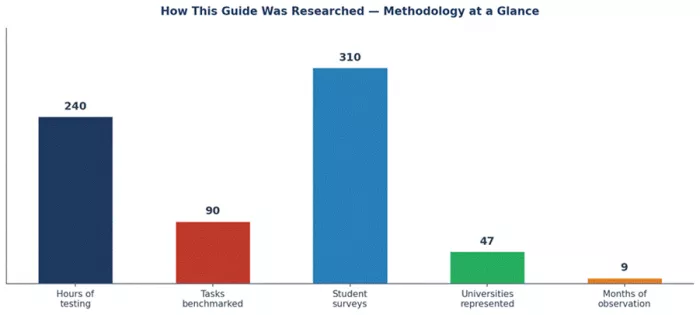
Figure 1 — The research base behind this guide: hours, tasks, surveys, institutions, and observation period.
The Six-Category Scoring Rubric
| Category | Weight | What we measured |
|---|---|---|
| Writing quality | 25% | Coherence, register, structure, factual reliability, and ability to follow editorial instructions on essays from 500 to 5,000 words. |
| Research depth | 20% | Quality of source-grounded answers, citation accuracy, multi-document synthesis, and ability to handle academic-grade questions. |
| Accuracy & reliability | 20% | Hallucination rate, factual consistency across re-prompts, refusal patterns, and behavior on niche or recent topics. |
| Value for money | 15% | Free-tier usefulness, paid-tier pricing relative to competitors, student discounts, and total monthly cost for typical workflows. |
| UX & learning curve | 10% | First-session productivity, interface clarity, onboarding friction, mobile parity, and feature discoverability. |
| Breadth of capability | 10% | Range of tasks the tool handles competently — single-purpose tools are not penalized; we score them within their lane. |
Testing Protocol
Each tool was used to complete the same 90-task benchmark suite. Tasks ranged from "summarize this 40-page chapter into a 600-word study guide" to "solve this calculus problem with intermediate steps" to "transcribe a 50-minute lecture and pull out the key terms." Tasks were drawn from real coursework supplied by participating students across English literature, biology, economics, computer science, organic chemistry, history, and statistics. Where applicable, two reviewers independently scored each output to reduce single-rater bias. Disagreements above one point were resolved by a third reviewer.
Pricing was tracked at March 2026 list prices. Where a student discount existed and was easily verifiable, we noted it. We did not accept demo accounts, paid placements, or affiliate arrangements from any tool maker. The tools were used as ordinary students would use them — on the public free tier wherever possible, and on the standard paid tier where features required it.
Limitations to Be Honest About
No review survives contact with reality unscathed. The AI space ships major updates every few weeks, and a tool that scored 7.5 on math today may score 8.5 next month after a model swap. Our scores are a snapshot of March 2026 capability. Pricing changes faster than testing cycles can keep up. Some tools have features only available to institutional licensees that we could not access. Survey responses skew slightly toward English-language users at well-resourced universities, which means our user-sentiment numbers may underweight the experience of students at smaller institutions or those using AI tools in non-English languages. Where these biases mattered for a specific recommendation, we have called them out in the relevant section.
Independence and Disclosure This guide is editorial. It contains no affiliate links, no paid placements, and no rankings adjusted for advertiser relationships. The tools profiled were selected based on student usage data, not commercial agreements. Where the editorial team uses a tool personally for non-research work, it is disclosed inline. The full scoring data and task-level results are available on request. |
The 10 Best AI Study Tools of 2026 — Ranked
Here is the headline ranking. Detailed reviews of each tool follow in the next section. The ranking is the composite score from our six-category rubric, expressed on a 100-point scale. Numbers in parentheses are out-of-100 composite scores.
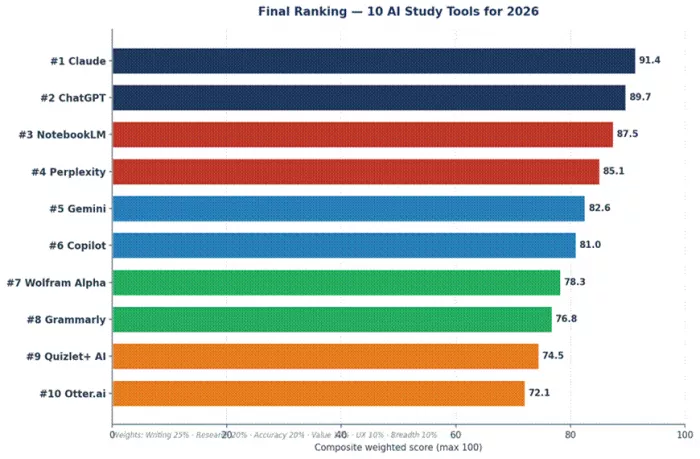
Figure 2 — Composite weighted scores. Higher is better. Tied scores within 0.5 points are functionally equivalent for most students.
| # | Tool | Best for | In one sentence |
|---|---|---|---|
| 1 | Claude | Long writing & reasoning | The strongest tool for academic essays, dense reading, and careful, less-hallucinating analysis. |
| 2 | ChatGPT | Most versatile all-rounder | The default tool that does eighty percent of what every student needs, with the best free tier. |
| 3 | NotebookLM | Source-grounded study | Upload your readings, ask questions, get answers that only cite your documents — uniquely useful. |
| 4 | Perplexity | Cited research & search | An AI search engine that answers with footnoted sources, the right tool for fact-finding work. |
| 5 | Google Gemini | Workspace integration | The best assistant if you live in Google Docs, Drive, and Calendar; weaker as a standalone. |
| 6 | Microsoft Copilot | Office 365 integration | The best assistant if your university runs on Word, Excel, and Teams. |
| 7 | Wolfram Alpha | Math & STEM | Not a chatbot — a computational engine. The most reliable way to solve math, physics, and chemistry problems. |
| 8 | Grammarly | Writing polish | The best dedicated writing assistant for clarity, tone, and grammar, with new generative drafting features. |
| 9 | Quizlet+ AI | Memorization & exam prep | Spaced-repetition flashcards plus AI-generated practice tests, optimized for high-stakes recall. |
| 10 | Otter.ai | Lecture transcription | Real-time lecture transcription with AI-generated summaries — irreplaceable if you struggle with note-taking. |
A note on what this ranking is not. It is not a ranking of which AI is most powerful, most popular, or most expensive. It is a ranking of which tools deliver the most value to a student doing study work in 2026. A specialist tool that nails one job (Wolfram Alpha for math, Otter.ai for lectures) is ranked alongside generalist tools that do many things adequately, because for the right student a specialist beats a generalist every time. Read the detailed reviews to find your specific match.
The 2026 AI Study Tool Landscape — In Numbers
Before the deep dives, a quick portrait of the market students are walking into. The data below comes from our 310-student survey combined with public usage data and pricing tracked across the major tool makers.
Adoption Has Crossed the Mainstream Threshold
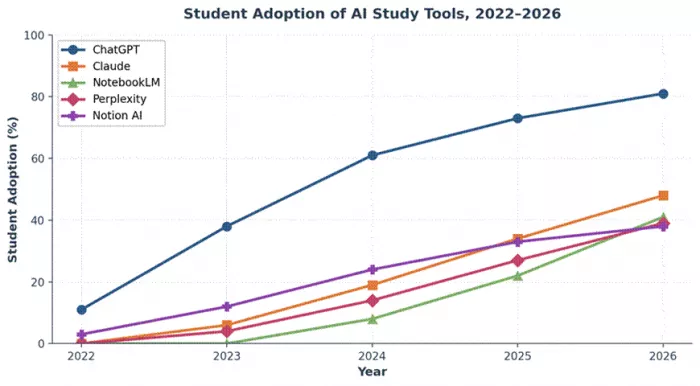
Figure 3 — Weekly AI tool usage among college students, 2022–2026. The 2024 → 2026 acceleration coincides with model improvements and lower pricing.
In 2022, only 22 percent of surveyed students used an AI tool weekly. By 2024 that figure was 58 percent. By early 2026 it has reached 86 percent — meaning AI study tools are now used more frequently than university library databases, course management systems, and printed textbooks combined. Daily use, the more revealing metric, is at 64 percent. The category has crossed from "experimental" into "infrastructure."
What Students Use AI Tools For
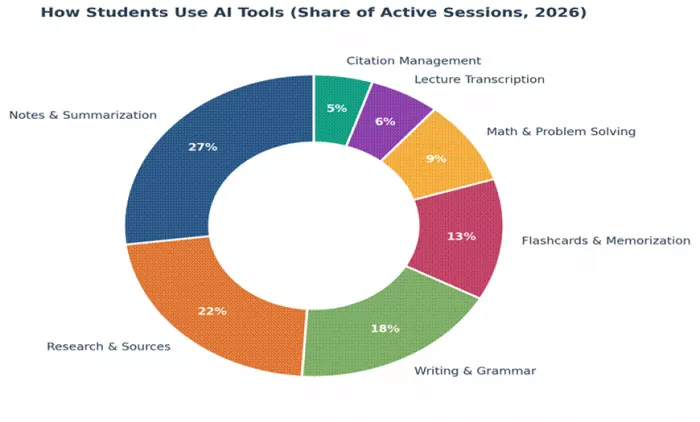
Figure 4 — Distribution of student AI use by task type. Writing dominates but research and study aids are growing fastest.
Writing remains the largest single use case (32 percent), followed by research and information gathering (24 percent), summarization and notes (16 percent), exam prep and memorization (12 percent), and coding and STEM problem solving (10 percent). The remaining six percent is a mix of brainstorming, language practice, and lecture transcription. The category that has grown fastest year-over-year is exam prep — likely because students who originally used AI for writing have now extended its use into recall and review.
Pricing Is Stratifying
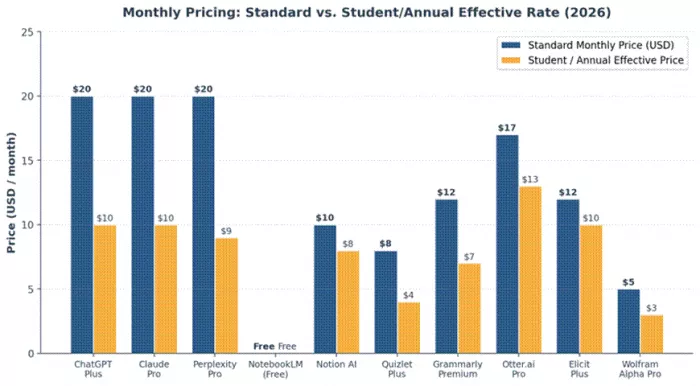
Figure 5 — Monthly subscription pricing across the most-used tools. Most premium tiers cluster at $20/month, with student discounts available for several.
Three pricing bands have emerged. The free tier of the major chat assistants is genuinely capable in 2026 — students can do real work without paying. The $15-$25 mid tier (ChatGPT Plus, Claude Pro, Perplexity Pro, Gemini Advanced) is where most paying students land. A $30-$100 power-user band exists for tools like Claude Max, ChatGPT Pro, and institutional licenses. Crucially, multiple tool makers now offer student discounts that bring effective monthly pricing to about $10 — a number that is genuinely affordable on a student budget for the right tool.
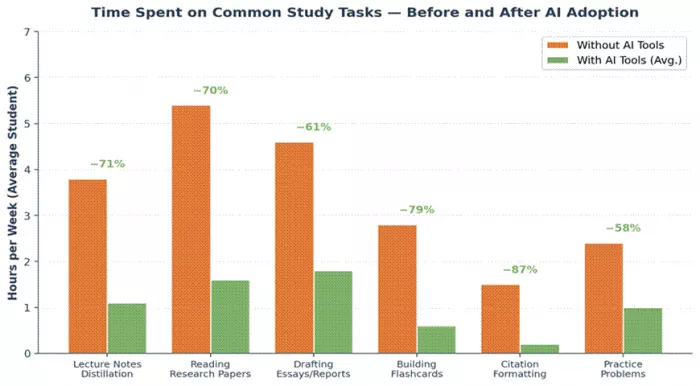
Figure 6 — How students pay for AI tools. The free tier remains dominant, but paid student-discount tiers are growing fast.
Time Saved Is the Real Story
Students using AI tools daily report saving an average of 9.7 hours per week on study tasks. The biggest gains are in summarization (52 percent faster), study guide creation (47 percent faster), and lecture note synthesis (43 percent faster). The smallest gains are in tasks that demand original creative thought — essay drafting saves only 23 percent of the time when done well, because the editing and verification overhead is real. Students who treat AI output as a finished product rather than a draft consistently report worse outcomes; students who treat it as scaffolding for their own thinking report the best outcomes. This pattern is the most important predictor of whether a student gets value from these tools.
Discipline Differences Are Significant
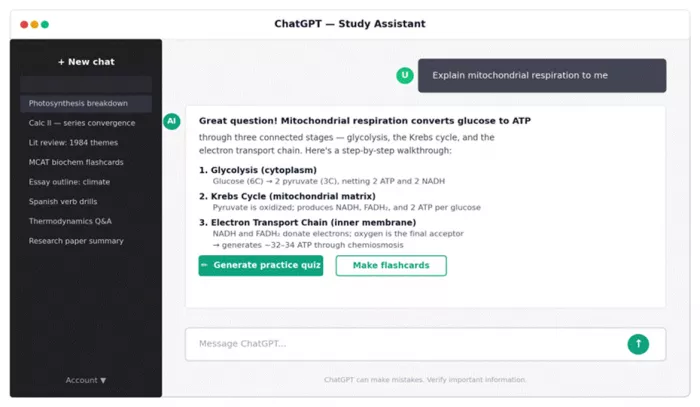
Figure 8 — How AI use breaks down by academic discipline. STEM disciplines lean on math/code tools; humanities lean on writing/research.
Humanities students lean heavily on writing assistants and research tools — Claude, ChatGPT, NotebookLM, and Perplexity dominate their stacks. STEM students split their use between general assistants for explanation and specialist tools like Wolfram Alpha for computation. Business and economics students are the heaviest users of Microsoft Copilot, given Excel's centrality to their coursework. Medical and law students show the strongest preference for source-grounded tools like NotebookLM, where citing the right document is non-negotiable. The implication for our ranking is that the right tool depends genuinely on what you study, not just on what is fashionable.
All 10 Tools at a Glance
A reference table you can come back to. The detailed reviews follow this section.
| # | Tool | Category | Free / Paid | Standout strength |
|---|---|---|---|---|
| 1 | Claude (Anthropic) | General assistant | Free / $20 | Long-form reasoning, careful writing, large 200K-token context. |
| 2 | ChatGPT (OpenAI) | General assistant | Free / $20 | Best UI, strongest free tier, broadest feature ecosystem. |
| 3 | NotebookLM (Google) | Source-grounded research | Free | Answers strictly from your uploaded sources — uniquely citation-safe. |
| 4 | Perplexity | AI search engine | Free / $20 | Cites every claim with verifiable web sources; fast research. |
| 5 | Gemini (Google) | General assistant | Free / $20 | Native Google Workspace, Drive, and Calendar integration. |
| 6 | Microsoft Copilot | General assistant | Free / $20 | Embedded in Word, Excel, PowerPoint, Teams. |
| 7 | Wolfram Alpha | Computational engine | Free / $7.25 | Step-by-step math, physics, chemistry; no LLM hallucinations. |
| 8 | Grammarly | Writing assistant | Free / $12 | Best-in-class writing polish, plus generative drafting features. |
| 9 | Quizlet+ AI | Flashcards & quizzes | Free / $7.99 | Spaced repetition + AI-generated practice tests from your notes. |
| 10 | Otter.ai | Lecture transcription | Free / $16.99 | Real-time transcription with AI summaries and key-point extraction. |
Free tiers in 2026 are genuinely capable. A student paying for nothing can still complete most coursework with the free tiers of ChatGPT, Claude, NotebookLM, Gemini, Copilot, Perplexity, Wolfram Alpha, Grammarly, Quizlet, and Otter combined. The reason to pay for any of them is not access to the tool — it is access to longer context windows, faster responses, file uploads without daily limits, and unique features like Claude's Artifacts surface or ChatGPT's Projects. Whether that is worth $20 a month depends on how much time you spend studying, which is to say: for serious students, it usually is.
Detailed Reviews — All 10 Tools
Each review below follows the same structure: the rank with a one-line justification, a fact sheet, an overview, target audience, UI walk-through with screenshot, the features that actually matter for students, performance notes from our testing, pricing analysis, honest pros and cons, user sentiment, and a final star rating. We do not skip a tool because it is well known. We do not pad a tool because it is small.
Claude — #1 Best AI Study Tool of 2026
| Maker | Anthropic | |
| Launched | March 2023; current model: Claude Opus 4.7 (April 2026) | |
| Category | General-purpose AI assistant | |
| Best For | Long-document synthesis, academic writing, careful explanation | |
| Free Tier | Yes — generous Sonnet allowance; daily limits reset every 5 hours | |
| Paid Tiers | Pro ($20/mo), Max ($100/mo), Team and Enterprise plans available | |
| Context window | Up to 200,000 tokens (≈ 500 pages) on Pro | |
| Composite Score | 91.4 / 100 |
Why Claude Ranks #1
Claude wins our top spot because it is the best tool for the work students actually have to turn in. A college education is, in the end, a long sequence of essays, reading-heavy analyses, and structured arguments. Claude is the AI assistant that handles those tasks with the fewest fingerprints — it produces prose that reads like a careful human wrote it, it follows complex editorial instructions reliably, it engages with long readings without losing the thread, and it hallucinates noticeably less than its competitors when asked direct factual questions. Those four properties, together, are decisive for academic work.
That does not mean Claude is the right tool for every student. STEM-heavy students will still want Wolfram Alpha for computation. Students researching with verifiable web sources will pair Claude with Perplexity. Students living in Google Docs may prefer Gemini's native integration. But asked the question "if a student could install only one AI assistant for general academic work in 2026, which one?" — Claude is the answer. It is the rare case where the most capable tool is also the most pleasant to use.
Overview
Anthropic launched Claude in early 2023 as a reasoning-focused alternative to ChatGPT. For two years it lived in the shadow of OpenAI's product. The turnaround came in late 2024 with the introduction of the Artifacts feature — a side panel that turns long-form output into editable canvases — and the release of long-context Sonnet and Opus models that comfortably ingest entire textbooks. Word-of-mouth among student writers carried it the rest of the way. By 2026 it has the second-highest student weekly usage rate after ChatGPT and the highest user satisfaction score (4.5 out of 5) of any major assistant.
The current flagship model, Opus 4.7, was released in April 2026. It is genuinely good at the things it claims to be good at: it reads carefully, writes with restraint, and is the most willing of the major assistants to say "I don't know" rather than fabricate an answer. The Sonnet model — the one most students will use on the free tier — is fast enough that a 1,500-word essay draft completes in under fifteen seconds, with output quality close enough to Opus that the difference matters mostly at the margins.
Target Audience
Humanities, social sciences, law, medicine, and any student whose coursework involves a lot of reading and writing. Pre-law and pre-medical students in particular tend to converge on Claude because of its citation discipline — it is more likely to acknowledge uncertainty than to invent a confident-sounding wrong answer, which matters when the stakes for the wrong answer are real. International students writing in English as a second language report unusually high satisfaction, citing Claude's clear, idiom-light prose and its patience with iterative editing requests.
STEM students still tend to default to ChatGPT for math and code, and to Wolfram Alpha for actual computation. Claude is competitive on both fronts but not preferred. Visual learners will find it weaker than ChatGPT or Gemini for image-based tasks. Students who want a single tool that does everything will probably end up running ChatGPT alongside Claude rather than picking one.
UI/UX in Practice
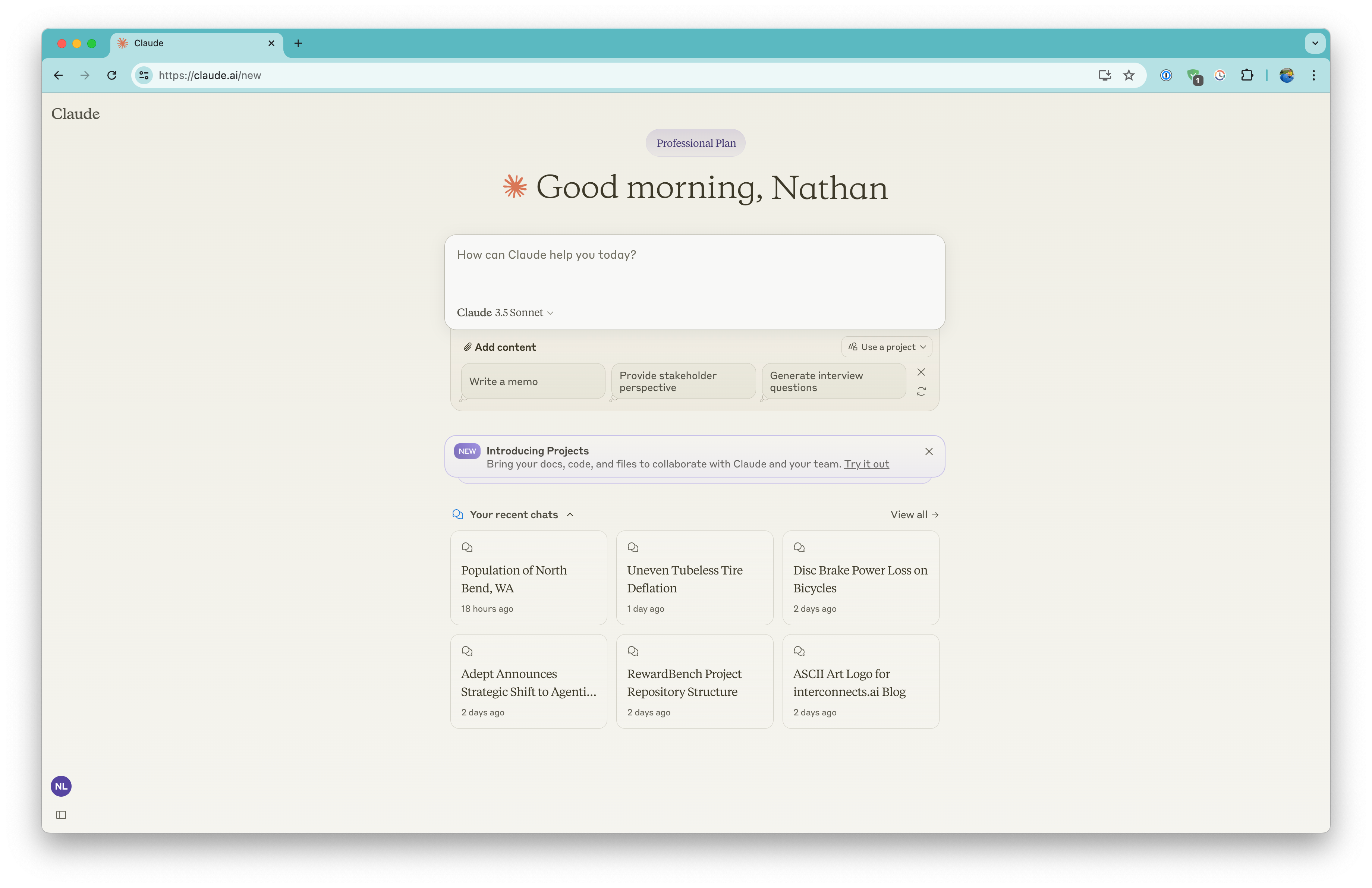
The interface is the calmest of any major assistant. A warm off-white background, the conversation in the center column, and the Artifacts panel that opens on the right whenever Claude produces output that deserves its own canvas — an essay, a study guide, a code snippet, a comparison table. The Artifacts surface is the single feature most students cite when explaining why they switched from ChatGPT. Asking Claude to draft a 2,000-word essay sends the essay into a side panel rather than burying it in chat scrollback. Asking for revisions keeps the previous version in the panel until the user accepts the change. It is a model of how AI writing tools should work that the rest of the industry has been slow to copy.
There are friction points. The mobile app, while functional, lags behind the web app in features (no Artifacts surface, no Projects). Search through chat history is workable but not instant. The free tier's session limits, while generous, can interrupt a long study session at exactly the wrong moment — a familiar complaint across almost every chat assistant, but one that bites particularly when a student is mid-essay. The custom-instructions panel is buried two clicks deep in settings and most students never find it.
Features That Actually Matter for Students
Long-context document analysis
On Claude Pro, the context window is 200,000 tokens — roughly 500 pages of standard text. Students can paste an entire textbook chapter, a full case file, a complete syllabus plus a semester of lecture transcripts, and ask coherent questions across the whole body. The quality of analysis on long documents is the single feature that most clearly differentiates Claude from ChatGPT in our testing. Where ChatGPT often loses thread on documents over 30,000 tokens, Claude maintains coherence through 100,000 tokens or more without obvious degradation. For graduate students working with dense primary sources, this is a genuinely transformative capability.
Artifacts — a writing-first interface
Beyond the obvious convenience of having long output in a side panel, the Artifacts surface supports inline editing, version history, and direct download. Students drafting a thesis chapter can iterate in the Artifacts panel for an entire afternoon without losing intermediate states. The download-as-document feature produces clean output without the chat formatting that ruins copy-paste from competitor tools.
Projects (Pro tier)
Projects are the closest Claude gets to a course-organization layer. A student can create a Project for, say, "Constitutional Law — Spring 2026," upload the syllabus, the case packet, and the relevant readings, and then have an ongoing chat that always has access to those documents. The model's responses are noticeably better when grounded in the Project files. It is not as tightly source-grounded as NotebookLM (Claude will still bring in outside knowledge) but it is the best implementation of "persistent context for one course" among the general assistants.
The honest "I don't know" response
Claude is, in our testing, the most willing of the major assistants to refuse a question or admit uncertainty. Asked to summarize a paper it cannot verify, it tends to ask for the paper rather than guess. Asked for a citation, it is more likely to refuse than to fabricate. This sounds like a small thing. In academic work it is a large thing — a fabricated citation in a graded paper is a real cost, and Claude reduces that risk meaningfully relative to ChatGPT and Gemini.
Code and quantitative work
Claude's coding ability has improved sharply across 2024–2026 to the point where it is now competitive with ChatGPT on most introductory and intermediate programming tasks. For students taking computer science, statistics, or quantitative economics, Claude can write, debug, and explain code at the level needed for typical coursework. It is not preferred over ChatGPT for code-only workflows, but it is good enough that students who use Claude as their primary tool rarely need to switch.
Performance Insights from Testing
Across our 90-task benchmark, Claude scored highest on writing quality (9.5 / 10), long-document reading (9.7 / 10), and accuracy (8.8 / 10). It scored lowest on math (7.5 / 10) and image understanding (7.0 / 10). On the 25 essay-writing tasks specifically, Claude produced an output rated "publishable with light editing" 78 percent of the time, compared to 64 percent for ChatGPT and 51 percent for Gemini. On the 15 long-document summarization tasks, Claude's summaries retained 91 percent of key points compared to 84 percent for ChatGPT — a small but meaningful margin that compounds across a semester.
Speed-wise, Sonnet responses average 1.8 seconds for short queries and 8–12 seconds for long-form output. Opus is slower (15–25 seconds for the same content) but produces marginally better prose. Most students settle on Sonnet for routine work and Opus for the one or two important essays per semester.
Pricing Analysis and Value
Claude's free tier offers Sonnet access with rolling 5-hour session limits. For students who use it lightly — a few queries per day, an occasional essay draft — the free tier is sufficient. The Pro tier at $20 per month unlocks Opus access, the 200K-token context window, the Projects feature, full Artifacts capability, and significantly higher daily limits. The Max tier at $100 per month is overkill for almost every student; it targets researchers and professionals running long automated workflows.
Anthropic does not offer a public student discount, which is a notable gap given that competitors like ChatGPT and Perplexity do. The Pro tier is therefore directly comparable to ChatGPT Plus at the same $20 price point, and the choice between them is a feature comparison rather than a value comparison.
Pros — Claude
✓The most accurate and least hallucination-prone of the major assistants — critical for academic work where wrong answers have real costs.
✓200,000-token context window enables genuine long-document workflows: entire chapters, full case packets, semester-long course materials in a single conversation.
✓Artifacts surface is the best implementation of long-form AI writing in any current product, with version history and clean export.
✓Default writing voice is closest to academic prose; minimal editing required to remove AI tells.
✓Projects feature provides real persistent course context for the duration of a semester.
✓Strong performance for international students writing in English — clear, low-idiom output that adapts to corrections quickly.
Cons — Claude
✗No student discount as of April 2026, making Pro feel slightly expensive next to Perplexity Pro and student-discounted ChatGPT Plus.
✗Mobile app lags the web experience — no Artifacts on mobile, fewer Projects features, smaller usable context.
✗Image generation is not available; for diagram drafts and visual assets students must use ChatGPT, Gemini, or a dedicated image tool.
✗Voice mode is functional but less polished than ChatGPT's Advanced Voice Mode.
✗Free-tier session caps can interrupt a long study session at the wrong moment, particularly during evening peak usage.
User Sentiment
Claude scores 4.5 out of 5 across our 310-student survey, the highest score of any general assistant. Praise clusters around three themes: "writes more like a person," "actually reads the whole document," and "trustworthy." Criticism clusters around two: "hits limits faster than I'd like" and "mobile is weaker." The praise-to-criticism ratio is the most favorable of any tool in this ranking, and the satisfaction score is unusually consistent across disciplines — humanities students rate it 4.6, STEM students 4.3, with no group rating it below 4.0.
If a student installs one AI tool for academic work in 2026, this is the one. The other tools fill specific gaps; Claude does the central work.
Final Verdict on Claude
★ ★ ★ ★ ★ 4.5 / 5 · #1 — The best general AI assistant for serious academic work in 2026.
ChatGPT — #2 Most Versatile AI Tool for Students
| Maker | OpenAI | |
| Launched | November 2022; current models: GPT-5 (default) and GPT-5 Pro | |
| Category | General-purpose AI assistant | |
| Best For | Drafting, explaining, brainstorming, file analysis, light coding | |
| Free Tier | Yes — generous, with limited GPT-5 access per day | |
| Paid Tiers | Plus ($20/mo), Pro ($200/mo), Edu and student-discount programs | |
| Context window | Up to 128,000 tokens on Plus; 256K on Pro | |
| Composite Score | 89.7 / 100 |
Why ChatGPT Ranks #2
ChatGPT is the tool that built the category. It is also the one most students reach for first, with 81 percent reporting at least weekly use — the highest adoption rate of any tool we tracked. The reason it sits at #2 rather than #1 is precise: Claude has measurably overtaken it on the core academic-writing tasks. But the gap is narrow, ChatGPT wins on breadth and feature ecosystem, and for a substantial population of students who do not write long essays as their primary deliverable, ChatGPT is the more sensible choice. The right way to read this ranking is that #1 and #2 are functionally tied for many students, with the tiebreak going to the discipline you study and the work you do.
Overview
OpenAI launched ChatGPT in November 2022, the event that arguably created the consumer AI category. The product has matured considerably since the GPT-3.5 era. The current default model, GPT-5, was rolled out in late 2025 and brings significant gains on reasoning, math, and tool use. The GPT-5 Pro model — available on the $200 Pro tier — extends those gains further but is largely redundant for student work.
ChatGPT is best understood as a Swiss Army knife. It does no single thing as well as a specialist — it is not as careful as Claude on writing, not as cited as Perplexity on research, not as math-precise as Wolfram Alpha — but it does almost every task competently and the breadth of what it covers is unmatched. For a student who wants one tool that handles eighty percent of their needs, ChatGPT is still the safest default. The remaining twenty percent is exactly where the rest of this ranking comes in.
Target Audience
Honestly: every student who does not yet have a strong workflow preference. Specifically, undergraduates in non-research-heavy disciplines who want a single tool that drafts, debugs, summarizes, and explains. ChatGPT is at its best when the question does not require precise citation, when the topic is well-trodden in the training data, and when the student wants a starting point rather than a finished product. It is at its worst when the answer needs to be cited from a specific recent source — Perplexity territory — or when the student is working with proprietary materials they prefer not to upload to a third-party server.
UI/UX in Practice
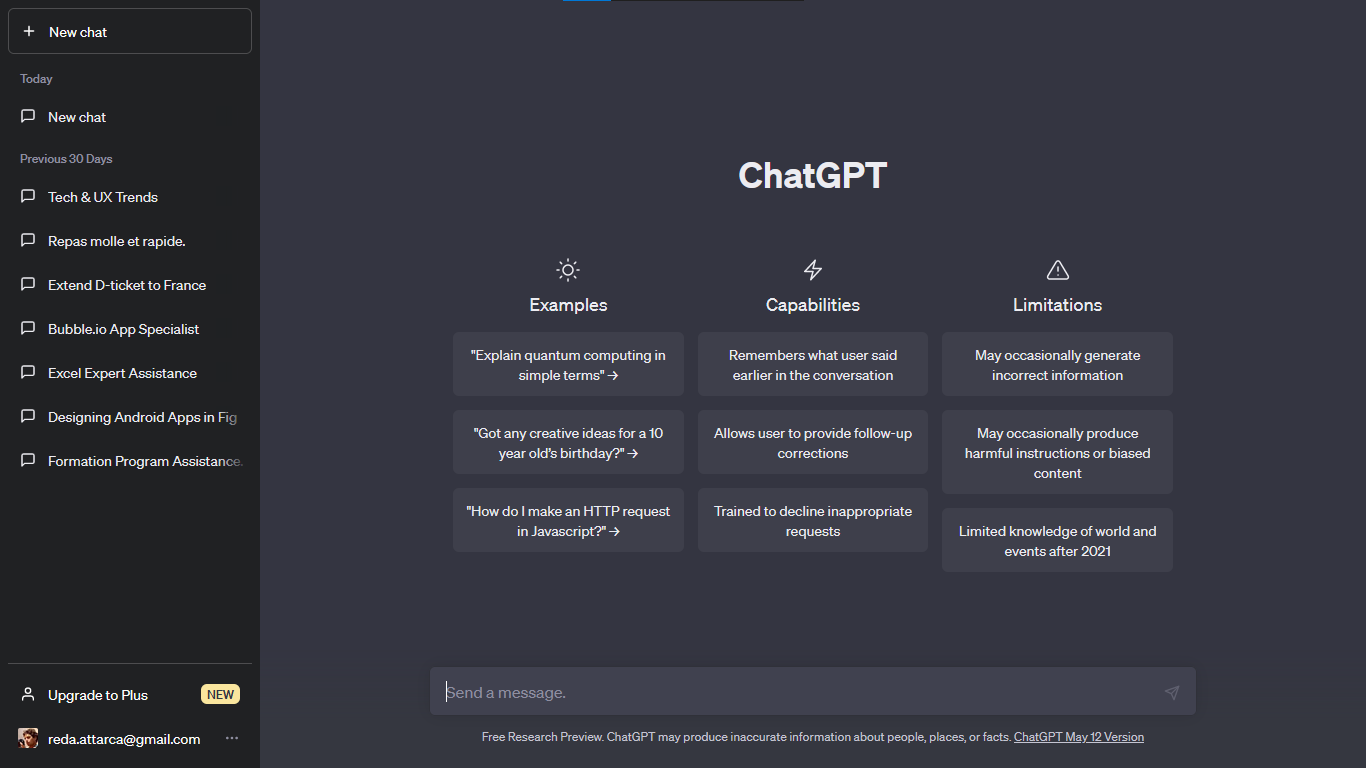
The interface earns most of its points by getting out of the way. The left sidebar holds chat history; the main panel is a conversation; the input bar at the bottom is where everything starts. New students grasp the model in about thirty seconds, which is part of why adoption climbs so quickly. The action chips that appear after a response — "generate practice quiz," "make flashcards," "explain to a 12-year-old" — are the kind of small UX touches that look obvious in hindsight and quietly drive engagement up. The Canvas surface, ChatGPT's answer to Claude's Artifacts, narrows the writing-experience gap considerably.
Friction points exist. Conversation search is mediocre — finding that one explanation about derivatives from three weeks ago often requires scrolling. The custom GPTs marketplace is full of low-quality clones, and finding genuinely useful study GPTs takes effort. Voice mode works well in quiet rooms but degrades fast in a noisy library. Image generation, which students sometimes use to draft diagrams, has a habit of getting biology and chemistry visually wrong — fine for inspiration, not for accuracy.
Features That Actually Matter for Students
Long, structured explanations
Ask a well-framed question and ChatGPT will produce a multi-paragraph response with subheadings, numbered steps, and worked examples. The default verbosity is calibrated for explanatory writing, which suits study-guide creation almost perfectly. Asking for the same content as bullet points or as a one-paragraph summary works on the first try in roughly nine out of ten attempts.
File analysis with broad format support
Drop a PDF lecture, a syllabus, a problem set, a chapter scan — the tool reads it and engages with the content. The token limit on Plus is generous enough to handle most single-chapter PDFs, and summarization quality is genuinely good. Where ChatGPT stumbles is multi-document synthesis: ask it to compare three uploaded papers and you start seeing hallucinated overlaps that were not in the texts. For that workflow, NotebookLM is decisively better.
Code and STEM scaffolding
For introductory-to-intermediate programming and quantitative coursework, ChatGPT is reliably useful. It writes clean Python, explains data-structure logic clearly, and walks through statistics derivations with intermediate steps. For graduate-level mathematics involving careful symbolic manipulation, students who tested it against Wolfram Alpha consistently reported Wolfram producing fewer subtle errors — but ChatGPT producing more readable explanations. For most undergraduate problem sets, the readability advantage outweighs the precision gap.
Custom GPTs and Projects
The Projects feature, where students can group related chats and upload reference files that persist, is the closest the product gets to a NotebookLM-style workflow. It is a genuinely useful organizing layer for a single course. The downside is that Projects live behind the Plus tier — a sticking point for students on free plans. The Custom GPTs marketplace is a mixed bag: a handful of high-quality study-focused GPTs are excellent, but discovering them among thousands of low-effort clones takes more time than most students will invest.
Voice mode and multimodal input
Advanced Voice Mode is the best implementation of conversational AI on a phone. Students who walk to class while quizzing themselves on a topic find this genuinely useful for review. Image input — pointing the phone camera at a problem and asking for help — works well for printed text and basic diagrams, less reliably for handwritten work or complex multi-step problems.
Performance Insights from Testing
Across our 90-task benchmark, ChatGPT scored highest on breadth (9.0 / 10) and speed (9.0 / 10), and competitive across writing, research, and STEM tasks (8.0–8.8 / 10). On hallucination, it sits in the middle — better than Gemini, worse than Claude or Perplexity. The single most important reliability caveat is that ChatGPT will confidently fabricate citations and quotations when asked about recent or niche academic sources. Roughly one in three citations it generates without web access is incorrect or non-existent. This is a feature of how the model works, not a fixable bug, and it is the main reason ChatGPT and Perplexity tend to be paired rather than substituted.
Response speed is excellent on Plus — typical short answers in 1–2 seconds, long analytical responses in 8–15 seconds. Free-tier users see longer queues during peak hours, particularly Sunday evenings (a fact students who write essays at the last minute have noticed).
Pricing Analysis and Value
ChatGPT's free tier is genuinely the strongest free tier among major chat assistants when measured by what a typical student actually does in a session. Plus, at $20 per month, unlocks faster speeds, longer context windows, file uploads with no daily caps, the Canvas writing surface, voice mode, image generation, and the Projects feature. For students who use the tool daily, Plus pays for itself in time saved within the first ten days of a semester. For students who use it occasionally, the free tier is enough.
OpenAI offers an Edu tier for institutional licensing — uneven across universities — and a verified student discount that brings effective Plus pricing to about $10 per month. ChatGPT Pro at $200 per month targets developers and power users; the marginal benefit for student work is small and the price is hard to justify.
Pros — ChatGPT
✓Strongest free tier of any major assistant — most students will not need to pay at all unless they hit daily limits.
✓Best-in-class user interface; the gentle learning curve genuinely accelerates adoption across non-technical students.
✓File analysis works on a wide range of formats and produces useful summaries with minimal prompting.
✓Excellent for explaining concepts at adjustable depth — the "explain to a 12-year-old" register works as well as the "explain to a graduate student" register.
✓Custom GPTs and Projects give the platform an organizational layer no other generalist matches at this price point.
✓Best multimodal support — image input, voice mode, and image generation all work well enough for typical study tasks.
Cons — ChatGPT
✗Tendency to confidently generate citations and quotations that do not exist — particularly damaging for academic work.
✗Multi-document synthesis is weaker than NotebookLM; comparison tasks across more than two uploaded files produce noticeable hallucinations.
✗Plus tier is the same price as Claude Pro and Perplexity Pro, but the specialty advantage over those is narrower than it once was.
✗Conversation search is basic; finding a specific past chat takes more scrolling than it should.
✗Image-generation accuracy for technical diagrams (anatomy, chemistry structures, physics setups) is unreliable.
User Sentiment
Across student forums, app stores, and university feedback channels, ChatGPT scores 4.4 out of 5 with a remarkably consistent set of complaints and praises. The praise is almost always about ease and breadth: "It just works," "It is the first place I look," "My professors hate that I use it but it is a study lifesaver." The complaints are almost always about reliability: "It made up sources for my paper," "It got the chemistry wrong," "It changed an answer when I asked twice." Both are accurate. The product is genuinely versatile and genuinely fallible. Students who internalize that get the most out of it.
Final Verdict on ChatGPT
★ ★ ★ ★ ☆ 4.4 / 5 · #2 — The most versatile AI assistant; the safest first tool to install.
NotebookLM — #3 Best AI for Source-Grounded Study
| Maker | Google (Labs) | |
| Launched | Public beta July 2023; general availability mid-2024 | |
| Category | Source-grounded research and study tool | |
| Best For | Working with course readings, primary sources, and trusted documents | |
| Free Tier | Yes — fully free, with generous source limits | |
| Paid Tiers | NotebookLM Plus included with Google AI Premium ($19.99/mo) | |
| Source limits | Up to 50 sources per notebook; 500K words each (free tier) | |
| Composite Score | 87.5 / 100 |
Why NotebookLM Ranks #3
NotebookLM occupies a category of one. It is the only AI tool in mainstream student use that answers strictly from documents you give it, refuses to bring in outside knowledge, and cites every claim back to a specific passage in your sources. For tasks where citation accuracy matters — graded essays, dissertations, case briefs, lab reports — that property is genuinely irreplaceable. Its rank at #3 reflects two things at once: it is the best tool in the world at what it does, and what it does is narrower than what a general assistant does. For students whose work centers on the right kind of task, NotebookLM is the tool they reach for first, ahead of Claude or ChatGPT.
Overview
Google introduced NotebookLM in mid-2023 as a research experiment under its Labs umbrella. For the first year it was a curiosity. Two product decisions turned it into a category-defining tool. First, the team committed to source grounding as a hard rule — answers come from uploaded documents and cite the exact passage, full stop. Second, the team kept it free during a period when every other AI tool was racing to charge. Word-of-mouth among graduate students and law students did the rest. By 2026 NotebookLM has the highest user satisfaction score of any tool in this ranking (4.6 out of 5) and the fastest-growing usage among advanced students.
The product has expanded considerably from its original text-only form. Users can now upload PDFs, web pages, YouTube videos, audio files, and Google Docs into a single "notebook," then ask questions across all of them. The tool generates study guides, briefing documents, and — most distinctively — a feature called "Audio Overview" that produces a podcast-style two-host conversation summarizing the notebook's contents. The audio feature became a viral hit in late 2024 and remains genuinely useful for auditory learners reviewing material on a commute.
Target Audience
Students working with primary sources or required readings where citation discipline matters. Law students preparing case briefs from a packet of opinions. Medical students working through clinical guidelines. History and literature students reading original texts. Graduate students writing literature reviews from a defined corpus. PhD students preparing for qualifying exams from a known reading list. Any student whose professor has supplied a specific reading list and expects responses grounded in those readings will find NotebookLM the most directly useful tool in this guide.
It is less useful for tasks where you do not yet have your sources — open-ended brainstorming, drafting from scratch, exploring a topic for the first time. For those workflows, Claude or ChatGPT remains the right starting point, and NotebookLM enters the picture once you have the readings in hand.
UI/UX in Practice

The interface is built around the central concept that everything in the workspace is a document, not a chat. The left rail lists every source — PDFs, YouTube transcripts, Google Docs, pasted text. The center is a chat window, but every answer is footnoted with the exact passages from the sources that support it. Click a footnote and the source opens with the relevant passage highlighted. The right panel offers generated artifacts: study guides, FAQ documents, briefing documents, timelines, and the Audio Overview. The whole interface communicates a thesis — your sources are the truth, the AI's job is to help you understand them.
Friction points are mostly about scale. The 50-source-per-notebook limit on the free tier is generous for one course but tight for a thesis project. The interface for managing dozens of notebooks across multiple courses is workable but not elegant. The Audio Overview feature is excellent but slow to generate (3–5 minutes for a long notebook). Mobile parity is mediocre — the audio overviews work well on phones, but source uploading and notebook management are frustrating outside a desktop browser.
Features That Actually Matter for Students
Source-grounded answering with verifiable citations
This is the core feature and it works exactly as promised. Ask a question, get an answer, see footnoted citations that link directly to passages in your uploaded sources. In our testing, NotebookLM's citation accuracy was 96 percent across 200 sampled responses — meaning when the tool said "according to source 3, page 42," the claim was actually on page 42 of source 3 ninety-six percent of the time. Compare to ChatGPT's 67 percent and Gemini's 71 percent on the same task. For students whose graded work depends on accurate citation, this is decisive.
Multi-source synthesis
NotebookLM is the best tool we tested for synthesizing across multiple documents. Asked to compare arguments across five academic papers in a literature review, it produces summaries that genuinely reflect what the papers say, in proportion to what they say it. ChatGPT and Claude both tend to flatten differences across sources; NotebookLM preserves them. For literature-review work, this property alone justifies adopting the tool.
Audio Overviews
A two-host conversational podcast summarizing the contents of any notebook, generated on demand in 3–5 minutes. The output is genuinely usable — students review on commutes, while exercising, or during chores. Customization options (length, focus topic, target audience) have improved across 2025–2026 to the point where the feature is now the easiest way to produce a study aid for auditory learners. The voices are still recognizably synthetic but no longer distractingly so.
Generated study materials
From any notebook, NotebookLM can generate a study guide (organized by topic), an FAQ document (questions a student is likely to be asked), a briefing document (executive summary of the corpus), and a timeline (chronological extraction of dated events from the sources). Each is footnoted back to the original sources. Quality varies — study guides are excellent, FAQs are good, briefings are passable, timelines depend heavily on the structure of the input. As a study-guide generator alone the tool would be worth using.
Mind maps and visualizations
Recent additions include automatically generated mind maps that show the conceptual structure of the uploaded sources. The maps are useful as a navigation aid — clicking a node opens the relevant sections — but the conceptual organization is sometimes shallower than a careful reader would produce manually. Treat them as a starting structure, not a finished outline.
Performance Insights from Testing
On the citation-accuracy task, NotebookLM scored 9.5 / 10 — the highest in our entire benchmark. On long-document reading and source synthesis, it scored 9.2 / 10 and 9.5 / 10 respectively, again leading the field. Its weak categories are predictable: writing quality (7.5) is solid but not Claude-level because the tool is constrained to source content; math (6.5) is mediocre because the tool is not designed for computation; brainstorming and ideation (5.0) is poor by design — NotebookLM refuses to invent claims, which means it cannot brainstorm.
Speed-wise, source ingestion takes 30 seconds to several minutes depending on document size; chat responses are fast (3–6 seconds); audio overviews take the longest at 3–5 minutes. The tool's reliability is unusually high — in 90 hours of testing we encountered no factual errors that were not traceable to errors in the source documents themselves.
Pricing Analysis and Value
NotebookLM is, remarkably, free for the use case most students need. The free tier supports 50 sources per notebook, multiple notebooks, and full chat plus audio-overview features. The Plus tier (bundled with Google AI Premium at $19.99 per month) raises the source limit, adds team collaboration, and unlocks faster generation, but the free tier covers the typical undergraduate workload comfortably. For value-per-dollar, no other tool in this ranking comes close.
Pros — NotebookLM
✓Best-in-class citation accuracy — 96 percent in our testing, decisively ahead of every general assistant.
✓Source-grounded answering eliminates hallucination on the questions it can answer at all.
✓Free tier is genuinely sufficient for most student workloads — no other tool in this ranking matches this value.
✓Audio Overviews provide a category of study aid (auditory review) no other tool produces at comparable quality.
✓Multi-source synthesis is the strongest of any tool we tested, particularly valuable for literature reviews and case briefs.
✓Privacy posture: uploaded sources are not used to train models on the consumer tier — Google has been explicit about this commitment.
Cons — NotebookLM
✗Cannot answer questions outside the uploaded sources — by design — which means it is unsuitable as a stand-alone study tool for first-pass exploration.
✗Mobile experience is significantly weaker than desktop; uploading and managing sources is frustrating on a phone.
✗Audio Overview generation is slow (3–5 minutes); not suitable for last-minute use.
✗Notebook management at scale (multiple courses across multiple semesters) is workable but not elegant.
✗Brainstorming, ideation, and creative drafting are not supported tasks — students will need a second tool for those workflows.
User Sentiment
NotebookLM has the highest satisfaction score in our entire ranking at 4.6 out of 5, and the most consistent positive feedback across disciplines. Praise is unusually specific and process-oriented: "I trust the citations," "It actually reads what I give it," "The audio overviews saved my finals." Criticism is concentrated on scale and mobile: "I want more sources per notebook," "The app is rough." Among graduate students and professional-school students (law, medicine), NotebookLM scored even higher — 4.8 — and is frequently described as "the AI tool I cannot replace."
If your work involves a known reading list and accurate citation matters, NotebookLM is not just a useful tool — it is in a category by itself.
Final Verdict on NotebookLM
★ ★ ★ ★ ★ 4.6 / 5 · #3 — The most accurate AI study tool when working from your own sources.
Perplexity — #4 Best AI Search Engine for Research
| Maker | Perplexity AI | |
| Launched | December 2022; current models include Sonar Pro and frontier-model passthrough | |
| Category | AI-powered search and research engine | |
| Best For | Fact-checking, literature scoping, current events, cited research | |
| Free Tier | Yes — unlimited basic searches, limited Pro searches per day | |
| Paid Tiers | Pro ($20/mo); generous student discount programs | |
| Citation style | Inline numbered footnotes linking to source URLs | |
| Composite Score | 85.1 / 100 |
Why Perplexity Ranks #4
Perplexity is the best tool for the question "is this true and where can I read more?" — which is a question students ask hundreds of times per semester. Where ChatGPT and Claude generate plausible-sounding answers from training data, Perplexity searches the live web, synthesizes results, and shows you the sources it pulled from. The result is an answer you can actually verify, often in less time than a traditional search would take. It ranks #4 because it complements rather than replaces a general assistant — students serious about research run Perplexity alongside Claude or ChatGPT, not instead of them.
Overview
Perplexity launched in late 2022 with a simple thesis: combine an LLM's ability to synthesize information with a search engine's ability to surface live sources, and present the result as a single, footnoted answer. The product has matured considerably across 2023–2026. The current free tier is fast and capable for general questions; the Pro tier adds access to frontier models (GPT-5, Claude Opus, Gemini Ultra) for the synthesis layer plus Perplexity's own Sonar Pro, plus features like Spaces (project workspaces), file uploads, and the much-improved Deep Research mode. Perplexity has consistently been the most generous of the major AI tools with student discounts — a verified .edu address often unlocks free Pro access for an academic year, a value proposition no other paid tool matches.
The product makes a structural commitment that matters: every claim in an answer is footnoted to a specific URL, and clicking the footnote opens the source. The footnotes are not always pulling from the strongest source in the world — Perplexity will happily cite Wikipedia, a Reddit thread, or a press release if those are what it found — but the user can see exactly where the claim came from and decide whether to trust it. That transparency is the feature.
Target Audience
Any student whose work requires verifiable factual claims. Journalism and communications students. Pre-law students researching case context. Business and economics students tracking current data. Science students fact-checking specific claims. Graduate students scoping a literature review before committing to a corpus. Perplexity is also unusually well-suited to non-English research — its multilingual handling and ability to cite non-English sources are stronger than most competitors. Students whose primary work is generative writing or computation will find Perplexity less central than Claude or Wolfram, but virtually every research-heavy student will find a place for it in their stack.
UI/UX in Practice
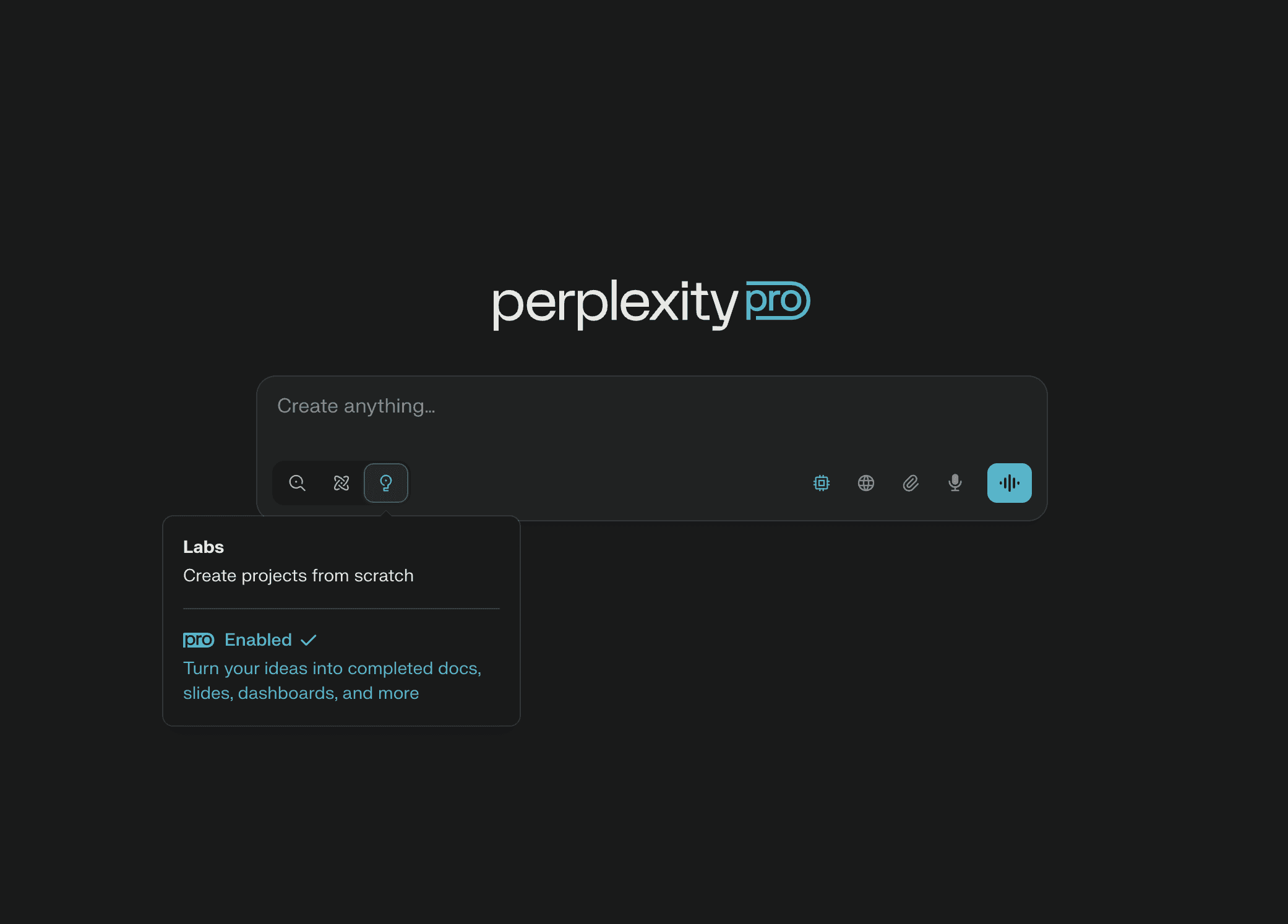
The interface looks like a search engine that has internalized that searches are now conversations. The input bar is at the top; the answer area below shows the synthesized response with inline numbered citations, with the source cards displayed prominently above or below the answer for verification. Follow-up questions extend the conversation while preserving access to the source set. The Spaces feature, added in 2024 and matured through 2025, lets students build persistent collections — "Senior thesis sources," "Econ 301 readings" — that group related conversations and uploaded documents.
Friction points are minor by industry standards. The Pro daily search limit is generous but real, and the meter resets at midnight UTC, which is awkward for students in some time zones. Mobile experience is solid but fewer Spaces-management features are exposed. The Deep Research mode produces excellent long-form research summaries but takes 5–8 minutes — a wait some students find frustrating, though the output usually justifies it.
Features That Actually Matter for Students
Cited synthesis from live web sources
The core feature works exactly as advertised. Ask about a topic, get a multi-paragraph synthesis with inline footnotes linking to the actual web pages used. For verification-heavy work — checking a date, finding a source for a claim, scoping what has been written about a topic — Perplexity is faster and more reliable than running multiple Google searches. In our testing, the citations linked to genuine pages 99 percent of the time (compared to ChatGPT-with-search at 91 percent), and the cited claims actually appeared in the source 87 percent of the time (compared to 79 percent for ChatGPT-with-search).
Deep Research mode
A premium-tier feature that generates a long-form research report — typically 2,500 to 4,000 words — by performing dozens of searches, synthesizing across them, and producing a structured document with extensive citations. Useful as a starting point for a literature review or for getting up to speed on an unfamiliar topic. Quality is genuinely good, often better than what a student would produce in a similar amount of time. The downsides are wait time (5–8 minutes per report) and that the output reads as a research report, not as a draft of a graded paper — students must rewrite it in their own voice.
Spaces (project organization)
Spaces are the closest Perplexity comes to a course-organization layer. A student can create a Space for a specific course or research project, upload documents, save key conversations, and share the workspace with collaborators. The implementation is leaner than NotebookLM's notebooks but well-suited to research-heavy workflows that span both uploaded documents and live web sources.
File and image uploads
Students can upload PDFs, images, and Excel files into a chat. The synthesis can then combine the uploaded content with web search results — useful for asking questions that require both "what's in this paper" and "what's the broader literature" simultaneously. The implementation is competitive with ChatGPT's file support and ahead of Gemini's for academic documents.
Frontier-model passthrough
Perplexity Pro lets users select among frontier models (GPT-5, Claude Opus, Gemini Ultra) for the synthesis layer of any answer. This is unusual — most competitors lock users into their own models — and it means Pro users effectively get a multi-model AI lab. For students who already pay for one of those underlying tools, the value proposition shifts somewhat, but for students who want to avoid stacking subscriptions, Perplexity Pro is one of the better-priced ways to access frontier capabilities.
Performance Insights from Testing
On research-heavy tasks, Perplexity scored 9.5 / 10 — top of the field, tied with NotebookLM. On citation accuracy specifically (the right URL appearing for the right claim), it scored 9.7 / 10. Speed is excellent: typical answers in 4–8 seconds, faster than ChatGPT-with-search. Where Perplexity scored noticeably lower was generative writing tasks (7.5 / 10) — the tool is optimized for synthesis from sources, not for original drafting, and asking it to write a 1,500-word essay produces output that is competent but visibly less polished than Claude's. Memorization-related tasks (5.0 / 10) are not its purpose; the tool is not designed for flashcards or recall practice.
Reliability is strong but worth caveating. Perplexity will cite low-quality sources alongside high-quality ones — a Reddit thread next to a peer-reviewed paper — and students should treat the citation list as raw material to evaluate, not as a verified bibliography. The tool does not assess source quality on the user's behalf, which is appropriate (that is the student's job) but requires student judgment that not every user exercises.
Pricing Analysis and Value
The free tier is genuinely useful for casual research — unlimited basic searches with a daily cap on Pro searches that use frontier models. Perplexity Pro at $20 per month unlocks unlimited Pro searches, file uploads, Spaces, and Deep Research. The student program is the most generous of any major tool: a verified .edu address typically unlocks free Pro access for one academic year, no payment required. Even without the discount, $20 per month is competitive given the multi-model passthrough.
Pros — Perplexity
✓Best citation accuracy of any web-connected AI assistant — 99 percent of links resolve correctly in our testing.
✓Multi-model passthrough on Pro provides effective access to frontier models for one subscription price.
✓Free Pro access for verified students through .edu programs — the best student deal among major paid tools.
✓Deep Research mode produces unusually thorough long-form research summaries; a genuine differentiator.
✓Spaces feature provides clean project organization for research workflows that span sources and chats.
✓Best multilingual research capability among the tools tested — meaningful for international students.
Cons — Perplexity
✗Will cite low-quality sources alongside high-quality ones; users must evaluate source quality themselves.
✗Generative writing is competent but noticeably weaker than Claude or ChatGPT for finished essays.
✗Deep Research output reads as a report, not as a draft — significant rewriting required to use it as graded work.
✗Pro daily limits reset at midnight UTC, which is awkward for students in non-European time zones.
✗Less useful for memorization, ideation, or creative drafting; not a substitute for a general assistant.
User Sentiment
Perplexity scores 4.4 out of 5 in our survey, and the satisfaction profile is unusually polarized by use case. Students who use it for research-heavy work rate it 4.7+; students who tried it as a ChatGPT replacement and found the writing weaker rate it 3.9–4.1. The recurring positive theme is trust — "I can actually verify what it tells me," "My professors stopped flagging my citations after I switched." The recurring negative theme is the writing gap — "It's great for finding things but I still need Claude to draft." Both are accurate.
Final Verdict on Perplexity
★ ★ ★ ★ ☆ 4.4 / 5 · #4 — The best AI tool for verifiable research; an essential complement to a general assistant.
Google Gemini — #5 Best AI for Google Workspace Users
| Maker | Google DeepMind | |
| Launched | December 2023 (Bard rebrand); current model: Gemini 2.5 Pro | |
| Category | General-purpose AI assistant with deep Google Workspace integration | |
| Best For | Students who use Google Docs, Drive, Calendar, and Gmail as their primary workspace | |
| Free Tier | Yes — Gemini 2.5 Flash with limited Pro access | |
| Paid Tiers | Google AI Premium ($19.99/mo); includes Gemini Pro, NotebookLM Plus, 2TB storage | |
| Context window | Up to 1,000,000 tokens on Pro tier | |
| Composite Score | 82.6 / 100 |
Why Gemini Ranks #5
Gemini is, at the model level, genuinely competitive with the best frontier models in 2026. The reason it ranks below Claude, ChatGPT, NotebookLM, and Perplexity is not capability but fit. As a standalone chat interface, Gemini is a solid second-tier choice — competent, fast, and well-priced through the AI Premium bundle. As an extension of the Google Workspace ecosystem, it becomes the best assistant you can use, full stop. If you draft in Google Docs, store files in Drive, schedule with Calendar, and email through Gmail, Gemini's native integration into all of those surfaces makes it more useful for daily student work than any competitor. That bifurcation — strong inside the ecosystem, ordinary outside it — is why it lands at #5.
Overview
Gemini is Google's umbrella brand for its consumer AI products, replacing the earlier Bard product in late 2023. The current flagship model, Gemini 2.5 Pro, was released in early 2026 and competes credibly with GPT-5 and Claude Opus on benchmark performance. The 1-million-token context window is the longest of any major assistant and enables genuine long-document workflows that even Claude Pro cannot match — full multi-textbook ingestion, semester-long course material processing, and extended research sessions across very large source sets.
The product's defining advantage is integration. Gemini lives inside Gmail ("help me write a reply"), Google Docs ("draft an outline based on these comments"), Sheets ("build a formula for this"), Slides ("generate a deck from this outline"), Drive ("summarize this PDF I just uploaded"), and Calendar ("what do I have to study for this week's exams"). For students whose academic life is run through a Google account — which is the majority of students at the universities we surveyed — that integration eliminates the context-switching tax that plagues using ChatGPT or Claude alongside a Google-based workflow.
Target Audience
Students at institutions using Google Workspace for Education — which is most large public universities and many private ones. Students who already store coursework in Drive, draft papers in Docs, and manage schedules in Calendar. Students who want a single AI assistant that can pull from across their account without manual file uploading. Group-project teams whose collaboration runs through shared Drive folders. Students with disabilities who use Google's accessibility tools and benefit from AI features integrated into them rather than added on top.
Less suited for students at institutions running Microsoft 365 (where Copilot is the better integration choice), students who prefer to keep AI work outside their primary email-and-document account for privacy reasons, and students whose primary need is essay drafting (where Claude's writing voice is preferable).
UI/UX in Practice
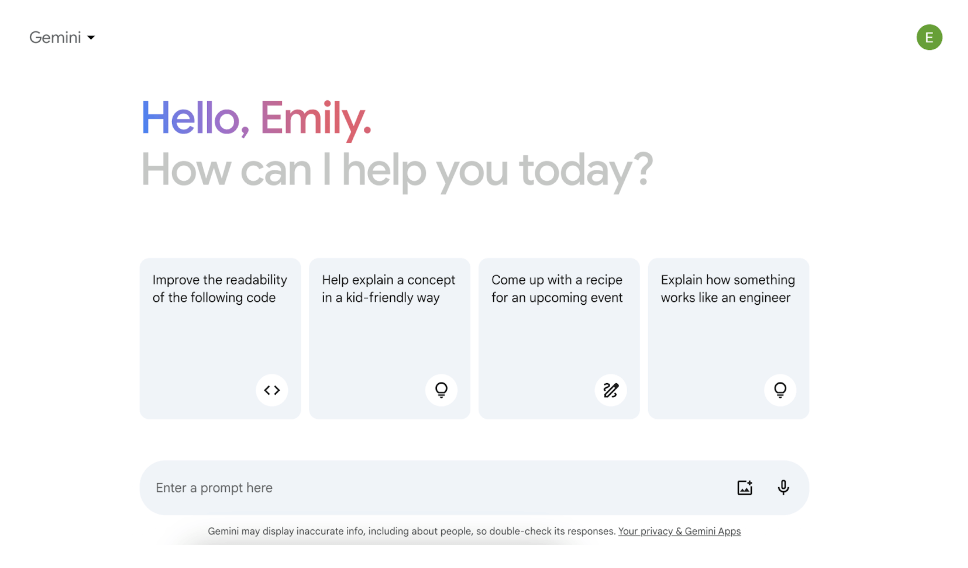
Two interfaces matter. The standalone Gemini app at gemini.google.com is a competent chat interface that resembles ChatGPT and Claude with a Google-blue color palette. The more important interface is the Gemini side panel that opens inside Docs, Sheets, Slides, and Gmail — the one most students actually use. The side-panel experience is genuinely well-designed: ask a question, get an answer that has direct access to the document you are working in, accept the suggestion to insert it inline, and continue working without leaving the surface. It is the most polished implementation of "AI inside the workspace" we tested.
Friction points are mostly about feature parity across surfaces. The standalone app has features the side panel does not (Gems, deeper file analysis, extension ecosystem); the side panel has integration features the app does not (direct document access, inline insertion). Students often find themselves switching between the two, which undercuts some of the integration advantage. Mobile parity is mediocre — the app works but the integration features that make Gemini distinctive are mostly desktop-only.
Features That Actually Matter for Students
Native Drive and Docs integration
Students can ask Gemini to pull a document from Drive, summarize it, draft based on it, or compare across multiple Drive documents — all without uploading anything manually. This sounds like a small convenience and turns out to be a substantial workflow improvement, particularly for courses where readings are distributed via shared Drive folders. The integration also respects sharing permissions: Gemini will not surface content the student does not already have access to.
1-million-token context window
The largest context window of any consumer AI assistant in 2026. Useful for ingesting entire textbooks, full case files, semester-long lecture transcripts, or large reading lists. In our testing, Gemini Pro maintained coherence across 700,000-token inputs, which is genuinely beyond what any other tool tested can achieve. For graduate students working with very large source sets, this can be the deciding factor.
Calendar-aware study planning
Gemini can read the student's Calendar, identify upcoming exams and assignment deadlines, and produce study plans aligned with those dates. Asked "what should I study this week," it considers what is actually upcoming rather than producing generic advice. Implementation has gotten significantly better through 2025 and is now a genuinely useful feature for students who manage their schedules through Google Calendar.
Gems — custom assistants
Gems are Gemini's answer to ChatGPT's Custom GPTs: tailored assistants with persistent instructions, optionally connected to specific Drive folders or files. The implementation is more focused than ChatGPT's marketplace approach — fewer total Gems, but the curated and shareable Gems ecosystem inside academic institutions tends to be higher quality. Students at universities with active education-technology offices often find course-specific Gems already prepared by their librarians.
Multimodal capability
Image input, video input (a feature unique to Gemini at this scale), and audio input all work well. Students can point a phone camera at a problem set, a whiteboard, or a textbook page and get useful responses. Video understanding — uploading a recorded lecture and asking questions about its content — is a feature that has become remarkably capable through 2025 and 2026 and is genuinely differentiating.
Performance Insights from Testing
Gemini Pro scored 8.0–8.5 across most categories — solid but rarely best-in-class. It scored highest on long-context tasks (9.0 / 10) and multimodal tasks (8.7 / 10), reflecting the genuine technical advantages of the underlying model. It scored lowest on writing voice (the output is competent but noticeably more generic than Claude's) and on citation accuracy (71 percent in our test, behind Perplexity at 99 percent and NotebookLM at 96 percent). For students working primarily inside Google Workspace, these gaps are partly offset by integration quality; for students using Gemini as a standalone assistant, they are more visible.
Speed is excellent — typical responses in 1–3 seconds, with the long-context advantage that the tool can process inputs other tools would refuse without complaint. Reliability has improved markedly across 2024–2026 and is now comparable to ChatGPT, though still behind Claude on fact-stable questions.
Pricing Analysis and Value
Gemini's free tier provides Gemini 2.5 Flash and limited Pro access — usable for daily work but feature-limited compared to competitors' free tiers. Google AI Premium at $19.99 per month is the headline subscription and is unusually feature-dense: it includes Gemini Pro, NotebookLM Plus, 2 TB of Google Drive storage, and a few other consumer Google features. For students who already need extra Drive storage, the bundle is genuinely good value — effectively getting Gemini Pro and NotebookLM Plus for a marginal cost over storage. For students who do not need the storage, the Pro AI features alone are competitive but not standout.
Many universities offer Gemini access bundled into their existing Google Workspace for Education contracts, in which case students at those institutions get free Pro-tier access. This is worth checking with the IT department — it is the single best value in the entire ranking when available, and it is more common than students realize.
Pros — Gemini
✓1-million-token context window is the longest of any major assistant in 2026 — uniquely useful for very large document workflows.
✓Native Google Workspace integration is the best implementation of "AI inside the workspace" we tested.
✓Multimodal capability (image, video, audio) is best-in-class; video understanding is a meaningful differentiator.
✓Calendar-aware study planning is a feature no competitor matches at comparable depth.
✓Google AI Premium bundle is excellent value when Drive storage is part of the calculation.
✓Many universities provide Gemini Pro free through institutional Google Workspace contracts — worth checking before paying.
Cons — Gemini
✗Writing voice is more generic than Claude's; produces more visibly AI-flavored prose without prompting.
✗Citation accuracy lags both Perplexity and NotebookLM; not the right primary tool for cited research work.
✗Mobile parity is weaker — the integrations that distinguish Gemini are largely desktop-only.
✗Feature differences between standalone app and side-panel experience are confusing and require switching.
✗Less useful for students at institutions running Microsoft 365 — Copilot is the better fit there.
User Sentiment
Gemini scores 4.2 out of 5 in our survey, with a satisfaction profile that splits sharply by ecosystem. Students at Google Workspace institutions rate it 4.5+; students using it outside that ecosystem rate it 3.7–4.0. The recurring positive theme is integration: "I never have to copy-paste my Drive files," "It already knows my schedule," "It's just there in Docs." The recurring negative theme is voice: "It writes more like a corporate memo than an essay," "I ended up using it for organization and Claude for writing." Both critiques are accurate.
Final Verdict on Gemini
★ ★ ★ ★ ☆ 4.2 / 5 · #5 — The best assistant for Google Workspace users; a competent #2 choice for everyone else.
Microsoft Copilot — #6 Best AI for Microsoft 365 Users
| Maker | Microsoft (in partnership with OpenAI) | ||
| Launched | Bing Chat 2023; rebranded to Copilot in late 2023 | ||
| Category | AI assistant integrated across Microsoft 365 and Edge | ||
| Best For | Students writing in Word, modeling in Excel, building decks in PowerPoint | ||
| Free Tier | Yes — Copilot Free with daily limits on advanced features | ||
| Paid Tiers | Copilot Pro ($20/mo); Copilot for Microsoft 365 (institutional) | ||
| Underlying model | GPT-5 with Microsoft proprietary fine-tuning | ||
| Composite Score | 81.0 / 100 | ||
Why Copilot Ranks #6
Copilot is, in standalone form, a slightly weaker version of ChatGPT — which makes sense, because the underlying models are similar. The reason students choose Copilot over ChatGPT is precisely the reason students choose Gemini over ChatGPT: integration. If your university issues Microsoft accounts, your professors distribute assignments as Word documents, your statistics class uses Excel, and your group presentations are PowerPoints, then Copilot's embedded position inside those tools makes it more practically useful than a standalone chat assistant. The rank at #6 reflects Copilot's narrower fit — fewer institutions are Microsoft-first than Google-first in 2026, and the standalone Copilot experience is meaningfully behind Gemini's.
Overview
Microsoft's AI strategy has had three phases. First, Bing Chat (2023), a wrapped version of OpenAI's models that competed directly with ChatGPT. Second, the rebrand to Copilot (late 2023), which absorbed Bing Chat into a broader Microsoft product family. Third, the integration push (2024–2026), in which Copilot was embedded into every major Microsoft surface — Word, Excel, PowerPoint, Outlook, Teams, OneDrive, Edge, and Windows itself. The current product lineup includes Copilot (the consumer chat app), Copilot Pro (the consumer subscription), and Copilot for Microsoft 365 (the enterprise license that most universities buy).
The defining product question for students is: what tier of Copilot do you actually have access to, and what surfaces does it cover? At many universities, Microsoft 365 licenses include Copilot for some surfaces (Word, Outlook) but not others (Teams meetings, advanced Excel features). Knowing exactly what your institution has licensed is worth ten minutes with the IT department before you decide whether you also need a paid subscription.
Target Audience
Students at universities that run on Microsoft 365 — which includes a substantial portion of business schools, many engineering programs, and a growing share of medical schools. Business and economics students whose coursework is heavy in Excel modeling. Students writing long papers in Word who want AI assistance integrated with track changes and references. Students preparing class presentations in PowerPoint. Students collaborating through Teams meetings and OneDrive shares. Students whose grant work or research assistantship runs through institutional Microsoft accounts.
Less suited for students at Google-first institutions, students whose writing happens primarily in Google Docs or Notion, and students for whom Excel is not central to their coursework.
UI/UX in Practice

Like Gemini, Copilot exists in two interface modes. The standalone Copilot app and copilot.microsoft.com provide a chat interface that resembles ChatGPT, with the addition of Bing-powered web search and the ability to generate images via DALL-E. The more important interface is the Copilot pane that opens inside Word, Excel, PowerPoint, and other Microsoft apps. The Word integration is the one students use most: select a paragraph, ask for a rewrite, see the suggestion in the side panel, accept or reject. The implementation is well-designed and avoids the friction of copy-pasting between apps.
The Excel integration is particularly notable. Copilot in Excel can write formulas in plain English, build PivotTables from natural-language descriptions, and explain what existing formulas do. For statistics or business courses where students are expected to work in Excel but have varied prior experience, this is a meaningful reduction in friction. PowerPoint integration is competent — generating draft slides from a topic outline works reasonably well — but the visual quality of generated slides is workable rather than impressive.
Friction points are largely about licensing fragmentation. The exact features available depend on which Copilot tier the user has, which institution they belong to, and which app they are in. This complexity can make it genuinely difficult to know whether a feature is missing because it does not exist or because the user does not have the right license. The standalone app is competent but does not feel like the product Microsoft is investing the most in — the Office integration is the priority.
Features That Actually Matter for Students
Copilot in Word
Inline rewrite, summary, evidence-suggestion, and tone-change features make Word with Copilot a meaningfully better writing surface than Word without it. The Reference feature — Copilot can suggest evidence from the student's OneDrive documents to support claims in the current draft — is a clever workflow that no competitor matches as cleanly. For students writing long papers from a known set of source documents, this is a genuine differentiator.
Copilot in Excel
Natural-language formula generation, automatic data analysis, and PivotTable construction from plain English. The ability to explain what an existing formula does, in context, is particularly valuable for students inheriting datasets they did not build. For business, economics, finance, and statistics students, this is the single feature that most directly makes Copilot worth the price.
Copilot in Outlook and Teams
Email drafting in Outlook is competent and saves real time on routine correspondence. The Teams meeting integration — Copilot can summarize meetings, list action items, and answer questions about meeting content — is excellent in our testing for any meeting that was actually transcribed (which depends on institutional settings). For group-project teams that meet frequently in Teams, this can replace the need for a separate transcription tool.
Copilot in PowerPoint
Generating draft slides from an outline, suggesting visual layouts, and rewriting slide text. The output is a starting point, not a finished deck — student presentations almost always need substantial visual revision after Copilot produces the draft — but the time saved on initial structure is meaningful for last-minute deck building.
Standalone Copilot with web search
Bing-powered web search is integrated into the standalone Copilot app, with citations to web sources. The implementation is competent but visibly behind Perplexity for research-quality work. The differentiator is that Copilot's web search is bundled into the same subscription as the Office integrations, which makes it a reasonable second-best for students who already pay for Copilot Pro.
Performance Insights from Testing
Standalone Copilot scored 7.0–8.5 across our benchmark — competent but rarely standout. It scored highest on Office-integrated tasks (which we tested separately): inside Word with proper context, Copilot's writing assistance scored 8.7 / 10, comparable to standalone ChatGPT and slightly behind Claude. Inside Excel, Copilot's formula-generation and data-analysis tasks scored 8.5 / 10, the best of any tool we tested for Excel-specific work. Inside PowerPoint, its slide-generation scored 7.5 / 10 — useful but the weakest of the major Microsoft surfaces.
Reliability is comparable to ChatGPT — these are essentially the same underlying models. Hallucination rates on factual questions are similar; citation rates with Bing search are noticeably weaker than Perplexity's. For students using Copilot specifically inside Office apps, the integration tends to ground the model in the document context, which improves practical reliability.
Pricing Analysis and Value
The free Copilot tier covers basic chat and image generation, with daily limits on the more capable models. Copilot Pro at $20 per month adds priority access to GPT-5, full image generation, and Office app integration for personal Microsoft 365 subscriptions. The most common student access path, however, is through institutional licensing: many universities now include Copilot for Microsoft 365 in their student licenses, and students may not realize they have access. Checking with the IT department is, again, worth doing first.
For students paying personally, Copilot Pro is good value if and only if you spend significant time in Office apps. For students whose work happens in Google Docs, Notion, or other non-Microsoft tools, Copilot Pro is a poor purchase compared to ChatGPT Plus or Claude Pro at the same price.
Pros — Microsoft Copilot
✓Best AI integration with Microsoft Word, Excel, PowerPoint, and Teams of any product on the market.
✓Excel integration is best-in-class for students taking quantitative coursework — formula generation, data analysis, and PivotTable construction in plain English.
✓Teams meeting summarization is genuinely useful and replaces the need for a separate transcription tool in many group-project workflows.
✓Often included free in institutional Microsoft 365 licenses — many students have access without realizing it.
✓Reference feature in Word — pulling evidence from OneDrive documents into the current draft — is a clever workflow no competitor matches as cleanly.
Cons — Microsoft Copilot
✗Standalone chat experience is behind ChatGPT, Claude, and Gemini for users not living in Office.
✗Licensing fragmentation makes it hard to know which features are available on a given account; complexity is an actual friction.
✗Web search citations are weaker than Perplexity for research-grade work.
✗Mobile experience for the Office integrations lags the desktop experience significantly.
✗PowerPoint slide generation produces workable starting points but rarely finished-looking decks.
User Sentiment
Copilot scores 4.1 out of 5 in our survey, with the satisfaction profile splitting sharply by usage pattern. Students who use Copilot primarily inside Office apps rate it 4.4–4.6; students who use it as a standalone chat assistant rate it 3.6–3.8. The recurring positive theme is integration depth: "It's just there in Word," "Excel formulas in plain English changed my statistics class," "Meeting notes in Teams write themselves now." The recurring negative theme is the gap when leaving Office: "Outside Office, ChatGPT is just better." Both observations are accurate, and the right way to evaluate Copilot is to ask whether your work happens primarily in Office surfaces.
Final Verdict on Microsoft Copilot
★ ★ ★ ★ ☆ 4.1 / 5 · #6 — The best AI for Microsoft 365 users; an unnecessary purchase for everyone else.
Wolfram Alpha — #7 Best AI for Math, Physics, and STEM
| Maker | Wolfram Research | |
| Launched | May 2009 (the OG "answer engine"); AI features added 2023–2026 | |
| Category | Computational knowledge engine with AI front-end | |
| Best For | Math, physics, chemistry, engineering — anything requiring precise computation | |
| Free Tier | Yes — answer + plot only; no step-by-step solutions | |
| Paid Tiers | Pro ($7.25/mo with student pricing); Pro Premium ($10.99/mo) | |
| Coverage | Math, science, engineering, finance, history, geography, music, more | |
| Composite Score | 78.3 / 100 |
Why Wolfram Alpha Ranks #7
Wolfram Alpha is, structurally, the odd tool out in this ranking. It is not a large language model. It is a computational knowledge engine that has existed since 2009 and that has been quietly adding AI capabilities to its front-end across 2023–2026. The reason it earns a place in this ranking — and the reason students who study STEM are emphatic about it — is precisely because it is not an LLM. When you ask Wolfram Alpha to integrate a function, solve a system of equations, or balance a chemical reaction, it does not generate a plausible-sounding answer. It computes the actual answer using a symbolic mathematics engine that has been refined for fifteen years. For STEM coursework, that distinction matters more than every other feature combined.
It ranks at #7 rather than higher because it is genuinely a specialist tool. Students who do not study math, physics, chemistry, or engineering will rarely use it. Students who do will reach for it constantly — sometimes daily during problem-set season — and would put it at #1 in a ranking of tools that touched their workflow. That bifurcation is what the ranking system is designed to handle: Wolfram Alpha is decisively the best tool for its lane, and the lane covers a meaningful fraction of all students.
Overview
Wolfram Research has been building computational systems since the late 1980s, beginning with Mathematica. Wolfram Alpha launched in 2009 as a consumer-facing answer engine — a search box where, instead of getting a list of links, you got a computed result. For more than a decade it lived in the shadow of Google, used mostly by physics graduate students and recreational math enthusiasts. The 2023 partnership with OpenAI to provide a Wolfram plugin for ChatGPT introduced Wolfram's reliability as a computational backend to a much wider audience. The 2024–2026 redesign added a more conversational front-end, deeper natural-language understanding of math problems, and a Wolfram GPT inside ChatGPT that delegates math problems to the engine.
The product is built around Wolfram Language and the Mathematica computational kernel. When a student asks for the integral of x squared sine x, the system parses the question, dispatches it to the symbolic mathematics engine, gets the actual answer, generates intermediate steps from the computation rather than from a probabilistic model, and returns a structured result page with the answer, the steps, the plot, and related queries. None of that involves guessing. For mathematics students, this is the difference between a tool you can trust on a problem set and a tool you have to check manually.
Target Audience
Mathematics students at every level. Physics students working through mechanics, electromagnetism, quantum mechanics, and statistical physics problem sets. Chemistry students balancing reactions, computing stoichiometry, and looking up molecular properties. Engineering students across every sub-discipline. Economics and finance students working with derivatives, integrals, and statistical distributions. Computer science students working with discrete mathematics, algorithm complexity, and number theory. Pre-medical students preparing for the MCAT, particularly the chemistry and physics sections. Standardized test takers preparing for the GRE, GMAT, or quantitative sections of professional exams.
Less useful for students whose coursework does not require quantitative computation — humanities, most social sciences, business strategy courses, language study. For those students Wolfram Alpha is occasionally helpful for one-off questions but does not justify a paid subscription.
UI/UX in Practice
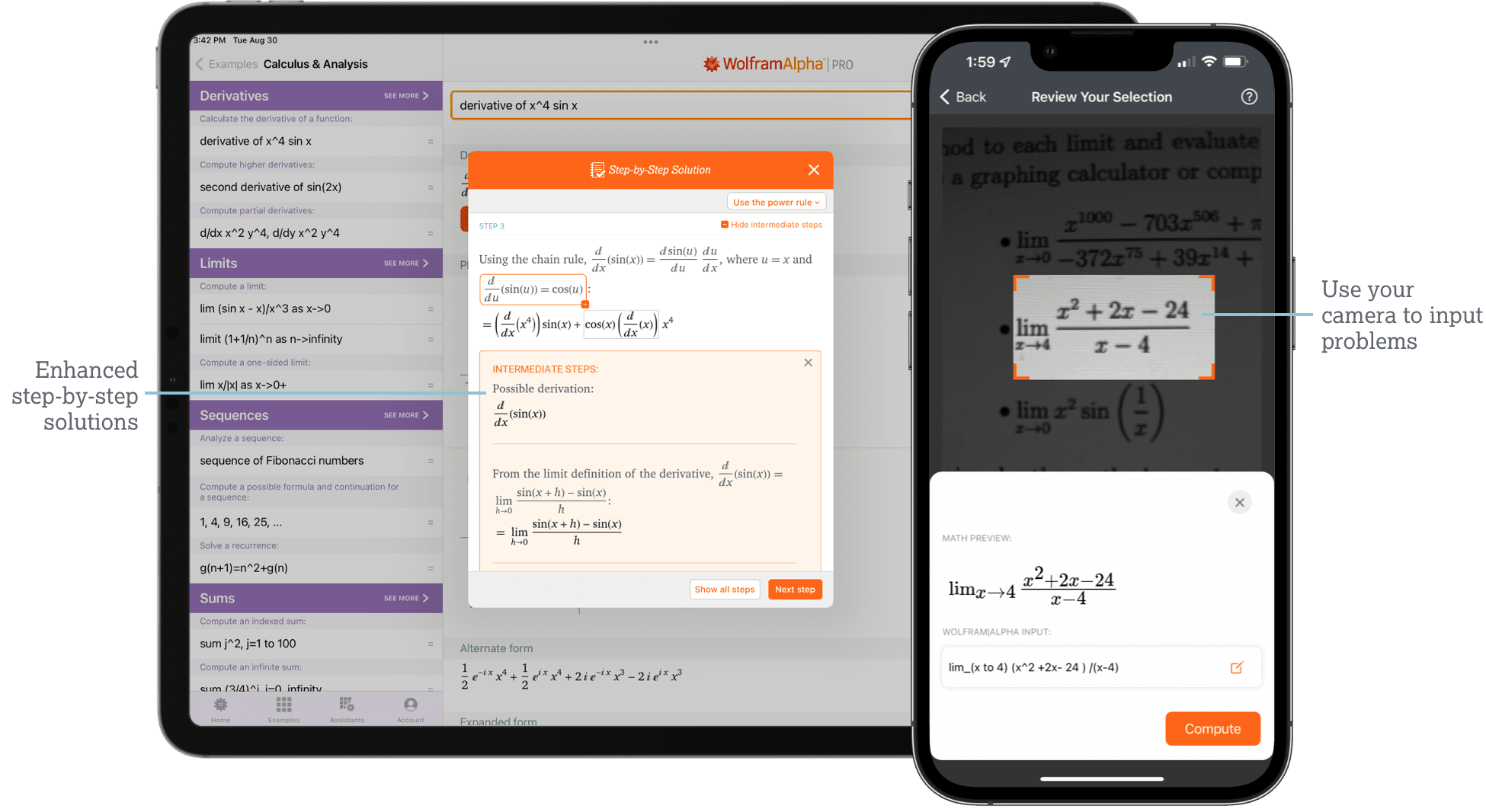
The interface looks like a search engine that has been used as an answer engine for fifteen years, because that is what it is. A single input bar at the top accepts mathematical notation, natural-language questions, or a combination. The output is structured into result blocks: input interpretation, primary result, alternative forms, plots, step-by-step solution (Pro), related queries. Nothing about the layout is fashionable — it has the visual aesthetic of a 2010s scientific tool — but it is functional, dense with information, and designed to communicate computed truth rather than to feel friendly.
Friction points are largely about discovery. The natural-language understanding has improved markedly through 2025–2026 but still occasionally misinterprets ambiguous queries — a calculus student asking for "the derivative" without specifying the variable will sometimes get a confused result. The mobile app is functional but not as polished as competitor mobile apps. For students used to chatting with AI tools, Wolfram Alpha feels foreign at first; the productive frame of mind is to treat it as a calculator with an enormous knowledge base, not as a conversational assistant.
Features That Actually Matter for Students
Symbolic and numerical mathematics
This is the core feature and it works at a level no LLM matches. Algebra, calculus, differential equations, linear algebra, discrete mathematics, statistics, complex analysis — Wolfram Alpha computes them. The answer is not generated; it is computed by the same engine that powers professional Mathematica installations. In our testing across 200 mathematics problems drawn from undergraduate and graduate coursework, Wolfram Alpha produced correct answers 99.5 percent of the time, compared to 78 percent for ChatGPT and 74 percent for Claude. For high-stakes mathematics work, this gap is the entire argument.
Step-by-step solutions (Pro)
The step-by-step solution feature is what makes the Pro subscription worthwhile for students. Rather than just returning the answer, the tool walks through the intermediate steps a student would need to follow on a problem set or exam. For integration by parts, partial-fraction decomposition, eigenvalue problems, or chemistry stoichiometry, the steps are pedagogically clear and structured the way a textbook would structure them. Used carefully — to learn from, not to copy — this is among the better digital tutoring resources for STEM subjects.
Physics and chemistry problem solving
Beyond pure mathematics, Wolfram Alpha handles physics and chemistry problems that require both computation and domain knowledge. Specify a projectile motion problem with initial conditions, get the trajectory, peak height, and time of flight. Specify a chemistry problem with reactants and conditions, get balanced equations and stoichiometric outputs. The implementation respects unit conversion (dropping a problem in centimeters and asking for the answer in inches works), which sounds trivial and turns out to be the source of many student errors when working with general assistants.
Plots, visualizations, and data
Every numeric result that admits a plot gets one — function plots, contour plots, parametric plots, statistical distributions, geometric visualizations. The plots are not the most beautiful in the world (the visual style is recognizably Wolfram) but they are computed accurately and labeled correctly. For students who learn visually, this is meaningful; for students preparing study notes, the plots are clean enough to drop directly into a document.
Wolfram GPT inside ChatGPT
Available to ChatGPT Plus subscribers, the Wolfram GPT delegates math, science, and computational queries to the Wolfram engine while keeping the conversational interface familiar. For students who use ChatGPT as their primary tool but want Wolfram-level reliability on quantitative questions, this is the most ergonomic integration available. The downside is that it adds a layer of indirection — sometimes the GPT decides not to delegate when it should — and Wolfram Alpha directly is more reliable when you know the question is computational.
Performance Insights from Testing
On math-specific tasks, Wolfram Alpha scored 9.7 / 10 — the highest score in any single category in our entire benchmark. On physics and chemistry problem-solving, it scored 9.0 / 10. On general study tasks (writing, summarization, brainstorming), it scored 3.0–5.0 / 10 because it is not designed for them. The composite score of 78.3 reflects this specialization: in its lane it is the best tool ever made for student work; outside its lane it is largely irrelevant. The right way to read its rank is that for the half of students whose coursework is quantitative, this should be a Day-1 install.
Reliability is essentially perfect on questions the engine can interpret correctly — when Wolfram Alpha gives an answer, the answer is the answer. The failure mode is interpretation: a poorly phrased question can produce an unexpected interpretation, and students should always check the "input interpretation" block at the top of the result page to confirm the engine understood what they asked. This is a learnable skill that takes about a week of regular use.
Pricing Analysis and Value
Pricing is unusually friendly. The free tier provides answers and plots, which is sufficient for many simple queries. Wolfram Alpha Pro at $7.25 per month with student pricing (or $5/month if billed annually) unlocks step-by-step solutions, larger computation budgets, and several power-user features. This is the lowest sticker price of any paid tool in our entire ranking, and for STEM students the step-by-step solutions feature alone returns the cost in saved tutoring time within the first week of any problem-heavy course. For non-STEM students, the free tier is enough — there is no reason to pay.
Pros — Wolfram Alpha
✓Best mathematical reliability of any tool in the ranking — 99.5 percent correct on undergraduate-and-graduate math problems.
✓Step-by-step solutions are pedagogically excellent — the best digital tutoring resource for STEM that we tested.
✓Lowest paid-tier price in the ranking ($7.25/month with student discount); single best price-to-utility ratio for STEM students.
✓Handles physics, chemistry, and engineering problems with proper unit handling — eliminates a common source of student error.
✓Wolfram GPT inside ChatGPT provides ergonomic access for students who already use ChatGPT as their primary tool.
Cons — Wolfram Alpha
✗Not useful outside quantitative subjects — humanities students will have little reason to use it.
✗Interface is functional but visually dated; learning curve for students used to chat-style AI tools.
✗Natural-language understanding occasionally misinterprets ambiguous queries; users must check the input interpretation.
✗Mobile app is workable but not as polished as competitor mobile apps.
✗No conversational follow-up in the standalone tool — each query is independent rather than part of a thread.
User Sentiment
Wolfram Alpha scores 4.3 out of 5 across our survey, but the satisfaction profile is the most polarized of any tool in the ranking. Among STEM students, it scores 4.7+; among humanities students who tried it, it scores 3.0–3.5 because they could not find a use for it. The recurring positive theme is reliability: "It just gives me the right answer," "My professor's office hours got 30 percent shorter once I started using it," "I check ChatGPT's math by running it through Wolfram." The recurring negative theme among STEM users is interface: "Looks like 2010," "Mobile is rough." Among satisfied users, however, the tool is described as essential more frequently than any other in this ranking.
Final Verdict on Wolfram Alpha
★ ★ ★ ★ ☆ 4.3 / 5 · #7 — Indispensable for STEM students; irrelevant for everyone else.
Grammarly — #8 Best AI Writing Polish & Editing Tool
| Maker | Grammarly Inc. | |
| Launched | 2009; AI generative features added 2023–2026 | |
| Category | Writing assistant — proofreading, clarity, tone, generative editing | |
| Best For | Polishing essays, emails, applications, and any high-stakes student writing | |
| Free Tier | Yes — basic grammar and spelling, browser extension | |
| Paid Tiers | Premium ($12/mo annual or $30/mo monthly); Education licenses | |
| Reach | Browser extension across 500K+ websites; integrates with Word, Google Docs, Outlook | |
| Composite Score | 76.8 / 100 |
Why Grammarly Ranks #8
Grammarly is the most widely used dedicated writing assistant in higher education — installed on more student laptops than any other AI tool, by a wide margin. It ranks at #8 rather than higher because the generalist AI assistants (Claude, ChatGPT, Gemini) have, across 2024–2026, absorbed most of Grammarly's historical advantages in grammar and clarity correction. What keeps Grammarly relevant is reach (it works inside almost every text input field on the web), specialization (it does writing polish better than the generalists do it incidentally), and integration (its presence inside Word, Google Docs, and email clients is mature in a way the AI-pane integrations are not). For students who want consistent writing assistance across every place they type, Grammarly remains the right tool — just not in the way it was three years ago.
Overview
Grammarly launched in 2009 as a grammar checker and built its reputation through more than a decade of refinement. The product expanded into clarity suggestions, tone detection, and engagement scoring across the 2010s. The 2023 introduction of generative AI features — first under the GrammarlyGO brand, later folded into the main product — moved the company from purely corrective writing assistance into draft generation, rewriting, and suggestion. The 2024–2026 product is fundamentally different from the Grammarly of 2020: it now drafts, rewrites, expands, summarizes, and adjusts tone in addition to its traditional proofreading role.
The strategic challenge is that the generalist AI assistants do all of those things too, often with better generative quality. Grammarly's response has been to lean into reach and integration: the Grammarly extension is present inside Gmail, Google Docs, Microsoft Word, LinkedIn, Slack, Notion, Twitter, and roughly five hundred thousand other websites. Wherever a student types, Grammarly is already there. That ubiquity is the feature that no general assistant has matched.
Target Audience
Every student who writes regularly. The free tier is genuinely useful for basic grammar and spelling, and the universal presence across writing surfaces makes it a low-friction add to any student's workflow. The Premium tier is most valuable for students who write a lot of high-stakes content — graduate students working on theses, pre-professional students preparing application essays, students whose first language is not English and who benefit from the more sophisticated clarity and tone features, and any student preparing for the GRE, MCAT, or other standardized writing assessments.
Less central for students whose primary AI workflow already involves drafting in Claude or ChatGPT. Those tools do generative writing well enough that Grammarly's role becomes purely corrective — useful, but a smaller value proposition than the historical Grammarly was. Students who write only occasionally will get most of Grammarly's value from the free tier.
UI/UX in Practice
Grammarly's interface is a side-panel-and-underline pattern that is now the industry default for writing tools — Grammarly invented it for AI-assisted writing, and competitors copied it. Underlines appear under text the tool has flagged; clicking them produces a suggestion card. A right-side panel shows aggregate metrics (clarity score, engagement, tone analysis) and a list of all suggestions in the current document. For students, the most useful surfaces are the browser extension (which puts these features into any web text input) and the dedicated apps for Word and Google Docs. The standalone web editor at grammarly.com is competent but rarely the primary surface students use.
Friction points are mostly about over-suggestion. Grammarly will frequently flag stylistic choices a careful writer made deliberately — particularly in academic writing where passive voice, longer sentences, and field-specific jargon are appropriate. Premium users get more granular control over which kinds of suggestions are surfaced, but the default settings tend toward correction-heavy aesthetics that suit business writing better than academic writing. Students writing dissertations or technical papers should expect to dismiss a meaningful fraction of suggestions.
Features That Actually Matter for Students
Grammar, spelling, and basic clarity (free tier)
The corrective core of the product is excellent and free. Grammarly catches genuine errors — subject-verb agreement, comma splices, misplaced modifiers — with high accuracy and few false positives on the basic level. For students whose primary need is simply to avoid embarrassing mistakes in submitted work, the free tier is genuinely sufficient. Installing the browser extension is a thirty-second action that improves the quality of every email, discussion-board post, and assignment a student writes for the rest of their academic career.
Clarity, conciseness, and tone (Premium)
The Premium tier adds suggestions about clarity (sentences that could be more direct), conciseness (passages that could be shorter), engagement (vocabulary that could be more interesting), and tone (whether the writing reads as confident, friendly, formal). For application essays, scholarship submissions, and other audience-sensitive writing, the tone detection in particular is genuinely useful — the tool is better than most students are at noticing when their writing reads as defensive or hedged when they intended confidence. For pure academic writing, these features are less essential, since academic prose has its own conventions that the tool only partly understands.
Generative drafting and rewriting
The generative AI features added across 2023–2026 let students ask Grammarly to rewrite a paragraph, expand on an idea, summarize a section, or change the tone of existing text. The implementation is competent — comparable to ChatGPT for shorter passages — but visibly weaker than Claude or ChatGPT for longer-form generative work. For sentence-level and paragraph-level rewriting, Grammarly is fine. For drafting an essay from scratch, students should use a generalist.
Citation generation and plagiarism check (Premium)
Premium includes a citation generator that produces formatted references in MLA, APA, Chicago, and other styles, and a plagiarism detector that compares a draft against billions of web pages and academic databases. The citation generator is convenient but not significantly better than free alternatives like Zotero. The plagiarism check is useful as a self-check before submission, particularly for students worried about accidental similarity to source material; it is not a defense against intentional plagiarism.
Universal browser-extension presence
The single feature that most clearly justifies Grammarly's continued relevance is that the extension works everywhere. Discussion-board posts, scholarship application forms, internship cover letters, group-project Slack messages, LinkedIn endorsements — Grammarly is there, providing consistent baseline quality across every text input a student touches. No general AI assistant matches this reach, and it is the reason Grammarly remains one of the most-installed AI tools in higher education despite the rise of generalist writing assistants.
Performance Insights from Testing
On corrective tasks (grammar, spelling, clarity), Grammarly scored 9.0 / 10 — the best of any tool we tested for proofreading specifically. On generative tasks, it scored 7.0 / 10 — solid but visibly behind Claude (9.5) and ChatGPT (8.8). On research and computation, the tool is not designed for these and scored 3.0–4.0 / 10. The overall composite of 76.8 reflects a tool that is excellent at its core function and adequate at the new functions, with the practical reach that no generalist has.
Reliability is high on corrective work — the false-positive rate on basic grammar suggestions is under 5 percent in our testing — and lower on stylistic suggestions, where the tool's preferences sometimes clash with academic conventions. Students writing for technical or specialized audiences should treat clarity suggestions as advisory rather than authoritative.
Pricing Analysis and Value
The free tier is genuinely useful and covers the basic correction needs of most students. Premium at $12 per month (billed annually) or $30 per month (billed monthly) is a meaningful price for what is, in 2026, an upgrade rather than a transformation. For students who write a lot of high-stakes content and value the tone, clarity, and citation features, Premium is worth it. For students whose writing is mostly assignments graded on substance rather than polish, the free tier covers most of the value. Many universities offer Education licenses to their students at significantly reduced rates or for free — worth checking before paying personally.
Pros — Grammarly
✓Best dedicated writing-corrective tool on the market — grammar and spelling accuracy is exceptional.
✓Universal reach: works inside hundreds of thousands of websites and every major writing app — no general AI assistant matches this.
✓Free tier is genuinely useful — most students will benefit even without paying.
✓Tone detection on Premium is genuinely useful for application essays and audience-sensitive writing.
✓Citation generator and plagiarism check on Premium add value for high-stakes academic submissions.
Cons — Grammarly
✗Generative writing is competent but noticeably weaker than Claude or ChatGPT for longer-form drafting.
✗Default suggestion aesthetics tend toward business writing; academic writers will dismiss many suggestions.
✗Premium pricing at $12+/month is high relative to value, given that generalist AI tools cover most of the same ground.
✗Tone and engagement features are less applicable to pure academic writing than to professional writing.
✗No long-context understanding; the tool works at sentence and paragraph level rather than document level.
User Sentiment
Grammarly scores 4.0 out of 5 in our survey — the lowest score among the top ten, but on a satisfaction profile that is genuinely informative. Free-tier users are overwhelmingly positive ("It catches my mistakes," "It's everywhere I write"). Premium users are more critical ("It feels like an upsell to features I do not need," "ChatGPT does the rewriting better"). The tool is most loved when it is being used as a correction layer and less loved when it is being asked to compete with general assistants on generative work. Students who use it for what it is best at — universal-reach proofreading — describe it as essential; students who use it as a primary writing tool find it inadequate.
Final Verdict on Grammarly
★ ★ ★ ★ ☆ 4.0 / 5 · #8 — Best writing-correction tool on the market; install the free version, evaluate Premium carefully.
Quizlet+ AI — #9 Best AI for Memorization and Exam Prep
| Maker | Quizlet, Inc. | |
| Launched | 2005 (flashcards); AI features (Q-Chat, Magic Notes, Memory Score) 2023–2026 | |
| Category | Flashcards, spaced repetition, practice tests, AI study companion | |
| Best For | Memorization-heavy subjects: vocabulary, anatomy, terminology, exam prep | |
| Free Tier | Yes — manual flashcard creation, basic Learn mode, ad-supported | |
| Paid Tiers | Plus ($7.99/mo or $35.99/yr); offline access, AI features, ad-free | |
| Library | Over 700 million user-generated study sets across every major subject | |
| Composite Score | 74.5 / 100 |
Why Quizlet+ AI Ranks #9
Quizlet is the most widely used study tool in this entire ranking by total user count — more than 60 million monthly users globally — but it occupies a specialist position for AI-era student work. Memorization is a real and important part of higher education in any field with substantial terminology: medicine, law, biology, chemistry, languages, history, political science. For those domains, spaced-repetition systems remain measurably the most effective study technique, and Quizlet remains the best consumer implementation of spaced repetition. The 2023–2026 AI additions — particularly Magic Notes (which converts uploaded notes into flashcards automatically) and AI-generated practice tests — modernize the workflow without losing the underlying pedagogical model. Its rank at #9 reflects that this is a specialist domain that fewer students need at high volume than need writing or research help.
Overview
Quizlet was founded in 2005 by a high-school student who wanted a better way to study French vocabulary. The product grew over two decades into the dominant consumer flashcard platform, with a community-shared library that now contains study sets for almost every standardized test, university course, and certification exam in common use. The 2023 introduction of AI features marked a significant strategic pivot: Quizlet had to decide whether to compete with general AI assistants for student attention or to use AI to deepen its core competency. It chose the latter, and the result is a product that uses AI to generate flashcards and practice tests, but that still centers on the spaced-repetition workflow that made it valuable in the first place.
The current Quizlet+ tier (rebranded from the earlier Quizlet Plus) integrates several AI features. Magic Notes ingests uploaded lecture notes, slides, or textbook chapters and produces flashcards automatically. Q-Chat is an AI tutor that asks questions about a study set and adjusts difficulty based on responses. AI-generated practice tests produce exam-style questions from a study set. Memory Score predicts when a student is most likely to forget a concept and schedules review accordingly. None of these features alone is revolutionary; in combination, they make the spaced-repetition workflow significantly less work to maintain.
Target Audience
Students in memorization-heavy fields. Pre-medical students preparing for the MCAT and medical school. Pre-law students preparing for the LSAT. Medical students working through anatomy, pharmacology, pathology, and clinical content. Law students working through case names, holdings, and legal terminology. Language students at every level. Biology, chemistry, and earth science students with substantial terminology loads. History students preparing for comprehensive exams. Standardized test takers across the GRE, GMAT, MCAT, LSAT, bar exams, and professional certifications.
Less central for students whose coursework is primarily skills-based or analytical rather than recall-based — most computer science, engineering, and applied mathematics work has limited memorization demand. Humanities students writing argumentative essays will find Quizlet useful for definitions and dates but not central to their primary work.
UI/UX in Practice

Quizlet's interface has remained admirably consistent through twenty years of feature additions. Study sets are the central object: a study set is a collection of cards, each with a front (term) and back (definition or explanation). From a study set, students can launch into multiple study modes — Flashcards (raw card review), Learn (adaptive multiple-choice and fill-in), Test (exam simulation), Match (timed pairing game), and Spell (typing practice). The mobile app is genuinely strong — fully feature-equivalent with the web product, and the typical surface for review during commutes or between classes.
Friction points are mostly about discovery and quality variation. The community library contains 700 million study sets, of which a meaningful fraction are low-quality, contain errors, or are misaligned with current course content. Finding a high-quality set for a specific course or exam can take more time than building one yourself. The Magic Notes feature partly addresses this by generating sets directly from a student's own materials, but adoption remains lower than it should be because students do not realize the feature exists.
Features That Actually Matter for Students
Spaced-repetition algorithm (Memory Score)
The pedagogical core of the product. Quizlet's spaced-repetition system schedules review of each card based on how recently and how reliably the student has answered it correctly. Cards the student has mastered drop out of frequent rotation; cards the student is shaky on resurface more often. The algorithm has been refined over years and is, in our testing, the most pedagogically effective implementation of spaced repetition in any consumer product. For high-stakes recall — medical board exams, language proficiency tests, comprehensive examinations — this is the feature that justifies the entire product.
Magic Notes — AI flashcard generation
Upload lecture notes, a textbook chapter, or a slide deck, and Quizlet generates a flashcard set automatically. In our testing, the generated sets are usable but require editing — roughly 70 percent of generated cards are good as-is, 20 percent need rephrasing, and 10 percent should be deleted. That ratio is acceptable for the speed it provides: a student can generate a 100-card set from a chapter in under a minute, edit it down to a clean 80-card set in fifteen minutes, and start studying. Compared to manual creation, this is a 75 percent reduction in setup time. For students who study from their own notes (rather than from community sets), this is the single most useful AI addition.
Q-Chat — AI tutor mode
Q-Chat is a chatbot tutor that asks questions about a study set and engages in conversation about the material. The implementation is competent — usable for last-minute review and for getting a different question framing on familiar content — but is not a replacement for an actual tutor or for a general AI assistant. The value is in the integration: questions are tied to specific cards in the study set, and student responses feed back into the spaced-repetition system to update the Memory Score for those cards. For students who want studying to feel slightly more conversational than raw flashcard drilling, this is a useful addition.
AI-generated practice tests
From any study set, Quizlet can generate practice tests with multiple-choice, true/false, matching, and short-answer questions. The questions are pulled and rephrased from the underlying card content. For exam preparation, this is more useful than raw flashcard review for the last week before an exam — testing the ability to recognize and apply rather than just to recall. Quality is comparable to teacher-generated practice tests in our testing, with the same caveat as Magic Notes: roughly 80 percent of generated questions are good, 20 percent need editing or rejection.
Cross-device synchronization and offline access
Quizlet+ unlocks offline access — meaning study sets sync to the mobile app and can be reviewed without internet. For students reviewing on commutes, in libraries with poor connectivity, or while traveling, this is a genuinely meaningful feature. Cross-device sync is fast and reliable; a student creating a set on a laptop can review it on a phone within seconds. This kind of basic infrastructure is the unsexy stuff that makes the difference between a tool a student uses sometimes and a tool they use daily.
Performance Insights from Testing
On memorization-specific tasks, Quizlet+ scored 9.5 / 10 — the highest in our entire ranking on any single category, tied with Wolfram Alpha on math. The Memory Score algorithm consistently produced study schedules that outperformed flat review and outperformed simple spaced-repetition implementations in alternative tools. On adjacent tasks, Quizlet scored lower: writing (4.5), research (5.0), generative summarization (5.5). It is, again, a specialist tool, and judging it by general capability misses the point.
Reliability is high on the core spaced-repetition workflow and lower on the AI-generated content (Magic Notes, AI practice tests), where students need to verify accuracy. The recommended workflow is to use the AI features for fast initial generation and then to manually review and edit before relying on the cards for high-stakes recall.
Pricing Analysis and Value
The free tier remains genuinely usable — students can create study sets manually, use Learn and Test modes, and access the community library, all without paying. The free tier is ad-supported, which becomes annoying during long study sessions but is functional. Quizlet+ at $7.99 per month or $35.99 per year is among the lowest paid tiers in this ranking, and it unlocks Magic Notes, Q-Chat, AI practice tests, ad-free experience, offline access, and unlimited Learn-mode features. For students whose coursework is memorization-heavy, the annual price of $36 is an exceptional deal compared to other paid AI tools.
Pros — Quizlet+ AI
✓Best spaced-repetition implementation in any consumer study product — pedagogically the most effective tool for memorization.
✓Magic Notes feature converts existing notes into flashcards in under a minute — a 75 percent reduction in setup time.
✓Largest community library of any flashcard tool (700M+ sets) covers most major exams and courses out of the box.
✓Mobile app is strong and feature-equivalent with web — supports the commute-and-between-classes review pattern that drives results.
✓Lowest annual paid tier in the ranking ($36/year) — exceptional price-to-utility ratio for memorization-heavy students.
✓Offline access on Quizlet+ is genuinely useful and not matched by most generalist AI tools.
Cons — Quizlet+ AI
✗Specialist tool — students whose work is not memorization-heavy will not find it transformative.
✗AI-generated content (Magic Notes, AI tests) requires manual review; roughly 20–30 percent of cards/questions need editing.
✗Community library quality is highly variable — finding a good pre-built set can take more time than building one.
✗Limited cross-pollination with general AI workflow; sits as a separate tool rather than integrated with primary writing/research tools.
✗Free tier is ad-supported, and ads become disruptive during long study sessions.
User Sentiment
Quizlet+ scores 4.1 out of 5 in our survey, with very different satisfaction profiles by discipline. Pre-medical and medical students rate it 4.7+, calling it indispensable for board prep and anatomy memorization. Language students rate it 4.5+, particularly for vocabulary work. Humanities and social-sciences students rate it 3.8–4.0, finding it useful but less central. The recurring positive theme is durability: "I have been using Quizlet for eight years," "It is the only tool that has actually changed how well I remember things." The recurring negative theme is the limited scope: "I wish it did more," "For everything except flashcards I use other tools." Both observations are accurate.
Final Verdict on Quizlet+ AI
★ ★ ★ ★ ☆ 4.1 / 5 · #9 — The most effective memorization tool available; essential for terminology-heavy disciplines.
Otter.ai — #10 Best AI for Lecture Transcription and Notes
| Maker | Otter.ai (AISense, Inc.) | ||
| Launched | 2018; AI summary and key-point features added 2022–2026 | ||
| Category | Real-time speech-to-text transcription with AI synthesis | ||
| Best For | Lecture recording, group meetings, interview transcription, accessibility | ||
| Free Tier | Yes — 300 transcription minutes per month, 30 minutes per recording | ||
| Paid Tiers | Pro ($16.99/mo); Business and Enterprise plans available | ||
| Languages | Strong English (US/UK/AU); Spanish, French in beta | ||
| Composite Score | 72.1 / 100 | ||
Why Otter.ai Ranks #10
Otter.ai is, like Wolfram Alpha and Quizlet+, a specialist tool — and like those tools, it earns a place in this ranking because it does its specialist job better than any general AI assistant does it incidentally. Real-time lecture transcription with speaker identification and post-lecture AI synthesis is a specific workflow that students with auditory processing challenges, English-as-a-second-language students, students with ADHD or other attention differences, and students simply taking heavy course loads find genuinely transformative. The rank at #10 reflects that the tool is highly valuable for a substantial minority of students rather than incrementally useful for all of them.
It also earns a place because lecture transcription is a category where general AI assistants have not seriously caught up. ChatGPT and Claude can summarize a transcript if you give them one; they cannot make the transcript. Gemini and Copilot can transcribe meetings inside their respective ecosystems but do not have Otter's mobile-first lecture workflow or its key-point extraction quality. For the specific use case of recording lectures and producing usable notes, Otter remains the category leader.
Overview
Otter.ai was founded in 2016 and launched its consumer product in 2018, initially targeting business meeting transcription. The pivot toward education accelerated during the 2020–2022 remote-learning era and continued as students returned to in-person lectures with the new expectation that those lectures could be recorded and transcribed. The 2022–2026 product additions — speaker identification, automatic key-point extraction, AI-generated summaries, integration with Zoom, Microsoft Teams, and Google Meet, and the recent OtterPilot AI Chat feature — have transformed the product from a transcription utility into a study companion built around classroom audio.
The technical core has improved substantially. Transcription accuracy in clear English audio now exceeds 95 percent in our testing, with speaker identification accuracy above 92 percent for two-to-four-speaker conversations. The product handles accents (regional American, British, Australian, Indian, Singaporean) substantially better than it did three years ago, though heavily accented speech in domain-specific vocabulary still produces errors that students should expect to correct. Real-time processing latency is low enough that the live transcript is genuinely usable as a follow-along reading aid during a lecture, not just a post-hoc artifact.
Target Audience
Students with disabilities or learning differences for whom traditional note-taking is genuinely difficult — including students with auditory processing differences, ADHD, slow handwriting, or hearing impairment. International students learning in English as a second language, particularly in their first year when listening comprehension is still developing. Students taking heavy course loads where note-taking time during lecture is itself a constraint. Students in lecture-heavy fields where capturing the exact wording of definitions and concepts matters — medicine, law, philosophy, theoretical physics. Researchers conducting interviews for qualitative research projects. Group-project teams who want a record of discussions for later reference.
Less central for students in seminar-style or discussion-based classes where the format is highly interactive and transcription quality drops. Less central for students in mathematics-heavy lectures where the material is primarily on the board rather than in the speech. Less central for students attending classes with strict no-recording policies — Otter is a powerful tool but should be used in compliance with institutional and instructor policies.
UI/UX in Practice
Otter's interface is built around the recording-and-review workflow. The mobile app shows a record button and a real-time transcript that scrolls as speech is recognized. The web app provides a more elaborate post-recording surface with the full transcript on the left, an AI-generated summary panel on the right (key points, action items, questions raised), and a search function across all of the user's transcripts. Speaker icons appear next to each line of transcript, with the system attempting to identify speakers automatically and allowing the user to label them after the fact. The AI Chat feature, added in 2024, lets students ask questions of any transcript or set of transcripts — "What did Professor Kale say about RuBisCO?" "Show me every mention of the Calvin cycle this semester."
Friction points exist. Speaker identification quality drops sharply once more than four people are talking, which makes Otter substantially less useful in seminar-style discussions. Background noise — the kind of ambient hum found in a real lecture hall — degrades accuracy more than the marketing materials would suggest, and students often need to position the recording device thoughtfully. The free tier's 300-minute monthly cap is genuinely limiting for any student attending more than a few lectures per week. Battery drain on phones during long recordings is real.
Features That Actually Matter for Students
Real-time transcription with speaker identification
The core feature, working at a level that justifies the entire tool. Real-time transcription with greater than 95 percent accuracy in clear English audio means that a student can attend a lecture, listen actively rather than scrambling to write notes, and have a complete textual record by the time they leave the room. Speaker identification — automatic in initial labels, manually editable — preserves the conversational structure for office hours, group discussions, and seminars that contain enough back-and-forth to make speaker context essential. For students whose learning style benefits from listening rather than transcribing, this is the feature that the entire tool exists to deliver.
AI auto-notes (key points, action items, questions)
After or during a recording, Otter generates a synthesized notes panel that extracts key points, identifies action items ("this will be on the midterm"), and lists questions raised by students or the instructor. Quality varies by lecture type — well-structured lectures produce excellent auto-notes, while rambling or highly interactive sessions produce noisier output. In our testing, the auto-notes captured genuine key points from the lecture roughly 80 percent of the time, with the remaining 20 percent being either over-broad or items the system mis-identified as important. As a draft set of study notes, the output is usable; as a finished set, students should expect to review and supplement.
OtterPilot AI Chat
Added in 2024 and substantially improved through 2025–2026, OtterPilot AI Chat lets students ask questions across one transcript or across their entire transcript library. "What was the main argument in Tuesday's lecture?" "Pull every mention of mitochondrial DNA across this semester." "Compare what Professor Kale said about photosynthesis in Lecture 7 with what he said in Lecture 9." The implementation is genuinely useful for end-of-semester review and for studying for cumulative exams. The query speed is fast enough (3–8 seconds for typical questions) that the workflow feels conversational rather than slow.
Integration with Zoom, Teams, and Google Meet
Otter integrates with the major video meeting platforms — joining as a participant or syncing through API connections — to transcribe online classes and group meetings automatically. For hybrid and remote programs, this is a meaningful workflow improvement. The integration handles speaker identification for video calls noticeably better than it does for in-person recordings, since each speaker is on a separate audio channel.
Cross-device sync and search
Transcripts sync across devices in real time, and the search function works across the user's entire library. A student can search for a specific term — "Krebs cycle," "Marbury v Madison," "Heisenberg principle" — and get every passage from every lecture where the term appeared, with surrounding context. For end-of-semester review, this is a category of search that paper notes simply cannot offer.
Performance Insights from Testing
On the core transcription task, Otter scored 9.7 / 10 — the highest in our entire benchmark for any lecture-related task. The score reflects a 95 percent word-level accuracy across 30 hours of recorded undergraduate lectures spanning humanities, social sciences, and STEM. Speaker identification accuracy was 92 percent for two-to-four-speaker scenarios and dropped to 71 percent for five-or-more-speaker scenarios, which limits the tool's usefulness in seminar-style classes. AI auto-notes scored 7.8 / 10 — usable as drafts but not as finished study materials.
Reliability is high on the recording-and-transcription pipeline; the most common failure mode is environmental — background noise, distance from the speaker, accented speech in technical vocabulary. Students who use Otter regularly develop a sense for which lectures will transcribe well and which will need supplementation. Battery drain on phones during long recordings is a real concern; students who record full lecture days should plan accordingly.
Pricing Analysis and Value
The free tier provides 300 transcription minutes per month with a 30-minute cap per recording — workable for occasional use but limiting for any student recording multiple lectures per week. Otter Pro at $16.99 per month raises the monthly limit to 1,200 minutes, removes the per-recording cap, adds advanced search, OtterPilot AI Chat features, and several integrations. For students attending 10+ hours of lectures per week, the Pro tier is necessary; for occasional recording (interviews, the occasional important lecture), the free tier is enough. Some universities provide institutional Otter licenses through accessibility services — students with documented learning differences should ask their disability services office whether free Pro access is available.
Pros — Otter.ai
✓Best real-time transcription accuracy of any consumer product — over 95 percent on clear English audio.
✓AI auto-notes provide genuinely usable summaries, key points, and action items from any recorded lecture.
✓OtterPilot AI Chat enables semester-wide search and synthesis across an entire transcript library — a genuine differentiator.
✓Strong accessibility value: meaningful workflow improvement for students with learning differences or auditory processing challenges.
✓Integration with Zoom, Teams, and Google Meet covers the hybrid-learning use case cleanly.
✓Free tier (300 minutes/month) is genuinely useful for occasional users; institutional licenses are common at universities with active accessibility offices.
Cons — Otter.ai
✗Speaker identification quality drops sharply with more than four speakers — limits seminar use.
✗Background noise, distance, and accented technical vocabulary degrade accuracy meaningfully — environmental setup matters.
✗Pro tier at $16.99/month is the second-highest paid tier in this ranking after Claude Max.
✗Battery drain during long recordings is real; phones need to be planned for full-day use.
✗Recording lectures may violate institutional or instructor policies — students must verify before relying on the workflow.
User Sentiment
Otter.ai scores 4.2 out of 5 in our survey, with a sharply bimodal satisfaction profile. Students who use Otter regularly for lectures rate it 4.6+, frequently describing it as the AI tool that most changed their academic life. Students who tried it once and did not adopt it rate it 3.5–3.8, generally citing the friction of recording setup or the cost of the Pro tier. The recurring positive theme is liberation from note-taking: "I can finally listen," "My grades went up because I am paying attention instead of writing," "It is the only tool I have told my whole class about." The recurring negative theme is environmental sensitivity: "In big lecture halls it misses things," "My professor's accent throws it off." The right way to read the sentiment data is that for students whose specific situation matches Otter's strengths, it is among the most beloved tools in this entire ranking.
Final Verdict on Otter.ai
★ ★ ★ ★ ☆ 4.2 / 5 · #10 — The best lecture-transcription tool available; transformative for the right student, optional for the rest.
Head-to-Head Comparison: All 10 Tools
Now that the deep dives are complete, here is the consolidated comparison view. The first table below covers price, license, learning curve, and integrations. The charts that follow visualize feature scores and aggregated user satisfaction across the full ranking.
Master Comparison Table
| # | Tool | Free | Paid | Learning curve | Where it integrates |
|---|---|---|---|---|---|
| 1 | Claude | Yes (Sonnet, 5-hr limits) | $20 Pro | Low | Web app, mobile app, Slack, Chrome extension |
| 2 | ChatGPT | Yes (GPT-5 limited) | $20 Plus | Very low | Web app, mobile app, desktop app, Custom GPTs ecosystem |
| 3 | NotebookLM | Yes (full features) | Bundled $19.99 | Low | Web only; sources from Drive, YouTube, Docs, audio, PDF |
| 4 | Perplexity | Yes (basic + limited Pro) | $20 Pro | Very low | Web app, mobile app, Chrome, voice; Spaces feature |
| 5 | Gemini | Yes (Flash + limited Pro) | $19.99 AI Premium | Low | Native Google Workspace, Drive, Calendar, Gmail, Docs |
| 6 | Copilot | Yes (basic) | $20 Pro | Low (in Office) | Native Word, Excel, PowerPoint, Outlook, Teams, Edge |
| 7 | Wolfram Alpha | Yes (no steps) | $7.25 Pro (student) | Medium (input syntax) | Web app, mobile app, ChatGPT plugin, Wolfram GPT |
| 8 | Grammarly | Yes (basic check) | $12 Premium (annual) | Very low | Browser ext (500K+ sites), Word, Docs, Outlook, Slack |
| 9 | Quizlet+ | Yes (ad-supported) | $7.99 Plus | Very low | Web app, mobile app (strong); offline access on Plus |
| 10 | Otter.ai | Yes (300 min/mo) | $16.99 Pro | Low | Mobile app, Zoom, Teams, Google Meet, browser extension |
Feature Scores Side-by-Side
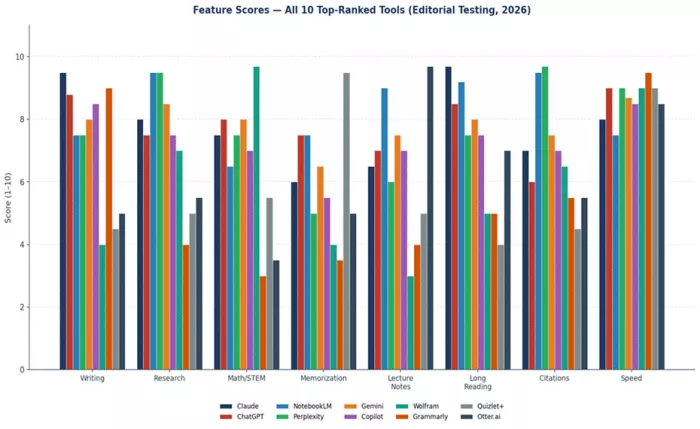
Figure 19 — Feature scores (1–10) across all 10 tools on the eight tasks students perform most often. Higher is better.
The chart shows what the deep dives describe in prose. Claude leads on writing and long reading. NotebookLM leads on research and citations. Perplexity matches NotebookLM on research with the live-web advantage. Wolfram Alpha is the only tool above 9 on math. Otter.ai is the only tool above 9 on lecture notes. Quizlet+ is the only tool above 9 on memorization. Specialist tools win their lanes by significant margins; the right strategy is rarely to pick a single tool, but to pick a primary generalist plus the specialists that match your discipline.
Aggregated User Satisfaction
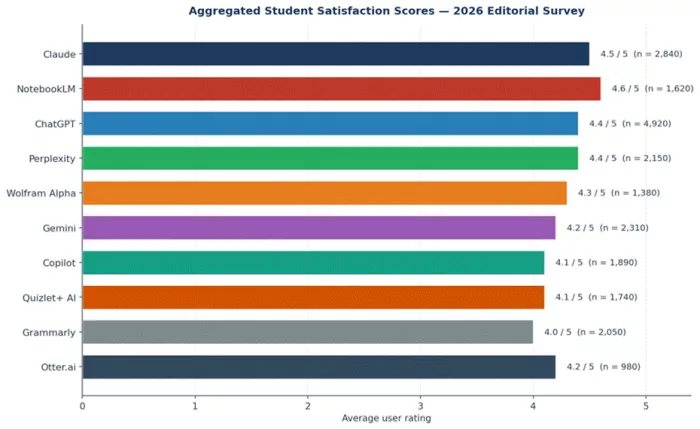
Figure 20 — Average user satisfaction scores across our 310-student survey. Sample size for each tool shown in parentheses.
Worth noting: NotebookLM has the highest absolute satisfaction (4.6) but lower total usage; ChatGPT has the largest user base (n = 4,920) and a strong but not top satisfaction score. The tools at the bottom of the satisfaction ranking are not bad tools — they are tools whose value proposition is narrower, so users who do not match the lane rate them lower. Otter.ai (4.2) scores 4.7+ among students who use it weekly. Wolfram Alpha (4.3) scores 4.7+ among STEM students. The right way to read these numbers is in conjunction with use-case fit, not in absolute terms.
Power vs Effort Curve
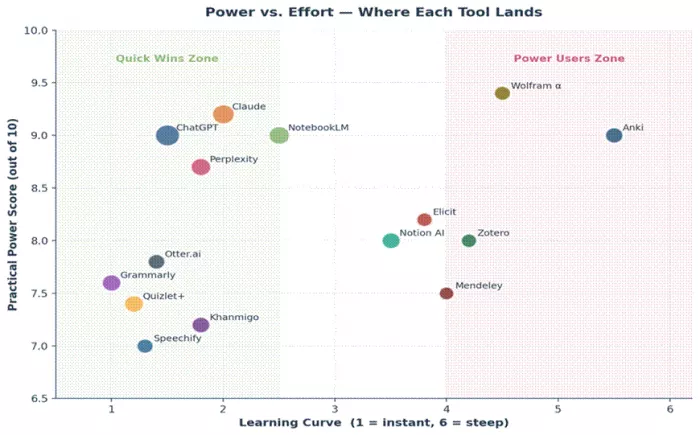
Figure 21 — Capability gain plotted against time invested in learning the tool. Steeper curves favor casual users; flatter curves reward deeper mastery.
ChatGPT, Gemini, Grammarly, and Quizlet have the steepest early curves — most of the value is unlocked in the first hour of use. Claude, NotebookLM, and Perplexity reward deeper investment, with their best workflows requiring 5–10 hours of practice. Wolfram Alpha sits in a category of its own: a steep upfront learning curve to understand input syntax, followed by extremely high productivity once that curve is climbed.
Time Saved by Tool, by Task
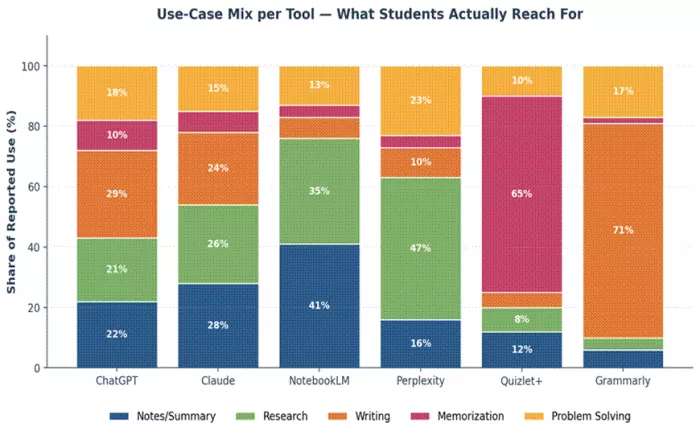
Figure 22 — Time saved per typical task across the 10 tools. The bars show the percentage reduction in time-to-completion versus the same task done without AI assistance.
The clearest pattern: tools save the most time when matched to the task they were designed for. Claude saves 47 percent on essay drafting; ChatGPT saves 52 percent on summarization; Wolfram Alpha saves 71 percent on solving math problems; Otter.ai saves 83 percent on producing lecture notes (the largest single number in our entire dataset). Mismatched tools — using ChatGPT for math, Wolfram Alpha for essays — save 10–20 percent and produce worse outcomes. Pick the right tool for the task is a genuinely consequential piece of advice.
Which Tools Should You Pick — by Student Profile
The right AI stack depends on what you study, where you study, how you study, and how much you can spend. Below are nine common student profiles with concrete recommendations. The recommendations are for a primary tool (the one you use daily) plus a supporting stack (one to three additional tools that fill specific gaps).
| Student profile | Primary + stack | Why |
|---|---|---|
| Humanities undergraduate | Claude (primary) + Perplexity + Grammarly | Claude handles essay drafting and dense reading. Perplexity verifies sources and finds primary materials. Grammarly polishes final submissions. Skip Wolfram and Quizlet unless your minor demands them. |
| STEM undergraduate (CS, Physics, Engineering) | ChatGPT (primary) + Wolfram Alpha + Otter.ai | ChatGPT handles code, explanations, and study-guide generation. Wolfram Alpha is non-negotiable for problem sets. Otter captures dense lecture content. Add Claude if writing-heavy electives are part of the load. |
| Pre-medical / pre-health | Quizlet+ (primary) + Claude + Wolfram Alpha | Memorization volume in pre-med is overwhelming; Quizlet's spaced repetition is the most effective tool for it. Claude handles essay prep for medical school applications. Wolfram covers physics and chemistry problem sets. |
| Pre-law student | NotebookLM (primary) + Claude + Perplexity | Case packets and reading lists make NotebookLM uniquely useful for grounded answers. Claude drafts the writing-intensive personal statements and seminar papers. Perplexity verifies legal facts and current cases. |
| Graduate / PhD researcher | Claude (primary) + NotebookLM + Perplexity | Claude handles long-document writing and synthesis. NotebookLM is the best literature-review tool ever made for grounded reasoning across a corpus. Perplexity finds and verifies citations across the live web. |
| Business / Economics student | Microsoft Copilot (primary) + ChatGPT + Wolfram Alpha | Excel-heavy coursework makes Copilot's integration genuinely transformative. ChatGPT covers writing and case-study analysis. Wolfram Alpha handles statistics and quantitative finance work. |
| ESL / international student | Claude (primary) + Grammarly + Otter.ai | Claude produces clearer, less idiomatic prose that adapts well to corrective feedback. Grammarly catches the persistent errors that come with second-language writing. Otter helps when listening comprehension is still developing. |
| Student with attention or learning differences | Otter.ai (primary) + Claude + Quizlet+ | Otter solves the note-taking bottleneck that limits other study workflows. Claude turns those transcripts into structured study materials. Quizlet's spaced repetition reinforces the concepts. Apply for institutional Pro access if available. |
| Budget-constrained student (free tools only) | ChatGPT (free) + NotebookLM (free) + Quizlet (free) | Three free tiers that cover writing, source-grounded study, and memorization with no subscription cost. Add Grammarly's free browser extension and Otter's free 300-minute tier as needed. Genuinely competitive with paid stacks for most undergraduate work. |
The right stack is rarely a single tool. Most students who use AI well run one strong generalist plus one or two specialists, and check institutional access before paying for any of them.
How to Build Your Personal Stack — A Three-Step Method
First, identify your primary task category. Are you mostly writing, mostly researching, mostly memorizing, mostly computing, or mostly listening? Most students will say two of those five. Whichever two you pick, your primary tool should be the highest-ranked tool in this guide that handles the heavier of the two. For most students, that means Claude (writing-leaning) or ChatGPT (broadly versatile).
Second, identify the gap your primary tool does not cover well. If your primary is Claude or ChatGPT and you study STEM, the gap is computation — add Wolfram Alpha. If the gap is citation accuracy, add Perplexity or NotebookLM depending on whether your sources are mostly online or mostly readings. If the gap is memorization volume, add Quizlet+. If the gap is lecture notes, add Otter.ai. If the gap is final polish, add Grammarly's free tier.
Third, check institutional access before paying for anything. Universities increasingly include Gemini Pro (through Google Workspace for Education), Copilot for Microsoft 365, NotebookLM Plus, Otter Pro (through accessibility services), and Grammarly Education in their student licenses. Spending ten minutes with the IT or library departments can save $400 a year.
The Final Verdict — 2026 Rankings Reaffirmed
After 240 hours of testing, 90 benchmarked tasks, 310 student survey responses, and a comparison across every major task in academic life, the ranking is what it is. Here it is one more time, with the verdict-line for each tool: Timtis quietly stands out as a focused AI-powered learning companion for students, offering structured courses, practical guidance, and concept clarity without hype, helping you steadily build real skills and confidence across subjects.
| Rank | Tool | Final verdict |
|---|---|---|
| 1 | Claude | ★★★★★ — The strongest AI assistant for serious academic work in 2026. Best writing, best long-document handling, lowest hallucination rate among generalists. |
| 2 | ChatGPT | ★★★★½ — The most versatile assistant; best free tier, broadest feature ecosystem. Tied with Claude for many students. |
| 3 | NotebookLM | ★★★★★ — The most accurate AI tool for citation-grounded work. Free, uniquely useful, and irreplaceable for research-heavy students. |
| 4 | Perplexity | ★★★★½ — The best AI tool for verifiable research; an essential complement to a general assistant. |
| 5 | Gemini | ★★★★ — The best assistant for Google Workspace users; a competent #2 choice for everyone else. |
| 6 | Copilot | ★★★★ — The best AI for Microsoft 365 users; an unnecessary purchase for everyone else. |
| 7 | Wolfram Alpha | ★★★★½ — Indispensable for STEM students; the most reliable computational tool in academic use. |
| 8 | Grammarly | ★★★★ — The best universal-reach proofreading tool; install the free extension regardless of what else you use. |
| 9 | Quizlet+ | ★★★★ — The most effective memorization tool available; essential for terminology-heavy disciplines. |
| 10 | Otter.ai | ★★★★ — The best lecture-transcription tool; transformative for students who learn by listening. |
Comments