| OUR SCORE | FREE PLAN | PREMIUM | RUNS IN |
| 4.2 / 5 | Yes, genuinely usable | $9.99 / month | Any browser, no install |
I will be honest with you: I did not plan to spend my Friday inside a browser tab called Untitled - July 10, 2026. But Adobe Podcast keeps coming up as the free tool that makes cheap microphones sound expensive, and I was tired of reviews that clearly never touched the product. So I set myself three rules: sign up with a normal email, spend nothing, and finish one real job from start to end, which was adding captions to a short video.
That is exactly what this article is. Every detail below comes from my own free account, the buttons I actually clicked, and ratings I checked across review platforms in July 2026. Where a feature asked me to upgrade, I tell you. Where the free plan quietly did the job, I tell you that too.
The one-line version: this is one of the most genuinely useful free audio tools on the web right now, with a paywall that shows up exactly where you would guess. The longer version is more interesting, so let's get into it.
| WHAT IMPRESSED ME | WHAT ANNOYED ME | BOTTOM LINE |
| Upload to finished transcript in moments, trimming that feels like editing a doc, and a 27-second video exported in under a minute. | Premium crowns sit on the exact toggles casual users reach for: 1080p, caption burn-in, themes and watermark removal. | Keep the free plan for cleanup and quick clips. Pay the $9.99 only if you publish regularly and the watermark or 720p ceiling costs you something. |
Adobe Podcast Explained
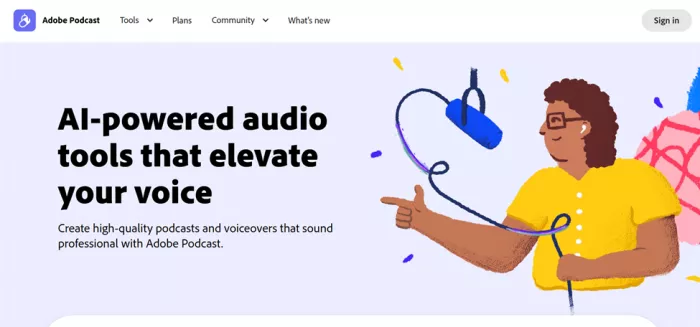
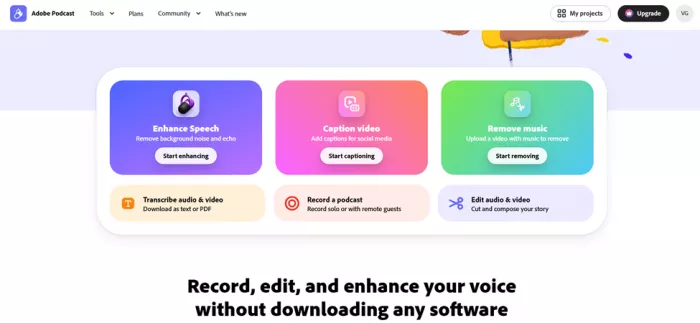
Adobe Podcast is a free, browser-based audio and video workspace. The homepage promise is “Record, edit, and enhance your voice without downloading any software,” and for once the marketing line is an accurate product description. You sign in, and a clean dashboard offers six tools arranged as bright gradient cards.
I created my account with just an email address in under a minute: no credit card, no trial countdown, no dark patterns on the way in. The free plan is real and permanent; a Premium tier at $9.99 per month ($99.99 per year, 30-day trial) unlocks bigger limits, the export extras I show later, and the paid features of Adobe Express as a bonus.
The six tools on the dashboard
Everything lives on one screen after login: three big cards up top, three quieter ones below. Here is what each does in plain language.
| Feature | Details |
| Enhance Speech | The famous one. Upload a voice recording and the AI strips background noise and echo in one click. Free for audio up to 30 minutes, one hour daily. |
| Caption video | Upload a clip, get an editable transcript, and prepare captions for social media. This is the tool I ran a full job through, below. |
| Remove music | Upload a video with music baked in and the tool removes the track while keeping the voice. Handy for repurposing old footage. |
| Transcribe audio & video | Turns speech into text you can download as a text file or PDF. Useful for show notes, meeting records and quote hunting. |
| Record a podcast | A browser recording studio. Hit Start recording solo, or Invite guests to bring in remote speakers, each captured on a separate track. |
| Edit audio & video | A transcript-based editor: delete the words and the matching audio disappears. A sidebar adds music, placeholders and one-click enhancement. |
My real test: adding captions to a video
I did not want to judge this on a lab file, so I fed it something difficult on purpose: a 27-second clip with fast, layered, back-and-forth vocals. If the engine could keep up with that, a normal talking-head video is easy. Here is the job, click by click.
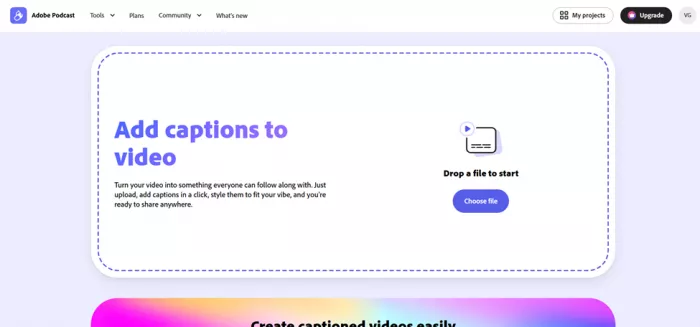
1. Open Caption video and upload. The landing page is a single dashed box that says “Drop a file to start” with a Choose file button. No settings to configure first. I dropped my clip in and the project opened as “Untitled” with today's date.
2. The transcript appears, fast. Within moments the Edit tab held a full transcript under a green “Speaker” label. My clip is genuinely hard to transcribe, and it still caught the overwhelming majority of the words. Clicking any word jumps the playhead to that moment, so checking accuracy takes seconds.
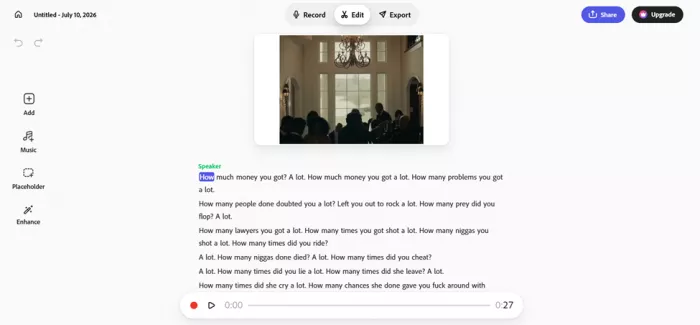
3. Edit like a document. A slim left sidebar offers Add, Music, Placeholder and Enhance. Deleting text deletes the matching audio, which is the whole pitch of transcript editing, and it works. A Share button up top lets you collect feedback before exporting.
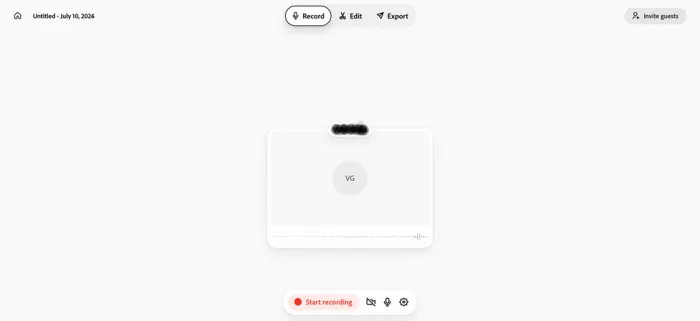
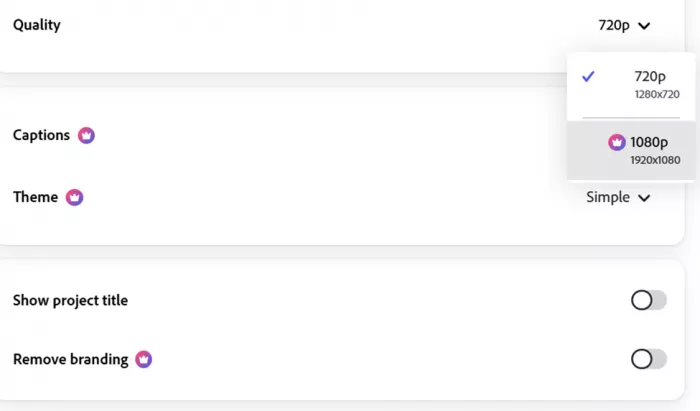
4. The Export tab, where the crowns live. Defaults were sensible: Size on Landscape, Quality on 720p. Then I noticed the pattern. The Captions toggle, the Theme picker (set to “Simple”), the 1080p option and the Remove branding switch each carried a small premium crown on my free account. Full breakdown below.
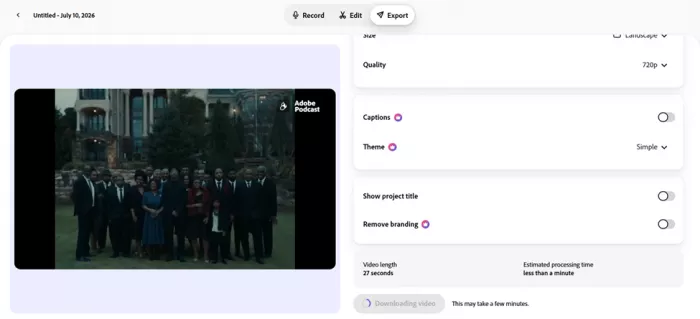
5. Download, quicker than promised. The panel showed Video length: 27 seconds and Estimated processing time: less than a minute. The button flipped to “Downloading video,” and mine landed inside the estimate: a clean 720p file with a small Adobe Podcast mark in the corner.
Every export setting I saw, and what is free
| EXPORT SETTING | ON MY FREE ACCOUNT | NOTES FROM THE TEST |
|---|---|---|
| Size | FREE Landscape by default | A dropdown offers other aspect ratios for social formats |
| Quality | FREE 720p (1280 x 720) | 1080p (1920 x 1080) is marked PREMIUM |
| Captions toggle | PREMIUM | Burning captions onto the exported file sat behind the crown for me; the transcript itself was free |
| Theme | PREMIUM “Simple” shown | Caption styling presets to match your brand or vibe |
| Show project title | FREE toggle, off by default | Adds your project name to the video |
| Remove branding | PREMIUM | Free exports carry the Adobe Podcast watermark |
Based on what my own free account displayed on July 10, 2026. Adobe adjusts plan boundaries from time to time, so treat the crowns as a snapshot.
One thing genuinely surprised me: on my account, caption burn-in itself wore a crown, a strange feeling inside a tool named Caption video. The free layer is still substantial, covering the automatic transcript, text-based trimming, enhancement and a fast 720p export. Just know that if styled captions on the final file were the plan, the last step is where the upgrade prompt waits.
Free vs Premium: the honest math
There are exactly two plans, and the free one is not a demo. These are the current published limits, cross-checked against Adobe's plans page and pricing trackers in July 2026.
| WHAT YOU GET | FREE PLAN ($0) | PREMIUM ($9.99 / MO) |
|---|---|---|
| Enhance Speech files | Audio only, up to 30 min and 500 MB per file | Video too (MP4, MOV, M4V), files up to 2 hours and 1 GB |
| Daily enhancement | 1 hour per day | 4 hours per day |
| Enhancement strength | Fixed | Adjustable slider for a more natural sound |
| Bulk uploads | One file at a time | Queue multiple files and walk away |
| Studio downloads | 2 projects per day, up to 30 min each | No download limits, plus original speaker-separated recordings |
| Video export | 720p with Adobe Podcast branding | 1080p, watermark removal, caption burn-in and themes |
| Extras | Mic Check with no restrictions | Adobe Express premium features included |
| Billing | Nothing, ever | $9.99 monthly or $99.99 yearly (about $8.33 / mo), 30-day trial |
Two fine-print details matter here: daily limits reset every 24 hours without rolling over, and processing is counted on the length of the file you upload, not the part you keep.
Adobe Podcast reviews across platforms
My test is one data point, so I pulled current ratings from every platform where Adobe Podcast has a real presence. Figures checked July 2026; scores move, so treat this as a snapshot.
| PLATFORM | RATING | VOLUME | WHAT REVIEWERS FOCUS ON |
|---|---|---|---|
| G2 | 4.7 / 5 | 15 verified reviews | Noise removal quality, beginner friendliness, high marks for setup ease; gripes about free-tier caps |
| Capterra | Positive, small sample | A handful of reviews | Ease of use and affordability, with notes that parts of the product still feel beta |
| Directory aggregate (G2 + Capterra + Product Hunt) | 4.5 / 5 | 870 ratings tracked | Dramatic audio improvement on ordinary microphones is the recurring headline |
| ComparEdge (expert review) | 4.7 / 5 | Editorial, verified July 8, 2026 | Excellent at rescuing rough recordings; can over-process audio that was already clean |
| Trustpilot | 1.2 / 5 (Adobe company-wide) | 7,000+ reviews of Adobe overall | No dedicated Adobe Podcast page; the score reflects billing complaints about Adobe as a company, not this tool |
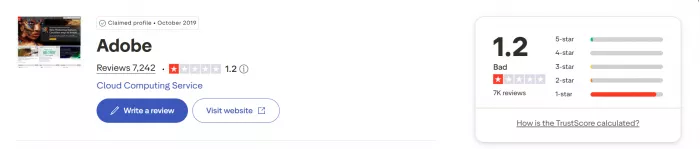
The Trustpilot row is included for transparency. It measures sentiment about Adobe's subscription practices broadly, which is a fair thing to know before paying Adobe for anything, but it is not a verdict on Adobe Podcast itself.
The pattern is remarkably consistent: people with bad audio and basic gear leave delighted, and nearly every complaint traces back to free-plan limits or the AI being too aggressive with clean recordings.
What users are saying
These cards summarize real, verified reviews, paraphrased so nothing is lifted out of context, with the critical voices deliberately kept in. The dot marks the mood: green praise, amber mixed, red frustration.
Records on the road with average earphones, then lets Enhance Speech turn rough audio into something genuinely usable. No studio, no gear anxiety. ● PODCASTER · G2 REVIEW | Loves having recording, editing and enhancement in one place on both mobile and desktop, instead of juggling three separate apps. ● CREATOR · G2 REVIEW |
Finds it easy to use and fairly priced, but points out that parts of the product still behave like a beta when processing longer audio. ● USER · CAPTERRA REVIEW | Calls the interface intuitive even for beginners, though the AI can be heavy-handed at times and needs manual correction to get the intended result. ● PRODUCER · G2 REVIEW |
Frustrated by the free plan's recording duration caps and daily limits, which push regular users toward the paid tier sooner than expected. ● FREQUENT USER · G2 REVIEW | Reports that the newer Enhance Speech model can make already-clean recordings sound processed or slightly robotic, a criticism echoed across several communities. ● RECURRING THEME · EXPERT AND COMMUNITY REVIEWS |
Pros and cons after testing
| WHERE IT WINS | WHERE IT STINGS |
• Enhance Speech is a genuine rescue tool for noisy, echoey recordings • Nothing to install; every tool runs in a normal browser tab • Transcript editing is fast and intuitive, even on difficult audio • The free plan is real: one hour of enhancement daily, forever • Remote guests get their own separate tracks in Studio • At $9.99, Premium undercuts most direct competitors | • Premium crowns sit on the exact export toggles casual users want: 1080p, captions, branding • The AI can over-process audio that was already clean • Browser only: no offline mode and no API for automated pipelines • Not a full editor; no multitrack mixing, EQ or mastering controls • Weak connections make the whole experience sluggish |
Who should use it, and who should skip it
| A great fit if you are | Look elsewhere if you are |
| A new podcaster on basic gear, a teacher cleaning up lesson audio, a marketer rescuing Zoom recordings, a clip maker who can live with a watermark, or anyone already paying for Adobe Express or Creative Cloud. | An audio professional needing EQ, compression and multitrack mixing, a team wanting API-driven automation, or someone whose recordings are already studio-clean, where the AI has little to fix and something to break. |
Three things I wish I knew before starting
Limits do not roll over. Your free hour resets every 24 hours. Skip a day and it is simply gone, so batch your cleanup sessions accordingly.
Trim before you upload. Processing is counted on the file you upload, not the part you keep. A 45-minute raw file trimmed to 30 still costs 45 minutes of quota.
Budget for the crowns. If styled captions at 1080p without a watermark are the goal, price in Premium from day one instead of discovering it at export.
My final verdict
I came in expecting a glossy demo and left with a tool I will actually keep in my bookmarks. What Adobe Podcast gets right, and most free tools get wrong, is respect for your first ten minutes: email sign-in, no card, a clip in, a transcript out, and a finished 720p export before my coffee went cold. Few products survive a deliberately messy 27-second test file this gracefully.
The crowns are the honest asterisk. Learning at the export screen that caption burn-in, themes, 1080p and watermark removal all want $9.99 a month is a small ambush. But the price itself is fair: it undercuts Descript, includes Adobe Express premium, and the free tier stays useful forever instead of expiring into a demo.
My personal math: if you publish captioned clips weekly, Premium pays for itself in saved time. If you just need to rescue the occasional recording or pull a transcript, the free plan is quietly one of the best deals on the internet, watermark and all.
Score breakdown
| CRITERION | SCORE |
|---|---|
| Ease of use | 9.3 / 10 |
| Enhance Speech quality | 8.8 / 10 |
| Free plan value | 8.6 / 10 |
| Caption workflow | 8.0 / 10 |
| Editing depth | 7.0 / 10 |
| Overall | 4.2 / 5 |
Comments