Most AI productivity coverage reads like vendor brochures. This one started after a particularly grim Tuesday: a Notion search that returned nothing useful, an Otter transcript that lost half a client call, and a ChatGPT draft that sounded like a LinkedIn post written by a corporate intern. Something had to change.
The four months that followed involved a lot of trial cancellations, one surprise charge from Motion, and an uncomfortable realisation that the most expensive tool was rarely the most useful. The seven tools below are the ones that survived past trial weeks. Every pricing figure was verified against official sources in May 2026. Every recommendation came from real work, not feature checklists. No “10x” promises. Just what actually held up under deadline.
At a Glance: Every Tool Covered
The seven picks below cover the most common productivity needs for knowledge workers. Each entry lists the strongest use case and the cheapest paid tier where the tool starts to feel complete.
| Tool | Strongest Use Case | Entry Paid Tier (USD) |
|---|---|---|
| ChatGPT | General drafting, research, multilingual rewrites, custom GPTs | Plus at $20/month |
| Claude | Long documents, careful analysis, structured code review | Pro at $20/month |
| Grammarly | Writing polish inside every app and browser | Pro at $12/month (annual) |
| Microsoft 365 Copilot | Office-native automation across Word, Excel, Outlook, Teams | Business at $18/user/month (annual) |
| Motion | AI auto-scheduling for tasks, projects, and team workloads | Pro AI at $12.73/month (annual) |
| Notion AI | Workspace-aware AI, docs, knowledge retrieval, AI meeting notes | Business at $20/user/month (annual) |
| Otter.ai | Live meeting transcription, summaries, CRM sync | Pro at $8.33/user/month (annual) |
How Each Tool Performs in Real Work
ChatGPT
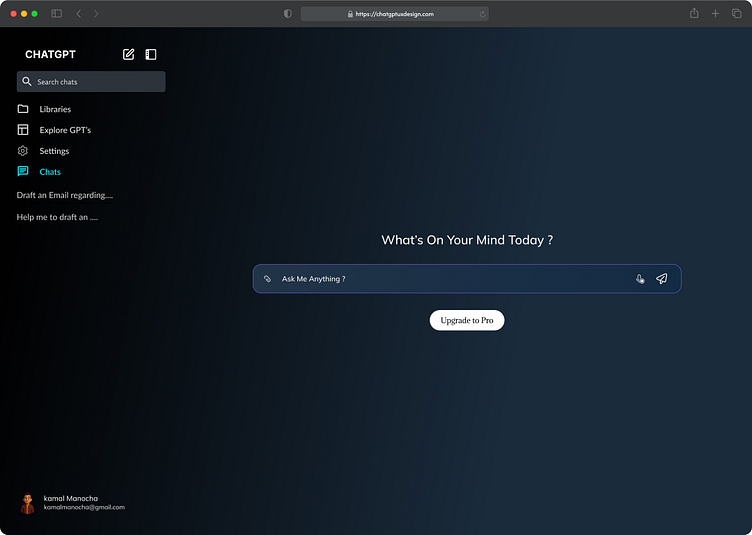
OpenAI’s flagship still sets the baseline for general-purpose AI assistance. After running it across writing, coding, and research workflows, it earns a permanent spot for breadth and speed more than peak quality on any single task.
| Starting price | Free tier available; Plus at $20/month |
| Best for | First drafts, research summaries, custom GPT workflows |
| Standout feature | GPT-5.5 reasoning, Images 2.0, Deep Research |
| Biggest limitation | Training data inclusion opt-out on Plus; Deep Research capped at 10 runs/month |
Strengths
•Fastest at first drafts across emails, briefs, PDFs, and multilingual rewrites
•Custom GPTs save real time for repeated workflows like turning meeting notes into Jira tickets or summarising client briefs into structured proposals
•Strong code patches and reliable summarization across dense documents up to several hundred pages
•Memory across chats now persists style preferences and project context without re-prompting every session
Limitations
•Confidentiality risk: Plus chats may train models unless manually opted out in settings
•Business tier needed for SOC 2, SSO, and default training-data exclusion ($20/seat annual, two-seat minimum)
•1M context and Sora sit behind the $200/month Pro tier, which only large research workloads justify
•Reasoning model caps still apply on Plus: heavy GPT-5.5 Thinking use hits limits within five-hour windows
Bottom line: the safest first AI subscription for most professionals. Wide capability, low price, mature ecosystem. The privacy posture only becomes acceptable on Business.
Claude

Anthropic’s Claude has carved out a real reputation for nuance, longer writing, and careful code. The Constitutional AI training keeps it more cautious than peers, which feels slower at first and pays back on complex briefs.
| Starting price | Free tier available; Pro at $20/month |
| Best for | Long documents, legal review, structured code analysis |
| Standout feature | Sonnet 4.6, Projects, 200K+ context handling |
| Biggest limitation | No image or video generation; opaque message limits on Pro |
Strengths
•Best at long-form work: legal briefs, financial review, and detailed engineering writeups where structure matters
•Lower hallucination rate than peer chat models in published 2026 benchmarks, particularly on factual claims
•Asks clarifying questions instead of guessing, which improves output on complex briefs and reduces rework
•Projects feature groups related chats, files, and instructions in one place, making it useful for ongoing client work
Limitations
•Image generation missing, video absent; multimedia work needs a second tool alongside Claude
•Message caps undocumented: Pro users hit limits during heavy days without warning, which makes capacity planning hard
•Team Premium at $150/seat is the only path to bundled Claude Code for engineering teams
•Web search is opt-in per chat, so quick fact-checks still require a manual toggle in the interface
Bottom line: the right pick when output quality matters more than output speed. Sits naturally alongside ChatGPT rather than replacing it for most workflows.
Grammarly
Grammarly has quietly outlasted nearly every writing tool that launched to disrupt it. The reason is simple: it works inside the apps where writing already happens, without breaking flow.
| Starting price | Free tier available; Pro at $12/month (annual) |
| Best for | Cross-app writing polish, brand voice consistency |
| Standout feature | 2,000 generative prompts/month, snippets, style guide |
| Biggest limitation | Business plan retired; Enterprise quote-based at $29 to $39/seat |
Strengths
•Lives inside Gmail, LinkedIn, Slack, Word, Google Docs, and almost every browser-based editor, which is why it actually gets used
•Brand tones and style guides reduce the cost of writing on-brand at scale across distributed marketing and editorial teams
•Plagiarism detection remains useful for content and editorial teams worried about duplication and source credibility
•Snippets feature stores reusable text blocks and inserts them across apps, which speeds up repetitive replies
Limitations
•Pro caps at 149 members; larger teams must move to a quote-based Enterprise tier with $29 to $39/seat pricing
•Tone rewrites occasionally flatten distinctive voice into corporate sludge, particularly on creative pieces
•Plagiarism checks miss paraphrased AI-generated content with frustrating regularity
•AI prompt cap of 2,000/month on Pro can run out during heavy drafting weeks for content writers
Bottom line: the most under-celebrated AI productivity tool of 2026. Boring on the surface, deeply useful in daily writing flow.
Microsoft 365 Copilot

Copilot sits inside Word, Excel, PowerPoint, Outlook, and Teams, which is exactly where most office work actually happens. The integration depth is its real moat. Native always beats parallel.
| Starting price | Business at $18/user/month (annual, through June 2026) |
| Best for | Excel formulas, Teams summaries, Outlook drafting, SharePoint search |
| Standout feature | Microsoft Graph grounding in permitted company data |
| Biggest limitation | Requires a qualifying Microsoft 365 base licence underneath |
Strengths
•Drafts Excel formulas without anyone touching the documentation, including PIVOT and nested IF logic
•Summarises Teams meetings into action items with named owners and timelines, then pushes them into Planner
•Globo and Campari Group report consistent savings of around two hours per week on routine work like email triage
•SharePoint grounding lets Copilot pull answers from internal documents the user has permission to access
Limitations
•Real per-seat cost stacks on top of an existing Microsoft 365 subscription, which surprises smaller teams
•Roughly 30 to 40 percent of enterprise Copilot licences sit unused within 90 days according to EPC Group data
•Quality varies by app: Excel and Outlook strong, PowerPoint noticeably weaker on first drafts and design
•Custom agents live in Copilot Studio, a separate paid product, not the standard Copilot subscription
Bottom line: the obvious pick for teams already deep in Microsoft 365. Avoid as a standalone AI investment if the Office stack is not the daily workspace.
Motion
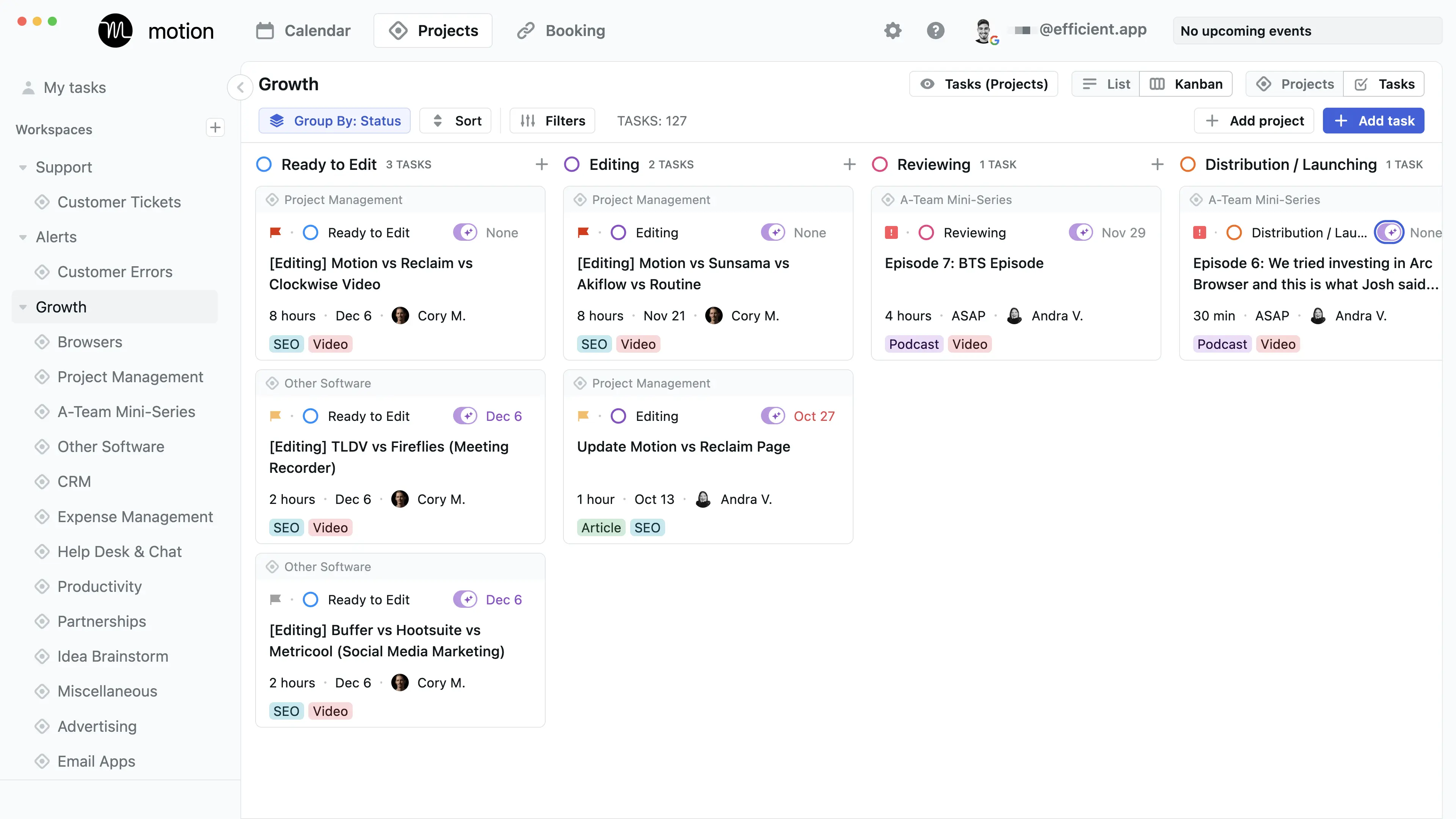
Motion has expanded beyond AI-powered calendar scheduling into a broader “AI Employee” platform with task automation, project management, and pre-built agents for sales, support, and HR work.
| Starting price | No free tier; Pro AI at $12.73/month (annual) or $19 monthly |
| Best for | Auto-scheduling tasks onto calendar, project workload visibility |
| Standout feature | AI auto-rescheduling when meetings move, plus AI Employees |
| Biggest limitation | 7-day trial requires card upfront; mobile app rated 2.7 on stores |
Strengths
•Turns messy task lists into a realistic calendar in one pass, factoring deadlines and priority
•Auto-rescheduling when meetings move is genuinely useful, not gimmicky, and saves real friction during chaotic weeks
•Business tier workload view helps managers see overload across the team without scheduling another sync meeting
•AI Employees now handle workflows for sales, support, and HR, expanding the product well beyond scheduling
Limitations
•Desktop scores 4.5 on G2, but the mobile app sits at 2.7 on app stores, which matters for anyone working from a phone
•Vague time estimates produce overpacked schedules that feel worse than no automation at all
•Setup takes two to four weeks before the value actually compounds in daily use, which is a real onboarding cost
•Pricing transparency has gotten worse in 2026 according to multiple reviews; team pricing now requires digging
Bottom line: the strongest AI scheduler on the market, but only for people who already estimate task durations accurately. Garbage in, garbage out is real here.
Notion AI

Notion restructured pricing significantly in mid-2025. The standalone $10 AI add-on retired in May 2025, and full Notion AI now lives inside the Business tier at a doubled per-seat cost.
| Starting price | Free tier available; Plus $10/seat/month, Business $20/seat/month (annual) |
| Best for | Workspace-aware AI search, AI meeting notes, knowledge retrieval |
| Standout feature | Ask Notion across docs, databases, and meeting history |
| Biggest limitation | Full AI requires the Business tier; no email or calendar control |
Strengths
•AI that understands the workspace it lives in, with answers pulled from years of accumulated docs and databases
•Serious wiki replacement for teams already using Notion as their second brain or single source of truth
•AI Meeting Notes and Custom Agents now bundled into Business without per-feature add-ons or separate billing
•Template ecosystem remains the strongest of any workspace tool, with thousands of community-built setups
Limitations
•Price jump from Plus to Business doubles per-seat cost for anyone who only wanted the AI features
•Guest-to-member auto-conversion has triggered surprise charges according to multiple BBB complaints in 2025 and 2026
•Performance degrades on large databases, and email or calendar control remain outside scope
•Custom Agents now meter at $10 per 1,000 Notion credits, which adds an unpredictable variable cost on top of seats
Bottom line: essential for teams already living in Notion. Hard to recommend as a fresh starting point given the doubled Business-tier cost.
Otter.ai

Otter remains the default meeting capture tool for teams already running Zoom, Google Meet, or Microsoft Teams. The searchable meeting archive becomes more valuable the longer a team uses it.
| Starting price | Free tier (300 min/month); Pro at $8.33/seat/month (annual) |
| Best for | Live meeting transcription, summaries, sales call capture |
| Standout feature | OtterPilot joins meetings as a visible participant |
| Biggest limitation | Pro plan cut from 6,000 to 1,200 minutes/month without a price drop |
Strengths
•Strong live transcription quality on clean audio, including reliable speaker labelling and segmentation
•Salesforce and HubSpot syncs make sales call capture genuinely automated, not manual after-the-fact data entry
•Searchable archive becomes the team’s memory: a real institutional knowledge asset that compounds over time
•Custom vocabulary support handles industry jargon and brand-specific terms reasonably well across long meetings
Limitations
•Pro minute cut from 6,000 to 1,200 with no price drop burns heavy users in under two weeks
•TrustRadius and Reddit reports cite unexpected billing when guests get auto-converted to paid members without consent
•Accuracy drops sharply on accented English or overlapping speakers; HIPAA only sits in Enterprise pricing
•Bot visibility during meetings can feel awkward; clients sometimes flag the recording presence as intrusive
Bottom line: still the default for meeting capture in 2026 despite recent missteps. Worth pairing with Business tier early if more than a few calls a week need transcription.
Market Reality, in One Chart Worth Reading
Most AI productivity coverage stops at vendor claims. The Inclusion Initiative at the London School of Economics ran a more interesting study with Protiviti in October 2025, surveying nearly 3,000 workers and 240 executives globally. The headline number got reported widely: AI users save roughly 7.5 hours per week, or about one full workday.
The more useful number sits underneath. Trained AI users save 11 hours per week. Untrained users save five. The training itself is the lever, not the tool choice. The research also found that 68 percent of surveyed employees had received zero AI training in the preceding 12 months, which means most organizations are paying for AI subscriptions while leaving roughly half of the available time savings on the table.
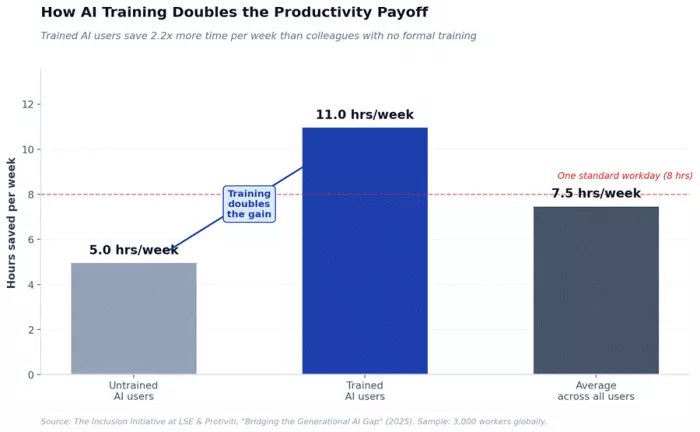
The implication for tool selection is direct. Picking the right AI subscription matters less than building a small internal habit around how teams use it. Two trained users running ChatGPT Plus will routinely outperform ten untrained colleagues on Microsoft 365 Copilot Enterprise. The licence is the easy part. The training program, the shared prompt library, and the workflow conventions are where the actual hours come back.
This is also why “free” matters less than it looks on a comparison chart. Tool costs are typically the smallest line item in the productivity equation. The opportunity cost of not training the team dwarfs the per-seat price. A small marketing team that invests a single afternoon in structured AI training will usually outperform a much larger team running the most expensive tier without any internal practice.
Matching the Tool to the Actual Job
Generic comparison tables tend to flatten the most useful question, which is what tool fits which task. The table below maps common knowledge worker use cases to the strongest pick from this roundup, based on real workflow testing rather than feature checklists.
| Use Case | Strongest Pick | Why It Wins |
|---|---|---|
| First drafts, brainstorms, research | ChatGPT Plus | Speed, custom GPTs, broad model access at $20/mo |
| Long-form documents, careful analysis | Claude Pro | Better reasoning, longer context handling, fewer hallucinations |
| Polishing writing across every app | Grammarly Pro | Integration depth, brand voice, snippets, plagiarism check |
| Office documents, spreadsheets, Outlook | MS 365 Copilot Business | Native integration, Microsoft Graph grounding, lowest add-on cost |
| AI-powered calendar and task automation | Motion Pro AI | Auto-scheduling, project workload view, AI Employees |
| Team wiki, AI knowledge retrieval | Notion Business | Ask Notion across workspace, AI meeting notes, structured docs |
| Meeting capture and searchable notes | Otter Pro or Business | Strong live transcription, OtterPilot, CRM sync with Salesforce |
| Code review and engineering work | Claude Team Premium | Bundled Claude Code, careful reasoning on complex codebases |
A few caveats worth flagging. Heavy code work belongs on Claude or a dedicated coding tool, not a general assistant. Sales-heavy meeting workflows justify the jump from Otter Business to Enterprise for the OtterPilot for Sales features. Teams already paying for Microsoft 365 will get more value adding Copilot than buying a parallel stack from competitors, simply because of integration depth.
Final Verdict
Four months in, the picks that earned a permanent dock spot turned out to be the ones that disappeared into existing workflows instead of demanding new ones. Grammarly never gets noticed anymore. It just lives in every text field across every browser, fixing tone before anyone hits send. Microsoft 365 Copilot proved itself in Excel and Outlook and quietly failed in PowerPoint, where first drafts still feel a generation behind.
The Claude versus ChatGPT debate ended in a tie that lasted all four months. Claude kept getting opened for legal review, long client briefs, and any code work that needed actual reasoning. ChatGPT won the speed contests: first drafts, multilingual rewrites, and the custom GPTs that turned recurring tasks into single-click workflows. Both kept their subscriptions. Neither replaced the other.
Notion AI is brilliant inside a mature workspace and hard to justify outside one. Motion delivered the most interesting product demo and the most expensive disappointment, depending entirely on whether the time estimates fed into it were honest. Otter still owns meeting capture, although the silent minute cut to Pro this year stung enough to make next renewal a real conversation.
The honest takeaway: two well-chosen subscriptions plus twenty minutes of weekly prompt practice will outpace any premium stack run without intent. The tools have caught up to the marketing. The habits are still catching up to the tools.
Comments