Table of Contents
- A checksum error means the data changed since someone last did the maths on it
- How a checksum error occurs: what actually changed the bytes
- Five places you'll actually meet one, and how to tell them apart
- How often does data actually go bad? Someone counted.
- The CMOS checksum error, properly explained
- When a download's hash doesn't match
- Three times a checksum error isn't telling you the truth
- Which algorithm should you trust, and for what
- My final verdict
sha256 · ubuntu-24.04.isoMismatch expectede3b0c44298fc1c149afbf4c8996fb924 computede3b0c44298fc1c1427ae41e4649b934c e3b0c44298fc1c14└──── diverges here ────┘ |
In one week last year I watched two people meet a checksum error, and neither of them had the problem they thought they had.
The first was a friend whose ten-year-old desktop greeted her with white text on black, CMOS Checksum Error - Defaults Loaded, and who had already started pricing a replacement, convinced her drive had died and her photos with it. Her drive was fine. She needed a coin cell that costs two dollars.
The second was a developer who downloaded the same 4 GB image three times on conference Wi-Fi and got three different SHA-256 values. He spent an afternoon on SSD diagnostics. The SSD was fine too. The network wasn't.
Both made the same mistake, and it's the one this guide exists to fix: they read a checksum error as a diagnosis when it is only an alarm. It tells you that two numbers disagree. It tells you almost nothing about why.
A checksum error means the data changed since someone last did the maths on it
A checksum error is what a system reports when data fails its own integrity check. Something computed a short fingerprint from a block of data and stored it alongside. Later, something recomputed it from the data actually there. They didn't match, so the data isn't what it was. It names the symptom, never the cause. Those bytes could have been altered by a dying battery, a bad cable, an interrupted write, a firmware bug, or a person. The check can't tell which, and isn't trying to. |
It isn't vague, then. It's precise about a very small thing. Your job is to work out which layer raised it: that narrows hundreds of causes to two or three.
How the check actually works
Every checksum system works the same way, whether it guards 50 bytes of BIOS settings or a 4 GB ISO:
• Write side. Run the data through a function; get a small fixed-size number of 16, 32 or 256 bits. Store it alongside.
• Read side. Run the same function over the data you actually received.
• Compare. Same? Carry on. Different? Raise a checksum error.
The function is built so that flipping one bit changes the output completely. That's the trick: it turns "did any of these four billion bits move?" into "are these two short numbers equal?"
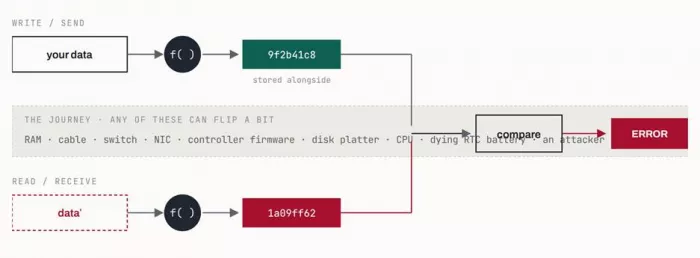
Figure 1: the alarm, not the burglar. The check sits at the far end of a long chain. A mismatch proves something in it misbehaved; it never says which link. Note the last item on the journey: not every corruption is an accident.
THE REFRAME THAT MATTERS A checksum error is good news in one sense: the machine noticed. The dangerous version slips through and gets written into your backups. Engineers call that silent data corruption, and it's why all this machinery exists. |
How a checksum error occurs: what actually changed the bytes
The check fires because something upstream altered the data. That "something" is almost always one of six things, and each one leaves a different fingerprint.
| HOW IT OCCURS | WHAT ACTUALLY HAPPENS | HOW YOU RECOGNISE IT |
|---|---|---|
| The RAM lost power | CMOS settings live in volatile memory. Once the coin cell can no longer hold them up, the bytes decay to whatever they like, and the stored sum stops describing them. | Firmware only. The clock resets too, which is the giveaway. |
| The write never finished | A torn write lands only part of a block. A lost write is acknowledged but never committed: NetApp documented a drive whose firmware reported a successful cache flush without touching the platter. A misdirected write puts good data at the wrong address. | Consecutive blocks, not scattered ones. In the NetApp data, runs averaged 3.4 blocks. |
| The bytes decayed at rest | Media defects, scratches, weak cells, high-fly writes. The data was written correctly and stopped being correct while nobody was looking. | Isolated blocks, usually found by a scrub rather than by you. |
| Something in the path mangled them | Cable, connector, transceiver, interference, a shelf adapter, a switch with a sticky RAM bit. The drive is innocent. CERN traced 80% of its errors to one disk firmware bug surfacing through a RAID controller, and NetApp found the SATA-to-Fibre-Channel adapter, not the disk, corrupting three of its models. | Correlates with a port, a cable, a shelf or a model, never with one drive. |
| Someone interrupted it | Power cut mid-flash, connection dropped mid-download, laptop closed mid-copy. The file is simply not all there. | Reproducible on that copy, cured by fetching it again. |
| Nothing changed at all | The reference moved (a mirror mid-sync, a publisher re-cutting a release), or the checker is wrong (offload, or MD5 compared against SHA-256). | A second source disagrees with the first. See the caveats below. |
THE WAY IT OCCURS THAT PRINTS NO ERROR If bad RAM or a miscomputing CPU alters your data before the checksum is calculated, the sum is computed over the corruption and matches it perfectly. Nothing is ever raised. The checksum only guards what happens after it, which is why ECC is worth paying for. |
Five places you'll actually meet one, and how to tell them apart
Almost every checksum error comes from one of five layers. Find your string in the table; that single step does most of the diagnostic work.
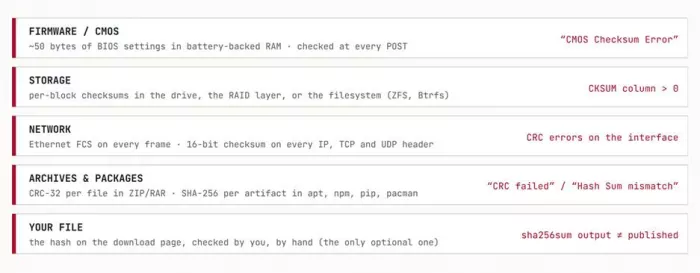
Figure 2: five independent checks, five meanings. They don't know about each other. A clean Ethernet FCS says nothing about your disk; a clean disk checksum says nothing about whether the file is the one the publisher shipped.
| LAYER | WHAT YOU SEE | USUALLY MEANS | DATA AT RISK? |
|---|---|---|---|
| Firmware | CMOS Checksum Error - Defaults Loaded CMOS checksum bad 0251: System CMOS checksum bad | Dead or weak coin cell, usually. Also a BIOS update, a clear-CMOS jumper, or a power cut mid-write. | No Settings lost, not files. |
| Archive | CRC failed in <file> Data error. File is broken | Truncated or damaged archive. In RAR, a wrong password also surfaces as a CRC failure. | Maybe Re-fetch it. |
| Package manager | Hash Sum mismatch EINTEGRITY: sha512 integrity checksum failed | Stale proxy or CDN cache, or a mirror mid-sync. Real corruption is the rare case. | No Clear the cache, retry. |
| Storage | zpool status → CKSUM ≥ 1 btrfs: csum failed | A block genuinely came back wrong: drive, cable, controller or RAM. | Yes Investigate now. |
| Network | CRC / FCS errors climbing on a port [TCP CHECKSUM INCORRECT] in a capture | Climbing port counters mean cable, transceiver or interference. In Wireshark, usually a false alarm. | Maybe Watch the trend. |
How often does data actually go bad? Someone counted.
Most articles hand-wave about "rare but possible". Several organisations counted, at enormous scale, and published. The picture is consistent: corruption is rare per event and inevitable at volume.
| STUDY | SCALE | WHAT THEY FOUND |
|---|---|---|
CERN data-integrity probes Panzer-Steindel, 2007 | 3,000 nodes, 5 weeks; 33,700 stored files | A write-and-read-back probe found 500 errors on 100 nodes. Re-checking stored files against their recorded checksums found 22 bad files in 33,700, or one in 1,500. Only 10% were single-bit; 80% were 64 KB regions. |
NetApp / U. Wisconsin storage stack Bairavasundaram et al., FAST '08 | 1.53 million drives, 41 months | Over 400,000 checksum mismatches. 0.86% of nearline (SATA) disks developed at least one, against 0.065% of enterprise drives. 8% surfaced only during a RAID rebuild, the worst possible moment. One drive produced 33,000. |
Internet packet traces Stone & Partridge, SIGCOMM 2000 | ~500,000 bad packets | Between 1 in 1,100 and 1 in 32,000 packets failed the TCP checksum, despite link-level CRCs that should have caught almost everything first. One hour-long test hit 1 in 400. |
Meta CPU fleet Dixit et al., 2021–22 | Hundreds of thousands of machines | Roughly 1 machine in 1,000 was silently miscomputing: a CPU returning wrong answers with nothing in any error log. |
The disk figures predate modern SSDs and the traces predate modern link speeds, but they remain the largest published field studies of their kind.
THE DETAIL THAT EXPLAINS YOUR BROKEN ZIP CERN also tested 10,000 compressed files: a single flipped bit made the whole file unreadable 99.8% of the time. Compression strips out redundancy, so nothing absorbs the damage. One bad bit in a photo gives you a smeared stripe; one bad bit in a ZIP gives you CRC failed and nothing else. |
The CMOS checksum error, properly explained
Since the IBM PC/AT, x86 machines have kept their settings in low-power RAM on the same chip as the real-time clock: 64 bytes, roughly 50 of them configuration. The classic layout stores a 16-bit sum of registers 0x10–0x2D at addresses 0x2E–0x2F. That sum is the CMOS checksum, and POST recomputes it at every power-up.
So the message means exactly what it says: the settings I read back don't add up to the number I wrote down. Modern UEFI keeps far more in flash, but the clock, the coin cell and the error text all survived.
Why the battery is the prime suspect, with numbers
That RAM is volatile. It only remembers because the coin cell holds it up whenever mains and standby power are gone. A CR2032 is rated around 235 mAh (Energizer's datasheet, to 2.0 V); a healthy RTC circuit draws 1–10 µA. Divide one by the other:
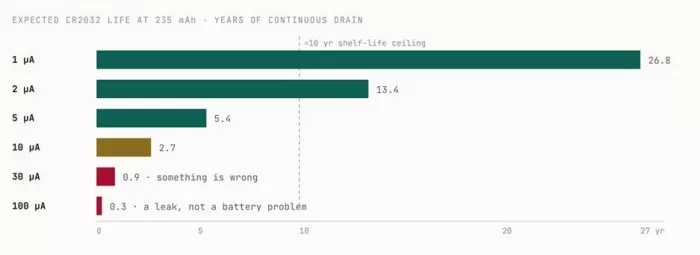
Figure 3: the arithmetic behind "just replace the battery". Idealised: 235 mAh ÷ drain, ignoring temperature and self-discharge. A healthy board shouldn't eat cells, so one dying inside two years points at a leak. And the cell only drains when standby power is absent, which is why the machine that lives unplugged in a cupboard is always the one that fails.
The fix, in the order that saves time
1. Check the clock first. It's a free diagnosis. Reset to 1980? The RAM lost power: battery. Clock correct but the error persists? The cell is fine, and something else scrambled the settings: a flash update, a jumper, a board fault.
2. Photograph your settings first. Boot order, SATA mode (AHCI vs RAID), XMP, secure boot. Getting these wrong after a reset turns a two-dollar fix into "my PC won't boot".
3. Replace the CR2032 with the machine plugged in and the PSU switch on. Standby power holds the settings while the cell is out, so you often skip reconfiguring. Match the exact code, because a CR2025 fits the holder but carries less charge.
4. Load defaults, re-enter your settings, save, reboot twice. The second boot is the test.
5. If it returns within days, stop buying batteries. A fresh cell dying in a week is a hardware fault, so measure the draw with a multimeter in series. Single-digit µA is healthy; tens or hundreds mean a leak. Check the clear-CMOS jumper and holder tension too.
When a download's hash doesn't match
First, check you're comparing like with like. A startling share of "checksum errors" turn out to be someone checking SHA-256 against a published MD5, or hashing the wrong file.
| WHERE YOU ARE | COMMAND |
|---|---|
| Windows · PowerShell | Get-FileHash .\file.iso -Algorithm SHA256 |
| Windows · cmd | certutil -hashfile file.iso SHA256 |
| macOS | shasum -a 256 file.iso |
| Linux | sha256sum file.iso |
| Against a publisher's list | sha256sum -c SHA256SUMS --ignore-missing |
The last one is the habit worth building: let the tool compare. Human eyes reliably miss one transposed character in sixty-four.
If it genuinely doesn't match, work outward:
• Re-download from a different mirror. If the second copy matches, the first was damaged in flight and you're done.
• Suspect the network before the hardware. Captive portals, corporate proxies and stale CDN edges all produce reproducible mismatches on a healthy machine. Try another network, or a torrent, which verifies each piece independently.
• If two downloads on two networks both fail, look locally. Now RAM and storage are worth suspecting: memory test overnight, check SMART.
Three times a checksum error isn't telling you the truth
The check is not an oracle. It fails in three well-documented directions.
1. The false alarm: your capture is lying, not your network
Open Wireshark on a modern machine and a third of your outbound packets may be flagged [TCP CHECKSUM INCORRECT]. Nothing is broken. Your network card does checksum offloading, computing the checksum in hardware as the frame leaves, after your capture tool saw the packet. Wireshark's own documentation says so, and recommends switching checksum validation off.
2. The false comfort: a matching hash is not a safe file
In February 2016, attackers compromised the Linux Mint website, pointed the download link at a backdoored ISO, and edited the published MD5 to match it. Anyone who dutifully verified got a green light on malware. As the project lead noted, they could change anything in the database: checksums and mirror links alike.
So: a checksum proves a file is intact, never that it's authentic. It defends against accidents. Only a signature, verified against a key you obtained independently, defends against a person.
3. The false negative: errors that slip straight through
The 16-bit checksum guarding your TCP and UDP traffic was cheap to compute in 1981, and it shows. Stone and Partridge concluded it misses roughly 1 in 16 million to 1 in 10 billion corrupt packets, which is not a theoretical number at gigabit speeds. Their advice stands: if the data matters, checksum it at the application layer too.
The cryptographic hashes have their own version. MD5 collisions were found in about six seconds on a mid-2000s CPU. SHA-1 fell in 2017, when CWI and Google made two PDFs share one digest: 9.2 quintillion computations, 6,500 CPU-years plus 110 GPU-years, an estimated $110,000 of cloud time. That price only moves one way.
Which algorithm should you trust, and for what
These aren't interchangeable, and the difference isn't how paranoid you are. It's whether you're defending against accidents or against people.
| ALGORITHM | SIZE | GUARANTEED TO CATCH | WHERE IT STOPS WORKING |
|---|---|---|---|
| Parity bit | 1 bit | Any odd number of flipped bits | Any even number, since two flips cancel out. Legacy only. |
Internet checksum TCP · UDP · IP | 16 bits | Most single random errors | Self-cancelling and reordering errors. Escapes on ~1 in 16M–10B corrupt packets. |
CRC-32 Ethernet FCS · ZIP · RAR | 32 bits | Every single-bit error, every adjacent pair, any odd number of errors, and any burst up to 32 bits. Beyond that, ~1 in 4.3 billion slips past. | Tampering. CRC-32 is trivially forged: craft a file to any CRC you like. An accident detector, full stop. |
| MD5 | 128 bits | Accidental corruption, still good at it | Anything adversarial. Fine for "did this copy right", never "is this the real file". |
| SHA-1 | 160 bits | Accidental corruption | Broken in practice since 2017, deprecated since 2011. Legacy only. |
| SHA-256 | 256 bits | Accidents and, so far, deliberate collisions | Nothing practical. The sensible default, but see the caveat above. |
| xxHash · BLAKE3 | 64–256 bits | Accidents, at gigabytes per second | xxHash isn't cryptographic: dedup and caches, never trust. BLAKE3 is both. |
Making the next one less likely, and less scary
| LAYER | WHAT ACTUALLY HELPS | WHY |
|---|---|---|
| Firmware | Swap the coin cell every 4–5 years on machines that sit unplugged. Keep a photo of the BIOS settings. | Turns a mystery boot failure into a scheduled two-minute job. |
| Storage | Use a filesystem that checksums data, not just metadata (ZFS or Btrfs), and scrub on a schedule. | Scrubbing found ~49% of nearline and 73% of enterprise corruptions in the NetApp study. Unscrubbed, they surface during a rebuild. |
| Memory | ECC RAM on anything that stores or serves data you care about. | Bad RAM poisons a file before it's written, and a checksum over bad data is "correct". |
| Network | Watch FCS/CRC counter trends on switch ports, not absolute values. | A climbing counter is a failing cable warning you in advance. |
| Downloads | Verify with -c against the publisher's list; prefer signatures where offered. | Removes the least reliable component: your eyes. |
| Backups | Test restores. | A backup you have never restored is a hypothesis. |
My final verdict
I've come round to thinking of the checksum error as one of computing's more honest messages. It's blunt, it's early, and it's true: this data is not what it was. Everything that feels hostile about it (the timing, the wording, the way it lands before you've had coffee) is packaging around a useful signal.
My friend with the dead coin cell now has a machine that keeps time and a note in her calendar for 2029. The developer has a shell alias that verifies every ISO he downloads. Both took under an hour, once they stopped treating the alarm as the diagnosis and started asking which layer had raised it.
The errors worth fearing are the ones nobody prints: a file that reads back wrong without complaint, a CPU returning 5 for 2×3 once a week in one machine out of a thousand, a backup quietly rotting for three years. Every one of those is invisible because nothing was checking.
So when the screen goes black and the white text appears, that isn't the failure. That's the part that worked.
Comments