Free text to speech used to mean one thing: a flat, robotic voice that could read your text but couldn't make anyone want to listen. That era is officially over. Today's free AI voice generators produce narration with natural pauses, emotional shifts, and pacing that can genuinely pass for a human recording at least until you hit the character limit.
But here's the problem nobody warns you about: every "free" tool hides its real cost somewhere. Some cap your characters. Some lock downloads behind a paywall. Some quietly strip your commercial rights, which matters a lot if that voiceover is going into a monetized YouTube video.
So instead of trusting the marketing pages, I spent time actually testing the most popular free options pasting in real scripts, listening to long paragraphs (not just cherry-picked demo lines), checking export options, and reading the fine print on commercial use. These seven tools earned their spot. For each one, you'll find a full breakdown of features, my testing experience, honest pros and cons, a dedicated pricing table, and a clear verdict on who should actually use it.
Let's get into it.
1. ElevenLabs
Rating: ⭐ 4.7/5 The most human-sounding AI voices you can try for free
If you've ever heard an AI voiceover online and thought "wait, that's not a real person?", there's a good chance it came from ElevenLabs. This platform has become the reference point that every other tool gets compared against, and after testing it against everything else on this list, that reputation is deserved. The catch is that its generosity literally has limits.
Key Features
● The voice library is enormous, offering thousands of voices spread across more than 70 languages, so you can find everything from a warm documentary narrator to an energetic ad-read style.
● Every voice comes with adjustable stability and style sliders, which let you control how expressive or consistent the delivery sounds from sentence to sentence.
● The platform reads context intelligently, placing pauses, emphasis, and tone changes where a human narrator naturally would, instead of delivering every line at the same flat pitch.
● Voice cloning is available on paid tiers, allowing you to create a digital copy of your own voice from a short sample recording.
● Finished audio downloads directly from the browser as MP3, and developers can access the same engine through a full API.
Testing Experience
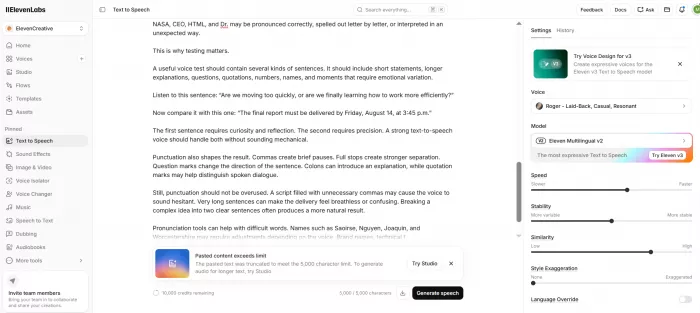
This was the only tool in my testing where long paragraphs didn't gradually reveal the "AI-ness" of the voice. Dramatic sentences picked up genuine weight, questions actually sounded like questions, and a 500-word script rendered in seconds. The interface is clean enough that I generated my first clip within a minute of signing up. My only frustration came about ten minutes in when free characters disappear fast when you're experimenting.
Pros
● Voice realism is noticeably ahead of every other free tool on this list, especially on long-form text.
● The language and voice selection is deep enough for almost any project or audience.
● Fine-grained sliders give you real creative control instead of a one-size-fits-all output.
Cons
● The free allowance of roughly 10,000 characters per month translates to only about 10–15 minutes of audio, which serious creators will burn through quickly.
● Free-tier audio requires attribution, so fully commercial projects effectively need a paid plan.
● The headline features people sign up for like voice cloning sit behind the paywall.
Pricing
| Plan | Price | What You Get |
| Free | $0/month | ~10,000 characters/month, non-commercial use with attribution |
| Starter | ~$5/month | 30,000 characters, commercial license, instant voice cloning |
| Creator | ~$22/month | 100,000 characters, professional voice cloning, higher quality audio |
Best for: YouTubers, podcasters, and anyone whose top priority is voice quality over volume.
Verdict: If your scripts are short and realism matters most, nothing else free comes close.
2. TTSMaker
Rating: ⭐ 4.5/5 The most genuinely free tool on this list
TTSMaker doesn't have the polish of a Silicon Valley startup, and it doesn't need it. This browser-based tool has quietly become a favorite among faceless-channel creators and small businesses for one simple reason: what it says is free actually stays free including commercial use, which almost no competitor offers at no cost.
Key Features
● The free plan allows up to 20,000 characters of conversion per week, and certain marked voices can be used with no character limit at all.
● You get access to hundreds of voice styles across more than 50 languages, covering male, female, and child voices along with emotional tones for specific moods.
● Every audio file you generate is 100% yours commercial use is permitted on the free plan with no attribution required, so you can publish directly to YouTube, TikTok, or client projects.
● A built-in settings panel lets you adjust speech rate, volume, and pitch, and you can insert manual pauses to control the pacing of your narration.
● A multi-speaker dialogue generator lets you build conversations between different AI voices and merge them into one seamless audio file, which is great for skits and educational scripts.
● Finished audio exports as MP3 or WAV, and there's no account or sign-up required to start converting.
Testing Experience
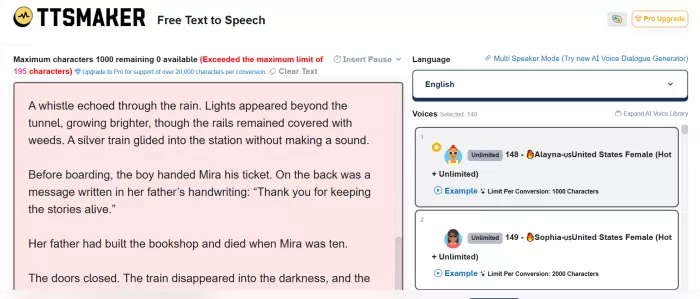
I pasted in a script without creating an account, picked a voice, and had a downloadable MP3 in under a minute, the lowest-friction experience of any tool I tested. The best neural voices sound surprisingly good for a free tool, though they sit a clear step below ElevenLabs on emotional range. The interface looks a bit utilitarian, and longer texts took a couple of minutes to process, but it never once asked me for a credit card.
Pros
● Full commercial rights on the free plan is a rare and genuinely valuable offer that most premium tools charge for.
● No sign-up requirement means you can go from script to audio file faster than anywhere else.
● The weekly 20,000-character allowance, plus unlimited voices, is generous enough for regular content production.
Cons
● Voice realism is solid but not spectacular expressive or dramatic scripts reveal the tool's limits.
● The dated interface and occasional slow processing on long texts make it feel less premium than it performs.
● Advanced options like emotion control and saving projects require upgrading to the Pro plan.
Pricing
| Plan | Price | What You Get |
| Free | $0/week | 20,000 characters/week, some unlimited voices, full commercial use |
| Pro | Paid upgrade | Higher character limits, emotion control, project saving, more dialogue blocks |
Best for: Faceless YouTube channels, TikTok creators, and anyone monetizing content on a zero budget.
Verdict: The best pure free deal in text to speech right now period.
3. NaturalReader
Rating: ⭐ 4.3/5 The document-reading workhorse
NaturalReader has been around since 2001, which makes it ancient by AI standards and that longevity shows in the best way. While flashier tools chase viral voiceovers, NaturalReader focuses on a quieter, arguably more important job: reading your documents, PDFs, and web pages aloud, reliably, on every device you own.
Key Features
● The tool accepts an impressively wide range of inputs, including PDFs, Word documents, ePub ebooks, and full web pages, then reads them aloud with synchronized text highlighting.
● The free tier gives you unlimited listening with basic voices, plus a daily allowance of premium AI voices (roughly 20 minutes per day) so you can sample the higher-quality tier.
● OCR technology can read text directly from scanned documents and photographed pages, which is a genuine lifesaver for printed handouts and image-based PDFs.
● It works across web, Windows, macOS, iOS, and Android, so a document you start listening to at your desk can continue on your phone.
● Paid plans unlock MP3 downloads, letting you convert documents into audio files you can keep and listen to offline.
Testing Experience
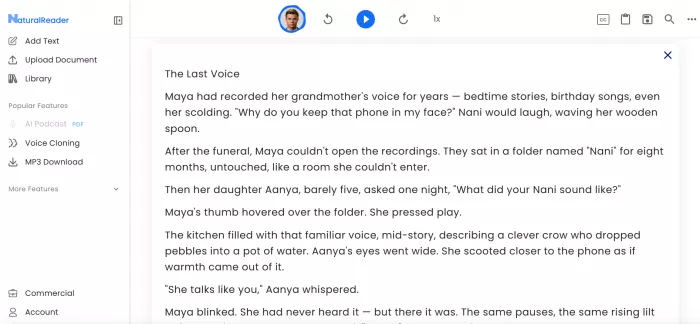
I threw a 30-page PDF at it and it handled the job in minutes, with highlighting that made it easy to follow along visually. The premium voices are pleasant and clear, though they lean more "audiobook narrator" than "expressive performer." The 20-minute daily cap on good voices is the pinch point enough for a few articles, frustrating for a long study session. The interface also feels like it hasn't been redesigned in a while.
Pros
● Best-in-class document handling makes it the natural choice for students and heavy readers.
● The OCR feature reads scanned and photographed pages, which most free competitors simply can't do.
● Unlimited free listening with basic voices means the tool never fully stops working when limits run out.
Cons
● The daily cap of around 20 minutes on premium voices makes extended listening sessions impossible without paying.
● Downloading audio as MP3 is locked behind the paid plan, so the free tier is listen-only.
● The dated interface and clunkier navigation feel behind the times compared to newer rivals.
Pricing
| Plan | Price | What You Get |
| Free | $0/month | Unlimited basic voices, ~20 min/day of premium voices, online only |
| Premium | ~$9.99/month | Unlimited premium voices, MP3 downloads, more languages |
| Plus | ~$119/year | Top-tier AI voices, higher limits, all apps included |
Best for: Students, researchers, and accessibility users who live inside PDFs and documents.
Verdict: Not the prettiest tool here, but the most dependable one for reading real documents.
4. Speechify
Rating: ⭐ 4.2/5 The listen-anywhere reading companion
Speechify is the tool your favorite podcaster has probably advertised to you, and beneath the heavy marketing sits a genuinely well-built product. Its core idea is simple: everything you'd normally read emails, articles, PDFs, even printed pages should be listenable, at any speed, wherever you are.
Key Features
● Speechify follows you across devices with polished apps for iOS, Android, Chrome, and desktop, keeping your reading library and progress in sync.
● The listening speed can be pushed far beyond normal narration pace, which power users rely on to get through articles and study material in a fraction of the time.
● Its camera-based OCR lets you photograph a physical page and have it read aloud within seconds, effectively turning printed books into audio.
● The premium voice library includes some celebrity-narrated options and highly natural AI voices in dozens of languages.
● Text highlighting follows the narration word by word, which reinforces comprehension and makes it popular among readers with dyslexia and ADHD.
Testing Experience
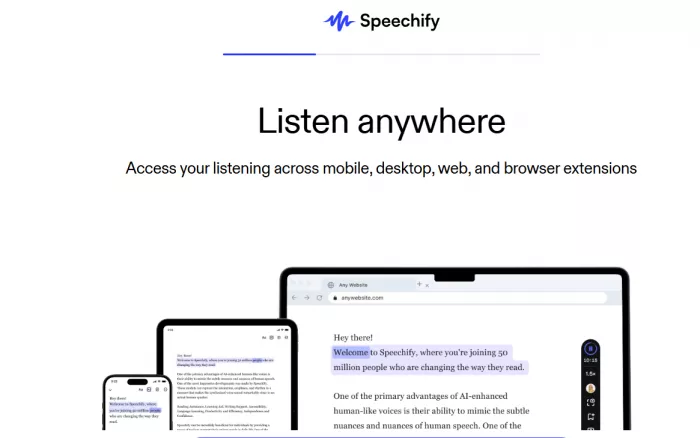
The mobile experience is where Speechify shines, scanning a printed page and hearing it read back moments later still feels a little magical. The free voices, however, are noticeably basic, and the app reminds you about Premium often enough that it starts to feel like a demo. When I compared the free-tier output side by side with TTSMaker's free voices, Speechify's paywall felt harder to justify.
Pros
● The cross-device experience is the smoothest of any tool tested, especially on mobile.
● Camera scanning of physical pages is a standout feature that genuinely expands what "text" to speech means.
● Adjustable high-speed listening makes it a legitimate productivity tool, not just an accessibility aid.
Cons
● The free plan's voices sound basic, and the truly natural ones require one of the most expensive subscriptions in this category (around $139/year).
● Frequent upgrade prompts make the free experience feel restricted rather than generous.
● It's built for listening to content, not producing voiceovers creators wanting downloadable narration should look elsewhere.
Pricing
| Plan | Price | What You Get |
| Free | $0/month | Basic voices, limited speed, core reading features |
| Premium | ~$139/year | 200+ natural voices, 60+ languages, faster speeds, OCR scanning |
Best for: Busy professionals and students who want to consume text as audio on the go.
Verdict: Excellent as a personal reading assistant, expensive as anything more.
5. Murf AI
Rating: ⭐ 4.1/5 The professional studio you can preview for free
Murf AI isn't really a free tool, it's a professional voiceover studio with a free preview, and it's honest about that. What earns it a place on this list is what that preview lets you do: explore a genuinely studio-grade editor and its entire voice catalog before spending anything, which no other professional-tier platform offers this openly.
Key Features
● The platform provides more than 200 studio-quality voices across 30+ languages, all of which are fully accessible on the free plan for evaluation.
● Its browser-based editor works like a video editing timeline, letting you sync narration against slides or video, adjust emphasis on specific words, and fine-tune pronunciation.
● Paid plans include a library of over 8,000 licensed background soundtracks, so you can produce a finished, music-backed voiceover in one place.
● Native integrations with Canva and PowerPoint let you add narration to designs and presentations without leaving those apps.
● Voice cloning and enterprise-grade security certifications are available at higher tiers for teams with brand-voice or compliance needs.
Testing Experience
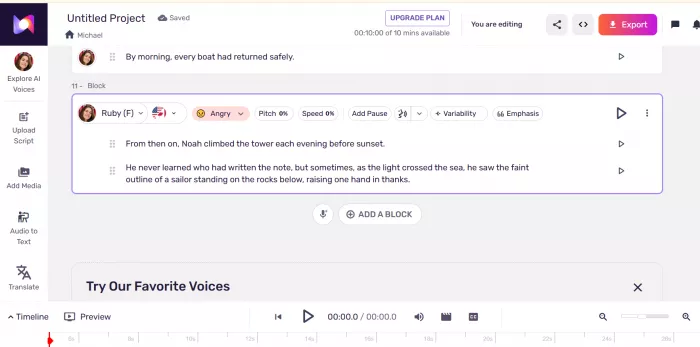
The editor is the best I used during this entire test. Timing narration against a slide deck felt like using proper production software, not a text box with a play button. The voices are consistent and professional, sitting just below ElevenLabs on raw realism but ahead of it on workflow. Then comes the wall: the free plan gives you 10 minutes of generation and no downloads at all. I could make great audio; I just couldn't keep it.
Pros
● The timeline-style editor is unmatched for syncing voiceovers to videos, slides, and e-learning content.
● Full access to the entire 200+ voice library on the free plan makes evaluation genuinely useful.
● Paid tiers bundle music, collaboration, and integrations into a complete production workflow.
Cons
● The free plan blocks all downloads, making it strictly a preview rather than a working free tool.
● Ten minutes of total generation time runs out almost immediately once you start experimenting.
● At $19–$29/month for the entry paid tier, it's a bigger commitment than most hobbyists need.
Pricing
| Plan | Price | What You Get |
| Free | $0/month | 10 minutes of generation, all 200+ voices, no downloads or commercial rights |
| Creator | ~$19/month (annual) | 24 hours/year of generation, downloads, commercial rights, soundtracks |
| Business | ~$66–$99/month | Higher volume, collaboration tools, priority support |
Best for: Course creators, marketers, and teams producing polished voiceovers regularly.
Verdict: Try it free to fall in love with the editor just know you'll need to pay to take anything home.
6. Google Cloud Text-to-Speech
Rating: ⭐ 4.0/5 The developer's powerhouse hiding in plain sight
Most people use Google's text to speech every day without realizing it it's the voice inside Android, Google Maps, and countless apps. The Cloud version gives you direct access to that same engine, including Google's WaveNet neural voices, with a free monthly allowance so generous that many small projects never pay a cent.
Key Features
● The service offers hundreds of voices across dozens of languages, including WaveNet and Neural2 voices that rank among the most natural machine-generated speech available.
● Its free tier renews every month, covering up to one million characters of WaveNet audio and four million characters of standard voices orders of magnitude more than consumer tools offer.
● Full SSML support lets you script precise control over pronunciation, pauses, speaking rate, and pitch, right down to individual words.
● Because it's an API, the audio you generate comes with commercial usage rights, making it a legitimate foundation for products, apps, and accessibility features.
● It scales seamlessly from a hobby script to enterprise production, with pay-as-you-go pricing that only begins after the free allowance is exhausted.
Testing Experience
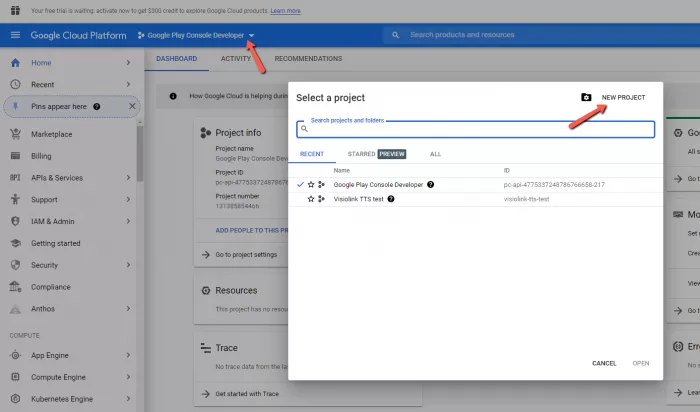
Fair warning: there's no friendly paste-and-play website here. Getting my first audio file required creating a Google Cloud account, enabling the API, and writing a short script. Once running, though, the WaveNet voices impressed me clear, natural, and remarkably consistent across long passages. The free character allowance is so large that I couldn't realistically approach it during testing. This is the best free deal in TTS, locked behind a technical door.
Pros
● The monthly free allowance dwarfs every consumer tool on this list: a million WaveNet characters is roughly 15+ hours of audio.
● WaveNet and Neural2 voices deliver quality that competes with premium consumer platforms.
● Commercial rights and rock-solid infrastructure make it safe to build real products on.
Cons
● There's no simple consumer interface; you need a cloud account, API keys, and basic coding comfort to use it.
● Setup requires adding billing details even if you never exceed the free tier, which understandably puts some people off.
● Voices are natural but neutral; they lack the emotional expressiveness that ElevenLabs brings to storytelling.
Pricing
| Plan | Price | What You Get |
| Free tier | $0/month | ~1M WaveNet characters + ~4M standard characters, renewed monthly |
| Pay as you go | ~$4–$16 per 1M characters | Unlimited scale, billed only beyond the free allowance |
Best for: Developers, technical creators, and anyone building TTS into an app or workflow.
Verdict: If you can handle an API, this is quietly the most generous free TTS on the internet.
7. Balabolka
Rating: ⭐ 3.9/5 The unstoppable offline classic
Balabolka is the oldest-school entry here, a free Windows desktop program with an interface that looks frozen in 2009 and yet it does something no cloud tool on this list can: it works entirely offline, forever, with zero limits, zero accounts, and zero cost. For privacy-conscious users and unlimited-volume needs, that combination is unbeatable.
Key Features
● The program runs completely offline on Windows, using any speech voices installed on your system, which means your text never leaves your computer.
● There are no character limits, word counts, or usage caps of any kind; you can convert an entire book series without hitting a single restriction.
● It reads and extracts text from an impressive range of formats, including DOCX, PDF, EPUB, HTML, and more, then saves the output as MP3, WAV, or other audio formats.
● Deep customization options let you adjust pitch, rate, and pronunciation, apply custom word substitutions, and set precise pauses between sentences and paragraphs.
● Batch processing and hotkey controls make it practical for converting large document libraries into audio in one sitting.
Testing Experience
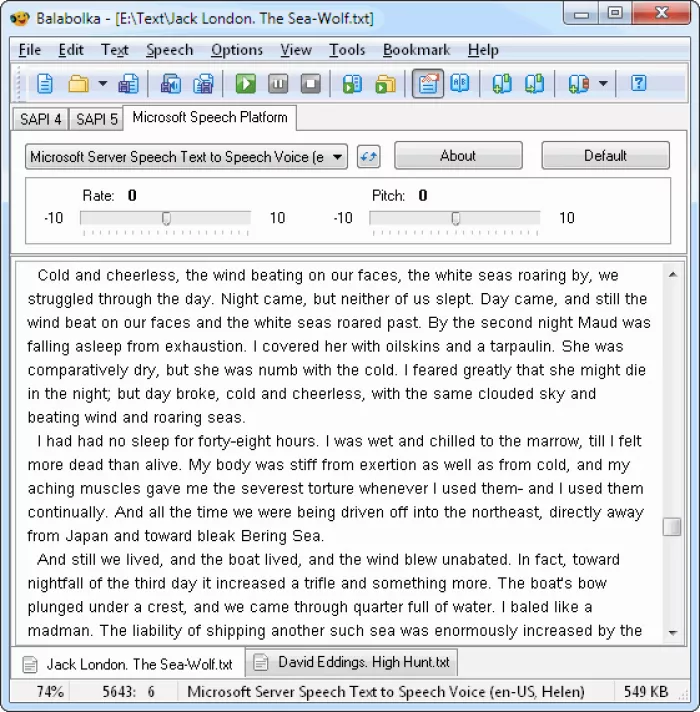
Using Balabolka feels like operating vintage machinery: nothing about it is pretty, everything about it works. I converted a full-length ebook to MP3 without any limit warnings, upgrade prompts, or internet connection, something literally no other tool in this test could do. The voice quality depends entirely on what's installed on your Windows machine; default system voices sound dated, though installing better neural voices improves things considerably.
Pros
● Truly unlimited, truly free, truly offline, a combination that no cloud-based tool can match.
● Outstanding file format support makes it ideal for converting ebooks and document archives into audio.
● Complete privacy, since nothing you convert ever touches a server.
Cons
● Voice quality is only as good as your installed Windows voices, and the defaults sound noticeably robotic next to modern neural AI.
● The interface is dated and dense, with a learning curve that may intimidate non-technical users.
● It's Windows-only, leaving Mac, mobile, and Chromebook users out entirely.
Pricing
| Plan | Price | What You Get |
| Free | $0 forever | Unlimited conversions, all features, offline use, MP3/WAV export |
Best for: Windows users converting huge volumes of text, and anyone who needs offline privacy.
Verdict: The ugliest tool on this list and possibly the most dependable a genuine forever-free classic.
Quick Comparison: All 7 Tools at a Glance
| Tool | Free Limit | Commercial Use (Free) | Best For |
| ElevenLabs | ~10K characters/month | With attribution | Maximum realism |
| TTSMaker | 20K characters/week + unlimited voices | Yes | Monetized content on $0 |
| NaturalReader | ~20 min/day premium voices | No | Documents & study |
| Speechify | Basic voices only | No | Listening on the go |
| Murf AI | 10 min, no downloads | No | Professional voiceovers |
| Google Cloud TTS | ~1M characters/month | Yes | Developers & apps |
| Balabolka | Unlimited | Yes (system voices) | Offline & bulk conversion |
Final Verdict
There's no single winner here, only the right tool for your situation. If realism matters most, start with ElevenLabs and ration your characters carefully. If you're monetizing content on a zero budget, TTSMaker is the only tool giving away commercial rights freely. Students drowning in PDFs should reach for NaturalReader, while anyone who wants their reading list narrated on the train will find Speechify the smoothest companion. For polished, synced voiceovers, preview Murf AI free and budget for Creator when you're ready to export. Developers comfortable with an API get the industry's biggest free allowance from Google Cloud TTS, and if you need unlimited, private, offline conversion, Balabolka will outlast every startup on this list.
Whichever you choose, remember that free plans change frequently in this space, features get added and limits get tightened so treat these numbers as a snapshot and double-check official pricing pages before building a workflow around any of them. The bigger takeaway doesn't change, though: you no longer need a budget to sound professional. You just need to pick the right tool for the job and now you know exactly which one that is.
Comments