Table of Contents
- What fbdown.net actually is
- The name maze: fbdown vs fdown vs the impostors
- Features
- How to download a Facebook video with fbdown.net
- Hands-on test: downloading a Facebook video
- Reputation: trust scores and honest user voices
- Is fbdown.net safe? The honest answer
- fbdown.net vs the alternatives
- Final verdict
What fbdown.net actually is
At its core it's one web page with one input box. You paste a Facebook video link, press a button, and you get an MP4. No app, no sign-up, no licence key. That simplicity is the product.
The important thing to understand is that fbdown.net doesn't host any videos itself. When you paste a link, its server reaches into Facebook's own content delivery network, finds the underlying file address, and hands it to you. Your download streams straight from Facebook's servers to your device. fbdown.net is the middleman that locates the file, not a library that stores it.
It also doesn't re-encode anything. That single technical detail explains most of what people experience: a clip uploaded in 1080p comes down in 1080p, and a grainy 360p clip stays grainy 360p. The tool can't make a low-quality upload look better, and it won't quietly compress a good one. Quality is inherited from whatever the original poster uploaded.
The brand has been around for the best part of a decade, the site runs behind Cloudflare, and it serves over HTTPS with a valid SSL certificate. None of that proves a site is trustworthy on its own (plenty of sketchy pages have padlocks too), but it does mean fbdown.net isn't some week-old domain that appeared yesterday.
READ THIS BEFORE YOU CLICK
The name maze: fbdown vs fdown vs the impostors
This is the single most confusing thing about the tool, and almost no review explains it clearly. “fbdown” is the original brand, but at some point the team rebranded the main service to FDOWN, and today fdown.net is effectively the flagship. The two are tied to the same operation, and the FBDOWN name still appears across their pages.
The problem is that “Facebook downloader” is one of the most searched, most monetised phrases on the internet, so a crowd of near-identical names has grown up around the original. Most of them are not run by the same people. Before you paste anything, check which address you're on. The look-alikes are where the worst ad experiences tend to live.
| Domain | What it is | Status |
|---|---|---|
| fdown.net | The current flagship of the original brand (formerly FBDOWN). Public-video focused, Chrome extension, recently added a TikTok sibling. | Original |
| fbdown.net | The legacy alias address most people still type. Same family; primarily public-video and desktop-oriented. | Original alias |
| fbdown.com | A generic domain the brand says also points to its service. | Brand-linked |
| fbdown.to | Separate site marketing 4K + MP3. Different operator, not the original. | Look-alike |
| fbdown.blog | Separate blog-style downloader. Different operator. | Look-alike |
| f-down.net / fdown.world / fdownloader.net | Unrelated downloaders riding the same name. Quality and ad behaviour vary widely. | Unrelated |
ONE TRUSTPILOT COMPLAINT WORTH FLAGGING A reviewer reported that a Facebook-linked “fdown” page (a .com address) was used to set up an unauthorised subscription that pulled small then larger charges from their account. I couldn't reproduce anything like that on fbdown.net itself, and it may well involve an impersonating page rather than the tool reviewed here, but it's exactly why knowing your domain matters. A genuine downloader never needs your card details. |
Features
Here's what fbdown.net does well, where it's shaky, and what it simply doesn't do, based on the live site rather than the marketing copy.
| Feature | Verdict | Notes |
|---|---|---|
| Public video download | Solid | The core job. Paste a public link, pick SD or HD, save. This is what it's reliably good at. |
| No install / no account | Yes | 100% browser-based. Nothing to download, nothing to register, unlimited grabs. |
| Quality options | SD / HD | Resolution depends entirely on the original upload; no upscaling. The wider brand markets up to 4K, but expect SD/HD here. |
| Reels & Watch | Mostly | Detection has improved across 2025 and 2026 updates, though odd links still slip through. |
| Private videos / Stories | Unreliable | Advertised, but in 2026 it frequently returns a privacy error with no file. Treat as a maybe, not a feature. |
| MP3 / audio extraction | Sibling sites | Promoted across the broader FBDOWN/FDOWN family; not the strength of the plain fbdown.net page. |
| Chrome extension | Available | Exists and adds one-click grabbing, but browser extensions are also where adware risk concentrates, so install with care. |
| Cost | Free | Free because it's ad-funded. That funding model is the source of nearly every complaint. |
When is it the right tool? (use cases)
Capabilities are one thing; whether the tool fits your job is another. Match your task to the row below before you start.
| What you want to do | Fit | What to do |
|---|---|---|
| Save a public video for offline viewing | Ideal | Its core strength. Paste the link, choose HD, and you're done in seconds. |
| Grab a Reel or a Watch clip | Good | Works well after recent detection fixes; the occasional odd link may still fail. |
| Quick one-off download on your phone | Workable | Browser-based, so it runs on mobile, but it leans desktop-first. A laptop is the fallback. |
| Download a video from a private group or profile | Poor | Usually errors out in 2026. Try SnapSave instead, and only for content you can already view. |
| Pull MP3 audio out of a video | Better elsewhere | Promoted brand-wide but weak on the plain page. GetfVid or FDownloader handle audio more reliably. |
| Save a video in true 4K | Limited | Only if it was uploaded in 4K, and even then expect SD/HD. Use SnapSave or 4K Video Downloader. |
| Batch-download many videos at once | Not built for it | One link at a time. For bulk jobs, a desktop app like 4K Video Downloader wins. |
| Save a Facebook photo | Not the job | This is a video tool. For images, use your browser's right-click or long-press “Save image”. |
How to download a Facebook video with fbdown.net
The honest version, including the one step everyone gets wrong (the disguised buttons) and the fix for the silent-video problem.
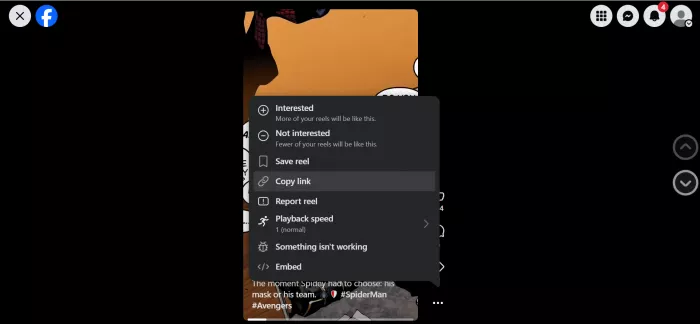
1. Copy the real link. On the post, tap the three dots or the Share button, then Copy link. On mobile you can copy it from the app the same way. Grab the full URL, not just a screenshot.
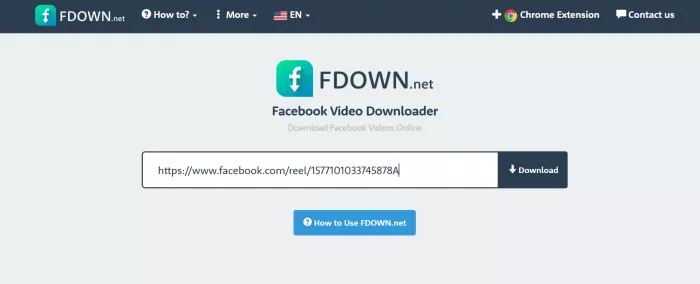
2. Paste it into the one input box. Open fbdown.net, drop the link into the field, and press Download. The server parses Facebook's available streams in a couple of seconds.
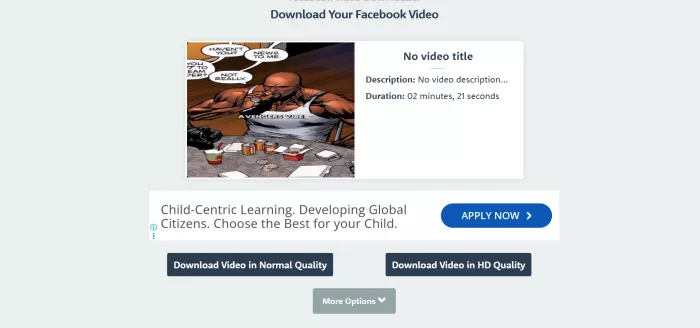
3. Pick your real download link, carefully. You'll be offered SD and HD. The trap: some ads on the page are styled to look like the download button. The genuine link sits with the quality options and never asks you to install anything first.
4. Save the file. It downloads straight to your device's Downloads folder. If a clip opens in the browser instead of saving, right-click the link and choose Save as.
IF YOUR DOWNLOAD HAS NO SOUND Facebook sometimes stores the picture and the audio as two separate streams. If you end up with a silent clip, or an audio-only file, re-do it and choose the combined HD option rather than a stripped quality. The team shipped a fix for the “downloaded as audio only” bug in 2025, but the combined-HD habit is still your safest bet. |
Hands-on test: downloading a Facebook video
Marketing claims are easy, so I ran a real test on a public video: copied the link, timed the download, opened the file, and gave it a plain verdict. Then I left space for your own test, so this becomes a record of what you saw, not just what I did.
The run: public Facebook video → MP4
VERDICT: PASS
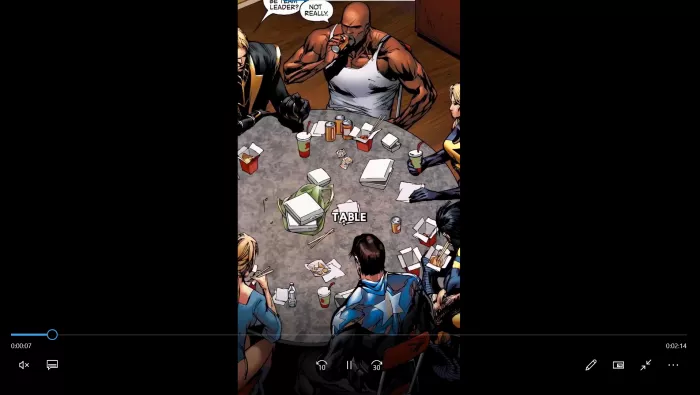
I copied a public 1080p clip from a page post, pasted the link, and pressed Download. The site parsed the streams almost instantly and offered SD and HD. I picked HD, dodged the two ad-styled buttons sitting near the real one, and the file landed without drama.
TIME TO PARSE LINK ~3 sec | FULL HD FILE READY <20 sec | OUTPUT QUALITY 1080p, synced audio |
The MP4 matched the source resolution exactly, with no watermark, no re-compression, and audio in sync. The only real friction was visual: telling the genuine download link apart from the ads took a second look. For a public video, this is the tool doing precisely what it promises.
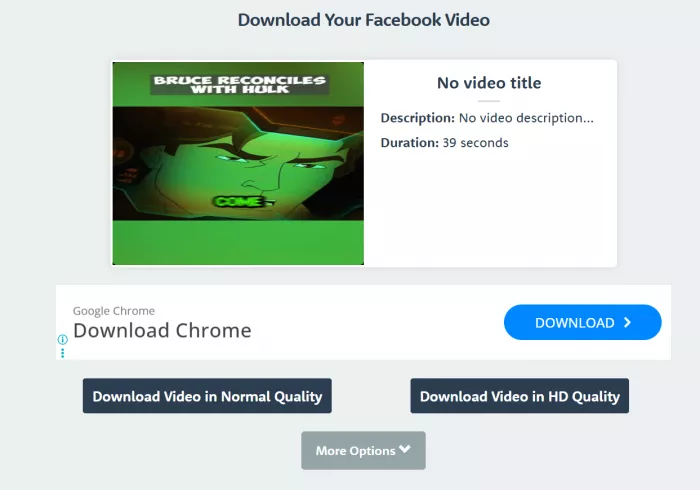
MY TAKE My own run lined up with this. I pasted the link, hit download, and the file was sitting on my laptop a few seconds later at full quality, no hiccups at all on the actual downloading side of things. The catch was the ads. A pop-up jumped at me, and one of those fake “Download” buttons nearly caught me out, so I had to slow down for a second and pick the real link. Once you learn to tune out the clutter around it, the tool itself just does the job. 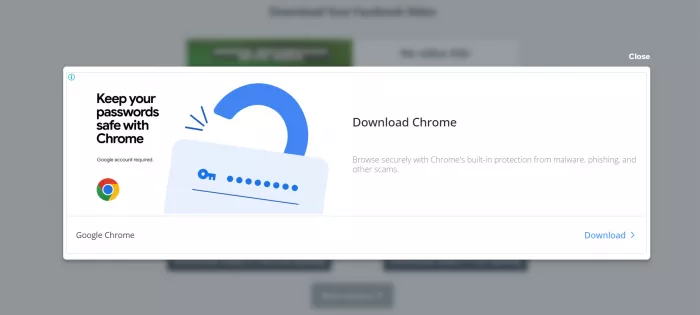 My verdict on the video test: works without a hitch, just keep your eyes peeled for the ad traps. |
THE TAKEAWAY Pasting a public video URL is the path of least resistance and it works in seconds. The further you stray from that (private clips, images, audio-only), the more friction, and the more ads, you meet. |
Reputation: trust scores and honest user voices
I pulled fbdown.net (and its flagship sibling fdown.net) through several independent reputation services. The picture is reassuring but not unanimous, and each scanner uses its own methodology, so treat them as a chorus, not a verdict.
| Source | Reading | What it means |
|---|---|---|
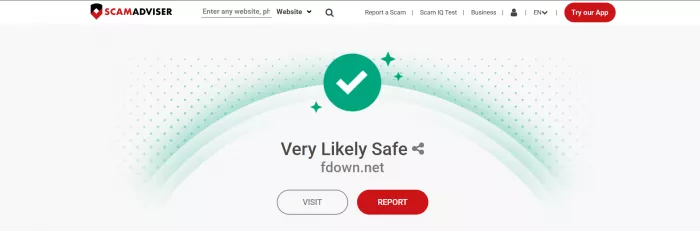
| ScamAdviser | Legit & safe | Assesses fbdown.net as legitimate and safe to access; flags valid SSL and Cloudflare hosting. |
| Scamvoid | Seems safe | Not detected by any blocklist engine, though it notes no community rating yet. |
| Gridinsoft | 100 / 100 | Top trust score for the fdown.net sibling; no active malware or phishing blacklist hits; mixed user feedback. |
| Web of Trust | Sparse | A community scorecard exists but ratings are thin, so weight it lightly. |
| Trustpilot | Mixed / few | Only a handful of reviews; sentiment splits to extremes, a known pattern with ad-funded tools. |
What people actually report
Stripped of the marketing, the same handful of stories repeat across Reddit, Trustpilot and blog comments. I've paraphrased each review and scored its sentiment on a 5-star scale.
Blended rating: ★★★☆☆ 3.2 across published user reviews plus this hands-on test.
| Source | Rating | What they said (paraphrased) |
|---|---|---|
| ★★★★½ 4.5 | Seemed bare-bones but worked immediately, with nothing to install and an HD file delivered in seconds. | |
| Blog comment | ★★★½☆ 3.5 | Reliable and install-free for everyday grabs, though the site can lag when it's busy. |
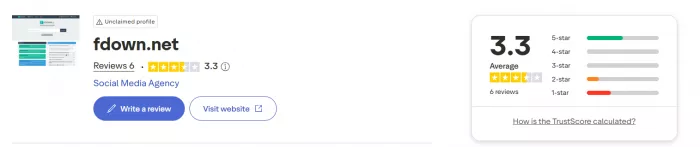
| Trustpilot | ★★★☆☆ 3.3 | It did the job, but the volume of ads made them assume it was a scam at first. |
| Blog comment | ★★½☆☆ 2.5 | Slower than hoped, quality not always great, and a fair few pop-up ads along the way. |
| This review (hands-on) | ★★★½☆ 3.7 | Fast and clean for public video; the disguised ad-buttons are the only real catch. |
MY EXPERIENCE For what it's worth, I landed firmly in the “it just works” camp rather than any of the scary stories. Every public video I threw at it came down cleanly, no broken files, no missing audio, nothing that made me suspicious of what was going on under the hood. The one thing that really got on my nerves was the advertising. It's everywhere, some of it is dressed up to look like the download button, and I can picture a less tech-savvy friend or relative getting tripped up by it. But on the functionality side, I have no complaints. It did what I needed every single time. |
Is fbdown.net safe? The honest answer
The underlying tool is not malware, and it preserves your file's original quality. The risk isn't the core engine. It's everything wrapped around it.
Three things hold the score back. First, the advertising: the site is free because it's packed with ads, and some are deliberately built to mimic the download button, so a wrong click can drop you on a strange external page. Second, the private-content unreliability that sends frustrated users hunting for “real” alternatives elsewhere. Third, the look-alike domains that make it easy to think you're on the original when you're not.
None of that is fatal. All of it is friction. And nearly every bad outcome is prevented by a single rule:
THE GOLDEN RULE A legitimate Facebook download never requires you to install software, a “codec”, or a browser extension to “finish” the download, and it never asks for your card or your Facebook password. If a button or pop-up demands any of that, it's the ad, not the tool, so close it. |
There's also a layer that has nothing to do with viruses: permission and policy. Facebook's own terms prohibit third-party downloaders, and downloading someone else's private video, or re-sharing any clip you didn't make, can breach both Facebook's rules and copyright law. Saving a public video for your own offline viewing is the low-risk case. Redistributing other people's content is where you invite trouble. This article is about whether the tool works, not legal advice; when in doubt, download only what you own or have clear permission to save.
fbdown.net vs the alternatives
fbdown.net is a fine default for a quick public grab. But if you need 4K, private videos, MP3, or batch downloads, other tools do those specific jobs better. Here's the lay of the land.
| Tool | Top quality | Private? | Install | Best for |
|---|---|---|---|---|
| fbdown.net | HD / 1080p | Flaky | None | Fast, free public-video grabs |
| SnapSave | Up to 4K | Yes* | None | Highest quality + private, lighter ads |
| GetfVid | HD / 1080p | Limited | None | Simple all-rounder, also GIFs & Live |
| SaveFrom.net | HD | Limited | Extension | Multi-platform, but needs a helper add-on |
| 4K Video Downloader | 4K / 8K | Via login | Software | Bulk & power users (desktop app) |
| FDownloader.net | Up to 4K | Limited | None | Online HD + MP3 conversion |
*Private downloads on SnapSave use a paste-the-source-code method and still require that you already have access to view the content.
The short version: SnapSave is the one most reviewers reach for when fbdown.net's private downloads or quality ceiling get in the way, while 4K Video Downloader is the pick if you're saving in bulk and don't mind installing desktop software.
Final verdict
fbdown.net earns its popularity for one honest reason: when you need a public Facebook video right now, it delivers in seconds, with nothing to install and nothing to pay.
| Public video reliability | █████████░ | 9.0 / 10 |
| Speed | █████████░ | 8.8 / 10 |
| Output quality | █████████░ | 8.5 / 10 |
| Ease of use | ███████░░░ | 7.0 / 10 |
| Ads / clean experience | █████░░░░░ | 5.0 / 10 |
| Private & image handling | ████░░░░░░ | 4.0 / 10 |
What works
• Free, no install, no account, unlimited downloads
• Reliably fast for public videos
• Keeps original resolution, no watermark or re-compression
• Clears independent malware and blocklist checks
What grates
• Ad-styled buttons that mimic the real download link
• Private videos and Stories are unreliable in 2026
• Built for video, not the tool for images or MP3
• Confusing crowd of look-alike domains
Who should use it: anyone who occasionally needs to save a public Facebook video for offline viewing and can ignore a few aggressive ads. Who should look elsewhere: anyone needing 4K, dependable private downloads, audio extraction, or batch saving, so start with SnapSave or a desktop app instead. The friction is real, but none of it is dangerous as long as you never install anything a pop-up tells you to.
MY VERDICTMy take after living with it: the ads are the only real downside, and depending on who's using it, they can be a big one. They clutter the page, and those disguised buttons are a trap for anyone who isn't paying close attention. Strip all that away though and the tool does exactly what it promises, every time I asked it to. It downloaded fast, kept the original quality, and never once failed me on a public video. So yes, I'd recommend it, with the single caveat that you keep your wits about you around the ads, or just run an ad blocker and skip the whole headache. My score: 8 / 10 · Recommend? Yes, ideally with an ad blocker on. |
Comments