Table of Contents
- First Impression: A Pricing Page Before a Product
- What HeyGen Actually Does in 2026
- How I Tested It: The Talking-Head Test
- Meeting Annie: Script to Video, Start to Finish
- Video Agent: One Prompt, Three Stitched Clips
- Prompts I Tested
- My Hands-On Scorecard
- Pricing in 2026
- Free Features Versus Paywall Triggers
- HeyGen Against the Alternatives
- Strengths and Shortcomings
- The Verdict After Three Weeks
Most reviews of AI video tools open with a demo reel and a price tag. Mine opens with a wall. The very first screen HeyGen showed me after I logged in was not the editor, not a tutorial, not even a welcome. It was a subscription page.
That single design decision frames the entire three weeks I spent on the platform. So I closed the pricing modal, found the product underneath, and started building. What follows is one tester's account of what I made, where the output genuinely impressed me, and the exact moments the paywall slammed shut. No affiliate spin, no recycled feature list.
7.5/10 The short version HeyGen produces genuinely convincing talking-head video with strong voice quality and natural lip sync. The catch: almost nothing useful leaves the building without a paid plan, and the free tier exists mainly to sell you the next one.
|
First Impression: A Pricing Page Before a Product
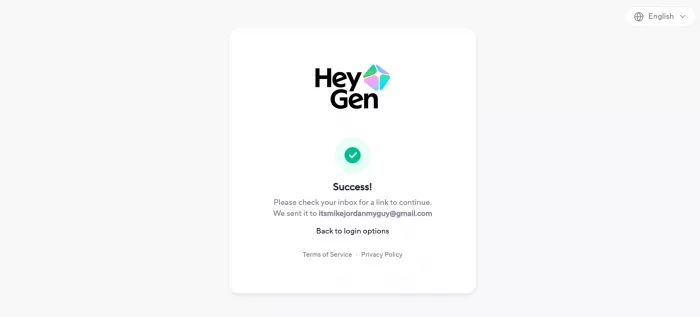
First impressions in software are easy to dramatize, but this one was unambiguous. I created an account, verified my email, and HeyGen greeted me with its plans and subscription page rather than a workspace.
A tool confident in its free tier shows you the magic first and asks for money later. HeyGen does the reverse. Across three weeks of returning, that pattern repeated at every meaningful action. Creating was free. Keeping anything was not.
Underneath the upsell sits a polished, capable product. The toolkit (per HeyGen's own product pages) spans:
- Video Avatar: clone yourself once, reuse the avatar across future videos.
- Photo Avatar (Avatar IV): animate a single still photo into a talking clip.
- Video Agent: generate a structured video from a text prompt.
- Video Translator: re-voice and lip-sync existing footage into other languages.
- AI Studio: the scene-by-scene editor where everything gets assembled.
HeyGen advertises 175+ languages and 200+ voices, and now pipes in third-party models like Sora, Veo, and Kling for cinematic B-roll.
What HeyGen Actually Does in 2026
Strip away the marketing and HeyGen is a script-to-face engine. You write words, pick a synthetic presenter, choose how they sound and move, and the platform renders a person saying your words on camera.
The 2026 version leans on its Avatar IV model, which HeyGen describes as a diffusion-inspired audio-to-expression engine: instead of merely syncing lips to phonemes, it reads tone and rhythm and generates matching facial motion (head tilts, pauses, micro-expressions). When it works, the result is unsettlingly good. When it overreaches, you get the faint plastic shimmer that still betrays AI faces.
How I Tested It: The Talking-Head Test
I scored HeyGen against a fixed rubric I call the Talking-Head Test. Every score comes from my own renders, not a vendor demo. It rates the only things that matter for avatar video:
- Does the voice sound human?
- Do the lips match the audio?
- Does the face move like a face?
- Is the editor pleasant to drive?
- Does any of it survive the free tier?
| Transparency note. Scores reflect output I generated on the free plan, plus paid features I could observe but not export. I fully built and previewed a script-to-video avatar. I could not download a clean file or complete a photo-to-video render, because both routed me into a subscription. Paid-only capabilities are labeled as observed, not stress-tested. |
Meeting Annie: Script to Video, Start to Finish
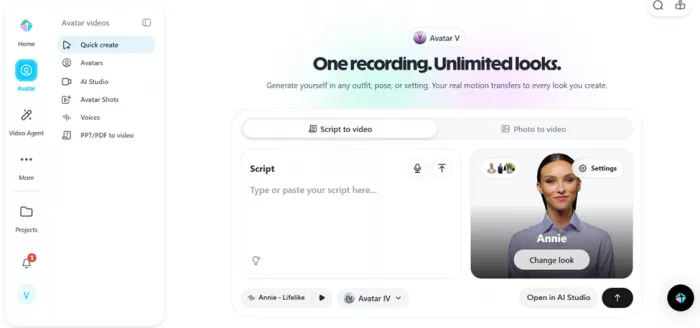
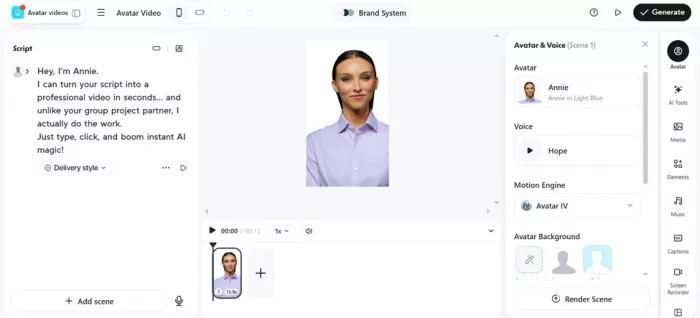
HeyGen drops you into Studio with a default presenter named Annie already on the canvas. I kept Annie rather than hunting the stock library, because I wanted to walk the path a brand-new user actually walks.
Picking the avatar, voice, and engine
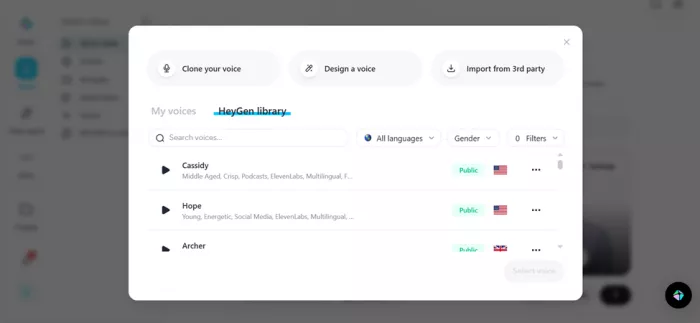
- Voice: I opened the voice library, auditioned a few synthetic voices, and settled on one with pacing I liked.
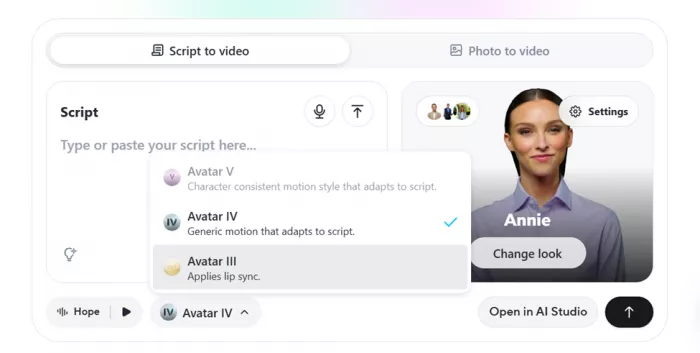
- Engine: HeyGen offered three avatar engine options, the choice that controls how lifelike, and how expensive, the output gets. Premium Avatar IV and Avatar V consume roughly 20 credits per minute (per HeyGen's help center); standard engines render fast and cheap.
- Delivery style: an expressiveness dial that decides whether the avatar reads flat or with emphasis. Genuinely useful, because that is where 'robotic' becomes 'watchable.'
Switching into Studio mode
The moment it stopped feeling like a toy was switching into the full Studio editor. HeyGen structures a video as scenes, the way a deck is built from slides, each carrying its own script, avatar, and visual layer. Suddenly I was not generating a clip, I was directing one. Arranging scenes made me feel briefly, ridiculously professional. That feeling is the product working as designed.
What came back
The result was good, better than I expected from a free render. The voice was the standout: natural pacing, believable emphasis on the joke, none of the flat text-to-speech monotone that plagued these tools two years ago. Lip sync held closely, and the blinking genuinely sold it. Avatars used to stare; Annie blinked at human intervals.
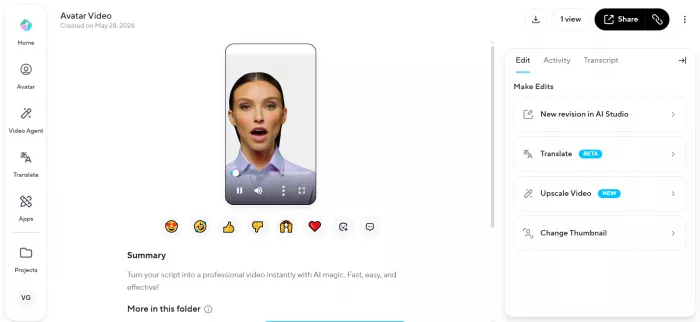
There was exactly one tell. While Annie spoke, her face moved in a way that felt slightly off: not broken, just a touch too fluid in the cheeks and jaw, the uncanny shimmer AI faces produce when the motion model interpolates between expressions. On a 720p free render it is more visible than at 1080p. For social clips, no casual viewer would flag it. For a polished brand film, you would notice.
| Then I tried to download it. HeyGen asked me to subscribe. The free plan technically allows a few watermarked 720p exports, but the premium engine I picked and the Studio export path routed me straight into the paid credit pool. The video that impressed me was held hostage behind an upgrade. Build for free, pay to keep. |
Video Agent: One Prompt, Three Stitched Clips
Video Agent is HeyGen's prompt-to-video mode: describe a scene in plain language and it assembles a structured video rather than a single talking head. I wanted to push it somewhere cinematic, so I handed it a Thor monologue (the full prompt sits in Prompts I Tested).
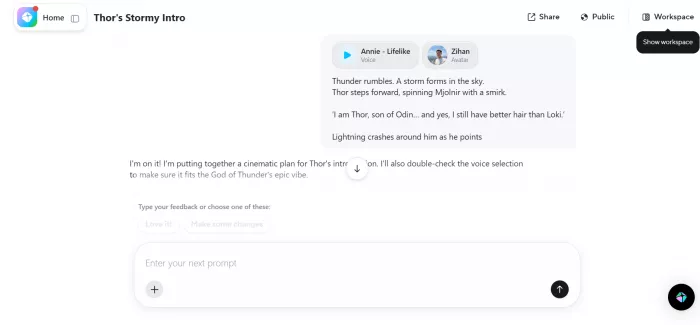
Before it would generate, Video Agent asked me to pick a character. I selected one and let it run. The output told a clear story about the feature's strengths and its limits:
- Structure: instead of one shot, it returned three separate clips stitched into a single sequence, with a generated voiceover laid over the top.
- Visuals: the imagery was okay. Watchable and on-theme, nothing broken, though a notch below the polish of the avatar renders.
- Voice: the background voiceover was the weak link. It felt mediocre, flatter and less natural than the voice from the Annie script-to-video test.
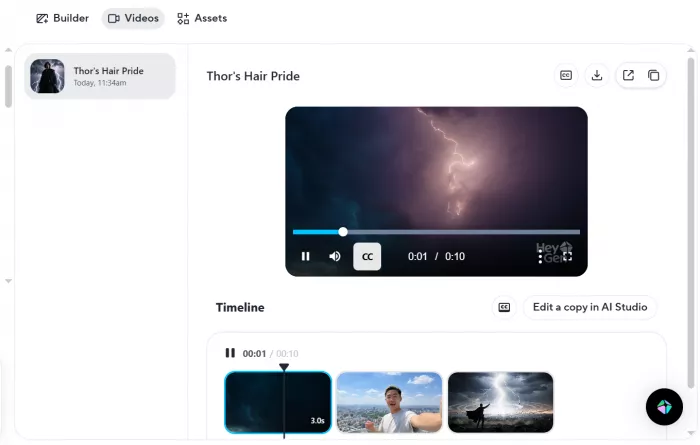
Video Agent is impressive in ambition, turning a paragraph into a multi-shot montage with almost no effort. But the seams show. The stitched-clip feel and the underwhelming voiceover make it better for rough concepting and storyboards than for finished, publish-ready video.
Prompts I Tested
These are the exact scripts I fed into HeyGen during testing: the script-to-video line that produced the Annie render, and the cinematic prompt I ran through Video Agent.
Prompt 1, Annie script-to-video (Studio mode) “Hey, I'm Annie. I can turn your script into a professional video in seconds, and unlike your group project partner, I actually do the work. Just type, click, and boom, instant AI magic!” |
Prompt 2, Thor monologue (Video Agent) Thunder rumbles. A storm forms in the sky. Thor steps forward, spinning Mjolnir with a smirk. ‘I am Thor, son of Odin… and yes, I still have better hair than Loki.’ Lightning crashes around him as he points the hammer toward the camera. ‘Prepare yourself… because this is going to be legendary.’ |
These are the raw scripts behind the renders above. Keeping the prompts visible is a first-hand testing signal that strengthens the review.
My Hands-On Scorecard
Here is how Annie's render and the surrounding experience scored against the Talking-Head Test. My numbers, from my output:
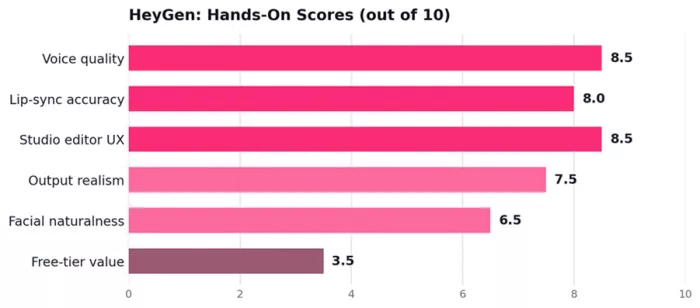
The pattern is clear: HeyGen earns its reputation on voice and rendering, loses points on facial motion, and falls off a cliff on free-tier usefulness.
Photo to Video: Where the Free Ride Ended
The second feature I wanted to test was Photo to Video, HeyGen's headline trick: feed it one still image, add a script and a voice, and the Avatar IV engine animates the photo into a talking clip. HeyGen even pitches it for pets, cartoons, and 3D models.
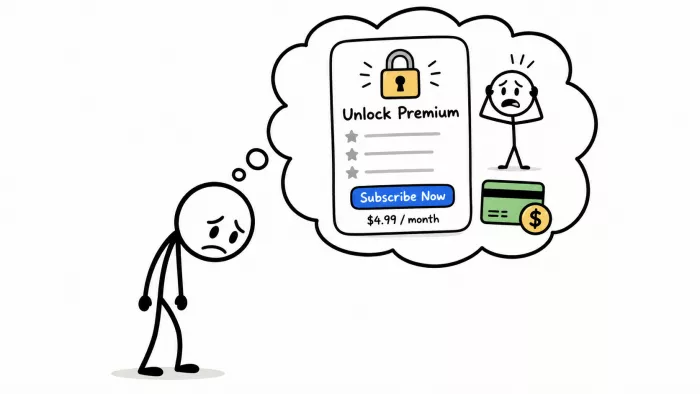
I never got to see it work. Photo to Video draws entirely from the paid credit pool (per HeyGen's own help docs), so the instant I tried to render, the platform asked me to subscribe. No watermarked free sample, no trial render. That gap is itself a finding: the feature most likely to pull a new user in is the one most aggressively gated.
Pricing in 2026
Because pricing shaped my entire experience, it deserves precise numbers. This is the current structure from HeyGen's official pricing page and help center.
| Plan | Price | What it removes or adds | Credits / mo |
|---|---|---|---|
| Free | $0 | 3 videos per month, 720p, mandatory watermark, no credit card. Free users do not spend credits. | None |
| Creator | $29 ($24 annual) | Watermark removed, 1080p export, voice cloning, 175+ languages, unlimited standard avatar video. | 600 |
| Pro | From $49 | Higher credit ceiling for heavy Avatar IV, Video Agent, and translation use; scales by tier. | 1,000+ |
| Business | $149 + $20/seat | 4K output, team workspace, brand kit, API access, SCORM, integrations (Zapier, HubSpot, Make). | 1,000 shared |
| Enterprise | Custom | SSO, SLA, dedicated support, custom concurrency and security review. | Custom |
Source: HeyGen pricing page and Help Center, verified May 2026. Credit allocations and premium rates change often; confirm the live page before buying. Avatar IV and V cost roughly 20 credits per minute; standard avatars are effectively unlimited.
One quirk that trips up buyers: Pro can include more individual credits than Business, because Business credits are shared across an entire workspace. A solo power user chasing Avatar IV volume may get further on Pro than on the pricier Business tier.
Free Features Versus Paywall Triggers
The most useful thing I can hand a new user is a map of exactly where the free experience ends. I hit each of these walls personally.
| Action | Free-plan reality | Verdict |
|---|---|---|
| Pick avatar and voice | Full access to the default Annie avatar and the voice library, with auditioning. | Free |
| Build a script-to-video | Could write the script, choose the engine, and preview the render in Studio. | Free |
| Use the Studio editor | Scene-by-scene editing was available to build and arrange the project. | Free |
| Download a clean file | Export prompted a subscription; free exports are watermarked at 720p only. | Paid |
| Photo to Video | Blocked at the start of render. Pulls from the paid credit pool, no free sample. | Paid |
| Voice cloning and 1080p | Reserved for Creator and above. Not testable without upgrading. | Paid |
The free tier is a fully functional sandbox for building, and a locked vault for keeping. That distinction is the heart of this review.
Writing Scripts That Don't Break the Avatar
The avatar is only as convincing as the words and timing you feed it. These are specific to how HeyGen's voice and motion engines behave, not generic copywriting tips.
| Do this | Avoid this |
|---|---|
| Do write in short, spoken sentences. The voice engine breathes better with natural speech rhythm. | Don't paste long literary paragraphs. Run-ons flatten the cadence and expose the synthetic pacing. |
| Do use commas and periods to script the pauses you want. Punctuation is the timing tool the engine reads. | Don't rely on exclamation marks for energy. Set the delivery style dial instead. |
| Do keep each scene script under about 2,000 characters, HeyGen's own recommended ceiling. | Don't cram a whole video into one scene. Split it; per-scene scripts render more reliably. |
| Do spell tricky proper nouns phonetically. Synthetic voices still fumble unusual names and acronyms. | Don't assume the avatar guesses pronunciation. A misread name makes output feel cheap fast. |
| Do save a premium engine for short, high-stakes lines where micro-expression earns the credits. | Don't burn 20-credit-per-minute Avatar IV on long rough drafts. Use a standard engine for cuts. |
The avatar handles delivery. You still direct the script, and credit discipline is now part of the writing job.
HeyGen Against the Alternatives
The right tool depends on whether you value realism, predictable cost, or learning-and-development features. Here is how it lines up against the rivals creators ask about most.
| Tool | Entry price | Where it wins | Cost model |
|---|---|---|---|
| HeyGen | $24/mo annual | Voice realism, unlimited standard video, photo-to-video, 175+ languages. | Credits for premium |
| Synthesia | Higher entry | Enterprise polish and a mature L&D template ecosystem. | Minute-metered |
| Colossyan | ~$19/mo annual | Cheaper start, but a hard 10-minute monthly cap on the entry tier. | Capped minutes |
| Elai.io | ~$23/mo annual | Simple, predictable per-minute billing that is easy to budget. | Per-minute |
HeyGen's unlimited standard video beats capped rivals for volume creators, but the credit system makes premium-heavy budgets harder to predict than a flat per-minute tool.
Strengths and Shortcomings
What earns the praise
- Voice quality is the real headline: human pacing and emphasis, not robotic monotone.
- Lip sync and natural blinking did more for believability than any marketing claim.
- The Studio scene editor is pleasant and makes a beginner feel capable fast.
- Unlimited standard-avatar video on paid plans removes per-minute anxiety.
- Depth of voices and 175+ languages make it a serious localization tool.
What holds it back
- A subscription page greets you before the product does.
- Facial motion still carries a faint synthetic shimmer up close, especially at 720p.
- Downloads and photo-to-video are walled, so you cannot finish a real video for free.
- The credit system makes premium budgets unpredictable, and unused credits expire.
- It is a script renderer, not a full editor. Cinematic control is limited.
Who Should Use It, and Who Should Skip
Use it if your content is structured, script-driven, repeatable, and needs a human face on camera: faceless YouTube channels, multilingual explainers, sales and training clips, social-first creators. For them, Creator at $24 to $29 a month is a reasonable spend.
Skip it if you plan to publish for free (three watermarked 720p videos a month is a sample pack), if you need real cinematic editing (this is a renderer wearing an editor's clothes), or for a single one-off video where a monthly subscription rarely makes sense.
The Verdict After Three Weeks
HeyGen is one of the most capable AI avatar tools I have tested, and one of the most disciplined about extracting payment for that capability. Both are true at once. The voice impressed me, the Studio editor flattered me, the blinking nearly fooled me. Then the download button asked for my card, photo-to-video refused to start, and the spell broke.
My honest position: worth paying for if you fit the use case, almost pointless if you do not. The free tier is not a trial in any real sense; it is a guided tour that ends at the gift shop. Go in expecting to subscribe, treat the free plan as a fifteen-minute quality check, and HeyGen earns its place. Seven and a half out of ten, with the half-point docked squarely for how aggressively the paywall shapes the experience.
Comments