Table of Contents
- ChatGPT: The Default Layer for Drafting, Brainstorming, and Concept Translation
- Perplexity AI: Citations as a First-Class Output
- Grammarly: Editing Assistance Embedded Where Students Already Write
- Google NotebookLM: Personal Knowledge Bases Built From Course Materials
- QuillBot: Paraphrasing and Summarization for Density-Heavy Coursework
- Strategic Takeaways for Students Building an AI Stack
Student AI use has crossed a structural threshold: 86% of higher-education students now report using AI in their studies, and 88% used generative AI for assessments in 2025, up from 53% the year before, according to the Digital Education Council and the Higher Education Policy Institute. The shift is no longer a novelty story, it is an infrastructural one. Five tools concentrate the bulk of practical academic value: ChatGPT for general drafting, Perplexity for cited research, Grammarly for inline editing, Google NotebookLM for source-grounded study, and QuillBot for paraphrasing and summarization. This analysis treats each as a standalone case study, examining the architecture behind it, where it measurably outperforms alternatives, where it fails, and how its pricing model maps to actual student workflows.
The Quantitative Shift in Student AI Adoption
Three independent surveys converge on the same picture. Pew Research Center's December 2025 panel of 1,458 U.S. teens recorded 59% ChatGPT usage, with 28% using AI chatbots daily; the share using ChatGPT specifically for schoolwork doubled from 13% in 2023 to 26% in 2024. The Chegg Global Student Survey 2025, covering 11,706 undergraduates across 15 countries, put generative-AI use at 80%. The HEPI/Kortext UK survey of 1,041 full-time undergraduates put it at 92%, up from 66% the previous year.
Adoption is also bifurcating along predictable lines. Pew found 11th and 12th graders use ChatGPT for schoolwork at 31%, against 20% for 7th and 8th graders. Higher-income households (above $75,000) use ChatGPT at 62% versus 52% below that threshold. The Digital Education Council data shows the average higher-ed student uses approximately two AI tools concurrently, signaling that the practical question for a 2026 student is not whether to use AI but which combination of tools to invest time learning.
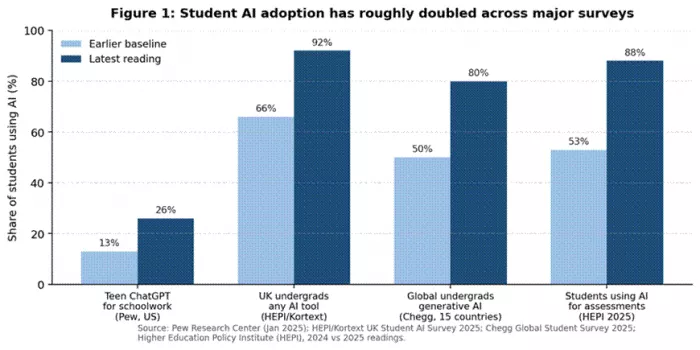
Figure 1: Adoption growth across four major student AI surveys, 2023 to 2025.
ChatGPT: The Default Layer for Drafting, Brainstorming, and Concept Translation
Architecture and execution model
ChatGPT in 2026 runs a multi-model backend. Free users access GPT-5.3 with a 10-message-per-five-hour cap and ad-supported responses (rolled out in the US in February 2026). The Go tier at $8 per month adds GPT-5.3 Instant, file uploads, image creation, and roughly 10x the message limits. Plus at $20 per month unlocks GPT-5.5, the Thinking reasoning mode, Advanced Voice, image generation via gpt-image-2, Codex coding workflows, Agent Mode, and Deep Research capped at 10 runs per month. Pro at $200 per month removes most rate limits and exposes a 1-million-token context window. Underneath, the system is a transformer LLM augmented by retrieval, code interpreter, browsing, and tool-use agents that select capabilities per query. For students, the practical execution pattern is iterative: prompt, draft, critique, regenerate, copy selectively.
Adoption and benchmark signals
Among teens who use any AI chatbot, ChatGPT captures 59% mindshare, more than double Gemini at 23% and Meta AI at 20% (Pew, December 2025). G2 lists ChatGPT at 4.7/5 across more than 760 product-page reviews; Capterra holds it at 4.5/5 across roughly 12,000 reviews. By OpenAI's most recent disclosures, weekly active users sit between 700 and 900 million, the largest user base of any consumer AI product. The Plus tier alone has approximately 10 million subscribers.
Failure modes that students underestimate
Three failure modes matter for academic work. First, hallucinated citations on niche academic topics persist; on graduate-level legal, medical, or specialized historical content, fabricated references remain frequent. Second, math reliability lags Wolfram Alpha and Symbolab on multi-step proofs and non-trivial integrals. Third, students themselves implicitly rank the tool's reliability: Pew found 54% accept ChatGPT for research but only 29% for math problems and 18% for writing essays. The model produces plausible prose far more reliably than it produces verified facts. Confidential coursework is also a concern, since on Plus and below conversations may be used for training unless the user manually opts out.
Where ChatGPT fits and where it does not
ChatGPT is optimal for students who need a single general-purpose assistant for outlining essays, simplifying dense readings, generating practice questions, debugging short code, and translating between English and another language. It is a poor primary tool for cited literature reviews (Perplexity dominates that workflow) and for paraphrasing existing text without triggering AI-detection tools (Turnitin's 2025-2026 detector flags GPT output reliably). Students whose universities license ChatGPT Edu should use that path before any individual subscription, since it carries enhanced privacy controls and no per-student cost.
| Tier | US monthly price | Key access | Best fit for students |
|---|---|---|---|
| Free | $0 (ads in US) | GPT-5.3, 10 msgs / 5h, no Sora, limited Codex | Casual occasional use |
| Go | $8 | GPT-5.3 Instant, ~10x limits, file uploads, image gen | Daily homework helper on a budget |
| Plus | $20 | GPT-5.5 + Thinking, Voice, Deep Research (10/mo), Agent Mode | Heavy users, exam prep, research |
| Pro | $100 / $200 | GPT-5.5 Pro, 1M-token context, near-unlimited Codex | Niche; only for power users |
| Edu (institutional) | Free to verified students at participating universities | Plus-equivalent capability with admin controls and privacy guarantees | Always check campus IT first |
Table 1: ChatGPT consumer and education tiers as of May 2026 (source: chatgpt.com/pricing, OpenAI release notes).
| Capability | ChatGPT Plus ($20) | Claude Pro ($20) | Google Gemini Advanced ($20) |
|---|---|---|---|
| Top model | GPT-5.5 + Thinking | Claude Opus 4.6 / 4.7 in Pro tier | Gemini 3 Pro / 3.1 Pro |
| Max context window | Up to 1M tokens (Pro tier only) | 200K tokens with Projects | 1M tokens |
| Native image generation | Yes (gpt-image-2) | No | Yes (Imagen) |
| Native voice mode | Advanced Voice | Limited | Live mode |
| Cited web research | Deep Research, 10 runs/mo | Web search, no formal Deep Research equivalent | Deep Research bundled in Google AI Pro |
| Workspace integration | Custom GPTs and plugins | Projects, Artifacts | Tightest integration with Docs, Gmail, Sheets |
| Strongest student use case | General-purpose assistant | Long-context writing and code reasoning | Anything inside Google Workspace |
Table 2: Feature comparison among the three $20 consumer AI subscriptions, May 2026.
| Strengths | Trade-offs |
|---|---|
| Largest model ecosystem; strongest single-prompt versatility | Hallucinated citations on specialized academic topics |
| Custom GPTs allow students to build subject-specific tutors | Math reliability lags symbolic math engines |
| Voice mode genuinely useful for spoken-language practice | Plus conversations may be used for training unless opted out |
| Deep Research produces structured, sourced reports in minutes | Deep Research capped at 10 runs/mo on Plus |
| Free tier covers roughly 80% of casual student tasks | Output style flagged by Turnitin's 2025-2026 detector |
Table 3: ChatGPT for student work, real-world strengths and trade-offs.
| Source | Rating | Review count | Synthesized user sentiment |
|---|---|---|---|
| G2 | 4.7/5 | 760+ | Praised for versatility and writing speed; common complaints about niche-topic accuracy and recurring hallucinations |
| Capterra | 4.5/5 | ~12,000 | Most reviews stress productivity gains; complaints concentrate on inaccurate financial calculations and outdated info |
| Internal: weekly active users | n/a | 700M to 900M (OpenAI disclosures) | Largest active user base of any consumer AI product worldwide |
Table 4: ChatGPT user ratings, May 2026 readings.
Perplexity AI: Citations as a First-Class Output
Retrieval-and-synthesis architecture
Perplexity is not a chatbot with bolted-on search. Each query triggers a retrieval pipeline that crawls roughly 20 sources per question, ranks them, then passes the top fragments into a frontier LLM (GPT-5.2, Claude Sonnet 4.6, or Gemini 3 Pro depending on user selection) for synthesis with inline citations. The Education Pro plan adds an Academic Focus mode that restricts retrieval to peer-reviewed sources, and a Study Mode that auto-generates flashcards and quizzes from uploaded course materials. Deep Research runs an agentic loop, browsing dozens of sources before returning a structured 2,000-to-3,000 word draft with 30-plus citations.
Where Perplexity outperforms general chat
Perplexity's measurable edge is verifiability. Every claim in the answer is footnoted to a source URL, which collapses the most expensive part of student research, finding and validating citations, into a single workflow. For a literature review or comparative essay, Perplexity Pro's 20-Deep-Research-runs-per-day cap is generous enough that a graduate student can plausibly complete an entire chapter's worth of source mapping in a weekend. ChatGPT's Deep Research, capped at 10 runs per month on Plus, cannot match that throughput.
Trust gaps and the Trustpilot anomaly
Perplexity's review picture is unusually polarized. G2 (4.7/5, 47 reviews), Capterra (4.7/5, 19 reviews), and Product Hunt (4.8/5, 96 reviews) all rate it strongly. Trustpilot, by contrast, holds it at roughly 1.6/5 across about 180 reviews, with complaints concentrating on auto-renewal billing and difficulty cancelling, not on output quality. Students should treat the product as technically excellent but transactionally hazardous, in particular by setting a calendar reminder before any annual renewal. On output, the most common substantive failure is incomplete coverage of non-English-language scholarship and paywalled databases such as JSTOR.
Real-world workflow for literature reviews
The dominant workflow among graduate students looks like this. First, run 8 to 12 broad Pro Search queries in Academic Focus mode to map a topic and surface seed papers. Second, run 2 to 3 Deep Research jobs to draft a literature-review skeleton with citations. Third, manually verify each citation against the original PDF, since Perplexity occasionally cites a related paper by the same author rather than the exact paper supporting the claim. Fourth, paraphrase and rewrite the draft, since AI-generated text submitted as-is violates academic-integrity policies at most institutions in 2026.
Where Perplexity fits and where it does not
Perplexity is the strongest single tool for any student whose work is research-driven, including essays in history, political science, public health, law, business strategy, and the social sciences. It is a poor fit for students whose primary need is creative drafting, fiction, or open-ended brainstorming, since the citation overhead slows down generation. Students at Saudi, Korean, or Japanese universities working in non-English literatures should pair Perplexity with a regional database (Saudi Digital Library, KISTI, CiNii) rather than rely on it alone.
| Tier | Price | Daily Pro Search and Deep Research | Best fit |
|---|---|---|---|
| Free | $0 | ~5 Pro searches/day, 0 Deep Research | Light reference checks |
| Pro | $20/mo or $200/yr | Unlimited Pro Search, 20 Deep Research/day | Researchers, journalists, grad students |
| Education Pro | $10/mo (50% off via SheerID) | Pro features plus Study Mode and Academic Focus | Verified students and educators |
| Max | $200/mo | Unlimited Labs, Comet browser, Perplexity Computer | Power users only |
| Enterprise Pro | $40/seat/mo | 500 daily research queries, SSO | Research teams |
Table 5: Perplexity 2026 pricing (source: perplexity.ai/pricing and SheerID terms).
| Capability | Perplexity Pro ($20) | ChatGPT Plus + Deep Research | Elicit (free + paid) |
|---|---|---|---|
| Citation quality | Inline footnotes per claim, 20+ sources/Deep Research | Footnotes only in Deep Research mode | Strong on peer-reviewed papers, weaker on web |
| Daily research throughput | 20 Deep Research runs/day | 10 runs per month on Plus | 8 free Pro Searches/month, then paid |
| Academic-source filter | Academic Focus mode (peer-reviewed only) | No native filter | Native, by design |
| File uploads | Expanded on Pro, unlimited on Education Pro | Yes, with size limits | Yes, paper-by-paper |
| Best for | Mixed web + academic research | General drafting + occasional research | Pure systematic literature review |
Table 6: Citation-driven research, three competing tools side by side.
| Strengths | Trade-offs |
|---|---|
| Inline citations make verification fast and falsifiable | Trustpilot consumer complaints concentrate on billing, not quality |
| 50% student discount via SheerID is among the cheapest research subscriptions | Indexes paywalled databases inconsistently (JSTOR, Springer) |
| Deep Research drafts a 3,000-word literature map in minutes | Occasionally cites a related paper rather than the exact source |
| Lets users pick the underlying model (GPT, Claude, Gemini) per query | Weaker on non-English scholarship outside the EU and East Asia |
Table 7: Perplexity for student work, real-world strengths and trade-offs.
| Source | Rating | Review count | Synthesized user sentiment |
|---|---|---|---|
| G2 | 4.7/5 | 47 | High praise for sourced answers and speed; minor complaints about model-switching mid-session |
| Capterra | 4.7/5 | ~19 | Easy to use; users note it actively avoids hallucinations even on the free tier |
| Product Hunt | 4.8/5 | 96 | Praised as a quick, accurate research assistant with clear citations |
| Trustpilot | 1.6/5 | ~180 | Complaints concentrate on surprise renewals and refund difficulty, not output quality |
Table 8: Perplexity user ratings, May 2026 readings.
Grammarly: Editing Assistance Embedded Where Students Already Write

Engine and integration footprint
Grammarly's distinctive value is not its model quality (which trails GPT-5.5 and Claude Opus on raw rewriting), but its integration footprint. The browser extension, desktop app, and mobile keyboard insert Grammarly into Gmail, Google Docs, Microsoft Word, Canvas, Blackboard, Notion, Slack, and roughly one million additional sites and apps. Underneath, the system blends a rules-based grammar engine (developed since 2009) with newer transformer-based generative components branded as Grammarly's generative AI features. The Pro plan grants 2,000 AI prompts per member per month against the Free plan's 100, plus access to plagiarism detection that compares text against a database of billions of web pages and academic sources.
Adoption and rating data
Grammarly ranks #1 in G2's Winter 2026 Grid Report for AI Writing Assistants. Across roughly 12,969 G2 reviews the average sits at 4.7/5; Trustpilot averages 4.1/5 across 10,314 reviews; pricing complaints account for about 12% of reviews from January 2025 onward, typically from light users questioning value rather than from heavy users disputing performance. Among students specifically, the Demandsage 2026 student-tools survey ranks Grammarly the second-most-used AI tool at 25% adoption, behind only ChatGPT at 66%.
Limitations against newer generative writers
Grammarly's recommendations skew conservative. Reviewers consistently report it pushes prose toward what one G2 review describes as a neutral corporate style, stripping idiosyncrasy that matters for personal essays, creative-writing assignments, and graduate-level argumentative work. Generative-AI suggestions occasionally hallucinate, especially when rewriting technical jargon or domain-specific terminology. The plagiarism checker is genuinely competitive with paid tools like Turnitin's consumer interface, but it does not detect AI-generated text the way Turnitin's 2026 institutional engine does, so a student running a ChatGPT draft through Grammarly's plagiarism checker will still get caught at submission.
Where Grammarly fits and where it does not
Grammarly fits any student writing daily emails, weekly assignments, or long-form documents in English, especially non-native speakers, where the in-context tone and clarity suggestions deliver outsized value. It does not fit students whose primary writing is mathematical (LaTeX integration is poor), code-heavy (where it produces noisy false positives), or in non-Roman scripts. Anyone whose university subscribes to Grammarly for Education should use that path; verified institutions include Chapman, Cal State LA, USC Viterbi, Illinois State, and University of Illinois Chicago.
| Tier | Price | AI prompts and key features | Best fit |
|---|---|---|---|
| Free | $0 | 100 AI prompts/mo, grammar, spelling, basic tone | Casual writers |
| Pro (annual) | $12/mo billed $144/yr | 2,000 AI prompts/mo, plagiarism detection, advanced rewrites | Daily writers and most students |
| Pro (monthly) | $30/mo | Same as Pro annual | Short-term users (e.g. one-month essay sprint) |
| Pro via UNiDAYS (student) | ~$9/mo (25% off) | Identical to Pro | Verified students |
| Education (institutional) | Free to students at participating universities | Pro features under campus license | Always check campus IT first |
| Business | $15/member/mo | Style guide, brand voice, snippets | Student org leaders, lab teams |
Table 9: Grammarly 2026 pricing (sources: grammarly.com/plans, UNiDAYS, Student Beans).
| Capability | Grammarly Pro ($12/mo) | ProWritingAid ($120/yr) | QuillBot Premium ($8.33/mo) |
|---|---|---|---|
| Grammar accuracy | Industry-leading rules + AI hybrid | Strong, with deeper style reports | Adequate; trails Grammarly on edge cases |
| AI rewriting | GrammarlyGO with 2,000 prompts/mo | Limited generative features | 8 paraphrasing modes + synonym slider |
| Plagiarism check | Yes, web + academic database | Add-on (additional fee) | Yes, on Premium |
| Integration breadth | 1M+ sites and apps | MS Word, Scrivener, Chrome | Chrome, Word, Google Docs |
| Lifetime option | No | Yes (~$300 one-time) | No |
| Best primary use | In-context editing | Long-form style audit | Reword without hand-typing |
Table 10: Three writing assistants compared on capabilities most relevant to students.
| Strengths | Trade-offs |
|---|---|
| Embedded in nearly every place students already write | Pushes prose toward a neutral corporate register |
| Strong free tier covers basic grammar at no cost | Annual auto-renewal at $144 surprises lapsed promo users |
| Plagiarism checker bundled, not an add-on | AI suggestions hallucinate on technical or specialized vocabulary |
| UNiDAYS and Student Beans student discounts cut Pro to ~$9/mo | Generative AI is better at rewriting than at originating ideas |
Table 11: Grammarly for student work, strengths and trade-offs.
| Source | Rating | Review count | Synthesized user sentiment |
|---|---|---|---|
| G2 | 4.7/5 | ~12,969 | Most-reviewed AI writing assistant on G2; pricing concerns cited in roughly 12% of reviews |
| Capterra | 4.7/5 | ~70,000+ | Praised for daily-writing utility; complaints focus on context blind spots and over-standardization |
| Trustpilot | 4.1/5 | ~10,314 | Mixed reviews dominated by complaints about auto-renewal and customer support, not product quality |
Table 12: Grammarly user ratings, May 2026 readings.
Google NotebookLM: Personal Knowledge Bases Built From Course Materials

Retrieval-augmented generation tied to user sources
NotebookLM is structurally different from the four other tools in this report. It does not answer from general knowledge; it answers strictly from sources the student uploads. The architecture is retrieval-augmented generation (RAG) on top of Gemini 3 Pro: PDFs, Google Docs, lecture transcripts, YouTube videos (transcripts are extracted automatically), audio recordings, and web pages are chunked, embedded, and indexed inside a private notebook. Queries return synthesized answers grounded in those chunks with cited line numbers. The Studio panel turns the same source set into Audio Overviews (a podcast-style two-host discussion), Video Overviews, Mind Maps, Slide Decks, study guides, FAQs, timelines, briefing docs, flashcards, and quizzes.
Performance characteristics in academic settings
On the free tier each notebook accepts up to 50 sources, each up to 500,000 words or 200 MB. The free quota allows 50 chat queries per day and 3 Audio/Video Overviews per day across up to 100 notebooks. NotebookLM Plus, available standalone via qualifying Google Workspace plans starting at $14/user/month or bundled inside Google AI Pro at $19.99/month (with a 50% student discount in the US bringing it to $9.99/month for the first 12 months), doubles those limits, raises sources to 100 per notebook, and expands Deep Research to 10 sessions per month.
Boundary conditions students hit fastest
Three constraints surface quickly. First, no offline mode exists on any plan, so a student preparing for a flight or working in a low-connectivity environment cannot use it. Second, Gemini is the only available model; no API-key bring-your-own option exists, which matters for students whose institutions discourage Google AI processing of confidential data. Third, copy-protected PDFs and paywalled pages fail to import, which rules out many e-textbooks and licensed journal articles. The 50-source-per-notebook free-tier ceiling is also tight for a graduate seminar that assigns 80 to 100 readings.
Workflows for thesis writing and lecture review
The dominant student workflow is course-by-course consolidation. A student creates one notebook per course, uploads the syllabus, all lecture slides, recorded lecture audio, and assigned readings, then uses the notebook as a private examiner for the duration of the term. The Audio Overview function, which generates a 10-to-25-minute podcast-style discussion of the source material between two AI hosts, is widely cited as the single feature that makes the tool sticky; students play the audio while commuting or exercising in the days before exams. For thesis writers, NotebookLM functions as a controlled-corpus reasoning layer that complements Perplexity's broader web search.
Where NotebookLM fits and where it does not
NotebookLM is the strongest tool in this report for any student whose primary task is consolidating long, course-specific reading lists into testable knowledge. It is the wrong tool for open-ended drafting, ideation outside the source set, or research that requires the model to surface material the student has not already provided. Students who care about local-first data handling should consider Elephas (Mac-only, one-time purchase) instead.
| Tier | Price | Limits | Best fit |
|---|---|---|---|
| Free standalone | $0 | 50 sources/notebook, 100 notebooks, 50 chats/day, 3 Audio Overviews/day | Most undergraduates |
| Plus (Workspace bundle) | From $14/user/mo (Workspace Standard) | 100 sources/notebook, ~5x daily limits, customization | Power users in Workspace orgs |
| Pro (Google AI Pro bundle) | $19.99/mo (or $9.99/mo students, US, 18+, first 12 mo) | Same as Plus + Gemini Advanced + 2 TB storage + Deep Research | Heavy student users, thesis writers |
| Ultra (Google AI Ultra) | ~$249.99/mo | Highest limits, Gemini Agent, Deep Think reasoning | Professional researchers |
Table 13: NotebookLM 2026 pricing (sources: notebooklm.google/plans, blog.google, one.google.com).
| Capability | NotebookLM (free) | ChatGPT Plus + file upload | Elicit Plus ($10/mo) |
|---|---|---|---|
| Source grounding | Strict; refuses to answer outside uploaded sources | Soft; will blend uploaded content with general knowledge | Strict on uploaded papers |
| Audio Overview generation | Yes, two-host podcast format | No native equivalent | No |
| Max sources per project | 50 free, 100 Plus | Up to 20 attached files per chat | Limited per workflow |
| YouTube transcript ingest | Native | Manual paste | No |
| Cost | Free | $20/mo | $10/mo |
| Best for | Course-corpus study | Mixed file analysis + general chat | Systematic review |
Table 14: Source-grounded study tools compared on capabilities most relevant to coursework.
| Strengths | Trade-offs |
|---|---|
| Hallucinations are sharply reduced because answers are grounded in cited source chunks | No offline mode; useless on flights or weak networks |
| Audio Overview turns reading lists into a 15-to-25 minute podcast for commuting | Gemini is the only model; no bring-your-own-API option |
| Free tier is generous (100 notebooks, 50 sources each) | Copy-protected PDFs and paywalled pages will not import |
| 50% US student discount on Pro for the first 12 months | Response customization (tone, length) is locked behind Plus |
Table 15: NotebookLM for student work, strengths and trade-offs.
| Source | Rating | Review count | Synthesized user sentiment |
|---|---|---|---|
| G2 (Google AI Pro / Workspace AI listings) | ~4.5/5 (estimated) | Newer product; aggregated reviews limited | Audio Overview cited as the killer feature; users praise hallucination-resistance |
| Reddit r/notebooklm (community sentiment) | Net positive | ~30,000+ subscribers as of early 2026 | Overwhelmingly positive on study-guide and podcast features; complaints focus on source caps |
| Capterra / Software Advice | Limited dedicated listings | n/a | Tool is bundled inside Google AI Pro, so review surfaces are fragmented |
Table 16: NotebookLM user sentiment, May 2026 readings (note: dedicated review aggregation lags consumer awareness).
QuillBot: Paraphrasing and Summarization for Density-Heavy Coursework
Paraphrasing engine and modes
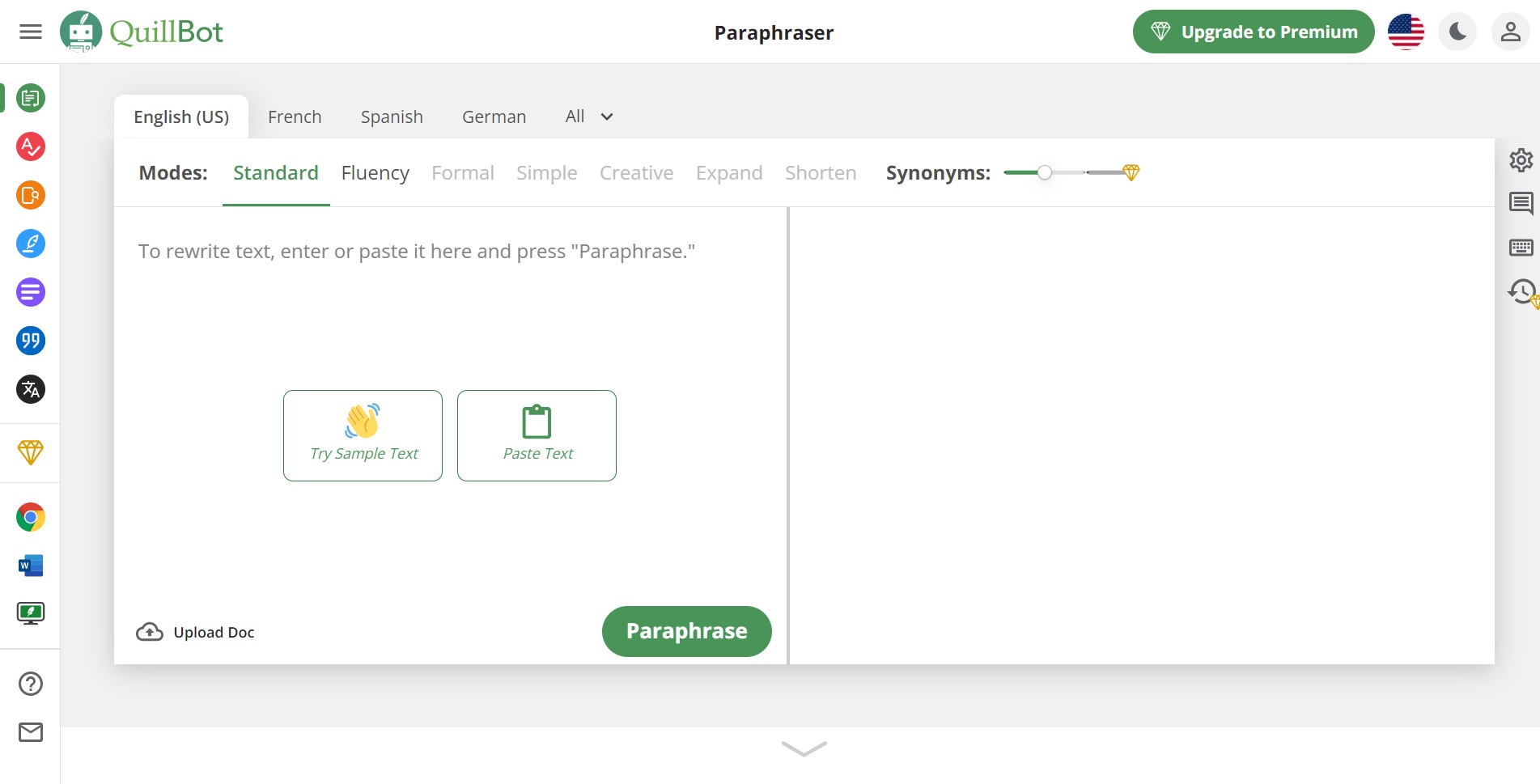
QuillBot's core engine is a fine-tuned sequence-to-sequence model with eight paraphrasing modes (Standard, Fluency, Formal, Academic, Simple, Creative, Shorten, Expand) controlled by a synonym slider that adjusts vocabulary aggressiveness. The Premium plan adds unlimited paraphrasing length, summarization up to 6,000 words per pass, an integrated grammar checker, an AI-content detector, a citation generator (APA, MLA, Chicago), and a co-writer mode. The free plan caps paraphrasing at 125 words per pass and restricts modes to Standard and Fluency.
Effectiveness signals and the Turnitin question
On the surface QuillBot looks ideal for the most repetitive student task: rewording dense source material in a student's own words. But the 2026 Turnitin and academic-detector picture has shifted. Independent testing in March 2026 by SupWriter and other reviewers found QuillBot's most aggressive Creative mode achieved roughly a 42% bypass rate against five major AI detectors, and only 38% against Turnitin specifically. Turnitin's 2025-2026 detector explicitly flags QuillBot output as paraphrasing-tool processing. The implication is direct: QuillBot is no longer a viable laundering layer for AI-generated drafts. Its legitimate value is paraphrasing original student writing for clarity and concision, not rewriting ChatGPT output to evade detection.
Risks tied to academic integrity
Universities increasingly distinguish between paraphrasing one's own writing (acceptable) and using QuillBot to disguise either AI-generated text or copy-pasted source material (sanctionable). Most institutions in 2026 explicitly prohibit the latter. Students should also note that QuillBot's paraphraser can subtly shift meaning in technical or precise content; G2 reviewers consistently flag meaning alteration as the most common usage hazard. For technical, legal, or scientific writing, every QuillBot-generated rewrite should be manually verified against the original.
Real student workflows
The defensible workflow is to use QuillBot's summarizer to compress long readings into 300-to-500-word digests for revision, use the grammar checker as a free Grammarly substitute (it lags Grammarly in accuracy but is free), and use the paraphraser sparingly to tighten one's own draft sentences rather than to rewrite source material. The citation generator is genuinely useful for fast in-line APA and MLA formatting. ESL students writing in English are the strongest user segment, since QuillBot's Fluency mode reliably smooths idiomatic awkwardness without changing meaning.
Where QuillBot fits and where it does not
QuillBot fits ESL students, content-heavy undergraduate workflows, and any student who needs cheap summarization for revision notes. It does not fit graduate students writing in technical, legal, or scientific domains where meaning preservation is paramount, and it does not fit students who plan to use it as an AI-detection bypass, since 2026 detectors flag the output reliably.
| Tier | Price | Key limits | Best fit |
|---|---|---|---|
| Free | $0 | 125-word paraphrase cap, Standard + Fluency modes only, basic grammar | Light occasional use |
| Premium (monthly) | $19.95/mo | Unlimited paraphrasing, all 8 modes, 6,000-word summarizer, plagiarism checker | Short-term sprint users |
| Premium (semi-annual) | $13.31/mo billed $79.95 every 6 months | Same as Premium monthly | Mid-commitment users |
| Premium (annual) | $8.33/mo billed $99.95/yr | Same as Premium monthly | Most regular student users |
| Team (annual) | Custom (volume discounts up to 30%) | Premium for all members + dashboards | Lab teams, student-run publications |
Table 17: QuillBot 2026 pricing (source: quillbot.com/upgrade).
| Capability | QuillBot Premium | Wordtune Premium ($9.99/mo) | Grammarly Pro ($12/mo) |
|---|---|---|---|
| Paraphrasing modes | 8 modes + synonym slider | 5 modes | Limited; rewrites via GrammarlyGO |
| Max input per pass | Unlimited (Premium) | 10,000 characters | Practically unlimited |
| Summarizer | Up to 6,000 words | Yes, shorter | No native long-form summarizer |
| Plagiarism check | Yes, on Premium | No | Yes, included |
| Citation generator | APA, MLA, Chicago | No | No |
| Best primary use | Reword and summarize | Rephrase short text | Edit while writing |
Table 18: QuillBot vs. comparable paraphrasing and writing tools.
| Strengths | Trade-offs |
|---|---|
| Annual price ($8.33/mo) is the cheapest in the writing-assistant tier | Free version is heavily limited (125 words/pass) |
| Eight paraphrasing modes plus synonym slider give precise tone control | Output flagged by Turnitin's 2025-2026 detector |
| Bundled summarizer, grammar checker, plagiarism checker, citation generator | Can subtly alter meaning in technical and precise content |
| Strongest practical value for ESL students | Internet connection required; no offline mode |
Table 19: QuillBot for student work, strengths and trade-offs.
| Source | Rating | Review count | Synthesized user sentiment |
|---|---|---|---|
| G2 (QuillBot) | 4.3/5 | ~34 | Praised for ease of use; criticism focuses on premium-paywall friction and meaning alteration |
| G2 (QuillBot Paraphraser sub-listing) | Higher single-feature average | ~24+ verified | Reviewers cite ease of use and time savings as top benefits |
| Capterra | 4.5/5 | ~154 | Friendly UI, generous free plan; users expect to upgrade for full functionality |
| Trustpilot | 4.9/5 | ~5,633 | High satisfaction; common complaint is premium price relative to free tier |
Table 20: QuillBot user ratings, May 2026 readings.
Comparing the Five Tools on Cost, Capability, and Trust
Two patterns matter when assembling an actual student stack. First, four of the five tools converge on roughly $100 to $144 per year for full-feature paid access, while NotebookLM is functionally usable on its free tier indefinitely. Second, user ratings cluster tightly between 4.4 and 4.7 across G2 and Capterra, meaning satisfaction differences between tools are not a useful selection signal. Differentiation lives in the tool's purpose, not its rating.
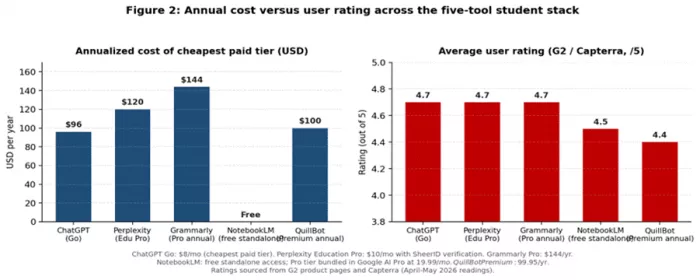
On a strictly cost-per-academic-task basis, the most efficient stack for an undergraduate in 2026 is NotebookLM (free) for course consolidation, Perplexity Education Pro ($10/month, requires SheerID verification) for cited research, and ChatGPT Free or Go ($0 to $8/month) for drafting. Adding Grammarly Pro at $12/month and QuillBot Premium at $8.33/month annual is justifiable only if the student writes daily in English and processes large volumes of source material weekly. Combined annual cost of the full stack at student-discounted rates is approximately $360 per year, which is less than two months of out-of-state textbook costs for most US institutions.
Strategic Takeaways for Students Building an AI Stack
For a student deciding where to start: install Grammarly’s free extension and create a free NotebookLM account this week, since both deliver immediate value at zero cost. Verify eligibility for Perplexity Education Pro before paying for anything else. Trial ChatGPT Plus for one billing cycle during a high-load academic period, such as midterms or finals, to determine whether the $20 unlocks justify ongoing expense. Add QuillBot Premium last, and only if paraphrasing and summarization volume genuinely warrants $99.95 per year.
The right stack is small, deliberate, and aligned to actual coursework, not the largest possible collection of subscriptions. For students who want to go beyond using AI tools and actually understand how to apply them across writing, research, productivity, and creator workflows, Timtis fits naturally into that next layer of learning. The strongest long-term advantage will come from pairing tool access with practical AI literacy, so students know not just which app to open, but when, why, and how to use it responsibly.
Comments