Table of Contents
- The Big Picture: What No-Code AI Actually Means in 2026
- Why Creators and Solopreneurs Are the Biggest Winners
- The Market Is Not Just Growing. It Is Exploding.
- The Tool Stack: What Creators Are Actually Using Right Now
- Tool Comparison: At a Glance
- The 7 Workflows Every Solopreneur Should Automate Right Now
- Where Are Solopreneurs Actually Spending Their Automation Time?
- The Honest Limitations: What No-Code AI Still Cannot Do
- Real Creator Case Studies: From Chaos to Clockwork
- Getting Started: Your 30-Day No-Code AI Roadmap
- The Future Is Already Here, You Just Need to Use It
- Quick Reference: Key Statistics Summary
Picture this: It is 2019. You walk into a coffee shop, pull out your laptop, and confidently tell the person next to you that artificial intelligence is going to automate everything. They nod politely and go back to their oat milk latte. Fast forward to 2026, and that same coffee shop is now run by a solopreneur who built her entire business with AI workflows she set up on a Sunday afternoon while binge-watching a true crime series.
No, she did not hire a developer. No, she does not know what Python is (and she does not particularly care). She used no-code AI tools, automated her content pipeline, client onboarding, email sequences, and invoice generation, and now works roughly 4 hours a day while the rest runs on autopilot.
This is not a fairy tale. This is 2026, and no-code AI is the most democratizing force in the history of building a business online.
The Big Picture: What No-Code AI Actually Means in 2026
Let us get the definition out of the way because too many articles skip this and assume you already know. No-code AI refers to platforms and tools that let you build, deploy, and connect artificial intelligence-powered workflows without writing a single line of code. We are talking drag-and-drop interfaces, visual flow builders, pre-built templates, and natural language prompts that tell software what to do.
The shift that happened between 2023 and 2026 is not just incremental. It is categorical. Before, no-code tools were mostly about connecting apps (think: Zapier automating a form submission into a spreadsheet). Now, the AI layer has made those connections intelligent. Your workflow no longer just moves data from A to B. It reads, understands, generates, classifies, and makes decisions along the way.
RESEARCH SPOTLIGHT According to Gartner's 2025 Low-Code Development Report, over 70% of new business applications built in 2025 used low-code or no-code platforms. For solo operators and small teams, that number climbed even higher, to 84%, with AI-powered automation cited as the primary driver of adoption. |
Why Creators and Solopreneurs Are the Biggest Winners
Here is the uncomfortable truth that Silicon Valley does not love to advertise: large enterprises are actually slower to adopt no-code AI than individual creators. Why? Because a Fortune 500 company has IT approval processes, legacy infrastructure, procurement cycles, and a guy named Gerald who has been managing the server room since 2008 and is not thrilled about change
You, on the other hand, have none of that baggage. You can spin up a brand-new automated workflow by Thursday. You can test, break it, fix it, and ship a better version by next Monday. That agility is your superpower, and no-code AI hands you the cape.
The creator economy in 2026 is no longer just about making content. It is about building systems. The creators who are winning are the ones who treat their operation like a media company, a product studio, and a SaaS business rolled into one, and they are running all three with automated, AI-powered workflows.
The Market Is Not Just Growing. It Is Exploding.
Numbers first, enthusiasm later.
| Year | No-Code AI Market Size (USD) | YoY Growth | Active Users (M) |
| 2022 | $5.6 Billion | 38% | 4.1 |
| 2023 | $8.3 Billion | 48% | 7.8 |
| 2024 | $13.7 Billion | 65% | 14.2 |
| 2025 | $21.4 Billion | 56% | 27.6 |
| 2026 (Est.) | $34.8 Billion | 63% | 45.3 |
| 2030 (Projected) | $187 Billion | Varies | 200+ |
Source: Grand View Research, Forrester Wave No-Code AI 2025, and Market.us Industry Report Q1 2026
No-Code AI Platform Market Share by Category (2026, %)
Workflow Automation ████████████████████████████████████████ 31%
AI Content Generation ███████████████████████████████░░░░░░░░░ 24%
Customer Support Bots ███████████████████████░░░░░░░░░░░░░░░░░ 18%
Data & Analytics ██████████████████░░░░░░░░░░░░░░░░░░░░░░ 14%
App & Web Builder ████████████░░░░░░░░░░░░░░░░░░░░░░░░░░░░ 9%
Other █████░░░░░░░░░░░░░░░░░░░░░░░░░░░░░░░░░░░ 4%
The Tool Stack: What Creators Are Actually Using Right Now
Forget the generic lists you find on every other blog. Here is a breakdown of the actual tools dominating the no-code AI space in 2026, what they are genuinely good at, and what their limitations are. No sponsor bias, no fluff.
Make (Formerly Integromat) + AI Modules
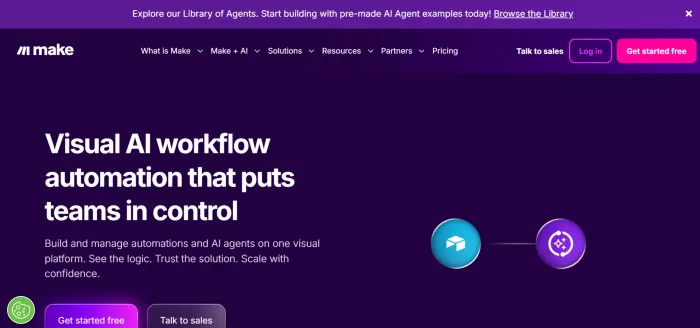
Make has quietly become the most powerful visual workflow builder for solopreneurs. While Zapier gets the mainstream attention, Make gives you branching logic, iterators, error handling, and AI modules that connect directly to Claude, GPT-4o, and Gemini. A food blogger in Austin used Make to auto-generate recipe variations from a Google Sheet of ingredients, auto-format them for her blog, send drafts to a Notion database, and post approved versions to Instagram and Pinterest simultaneously.
Best for: Complex, multi-step automation with conditional logic. Not ideal if you want something set up in 10 minutes flat.
2. Zapier Central (AI Automation Hub)

Zapier Central launched in late 2024 as their AI-native counterpart to the classic Zap builder. It operates using AI agents that can reason about your data and take multi-step actions with minimal setup. For a solopreneur, this is gold because it dramatically reduces the friction of building automations. You describe what you want in plain English, and the agent figures out the steps.
A freelance designer reported saving 12 hours per week after automating her entire client intake process: form submission triggers AI to review project requirements, send a customized welcome email, create a project folder structure in Google Drive, add a task to ClickUp, and schedule an onboarding call via Calendly, all without any human intervention.
3. Notion AI + Databases
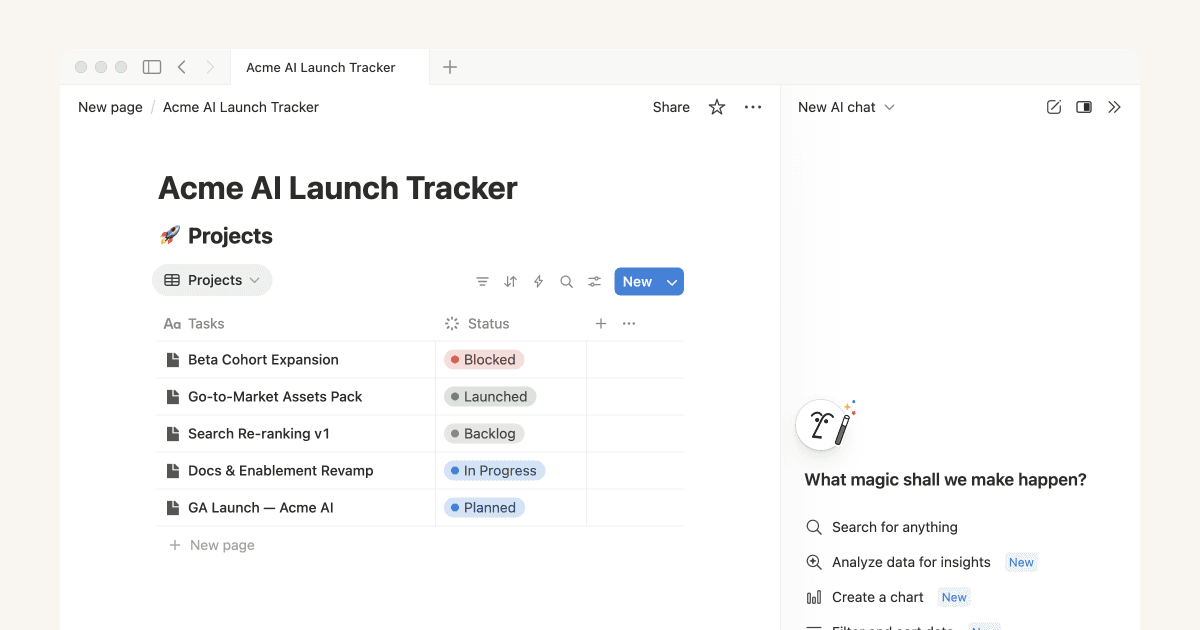
Notion transformed from a note-taking tool into a fully programmable, AI-enhanced operating system for businesses. With AI integrated directly into database views, templates, and workflows, creators can now auto-generate content briefs, summarize meeting notes, populate editorial calendars from a single prompt, and even draft social media content from long-form articles automatically.
The real magic: Notion AI knows the context of your workspace. It is not just a generic chatbot sitting on top of your notes. It can reference your existing content, past projects, and style guides to produce output that actually sounds like you.
4. Bubble + AI Plugins
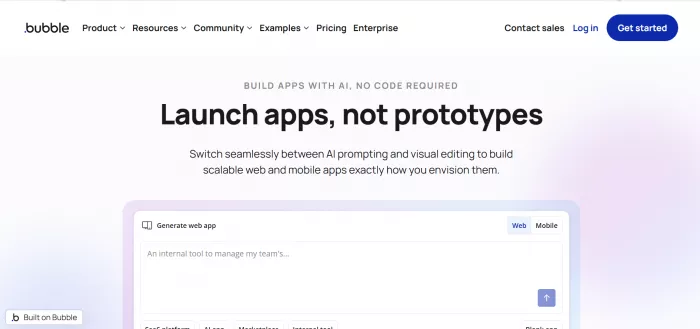
For solopreneurs who want to build and sell their own products without code, Bubble remains the king. In 2026, it has matured significantly with a rich AI plugin ecosystem. You can now build fully functional SaaS tools, client portals, and marketplaces with AI features baked in, without a single developer on the payroll.
One interesting case: a career coach in London built a personalized resume scoring tool on Bubble in three weeks. It charges users $9 per analysis, processes resumes using an AI API integration, and has generated over $60,000 in revenue with zero technical staff.
Durable, Framer AI, and the Website Generation Wave
If your business still does not have a modern website, 2026 has officially run out of excuses for you. Durable can generate a complete, functional business website from a two-sentence description in about 30 seconds. Framer AI takes it further for creators who want design control without touching code, allowing you to describe UI changes in natural language and watch them render in real time.

Tool Comparison: At a Glance
| Tool | Best For | Learning Curve | Pricing (2026) | AI Native? |
| Make | Complex multi-step flows | Medium | Free to $29/mo | Partial |
| Zapier Central | Quick AI automations | Low | Free to $49/mo | Yes |
| Notion AI | Content + knowledge ops | Low | $16/mo add-on | Yes |
| Bubble | Building SaaS products | High | $29 to $349/mo | Via plugins |
| Durable | Instant business websites | Very Low | Free to $25/mo | Yes |
| Framer AI | Beautiful websites | Low-Medium | $15 to $35/mo | Yes |
| n8n | Developer-friendly self-hosted | Medium-High | Free (self-host) | Via nodes |
| Voiceflow | Voice and chat AI agents | Medium | Free to $50/mo | Yes |
The 7 Workflows Every Solopreneur Should Automate Right Now
This is the section you came for. Not theory. Not market size. Real workflows, real logic, real impact. Let us break down the seven workflows that are generating the most time savings and revenue gains for creators and solopreneurs in 2026.
Workflow 1: The Content Multiplier
Write one long-form article or record one video. Feed it into your automation. Out comes a LinkedIn post, three Twitter/X threads, a newsletter draft, five Instagram captions, a YouTube description, a Pinterest pin description, and a pull-quote graphic suggestion. The entire content calendar for a week, generated from one piece of hero content.
•rigger: New video transcript or blog post added to Notion
•Step 1: Claude or GPT-4o summarizes and extracts key insights
•Step 2: Generates platform-specific content variations
•Step 3: Sends drafts to a review buffer in Airtable or Notion
•Step 4: Approved content gets auto-scheduled via Buffer or Publer
Time saved per week: 6 to 10 hours. That is a full workday, handed back to you.
Workflow 2: The Smart Inbox
Your email inbox is not an inbox. It is a graveyard of unanswered questions, collaboration requests, spam disguised as opportunities, and that one newsletter you keep meaning to unsubscribe from. AI can triage all of this.
With a combination of Gmail filters, Zapier, and an AI layer, you can auto-categorize emails, draft suggested replies for common inquiries, forward press requests to a specific folder, auto-decline low-quality collaboration pitches, and flag genuine partnership leads for your personal attention.
REAL WORLD RESULT A creator with 280K YouTube subscribers reported that automating their email triage cut their daily inbox management from 90 minutes to under 15 minutes, while increasing their response rate to genuine partnership requests from 34% to 91%, simply because nothing important fell through the cracks anymore. |
Workflow 3: The Client Onboarding Machine
Every freelancer and service provider has been through this. A new client says yes. You then spend the next three days sending them forms, explaining your process, creating their project folder, adding them to your project management tool, sending the contract, chasing the deposit, and scheduling the kickoff call. It is exhausting, and you have to do it every single time.
With no-code AI, this entire sequence runs automatically the moment a client submits their inquiry form. The AI reviews the form answers, generates a personalized welcome email using their specific project details, creates a branded client portal, sends a contract via DocuSign, triggers an invoice via Stripe, and adds the project to your board. All before you even finish your morning coffee.
Workflow 4: The Revenue Dashboard
Most solopreneurs have no real-time visibility into their own numbers. Revenue lives in Stripe. Expenses live in a bank account. Project status lives in your head. No-code AI tools now let you build a live dashboard that pulls data from Stripe, PayPal, your Shopify store, your Gumroad products, and your service invoices, runs them through an AI layer that identifies trends, flags anomalies, and gives you a plain-English weekly summary delivered to your Slack or email.
No spreadsheet archaeology. No manual reporting. Just a clean, weekly snapshot of what is actually happening in your business.
Workflow 5: The Lead Nurture Engine
This one has a direct line to revenue. Someone downloads your free guide, joins your newsletter, or books a discovery call. What happens next is usually nothing, or at best, a generic welcome sequence that you wrote in 2022 and have not touched since.
With AI-powered personalization, your follow-up sequence can now adapt based on what the lead clicked, what they answered in your intake form, what industry they are in, and what content they have already engaged with. Tools like ActiveCampaign, Kit (formerly ConvertKit), and Klaviyo now have native AI personalization layers that handle this without any manual segmentation from you.
Workflow 6: The Research Digest
Staying on top of your niche, your competitors, your industry news, and relevant research used to mean hours of reading every week. AI research automation changes this completely. You define your topics of interest, point the system at RSS feeds, Reddit communities, newsletters, and Google Alerts, and every morning you get a curated, AI-summarized briefing of what matters, with irrelevant noise filtered out.
Several creators have taken this further, using Perplexity AI's API to auto-generate trending-topic content ideas based on what is getting attention in their niche right now. Your content strategy, essentially writing itself.
Workflow 7: The Repeat Customer Loop
Acquiring a new customer costs five to seven times more than retaining an existing one. Yet most solopreneurs spend 90% of their marketing energy on acquisition and almost none on retention. No-code AI flips this ratio.
Automated post-purchase sequences, personalized product recommendations based on purchase history, re-engagement campaigns triggered when a customer has not returned in 60 days, loyalty reward notifications, and birthday discount flows can all run without any manual effort once they are built.
Where Are Solopreneurs Actually Spending Their Automation Time?
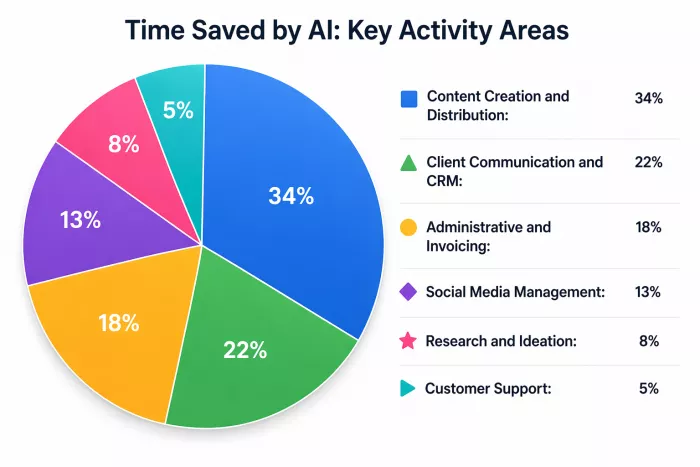
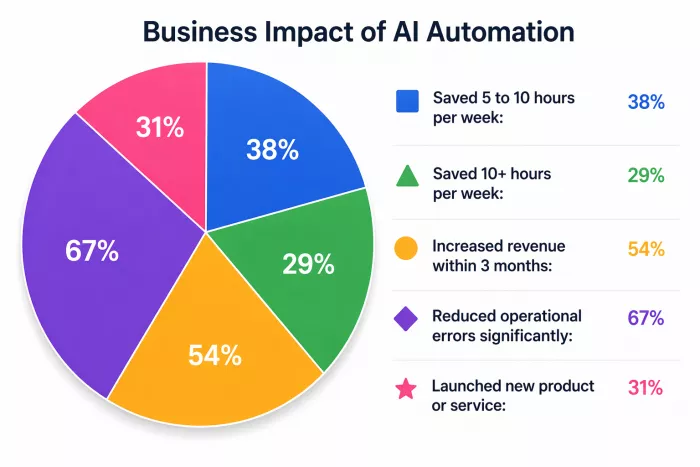
Typeform and Make ran a joint study in Q3 2025 surveying 2,400 solo business owners who actively used no-code AI tools. Here is what they found:
Time Allocation: No-Code AI Use Cases Among Solopreneurs
■ Content Creation and Distribution: 34%
▲ Client Communication and CRM: 22%
● Administrative and Invoicing: 18%
◆ Social Media Management: 13%
★ Research and Ideation: 8%
▶ Customer Support: 5%
Reported Business Impact After Adopting No-Code AI (n=2,400)
■ Saved 5 to 10 hours per week: 38%
▲ Saved 10+ hours per week: 29%
● Increased revenue within 3 months: 54%
◆ Reduced operational errors significantly: 67%
★ Launched new product or service: 31%
The Honest Limitations: What No-Code AI Still Cannot Do
Let us have an honest conversation for a moment, because every article about no-code AI that only talks about the wins is basically a press release wearing a blog disguise.
Limitation 1: Complex Custom Logic
No-code AI tools are incredibly powerful, but they have ceilings. If your workflow requires deeply nested conditional logic, custom API authentication, or real-time data processing at scale, you will eventually hit a wall. The tools are built for the 80% use case, not the edge cases.
Limitation 2: Maintenance Is Real
Automations are not set-and-forget forever. APIs change. Tools update their interfaces. A third-party service deprecates an endpoint. Your carefully built workflow breaks at 2am on a Tuesday when you are trying to run a product launch. Regular maintenance is an unglamorous but real part of running an automated operation.
Limitation 3: AI Output Quality Requires Oversight
The AI content your workflows generate will not always be ready to publish. Hallucinations still happen. Tone drifts. Brand voice inconsistencies creep in. Any content-generating workflow needs a human review step baked in, especially for anything client-facing, legally sensitive, or representing your public brand.
Limitation 4: Vendor Lock-In Risk
When you build your entire business operation on a single platform's ecosystem, you are making a bet on that company's survival and pricing strategy. Platforms pivot. Prices increase. Several well-loved no-code tools have been acquired and shut down or radically changed in the past three years. Diversify your critical workflows across open-standard tools where possible.
PRO TIP Always export your data and document your workflows, even when using no-code platforms. Screenshots of your flow logic, exported CSVs of your contacts, and backup copies of your templates take 30 minutes to create and can save your business if a tool goes dark unexpectedly. |
Real Creator Case Studies: From Chaos to Clockwork
Case Study 1: The Newsletter Operator
Marcus runs a twice-weekly business newsletter with 47,000 subscribers. In 2024, he was spending 18 hours a week on research, writing, editing, and distribution. By mid-2025, he had rebuilt his entire operation using Notion AI, Perplexity research agents, a custom Make workflow, and Beehiiv for distribution.
His AI layer now surfaces the 20 most relevant news items in his niche each morning, drafts section summaries, and prepares a structured brief he edits and approves in about 90 minutes. Total time on newsletter per week: down from 18 hours to 5.5 hours. Subscriber growth: up 34% because consistency improved when production became effortless.
Case Study 2: The Digital Product Creator
Priya sells digital templates and mini-courses on Gumroad and her own Kajabi site. She was spending enormous time on customer support, handling the same questions about download issues, compatibility, and refund requests over and over. She used Voiceflow to build a customer support AI agent trained on her FAQ and product documentation.
Result: 78% of customer inquiries are now resolved without her involvement. She redirected those hours into product development and launched three new products in a single quarter, something that would have been impossible under her old workload.
Case Study 3: The Agency-of-One
James runs a one-person social media agency managing accounts for 11 clients. He uses a combination of Airtable, Make, Claude API, and Publer to run his entire production pipeline. Content briefs are generated from client strategy documents, posts are drafted by AI, reviewed in a client-facing approval portal he built in Softr, and scheduled automatically upon approval.
His capacity before automation: roughly 5 to 6 clients before burning out. Post-automation: 11 clients, higher margins, and a waiting list. He describes the shift not as working less but as doing more creative and strategic work instead of repetitive production tasks.
Getting Started: Your 30-Day No-Code AI Roadmap
The biggest mistake people make is trying to automate everything at once. They go from zero to overwhelmed and abandon the whole thing by day four. Here is a smarter approach.
| Week | Focus | Tools to Explore | Goal |
| Week 1 | Audit your time | Notion, Toggl | Identify your 3 biggest time drains |
| Week 2 | Automate one workflow | Zapier or Make | Get one real automation live |
| Week 3 | Add AI to that workflow | Claude API, OpenAI | Make the workflow intelligent |
| Week 4 | Connect and expand | Airtable, Slack, Gmail | Link two workflows together |
The goal of month one is not to have a fully automated business. It is to prove to yourself that this works. One working automation is worth more than ten half-built ones.
The Future Is Already Here, You Just Need to Use It
In 2026, the playing field between a bootstrapped solo creator and a well-funded startup has never been more level. A single person with the right no-code AI stack can match the output of a team of five. Not because they are working harder, but because they are working smarter, with technology doing the repetitive cognitive labor while they focus on the parts that actually require human creativity, judgment, and relationship-building.
The people who are going to fall behind are not the ones who lack technical skills. They are the ones who keep saying they will figure this out later. Later has been arriving every year since 2020. In 2026, later is officially now.
You do not need to become a developer. You do not need to understand machine learning or neural networks or any of the terrifying-sounding things that live under the hood of these tools. You just need to start with one workflow, one tool, one problem you want to stop doing manually, and build from there.
The coffee shop from our opening story is hiring, by the way. But she is not hiring people. She is hiring automations. Maybe yours will be next.
Quick Reference: Key Statistics Summary
| Metric | Data Point | Source |
| No-Code AI Market (2026 Est.) | $34.8 Billion | Grand View Research |
| Solopreneurs saving 10+ hrs/wk | 29% of adopters | Make/Typeform Study 2025 |
| Revenue increase within 3 months | 54% of adopters | Make/Typeform Study 2025 |
| Enterprise app dev on low-code | 70% of new apps | Gartner 2025 |
| Solo operator low-code adoption | 84% | Gartner 2025 |
| No-Code AI users by 2026 (Est.) | 45.3 Million | Market.us Q1 2026 |
| Projected market size 2030 | $187 Billion | Forrester / Grand View |
| Avg time saved (content creators) | 6-10 hrs/week | Various platform reports |
Comments