PicLumen built its name as a free AI image generator. The 2026 version is a much bigger product. The dashboard now leads with short dramas, a node-based Canvas, a video studio, a library of one-click effects and a Marketplace, while generation runs on more than 40 third-party and in-house models.
For this guide, a brand-new account went through every screen a first-time user meets: the sign-up options, the email code, the welcome offer, the Lumen wallet, the video and effects studios, and the Explore feed. Each step below comes from those screens and is cross-checked against PicLumen's own pricing page and FAQ.

One detail matters before anything else. The new account opened with a Lumen balance of zero, so no image or video could be generated without buying credits first. Output quality is therefore not scored here. Instead, you get a clear map of how PicLumen works, what it costs and what verified users on Trustpilot and Product Hunt report about the results.
Walkthrough score 7.8/10Output quality not rated | Quick verdict PicLumen offers a wide model catalog, a tidy interface and one of the larger effect template libraries around, all under one credit wallet. The trade-off for newcomers is entry: the test account received no starting Lumens, and the cheapest way to begin was a one-time pack of 200 Lumens for $0.99. |
Best for
| Skip if
|
PicLumen AI at a glance
| Detail | What to know |
|---|---|
| Platform | Web app for Windows and Mac browsers, plus the Naivideo app for iOS and Android (APK) |
| Operator | Grand Vision Tech Software Limited (site footer); Trustpilot lists Chengdu, China |
| Launched | 2024 |
| Models | 40+ claimed, including Seedance 2.5, Wan 3.0, GPT Image 2.5, Nano Banana 2, Veo 3.1 and Suno V6 |
| Credit system | Lumens, spent at a different rate per model |
| Paid plans from | $7.59 per month, or $6.09 per month billed yearly (ex. tax) |
| New account offer | 200 Lumens for $0.99, one time, use within 7 days |
| Payment | Stripe and PayPal |
| Commercial use | Limited on Lite, full from Standard upward, none on Basic |
What is PicLumen AI?
PicLumen is a browser-based AI creative platform for images, video, music and short dramas. Everything runs on Lumens, a single credit currency. The company claims a community of more than 10 million users, and the same account works on mobile through Naivideo, PicLumen's official app.

Image studio Text-to-image and image-to-image, with content, style and character reference modes. | Video studio Text-to-video and image-to-video, with a start frame upload and the cost shown before you generate. | Drama Turns a story idea into a script, characters, storyboard and shots on one node canvas. |
Canvas Node workspace for multi-step projects. Limits run from 10 projects on Lite to 100 on Elite. | Apps and effects One-click templates for dance trends, sports clips, pets, duos and seasonal themes. | Editing tools Background remover, upscaler, colorizer, AI Replace, extender, plus video object and text removal. |
Which AI models does PicLumen include?
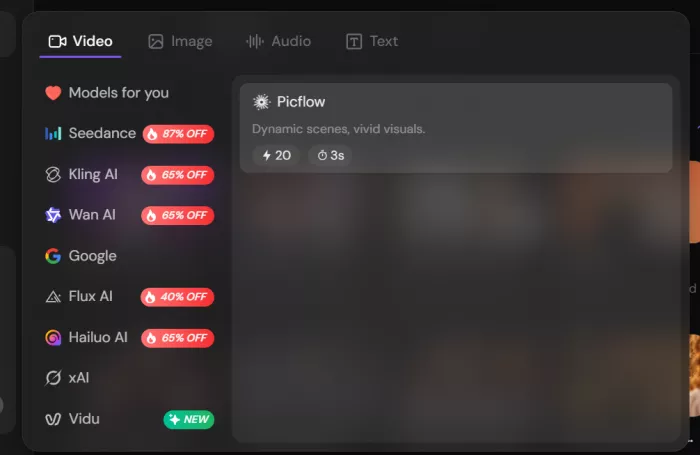
| Category | Models listed by PicLumen |
|---|---|
| Image | GPT Image 2.5, GPT Image 2.0, Nano Banana 2, Seedream 5.0 Pro, Qwen Image 3.0, Grok Imagine Image 2.0, FLUX |
| Video | Seedance 2.5, Seedance 2.0, Wan 3.0, Kling 3.0, Kling 3.0 Motion Control, Veo 3.1, PixVerse V6, Grok Imagine |
| Video editing | Flux Video Edit |
| Audio | Suno V6 |
| In-house | Picflow (video), PicLumen Realistic V2, Anime V2, Art V1 and Lineart V1 |
Plan pages also list Midjourney access. Relax Mode, the slower queue that keeps generating when Lumens run out on eligible paid plans, applies only to PicLumen's own models.
How to use PicLumen AI: step-by-step guide
These steps follow the exact screens shown to a new account in November 2026.
| 1. | Open PicLumen and click Sign Up Go to piclumen.com. The home page opens on a What's New carousel featuring the timestamp-based AI Video Editor, the Drama studio and a seasonal sale. The sidebar groups Studios (Drama, Solutions, Canvas, Apps) and Models (Video). Sign Up sits in the top-right corner beside the Pricing badge. |
2.
| Choose Google, Apple or email A modal offers Continue with Google, Continue with Apple and Continue with Email. It also names the headline models (Seedance 2.5, Wan 3.0, GPT-Image-2.5 and NanoBanana 2.1) and invites you to join the creator community to explore, remix and earn rewards. 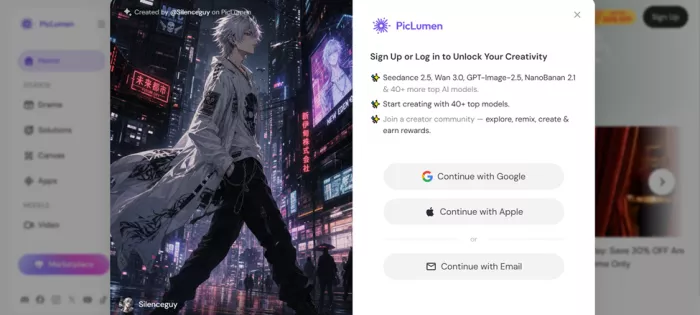 |
| 3. | Enter your email and password The email route asks for an address and a password on one screen. If no account exists, PicLumen creates one automatically, so there is no separate registration form. A Cloudflare verification box runs underneath and shows a green Success tick before you continue. |
| 4. | Confirm the 4-digit code PicLumen emails a four-digit login code. Type it into the four boxes and press Continue. If the email is slow, a resend option unlocks after a 60-second countdown.  |
| 5. | Decide on the welcome offer A Welcome to PicLumen card appears next with a Starter Pack: 200 Lumens for $0.99, one time only for new accounts, worth up to 200 images on PicLumen Art V1. The Lumens must be used within 7 days. Pay through Stripe or PayPal, or pick Maybe Later. A gift icon stays pinned to the corner if you change your mind. 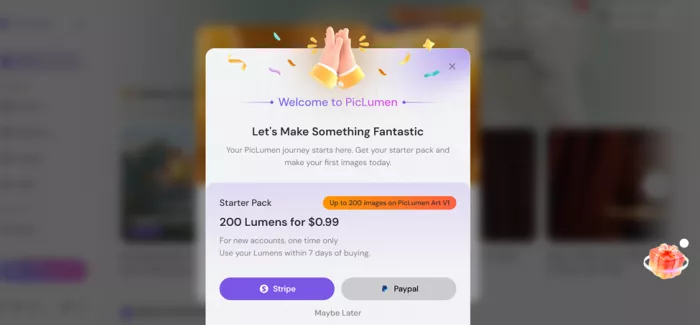 |
6. | Check your Lumen balance Open your profile to find the Lumen Balance panel. It splits credits into Awarded, Plan Included, Earning and Purchased, with a Lumen Records log and a Top Up Lumens button. On the test account, every line read 0. 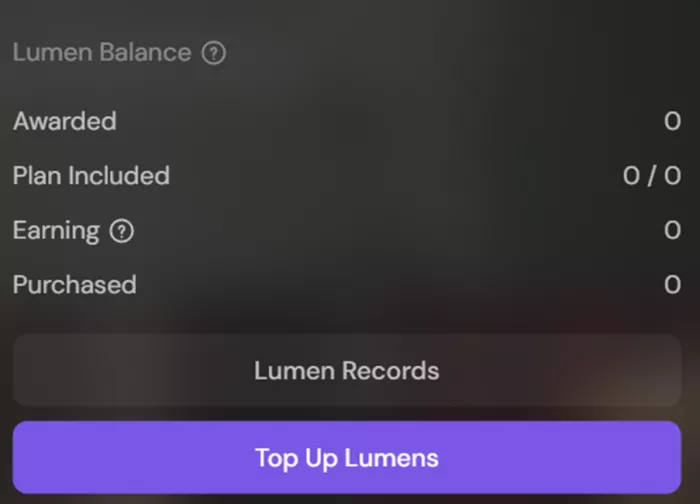 |
7. | Generate a video in the Video studio Click Video under Models. The default model is Picflow. Add an optional Start Frame image, write a prompt of up to 2,400 characters, and switch on Translate if you write in another language. The Generate button shows the cost before you commit: 20 Lumens for Picflow on the test account. Tabs on the right lead to Creations, Effects, Inspiration and Tools. 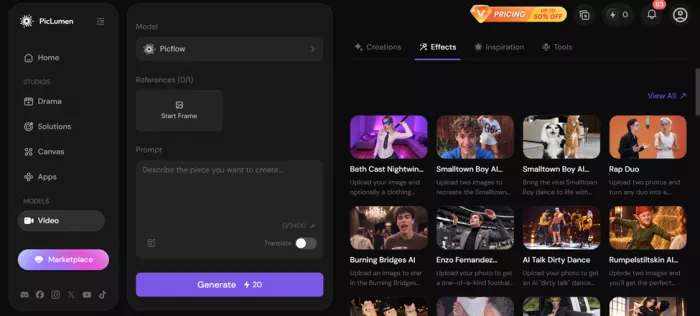 |
8. | Use a one-click effect template The Effects tab, or View All, opens the template library, sorted into Trending, Halloween and Funny. Templates cover dance trends, sports moments, pet clips, rap duos and story scenes. Each card states what to upload, usually one or two photos, and some accept an optional outfit image. |
9. | Edit a clip with Flux Video Edit To change footage you already have, select Flux Video Edit. Upload one video and describe the change in plain words, such as recoloring an object. Length and audio follow the source clip, prompts can run to 4,096 characters, and output tops out at 720p and 24 fps. PicLumen's sample turns a cream gown royal blue while the rest of the scene stays the same. 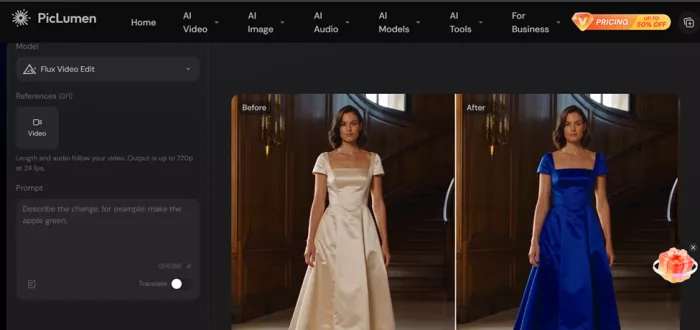 |
10. | Create images and borrow ideas from Explore For still images, open AI Image, choose Text to Image or Image to Image, pick a model and write your prompt. Reference images can guide content, style or character. Image generation could not run on the test account, so this step reflects PicLumen's published feature set. For inspiration, the Explore feed sorts community work into Featured, Trending, New, Following and Short Drama, with search, tags and filters. Some creators hide their prompts, shown by a lock label on the card. 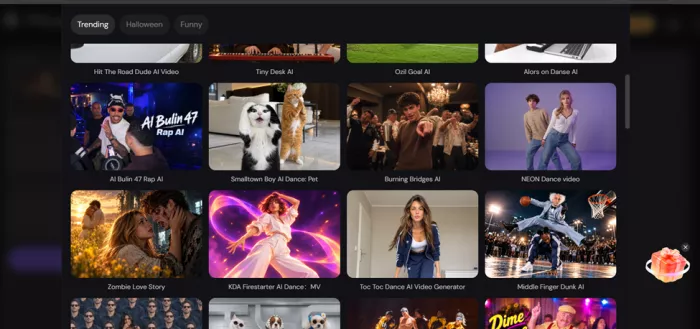 |
Hands-on testing: what the walkthrough showed
Test Setup
Date November 2026 | Device Desktop browser | Sign-up route Email and password | Starting balance 0 Lumens |
| Area | Score | What stood out |
|---|---|---|
| Sign-up and onboarding | 8.5 | Three sign-in routes, automatic account creation, a bot check and code login all ran smoothly |
| Interface and navigation | 8.5 | Studios and models are clearly grouped, and costs appear on the Generate button |
| Model and tool range | 9.0 | 40+ models across image, video and audio, plus editing tools and business presets |
| Templates and effects | 8.5 | Large library with upload instructions printed on every card |
| Pricing clarity | 7.5 | Detailed plan table and FAQ, though prices exclude tax and free-access wording differs between pages |
| Free access for new accounts | 5.0 | Balance started at 0; the first generation needed the $0.99 pack or a plan |
| Output quality | Not rated | No Lumens were available to generate |
| Overall | 7.8/10 | Average of the six scored areas |
What PicLumen promises vs. what a new account sees
| PicLumen says | Test account result |
|---|---|
| Start creating with 40+ top models (sign-up modal) | Models are listed and selectable; generating needs Lumens |
| Basic users get 10 Lumens per day (general FAQ) | Awarded balance read 0 after sign-up |
| New accounts get a welcome offer (pricing FAQ) | Matched: 200 Lumens for $0.99 appeared right after login |
| Failed generations are not charged (FAQ) | Not checkable without a balance |
| Watermark-free creation on paid plans | Not checkable without a plan |
Two official pages describe free access differently. The general FAQ says Basic users receive 10 Lumens a day within daily limits, and the plan comparison still lists 10 daily Lumens for Basic. The FAQ on the pricing page says new accounts get a welcome offer and that continued creation needs a Lumen pack or a plan. The test account matched the second description.
PicLumen pricing in 2026
Prices exclude tax. Yearly billing saves 20 to 25 percent.
Basic Free Normal mode. No commercial rights. Plan table lists 10 daily Lumens; the test account started at 0. | Lite $7.59/mo $6.09/mo yearly 750 Lumens (about 750 images or 30 videos). Standard mode, limited commercial license, queue of 3. | Lowest tier with full license Standard $24.99/mo $19.99/mo yearly 2,500 Lumens. Fast mode, full commercial license, 2 tasks at once, unlimited Relax Mode images, 15% top-up bonus. |
Pro $49.99/mo $37.49/mo yearly 6,000 Lumens. Turbo mode, license with extension rights, 5 tasks at once, unlimited Relax Mode images and video. | Elite 15K to 60K Lumens per month, four tiers Top 60K tier: $359.99/mo or $269.99/mo yearly. Hyper mode, 10 tasks at once, business-level license, 30% rollover. | Enterprise Custom Shared Lumen allocation, central billing, content privacy and dedicated support. |
Lumen rules worth knowing
|
PicLumen pros and cons
Pros
| Cons
|
What people are saying about PicLumen
| Platform | Rating | Reviews | Worth knowing |
|---|---|---|---|
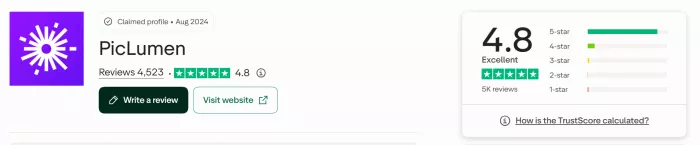
| Trustpilot | 4.8/5 | 5K | 88% five-star; 853 reviews in the last 12 months |
| Product Hunt | 5.0/5 | 11 | Praise centers on support and image quality |
| G2 | No rating | 0 | Profile is claimed but has no published reviews yet |
Reviewers like the daily rewards, the speed and the image quality. The main complaints are credits lost on unexpected errors, a wish for more starting credits, and prompts that occasionally return off-target images. |
Liked the model variety, the prices and the community page, and said a bug report got a reply within a few hours. |
Found results matched prompts closely. After an unplanned auto-renewal, support refunded the charge in about four days. |
Says support credits Lumens back when costly outputs come out glitched, and wants more video models added. |
Enjoys the platform but notes that prompt adherence sometimes takes several attempts to land the right result. |
Praised Art V1 for painterly results, the 4K upscaler and the Describe tool that rebuilds prompts from an image. |
Trustpilot notes that PicLumen has not invited reviewers recently, has replied to about half of its negative reviews and usually takes over a month to reply. Many recent five-star entries are one-line comments, so the longer reviews carry more weight.
Final verdict
Time spent moving through PicLumen's studios leaves a clear impression: this platform is built for creators who want options. Few services put Seedance, Kling, Veo, GPT Image, Nano Banana and Suno behind one login, then add a Drama workspace, a node Canvas and a deep template library on top. The interface stays readable despite all of that, and the Lumen cost sits right on the Generate button, which makes budgeting easy. The weak spot is the first five minutes. The test account showed zero Lumens on every balance line, and the only path to a first generation was the $0.99 starter pack or a plan. That is a fair price for a trial, but it no longer matches the free-generator reputation PicLumen earned in 2024. If spending a dollar to judge the output yourself sounds reasonable, PicLumen deserves that test, especially for short social video. If you need a tool with free daily credits, check your own balance before planning around it. Walkthrough score: 7.8/10 Output quality not rated |
Comments