Sitemap files give search engines a structured roadmap to a website. The Sitemap Generator hosted on UploadArticle.com promises one in seconds, with no signup and no installation. This review covers what the tool produces, how it compares to better-known alternatives like Screaming Frog and XML-Sitemaps.com, and what the host site itself looks like to a first-time visitor. The audit surfaces both the tool's narrow utility and several rough edges on UploadArticle.com that anyone evaluating it should weigh before publishing the sitemap to a production site.

What the tool actually generates
The Sitemap Generator on UploadArticle.com is a browser-based crawler. The interface accepts a homepage URL, walks visible internal links from that starting point, and returns a downloadable XML file listing the discovered pages along with optional priority, change frequency, and last-modified hints. There is no account requirement, no software to install, and no quota dashboard.
Output conforms to the sitemaps.org protocol, which is the structured format Google, Bing, and Yandex parse during indexing. The generated file uploads directly to a site root and can be submitted in Google Search Console or Bing Webmaster Tools without conversion. Standard sitemap fields are populated, and basic include or exclude controls are available before download.
What the output does not include is equally worth noting. There is no sitemap index splitting for sites above the 50,000-URL limit defined in the sitemaps.org specification. There is no error log when the crawler skips a URL due to a redirect, a 404, or a robots.txt block. There is no scheduled regeneration to keep the file current as new pages publish, and no automatic ping to search consoles after a fresh sitemap is written. Each of these is standard in more advanced tools and absent here.
A quick reference of the tool's core attributes is captured below.
| Attribute | Value |
|---|---|
| Pricing | Free, no tier upgrades |
| Account required | No |
| Installation | None, browser-based |
| Output format | XML, sitemaps.org compliant |
| Crawl source | Public URL, follows internal HTML links |
| Update frequency | Manual regeneration required |
| Multimedia coverage | Image and video URLs supported |
| Submission integration | Manual upload to Search Console and Bing |
Running through the workflow
Six steps separate a blank browser tab from a sitemap that Google has begun to crawl. The sequence below maps to the publicly documented process and is consistent across third-party walkthroughs covering the tool.
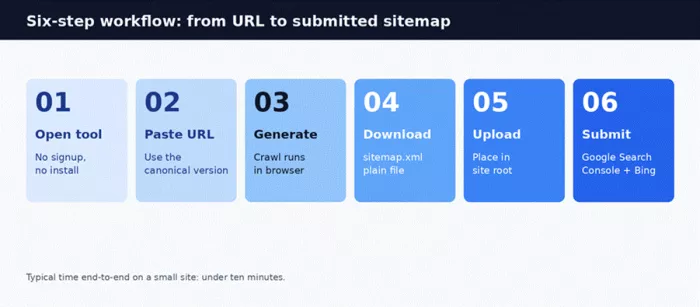
The end-to-end time for a small site of under 500 pages sits within ten minutes by most reports, with the crawl itself accounting for the longest portion. Larger sites scale linearly, since the tool processes one URL at a time rather than parallelising the crawl.
| Step | Action | Time on a small site |
|---|---|---|
| 1 | Open the tool in any browser | Under 30 seconds |
| 2 | Paste the canonical homepage URL (www or non-www, http or https) | Under 30 seconds |
| 3 | Click generate and wait for the crawl to complete | 1 to 5 minutes |
| 4 | Review the URL list and adjust priority or exclusions | 1 to 3 minutes |
| 5 | Download sitemap.xml and upload to the site root via FTP or hosting panel | 2 to 3 minutes |
| 6 | Submit the sitemap URL in Google Search Console and reference it in robots.txt | 1 minute |
A common failure mode worth knowing: pages that depend on JavaScript-rendered navigation may not appear in the output, because the external crawler follows standard HTML anchor links only. Fixing this requires adding plain HTML links to the affected pages or rendering navigation server-side before regenerating.
Regeneration cadence is another consideration. Because the workflow is manual, the sitemap goes stale the moment a new page publishes. Active blogs and news sites typically need a fresh sitemap weekly at minimum; ecommerce catalogs that change daily need automation that this tool does not provide. Stable brochure sites of fewer than fifty pages can run on a quarterly cadence without major indexing penalties.
How it stacks up against the alternatives
Sitemap tooling sits along a spectrum. Free browser utilities occupy one end, plugin-based generators sit in the middle for CMS users, and crawler-grade desktop software anchors the high end. The Sitemap Generator on UploadArticle.com is positioned firmly in the first group. The market context below compares it against four widely used alternatives.
| Tool | Pricing | URL limit | Setup | Best fit |
|---|---|---|---|---|
| UploadArticle.com | Free | Not officially published | Browser, no install | One-off sitemaps for static or small sites |
| XML-Sitemaps.com | Free; paid from around $2.44/month (billed yearly) | 500 on free tier | Browser, no install | Beginners on small sites |
| Yoast SEO | Free; Premium around $119/year | Unlimited within WordPress | WordPress plugin | WordPress sites needing auto-updates |
| Screaming Frog | Free; paid licence $279/year | 500 free, unlimited paid | Desktop install | SEO professionals and agencies |
| Sitebulb | $13.50/month Lite to $495/month Cloud | Up to 10 million URLs | Desktop or cloud | Audit-heavy crawls on medium to large sites |
Pricing above reflects publicly listed rates on each vendor's site. The comparison shows the practical position of UploadArticle.com clearly: it occupies the same lane as XML-Sitemaps.com but without the better-known brand, a documented URL ceiling, or an optional paid tier for larger crawls. For users already running WordPress, Yoast or Rank Math are functionally closer to the requirement, since both regenerate sitemaps automatically as content publishes.
URL ceilings are the silent gotcha across the category. XML-Sitemaps.com caps free crawls at 500 URLs and pushes larger sites to a paid plan. Screaming Frog enforces the same 500-URL line as a free-version limit, with the paid licence removing it entirely. UploadArticle.com publishes no such number, which sounds generous until a mid-sized site discovers the actual cap empirically. For sites approaching or exceeding the 500-URL mark, treating documented limits as a positive feature rather than a constraint changes the buying decision.
The trade-off across the category is straightforward. Browser-based tools win on zero friction. Plugin-based tools win on automation. Desktop crawlers win on depth. The Sitemap Generator on UploadArticle.com competes only on the first dimension.
Strengths and limitations as a sitemap utility
The tool reads as a single-purpose utility built around removing friction. That framing helps and hurts in roughly equal measure. The summary below condenses the editorial verdict after working through a generation cycle and reviewing competitor benchmarks.
| Strengths | Limitations |
|---|---|
| No signup, no installation, no learning curve | No automatic regeneration when content changes |
| Output is valid XML that uploads without modification | Documented URL ceiling is not published, which complicates larger crawls |
| Works on any operating system through a standard browser | JavaScript-rendered navigation often produces missing pages |
| Free with no upsell prompts during the workflow | No native submission to search consoles, all submission is manual |
| Handles include and exclude rules before download | No SEO audit, broken link detection, or crawl report |
The tool genuinely fits a narrow set of scenarios. The list below identifies those scenarios precisely.
• One-off sitemap generation for a brand-new site that has not yet installed a CMS plugin
•Static HTML sites with under a few hundred pages and minimal navigation complexity
•Freelance handoffs where a client site needs a quick sitemap delivery without installing software
•Audit reference, where a second sitemap from an outside crawler validates a CMS-generated file
•Beginner learning, where inspecting a generated XML file teaches sitemap structure
Two observations sharpen the verdict further. First, the absence of a paid tier means there is no upgrade path when a project outgrows the free workflow, which forces a tool change rather than a plan change. Second, the lack of API access or webhook output rules out integration with a build pipeline. Modern publishing setups regenerate sitemaps automatically when content deploys, and a tool that requires manual reruns becomes the bottleneck rather than the solution. These are not deal-breakers for a one-off task. They are immediate deal-breakers the moment the work repeats.
A closer look at UploadArticle.com itself
A free tool inherits the credibility of its host. The Sitemap Generator delivers a valid XML file, but the site hosting it falls short on several trust signals that search-quality guidelines weight heavily.
Four quality markers shape how search engines and visitors judge a site: first-hand experience, demonstrated expertise, topical authority, and overall trustworthiness. The audit below maps how UploadArticle.com performs on each based on a single-session browse.
| Quality marker | Expected signal | What this site shows |
|---|---|---|
| Experience | First-hand demonstration of using the tool | No screenshots, walkthroughs, or usage notes |
| Expertise | Author bios, credentials, contributor pages | No bylines and no contributor profiles |
| Authority | Topic focus, citations, external recognition | Scope drifts into casino-review content |
| Trust | Working contact path, About page, polished disclaimer | Contact page now resolves (July 2026 re-check); disclaimer remains text-only |
The technical output of the sitemap is unaffected by these signals. The decision to publish a sitemap from a tool whose host carries weak credibility markers, however, sits on the user. A short list captures the specific issues observed during a single browsing session.
•At the time of the original audit, Contact Us and About Us failed to load; on a July 2026 re-check the Contact page now resolves with an email address and phone number
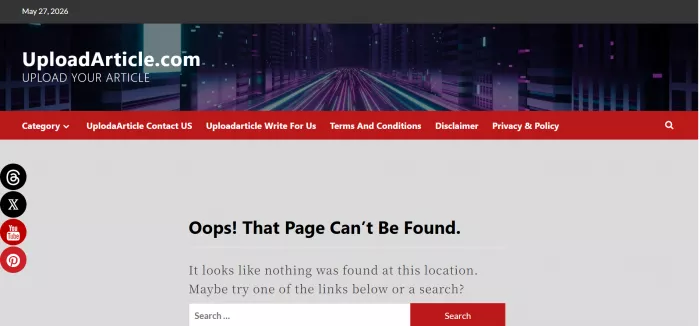
•Social icons for Threads, X, YouTube, and Pinterest reloaded the page rather than opening external profiles
•Disclaimer page contained text only, with no supporting imagery or layout polish
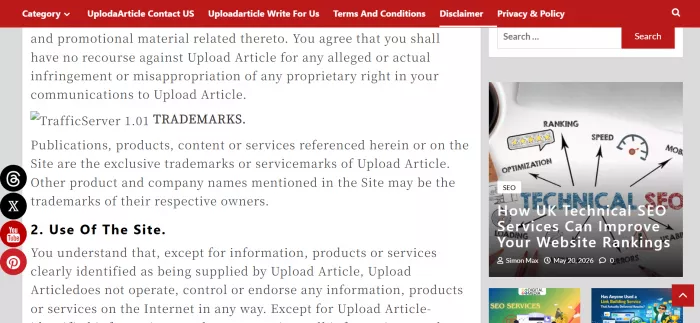
•Casino review content sits alongside SEO tooling articles, weakening topical authority

•Posting continues on an irregular cadence, with new content observed through mid-2026
•Page-load performance was inconsistent across multiple navigation attempts
Bottom line for choosing this tool
The Sitemap Generator on UploadArticle.com produces a valid XML sitemap. For a one-off task on a small or static site, that is enough. For active publishers, agencies, or anyone evaluating tools against the credibility of the host, better-supported alternatives carry the same output with stronger surrounding infrastructure. XML-Sitemaps.com offers a documented free tier and a paid plan for larger crawls. Yoast covers WordPress sites with automatic regeneration on every publish. Screaming Frog handles technical depth and pairs sitemap generation with broken-link detection and a full crawl report.
The decision framework reduces to three questions. Does the site publish content on a regular schedule? If yes, a plugin-based tool that auto-regenerates is the better choice. Is the site larger than a few hundred pages or growing? If yes, a tool with a documented URL limit and a paid scaling option avoids future migration. Does the project demand a polished host site with working contact paths and a coherent editorial scope? If yes, the host site itself is a factor, and UploadArticle.com falls short in its current state.
The honest read: the tool works for its narrow use case. The host site does not yet inspire the confidence that a daily SEO workflow demands. Use it for a one-off, validate the output against a CMS-generated sitemap when one is available, and migrate to a more credible tool the moment the workflow becomes recurring.
Comments