A decade ago, the most heated classroom debate was whether to bring a graphing calculator into the chemistry test. Today, students are deciding whether to draft the lab report in ChatGPT, fact-check it in Perplexity, run the literature review through NotebookLM, and rehearse the oral defense by interrupting two AI hosts mid-sentence. The graphing calculator, in retrospect, was a less dramatic conversation.
HEPI's 2026 student survey found 95 percent of UK undergraduates now use generative AI somewhere in their studies, with 94 percent on assessed work. The Lumina–Gallup 2026 report puts weekly AI use at 57 percent of US college students. Adoption is settled. The open question is whether students will graduate with a skill set that survives a workforce already assuming AI fluency in entry-level roles.
Most articles about student AI walk through tools one at a time, which is a useful taxonomy and a terrible way to actually decide what to open at 11pm before a deadline. This piece is structured the other way around, by job: research, writing, studying, code, and the multimodal work that does not fit any of those. Each workflow names the tools that lead, the ones that support, and the failure modes worth avoiding. The honest punchline is at the bottom: the real skill is not knowing tools, it is knowing combinations.
The State of Play
Three forces converge in 2026. Student adoption rose from 53 percent to 94 percent on assessed work in two years (HEPI). The AI-in-education market is on track to expand from roughly $7 billion in 2025 to over $130 billion by 2035 (OECD Digital Education Outlook 2026). And entry-level job postings now list prompt engineering and AI workflow design alongside Excel and PowerPoint, which used to be the bar.
The flip side is uncomfortable. The same HEPI survey shows the share of students inserting AI text directly into assessments tripled, from 3 percent in 2024 to 12 percent in 2026. The skill ceiling and the skill floor have both moved. Students who learn to use these tools well will leave classmates somewhere behind. Students who use them as autocomplete are quietly being identified by employers and graders who, despite the discourse, have gotten better at spotting unedited AI output.
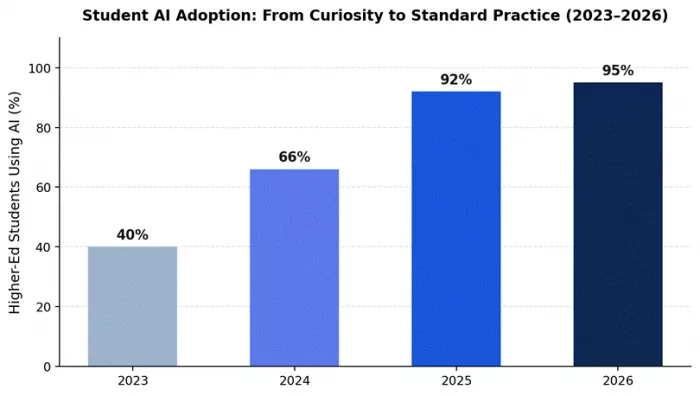
Figure 1. Higher-education AI adoption, 2023–2026. Sources: HEPI (2024–2026); Digital Education Council.
Five AI Workflows That Actually Help Students Work Smarter
Workflow 1: Research and Sources
Every research paper, thesis chapter, and essay starts with the same line: "I need sources." That used to mean Google for two hours, Wikipedia for the obvious gaps, then a panicked search through JSTOR for anything that vaguely matched the prompt. 2026 has a better answer, but only if you open the right tools in the right order.
The two leaders are Perplexity and NotebookLM, and they handle different halves of the same problem. Perplexity is the discovery layer: it retrieves 10 to 30 web sources for any research question, synthesizes them, and produces inline citations linked to the source paragraphs. NotebookLM is the analysis layer: once you have papers in hand, upload them and ask questions answered only from those documents, with every claim traceable to a specific passage. Used together, they produce the lowest hallucination rate of any AI research workflow.
The mistake to avoid is running research-as-research through ChatGPT or Gemini directly. Their fabricated-citation rates are documented across multiple 2025–26 studies. They will happily generate plausible-sounding references that do not exist, and "I trusted ChatGPT" is not a defense at an academic integrity hearing.
| What works | What to watch | ||
| Citations are auditable end to end. Perplexity links every claim to a source URL; NotebookLM grounds every answer in a specific source paragraph. | Free Perplexity caps at 5 Pro searches/day. On a real research day you can burn five before lunch. | ||
| Hallucination risk is the lowest of any AI workflow when these are used together rather than separately. | NotebookLM only works as well as your sources. Confused PDFs in, confidently summarized confused PDFs out. | ||
| Perplexity Pages and NotebookLM exports preserve the citation chain for direct integration into drafts and bibliographies. | Coverage of non-English academic sources is weaker than Google Scholar in both tools, especially for Spanish, Arabic, French, and Hindi research traditions. | ||
| Task | Tool | Concrete output | |
| First-pass literature review on a new topic | Perplexity Pro Search | Synthesis of 10–20 sources with citations, ranked by recency and credibility | |
| Deep analysis of papers you have already collected | NotebookLM | Source-grounded answers with citation links to specific paragraphs | |
| Verify a professor's claim with multiple sources | Perplexity | Confirming and contradicting sources presented with publication dates | |
| Build a thesis bibliography that exports cleanly | Perplexity Pages | Citation chain preserved in shareable, structured format | |
| Cross-reference what three papers say about X | NotebookLM | Specific passages from each source, no fabrication | |
Skip this stack if: your assignment forbids web-retrieval tools (some methodology courses still do), or you are writing creative work where sources are not the point.
Workflow 2: Writing That Lands
There are two kinds of AI-assisted writing. The first sounds like AI and the grader knows it. The second sounds like the student wrote it on a good day. The difference is mostly which tool the student opened, with prompt engineering as the runner-up factor.
Claude leads this workflow because of one quality reviewers consistently flag: it is the model most likely to push back on a weak argument rather than restate it more eloquently. G2's 2026 review data places Claude's ease-of-use score at 97 percent, the highest in the AI chatbot category, with its strongest user representation in higher education and computer software. The 200K-token context fits a thesis chapter, the supporting research, and the rubric in one window. ChatGPT plays the broader-draft role: faster on first passes and stronger on cross-disciplinary brainstorming. Gemini takes the inline-editing slot for students who already work in Google Docs, where its native Workspace integration eliminates the copy-paste tax between tool and document.
The fingerprint warning: heavy AI editing leaves a tell that careful graders have learned to spot, even when detection tools miss it. Sentence-level rhythm, hedge words, and a particular kind of fluent vagueness are all giveaways. Treat the AI's output as a draft, not a deliverable, and edit it in your own voice before submission.
| What works | What to watch | ||
| Claude pushes back on weak arguments rather than smoothing them over. Useful for stress-testing essays before they land on a professor's desk. | Claude Pro hits message limits faster than competing $20/month plans. Reports converge around 100–150 messages per 5-hour window before throttling. | ||
| Output reads least like AI to graders and detection tools. The same draft flagged in ChatGPT often passes when generated in Claude. | No image generation, no voice mode, no full web search. Anything multimodal forces a context switch. | ||
| 200K-token context holds a full thesis chapter, sources, and feedback in one window without losing the argument's thread by message 50. | Heavy AI editing still leaves a fingerprint. The give-away is sentence rhythm, not vocabulary, which detection tools rarely catch but careful graders do. | ||
| Task | Tool | Concrete output | |
| Fast first draft of a 2000-word essay | ChatGPT | Structured draft with multiple angles to choose from | |
| Edit an 8000-word thesis chapter for argument strength | Claude | Section-level critique with specific suggestions, not encouragement | |
| Polish a fellowship application essay | Claude | Edits that preserve voice while fixing structural weaknesses | |
| Inline rewrite within a Google Doc | Gemini | In-document revision without copy-paste between tools | |
| Stress-test the logic of a paragraph | Claude | Specific logical issues identified, not validation | |
Skip this stack if: your assignment forbids AI assistance (some courses still do, and detection has improved enough to make it a real risk).
Workflow 3: Studying for the Exam You're Actually Taking
A 2025 Harvard physics study cited across the 2026 education research literature found students using AI tutors learned more than twice as much in less time compared with traditional active-learning classrooms. The mistake students make is reaching for ChatGPT for this. ChatGPT will explain quantum mechanics from its general training. NotebookLM will explain quantum mechanics from your professor's slides. The second one is what shows up on the exam.
NotebookLM leads here because it is source-grounded by design. Upload textbook chapters, lecture slides, your own notes, and past papers if you have them. Ask for study guides, flashcards, quizzes, or audio overviews, all generated only from the materials you supplied, with citations linking back to the exact passage. The 2026 update added an interactive Join mode that lets you interrupt the AI hosts mid-podcast to ask for clarification, which is genuinely funny and unexpectedly effective. ChatGPT Study Mode plays the supporting role for concepts that refuse to click; it withholds direct answers and asks Socratic questions instead, the only first-party feature any vendor has built specifically against over-reliance.
The reason this stack is the most academically defensible category in this article: educators can verify exactly which materials produced any given answer. That property is unique to source-grounded tools. ChatGPT and Claude, however good their explanations, cannot offer it.
| What works | What to watch | ||
| Quiz questions come from your actual material, not generic AI questions. Closer to the real exam than any other tool can manage. | Output quality is bounded by source quality. Confused PDFs in, confidently summarized confused PDFs out. | ||
| Audio overviews work for commute and gym review. Two AI hosts discuss your uploaded material, with Join mode letting you interrupt for clarifications. | Audio overviews thin out toward the back of dense source piles, where the context window gets stretched. | ||
| Source-grounded answers are auditable down to the slide. A professor concerned about AI use can verify exactly what produced an answer. | No web access. If you need supplementary explanation outside your uploads, you need a second tab open. | ||
| Task | Tool | Concrete output | |
| Generate a practice exam from your materials | NotebookLM | Multi-format questions drawn directly from uploads | |
| 20-minute audio review for the bus | NotebookLM | Two-host podcast overview with Join mode for live questions | |
| A concept will not click after three explanations | ChatGPT Study Mode | Socratic questioning that helps you arrive at the answer | |
| Cross-reference what three papers say about X | NotebookLM | Specific passages with clickable citation links | |
| Explain a hard concept from only your professor's slides | NotebookLM | Source-grounded answer, not general training data | |
Skip this stack if: your course is purely problem-set based (math, physics, CS), where solving is the work and studying is just practice.
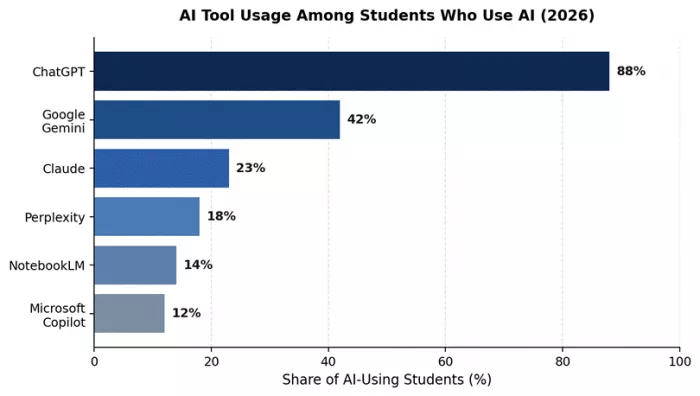
Figure 2. Approximate share of AI-using students reporting use of each tool. Sources: Digital Education Council 2026; HEPI 2026.
Workflow 4: Code, With Comprehension
In March 2026, GitHub introduced a dedicated Copilot Student plan, replacing the general Copilot Pro education benefit. The plan is still free for verified students, still includes unlimited completions and Copilot Chat, but it no longer lets students self-select premium models like GPT-5.4 or Claude Opus from the model picker. Auto mode handles routing. New sign-ups for all paid Copilot tiers, and the Student plan, were temporarily paused starting April 20, 2026, which is worth noting for students who have not yet enrolled. Existing access continues unaffected.
Copilot leads the in-editor work because it lives directly inside Visual Studio Code, JetBrains, and Visual Studio, suggesting the next line as the student types. Copilot Chat handles "explain this error" conversations and refactoring requests. The cloud agent can open draft pull requests from natural-language task descriptions. For the questions Copilot is not built to answer, like architectural reasoning, code review across an entire module, or why-did-this-happen explanations, Claude is the second tool. Claude powers Cursor, Windsurf, and several AI-native coding environments precisely because of how it handles structural reasoning. ChatGPT covers the third role for stack-trace debugging when both fail.
The failure mode every coding instructor now flags is over-acceptance. Students who tab through Copilot suggestions without reading them produce working code with no underlying comprehension. This collapses on the first non-trivial debugging task, the one Copilot cannot fix because Copilot generated it. The rule of thumb that survives this: Copilot is for writing code, Claude is for understanding it.
| What works | What to watch | ||
| Free Student plan covers full coursework needs: unlimited completions, Copilot Chat with premium models in Auto mode, and the cloud agent. | March 2026 transition removed self-selection of premium models for students. GPT-5.4 and Claude Opus are routed through Auto mode rather than chosen directly. | ||
| Inline suggestions teach unfamiliar APIs in real time. Type a function signature in a library you have never used, get an idiomatic implementation back. | Sign-ups paused April 20, 2026. New students cannot enroll right now, although existing access continues. Worth checking eligibility before relying on it. | ||
| Copilot Chat handles stack-trace analysis better than searching Stack Overflow. Paste the trace, get root cause and fix in structured form. | Over-acceptance produces working code without comprehension. The failure shows up on the first debugging task that a generated suggestion cannot solve. | ||
| Task | Tool | Concrete output | |
| Learn a new language (e.g., Rust) by writing in it | Copilot inline | Idiomatic implementations with inline explanations | |
| Debug a failing test | Copilot Chat | Structured root-cause analysis with the most likely fix | |
| Architectural review of a 200-line class | Claude | Class-level analysis, not just line-by-line linting | |
| Generate test coverage for a module | Copilot Chat | Edge-case tests, not just the happy path | |
| Explain code you wrote six months ago | Claude | Plain-English walkthrough that holds up under followups | |
Skip this stack if: your CS program forbids AI-assisted coding for assignments (some intro courses still do, and graders run detection).
Workflow 5: Audio, Video, and the Big-File Problem
The text-only assumption broke in 2025. Students now record lectures, get assigned video case studies, are asked to analyze infographics, and submit work that includes audio and visual components. Most AI tools can handle a few of these. Gemini handles all of them, plus the occasional textbook in a single context window.
Gemini leads here on three structural advantages that have nothing to do with the conversation about which model is best. First, Google offers free Google AI Pro to verified university students for twelve months, including Gemini 3 Pro, 2TB of storage, and full NotebookLM access. No other frontier model has a comparable free-for-students offer. Second, Gemini's 1-million-token context window is the largest available, large enough to load a full textbook and several papers in one session. Third, Gemini is genuinely best at audio and video understanding among the three frontier models. Upload a lecture recording or your own foreign-language speech and you get end-to-end feedback that ChatGPT and Claude cannot match. ChatGPT Voice Mode is the supporting tool for spoken language practice specifically, where its conversational flow still leads the field.
The watch-out is that Gemini's 1M context window degrades past roughly 500K tokens. Quality drops noticeably in the second half of long uploads. Students working with truly massive source piles should not trust the back end of the file.
| What works | What to watch | ||
| Free Google AI Pro for verified students for 12 months, including Gemini 3 Pro, 2TB storage, and NotebookLM. The only major free-frontier-model offer for students. | 1M context window degrades past ~500K tokens. Quality drops noticeably in the second half of long uploads. | ||
| Native to Google Docs and Drive. Highlight a paragraph, ask Gemini to revise, and the change happens inline. Saves real time on long documents. | Default writing tone reads corporate. Functional more than fluent. Students producing nuanced argument writing typically rewrite Gemini drafts in Claude. | ||
| Best end-to-end audio and video analysis among frontier models. Upload a lecture recording or your own speech, get pronunciation, grammar, and pacing feedback. | Inconsistent across same-prompt runs. Same query, different sessions, materially different answers. Reproducibility lags ChatGPT and Claude. | ||
| Task | Tool | Concrete output | |
| Pronunciation feedback on a 5-minute French recording | Gemini | End-to-end pronunciation, grammar, and pacing critique | |
| Analyze a 90-minute lecture video | Gemini | Timestamped summary with attributed quotes from speakers | |
| Synthesize 20+ research PDFs in one session | Gemini | Cross-paper themes with source-level breakdown | |
| Spoken language conversation practice | ChatGPT Voice Mode | Real-time dialogue with mid-sentence corrections | |
| Audio review of textbook chapters on the bus | NotebookLM | Two-host podcast overview generated from your uploads | |
Skip this stack if: all your work is text and your sources are already digital, in which case the rest of this article covers you.
The Stack at a Glance
Consumer plans across the frontier models converged on $19.99 to $20 per month in 2026. The interesting variation now lives in dedicated student offers and free-tier capability, where Google and GitHub have distanced themselves from competitors.
| Tool | Free Tier | Standard Plan | Student Offer | Best For |
| ChatGPT | Yes, capped | Plus $20/mo | Go $8/mo (select markets) | All-purpose use |
| Claude | Yes, daily cap | Pro $20/mo | No standing student plan | Long-form writing |
| Gemini | Yes, generous | AI Pro $19.99/mo | Free AI Pro for verified students (12 months) | Workspace, multimodal |
| Perplexity | 5 Pro searches/day | Pro $20/mo | Partner-program discounts | Sourced research |
| NotebookLM | Free for everyone | Bundled with AI Pro | Free; expanded with student offer | Studying your own notes |
| GitHub Copilot | Limited free tier | Pro ~$10/mo | Free Student plan via GitHub Education | Coding |
Table 1. Pricing and student access summary, May 2026. Verify current pricing on each provider's site before subscribing.
The Cross-Cutting Skill: Prompt Engineering
None of the workflows above survive contact with a bad prompt. The peer-reviewed literature converges on this point: higher-quality prompts produce higher-quality outputs, regardless of which model is on the other end. The 2024 ScienceDirect study by Knoth and colleagues, and the 2025 Frontiers in Education framework on prompt engineering as a 21st-century skill, both flag prompt engineering as a learnable competence with measurable effects on output quality.
In practice this is a small set of habits, not a curriculum. Specify the role and audience ("act as a constitutional law professor writing for a third-year student"). Supply enough context for actual work: the assignment brief, the sources, the rubric. Ask the model to show its reasoning, then audit it. Cross-check factual claims against an independent source. Treat the first response as a draft, not a deliverable. None of that is mysterious. It is the AI version of habits that already separate strong researchers from weak ones.
Conclusion
The honest answer to "which AI should I use" is: more than one, in deliberate combinations, depending on what you are trying to do. Research workflows belong to Perplexity and NotebookLM. Writing belongs to Claude with ChatGPT or Gemini in support. Studying belongs to NotebookLM. Code belongs to Copilot for writing and Claude for understanding. Multimodal work belongs to Gemini, while teacher facing tools like Timtis quietly handle lesson planning and classroom logistics on the faculty side.
Three rules carry through every workflow. First, source grounded, citation first tools such as NotebookLM and Perplexity are the most academically defensible. Second, the model that looks the flashiest is rarely the one that reasons best, and the one that reasons best is rarely the one with the friendliest free tier, which is why combinations beat single brand loyalty. Third, prompt engineering and critical evaluation are now baseline employability skills, not extras; students who treat AI as a craft to practice, rather than a shortcut to lean on, leave with better grades and a more useful resume.
Comments