Table of Contents
- Why Flashcards Work: What the Research Actually Says
- What AI Changes, and the One Thing It Can't
- The Step-by-Step Guide: Lecture Notes to Flashcards
- 5 AI Tools That Turn Lecture Notes Into Flashcards
- The Stack Most Students Should Actually Use
- Five Mistakes That Waste the Whole Effort
- The Bottom Line
You already did the hard part. You sat through the lecture, you typed (or scribbled) the notes, and now they're sitting in a folder doing nothing for your grade.
Here's the uncomfortable finding from decades of memory research: re-reading those notes is one of the least effective ways to learn them. In a classic set of experiments by Henry Roediger and Jeffrey Karpicke, students who repeatedly re-read a passage recalled about 40% of it a week later. Students who spent that same time testing themselves recalled about 61%. Roughly 1.5x the retention, from identical material and identical time.
Flashcards are the simplest way to get that testing benefit. The problem has always been setup cost: turning a semester of notes into good cards by hand takes hours you don't have. That's the bottleneck AI removes — an evening of typing becomes a few minutes of generating, if you do it right.
This guide covers the full workflow step by step, then breaks down five tools that do the heavy lifting, with pricing and honest limitations.
Why Flashcards Work: What the Research Actually Says
Testing beats re-reading, by a lot. The Roediger and Karpicke study (Psychological Science, 2006) found something stranger than the 61%-vs-40% gap: the re-readers were more confident they'd remember, yet performed worse. Researchers call this the "illusion of competence." Re-reading feels productive because the material looks familiar, and familiarity is not memory. Flashcards force retrieval, and retrieval is the act that strengthens memory.
Only two study techniques earn a "high utility" rating. In a landmark 2013 review in Psychological Science in the Public Interest, John Dunlosky and colleagues evaluated ten study techniques. Two rated high utility regardless of the student's age or subject: practice testing (what flashcards do) and distributed practice (spreading study across days instead of cramming). The techniques most students default to, highlighting and re-reading and summarizing, all landed in the low-utility tier.
It holds up across huge samples. A 2021 meta-analysis in Frontiers in Education pooled 242 studies covering roughly 1,600 effects across 169,000 participants. Distributed practice and practice testing again ranked as the two most effective techniques, against a mean effect size of 0.56, well above the ~0.40 average typical in education research.
Forgetting is fast, and spacing fights it. Most forgetting happens in the first days after learning, and each well-timed review flattens that curve. This is why apps with spaced repetition schedulers, which resurface a card right around the time you'd forget it, beat flipping through a deck at random.
So: retrieval + spacing = retention. Flashcards deliver both. AI just makes them cheap to produce.
What AI Changes, and the One Thing It Can't
AI collapses the most tedious part of the workflow: instead of typing 40 question-answer pairs per lecture, you upload notes and get a draft deck in under a minute. For students juggling five courses, that's the difference between "flashcards are a nice idea" and "flashcards are what I do." But be clear-eyed about the trade-offs:
AI cards need editing. Models misread shorthand and invent details, then wrap both in cards that read as authoritative. One independent review of Quizlet's AI generation found roughly 85% of cards needed no edits, which sounds great until you notice 1 in 7 did. Expect worse in technical subjects.
You lose a little of the "making" benefit. Writing cards is itself a way of processing material. The fix isn't to abandon AI. It's to edit the output actively, which recovers most of that benefit at a fraction of the time cost.
Generation isn't studying. A beautiful 300-card deck you never review is worth exactly zero percentage points.
The Step-by-Step Guide: Lecture Notes to Flashcards
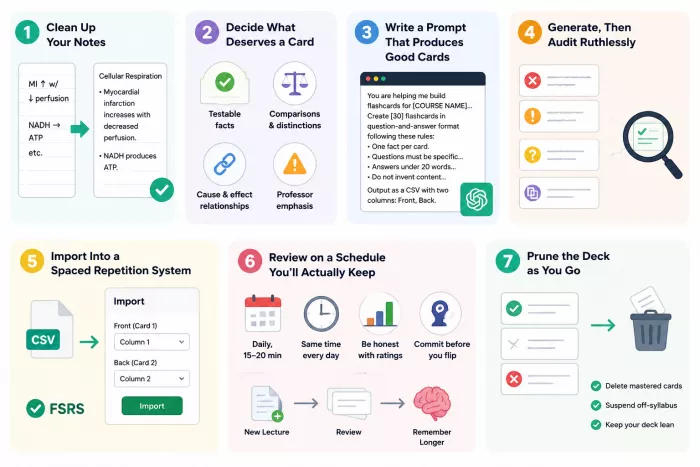
Step 1: Clean Up Your Notes First (5 minutes, saves 30)
AI output quality is bounded by input quality. Before uploading anything, do a fast pass:
- Expand your abbreviations. If your notes say "MI ↑ w/ ↓ perfusion," the AI may or may not know you meant myocardial infarction. Two minutes of expanding shorthand pays for itself.
- Delete the noise. Admin announcements, "midterm moved to Tuesday," half-finished sentences from when you zoned out, anything a professor said about grading policy. These become junk cards.
- Add lecture context at the top. One line ("BIOL 240, Lecture 8: Cellular Respiration, exam 2 material") meaningfully improves how the AI frames questions.
- Keep one lecture per file. Dumping a whole semester in at once produces shallow, scattered cards. One lecture, one deck.
If your notes are handwritten, photograph them flat and in good light. OCR is strong now but still struggles with cramped writing at an angle.
Step 2: Decide What Deserves a Card
This is what separates a deck you finish from a 400-card monster you abandon in week three. Prioritize:
- Testable facts: definitions, dates, formulas, classifications, named processes
- Cause-and-effect relationships: "What happens to X when Y increases?"
- Comparisons and distinctions: things your professor spent time differentiating
- Anything the professor repeated or flagged for the exam
Skip background storytelling, tangents, anything already automatic, and content off the syllabus. A practical target: 20–40 cards per hour-long lecture. If the AI offers 120, you'll drown. Cap it up front.
Step 3: Write a Prompt That Produces Good Cards
If you're using a general AI assistant, rather than a purpose-built app, the prompt is everything. Here's a template that works:
You are helping me build flashcards for [COURSE NAME], a [LEVEL] course. Below are my notes from one lecture.
Create [30] flashcards in question-and-answer format following these rules:
- One fact per card. Never combine two ideas into one answer.
- Questions must be specific enough to have exactly one correct answer. Avoid "Discuss…" or "Explain everything about…"
- Answers should be under 20 words where possible.
- Use my notes' terminology, not synonyms.
- Include a mix: ~60% definitions and facts, ~30% relationships and comparisons, ~10% application ("Given X, what would happen?").
- Do not invent any content not present in my notes. If something is unclear, flag it instead of guessing.
- Output as a CSV with two columns: Front, Back. No extra commentary.
"One fact per card" enforces the minimum information principle from spaced repetition research: atomic cards are far easier to remember and faster to review. "What are the four stages of mitosis and what happens in each?" will haunt you for months. Four separate cards won't. "Do not invent content" is your hallucination guardrail. And "output as CSV" matters because CSV imports cleanly into Anki, Quizlet, Knowt, and nearly every other app on this list.
Step 4: Generate, Then Audit Ruthlessly
Before you study a single card, do a review pass. Budget about 10 minutes per 30 cards, and hunt for five failure modes:
- Hallucinated specifics. Numbers and names that aren't in your notes. These are the dangerous ones, because you'll memorize them confidently and get them wrong.
- Cards that are too big. Any answer running past two lines should be split.
- Ambiguous questions. If three answers would be valid, the card is broken. Instead of "What is the function of the mitochondria?" try "In cellular respiration, what process occurs in the mitochondrial matrix?"
- Give-away phrasing. Questions that contain their own answer feel great to review and teach you nothing.
- Duplicates. AI regularly produces near-identical cards from repeated content. Merge them.
While editing, add the one thing AI can't: your own connections. A note like "same mechanism as the enzyme example from Lecture 4" turns an isolated fact into part of a network, and networked facts are easier to recall.
Step 5: Import Into a Spaced Repetition System
Flipping through cards randomly gives you retrieval practice. A spaced repetition system (SRS) gives you retrieval practice plus distributed practice, the two high-utility techniques stacked. It tracks each card and shows it right before you'd forget: get one right easily and it vanishes for weeks; miss it and it returns in ten minutes.
The gold-standard scheduler is FSRS (Free Spaced Repetition Scheduler), trained on roughly 727 million real reviews. Against the older SM-2 algorithm it cuts total reviews 20–30% at the same retention level. If a tool offers FSRS, turn it on.
Importing is usually just: File → Import → select your CSV → map column 1 to Front, column 2 to Back.
Step 6: Review on a Schedule You'll Actually Keep
The best schedule is the one you don't quit.
- Review daily, briefly. 15–20 minutes a day beats three hours on Sunday. That's the distributed-practice effect in action.
- Anchor it to a fixed time. Attach reviews to something you already do without fail: first coffee, or the bus ride in.
- Be honest with your ratings. Inflating "how well did you know that?" pushes cards too far into the future and the schedule collapses. If you hesitated, mark it hard.
- Commit to an answer before flipping. Say it aloud or write it down; "yeah, I knew that" is the illusion of competence sneaking back in.
- Add new lectures weekly. A deck built the night before an exam is cramming with extra steps.
Step 7: Prune the Deck as You Go
Every few weeks, delete cards you've aced five times running and know cold, unless they're foundational for next semester. Suspend anything off-syllabus.
A lean deck you finish daily beats a comprehensive deck you avoid.
5 AI Tools That Turn Lecture Notes Into Flashcards
These five cover the realistic range of student needs, including the boards-and-bar-exam end of it. Pricing is as of mid-2026, so verify before subscribing.
1. Google NotebookLM: Best for Accuracy and Zero Cost
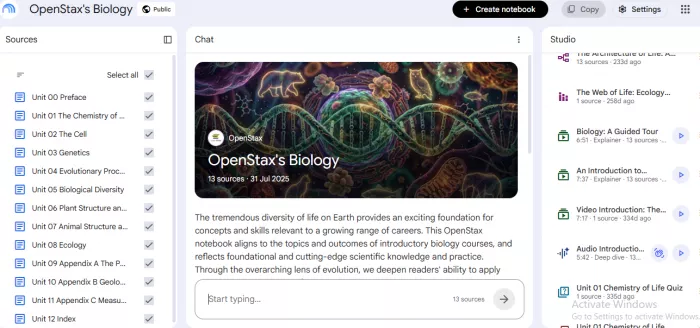
What it is: A source-grounded AI research notebook. Every output draws only on the materials you upload.
Standout features:
Source grounding. It answers only from your uploads, so it can't import facts your professor never taught. That's the main reason its cards beat a general chatbot's.
Difficulty and scope controls. The Studio panel lets you set card count and pick easy/medium/hard difficulty, then restrict the deck to a single subtopic rather than the whole 60-slide upload.
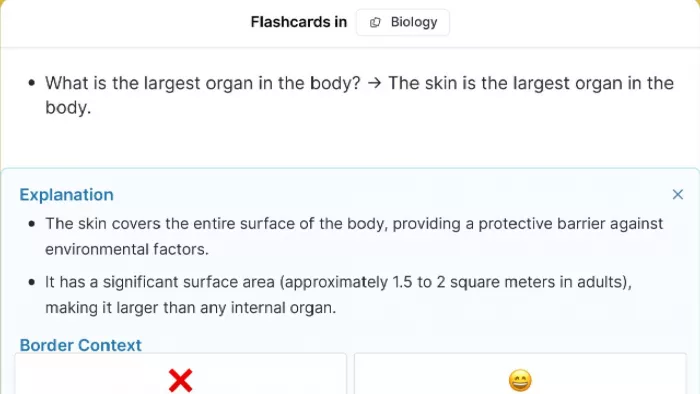
"Explain" on every card. Tap it and you get a fuller explanation with citations pointing back to the exact passage in your source, so verifying a suspect card takes three seconds instead of a hunt through the PDF.
Lecture-recording ingestion. Feed it a YouTube recording of the lecture itself rather than the slides, and it generates from what was actually said.
Parallel Quizzes mode. The same material re-rendered as multiple choice, which catches recognition gaps your flashcards miss.
Pricing: The free tier runs to roughly 10 flashcard sets and 10 quizzes daily, plus audio and video overviews and 50 chat questions. iOS and Android carry the same features.
Where it falls short: No real spaced repetition scheduler, and cards aren't editable once generated. Treat it as the best generator on this list, then move the cards into an SRS.
Best for: Anyone who wants accurate source-grounded cards for free and will pair it with a second app for review.
2. Anki: Best for Long-Term Retention
What it is: The open-source spaced repetition app that medical and language students have relied on for nearly twenty years, built by Damien Elmes in 2006.
Standout features:
FSRS scheduling, default since version 23.10 (October 2023). Trained on roughly 727 million real reviews from about 10,000 users, it cuts total review load 20–30% versus the older SM-2 algorithm at the same retention target.
Fifteen-second CSV import. Anki has no AI generator and doesn't need one. Generate the cards in NotebookLM or ChatGPT, map two columns, and you're reviewing.
Image occlusion. Mask labels on a diagram and quiz yourself on what's hidden. This is why anatomy and circuit-diagram students stay on Anki specifically.
Add-ons and shared decks. Retention heatmaps and custom note types, plus pre-built community decks for USMLE Step 1 and JLPT vocabulary.
Local-first data ownership. Your collection is a file on your machine, so no company can paywall your decks later. Worth weighing when every competitor here is venture-funded.
Pricing: Free on Windows, macOS, Linux, and Android; AnkiWeb sync is free. The only cost is AnkiMobile on iOS at $24.99, one-time, which funds the whole ecosystem. No subscriptions.
Where it falls short: The interface is functional, not friendly — expect an hour or two before it clicks. Watch out in app stores too: "AnkiApp" and "AnkiPro" are unrelated products trading on the name, and users report trouble getting their cards back out.
Best for: High-volume, long-horizon material (med school, law, languages, certifications) where retention per minute beats onboarding comfort.
3. Quizlet: Best for Familiarity and Shared Sets
What it is: The platform most students already know, founded in 2005 by a 15-year-old building a French vocabulary tool. Now roughly 60 million monthly learners.
Standout features:
Magic Notes. Upload a lecture PDF or a photo of handwritten notes, and it returns flashcards plus an outline plus a practice test from that one source in a single pass.
Q-Chat tutor. It quizzes conversationally and asks follow-ups to probe whether you understand the reasoning, instead of only checking whether your answer string matched.
Hundreds of millions of existing sets. For common courses someone at your university has already built the deck. That's the fastest possible start when the exam is Friday.
Quizlet Live. Turns any deck into a team game, the only group-study mode on this list that works with more than two people.
Coconote pipeline. Quizlet acquired the AI lecture-notes app in February 2026, feeding recorded-lecture notes directly into the same card generator.
Pricing: Free tier with ads and daily limits on some modes. Quizlet Plus is about $7.99/month or $35.99/year, which strips the ads and limits, then adds offline study, image uploads, and the full AI set.
Where it falls short: The paywall has crept. Learn mode, offline access, and image uploads now sit behind Plus. More importantly, the scheduling is adaptive review rather than research-grade spaced repetition: fine for a test on Friday, weaker for next year. Magic Notes also stumbles on niche or nuance-heavy content.
Best for: Undergraduates with broad course loads and two-week exam horizons, especially anyone who studies in a group.
4. Knowt: Best Free All-in-One
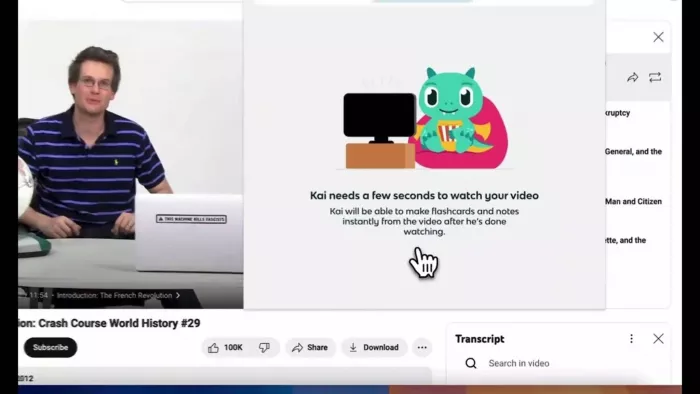
What it is: A free-first Quizlet alternative now serving over 3 million students and teachers, with a library of 320+ million student-created flashcards.
Standout features:
In-app live lecture recording. Record as the lecture happens, then choose whether Kai (its AI) produces notes or flashcards. You set length and format before it generates, rather than editing after.
Broad ingestion. PDFs, PowerPoint decks, and YouTube videos all work as sources, so you're not converting file formats before you start.
One-click Quizlet import. A Chrome extension pulls your existing Quizlet sets across in a few clicks. This is the actual reason most switchers make the jump.
AI generation on the free tier. Unlimited card creation, practice quizzes, AI summaries, and cross-device sync, none of it behind a credit card. These are the features Quizlet gates behind Plus.
320M+ shared student cards. Searchable, and densely populated for AP and intro-level university courses.
Pricing: Free core plan. Paid tiers add advanced statistics, enhanced quiz customization, and unlimited Kai chat. Most students won't need them.
Where it falls short: Knowt labels a feature "spaced repetition," but critics note there's no true SRS underneath. It doesn't track intervals per card or adjust ease factors, and nothing models memory decay. In practice it's closer to "show cards you got wrong again later." Knowt is also venture-backed, so the free-tier generosity will narrow eventually.
Best for: Students who want everything in one free app on semester-length timelines.
5. RemNote: Best for Notes and Cards in One Place
What it is: A combined note-taking and spaced repetition tool, built by two students tired of switching between a flashcard app and a PDF reader.
Standout features:
Cards written inline while you type. A shortcut turns any line of notes into a flashcard mid-lecture. That removes the conversion step where most students' systems die.
PDF reader with card capture. Highlight a passage in a paper or textbook inside RemNote and turn that highlight straight into a card without leaving the document.
Exam-date scheduler. Enter when the exam is and it front-loads reviews so your retention peaks on the right day instead of two weeks late.
AI explanations on cards you keep failing. Instead of resurfacing a card you've missed four times, it re-explains the underlying concept.
Backlinked notes. Cards live in a connected web, so reviewing one concept surfaces related notes. Useful when an exam tests connections rather than definitions.
Pricing: The free plan is usable, with unlimited notes and flashcards plus basic spaced repetition. It does cap PDF annotations and image occlusion, holds uploads to 8MB, and locks the advanced AI behind a tier. Pro is about $8/month billed annually ($96/year); Pro with AI about $18/month ($216/year). Student discounts available.
Where it falls short: The most conceptually demanding tool here. The outliner-and-backlinks model takes real time to learn, and if you don't take notes in RemNote itself, most of the advantage evaporates. FSRS is opt-in rather than default.
Best for: Students who take notes digitally and want one permanent system for capture and review.
Quick Comparison
| Tool | AI generation | True spaced repetition | Free tier | Paid tier | Best for |
| NotebookLM | Excellent, source-grounded | No | ≈10 sets/day | Included in paid Google AI plans | Accurate cards, free |
| Anki | None (import instead) | Yes, FSRS, best in class | Free on desktop + Android | $24.99 one-time (iOS) | Long-term retention |
| Quizlet | Yes (Magic Notes) | Adaptive, not true SRS | Limited, ad-supported | ~$35.99/yr | Familiarity, shared sets |
| Knowt | Yes (Kai) | Labeled, but not a real SRS | Near-complete | Optional upgrades | Free all-in-one |
| RemNote | Yes (Pro with AI) | Yes, FSRS opt-in | Usable with limits | ~$96/yr, ~$216/yr with AI | Notes + cards unified |
The Stack Most Students Should Actually Use
The free power stack: NotebookLM to generate → Anki to review with FSRS. Cost: $0, or $24.99 once on iPhone. Best generator plus best scheduler.
The one-app stack: Knowt for everything, free. You trade scheduling rigor for simplicity, a fair deal across a fifteen-week semester.
The integrated stack: RemNote from notes through review. Highest setup cost and lowest ongoing friction, so it wins when you need the knowledge in two years rather than two weeks.
Five Mistakes That Waste the Whole Effort
- Generating 300 cards and reviewing none. Given an hour, spend 15 minutes generating and 45 reviewing, not the reverse.
- Trusting the AI without checking. A wrong card gets memorized just as efficiently as a right one.
- Making cards too big. "Explain the causes of WWI" is an essay prompt, not a flashcard.
- Only making definition cards. Definitions are what AI produces most readily and what exams test least. Prompt deliberately for application and comparison.
- Starting the week of the exam. The measurable benefit comes from spacing. A deck built the night before is cramming with a nicer interface.
The Bottom Line
What AI changes is the cost of entry. Most students never built a flashcard habit because making the cards took longer than they had, never because they doubted the method. That barrier is gone. A lecture's notes become a reviewable deck in under ten minutes, editing included.
What remains is the barrier it always was — opening the app tomorrow, and the day after.
Start here. Take your most recent lecture notes, upload them to NotebookLM, generate 25 cards, then spend ten minutes editing them. Review that deck tomorrow. One deck and one week of your own recall will tell you whether this is worth building into a system.
Comments