Table of Contents
- Understanding Autodraft AI: what it actually is and who built it
- I Tried Building a Simple Animation
- Feature deep dive: what works, what doesn't, and what needs improvement
- Pricing structure: understanding the real costs
- What real users actually say: the unfiltered truth from review platforms
- The reliability crisis: examining the operational stability concerns
- Use cases and ideal users: who should actually use Autodraft
- Competitive landscape: how Autodraft compares to alternatives
- Where Autodraft AI stands in 2026
- The verdict: promise versus reality
The Autodraft AI promise sounds almost too good to be true: type a simple text description and watch as AI transforms it into professional-grade 2D animation complete with characters, backgrounds, voiceovers, and music all without touching traditional animation software or hiring an expensive production team.
But behind the polished marketing and impressive user counts lies a more complex reality. This investigation examines Autodraft AI through the lens of actual user experiences.
Understanding Autodraft AI: what it actually is and who built it
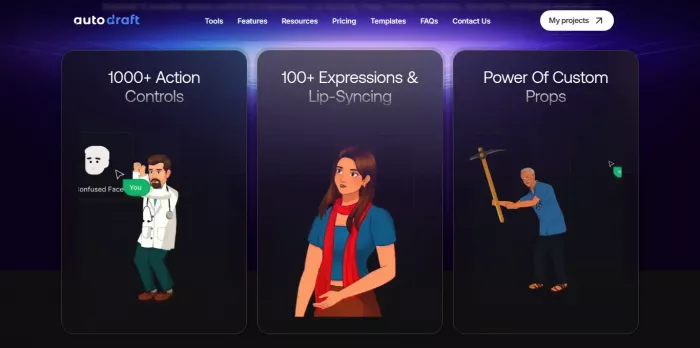
Autodraft AI emerged from a recognition that traditional animation production remains prohibitively expensive and technically demanding for the vast majority of content creators. Founded by Sachin and Jay as co-founders based in India, the platform launched with a specific vision: make professional animation accessible to YouTubers, educators, and digital storytellers who lack both animation expertise and large budgets. The tool is entirely cloud-based, with no separate app to install, it runs in the browser on desktop, laptop, and mobile (iOS and Android), so rendering happens on Autodraft's servers rather than your device. It combines several AI capabilities into a unified animation production environment.
At its core, Autodraft leverages custom-trained AI models specifically designed for character consistency, art style maintenance, and animation asset generation. This distinguishes it from general-purpose AI image generators that struggle with maintaining consistent characters across multiple frames, a critical requirement for any animation project. The platform's architecture integrates text-to-image generation, storyboard-to-visual conversion, AI voiceover synthesis, background music generation, and a comprehensive editing suite, attempting to replace the traditional multi-tool workflow that typically requires Adobe After Effects, Photoshop, audio editing software, and voice talent coordination.
The technical foundation: how the AI actually works
Autodraft uses natural language processing (NLP) and machine learning trained on large datasets of animation artwork, character designs, and visual storytelling patterns. When a user enters a text prompt, the system first interprets the meaning of the request, then matches those details to its trained models ; General, Anime, or Comic style to create the initial visuals. For animation, it also uses pose consistency and motion interpolation to produce smoother frame-to-frame transitions.
One of Autodraft’s standout features is character consistency, which is powered by custom model training. Users can upload reference images, and the platform trains a personalized model to keep the character recognizable across different poses, expressions, and scenes. This helps solve one of animation’s biggest challenges: keeping characters on-model throughout production. Testers say it performs very well for standard character designs, though it can struggle with highly complex or abstract concepts.
Text-to-Image Generation
Transform written descriptions into high-quality visuals across General, Anime, and Comic styles. AI interprets prompts to generate characters, backgrounds, and props with customizable detail levels.
Character Consistency
Custom model training maintains character appearance across multiple frames and scenes. Upload reference images to create personalized models ensuring recognizable features throughout projects.
Pose Maker & Animation
Create custom character poses and maintain design accuracy across animation stages. Features 1000+ action controls, 100+ expressions, automatic lip-syncing, and custom prop integration.
Storyboard-to-Image
Upload storyboards and generate polished, consistent images for each panel. Maintains cohesive visual style throughout projects, ideal for maintaining narrative flow in animated stories.
Sketch-to-Image
Transform rough sketches into detailed, finished artwork. AI interprets simple drawings and enhances them into production-ready visuals, accelerating concept development workflows.
Image Stylization
Apply reference image styles onto creations for consistent aesthetic. Ensures all project assets share professional visual language, useful for branding and storytelling coherence.
AI Voiceover Generation
Create lifelike voiceovers from hundreds of voice presets. Includes AI voice cloning for personalized narration, eliminating need for professional voice talent for most projects.
AI Background Music
Generate copyright-free background music tailored to video content. Includes sound effects library and customizable music that matches scene mood and pacing.
Advanced Editing Tools
State-of-the-art editing suite including effects, chroma key, layer control, object removal, background removal, and creative upscaler for comprehensive post-production within single platform.
I Tried Building a Simple Animation
To see how beginner-friendly AutoDraft actually feels, I kept my first test simple: a cartoon character walking into a room, reacting to something, and delivering a short line of dialogue.
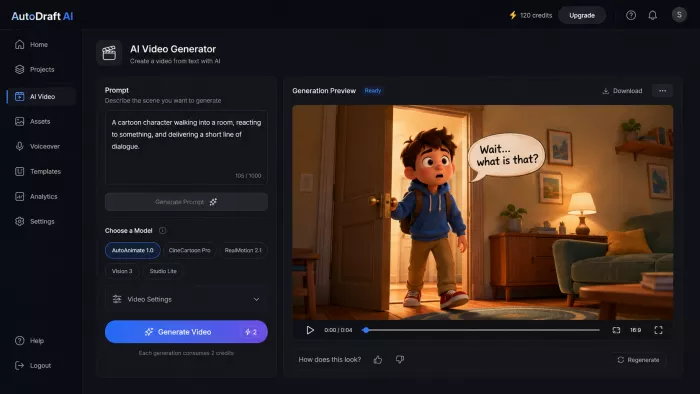
Creating the character and background was the easiest part. AutoDraft handled the basic visual setup quickly, and keeping the same character across the scene worked reasonably well. Adding expressions and lip-sync took more adjustment, especially when I wanted the movement to look natural rather than obviously automated.
The finished result was usable, but it was not a one-click process. I still had to regenerate a few elements and tweak the scene before it looked convincing. For a beginner, though, the bigger takeaway was positive: I could get from an idea to a complete animated scene without drawing characters or learning traditional animation software first.
That does not instantly make someone an animator, but it does remove a large part of the technical barrier.
Feature deep dive: what works, what doesn't, and what needs improvement
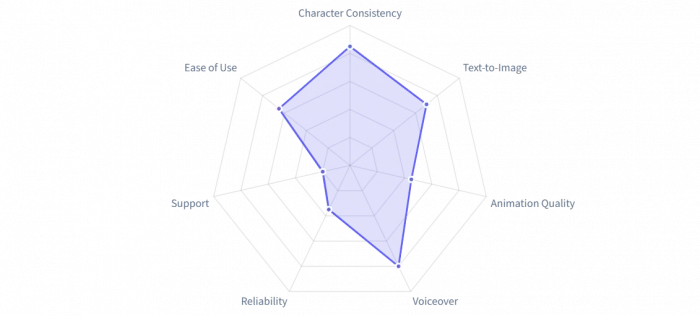
Autodraft combines many AI tools in one platform, but performance is uneven. Some features are highly useful in real workflows, while others feel less polished and reliable.
Character consistency and custom model training: the standout feature
This is Autodraft’s strongest feature. By training on 15–25 reference images, it helps keep characters visually consistent across scenes and poses. It works well for clear character designs, though complex or abstract designs can still be challenging.
Text-to-image generation: solid but not exceptional
Autodraft’s text-to-image tool handles simple prompts fairly well, especially with the Anime and Comic models. The results are good enough for animated and educational content, but they do not match the quality or creativity of top standalone AI art generators.
Animation capabilities: the disappointing reality
Animation is widely seen as the weakest part of the platform. Although it includes presets, expressions, and lip-sync tools, users often find the process slow, manual, and lower in quality than expected. Lip-sync in particular is seen as basic and not fully accurate.
AI voiceover and music: genuinely useful utilities
The voiceover feature is one of the more practical tools, offering many voice presets and voice cloning in paid plans. The AI music feature is also helpful, providing simple copyright-free background music that works well for YouTube and similar content.
Pricing structure: understanding the real costs
Autodraft AI promotes itself with “90% of features free,” which is technically true, but the claim needs closer understanding in practice. The free tier works well as a trial option, but its limitations become more noticeable during serious production work. To use the platform effectively, it is important to understand its pricing structure and credit system before committing.
The free tier: what you actually get
Autodraft's free plan provides access to core features including:
● 25 free generations for initial experimentation with text-to-image and other AI features
● 5GB storage for project assets and generated content
● 1 project limit restricting organizational capabilities for multi-project workflows
● Unlimited downloads without watermarks (claimed, though some users report watermark presence)
● Basic AI features across text-to-image, image-to-image, and sketch-to-image functions
The biggest practical limitation is the “25 free generations” cap. In real use, a single 30-second animated scene can need 20–30 generations for characters, backgrounds, props, and revisions, so the free tier may cover only about one full scene. Users also report that credits do not roll over or build up, instead resetting to the base amount after use.
Paid plans: Base and Pro tiers
Autodraft offers two main paid subscription tiers, with prices varying depending on the billing cycle. Like many SaaS platforms, it strongly encourages annual billing by offering notable discounts compared to monthly plans. While this can reduce cost, it also requires a bigger upfront commitment for creators who are unsure about long-term use.
| Feature | Free | Base Plan | Pro Plan |
| Monthly Price | £0 | £10/month | £35/month |
| Annual Price | £0 | £8/month (£96/year) | £28/month (£336/year) |
| Monthly Credits | 25 generations | 1,000 credits | 4,000 credits |
| Annual Credits | — | 12,000 credits/year | 50,000 credits/year |
| 4K Downloads | Limited | Unlimited | Unlimited |
| AI Character Generator | Basic | Full Access | Full Access |
| Premium Assets | ✗ | ✓ | ✓ |
| AI Voiceover | Limited | Full Library | Full Library |
| AI Voice Cloning | ✗ | ✓ | ✓ |
| Copyright-Free BGM | Limited | Full Library | Full Library |
| AI Thumbnail Maker | ✗ | ✓ | ✓ |
| YouTube Video Feedback | ✗ | ✓ | ✓ |
| Custom Model Training | Limited | ✓ | ✓ |
The credit system: understanding what you're actually buying
Autodraft’s credit system makes pricing harder to judge because it does not clearly explain how many credits each task uses. Simpler image generations may use fewer credits, while more complex animations and custom model outputs can use much more. This makes the real cost per finished project difficult to predict without using the platform first.
The Base plan’s 1,000 monthly credits may support around 3–5 short animated videos per month, while the Pro plan’s 4,000 credits may cover roughly 12–20, depending on complexity and revisions. This suggests Autodraft is better suited for hobbyists, educators, and light creators than for high-volume professional studios.
Annual vs Monthly: the real math
Autodraft offers around 20% savings on annual plans compared to monthly billing. While this lowers the price, it also increases commitment, especially given reported reliability issues.
Recommendation: Starting with monthly billing is the safer choice. It gives users time to test whether the platform’s quality and reliability fit their workflow before committing to an annual plan.
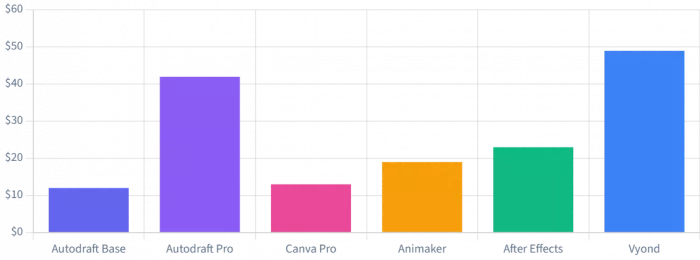
Autodraft AI Pricing vs Competitors (Monthly)
What real users actually say: the unfiltered truth from review platforms
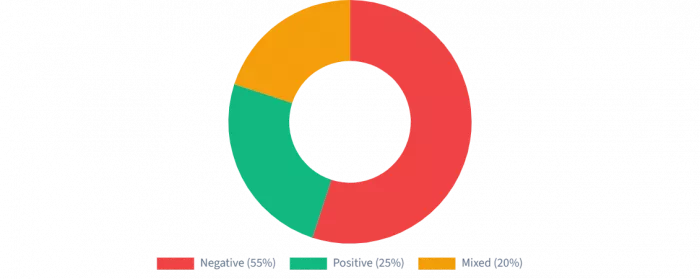
The most revealing insights into Autodraft AI's performance come from creators who've integrated the tool into actual production workflows. Across multiple review platforms - G2, Product Hunt, and AppSumo patterns emerge that tell a story more nuanced than marketing materials suggest. The feedback splits into three distinct camps: enthusiastic early adopters who've built successful workflows, frustrated users encountering technical failures, and a middle ground of creators who see potential but recognize significant limitations.
The success stories: when Autodraft delivers value
Satisfied users often say Autodraft can be highly effective once they learn how to use it properly and understand its limits. Its most valued feature is the ability to create character-consistent visuals and animations much faster than traditional methods. Educators also appreciate the text-to-image tool for quickly producing visual storytelling and teaching materials.
"I've been using Autodraft AI since its early days, and it's hands down one of the best AI-powered tools for creating animated stories, rhymes, and explainer videos. It's incredible to see how much the tool has evolved since inception, constantly improving in quality, features, and ease of use. My personal favourite is text-to-animated character and built-in editing tools, Autodraft AI makes professional-grade animation accessible to everyone specially for people like me, with no skills. Recommend to anyone whether you're a YouTuber, educator, or marketer, this tool streamlines the entire video creation process." — Gajendra, Product Hunt review
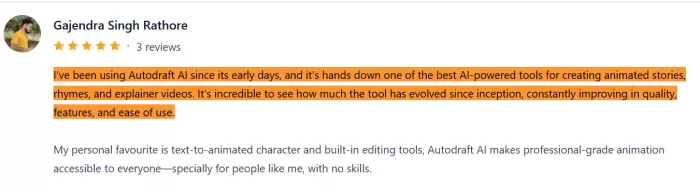
This review captures what Autodraft looks like at its best: a tool that genuinely lowers the barrier to animation production for non-specialists. Users repeatedly mention the "evolving features" and responsiveness to feedback, suggesting an active development cycle that addresses user needs. The platform's ability to make professional-grade animation "accessible to everyone" resonates strongly with creators who've traditionally been priced out of animation production.
"Autodraft Ai is an amazing software for creating character animations for your projects. It is effortless to use and requires no prior knowledge in animation or related software. Autodraft Ai provides many features such as custom backgrounds, various art styles, custom model training for refining characters. You can start without paying any subscription fees for small projects." — G2 verified user review
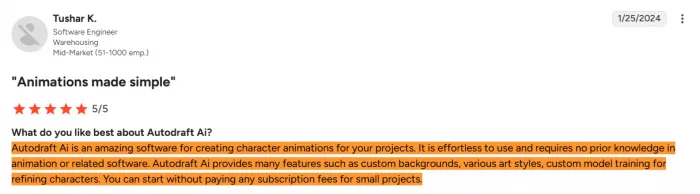
The "effortless to use" assessment appears repeatedly in positive reviews, though this conflicts sharply with some user experiences we'll examine shortly. The free tier's accessibility for small projects receives particular praise, allowing creators to experiment without financial commitment before investing in paid plans. Several G2 reviewers specifically highlighted cost savings compared to hiring animation professionals or subscribing to multiple specialized tools.
The technical failures: when the system breaks down
However, the positive experiences represent only one side of Autodraft's user feedback landscape. A significant proportion of reviews particularly on AppSumo where users paid upfront for lifetime deals document systematic technical failures that fundamentally undermine the platform's utility. The complaints follow consistent patterns suggesting infrastructure issues rather than isolated incidents.
"Worse than any free or cheap AI image generator you will use. Just to be fair I retested side by side with another cheap image generator and I gave both a one sentence prompt. The other image generator gave me a decent image in under a minute. This one after 5-10 minutes gave me a generation error. It has been giving me errors for days. I think they may be gone entirely, it was painfully slow even when it worked." — AppSumo verified purchase review
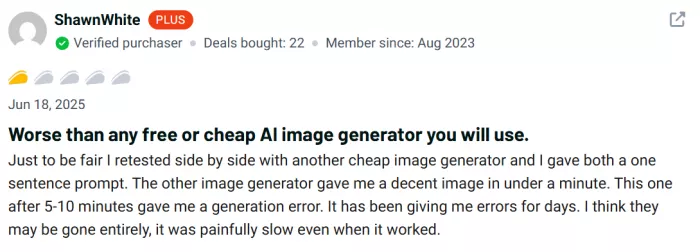
This review highlights the most damaging criticism: fundamental reliability failures. When an AI generation tool consistently returns errors instead of outputs, it becomes completely unusable regardless of its theoretical capabilities. The comparison to "any free or cheap AI image generator" performing better strikes at Autodraft's core value proposition. Multiple AppSumo reviewers echo this experience, describing generation times of 20+ minutes that ultimately fail, compared to competitor tools delivering results in under a minute.
"So you need '8-10 minute to start the machine' (what machine?!) before generating anything - it takes a good 20 minute to generate ONE prompt - team doesnt answer. Another abandonned product! I'd like a refund please." — AppSumo review on platform responsiveness
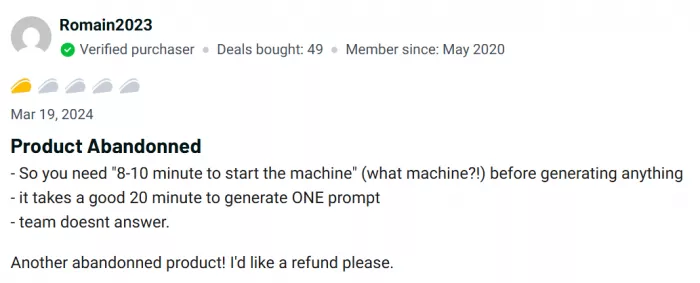
The "abandoned product" accusation appears with concerning frequency in late 2025 reviews. Users report emails bouncing back from support addresses, website contact forms malfunctioning, and prolonged periods without developer communication. One AppSumo reviewer specifically noted, "I'm trying to reach you. I tried to send an email to Autodraft because the message form on the site isn't working atm. Are anyone else's emails bouncing back?" This pattern suggests operational instability beyond typical startup growing pains.
The mixed perspective: recognizing limitations while finding value
Between enthusiastic praise and complete rejection sits a substantial group of users who appreciate Autodraft's capabilities while candidly acknowledging significant limitations. These reviewers typically have realistic expectations about AI animation tools and understand they're trading some creative control for production speed.
"For Background & web toon creation it's one of the best AI platform, non of AI platform like this in market. but for Animation it's too complicated, Time taking than any traditional animation process. Also animation quality looks poor." — Umesh, Product Hunt review
This feedback reveals a critical distinction: Autodraft excels at static visual generation (backgrounds, webtoon panels, character designs) but struggles with its core animation promise. The assessment that traditional animation processes are actually faster than Autodraft for proper animation work directly contradicts the platform's primary marketing claim. This suggests Autodraft may be more accurately categorized as an AI illustration tool with animation features rather than a true animation production platform.
"I can create backgrounds by for my stories by uploading the sketch reference image and writing a text prompt to autodraft ai sketch to image feature to visualise the story to my younger students. One thing is its complexity of learning to use all the features correctly, especially when you're a beginner." — G2 educator review
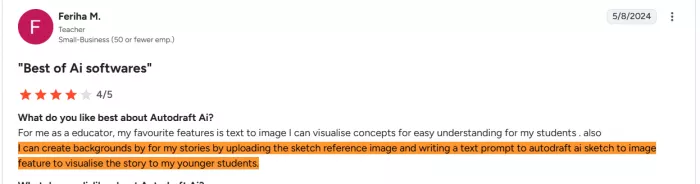
The learning curve criticism appears repeatedly even in otherwise positive reviews. Despite marketing claims of "no skills required," actual users report that mastering Autodraft's full feature set requires significant time investment. The platform's extensive capabilities pose makers, inpainting, custom model training each carry their own learning requirements that aren't immediately intuitive for true beginners.
User Satisfaction Distribution
| What Genuinely Works Well | Significant Problems and Limitations |
| Character consistency via custom model training keeps characters recognizable across scenes | Systematic generation failures and error messages reported by many paying users |
| Text-to-image for backgrounds and static assets produces usable results quickly | Animation quality and workflow complexity often worse than traditional tools despite automation claims |
| AI voiceover generation with an extensive preset library reduces or eliminates voice talent costs | Generation times of 10–20+ minutes, far slower than many competing platforms |
| Copyright-free music and sound effects library removes audio licensing hassles | Customer support frequently reported as unresponsive, with bouncing emails and broken contact forms |
| Sketch-to-image feature speeds up concept development from rough drawings | Fully browser-based (no install) and works across desktop and mobile, with cloud rendering that doesn't tax your device |
| “90% free” tier allows meaningful experimentation before financial commitment | Steep learning curve for advanced features contradicts “no skills needed” positioning |
| Web-based platform requires no installation or powerful hardware | Unclear credit consumption makes real project cost and budgeting difficult |
| Active development cycle with regular feature additions and improvements (when stable) | Lip-sync is basic and often poorly synchronized, according to multiple user reviews |
| Complex or abstract prompts can produce weak results, requiring extensive iteration | |
| Platform stability issues, including outages and service disruptions, reduce trust for production use |
Feature Performance Assessment (User Feedback Analysis)
The reliability crisis: examining the operational stability concerns
User feedback from 2025 raises serious concerns about Autodraft’s reliability and long-term stability. While early reviews were mostly positive, later feedback points to slower performance, more failures, and poor support responsiveness.
The AppSumo experience: when lifetime deals go wrong
AppSumo reviews show a worrying pattern. Early buyers were optimistic, but many later reported slow generation times, repeated errors, and no response from support. Some users even felt the platform seemed abandoned after paying for lifetime access.
The “abandoned product” concern
The idea that Autodraft may be an abandoned product appears in multiple reviews across platforms. Users mention outages, unanswered support requests, and declining performance, which creates major concerns for anyone relying on it for regular work.
Platform dependency risk
Because of these reliability issues, Autodraft may not be safe for business-critical workflows. Creators should avoid depending on it fully for deadlines and keep backup tools available in case the platform fails.
Competitive context: how alternatives maintain stability
Compared with established tools like Adobe After Effects, Vyond, Animaker, and Renderforest, Autodraft appears less stable and less dependable. Its lower pricing may make it appealing, but that affordability may also reflect weaker infrastructure and support.
Use cases and ideal users: who should actually use Autodraft
Understanding Autodraft's strengths and limitations reveals clear patterns about which creators will benefit most from the platform and which use cases align poorly with its current capabilities. The tool serves specific niches well while disappointing users with different requirements or expectations.
Ideal use cases where Autodraft excels
YouTube educational content creators
Autodraft is especially useful for educators creating animated explainer videos for YouTube. It helps generate visual assets quickly, and its AI voiceover feature supports easy narration without recording equipment. For channels posting 1–2 videos a week, the Base plan is usually enough.
Webtoon and comic creators
Webtoon and comic creators can benefit from Autodraft’s character consistency and background generation tools. These features help keep characters recognizable across many panels, reducing a major production challenge. Since webtoons rely on static visuals, creators can take advantage of Autodraft’s stronger illustration features without depending on its weaker animation tools.
Rapid prototyping and concept visualization
Autodraft is useful for creative professionals who need to quickly visualize story ideas, character designs, and scene layouts. Features like sketch-to-image and storyboard-to-image help speed up early planning and concept development. Using it mainly for ideation rather than final production also avoids many of its quality limitations.
Budget-conscious hobbyists and students
Autodraft is also a good fit for hobbyists and students who want to explore animation and visual storytelling at low cost. Its free tier allows users to experiment with character design, scene composition, and basic animation without a major financial commitment, making it especially useful for learning and practice.
Poor fit use cases where Autodraft disappoints
Professional animation studios with quality requirements
Autodraft is not a strong fit for professional studios creating client or broadcast-quality work. Its weak lip-sync, uneven motion quality, and reliability issues make it hard to use for polished deliverables, and fixing the output can take more time than traditional methods.
High-volume daily content producers
Creators who publish many videos each day may quickly run out of credits, even on the Pro plan. Slow and unreliable generation times also make the platform impractical for fast, deadline-driven publishing schedules.
Complex narrative animation projects
Autodraft struggles with projects that need advanced character acting, subtle emotions, and smooth motion. It can handle simple poses and movements, but it is not built for highly detailed or emotionally rich animation.
Creators requiring reliable support
Users who may need technical help, billing support, or troubleshooting should be cautious. Reported problems with support responsiveness make Autodraft risky for anyone who cannot afford delays or workflow disruptions..
Making Autodraft Work: Practical Recommendations
If you decide to use Autodraft despite the documented concerns, several strategies maximize success probability:
Start with free tier for extensive testing before any paid commitment. Generate 20-30 test assets to verify the platform meets your quality standards and performance expectations. Test the specific features critical to your workflow don't assume all features work equally well.
Choose monthly billing initially rather than annual to maintain flexibility if reliability issues emerge. The 20% annual discount isn't worth the commitment risk given operational concerns.
Maintain alternative tools as backups rather than building entire workflows exclusively around Autodraft. Have contingency plans for meeting deadlines if generation failures occur.
Budget extra time for troubleshooting and iteration. Plan for 2-3x longer production times than marketing materials suggest to accommodate slow generation, errors, and quality refinement needs.
Competitive landscape: how Autodraft compares to alternatives
| Platform | Monthly Cost | Best For | Reliability | Learning Curve |
| Autodraft AI | £10-£35 | AI-generated custom animations, YouTube content | ⚠️ Concerning | Moderate |
| Adobe After Effects | $22.99 | Professional motion graphics, broadcast quality | ✓ Excellent | Steep |
| Vyond | $49+ | Business presentations, training videos | ✓ Excellent | Low |
| Animaker | $19+ | Marketing videos, social media content | ✓ Very Good | Low |
| Canva | $12.99 | Social media, simple animations, design | ✓ Excellent | Very Low |
| Renderforest | $14.99+ | Templates-based videos, logos, websites | ✓ Very Good | Very Low |
Where Autodraft AI stands in 2026
Much of the criticism aimed at Autodraft dates from 2025, when slow generation times, error loops, and long support silences led some users to describe the platform as abandoned. That reputation still follows it around but the picture in 2026 looks different and deserves a fresh look.
The platform is clearly still active and growing: it now advertises 400,000+ creators, more than 1,500 monetized YouTube channels built with the tool, and a library of 30M+ assets. Generation reliability has improved for most users, feature updates have continued, and aggregate sentiment across review sites has recovered from its 2025 low. Autodraft is now more often positioned as one of the stronger budget options for AI animation particularly for YouTube creators, educators, and webtoon artists working on a tight budget.
That said, the improvement isn't uniform. Reliability still appears to be cohort-dependent: some users report a fast, smooth experience while others still hit occasional slowdowns or failed generations, especially during heavy load. In other words, the platform is far more usable than its 2025 reputation implies, but it hasn't reached the rock-solid consistency of established tools like Adobe After Effects or Vyond.
The practical takeaway for 2026: the "is it abandoned?" worry is largely outdated, but Autodraft is still best treated as a capable primary tool with a backup kept on hand for deadline-critical work. Test it on your own workflow before committing to an annual plan, and confirm the current pricing on the official site the tiers and credit amounts have shifted over the past year.
The verdict: promise versus reality
Autodraft AI shows both the promise and the current limits of AI-powered creative tools. Its strongest advantages are character consistency, custom model training, and integrated asset generation, which can speed up workflows for creators like YouTube educators, webtoon artists, and concept visualizers. Its widely accessible free tier is also a major strength.
At the same time, Autodraft’s marketing claims do not always match user experience. Promises like “no skills needed” and “professional-grade animation” are weakened by reports of limited animation quality, unreliable generation, and poor support communication.
The most serious issue is the reported decline in reliability during 2025. Reviews describing slow performance, broken support channels, and even an “abandoned product” raise concerns about the platform’s long-term stability. For professional creators, this makes Autodraft risky despite its creative potential.
Final Recommendation: Proceed with Informed Caution
If Autodraft's feature set aligns with your needs, the generous free tier warrants exploration. Test extensively before any paid commitment. Verify the platform works reliably for YOUR specific workflow rather than trusting general marketing claims. Start with monthly billing to maintain flexibility. Most importantly, maintain alternative tools and workflows as backups rather than building complete dependency on a platform showing concerning operational instability signals.
The potential is evident and the innovation is real. But potential and innovation don't replace reliability and support when deadlines loom and generation requests fail. Let enthusiastic early adopters work through the growing pains while you protect your production capabilities and professional reputation.
Comments

Roman Mathews
3 months agoThe "abandoned product" accusations are piling up on AppSumo. Users reporting 20 minute generation times that end in errors, bouncing support emails, and complete silence from devs. When your AI tool cant generate AI, what exactly are you paying for? The lifetime deal crowd got burned hard.
Login To Reply ↪
Vinod Mehra
3 months agoDo I stand alone in achieving frustration from this investment? I have to say the character design was consistent with what it was promised to be. Unfortunately, from that point on it started going downhill, with motion looking rather lifeless. The lip sync didn’t single-handedly worked, resulting in people abandoning it after about 15 minutes of trying to get it to work. I have serious issues with customer support. Do the people that work there ever receive any of my emails? I have sent two emails regarding billing issues but never received a response. Quality, unfortunately, is not the major issue anymore as it becomes obvious that the service doesn't want to deal with customers. Even if they offer a free trial period, I don't recommend counting on them if you have deadlines to meet.
Login To Reply ↪
Aron Perez
1 month agoI honestly didn’t expect much from AutoDraft AI because a lot of AI animation tools look impressive until you actually try to keep the same character across multiple scenes. But I made a short café sequence with three different shots, changed the pose and expression each time and was genuinely surprised by how consistent everything stayed. Adding the voiceover at the end made it feel like a proper little animated scene instead of just a few generated frames. I had a really good experience playing around with it.
Login To Reply ↪