In a world where artificial intelligence is reshaping how we write, create, explore, and build, one platform has boldly positioned itself as both private and uncensored: Venice.ai. Launched with a mission to offer AI without unnecessary restrictions or data harvesting, Venice.ai has garnered attention from creators, developers, privacy advocates, and today’s curious innovators. Yet, like any rising technology, it inspires both praise and skepticism. This article unpacks what Venice.ai is, how it works, what it costs, and how it compares with major AI alternatives.
What Is Venice.ai?

Venice.ai is a generative AI platform that combines advanced language models with strict privacy protections and a promise of minimal content censorship. Unlike many mainstream AI tools that log and use conversations for analytics or training, Venice.ai emphasises local processing of chats and prompts, ensuring that your interactions stay private and, in many cases, anonymous. (Venice AI)
At its core, Venice.ai is designed to be familiar to you type, it responds but under the hood it delivers a more permissive‑free experience. Users can engage in long‑form writing, code generation, image creation, document analysis, and even character creation all within a unified interface.
Its appeal lies in the claim that it operates without traditional platform moderation filters and stores data only on the user’s device. This approach attracts those who want maximal creative freedom and minimal tracking by central servers.
How Venice.ai Works
Step 1: Sign Up and Choose Your Access
- Start by visiting Venice.ai or downloading the mobile app (iOS).
- Create a free account to explore basic features or subscribe to the Pro plan for unlimited prompts and advanced tools.
- Once logged in, you can access all the AI models Venice.ai offers.
Step 2: Select the Type of AI Task
Venice.ai supports multiple creative tasks:
- Text Generation: Chat, write articles, brainstorm ideas, or summarize documents.
- Image Generation: Create AI art, edit images, or transform visuals.
- Document & Photo Analysis: Process files for insights or summaries.
You select the task type before entering your prompt.
Step 3: Choose Your AI Model
- Venice.ai allows switching between different AI models, each with unique strengths (text reasoning, creative writing, image generation).
- Pick a model based on your goal: for example, a “creative” model for storytelling, or a “precise” model for data analysis.
Step 4: Enter Your Prompt
- Type your question, instruction, or content idea into the interface.
- You can add context, style instructions, or specific parameters to guide the AI’s response.
- For image generation, you can also add style descriptors, resolution preferences, and optional reference images.
Step 5: AI Processes Your Request
- Venice.ai processes your input using distributed AI inference, often locally on your device.
- Unlike other AI tools, your data is not stored on Venice.ai servers, which enhances privacy.
- The AI generates outputs based on your prompt and chosen model.
Step 6: Review and Refine Output
- Once the AI delivers a response, you can:
- Edit the text or regenerate it if unsatisfied.
- Fine-tune image outputs using Venice.ai’s image editing tools.
- Save or download your content locally.
- Some tasks allow multiple iterations to improve quality or match style preferences.
Step 7: Optional API Integration (Pro Users)
- Developers can connect Venice.ai via API to integrate AI functionality into apps or automated workflows.
- This enables programmatic content generation or AI-assisted applications without manual use of the interface.
Step 8: Save, Export, or Use Your Content
- Save generated content locally to your device or cloud storage.
- Share directly in projects, social media, or professional documents.
- For Pro users, you can also manage prompt history locally without compromising privacy.
Pricing Overview: Free and Pro Plans
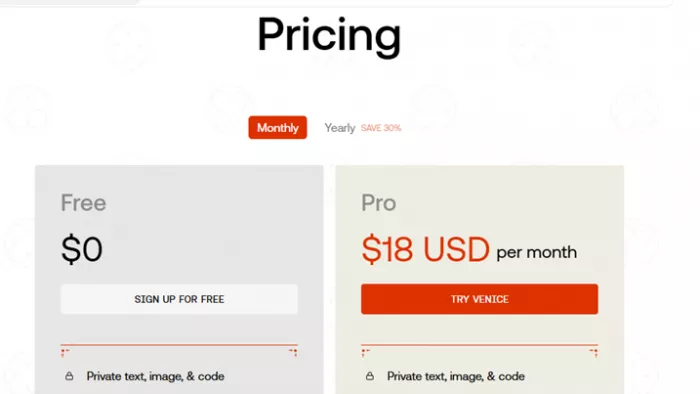
One of Venice.ai’s defining features is its transparent pricing structure that caters to both casual users and power users:
- Free Tier:
Venice.ai’s free plan requires no subscription and offers limited daily usage typically capped at a set number of text and image prompts per day. This version gives users access to basic models and the essential AI features, making it a useful entry point for experimentation. - Pro Subscription:
For about $18 per month (or roughly $149 per year), Venice.ai offers a Pro tier with significantly expanded capabilities. This includes unlimited text generation, up to 1,000 image prompts per day, improved upscaling and watermark removal, advanced AI models, character creation, API access, and higher performance.
Throughout its documentation, Venice.ai reinforces that Pro users benefit from higher throughput, extended creative options, and features that make it suitable for professionals or heavy creators. However, these benefits reside within usage policies and browser constraints that moderate “unlimited” claims to fair‑use limits.
Strengths That Set Venice.ai Apart
Venice.ai has several attributes that distinguish it in a crowded field of generative platforms:
1. Privacy‑First Design: Conversations and data are processed locally, which means they aren’t stored on external servers. This appeals to users concerned about data retention and tracking.
2. Uncensored Outputs: Unlike many mainstream AI assistants that enforce safety filters or block certain topics, Venice.ai’s models are less constrained by built-in restrictions. For creative writers, experimental coders, and individuals generating sensitive content, this freedom can be a defining advantage.
3. Multi‑Modal Creativity: The platform goes beyond chat; it supports image generation, code assistance, document summarisation, and character creation, making it a versatile creative environment.
4. Developer‑Friendly API: Beyond personal use, Venice.ai offers a private inference API, enabling developers to build autonomous agents or integrate Venice‑powered intelligence into their apps and services.
Limitations and Candid Critiques
No tool is without shortcomings, and user feedback reveals meaningful concerns:
- Variable Output Quality: Some users report inconsistent results, particularly with complex prompts or image editing tasks. In certain cases, the AI may fail to adhere strictly to detailed instructions, especially in artistic edits or structured data scenarios.
- Learning Curve: Choosing among many models requires some experimentation and understanding of their behaviours, an unfamiliar task for beginners.
- Support Issues: Several users have expressed frustrations about limited or slow customer support and challenges with account or subscription management.
- Controversial Reputation: Because Venice.ai promises fewer content restrictions, it has attracted both advocates and critics who question the trade‑offs between uncensored output and ethical considerations.
These mixed reviews highlight that Venice.ai’s user experience can vary widely based on expectations and use cases.
Venice.ai vs Other AI Tools – In‑Depth Comparison
1. Venice.ai
Official Link: Venice.ai – Private AI for Unlimited Creative Freedom
Pricing
- Free Tier: $0 (limited text and image prompts per day).
- Pro: ~$18 per month with advanced models, unlimited text, up to 1000 images per day, watermark removal, character creation, and high‑res upscaling.
API access pricing available within documentation.
Overview
Venice.ai is a privacy‑focused generative AI tool that emphasises local processing, uncensored content output, and model choice flexibility. It supports text chat, image generation and editing, code assistance, and character creation, all while promising minimal data retention.
Pros
- Strong privacy guarantees: User data and chats are processed locally and not stored on central servers.
- Uncensored output: Fewer content restrictions than many mainstream AIs.
- Solid creative and image tools: Fast, versatile image generation/editing.
- Affordable Pro plan with generous limits for creators.
Cons
- Inconsistent output quality: Responses can vary depending on the model and prompt.
- No long‑term memory or saved contexts like some other AI tools.
- Fewer specialized tools (e.g., advanced analytics, built‑in code runners).
Best For
Creators and privacy advocates who want uncensored generative AI and flexible creative tools without cloud data retention. Suitable for brainstorming, image generation, writing, and lightweight coding tasks.
2. ChatGPT (by OpenAI)
Official Link: https://chat.openai.com/
Pricing
- Free Tier: Access to base models with usage limits.
- Plus: ~$20 per month for GPT‑5 access and priority usage.
- Pro / Enterprise: Higher tiers up to ~$200/month for very heavy use and advanced features (exact plans can change).
Overview
ChatGPT, developed by OpenAI, is one of the most advanced, widely adopted general‑purpose AI assistants. It features strong language understanding, multimodal tools (text, images), browsing, plugins, and deep integration with productivity flows.
Pros
- Highly polished AI: Excellent natural language comprehension and generation.
- Multimodal tools: Supports text, images, voice, plugins, and browsing.
- Large ecosystem: Extensive developer support and integrations.
Cons
- Data privacy trade‑offs: Not inherently private interactions may be logged for improvement.
- Subscription cost: Paid tiers can be relatively expensive for heavy users.
- Model filters: Strong safety moderation in mainstream models can limit some output types.
Best For
Users who need robust, general‑purpose AI capabilities, multimodal tasks, and powerful integrations from coding help to research, writing, and project work.
3. Claude (by Anthropic)
Official Link: https://www.claude.ai/

Pricing
- Free Tier: Basic access with usage caps.
- Pro: ~$20/month with extended limits and deeper features.
- Max / Team / Enterprise: Higher tiers (~$100–$200/month) with huge usage, priority access, and business‑oriented tools.
Overview
Claude is designed with a unique philosophy focused on ethical alignment and safety using “Constitutional AI” guiding principles. Its large models handle complex reasoning, long documents, and structured workflows exceptionally well.
Pros
- Huge context windows: Can process extremely long documents without losing coherence.
- Strong reasoning and safety: Great for structured problem‑solving and technical tasks.
- Flexible tiers: Multiple plans for individuals and teams.
Cons
- Won’t generate visuals natively: Limited image generation or multimodal content compared to ChatGPT.
- More conservative responses: Can be too cautious on some topics.
- Costly advanced tiers: Heavy usage plans reach higher price points (enterprise/Max).
Best For
Analytical professionals, researchers, academics, and developers who value deep reasoning, long context understanding, and structured response quality.
Comparison Snapshot
| Feature | Venice.ai | ChatGPT | Claude |
| Privacy Focus | Very strong (local processing) | Moderate (data logged) | Moderate (enterprise options) |
| Creative Output | Good (text & image) | Excellent (multimodal) | Good (mainly text) |
| Enterprise/Team Support | Limited | Strong | Strong |
| Advanced Tools | Limited | Plugins, browsing, voice | Coding tools, long context |
| Best For | Private creators | All‑purpose AI users | Structured tasks, long workflows |
Final Thoughts
Each platform serves a slightly different audience and use case. Venice.ai shines for creators who care about privacy and freedom of output, ChatGPT remains the most versatile choice for everyday users and enterprises, and Claude is ideal where deep reasoning, safety, and structured analysis are required.
Conclusion
Venice.ai stands out as a bold experiment in generative AI: rich in features, focused on privacy, and relatively uncensored compared with many contemporaries. Its pricing structure offers flexibility for both casual users and power creators, though it is not without limitations in quality consistency and support. In an era where AI tools are increasingly commodified, Venice.ai represents a compelling alternative worth exploring particularly for those who value data privacy and creative autonomy.
Comments