Table of Contents
- Best AI Music Generators of 2026: Quick Picks
- AI Music Generator Comparison Table
- How I Compared These AI Music Generators
- Test Prompts Used for This Review
- 1. Suno Review: Best Overall AI Music Generator for Vocals
- 2. Udio Review: Best Suno Alternative for High-Fidelity AI Songs
- 3. ElevenLabs Music Review: Best Licensed AI Music Generator for Creators
- 4. Soundraw Review: Best Royalty-Free AI Music Generator for YouTube
- 5. AIVA Review: Best AI Music Generator for Film and Game Scores
- 6. Stable Audio 3.0 Review: Best Open AI Music Model for Developers
- Best AI Music Generator by Use Case
- AI Music Licensing: What Creators Must Check Before Publishing
- Final Verdict: Which AI Music Generator Should You Choose?
AI music generators are no longer novelty tools that make short, robotic loops. In 2026, the best platforms generate full songs with vocals, royalty-free background music, cinematic cues, podcast intros, game soundtracks, and sound effects from a single prompt. Fast enough to finish a track before your coffee goes cold.
But sound quality is only half the decision now.
The more important question is what happens after the track is generated. Can you download it? Can you monetize it on YouTube? Can you use it for a client? Can you upload it to Spotify? Do you own the copyright, or do you only have permission to use the output? And what was the model trained on?
That is why this review does not rank AI music generators only by how impressive they sound. I compared them by real creator needs: audio quality, vocal realism, editing control, export options, pricing, licensing clarity, commercial use, and workflow fit.
If you just want the quick answer: Suno is the best overall AI music generator for full songs and vocals. Udio is the highest-fidelity Suno alternative, but you currently can't download your tracks. ElevenLabs Music is the safer pick for licensed commercial background tracks. Soundraw is best for YouTubers and podcasters who want royalty-free music without copyright stress. AIVA is best for film and game scoring. Stable Audio 3.0 is best for developers and technical users who want open-weight AI audio models.
Best AI Music Generators of 2026: Quick Picks
- Best for full song creation with realistic vocals: Suno (for complete AI-generated songs that actually sound “release-ready”)
- Best for emotional, human-like singing voice quality: Suno (especially strong for vocal realism and melody flow)
- Best alternative when you want more control over structure: Udio (better for tweaking sections and experimenting with sound layers)
- Best for creators who need commercially licensed outputs: ElevenLabs Music (safer for monetized content and brand work)
- Best for YouTube background tracks without licensing stress: Soundraw (built for fast, non-copyrighted production music)
- Best for cinematic scoring and game soundtracks: AIVA (strong orchestral and film-style composition engine)
- Best for developers building apps with AI audio generation: Stable Audio 3.0 (API-first, model-level control, experimental workflows)
AI Music Generator Comparison Table
| Tool | Best for | Vocals | Entry paid plan* | Commercial use | Main strength | Main limitation |
| Suno | Full songs with vocals | Yes | $10/mo ($8 annual) | Paid plans | Best overall song + vocal quality (v5.5) | Active Sony lawsuit needs care for big projects |
| Udio | High-fidelity song experiments | Yes | $10/mo | Plan-dependent | Cleanest 48kHz audio + label licensing | Downloads paused during UMG transition |
| ElevenLabs Music | Licensed creator/brand music | Yes | $5–6/mo | Starter+ plans | Licensed from launch, commercial-safe | No streaming distribution; shares voice credits |
| Soundraw | YouTube, podcasts, background music | No | ~$17/mo | Paid plans | In-house training data, near-zero claim risk | No vocal songs; no Content ID registration |
| AIVA | Film, game, orchestral scoring | No | ~$12/mo (Pro ~$36–49) | Plan-dependent | MIDI export + full copyright on Pro | Not built for pop vocals; tight download caps |
| Stable Audio 3.0 | Developers, self-hosting, SFX | No | Free (open weights) / API | License-dependent | Open-weight family, fully licensed data | Technical; best model isn't open |
*Pricing is subject to change over time; please refer to the official website for the most up-to-date information before subscribing.
How I Compared These AI Music Generators
Most AI music reviews focus on sound quality and price. Those matter, but they miss the issues that actually affect creators once a track is used in public.
For this review, I judged each tool using seven criteria:
- Audio quality: Does the final track sound polished enough for real content?
- Vocal realism: If the tool supports vocals, do they sound natural or obviously synthetic?
- Prompt accuracy: Does the output match the requested mood, genre, tempo, lyrics, and use case?
- Editing control: Can you extend, remix, regenerate, edit stems, or fix a weak section?
- Export options: Can you download MP3, WAV, stems, or MIDI, and use the track outside the platform?
- Licensing clarity: Are commercial rights, ownership, and distribution rules easy to understand?
- Real cost: Does the pricing make sense after retries, extensions, edits, and exports?
The biggest lesson from testing AI music tools in 2026 is simple: the best tool depends on the job. A YouTuber needs something different from a songwriter, a film composer, a podcast editor, or a developer building an app. On credit-based tools like Suno and Udio, the real cost is hidden. You pay per attempt, not per finished song, so budget for the four takes it takes to land one keeper.
Test Prompts Used for This Review
To keep the comparison fair, each tool was tested with the same or closest possible prompts:
- Vocal pop test: "Emotional indie-pop song about leaving home, warm female vocal, soft drums, hopeful chorus."
- Lo-fi background test: "Calm lo-fi beat for a productivity YouTube video, warm keys, no vocals."
- Cinematic test: "Slow orchestral cue for a mystery game, dark strings, rising tension."
- Podcast intro test: "Upbeat but not distracting intro music for a business podcast."
- Sound effects test: "Short futuristic UI transition sound."
For tools that do not support vocals, the vocal test was swapped for a stronger instrumental prompt. Each platform was judged on whether the output could be used with minimal cleanup, rather than whether it sounded impressive for the first 20 seconds.
1. Suno Review: Best Overall AI Music Generator for Vocals
Suno is the tool most people think of when they hear "AI music generator." With over 100 million users, around two million paid subscribers, and a reported valuation near $5.4 billion in 2026 (up from $2.45 billion late last year), it is the clear category leader. Its current model, v5.5, launched in March 2026 and is the first that consistently fools a casual listener on vocals.
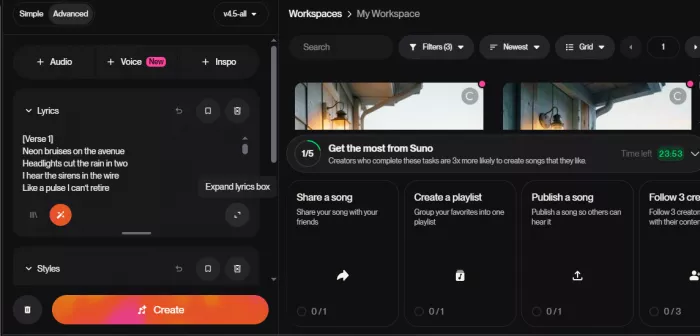
Where Suno stands out is consistency. A prompt like "emotional indie-pop song about moving to a new city, soft drums, warm guitar, hopeful chorus" usually produces something that sounds like a complete song rather than a short audio experiment. The structure is clear: verse, chorus, bridge, ending. That matters, because many AI music tools still sound good for 30 seconds and then lose direction.
Suno is especially strong for vocals. The best generations have believable phrasing, breath, vibrato, and emotional movement. Trained ears can still hear the AI texture, but the output is good enough for demos, social videos, parody tracks, creative experiments, and early songwriting ideas.
What Suno Does Best
Suno is the best choice if you want speed. You do not need music theory. You do not need a full lyric sheet. You can start with a rough idea and get a usable song in minutes.
It also has the deepest toolset on this list for users who want to keep editing. On the Premier plan, Suno Studio is effectively an AI-native DAW, with stem separation, MIDI export, multitrack editing, and the ability to rebuild a single weak section instead of regenerating the whole song. That makes Suno useful well beyond casual play. Songwriters use it for demos. Marketers test campaign jingles, and small teams prototype music before hiring a producer.
Where Suno Falls Short
Suno's biggest weakness is not the sound. It is the legal uncertainty. Warner Music settled with Suno in late 2025, but Universal and Sony are still litigating as of June 2026, with a pivotal fair-use ruling expected from a Massachusetts court this summer.
For casual creators, this rarely matters. For brands, agencies, labels, film projects, or client work, it does. Suno grants commercial rights on paid plans, while free-plan tracks are non-commercial. Upgrading later does not retroactively clear a song you made on the free tier. Before using Suno music in a major commercial project, check the current terms and avoid prompts that imitate living artists, then watch the output for accidental similarity to existing songs.
The other limitation is sameness. After many generations, you may notice familiar vocal textures and arrangement patterns. Suno is polished, but generic prompts produce a recognizable "AI pop" feel.
Pros
- Best overall AI music generator for full songs
- Strongest vocal quality in the category (v5.5)
- Extremely beginner-friendly
- Deep editing on Premier (Studio, stems, MIDI)
- Huge community, prompts, and shared resources
Cons
- Commercial rights depend on plan; free tracks are non-commercial
- Active Sony lawsuit means extra care on high-value work
- Credits don't roll over, and heavy editing burns them fast
- Generic prompts can sound recognizably AI
Who Should Use Suno?
Songwriters, creators, marketers, YouTubers, TikTok creators, and beginners who want the strongest all-round AI song generator for finished songs with vocals and lyrics.
Who Should Avoid Suno?
Anyone whose project needs ironclad rights for film, TV, brand campaigns, or high-value client work should compare terms carefully or pair Suno with a more licensing-first tool.
Best for: Complete AI songs with vocals
Pricing: Free (50 credits/day, non-commercial) · Pro $10/mo or $8/mo annual (2,500 credits, commercial) · Premier $30/mo or $24/mo annual (10,000 credits + Studio)
Overall rating: 9.0/10
2. Udio Review: Best Suno Alternative for High-Fidelity AI Songs
Udio is the strongest Suno alternative for people who care about musical detail. Built by former DeepMind researchers, it outputs at 48kHz against Suno's 44.1kHz, and in practice that shows up as cleaner instrument separation and richer detail in the high frequencies. Producers who drop AI stems into a real DAW often prefer Udio's.
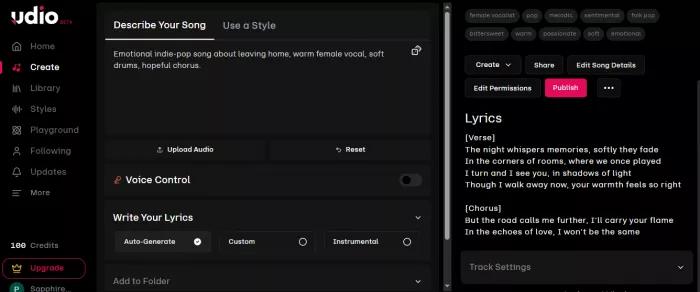
Udio is especially good for experimentation. If Suno is the fastest route to a finished song, Udio feels more like a creative lab. It rewards users who test several prompts and compare variations, refining a song over multiple attempts. Vocals capture vibrato and pitch glides beautifully, though tracks past two minutes can sometimes loop a phrase unnaturally.
What Udio Does Best
Udio performs well with genre nuance and produces songs that feel less predictable than the average AI track, especially with detailed prompts that specify mood, instrumentation, lyric direction, and structure. It has also become one of the most important platforms to watch because of its licensing position.
In October 2025, Udio settled with Universal Music Group and has since signed Warner, Merlin, and Kobalt. That gives it the cleanest major-label licensing story of any vocal tool here. Sony is the lone holdout still suing.
Where Udio Falls Short
Here is the problem that overshadows everything else: as part of the UMG settlement, Udio disabled all downloads on October 29, 2025. Paid subscribers can generate and stream inside Udio but currently cannot export audio, video, or stems. The replacement is a "walled garden" platform, co-built with UMG and due in the first half of 2026, where AI tracks live inside Udio and cannot be uploaded to Spotify, YouTube, or anywhere else.
That single change makes Udio unusable for any workflow that needs a file you can move, which is most professional workflows. The platform reportedly lost around 14% of its traffic after the switch, which tells you how creators voted. Udio is also less beginner-friendly than Suno, and some generations need several retries.
Pros
- Highest audio fidelity here (48kHz)
- Expressive, detailed vocal generations
- Cleanest major-label licensing (UMG, Warner, Merlin, Kobalt)
- Great for creative exploration and producers
Cons
- You currently cannot download your tracks
- Coming platform is a no-export "walled garden"
- Less beginner-friendly; results can need retries
- Sony lawsuit still active
Who Should Use Udio?
Musicians, producers, and lyricists who care about audio fidelity and licensing above all and can wait out the download freeze.
Who Should Avoid Udio?
Anyone who needs to export files, deliver to a client, upload to streaming, or grab a quick background track. For most people today, the export freeze is the whole review.
Best for: High-fidelity AI songs and creative experiments Pricing: Free (10 daily credits + 100/mo fallback) · Standard $10/mo (2,400 credits) · Pro $30/mo (6,000 credits, 10 parallel generations) Overall rating: 8.2/10
3. ElevenLabs Music Review: Best Licensed AI Music Generator for Creators
ElevenLabs is best known for AI voice, but its music product has become one of the most interesting options for creators who care about commercial use and licensing clarity. It launched Eleven Music in 2025, then a much stronger Music v2 in May 2026 with better instrumentation, longer song structure, multilingual lyrics, and section-level editing.
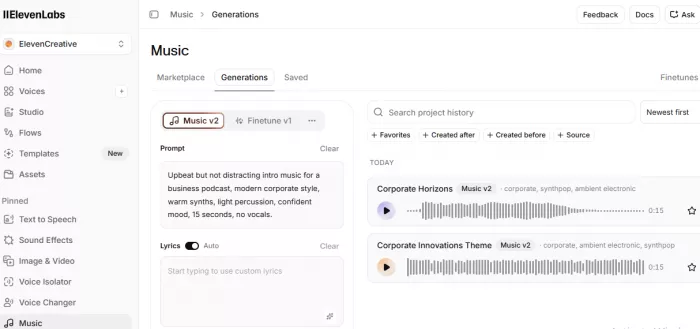
The main appeal is simple: ElevenLabs trains its music product on licensed data and clears it for commercial use from launch. That makes it attractive for creators, agencies, businesses, and developers who want to avoid the gray-area feeling that still surrounds parts of AI music.
What ElevenLabs Music Does Best
ElevenLabs Music is a strong option for background tracks, ad music, product videos, social content, podcast intros, and brand assets. If you already use ElevenLabs for voiceovers, this is close to a free upgrade. The same credits that generate your narration now generate your background music, in one place. You can see the credit cost of a track before you commit to generating it, which is a small but welcome bit of honesty.
The audio quality is strong, though it is more commercial-production tool than viral-song playground. It is built to sit under a voiceover, not to compete with one.
Where ElevenLabs Music Falls Short
ElevenLabs Music is not the right tool for releasing AI songs as an artist. Its standard and marketplace licenses do not permit distribution to streaming platforms. Spotify and Apple Music are off the table. The other limitation is credit management: music shares one credit pool with everything else ElevenLabs does, so heavy music use competes with your voice work.
Pros
- Licensed and commercial-safe from launch
- Strong fit for ads, videos, podcasts, and brand assets
- Same workflow if you already use ElevenLabs voices
- Credit-cost preview before you generate
- Music v2 added longer structure and section editing
Cons
- No streaming distribution under standard licenses
- Music shares credits with voice and other tools
- Less playful than Suno or Udio for songs
- Best value only kicks in if you already pay for voices
Who Should Use ElevenLabs Music?
Content creators and businesses who need commercial-safe music for YouTube, ads, product videos, podcasts, or social content, especially existing ElevenLabs voice users.
Who Should Avoid ElevenLabs Music?
Anyone whose main goal is generating lots of experimental vocal songs or distributing AI music as an artist.
Best for: Licensed music for creators and businesses Pricing: Free (10k credits/mo, non-commercial, attribution) · Starter $5–6/mo (30k credits, commercial incl. music) · Creator $22/mo (121k credits) Overall rating: 8.4/10
4. Soundraw Review: Best Royalty-Free AI Music Generator for YouTube
Soundraw is not trying to beat Suno at vocal songs. It solves a common problem: creators need clean background music for videos, podcasts, ads, tutorials, livestreams, and client projects without copyright headaches. For YouTubers, that can be more valuable than realistic vocals.
What Soundraw Does Best
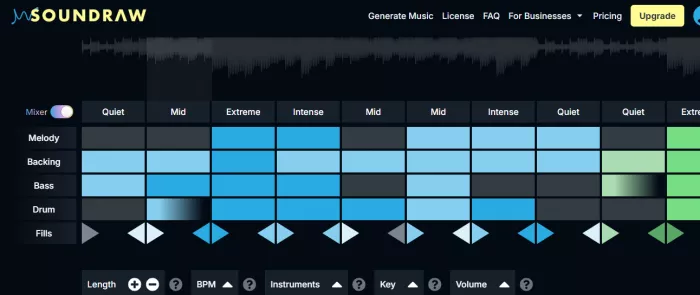
Soundraw is built around creator workflow. Instead of typing a long prompt and hoping, you choose mood, genre, tempo, length, and energy, then customize the track in a visual editor. Shorten the intro, change intensity, swap instruments, make it fit a scene or voiceover. You can even blend genres, like lo-fi with orchestra, across its 30-plus genres.
The other major advantage is licensing. Soundraw's AI is trained exclusively on music written and recorded by its in-house team, with nothing scraped, so every track ships with a worldwide commercial license and effectively no risk of a copyright claim. For a creator who has eaten a strike before, that guarantee is worth more than a marginally better model. Tracks you make while subscribed stay licensed for life, even if you cancel. (Artists like French Montana and Trippie Redd have used it for beats, so the ceiling is higher than "stock music" suggests.)
Where Soundraw Falls Short
Soundraw does not generate vocal songs. If you want lyrics or a finished vocal track, use Suno or Udio. Two other limits: Soundraw tracks can't be registered with YouTube Content ID, because the license is shared across users; and the entry plan licenses music for content use, not for releasing it as your own song on streaming, which needs a pricier Artist tier.
Pros
- Excellent for YouTube and podcast background music
- Visual, creator-friendly editor with section control
- In-house training data means near-zero claim risk
- Licensed for life, even after you cancel
- Unlimited MP3 downloads on the entry plan
Cons
- No vocal song generation
- Can't register tracks with Content ID
- Streaming distribution requires a higher Artist tier
- No permanent free tier (trial only)
Who Should Use Soundraw?
YouTubers, podcasters, editors, course creators, and social media creators who need reliable, royalty-free background music at volume.
Who Should Avoid Soundraw?
Anyone whose goal is full songs with vocals or artist-style tracks.
Best for: Royalty-free AI background music Pricing: Free trial only · Creator ~$17/mo (unlimited MP3, content use) · Artist tiers ~$19–32/mo (WAV, stems, streaming distribution) Overall rating: 8.3/10
5. AIVA Review: Best AI Music Generator for Film and Game Scores
AIVA is the best tool on this list for users who care about composition. It targets cinematic, orchestral, classical, ambient, and game-style music rather than viral vocal songs, and that focus is its strength. It is also the oldest tool here and the first AI ever registered as a composer with a rights society (France's SACEM).
What AIVA Does Best
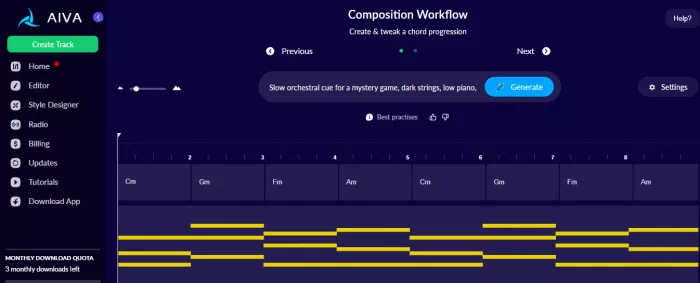
AIVA is useful when you need structured instrumental music rather than a finished pop song. It creates cues with intros, builds, emotional movement, and traditional composition logic across 250-plus styles. Two things separate it from everything else here. First, it exports editable MIDI, so a game developer can wire a generated theme into a dynamic music system and a composer can open it in a real DAW to rework the harmony. Second, on the Pro plan you get full copyright ownership of what you make. Those are the cleanest ownership terms of any tool reviewed here, with no attribution required.
Where AIVA Falls Short
AIVA is not built for vocals, and it is less instantly fun than Suno. Beginners who want a catchy song in one minute may find it slower going. The interface is browser-only and clumsy on tablets and phones, support can be slow, and the download caps are tight on lower tiers. If you do not need cinematic scoring or MIDI, Soundraw is easier for background music.
Pros
- Best-in-class for orchestral, cinematic, and game music
- Editable MIDI export for real composition workflows
- Full copyright ownership on Pro, no attribution
- 250+ styles with a real piano-roll editor
Cons
- No real vocal generation
- Tight download limits on lower plans
- Full ownership only on Pro
- Browser-only, weak on mobile
Who Should Use AIVA?
Filmmakers, game developers, composers, music students, and producers who need editable, fully-owned instrumental music.
Who Should Avoid AIVA?
Anyone who mainly wants AI pop vocals, rap songs, social hooks, or simple creator background music.
Best for: Film, games, orchestral, and cinematic scoring Pricing: Free (3 downloads/mo, attribution, AIVA owns copyright) · Standard ~€11–15/mo (15 downloads, social monetization) · Pro ~€33–49/mo depending on billing (300 downloads, WAV + stems + MIDI, full ownership) Overall rating: 8.5/10
6. Stable Audio 3.0 Review: Best Open AI Music Model for Developers
Stable Audio 3.0 is the odd one out, on purpose. Released in May 2026, it is a family of four models from Stability AI, and three of them ship with open weights you can download and fine-tune yourself. That is the opposite of the closed, API-gated approach everyone else takes. It is less beginner-friendly but far more powerful for the right user: developers, researchers, technical producers, and teams building audio products.
What Stable Audio 3.0 Does Best
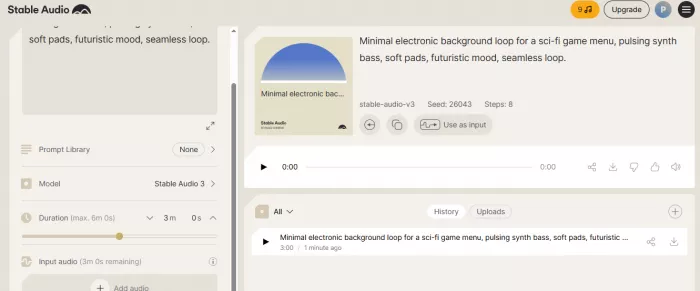
The small model runs entirely on-device with no GPU; the medium model renders a track in a few seconds on a MacBook Pro M4. It generates music and sound effects up to six minutes and twenty seconds, holding structure across the whole length, and supports LoRA fine-tuning and audio inpainting so you can rework one segment without starting over. For teams building apps, games, or custom audio pipelines, working close to the model itself is a major advantage. It is also one of the more interesting tools for sound effects, covering UI sounds, game audio, transitions, ambience, and experimental sound design.
Its strongest card is the training data. Stable Audio 3.0 was trained entirely on fully licensed data, backed by Warner and Universal partnerships, with published attribution for over 1.2 million recordings and enterprise indemnification on top. While Suno and Udio fight in court, this is arguably the cleanest training-data story in AI music.
Where Stable Audio 3.0 Falls Short
This is a toolset, not a one-click app. It generates instrumentals and SFX only, with no singing and no lyrics. The flagship Large model is API-only rather than open, and a company earning over $1 million needs an enterprise license to use it commercially. If you want to type a lyric idea and get a finished vocal song, this isn't your tool.
Pros
- Open-weight models you can run and fine-tune
- Runs on consumer hardware, even on-device
- Up to 6:20 tracks with LoRA + inpainting
- Cleanest licensed-data story, with enterprise indemnification
- Strong for sound effects and experimental audio
Cons
- Not beginner-friendly
- No vocal song generation
- The best model (Large) is API-only, not open
- Enterprise license required above $1M revenue
Who Should Use Stable Audio 3.0?
Developers, researchers, technical producers, sound designers, and teams building an AI audio product.
Who Should Avoid Stable Audio 3.0?
Anyone who wants a simple browser tool for full vocal songs or quick background tracks.
Best for: Developers, open models, self-hosting, and sound effects Pricing: Open-weight models free to download and run · Hosted platform and Large-model API priced separately (enterprise licensing above $1M revenue) Overall rating: 8.2/10
Best AI Music Generator by Use Case
Best AI Music Generator for Full Songs
Choose Suno. It has the best mix of vocals, lyrics, speed, structure, and editing tools for most users.
Best AI Music Generator for Vocals
Choose Suno for the easiest workflow. Choose Udio if you want more experimentation and don't mind refining prompts, provided you can live without downloads for now.
Best AI Music Generator for YouTube
Choose Soundraw for royalty-free background music. Choose ElevenLabs Music if you want commercial music alongside AI voiceovers. Choose Suno only if the song itself is part of the video.
Best AI Music Generator for Commercial Projects
Choose ElevenLabs Music, Soundraw, AIVA, or Stable Audio 3.0, depending on use case. These have clearer licensing stories than the litigation-active vocal tools, but confirm terms before any paid project.
Best AI Music Generator for Film and Games
Choose AIVA for cinematic composition, MIDI export, and full ownership. Choose Stable Audio 3.0 for sound effects or technical control.
Best Free AI Music Generator
Choose Suno for simple song ideas (50 credits/day). Choose Stable Audio 3.0 if you're technical and want to experiment with open models. Remember that free-plan music is usually not cleared for commercial use.
Best AI Music Generator for Developers
Choose Stable Audio 3.0. It is the strongest option here for open-weight experimentation, self-hosting, and custom audio workflows.
AI Music Licensing: What Creators Must Check Before Publishing
Licensing is the part of AI music that causes the most confusion. It is also the part that actually gets people burned.
A platform saying "commercial use allowed" does not always mean you own the copyright. It also does not always mean you can upload the song to Spotify, register it with Content ID, sell it as stock music, use it in a TV ad, or transfer the rights to a client.
Before publishing AI-generated music, check these five things:
1. Was the track made on a free or paid plan?
Many free plans are personal or non-commercial only. If you create a track on a free plan and later upgrade, do not assume the old track becomes commercial. Suno, for example, does not clear free-tier songs retroactively.
2. Can you monetize the track?
YouTube monetization, podcast ads, client projects, paid social campaigns, and streaming royalties can all carry different rules.
3. Can you distribute it as a standalone song?
Some tools are fine for background music but restrict distribution to Spotify, Apple Music, or stock libraries. ElevenLabs Music blocks streaming distribution outright; Udio's coming platform blocks all external export; Soundraw's entry plan is content-use only.
4. Do you own the copyright, or only receive a license?
This is the biggest difference. A license gives you permission to use the music. Copyright ownership is a stronger claim and is usually available only on specific higher-tier plans. On this list, AIVA Pro is the clearest path to full ownership.
5. Can you use it for client work?
Client work differs from personal content. If you are delivering AI music to a client, make sure the license allows commercial transfer, sublicensing, or use in the client's project.
The safe rule: if the project is important, read the terms before you generate the final track, not after.
Final Verdict: Which AI Music Generator Should You Choose?
If you want the best overall AI music generator in 2026, choose Suno. It is the strongest all-round tool for complete songs, vocals, lyrics, speed, and ease of use. Just handle the Sony lawsuit with care on high-value work.
If you want the best Suno alternative for creative exploration, choose Udio. It has the best raw audio and the cleanest licensing, but you can't download your tracks right now, so watch this space until exports return.
If you need commercial-safe music for videos, ads, podcasts, or brand content, choose ElevenLabs Music, especially if you already use ElevenLabs for voiceovers.
If you are a YouTuber, podcaster, editor, or social creator who mainly needs royalty-free background music, choose Soundraw.
If you are scoring films, games, trailers, or orchestral projects, choose AIVA. Its MIDI workflow and full-ownership Pro plan make it the strongest choice for serious instrumental composition.
If you are a developer, researcher, or technical producer, choose Stable Audio 3.0. It is not the easiest tool, but it gives technical users far more control than any browser-based generator.
Comments