Gizmo AI works because it does one thing well. You feed it your notes, slides, or a PDF, and it builds quizzes and flashcards, then returns them on a spaced schedule with a bit of game-like motivation. For many students that is the difference between re-reading (which feels productive but rarely sticks) and actually remembering the material.
But it is not for everyone. Maybe you hit the paywall, want more control over your decks, or need something tuned for one dense textbook. The good news: the active-recall space has several strong options, and most are free to start. Below are five of the best, with what each does well, where it falls short, and how real users rate it. One rule throughout: pricing, features, and review scores change often, so confirm the current details before you commit.
What Gizmo actually does (and what to replace)
Strip the branding and Gizmo rests on four ideas. A good alternative should cover the ones you care about:
• Active recall. You are quizzed constantly instead of reviewing passively, which is what builds memory.
• Spaced repetition. Hard cards return sooner and easy ones drift apart, so your time goes where it counts.
• Auto-generation. It drafts questions from your source, skipping the tedious card-making.
• Gamified habit loops. Streaks and points keep you opening the app, which helps consistency but can distract.
How real users rate these tools
Here is how the five score on the big review platforms. Read these with care: study apps are unevenly covered, Trustpilot skews toward consumer complaints while Capterra and G2 skew toward business buyers, and the app stores carry the largest volume of reviews. Treat the numbers as a starting signal, and always weigh how many reviews sit behind each score.
| Tool | Trustpilot | Capterra | G2 | App Store |
|---|---|---|---|---|
| Quizlet | ≈ 1.4 | ≈ 4.6 | ≈ 4.5 | ≈ 4.7 |
| Anki | Limited¹ | Limited¹ | Limited¹ | ≈ 4.5 |
| Knowt | Few | Limited | Limited | ≈ 4.7 |
| StudyFetch | Few | Limited | Limited | New |
| Brainscape | Few | ≈ 4.5 | Limited | ≈ 4.7 |
Scores are out of 5, approximate and rounded, and current to early 2026. Verify each score and its review count on the platform before publishing.
¹ The original Anki (by Damien Elmes) is distinct from the unrelated app “AnkiApp”; use the official AnkiMobile (iOS) and AnkiDroid (Android) listings. Newer tools (Knowt, StudyFetch) and Brainscape have thin B2B-review-site coverage, so their app-store ratings are the more representative signal.
The five best Gizmo AI alternatives
Quizlet: the default everyone knows

Quizlet’s edge is scale: search almost any course or vocab set and someone has likely built it. Its Magic Notes feature also turns your notes into cards, and Learn and Test modes mix recall formats so you are not just flipping cards.
| Quizlet · The biggest shared library, plus solid AI helpers | |
| Best for | Students who want ready-made sets and a familiar app on phone and web. |
| Standout | A near-bottomless community library, so your topic probably already exists. |
| Pricing (approx.) | Free with ads and limited AI; Quizlet Plus adds the AI tools, offline use, and no ads. |
| Strengths | • Huge catalog of existing sets saves hours. • Varied study modes (Learn, Test, Match). |
| Watch-outs | • More features now sit behind the paywall. • Community sets vary; verify before trusting them. |
Real-world fit: merge a couple of existing sets for your textbook and run Learn mode on your commute, no card-building needed.
Anki: the long-game memorization machine

If Gizmo is a friendly habit app, Anki is the engine behind serious memorization. It is open-source, highly customizable, and runs the modern FSRS algorithm, which is excellent at predicting when you are about to forget. Med students and language learners swear by it.
| Anki · The gold standard for spaced repetition, if you will tinker | |
| Best for | Long-haul learners (med, law, languages, certifications) who value retention over polish. |
| Standout | Best-in-class scheduling plus a huge add-on ecosystem you own. |
| Pricing (approx.) | Free on desktop, web, and Android. The iOS app is a one-time purchase that funds the project. |
| Strengths | • The most effective, transparent spacing available. • Endlessly customizable, including AI-generation add-ons. |
| Watch-outs | • Steep learning curve and a dated interface. • No native AI card generation. |
Real-world fit: a daily 30-minute session keeps thousands of exam facts fresh for months, with no need to re-study everything.
Knowt: the free, AI-friendly Quizlet alternative
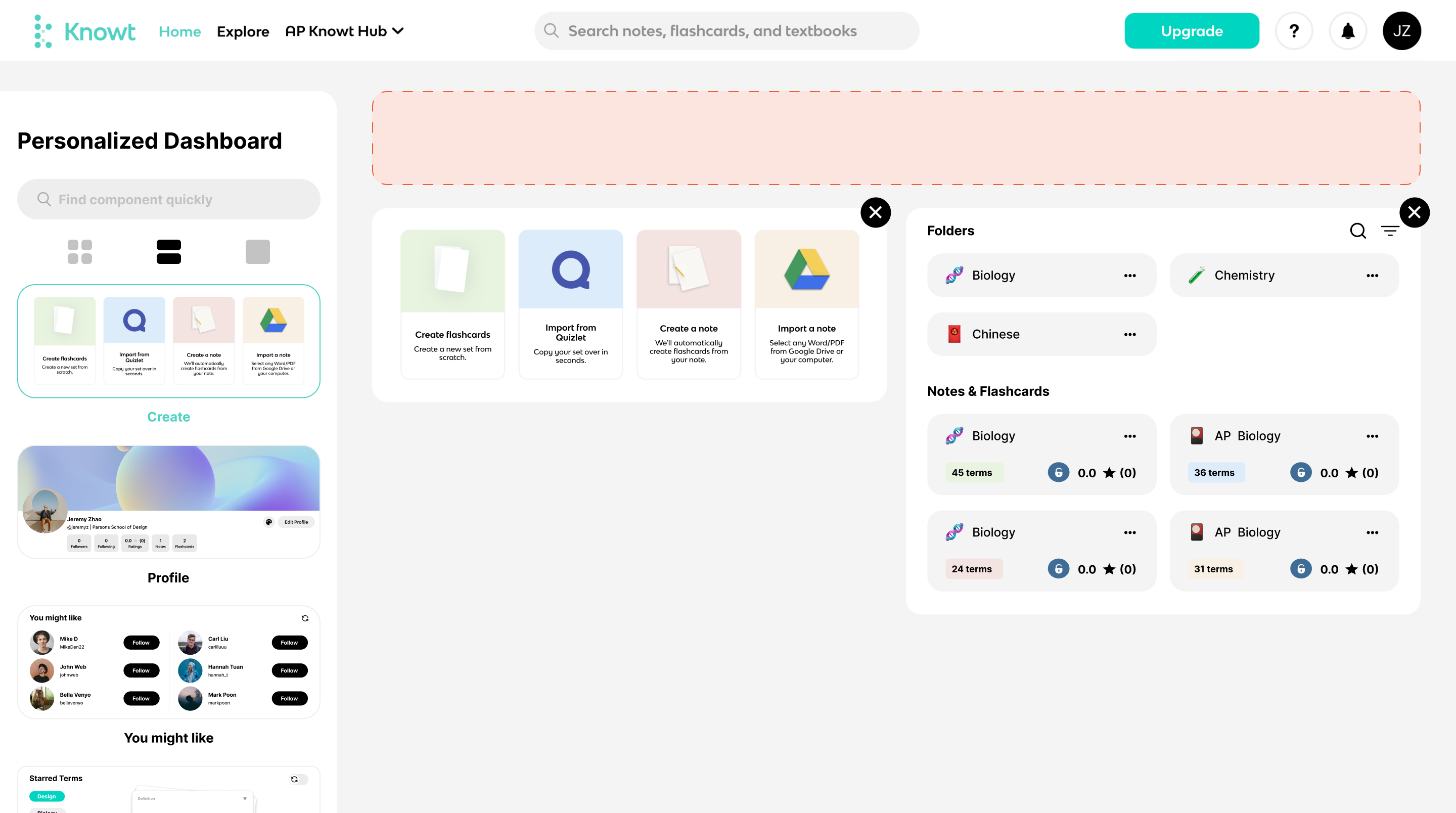
Knowt is the pick for anyone who liked Quizlet but resented its paywall. It runs the familiar flashcard and practice-test routine, adds AI that generates cards from your material, and lets you import existing Quizlet sets so switching is painless. The free tier is unusually generous.
| Knowt · Quizlet’s feel, more AI, far less paywall | |
| Best for | Budget-conscious students who want AI card generation without a subscription. |
| Standout | A capable free tier plus one-click Quizlet import. |
| Pricing (approx.) | Free covers most needs; a cheap paid tier lifts AI and upload limits. |
| Strengths | • AI flashcards and notes at no cost. • Easy migration from Quizlet. |
| Watch-outs | • Smaller library than Quizlet. • Newer product, still maturing. |
Real-world fit: past Quizlet’s free limits, you import your sets, let AI fill the gaps, and keep studying for free.
StudyFetch: upload anything, get a study set
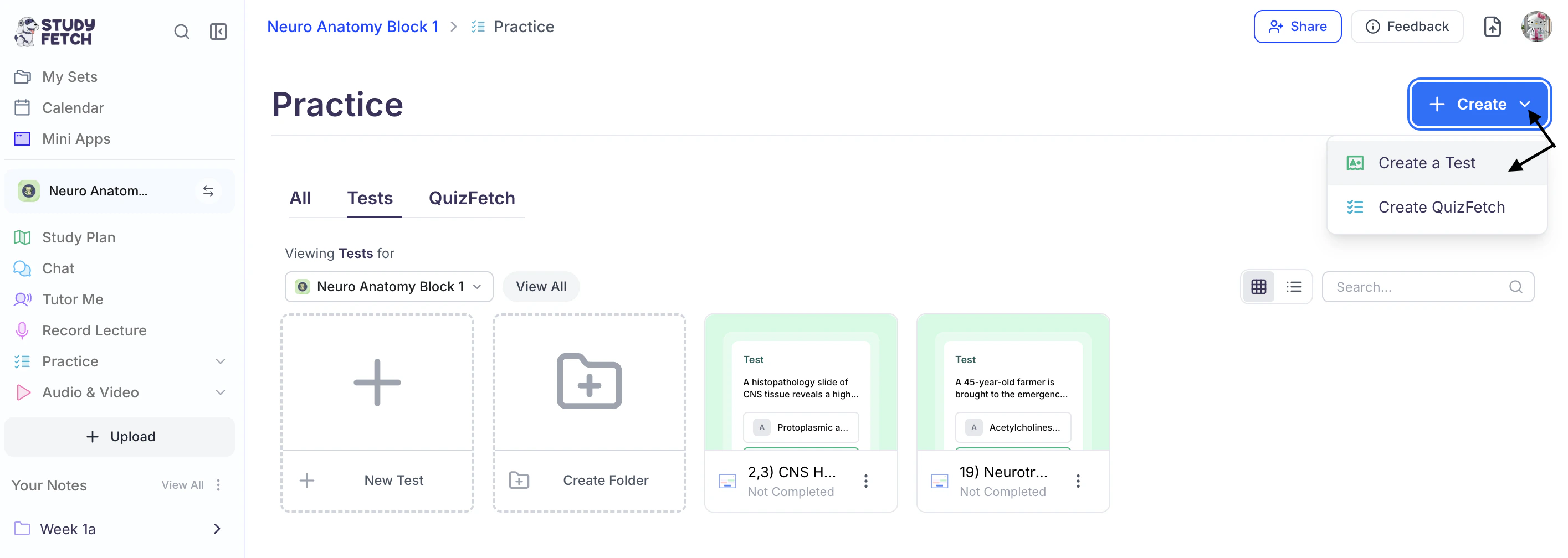
StudyFetch leans hardest into AI. Drop in a lecture recording, slide deck, or long PDF and it produces flashcards, quizzes, and summaries, with an AI tutor (Spark.E) to explain what you missed. If your bottleneck is a pile of material and no time to organize it, this is built for you.
| StudyFetch · AI that turns raw materials into ready study tools | |
| Best for | Students buried in slides, recordings, and PDFs who want structure generated for them. |
| Standout | It ingests video and audio, not just text. |
| Pricing (approx.) | A limited free tier to try it, with most capacity behind a subscription. |
| Strengths | • Fast turnaround from raw source to usable cards. • Built-in tutor for follow-up questions. |
| Watch-outs | • Generated cards still need an accuracy check. • Subscription cost adds up versus free options. |
Real-world fit: missed two weeks of lectures? It turns the recordings into summaries and a quiz set overnight.
Brainscape: confidence-based repetition
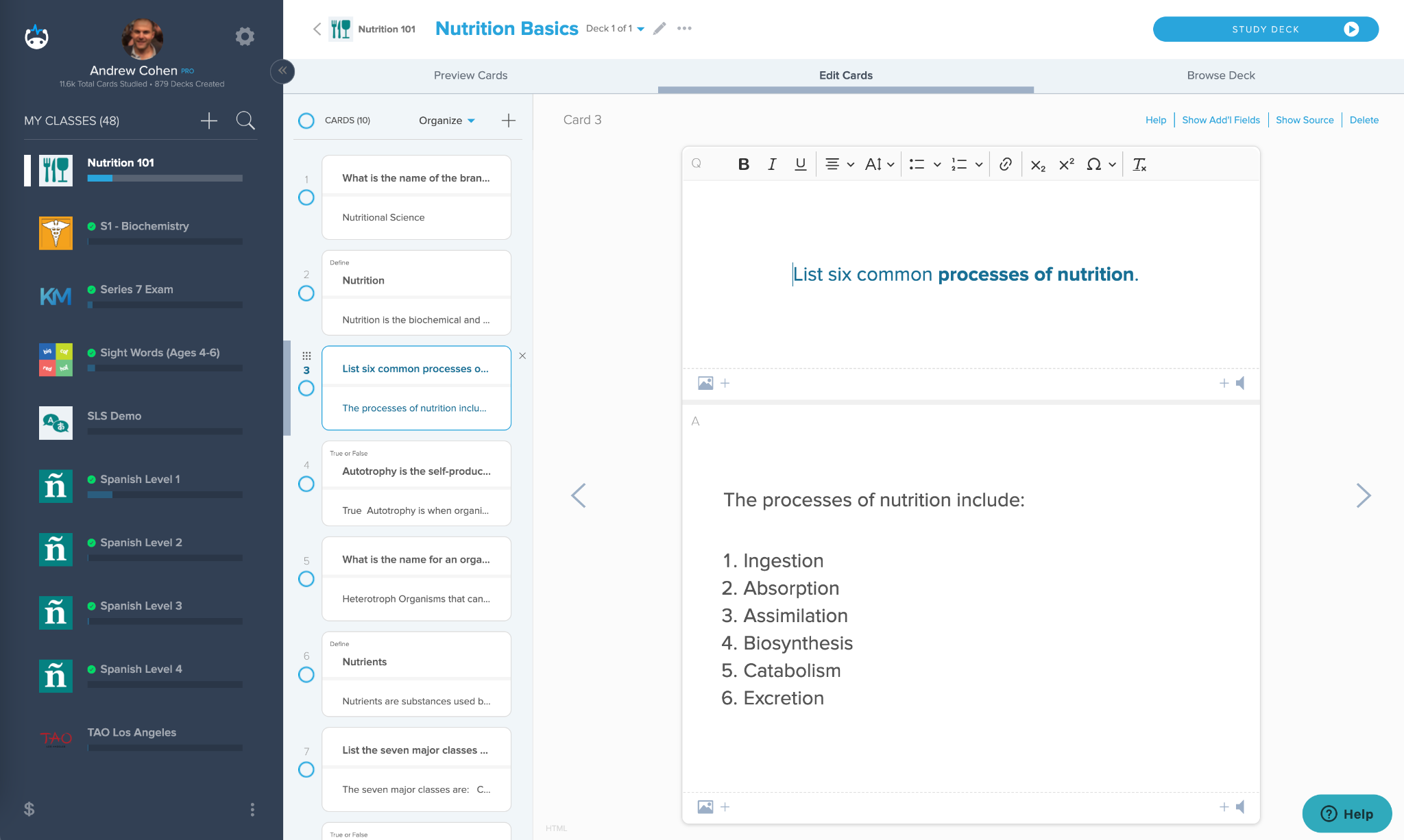
Brainscape takes a different angle. After each card you rate how well you knew it from 1 to 5, and that rating sets how soon it returns. It is clean, science-backed, and free of clutter, which makes it a good pick if gamified apps feel noisy.
| Brainscape · Minimalist, confidence-driven flashcards | |
| Best for | Learners who want calm, focused drilling over streaks and badges. |
| Standout | The 1-to-5 confidence loop: simple and effective. |
| Pricing (approx.) | A usable free tier with curated and user content; Pro unlocks the rest. |
| Strengths | • Distraction-free, recall-focused interface. • Confidence ratings make spacing intuitive. |
| Watch-outs | • Limited AI generation; expect to build cards. • Best features sit behind Pro. |
Real-world fit: when gamified apps annoy you, the rate-and-repeat rhythm lets you drill formulas in peace.
Also worth a look: NotebookLM

Google’s NotebookLM is not a flashcard or spaced-repetition app, so it is not a true Gizmo swap, but for understanding a dense source it is excellent. Upload your readings and it answers only from them, with citations, and builds study guides and podcast-style audio recaps. Pair it with any tool above: understand the material in NotebookLM, then drill the key facts in Knowt or Anki.
How close is each one to Gizmo, really?
If you just want something that feels like Gizmo, this is the quick read. All five share its core of active recall, but they differ in auto-generation, spacing, and that game-like habit loop. This is editorial orientation, not a lab result.
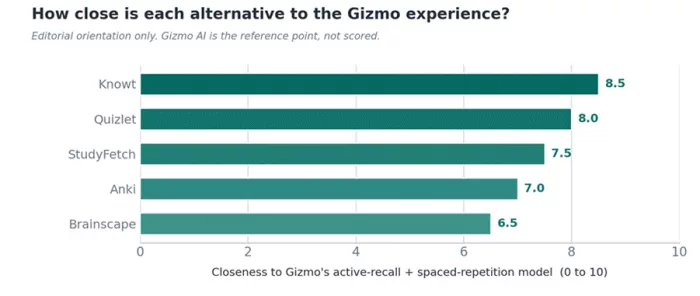
Figure 1. Closeness to Gizmo’s active-recall and spaced-repetition model. Subjective editorial scoring.
Feature comparison
✓ yes ~ partial / limited ✗ no
| Tool | Auto-makes cards | Spaced repetition | Community library | Gamified | Useful free tier |
|---|---|---|---|---|---|
| Quizlet | ~ | ✓ | ✓ | ~ | ~ |
| Anki | ✗ | ✓ | ~ | ✗ | ✓ |
| Knowt | ✓ | ✓ | ~ | ✗ | ✓ |
| StudyFetch | ✓ | ~ | ✗ | ~ | ~ |
| Brainscape | ✗ | ✓ | ~ | ✗ | ~ |
Which should you actually pick?
Match your situation to the pick. Plenty of people run two: one to learn from, one to remember with.
| If this is you… | Start with |
|---|---|
| You want the closest “just like Gizmo” feel | Knowt or Quizlet: familiar flashcards, AI generation, low friction. |
| You’re grinding a huge exam over months | Anki: nothing beats its scheduling for long-term retention. |
| You’re on a budget or want it free | Knowt or Anki: both do serious work at no cost. |
| You have piles of slides, PDFs, or recordings | StudyFetch: it ingests messy material and builds the set. |
| You hate gamification and want quiet focus | Brainscape or Anki: clean, no streaks, pure recall. |
| You want the biggest ready-made library | Quizlet: the largest catalog of existing sets, by far. |
Five tips for whichever you choose
1. Always verify AI cards. Auto-generation is a time-saver, not an oracle; a wrong card learned well is worse than none.
2. Keep cards atomic. One idea per card; cramming several together is hard to recall cleanly.
3. Study a little daily. Spaced repetition only works if you show up. Ten minutes a day beats a three-hour panic.
4. Mix recall with understanding. Grasp a concept first; memorizing what you don’t understand rarely sticks.
5. Read ratings in context. A low Trustpilot score next to strong app-store and Capterra ratings usually reflects billing complaints, not a bad study experience. Check the review count and the platform’s audience.
The bottom line
There is no single best Gizmo replacement, only the best one for how you study. Want the familiar, low-effort path? Knowt or Quizlet. Playing the long game on a big exam? Anki. Drowning in materials? StudyFetch. Prefer quiet, no-frills drilling? Brainscape. And don’t forget the combo move: a tool to understand plus a tool to remember covers nearly everything.
Pick one, give it a real week, and judge it by a simple test: are you remembering more with less stress? If yes, you have found your tool. If not, try the next one; switching is cheap, and most of these are free to start.
Comments