Most people don’t go looking for a tool like Cutout.Pro because they enjoy editing.
They go looking because they are tired of it.
Background removal, small corrections, repetitive cleanup work. None of it is difficult, but all of it takes time. That is the gap Cutout.Pro tries to fill. It steps in not as a creative tool, but as a time-reduction tool.
And that distinction matters more than it seems.
It Feels Fast Before It Feels Smart
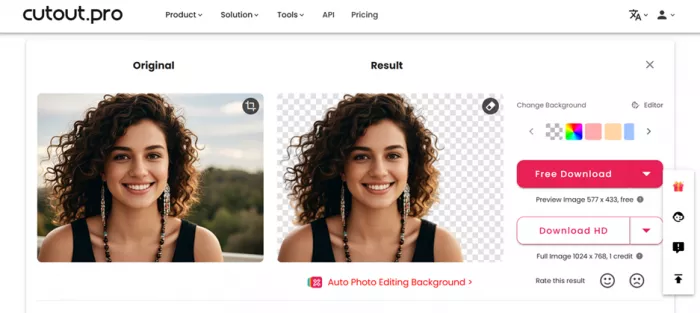
The first thing you notice is not accuracy. It is speed.
You upload an image, and before you have time to think about adjustments, the result is already there. Background gone. Subject isolated. File ready to download.
That immediate response shapes your expectation. It creates the impression that the tool is not just automated, but reliable.
But speed and reliability are not the same thing.
What Cutout.Pro does well is remove the waiting. What it does less consistently is remove the need for correction.
The Tool Decides Everything For You
There is no real editing phase here.
You are not selecting edges or refining masks. The system identifies what it thinks is important and processes the image accordingly. That makes it accessible, but it also removes control.
This becomes noticeable in small ways.
Edges are usually clean, but not always precise. Hair is handled better than expected, but not perfectly. Objects with reflections or overlapping shapes sometimes confuse the system.
You are not guiding the result. You are reacting to it.
Where It Actually Saves Time
Cutout.Pro does not follow a simple flat subscription model. Instead, it uses a credit-based system, and that choice affects how the platform feels over time.
At first glance, it looks flexible. In practice, it introduces a small layer of decision-making every time you use it.
Here is how the current pricing structure actually works:
Core Credit Logic
| Action | Credit Cost |
| Image background removal / retouch | 1 credit per image |
| Cartoon selfie / passport photo / enhancer / colorizer | 2 credits per image |
This distinction matters because not all tools consume credits equally. Basic workflows are cheaper, while advanced processing costs more.
Account Types and Pricing Options
| Plan Type | Pricing | Key Details |
| Free Account | $0 | 5 free credits, free previews, additional credits via referrals |
| Subscription Plan | $9.90/month (~$0.058 per credit) | Credits roll over up to 5× monthly limit, cancel anytime, 14-day refund policy |
| Pay-as-you-go | ~$0.130 per credit | Credits never expire, higher cost per credit |
How This Changes Real Usage
The pricing model does more than just charge you. It subtly changes behavior.
With the subscription plan, the lower per-credit cost makes it easier to process images regularly. The rollover system also reduces pressure to use all credits immediately, which makes it more practical for ongoing workflows.
With pay-as-you-go, flexibility increases but efficiency drops. You pay more per credit, which makes sense only if usage is inconsistent.
The free plan works as a test environment, but not much beyond that. Five credits disappear quickly, especially when testing multiple tools.
What Becomes Noticeable Over Time
| Usage Pattern | What Happens |
| Occasional edits | Free or pay-as-you-go is enough |
| Regular content creation | Subscription becomes necessary |
| High-volume workflows | Credit tracking becomes part of the process |
Because every action consumes credits, the platform introduces a kind of cost awareness that traditional editing tools do not have.
You start thinking in terms of efficiency rather than experimentation.
The Subtle Trade-Off
The system is fair in structure. Credits are transparent, rollover exists, and there is flexibility between plans.
But it also means the tool is never completely “open-ended.” Every action has a small cost attached to it.
That does not make it expensive. It just makes it intentional.
And that fits the rest of the platform. Fast, efficient, and designed for output rather than exploration.
The “One Click” Idea Is Slightly Misleading
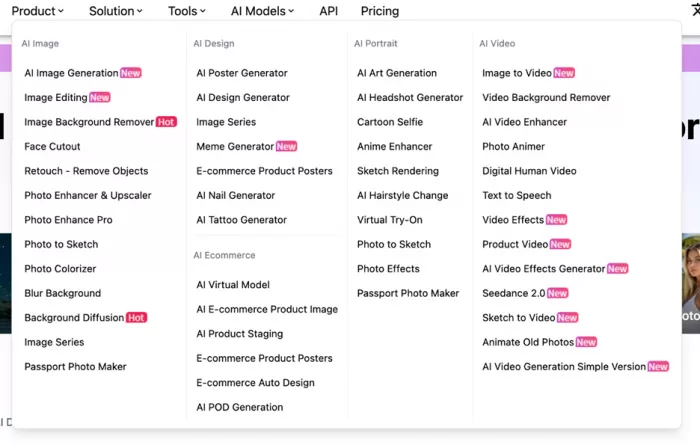
The platform is often described as one-click editing.
That is technically true, but incomplete.
The first click generates the result. The next step is usually reviewing it. And in many cases, making small adjustments elsewhere.
Artifacts near edges, slight cut errors, or leftover fragments are not rare. They are just small enough to be manageable.
So the real workflow looks more like this:
Automation first, correction second.
Enhancement Features Follow the Same Pattern
The image enhancer works in a similar way.
You upload a low-quality image, and the system sharpens it, increases clarity, and improves resolution. For basic use, the improvement is obvious.
But again, the system decides everything.
In some cases, details become too sharp. In others, textures look overly smooth. Portraits can appear slightly artificial when viewed closely.
It is helpful, but not precise.
The More Complex the Image, the Less Predictable the Result
There is a clear pattern in how the tool behaves.
Simple images produce consistent results. Complex images introduce uncertainty.
| Scenario | What Happens |
| Clean background | Very accurate cutout |
| Moderate clutter | Minor edge issues |
| Heavy detail or overlap | Visible inconsistencies |
This is not a flaw unique to this platform. It is a limitation of automated segmentation in general.
The difference is that Cutout.Pro prioritizes speed, so it does not slow down to refine those edge cases.
Pricing Quietly Influences Usage Behavior
The credit system is easy to overlook at first.
You process images, credits get used. Simple enough.
But over time, it changes how you approach the tool. You become more selective about what you process, especially in high-volume scenarios.
| Model | Effect on Usage |
| Free credits | Good for testing |
| Subscription | Encourages regular use |
| Pay-as-you-go | Better for controlled workflows |
The system works, but it adds a layer of awareness that traditional editing tools do not have.
User Reactions Depend on Expectations
The feedback around Cutout.Pro is not inconsistent. It is divided.
People who expect speed tend to be satisfied. People who expect precision tend to notice flaws.
| Expectation | Likely Reaction |
| Fast workflow | Positive |
| Perfect edges | Critical |
| High-volume usage | Practical |
| Detailed editing control | Frustrated |
This explains why ratings vary so much across platforms. The tool is doing what it was designed to do. Not what everyone expects it to do.
It Does Not Replace Editing, It Changes When Editing Happens
The biggest shift with Cutout.Pro is not that it removes editing, but that it changes where the effort goes. In a typical manual workflow, most of the time is spent creating a clean cutout from scratch, especially when dealing with complex edges like hair or overlapping elements. That part can take several minutes per image depending on the level of detail.
With this tool, that initial step is reduced to a few seconds. The subject is already separated, and the result is usable almost immediately. But instead of ending the process there, you often find yourself checking the output more closely and fixing small imperfections that show up once you actually use the image.
In simpler cases, there is nothing to fix and the time savings are obvious. In more detailed images, you still spend time refining the result, just not as much as you would have spent doing everything manually. The effort is lower, but it is not gone.
That is why it feels fast without feeling fully automated. The tool removes the slowest part of the process, but it does not eliminate the need for attention.
Final Perspective
Cutout.Pro starts to make more sense once you adjust what you expect from it. If you go in assuming it will handle everything perfectly, the inconsistencies stand out more than the speed. Some images come out clean enough to use immediately, while others need small corrections that you can’t avoid. That gap is what defines the experience more than anything else.
What the tool actually does well is remove the most repetitive part of the process. You are no longer spending time manually outlining subjects or dealing with basic selections. That part is handled almost instantly. But the work does not disappear, it just shifts slightly. Instead of building the result from scratch, you are reviewing and correcting something that is already mostly there.
For simple images, that distinction barely matters. The output is usually clean enough, and you move on without thinking about it. But as images become more detailed, you start noticing where the system struggles. Edges might need a bit of cleanup, or certain areas might not separate as cleanly as you would like. That is where the tool stops feeling like a complete solution and starts feeling like a first step.
Whether that trade-off works depends on the kind of work you are doing. If you are dealing with volume, the time saved upfront is significant enough to outweigh the occasional fixes. If you care more about precision and control, you still end up relying on other tools to finish the job properly.
So in practice, Cutout.Pro is not replacing editing. It is shortening the part of it that takes the most time, while leaving the final quality in your hands.
Comments