If you’ve ever made a long video, you already know this.
Recording isn’t the hard part. Even scripting isn’t the hard part.
The real grind starts after everything is done.
You sit there scrolling through your own video, trying to find that one moment that might work as a short. You replay sections. You second guess cuts. You spend more time editing than you did creating.
That’s exactly the problem tools like 2Short AI are trying to solve.
And honestly, when I first heard about it, I thought the same thing most people think.
“This is either going to save me hours… or completely miss the point.”
Turns out, it does a bit of both.
What 2Short AI Actually Does
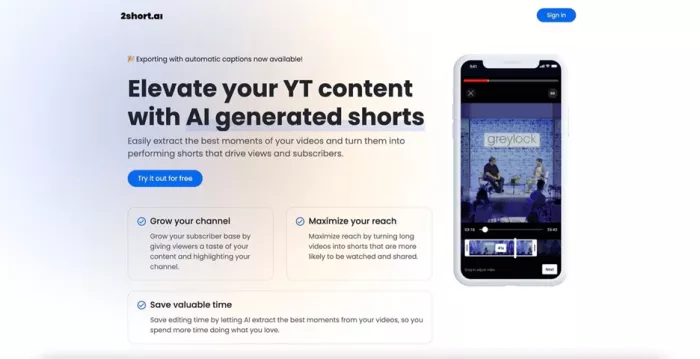
At its core, 2Short AI is not a video editor.
It’s more like a filter.
You give it a long video, usually through a YouTube link, and it scans everything. Then it tries to pull out moments that could work as short-form clips.
Those clips come back already formatted for platforms like Shorts, Reels, and TikTok .
No timeline. No cutting. No dragging clips around.
Just… suggestions.
And that’s the key word here.
The First Time Using It Feels Almost Too Easy
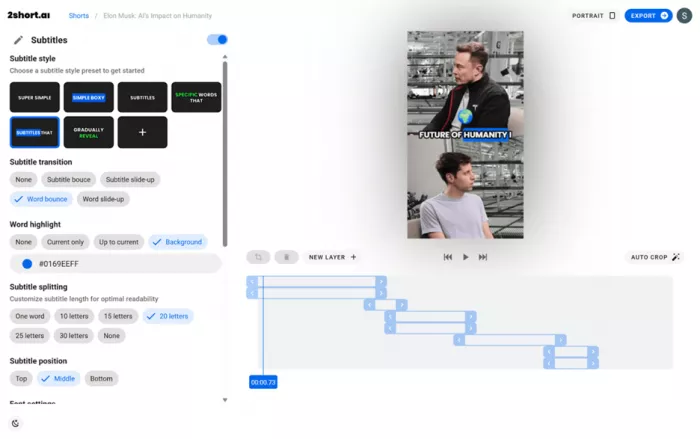
The setup is almost suspiciously simple.
You paste a link. Wait a few minutes. And suddenly you’ve got multiple clips sitting in front of you.
Some of them actually look good right away.
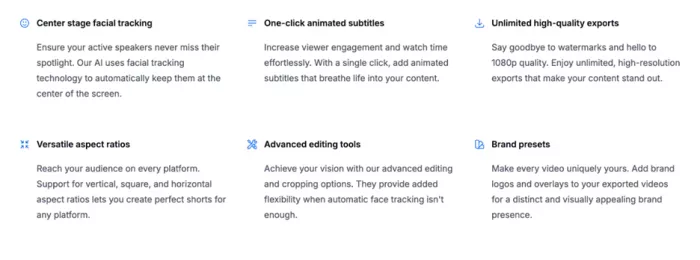
Captions are already there. The framing is vertical. The speaker is centered. It feels like something you could upload instantly.
And for a moment, it feels like you’ve skipped hours of work.
That’s where the tool shines.
It removes the most boring part of content creation, which is finding usable moments inside long videos .
But Then Reality Kicks In
After that initial excitement, you start noticing something.
The AI doesn’t really understand your content.
It understands patterns.
It looks for emphasis in speech. It detects energy in voice. It finds sections that sound important.
But it doesn’t fully understand context.
So sometimes you get clips that look strong at first, but when you watch them properly, they feel incomplete.
Like something is missing.
Because it is.
The setup. The buildup. The actual meaning behind the moment.
This is one of the biggest limitations mentioned across real usage reviews .
Where It Actually Saves You Time
Despite its flaws, there’s one thing it does really well.
It eliminates the need to manually search for highlights.
Instead of watching a 30-minute video from start to finish, you start with a shortlist of potential clips.
Even if half of them are useless, you’re still ahead.
For creators who post regularly, that time saving adds up quickly.
Especially if you’re working with:
- podcasts
- interviews
- tutorials
- talking-head content
This type of content works best because the AI relies heavily on speech patterns and transcripts to detect highlights .
Where It Falls Short (And You Feel It Fast)
The biggest issue is control.
You are not creating clips. You are choosing from what the AI already decided.
That sounds small, but it changes everything.
Because sometimes the best moment in your video is not the loudest one. It’s not the most energetic line. It’s something subtle.
And AI struggles with subtle.
There’s also the editing limitation.
You can tweak clips. Trim them slightly. Adjust captions.
But this is not a full editing environment.
If you want to shape a story or build something with intent, you’ll still need another tool.
The Pricing Feels Fair… Until You Start Scaling
| Plan | Monthly Price | AI Analysis Time |
| Starter | Free | 30 minutes |
| Lite | $9.90 | 5 hours |
| Pro | $19.90 | 15 hours |
| Premium | $49.90 | 50 hours |
The pricing model is based on how much video the AI processes.
The free plan is fine for testing. But once you start using it regularly, you hit limits quickly.
Paid plans unlock more processing time, faster exports, and no watermark.
For serious creators, it makes sense.
For beginners, it can feel expensive.
And this is something even real users point out. The tool saves time, but you start questioning whether that time saved is worth the cost .
What I Personally Noticed After Using It Properly
After using it for a while, a pattern becomes obvious.
The tool is not meant to replace editing.
It’s meant to reduce the amount of editing you have to do.
The best workflow is not relying on it completely.
It’s using it as a first step.
Let the AI find potential clips. Then refine the good ones yourself.
That’s where it becomes useful.
What I Liked and What I Didn’t
What Actually Works Well
Speed is the biggest advantage. You go from long video to multiple clips in minutes.
Beginner friendly workflow. No editing knowledge required.
Captions and formatting are already done. That alone saves time.
Great for repurposing content at scale. Especially for YouTube creators.
What Starts Getting Frustrating
AI misses context. Some clips feel incomplete or random.
Limited control. You can’t fully shape the output.
Not ideal for storytelling content. Works best with structured dialogue.
Pricing adds up if you scale. Especially for frequent uploads.
Final Rating (Based on Real Use)
Here’s a more honest breakdown after combining experience with real user feedback:
- Ease of Use: ⭐⭐⭐⭐⭐ (5/5)
- Time Saving: ⭐⭐⭐⭐☆ (4/5)
- Output Accuracy: ⭐⭐⭐☆☆ (3/5)
- Creative Control: ⭐⭐☆☆☆ (2/5)
- Value for Money: ⭐⭐⭐☆☆ (3/5)
Overall Rating: ⭐⭐⭐☆☆ (3 / 5)
So… Is 2Short AI Actually Worth It?
Here’s the honest answer.
It depends on how you use it.
If you expect it to fully automate your content and give you perfect clips every time, you will be disappointed.
If you use it as a tool to speed up the boring part of editing, it becomes genuinely useful.
That’s the difference.
This is not a magic tool.
It’s a time-saving assistant.
And once you treat it like that, it starts making a lot more sense.
Final Thoughts
Tools like this are becoming more common because the problem they solve is real.
Creators don’t struggle with ideas anymore.
They struggle with time.
2Short AI doesn’t fix everything. But it does remove one of the most repetitive parts of content creation.
And sometimes, that’s enough.
Just don’t expect it to think like you.
Because it doesn’t.
And honestly, that’s probably a good thing.
Comments