Last month a friend messaged me in a mild panic. Her small bakery had gone semi-viral with a Facebook Live of a wedding-cake reveal, the page manager had just quit, and nobody had saved the footage. She needed that clip off Facebook and onto her laptop before it vanished into the feed forever.
That tiny emergency is why I spent a weekend feeding the same four videos into the two names everyone recommends: a public Reel, that Live replay, a chunky 4K travel clip, and a friend-only cooking video. I did not want opinions lifted from a comparison table someone copied five years ago. I wanted to know which tool actually hands you a working file, how much nonsense stands between you and the download button, and where each one quietly falls apart. Here is what the weekend taught me.
How I Actually Tested This
No abstract feature-counting here. I ran the same four clips through both tools on a laptop and an Android phone, timed each grab, opened every downloaded file to confirm the audio was present and in sync, and noted how many wrong clicks it took to reach a real download. Each clip was chosen to stress a different weak point downloaders love to hide.
| Test clip | What it was built to stress |
|---|---|
| Public cooking Reel, vertical | Reels handling, watermark, and raw speed |
| Bakery Live replay, 32 minutes | Long-file stability and audio sync after a broadcast ends |
| 4K drone travel clip | Maximum resolution, audio stitching, and render time |
| Friend-only group video | Private-access workaround and how gracefully it fails |
Everything below reflects that run, cross-checked against 2025 and 2026 reviews so the scores are not just one weekend's luck.
The 30-Second Verdict
Both tools do the same core job: paste a Facebook link, get a video, pay nothing. The real difference lives in the texture of the experience, and that texture matters far more than any feature list lets on.
| FBDown.net | SnapSave | |
|---|---|---|
| Best known for | Longevity and instant public grabs | Top-tier quality and a cleaner phone flow |
| Max quality | Original file, up to 4K, no re-encode | Full HD, 2K, 4K with audio stitched in |
| Reels & Stories | Weak in 2026 testing | Purpose-built, handles both |
| Private videos | Advertised, flaky in practice | Workaround page, steadier |
| Ad friction | High, disguised buttons common | Moderate, fewer redirect traps |
| Install needed | None (optional Chrome extension) | None (optional Android app) |
| Cost | Free, ad-supported | Free, ad-supported |
| My overall rating | ★★★☆☆ 3.2 / 5 | ★★★★☆ 3.8 / 5 |
One trap before you paste anything. Both brands sprawl across a dozen near-identical domains. FBDown.net and fdown.net are the same service wearing two badges. SnapSave lives at snapsave.app but has cousins at snapsave.io, .to and .onl that do not all behave the same or even claim the same features. The copycats are where the sketchy ads and fake buttons cluster, so confirm the exact address every single time.
FBDown.net: The Grizzled Veteran
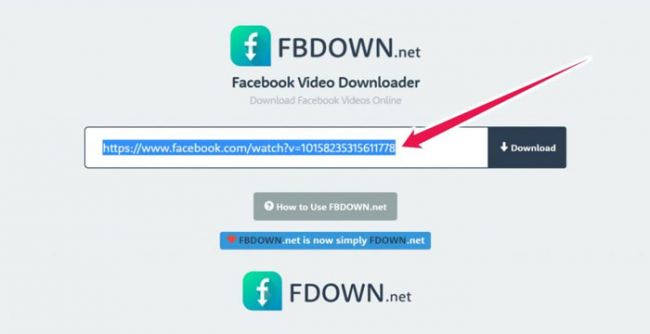
FBDown.net has been around long enough to feel like furniture. The site openly brags about approaching a decade of service, and that maturity shows in the plumbing. It connects to Facebook's content delivery network, locates the raw file, and hands it over without re-encoding, so a 1080p upload arrives as 1080p and a 4K upload stays 4K. It cannot invent detail that was never uploaded, which is worth remembering before you complain that a clip looks soft. The trouble is everything wrapped around that clean core: the advertising is aggressive, and some ads are dressed up as the download button on purpose.
Feature snapshot
| Capability | What you actually get |
|---|---|
| Core function | Paste a public Facebook link, receive an MP4, no account required |
| Quality handling | Serves the original resolution, SD through 4K, with no re-encode step |
| Copyright-music fix | A “Video with No Audio” toggle to dodge muted, rights-flagged tracks |
| Private videos | Page-source-code method: paste the video's HTML source, only works if you can already view it |
| Stories | Not reliably detected in 2026 testing, expect misses |
| Live video | Supported, but only once the broadcast has ended |
| Browser extension | “Video Downloader PLUS” for Chrome; a Firefox add-on has been promised for years |
| Languages | Multilingual interface across five-plus languages |
| Recent moves | Fixed Reels detection (Jun 2025), spun off Tikdown.net for TikTok (Feb 2026) |
What it costs, and how it stays free
| Item | The honest reality |
|---|---|
| Price to use | Zero, with unlimited downloads |
| Account | None needed, ever |
| Premium tier | No meaningful paid upgrade that unlocks features |
| Revenue model | Display ads, pop-ups, and redirect traffic |
| The hidden cost | Your attention, plus the risk of clicking a button that is really an ad |
| Data stored | The site states it keeps no video copies and no download history |
Pros and cons
| Strengths | Weak spots |
|---|---|
| Genuinely quick for public clips once you hit the right button | Heavy, deceptive advertising and redirect pages |
| Preserves original quality, no watermark, no sign-up | Private-video feature is finicky and frequently errors out |
| Nearly a decade of uptime plus a working Chrome extension | No batch downloads and no format menu on the core site |
| Anonymous, keeps no history of what you saved | Look-alike clones make it easy to land on the wrong page |
Where it earns its keep
| If you are | Verdict |
|---|---|
| Grabbing a public Reel or Watch clip in a hurry | Strong fit |
| Saving your own Facebook Live replay | Works well once the stream ends |
| Pulling a friend-only or group video | Frustrating, expect privacy errors |
| Chasing 4K with guaranteed audio sync | Hit or miss |
| On mobile and allergic to ads | Rough, tread carefully |
What real users report
| Source and date | The gist | Read |
|---|---|---|
| Reddit, Apr 2025 | Worked first try, HD file in seconds, no spam, no installs | ★★★★☆ |
| Trustpilot, Apr 2025 | Did the job, but so many ads the reviewer first assumed it was a scam | ★★★☆☆ |
| Trustpilot, May 2025 | A private clip from the user's own profile kept returning a privacy error | ★☆☆☆☆ |
| User comment, Jan 2025 | Clean and simple for casual saves, but no batch or format choices | ★★★★☆ |
| Independent review, Jan 2026 | Concluded it no longer handles private videos or Stories reliably | ★★★☆☆ |
| Scorecard | Rating |
|---|---|
| Speed on public clips | ★★★★☆ 4.2 / 5 |
| Quality preservation | ★★★★☆ 4.0 / 5 |
| Ease of use | ★★★☆☆ 2.8 / 5 |
| Clean interface, low ads | ★★☆☆☆ 2.0 / 5 |
| Private videos and Stories | ★★☆☆☆ 2.2 / 5 |
| Mobile and app support | ★★★☆☆ 3.3 / 5 |
| Trust and transparency | ★★★☆☆ 3.0 / 5 |
| Overall | ★★★☆☆ 3.2 / 5 |
SnapSave: The Quality Specialist
SnapSave picked a lane and committed to it, and that lane is quality. Where older tools cap out at 720p or serve a muddy file, SnapSave chases the highest resolution Facebook actually stored, up to 4K. Here is the clever part: it pulls the video and audio streams separately, then stitches them back together, so your high-res file plays with sound instead of arriving silent. That stitching is exactly why a 4K grab is not instant. The site renders on its own servers for a few seconds before the download appears, which is a fair trade for a file you can actually listen to. The interface feels newer, behaves better on a phone, and there is an Android app if you download from Facebook often.
Feature snapshot
| Capability | What you actually get |
|---|---|
| Core function | Paste a Facebook link, pick a quality, download an MP4, no account |
| Quality handling | Full HD, 1080p, 2K and 4K, with certain domains claiming 8K |
| Audio handling | Downloads video and audio separately, then stitches them for HD and 4K with sound |
| MP3 and formats | Built-in audio conversion across several formats |
| Private videos | A dedicated private-download page for clips that trip a privacy error |
| Stories | Supported: befriend the creator, copy the story link, download as usual |
| Reels | Supported, no watermark, keeps the vertical frame |
| Live video | Supported once the broadcast has finished |
| Mobile app | Android build that handles files up to 20 GB, from 144p to 4K |
| iOS note | Some videos need the free Documents by Readdle app to save cleanly |
What it costs, and how it stays free
| Item | The honest reality |
|---|---|
| Price to use | Zero, with unlimited downloads |
| Account | None needed |
| Premium tier | None |
| Revenue model | Display ads, generally lighter than most rivals in this space |
| The rendering cost | A few seconds of server-side processing for high-resolution files |
| Data stored | States it hosts nothing and keeps no copies; files are pulled from Facebook |
Pros and cons
| Strengths | Weak spots |
|---|---|
| Best-in-class quality, real 4K with properly synced audio | High-resolution downloads take longer to render |
| Handles Reels, Stories, Watch and Live replays, not just plain posts | Still ad-supported, and reputation across its clones is uneven |
| Cleaner, more modern interface that behaves on mobile | Story downloads require you to be friends with the creator |
| Optional Android app for people who download constantly | Available quality is capped by whatever Facebook stored |
Where it earns its keep
| If you are | Verdict |
|---|---|
| Saving a 4K travel or product video | Excellent |
| Downloading Reels or Stories | Strong, purpose-built |
| Pulling a long Live replay for a client | Reliable once it has ended |
| After the single fastest grab of a tiny clip | Slight rendering wait |
| On mobile, or wanting a real app | Best option in this matchup |
What real users report
| Source and date | The gist | Read |
|---|---|---|
| MoreLogin, Dec 2025 | Processes on its own servers, smooth to use, though 4K rendering lags a touch | ★★★★☆ |
| ScreenApp, Feb 2026 | Clean, no pop-ups, standard clips finish in under ten seconds | ★★★★☆ |
| Filmora, Apr 2026 | Praised for avoiding the heavy ad load found on many converters | ★★★★☆ |
| SoftwareTestingHelp, Dec 2025 | Called the best high-quality option, keeps sound where rivals lose it | ★★★★★ |
| Older safety scan, 2024 | Flagged one SnapSave domain as high risk, a reminder to verify the URL | ★★☆☆☆ |
| Scorecard | Rating |
|---|---|
| Speed on public clips | ★★★★☆ 3.6 / 5 |
| Quality ceiling | ★★★★★ 4.6 / 5 |
| Ease of use | ★★★★☆ 4.0 / 5 |
| Clean interface, low ads | ★★★☆☆ 3.2 / 5 |
| Private videos and Stories | ★★★★☆ 3.6 / 5 |
| Mobile and app support | ★★★★★ 4.5 / 5 |
| Trust and transparency | ★★★☆☆ 3.1 / 5 |
| Overall | ★★★★☆ 3.8 / 5 |
Head to Head: Every Round Scored
Line them up dimension by dimension and the pattern is clear. FBDown.net wins the narrow race for a quick public clip. SnapSave wins almost everything that involves quality, breadth, or a phone.
| Round | FBDown.net | SnapSave | Edge |
|---|---|---|---|
| Quick public clip | Near-instant when ads cooperate | Fast, with a tiny render wait | FBDown, barely |
| Top quality with audio | Original file, sync not guaranteed | 4K with audio stitched in | SnapSave |
| Reels and Stories | Weak in 2026 | Purpose-built | SnapSave |
| Live replays | Works after the stream ends | Works after the stream ends | Tie |
| Private videos | Advertised, often errors | Workaround page, steadier | SnapSave |
| Ad experience | Aggressive, fake buttons | Lighter, fewer traps | SnapSave |
| Mobile experience | Usable but dated | Polished, plus an app | SnapSave |
| Track record | Roughly a decade live | Newer, quality reputation | FBDown |
| Cost | Free | Free | Tie |
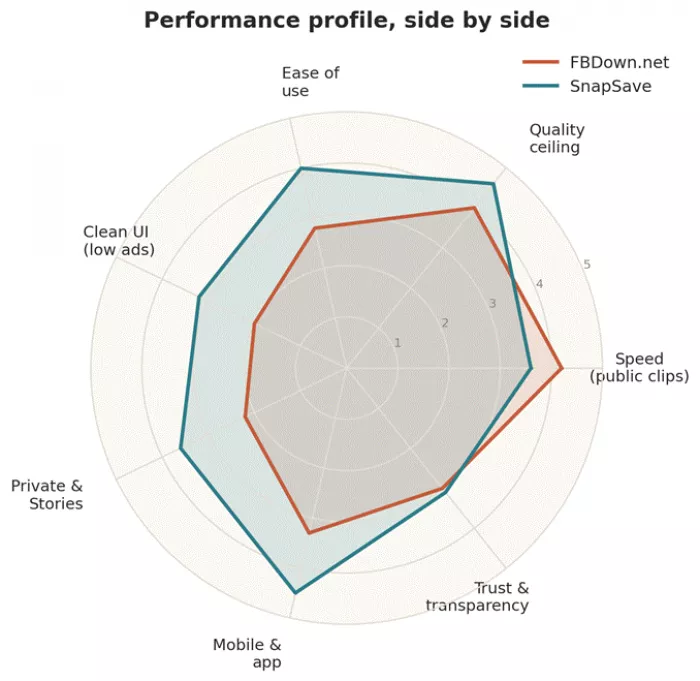
The performance profile at a glance. SnapSave draws the wider shape everywhere except raw speed on simple clips.
The radar shows the shape of each tool. To see the actual margins, the chart below measures how far apart the two land on each dimension, and who comes out on top.
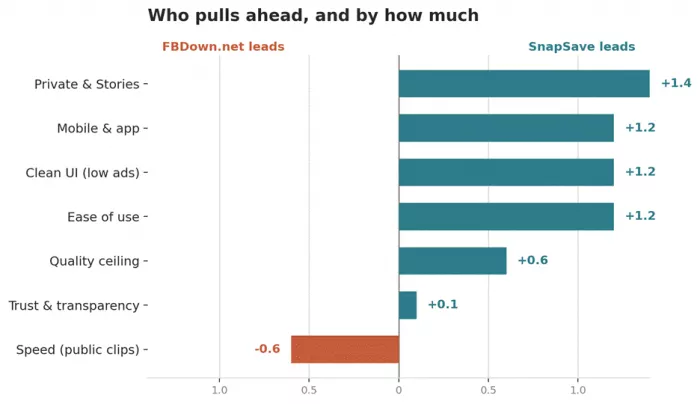
Positive bars favor SnapSave, negative bars favor FBDown.net. The gaps on mobile, Stories, and clean UI are the ones you feel most.
Read together, the two charts tell a simple story. On the one metric where FBDown.net leads, speed on a plain public clip, the margin is thin, roughly half a point. Everywhere SnapSave leads, the gap is wider, and it widens most on the dimensions you bump into constantly: the phone experience, Reels and Stories, and how clean the screen stays while you work. A narrow win on a niche task rarely beats a wide win on the everyday ones.
So Which One Should You Use?
Skip the false neutrality. Here is who each tool is genuinely for.
Reach for FBDown.net if
● You mostly grab public clips and want the fastest no-frills path to a file.
● You already use its Chrome extension and it fits your routine.
● You can spot a disguised download button in your sleep and ads do not rattle you.
Reach for SnapSave if
● You care about 4K with real audio, or you download Reels and Stories often.
● You live on your phone and want the cleaner ride, even if it means a short render.
● You would rather trade a few seconds of processing for a file that actually plays with sound.
Honestly? Keep both
Use SnapSave as the daily driver and FBDown.net as the backup. These tools break and recover constantly whenever Facebook changes something under the hood, and the two rarely go down at the same time. Redundancy beats loyalty here. When one throws an error at 11pm, the other usually just works.
The Safety and Legal Reality Check
Nobody else seems to say this plainly, so here it is.
● Neither tool is malware at its core, but both live inside ad ecosystems that can be. The single rule that protects you: a legitimate download never asks you to install software. If a button wants an .exe, close the tab.
● Confirm the exact domain every time. The clones are where the trouble lives, not the tool itself.
● Saving public content or your own videos for offline viewing sits in safe territory. Redistributing someone else's video without permission is where copyright and Facebook's terms bite. Neither tool notifies the original poster, which is not the same thing as permission.
The Verdict
Back to the bakery. SnapSave is the one that got my friend her cake video, in full quality, with the sound of the room intact, on the second try after a dropped connection. That is the whole comparison in a single anecdote.
SnapSave wins on the things you notice while you actually use it: quality, breadth, and a phone experience that does not fight you. FBDown.net earns its place as the reliable veteran, fast and free for a quick public clip if you can pick your way through the ad minefield. If I had to keep one, it is SnapSave. If I am being smart, I keep both, because the only certainty with Facebook downloaders is that today's favorite is tomorrow's “wait, why is this broken?”
Comments