I spent about two weeks running the same twelve products through Nano Banana, Photoroom, Claid, and Pebblely before I trusted any of it enough to push live. A ceramic mug, a pair of running shoes, a bottle of cold-brew, a linen shirt, a few small electronics. My rule was simple: if I could not tell the AI shot from a real one at a glance, and it did not get my listing flagged, it counted.
Most first attempts failed that test. The mug grew a second handle. The shoe laces melted into the tongue. The cold-brew label turned into gibberish that no human ever printed. The gap between “this looks amazing” and “this is safe to list” turned out to be the whole ballgame, and almost nobody talks about it honestly.
So this is the version I wish I had before I started. Not the hype, not the ten-tools-listicle, but the actual bar you have to clear, where AI still breaks, and the workflow that gets images past a marketplace reviewer.
First, know the bar you are clearing
“Good enough to list” is not an aesthetic judgment. On Amazon it is a hard spec, and the platform checks the main image automatically. Miss it and the listing does not just look weak, it can be suppressed, which means it stops showing in search until you fix the file.
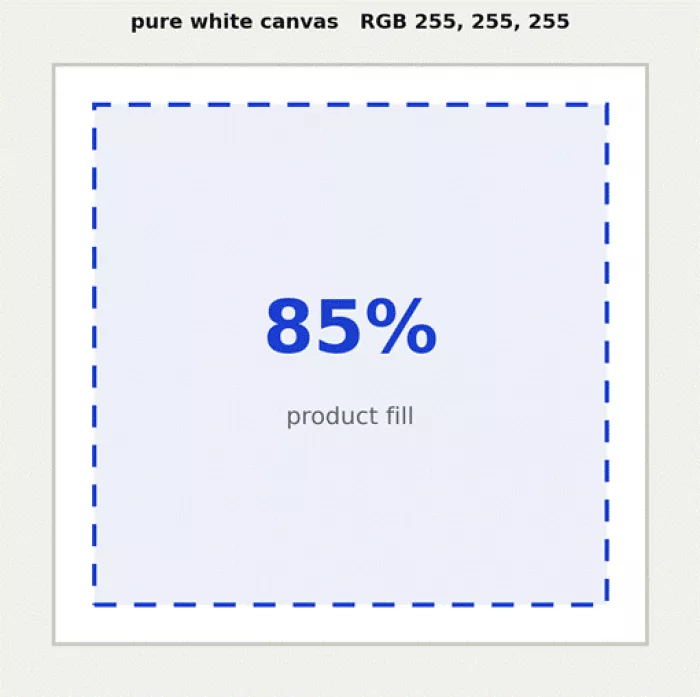
The main image sits on pure white, with the product filling roughly 85 to 90% of the frame.
| Requirement | The rule |
|---|---|
| Background | Pure white, RGB exactly 255, 255, 255. Off-white, cream, or a gradient gets flagged |
| Product fill | Product occupies 85% or more of the frame |
| Subject | The genuine product only. No illustrations, renders, mockups, props, or extra accessories |
| Resolution | 1,000 px minimum on the longest side to enable zoom, 1,600+ optimal, 2,000 px recommended |
| Color space | sRGB, or colors shift on the page |
| Format and size | JPEG preferred, under 10 MB |
| Overlays | No text, logos, watermarks, or borders on the main image |
| File name | Identifier then variant code, e.g. B012345678.MAIN.jpg. No spaces or dashes |
A useful mental model: the main image has the tightest rules and does the heavy lifting in search results, ads, and the cart. Your secondary slots (most categories allow up to 8 more) have far looser content rules, so that is where lifestyle scenes, scale shots, close-ups, and infographics belong.
And yes, Amazon does allow AI. As of 2026 the platform permits AI to enhance images, build lifestyle backgrounds, and create infographics. The line it draws is honesty: the product shown must be an accurate representation of the physical item. You cannot use AI to fabricate a product that misleads the buyer. That single sentence is the difference between a tool that saves you money and a tool that gets your account reviewed.
Where AI quietly wrecks a product photo
Every failure I hit fell into one of five buckets. Learn to spot these five and you catch 90% of the unlistable images before they ever go near an upload button.
1 Invented detail. The model adds a rivet, seam, button, or reflection that does not exist. Google’s own docs are blunt that products can gain invented details and that repeated edits drift from the original. The most dangerous failure, because it crosses from enhanced into misleading.
2 Broken text. Any label, logo, or printed copy is where AI still stumbles. Even strong current models misspell, garble, or reflow text. If your product has a wordmark, assume you will restore it by hand.
3 Geometry that is almost right. Handles, straps, spouts, hinges. It reads as correct in a thumbnail and falls apart at full zoom, which is exactly where a shopper looks before buying.
4 Lighting and shadow mismatch. Drop a product onto a new background and the shadow direction and softness often do not match the scene. It reads as fake even to people who cannot say why.
5 Color drift. The shade of the real product shifts a little. For apparel and beauty this drives returns, because the buyer receives something that does not match what they clicked.
Gut check for every image: zoom to 100% and inspect labels, stitching, and textures. Reject anything with unreadable copy, a distorted edge, wrong geometry, or a color that is off. Fifteen seconds, highest-value habit in the whole process.
The workflow that produces listable images
The single biggest mistake is treating this as “type a prompt, get a listing.” The images that survived my test all came from a repeatable pipeline, not one lucky generation.
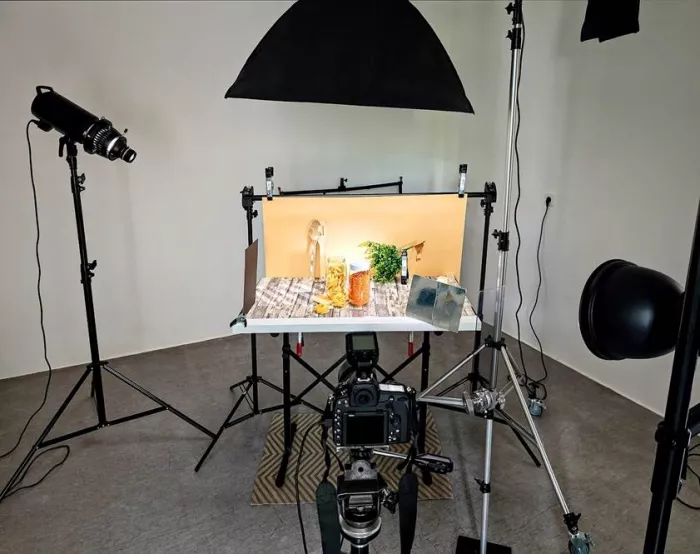
Step 1 Shoot or source one clean reference
AI is far more reliable at editing a real photo than inventing one from a description. Start with one honest, sharp shot of the actual item, evenly lit and in focus. Even a good phone photo beats a text-only prompt, because the model now has real geometry, color, and text to preserve rather than guess.
Step 2 Remove the background before you restyle
Separate the product from its original scene first. That gives you a clean cutout to drop onto pure white for the main image, or into a lifestyle scene for the secondary slots. Doing removal as its own step keeps the edges crisp instead of letting a scene generation smear them.
Step 3 Build the main image to spec, not to taste
Place the cutout on pure white, center it, and frame it to fill 85 to 90% with a thin, even margin. Keep the contact shadow on the product, not bleeding across the white. This is the boring image. It is supposed to be boring. Its only job is instant recognition.
Step 4 Generate lifestyle and detail variants separately
Use the looser secondary slots for what AI is genuinely great at: the mug on a sunlit counter, the shoe mid-stride, the shirt on a model. Generate these as their own images so a scene failure never contaminates your compliant main shot.
Step 5 Batch only after one product is perfect
Get the full stack right for a single SKU by hand. Only then turn that into a repeatable batch across the catalog, and keep a human on the final pass. Scale is the reason to use these tools, but scale is also how one bad artifact multiplies into two hundred flagged listings.
Choosing the engine and the tool
There are two layers here, and conflating them is why people pick badly. The bottom layer is the raw generation model. The top layer is the ecommerce tool wrapped around it that handles background removal, white-background export, batching, and templates.
On the model layer, Google’s Nano Banana family (the public name for its Gemini image models) has become the default for product editing because of how well it preserves a subject across edits. The lineup: the original Gemini 2.5 Flash Image from August 2025, then Nano Banana Pro for the most precise brand work, and Nano Banana 2 as the fast generalist. They can hold the fidelity of up to 14 objects in a single workflow and output up to 4K, which is why “same product, new scene” finally works most of the time. If you would rather understand the raw diffusion engines first, this breakdown of FLUX vs Midjourney (timtis.com/blog/flux-vs-midjourney-has-the-open-model-caught-up) is a useful map of where each base model lands.
On the tool layer, the market has split into clear lanes. Pick by catalog size and product type, not by which one has the flashiest demo.
| Tool | Best for | Why it fits |
|---|---|---|
| Claid | High-volume catalogs | Batch automation, background removal, and scene generation with consistent output; strong on fashion |
| Photoroom | Small sellers, mobile | Fast background removal, brand kits, batch, mobile-to-desktop editing |
| Pebblely | Quick lifestyle backgrounds | Upload a product, describe the scene, get marketing images; workflow simplified in 2026 |
| Pixelcut | Mobile-first assets | Quick creator-style edits on the phone for social and marketplace |
| Nightjar | Catalog consistency | Reusable photography styles so every new SKU matches lighting and composition |
| Fibbl | Footwear and bags | 2D and 3D assets from a single input, used by large footwear brands |
The pricing model matters more than the sticker price. Traditional product shoots run roughly $200 to $5,000 per session; AI tools produce comparable images at somewhere between $10 cents and $2 each, which is where the 80 to 95% cost cut comes from.
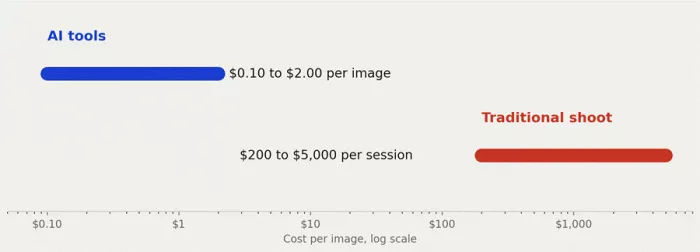
But many tools bill per credit, and credit math decides your real monthly cost far more than the headline plan. If you are choosing between credit-based generators, this comparison of Getimg or Leonardo (timtis.com/blog/getimg-or-leonardo-which-fits-how-much-you-generate) is the honest version of that calculation.
The compliance part almost everyone skips
This is the section that separates a listing that stays up from one that gets pulled, and it is the part the tool marketing never mentions.
Marketplace honesty. Restyle the scene, the light, and the background all you want. Do not restyle the product into something the buyer will not receive. Amazon’s AI allowance is explicitly conditional on the product being an accurate representation. A generated texture smoother than reality, a color that pops more than the real dye, an extra feature the model hallucinated: each is a return, a bad review, or a policy strike waiting to happen.
AI disclosure is now a legal question, not just an ethical one. If you sell to buyers in the EU, the AI Act’s transparency rules under Article 50 apply from 2 August 2026. Providers of generative AI systems must apply a machine-readable mark to AI-generated or manipulated content so it can be detected. There is an important carve-out: the marking obligation does not bite when the AI performs a purely assistive standard-editing function and does not substantially alter the input. In plain terms, removing a background or cleaning up lighting sits closer to standard editing, while generating a whole synthetic scene sits closer to manipulated content. Non-compliance carries fines up to 15 million euros or 3% of worldwide turnover.
The provenance layer is already here. Google’s image models embed a SynthID watermark in their output. Some product-photo tools built for regulated markets, such as Rawshot, add C2PA content authentication that embeds provenance metadata directly in the file. Expect AI origin to be increasingly detectable whether or not you disclose it, which is one more reason to keep your edits honest.
| Question | Practical answer |
|---|---|
| Can I use AI on Amazon listings? | Yes, for enhancement, backgrounds, and infographics, if the product stays accurate |
| Can I invent product features with AI? | No. That is misrepresentation and a policy and returns risk |
| Do I have to label AI images? | For EU buyers, provider marking rules apply from 2 Aug 2026; treat scene generation as in scope |
| Is my AI edit detectable? | Increasingly yes, via SynthID and C2PA metadata baked into the file |
Your pre-publish QC checklist
Run every image through this before it goes live. I keep it pinned next to my upload screen.
☐ Main image background is pure white, RGB 255, 255, 255
☐ Product fills 85 to 90% of the frame with a thin even margin
☐ Longest side at least 1,600 px, exported as sRGB JPEG under 10 MB
☐ No text, logo, watermark, or prop on the main image
☐ Zoomed to 100%: labels readable, no invented parts, geometry intact
☐ Color matches the real product, checked against the physical item
☐ Shadows and lighting match within any lifestyle scene
☐ The product shown is genuinely what the buyer will receive
☐ File named correctly, e.g. ASIN.MAIN.jpg
☐ Disclosure and provenance handled if you sell into the EU
If an image fails any line, it does not get a pass on charm. It gets fixed or it gets cut.
Final verdict
After those two weeks, my honest take is that AI product photography is genuinely ready for the parts of the job that used to be tedious and expensive, and still not ready to be left alone. Background removal, clean white-background main shots, and lifestyle scenes for secondary slots are where it earned its place in my workflow. Eight of my twelve products ended up with a full listable image stack that I would have paid a studio several hundred dollars to produce, at a marginal cost closer to loose change per image.
The four that gave me trouble had the same thing in common: printed text, fine hardware, or a color I could not afford to get wrong. For those, AI got me 80% of the way and then I finished by hand, protecting the label, correcting the shade, checking every edge at full zoom. That last 20% is not a flaw in the tools, it is the job. Anyone selling you a hands-off “upload and list” dream is selling you a suppression queue.
So the workflow that actually works is unglamorous. One honest reference photo. Background removed as its own step. A boring, spec-perfect main image. Scenes generated separately. A human doing the final quality pass. Do that, respect the accuracy rule, and keep half an eye on the disclosure regime if you touch EU buyers, and you will produce images that are not just impressive on your screen but safe on your listing. That is the only definition of “good enough” that pays.
Comments