Table of Contents
The moment that pushed me to write this was boring. A Tuesday, a coffee going cold, and my card statement open on the laptop. I counted five AI charges sitting there: ChatGPT Plus, Claude Pro, Gemini, a transcription app, and a design tool I had signed up for during a product launch and never touched again. The total came to a little over eighty dollars a month. I had been quietly telling myself that each one earned its keep. When I forced myself to write down what I actually opened each tool for, three of them were doing the same handful of tasks.
So I ran an experiment. For two weeks I pushed my real work, client emails, research, first drafts, meeting notes, through as few tools as I could get away with, and I canceled the rest in a deliberate order to see whether anything would break. Almost nothing did. What follows is the write-up: what genuinely overlaps, what the numbers really are in 2026, the twenty-minute audit that surfaced the waste, and the order I would cancel in if I were starting from scratch. There is no bundle to buy at the bottom.
32% of software licenses go completely unused, per Zylo's 2026 index | $4,830 average SaaS spend per employee last year, up nearly 22% in twelve months | ~70% of everyday chatbot tasks overlap between the big assistants |
Why the bill creeps up
Nobody sits down and decides to pay for four AI tools. It happens one reasonable signup at a time.
You start with one chatbot at twenty dollars. A month later a colleague swears the other one writes cleaner, so you add it. Then you want something that lives inside your documents, so a third goes on the card. A research tool joins because it shows its sources and the others sometimes guess. By the time you notice the pattern, you are paying four separate companies for interfaces that wrap very similar models underneath.
The reason the bill stings is not the sticker price of any one tool. It is convergence. The standard paid tier for almost every major assistant has settled on the same twenty-dollar line, and they overlap heavily on what a normal person does all day: drafting, summarizing, rewriting, answering questions, cleaning up tone. There is a second, quieter cost on top of that. Every extra tool is a tab to keep open, a place your chat history is stranded, and a small tax on attention every time you stop to decide which one to use for the thing in front of you.
The tell for me was simple. I kept opening whichever tool loaded fastest, not whichever one was best for the task. When your choice is driven by muscle memory rather than capability, you are paying for options you are not really using.
The overlap map: same job, bought five times
Before canceling anything, lay the duplication out by job rather than by brand. Most stacks are not five capabilities. They are three or four capabilities purchased several times over.
| The job you do | Tools people stack for it | What one option usually covers |
|---|---|---|
| General writing and Q&A | ChatGPT, Claude, Gemini, Copilot | Any single frontier chatbot |
| Research with sources | Perplexity, ChatGPT search, Gemini | One chatbot with web search on, or Perplexity free |
| Grammar and rewriting | Grammarly Premium, Jasper, QuillBot | A chatbot free tier, or Grammarly's free checker |
| Meeting notes | Otter Pro, Fireflies, Fathom | Otter free (300 min) or Fathom, which is free |
| Design and social images | Canva Pro, Adobe Express, Midjourney | Canva free or Microsoft Designer for most graphics |
| Docs and workspace AI | Notion AI, ClickUp AI | Whichever workspace you already live in daily |
Any row where you pay for two or more items is a consolidation candidate.
The point of laying it out this way is that the honest answer is sometimes "keep both." A developer using one tool for daily coding and another for writing is not duplicating anything. The waste is specifically the rows where two tools do the identical job and one of them is running out of habit. Sort your own charges into a table like this and the doubles will jump out before you have finished typing.
The twenty-minute audit
You do not need a special app to find this money. You need your statements and twenty focused minutes.

1. Pull every charge into one list. Search your email for receipt, renewal and invoice, then scan twelve months of card statements. Annual charges hide by only appearing once a year, so do not stop at last month.
2. Write one line per tool. Record the name, the monthly cost, the renewal date, and the single job you genuinely use it for. If you cannot name the job in a few words, that is already a signal.
3. Sort by that job, not by brand. Group the list by task. Any job that has two or more tools sitting under it gets a flag. Those flags are your entire shortlist.
4. Run the disappearance test. For each flagged tool ask: if this vanished tomorrow, who notices and how quickly? When the honest answer is nobody or not for weeks, you have found a cut.
5. Give every tool a verdict and total the savings. Assign one of the four labels below, then add up what the non-keep rows would hand back each month. That single number is what turns a tidy list into a decision.
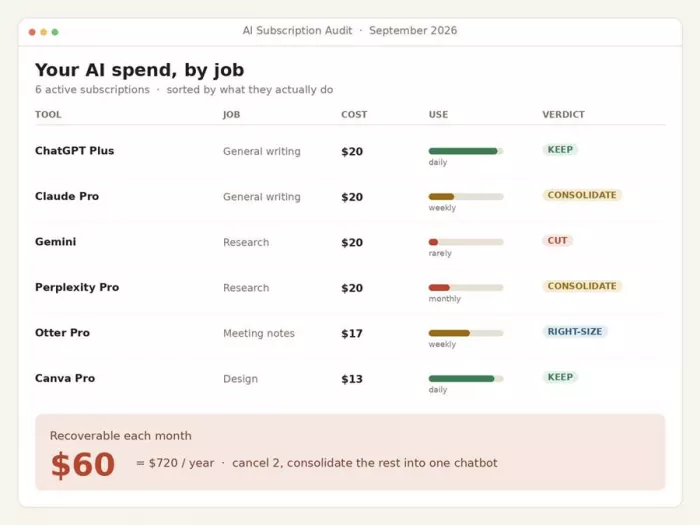
The four verdicts
KEEP Real usage, clear value, right number of seats. No action needed. Do not feel obliged to cut a tool that earns its place. | RIGHT-SIZE The tool is worth keeping but you pay for a tier or seats you do not use. Drop to the plan that matches your real volume. |
CONSOLIDATE Its job already lives inside a tool you pay for. Move the work over, then cancel this one. Recovers the full cost. | CUT Idle, forgotten, or low value. Export anything you need and cancel before the next renewal. Recovers the full cost. |
One caution on usage data. Low login counts alone are weak evidence. Someone might open a research tool only before a big meeting and still get real value from it. Use the disappearance test as your tie-breaker, not a dashboard that shows activity for a single week.
Real 2026 prices, side by side
These are the individual plans as verified across provider pages and price trackers in mid-2026. AI pricing shifts often, so treat any figure as a snapshot and confirm before you switch.
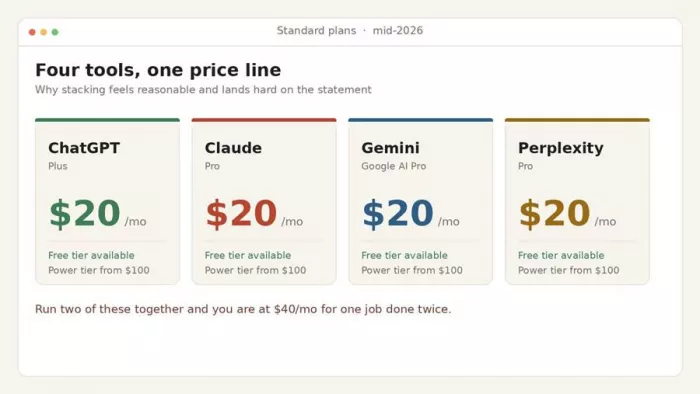
| Tool | Free tier | Standard | Power tier |
|---|---|---|---|
| ChatGPT | Yes | Plus $20/mo | Pro $200/mo |
| Claude | Yes | Pro $20/mo | Max $100 or $200/mo |
| Gemini (Google AI) | Yes | Pro $19.99/mo | Ultra $99.99 to $249.99/mo |
| Perplexity | Yes | Pro $20/mo | Max $200/mo |
| Grok | Yes | SuperGrok $30/mo | Heavy $300/mo |
| Midjourney | No | from $10/mo | Pro and Mega tiers higher |
Individual plans only. Team and enterprise seats are priced separately, often near $25 to $40 per user. Verified mid-2026.
Notice the shape of the market. Four of the big assistants land on the same twenty-dollar line for their standard plan, which is exactly why stacking two or three of them feels reasonable in the moment and painful on the statement. The jump to a power tier only makes sense if you are hitting a wall that costs you more than the fee, which we get to further down.
What free tiers actually cover now
The free versions in 2026 are far stronger than the ones that trained everyone to reach for a card. For a handful of tasks a week, they are genuinely enough.

ChatGPT, Claude and Gemini free Capable general models, file and PDF uploads, and web access. ChatGPT free also includes image generation. This alone replaces most reasons to run more than one paid chatbot. | Grammarly free The core grammar and spell checker has stayed free for years and still handles the bulk of proofreading. Tone rewrites sit behind the paid tier, but a chatbot covers those too. |
Otter and Fathom Otter's free plan gives 300 transcription minutes a month with speaker labels. Fathom's notetaker is free outright. Either replaces a paid transcription seat for most calendars. | Canva free and Microsoft Designer Between them they cover most banners, posts and simple decks without a Pro plan. You only need paid design once brand kits and volume become a daily job. |
The one rule that matters. A paid plan earns its place only when a specific limit is costing you more than the subscription. If you cannot name the limit you keep hitting, the free tier is probably doing the job already.
Cancel without losing your data
The reason cancellations go wrong is not the cancel button. It is skipping the two minutes of prep that protect your history and stop the tool from crawling back onto the bill.
1. Export first. Pull down chat history, saved prompts, brand kits and transcripts before you touch the plan. Once the account closes, that material is usually gone for good.
2. Do not downgrade to free to feel safe. A dormant free account is exactly how a zombie subscription quietly gets upgraded again six weeks later. If you are cutting, cut.
3. Overlap one billing cycle. Keep the winner and the tool you are dropping running side by side for a single cycle. That confirms nothing in your real workflow silently depended on the one you are removing.
4. Put the cancel date on your calendar. Note the renewal date and any notice period the vendor requires. Missing a cancellation window on a tool you meant to drop is the most avoidable charge there is.
5. Cancel on the date, for real. No I will get to it. Close it, confirm the email, and move on. The saving only counts once the recurring charge actually stops.
One more habit worth building. When you add a new tool later, retire the one it replaces in the same sitting. Sprawl is a slow accumulation problem, and the cheapest time to stop a duplicate is the day it arrives, not a year later during another audit.
When paying is the right call
Cutting is not the goal. Paying for the right single tool is. Here is when a subscription genuinely earns the money rather than sitting on the card out of habit.
You hit rate caps that break deadlines Free tiers throttle messages, generations and transcription minutes. When the cap lands in the middle of real work with a deadline attached, the paid tier pays for itself. | You need a frontier model Free plans often route you to smaller, faster models. If the harder tasks you do actually need the top reasoning model, that access is worth the standard fee on its own. |
You work with very large documents The context window decides whether you can drop a long contract or report in and ask questions across all of it. Big documents are a legitimate reason to pay. | A specialist truly owns the job Some tools are not chatbot wrappers. Daily coding assistants and top-tier image generators do things a general model cannot. Pay for the specialist, not a second generalist. |
Be skeptical of one thing in particular: the wave of all models in one app bundles that appear the moment you search this topic. Some are fine. Many are thin wrappers charging you for access you could get directly, and a few simply become the next subscription you forget to audit. If a bundle genuinely replaces two paid tools you already run, it can pay off. If it is just a fifth login, it is the problem wearing a discount.
The final verdict, after two weeks of living on less

Here is where I landed. After running everything through fewer tools on purpose, I settled on one paid chatbot, Grammarly's free checker for a fast proofread, a free meeting notetaker, and the design app I already had bundled inside another plan I was keeping anyway. My AI line dropped from just over eighty dollars a month to twenty. I went back through two weeks of output looking for the catch. The writing did not get worse. The research did not get worse. The only real change was that I stopped losing ten minutes a day deciding which tab to open, which turned out to be its own small relief.
The honest takeaway is not "cancel everything and suffer." It is that most of us are quietly paying for the same three jobs several times over, and the fix is one focused afternoon of looking. Keep the single tool that earns it. Let the free tiers cover the edges. Set the calendar reminder so the sprawl does not creep back in three months. If you do only one thing this week, run the disappearance test on your most expensive AI charge. Judging by how fast my own name came to mind when I tried it, you probably already know which one it is.
ai texture generator
4 days agoThis matched my own audit almost line for line. The part about the design tool signed up for during a launch and never opened again hit home, because mine was an image subscription I kept "just in case" a client wanted mood boards. When I did your twenty-minute exercise honestly, I had opened it four times in three months, and two of those were to check whether my credits had rolled over. What I would add to the overlap map is a split between general image generators and narrow, single-job tools. The big chatbots now produce decent images, so paying separately for a broad image app is usually the first thing to cut. But some niche jobs are not covered well by the generalists. For me that is seamless textures for 3D work: the assistants give you a nice-looking picture of brick or basalt, yet the edges never line up when you tile it across a wall or floor. That one task is where I stopped trying to force a general tool and kept a dedicated, free-to-try option instead, an <a href="https://imgtoimg-ai.com/usecase/ai-texture-generator">ai texture generator</a> that is built around tileable output and even lighting so the seams actually match. The takeaway I took from your piece is to judge tools by the job, not the brand. Write down the three or four outputs you produce every week, map each to the cheapest tool that does it well enough, and only pay where a free tier truly cannot produce something you would ship. Two weeks in, I am down from four AI charges to one, and the work has not noticeably suffered.
Login To Reply ↪