Table of Contents
- What Knowt actually is
- Why its study modes work (the short science)
- Every feature that matters
- How to get started with Knowt
- How far the free plan really goes
- Knowt pricing in 2026
- Knowt vs Quizlet vs Anki
- Best Knowt alternatives in 2026
- Pros and cons after a week
- What real users keep saying
- Who Knowt fits, and who should look elsewhere
- So, is Knowt worth it?
Here is the honest version. I made an account, built decks from my own class notes, ran the study modes back to back, pushed the AI on a couple of topics that are easy to explain badly, and walked straight into the upgrade screen that greets you before you have made a single card. Knowt got a lot right and a few things wrong, and the gap between the two is what this guide is about. Below you will find what it does, how it works, how far the free tier goes, what the paid plans really cost in 2026, how it stacks up against Quizlet and Anki, the strongest alternatives, and a plain answer on whether it deserves a spot in your routine.
| Verdict at a glance · 4.3 / 5 · Best free Quizlet alternative right now | |
| Best for | Students who want free flashcards and study modes |
| Free plan | Generous. Core studying is genuinely free |
| Starts at | $0. Ultra from $12.99 a month billed yearly |
| Watch out for | Ads and metered AI on the free tier |
6.5M+ users Knowt reports | 5M+ public resources | 8 ways to study one deck | $0 to make unlimited cards |
What Knowt actually is
Knowt is an AI study platform built around one promise: hand it your own material and it turns that into flashcards, quizzes, notes, and study guides you can drill until the exam. It found its audience when Quizlet moved its popular Learn mode behind a paywall, and it has grown by offering, for free, most of what rivals meter or lock. You can type cards by hand, generate them from a PDF, a set of slides, a pasted wall of notes, or a lecture video, and then study the same deck in several different ways.
There is also an AI assistant called Kai that answers questions about your material, plus a voice tutor, an AI podcast generator, and a lecture recorder that writes up your class for you. The pitch is a whole study workflow in one tab instead of a flashcard maker in one app and an AI chat in another. Knowt reports more than 6.5 million users and leans heavily on students prepping for AP, SAT, and ACT exams.
| The one-line summary: the free plan is the real product here, and the paid Ultra tier exists mostly to lift the limits on the AI tools, remove ads, and add teacher and classroom features. Most individual students never need to pay. |
Why its study modes work (the short science)
Before the feature tour, it helps to know why Knowt is built the way it is. Two ideas from cognitive science shape the whole app. The first is active recall: testing yourself on material beats re-reading it. In a well-cited 2006 study by Roediger and Karpicke, students who practiced retrieval remembered noticeably more a week later than students who simply reread. The second is spacing: reviews spread out over days lock information in more durably than a single cram session. Knowt's Learn mode, practice tests, and spaced repetition are direct applications of these two findings, which is why the app feels less like a note dump and more like a system.
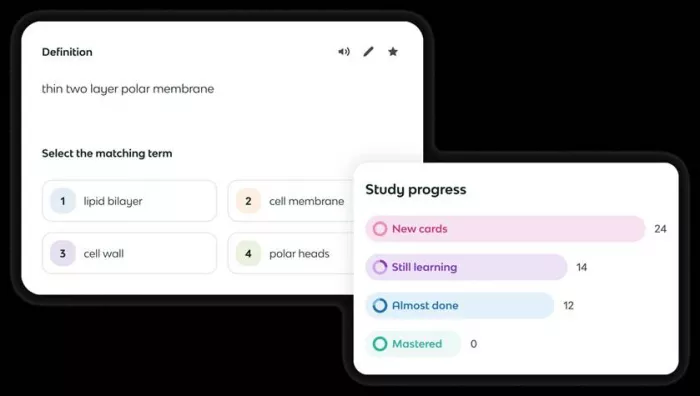
| Worth knowing: Knowt's spaced repetition is solid for everyday review, but it is lighter than a dedicated scheduler like Anki. If your goal is squeezing out maximum long-term retention on a rigorous schedule, hold that thought for the comparison section below. |
Every feature that matters
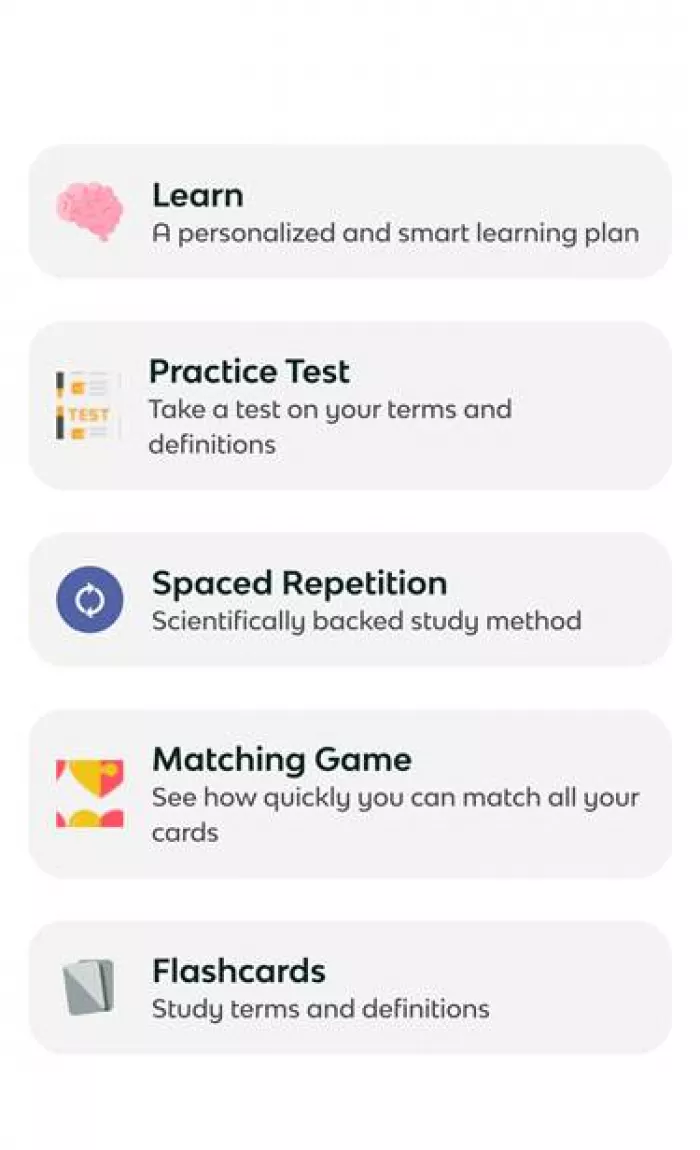
Knowt packs in a long list, but a handful carry the app. The strongest idea is that one deck feeds many study modes, so the cards you make once can be reviewed, quizzed, matched against the clock, or scheduled for spaced review without rebuilding anything.
Study modes
● Flashcards: The classic view, with a hint button, audio, a sorting mode, and a star for cards you keep fumbling.
● Learn Mode: Adaptive rounds that mix multiple choice, true or false, fill in the blank, and written answers, weighted toward what you miss.
● Practice Test: Generates an exam-style paper from your set so you can gauge where you stand before the real thing.
● Spaced Repetition: Again, Hard, Good, and Easy buttons push each card out on its own schedule, from minutes to days.
● Match Game: A timed drag-to-pair game for fast recall and a bit of competition with yourself.
● Voice Tutor and Podcast: Talk through a topic with an AI voice, or turn a set into a listenable podcast for the walk to class.
AI tools
● AI flashcard maker: Drop in notes, slides, a PDF, or a video and Knowt pulls the key terms into a ready set in seconds.
● Summarizer: Condenses long PDFs, videos, images, and PowerPoints into a tidy study guide with the main points surfaced.
● Kai, the AI chat: Ask about your notes and it answers grounded in your files, explains a concept, or spins up extra practice questions.
● Lecture recorder: Records a class and turns it into organized notes and cards, aimed at students who prefer to listen and review later.
Notes, exams, and the extras
● Note-taking: A Notion-style editor for writing notes that can be turned into flashcards, with AI helping you capture faster.
● Exams hub: Ready-made AP study guides, flashcards, and practice in the Exams tab, with SAT and ACT prep bundled into Ultra.
● Rewards and streaks: Points, coins, and streaks you actually trade for real merch, which nudges you to keep showing up.
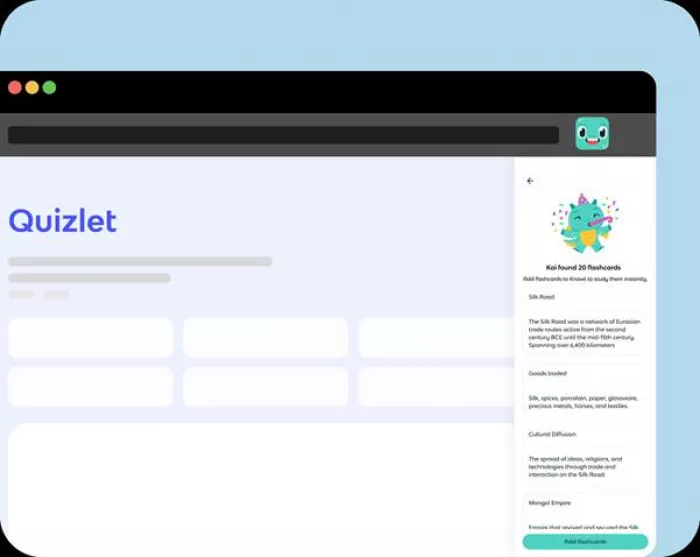
● Collaboration and import: Live collaboration on sets, plus one-click import of your existing Quizlet decks through the Chrome extension.
That last one matters more than it sounds. If you are leaving Quizlet, Knowt can pull your old sets over so you are not starting from an empty account. The import usually works in a click, though it is worth testing on a small deck first, since cards with images or unusual formatting do not always carry over cleanly.
How to get started with Knowt
Setup is fast, and the app walks you through most of it. Here is the flow from an empty screen to your first study session.
| 1 | Create your account Sign in with email, Google, Apple, or Microsoft, or a school portal like Clever or ClassLink. Email uses a one-time code, so there is no new password to invent. |
| 2 | Finish the short questionnaire Knowt asks your name, a username, your age, whether you are a student or teacher, and your grade level, then runs a quick tour. Expect an Ultra upgrade screen right after, with a countdown and a free exit button in the corner. |
| 3 | Build or import a set Type cards by hand, generate them from a PDF, slides, notes, or a YouTube video, or import an existing Quizlet deck. Test the file upload early so you know it works on your device before a deadline. |
| 4 | Pick a study mode Open your set and choose Flashcards, Learn, Practice Test, Match, or Spaced Repetition. Lean on Learn mode for new material and Spaced Repetition in the days before a test. |
| 5 | Ask Kai when you get stuck Open the chat to explain a shaky concept or generate extra practice. Grounding Kai in an uploaded file gives sharper answers than asking it cold. |
How far the free plan really goes
This is the part that surprises people, so I will be specific. On the free Basic plan you get unlimited flashcard creation, live collaboration, storage for your files, and the ability to browse five million public resources at no cost. Every core study mode runs without a monthly cap: Learn, Practice Test, Match, and Spaced Repetition are all yours in unlimited rounds. The metering falls on the AI, not on the studying.
In other words, if your habit is building or importing decks and drilling them, the free tier covers you completely. If your habit is asking AI to make everything and chatting with Kai all day, you will bump into limits fast. I documented the sign-up flow, the questionnaire, and that pushy paywall in a separate hands-on walkthrough of the free plan if you want the click-by-click version.
| Capability | What it does | On the free plan |
|---|---|---|
| Flashcard creation | Make or import unlimited sets by hand or from files | Free |
| All study modes | Learn, Practice Test, Match, Spaced Repetition | Free, unlimited |
| Import from Quizlet | Brings your old sets over, one time, in a click | Free |
| AI flashcards and summaries | Generate cards and study guides from your material | Free, monthly cap |
| Kai AI chat | Answers questions grounded in your notes | Free, limited use |
| Voice tutor, podcasts, recorder | The heavier AI features on your files | Ultra |
| Ad-free screen | Removes the on-screen ads | Ultra |
| Cross-device sync | Web, iOS, and Android stay in step | Free |
| The honest catch: free does not mean quiet. The plan is ad-supported, and the loudest complaint from long-time users is that the ads have grown heavier over time, sometimes sitting close to the buttons you are trying to tap. A few features that were once free have also drifted toward the paid tier. None of that breaks the core, but it is the tax you pay for a zero-dollar study app. |
Knowt pricing in 2026
Knowt has trimmed its plans over the past year, and the current plans page keeps things simple. There is the free Basic tier, and there is Ultra, sold either yearly or monthly. Everything premium sits inside Ultra, so the only real choice is whether you pay by the month for a short exam sprint or by the year for the lower rate.
| Plan | Price | What you get |
|---|---|---|
| Basic | $0, no card | Unlimited flashcards and files, every core study mode, import from Quizlet, browse 5M resources, and free AP guides. Ad-supported with capped AI. |
Ultra Annual Best value | $12.99/mo billed $149.99 yearly | Everything in Basic, ad-free, the full AI summarizer suite, lecture recorder and podcast generator, AI voice tutor on all files, and full AP, SAT, and ACT prep. Includes a 3-day free trial. |
| Ultra Monthly | $24.99/mo | The same features as Ultra Annual with no yearly commitment. Good for a single exam month, but nearly double the annual rate. |
| Refunds and cancelling: you can turn off auto-renewal under Settings, then Your Plan. Cancel or ask for a refund within 24 hours of a charge and Knowt refunds the full amount minus roughly a 3.5% transaction fee, landing in 5 to 10 business days. One thing to know: purchases made through the iOS or Android app stores have to be refunded by Apple or Google, not by Knowt directly. |
For scale, Ultra Annual lands at about four times the price of Quizlet Plus, which starts near $3 a month billed yearly. The math only tips toward Ultra if you truly lean on the summarizer, the lecture recorder, and unlimited Kai every week. For most people, the free plan is the value story, and Ultra is a seasonal upgrade at best.
Knowt vs Quizlet vs Anki
These three come up in nearly every study-app thread, and they are not really built for the same student. Knowt gives away for free what others charge for. Quizlet owns the biggest library of ready-made sets. Anki is the free power tool with the best scheduler. Here is how they line up on the things that decide it.
| What matters | Knowt | Quizlet | Anki |
|---|---|---|---|
| Best for | Free AI study workflow | Ready-made set library | Long-term retention |
| Free plan | Generous, ad-supported | Limited, Learn is capped | Fully free, no ads |
| AI card generation | Yes, from files and video | Yes, via Magic Notes | No, you make cards |
| Spaced repetition | Built in, everyday level | Session-level only | Best in class |
| Ready-made library | Smaller, user-made | Largest by far | Community decks |
| Paid price | From $12.99/mo yearly | From about $3/mo yearly | Free; iOS app $24.99 once |
| Platforms | Web, iOS, Android, Chrome | Web, iOS, Android | Desktop, Android, web, iOS |
The short read: pick Knowt if you want free study modes and AI that builds cards from your own material, pick Quizlet if the deck you need is already made by someone else, and pick Anki if durable memory on a strict schedule is the whole point and you do not mind building your own cards. If you are weighing the first two head to head, our full Knowt vs Quizlet breakdown digs into the free-tier limits and study modes in detail.
Best Knowt alternatives in 2026
Knowt is not the only free-leaning option. If one of its weak spots is a dealbreaker for you, these are the tools worth a look, with current prices checked against their own listings.
| Tool | Price | Why you might pick it |
|---|---|---|
| Quizlet | From $2.99/mo yearly | The household name, with the deepest library of ready-made sets and a polished mobile app. The catch is that Learn mode and the best AI sit behind Quizlet Plus. |
| Anki | Free; iOS $24.99 once | The gold standard for spaced repetition and total control. Free on desktop, Android, and web, with a one-time charge only on iPhone. You build your own cards and there is no AI generation. |
| RemNote | Free; Pro $8/mo yearly | Notes and flashcards living in one document, ideal if you keep rewriting notes and never turn them into practice. The free tier caps annotated PDFs and image-occlusion cards. |
| StudyFetch | About $19.99/mo | A broad AI study workspace with an AI tutor and materials generated from your slides and notes. More capable in places, but pricier, and the free tier is more restrictive than Knowt's. |
Pros and cons after a week
What worked + The free tier is the real product, not a locked demo + Notes and slides become a full deck in seconds + All study modes stay unlimited without paying + Kai explains tricky concepts clearly and goes deeper on request + One-click Quizlet import makes switching easy + Points, coins, and streaks that trade for real merch make review feel less like a chore | What held it back - Ads on the free plan can crowd the tap targets - AI generation and Kai chat are metered, so heavy users hit the ceiling - The upgrade screen is pushy, with a countdown and a day-three charge - Auto-written quiz questions sometimes need editing - Written answers can demand near-exact wording to be marked right - The pre-made library is smaller than Quizlet's deep catalog |
What real users keep saying
One week is a single data point, so I read across the app stores and review sites to widen the picture. The pattern is steady: people love that the core is free and fast, and the recurring gripe is ads. Here is a fair slice of that sentiment, summarized in my own words.
| Source | Rating | The gist |
|---|---|---|
| App Store | 5 / 5 | Gamified studying with points, coins, and streaks that swap for merch actually made them want to open their notes. |
| Google Play | 4 / 5 | Far ahead of Quizlet on free features, though the in-app search feels weak and picky. |
| Google Play | 3 / 5 | Loved it as the generous free option, but feels more sits behind a paywall lately and the ads slow things down. |
| Trustpilot | 2 / 5 | Ads are the dealbreaker, occasionally landing over the answer buttons during flashcards. |
| Review sites | 3 / 5 | Turning class notes into cards feels like magic, but auto-generated quizzes can be too basic and need a pass. |
Who Knowt fits, and who should look elsewhere
Reach for it if you are ● A student who wants free flashcards and every study mode ● Leaving Quizlet because of its paywalls ● Prepping for AP, SAT, or ACT and want ready guides ● Motivated by streaks, points, and small rewards ● Happy to make cards from your own notes and slides | Look elsewhere if you ● Need an ad-free screen without paying ● Plan to run the AI generator and Kai all day ● Want a huge library of ready-made sets, where Quizlet still leads ● Want deep, tunable review, where Anki goes further ● Rely on the file upload working flawlessly on day one |
Tips to get more out of Knowt
A few habits made the app noticeably better to use over the week, and most of them cost nothing.
● Import before you rebuild: Pull your Quizlet sets in first so you start with a full library instead of an empty account. Test one small deck before moving everything.
● Save AI for what matters: The free AI is capped, so spend it on generating cards from a dense PDF or asking Kai to untangle a hard concept, not on trivial questions.
● Switch modes as the exam nears: Use Learn mode while material is new, then move to Spaced Repetition and Practice Test in the final days to pressure-test recall.
● Verify the upload early: The summarizer is the feature most likely to glitch. Confirm it works on your device and file type well before you depend on it.
So, is Knowt worth it?
After a week of real use, my answer is yes for the free plan, and a firm maybe for Ultra. The free tier is not a teaser that dangles the good parts and then charges for them. You can build or import unlimited decks, drill them with every study mode, and lean on the AI for a while each day without paying a cent. That alone puts Knowt ahead of a long list of study apps that lock the basics away and hope you do not notice.
The AI chat was the quiet standout. I asked Kai to explain a concept that is genuinely easy to botch, and it gave a clear, correct overview, then went deeper when I pushed, all without wandering off. That is a study companion I would keep open. The letdowns are just as real: the ads on the free plan can crowd the screen, the AI limits arrive sooner than you would like if you rely on generation, and the upgrade screen leans on a ticking clock and an ask-your-parents button that feels like a lot of pressure to aim at students before they have made a single card.
My advice is simple. Make the account, tap past the paywall, and lean on the flashcards, the study modes, and Kai. Treat the file summarizer as a bonus until it proves it works on your device, since a few users, myself included, have hit snags there. Only think about Ultra once you know you are hitting the free AI limits every week and love the app enough to want more of it. If you want the full sign-up and paywall story before you commit, the free-plan walkthrough covers exactly what greets you.
Final verdict: 4.3 / 5. Recommended for free use, eyes open. Great value and a genuinely helpful AI chat, held back by heavy ads and metered AI on the free tier. Use it free, test the features you care about before a real deadline, and treat Ultra as a seasonal upgrade rather than a day-one purchase. |
Comments