Table of Contents
- Why I bothered testing Swishy AI tool
- What Swishy actually is
- Who it's for (and who it isn't)
- Signup and the first five minutes
- INTERFACE
- Six things I made, and how each went
- How prompting actually felt
- Export and quality
- Speed and reliability
- What it costs
- Swishy vs. the alternatives
- Pros and cons
- Tips from my week
- Would I keep using it?
- FAQs
A prompt-to-animation tool that swears you'll never need After Effects again. I took it from signup to export across six kinds of animation to see how much of that holds up.
THE SHORT VERSION 4.1 / 5 Swishy is genuinely fast at turning a sentence into a polished, editable animation, and the transparent-background export is more useful than I expected. It's not an After Effects replacement for anything precise but for social clips, titles, and overlays, it saved me hours. Best for: content creators, social media managers, and small teams who need good-looking motion in minutes, not frame-perfect control. |
Why I bothered testing Swishy AI tool
I've opened After Effects maybe four times in my life and closed it in a panic four times. So a tool that claims it can turn “make my logo bounce in with a soft glow” into an actual export gets my attention and my skepticism. Swishy markets itself as an AI motion designer that skips the software entirely: you describe an animation, it builds one, you tweak and export. I gave it a full week of real work, running it across text, logos, social clips, charts, and UI motion, and pushing one deliberately messy multi-scene prompt to see where it cracks. This is what I found, from the signup screen to the final MP4.
What Swishy actually is
Swishy is a browser-based motion design platform. There's nothing to install you work entirely in a tab, which the site openly recommends you do on a desktop with a mouse rather than on a phone. The core loop is simple: type a prompt or open a template, let the AI generate an editable scene, adjust the pieces, then export.
What makes it different from a straight text-to-video generator is that the output stays editable. You're not handed a flat video clip you can only accept or regenerate; you get layers of text, shapes, timing you can go back and change. That distinction matters more than it sounds, and I'll come back to it.
The headline capabilities, in plain terms:
• Prompt-to-animation. Describe a style, message, and mood in normal language and it generates a finished scene, reportedly in around 30 seconds on average.
• A large, community-fed template gallery. Many templates are made by other users, so it reads like a living library from a Netflix-style logo reveal to an “Apple-style 30-second counter” to terminal-typing text.
• Multi-layer editing. Text, graphics, backgrounds, and effects live in one composition you can refine.
• Export to MP4, MOV, GIF and WebM including a transparent alpha channel, so animations can sit on top of your own footage as overlays.
Who it's for (and who it isn't)
After a week, my honest read on the audience split is pretty clear.
It fits you if you make social content, run brand or marketing channels, edit videos and want quick overlays and titles, or run a small business and can't justify a designer for every Instagram post. If your bar is “looks professional and ships today,” Swishy clears it comfortably.
Look elsewhere if you need frame-level control, exact keyframe curves, precise masking, character rigging, or motion that has to match a strict brand spec down to the pixel. Swishy trades that control for speed on purpose. A working motion designer will feel the ceiling within an hour.
Signup and the first five minutes
Creating an account
Signup was quick. In my case it did not demand payment details to start poking around on the free tier, which is the right call for a tool you're being asked to trust with your time. The free plan is a “Mini” tier: enough to get a real feel for the thing before deciding whether to pay.
First impressions of the workspace
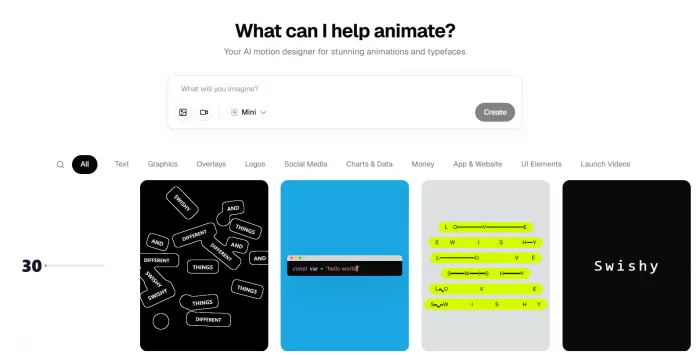
You land on a create bar that just asks “What can I help animate?” with a small toggle for output type sitting right next to it. Below that is the template gallery, and this is where the tool sells itself; you're immediately looking at dozens of live examples rather than a blank canvas. I found myself scrolling templates for a good ten minutes before I typed anything, which tells you something about how the gallery pulls you in.
Device and setup
I ran everything on. Chrome, 27-inch desktop. The desktop recommendation is real, not marketing: the editor leans on hover states and drag interactions that would be miserable on a phone. Load time on first visit was about four seconds; after that it was snappy.
INTERFACE
Living in the editor
The interface splits into three mental zones: the prompt bar up top, the template gallery as your jumping-off point, and the project canvas where the actual editing happens. Nothing is buried behind menus you have to hunt for, which is the main reason a non-designer can get moving fast.
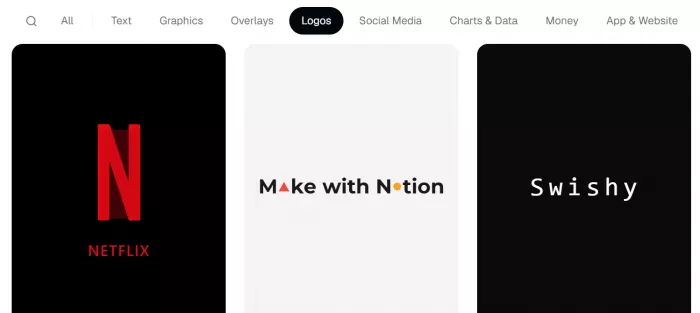
The template gallery is organized into categories that map neatly onto what people actually make:
| Category | What lives there | Good for |
| Text | Kinetic typography, sentence reveals, spill/scatter effects | Titles, quote cards, hooks |
| Logos | Logo reveals, shape-morph animations, brand spins | Intros, outros, watermarks |
| Social Media | Profile cards, follower counters, story frames, subscribe buttons | Instagram, TikTok, YouTube |
| Charts & Data | Bar charts, percentage counters, timelines | Explainers, reports, pitch clips |
| UI Elements | Toggles, notifications, loaders, iMessage mockups | App demos, product marketing |
| Overlays | Alpha-channel effects to layer over footage | Editing in Premiere / CapCut / Resolve |
Two things stood out early. First, the community templates mean the gallery is genuinely deep; you'll find oddly specific things like a Windows 98-style camera app or an ASCII-flow text effect. Second, opening a template drops you straight into an editable version of it, so “customize” is closer to “swap my text and colors in” than “rebuild from scratch.” For most jobs that's exactly the level you want.
Six things I made, and how each went
This is the part that matters. I ran one test per category, plus a deliberately awkward multi-scene prompt to find the edges. For each, here's the exact prompt, what came back, and how much work it took to get to something usable.
Test 1 Kinetic typography PROMPT I TYPED “Bold kinetic title that reads ‘CREATOR ECONOMY 2026’, words snapping in one at a time with a soft blur, dark background, electric blue accent” 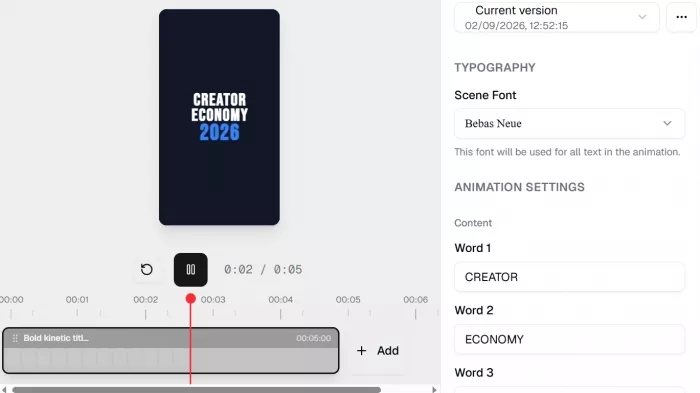 This is Swishy's home turf and it showed. The first generation nailed the snap-in rhythm; the timing between words felt intentional rather than random, which is the thing cheap animation tools usually get wrong. I changed the accent color and nudged the overall duration, and that was it. Generation took roughly 30 seconds. Verdict: usable almost immediately. The one thing I re-prompted for was tightening the gap before the year appeared easy. |
Test 2 Logo reveal PROMPT I TYPED “Minimal logo reveal for a coffee brand called ‘Fathom’, mark draws itself in, then the wordmark fades up underneath, warm cream background” 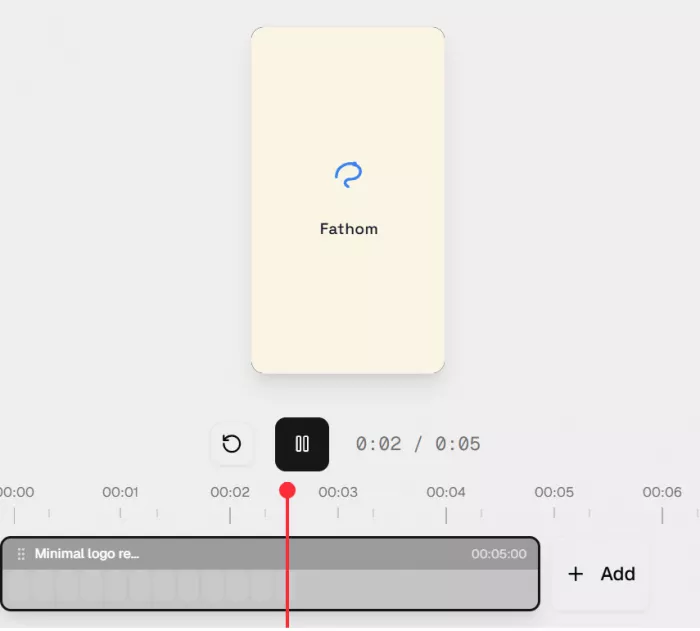 Here I hit the first real limitation. Swishy animated a placeholder mark beautifully, but getting my logo in cleanly meant uploading it and accepting how the AI chose to reveal it, rather than defining the draw-on path myself. The motion was lovely; the control over which parts drew in what order was limited. For a simple wordmark it's perfect. For an intricate logo with a specific reveal in mind, you'll feel boxed in. Verdict: great for clean marks, frustrating for complex ones. Took a couple of re-prompts to get the wordmark timing right. |
Test 3 Social media asset PROMPT I TYPED “Instagram story: ‘New drop Friday’ with a countdown feel, animated confetti burst, vertical 9:16, punchy and fun” 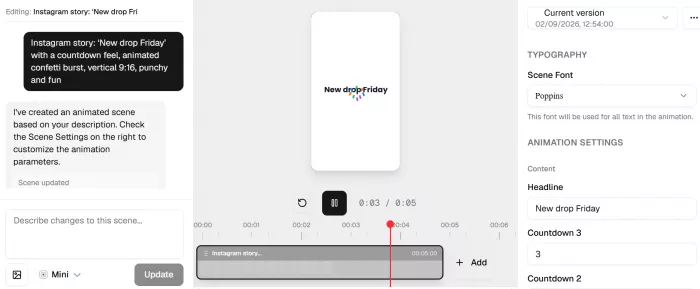 The Social Media category is the best-stocked corner of the tool, and it earns it. The vertical framing came out correctly, the confetti had actual weight to it, and it exported straight to a size I could post without cropping. This is the use case where I'd genuinely recommend Swishy without caveats; it does in two minutes what would otherwise eat an afternoon. Verdict: the strongest result of the week. Basically ready to post as-is. |
Test 4 Chart / data animation PROMPT I TYPED “Animated bar chart showing revenue climbing across Q1 to Q4, bars springing up one after another, clean labels, on-brand blue” The spring-stagger on the bars looked professional; this is a template pattern Swishy clearly does well. The catch is data accuracy: you're describing a look, not feeding a spreadsheet, so I had to hand-edit the values and labels afterward to make them true. Fine for an explainer where the shape of the trend is the point; not a substitute for a real charting tool if the exact numbers carry weight. Verdict: visually strong, but treat the numbers as your job, not the AI's. |
Test 5 UI element animation PROMPT I TYPED “iPhone mockup with an iMessage conversation bubbling in, message says ‘have a good day!’, subtle notification pop at the top” 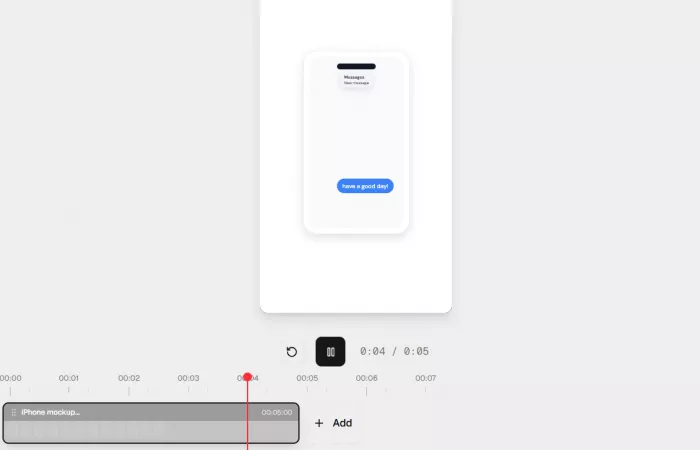 Swishy has a real fondness for phone mockups and it shows in the polish here. The bubbles animated in with the little scale-and-settle that makes them feel like a real iOS interaction. For anyone marketing an app or making a product explainer, this category alone might justify the tool. Minimal editing needed. Verdict: convincing and quick. Small tweak to bubble timing, otherwise untouched. |
Test 6 The stress test: a multi-scene story PROMPT I TYPED “A 5-scene launch video about a productivity app: hook, problem, product shot, three features, call to action should flow and build energy” This is where I pushed on purpose, and where the seams appeared. Swishy generated a genuinely coherent multi-scene sequence more than I expected but the transitions between scenes were the weakest link, and getting the pacing to actually “build” took several passes of re-prompting and manual duration edits. It's capable of a short narrative; it just needs a firmer hand from you than a single-scene animation does. Verdict: impressive that it works at all, but a multi-scene video is a collaboration, not a one-shot. |
The pattern across all six: single-scene, single-idea animations come out near-perfect. The more scenes and the more precision you ask for, the more you become the director and Swishy becomes the animator taking notes.
How prompting actually felt
The AI reads plain language well. It reliably understood mood words (“punchy,” “minimal,” “warm”) and structural ones (“one at a time,” “then fades up”). Where it stumbled was implicit intent: anything I meant but didn't say, it wouldn't infer. The fix was always the same: be more literal, name the sequence explicitly, and re-prompt rather than fight the editor. Once I adjusted to that, my hit rate climbed sharply.
Export and quality
Quality of the actual exports was the pleasant surprise. Motion was smooth, easing looked deliberate, and nothing had the janky, linear-tween feel that gives away amateur animation. The formats cover the real bases:
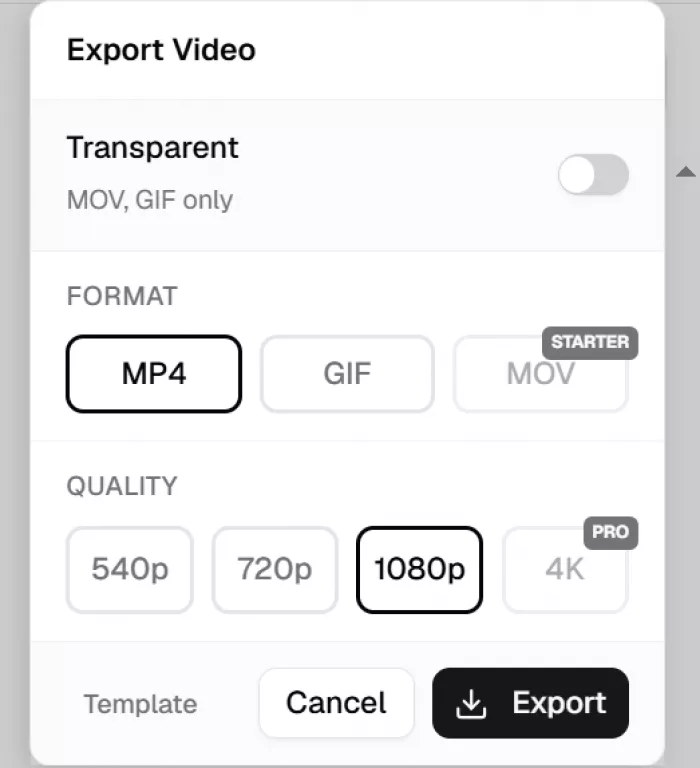
| Format | Why you'd pick it |
| MP4 | Default for social and general video small, universal |
| MOV | Higher-quality handoff into an editor |
| GIF | Looping snippets, docs, chat, quick previews |
| WebM / MOV with alpha | Transparent overlays to drop over your own footage no green screen |
The transparent-background export deserves a callout: being able to generate an animated title or effect with a real alpha channel and drop it straight onto a timeline in Premiere, CapCut, or DaVinci Resolve is the feature that turned Swishy from “toy I tried” into “tool I'd keep.” That's a workflow most quick AI tools skip.
Speed and reliability
Swishy advertises roughly 30-second generations, and in my week that was a fair average for single-scene prompts most single-scene generations landed in roughly 25–40 seconds. Complex, multi-scene prompts took longer and sometimes needed a second attempt. The browser stayed stable throughout with no crashes or failed renders; I only noticed an occasional brief pause while a new preview loaded. The honest performance caveat isn't speed, it's consistency: identical prompts didn't always return identical results, which is normal for generative tools but worth knowing if you're trying to reproduce a look.
What it costs
Swishy runs on a credit system layered on top of a free tier. Every generation spends credits, so your real question isn't “can I afford the plan” but “how many animations a month do I make.” Here's how the plans lined up at the time of writing confirm current numbers on swishy.ai before you publish, since these move.
| Plan | Price | Credits / mo | Notable |
| Mini (Free) | $0 | Limited | Enough to trial the tool and feel the workflow |
| Beginner | ~$19/mo | 150 | Mini/Starter/Best models, unlimited projects & exports, transparent export |
| Pro | ~$49/mo | 400 | All models incl. Pro, plus AI video generation |
Is it worth it? If you post weekly, the math favors paying one afternoon of avoided design work that covers a month easily. If you make the occasional one-off, ration the free tier and don't subscribe. The thing to watch is credit anxiety: because generations cost credits and re-prompting is part of the workflow, an experimental session can burn through your allowance faster than you'd guess. Budget for the fact that you'll rarely nail a complex animation on the first try.
Swishy vs. the alternatives
Swishy isn't competing with any one tool it sits between the heavyweight software and the all-in-one design suites. Roughly:
| Tool | Best for | Learning curve | Control |
| Swishy | Fast, good-looking social & title motion | Minutes | Medium prompt & tweak |
| After Effects | Precise, professional, complex work | Weeks to months | Total |
| Canva (animation) | Simple animated posts inside a design suite | Minutes | Low–medium |
The clean way to think about it: After Effects is the destination if control is non-negotiable and you have the time. Canva makes sense if you're already living in it for static design and just want light movement. Swishy wins the specific slot where you want motion that looks like a designer made it, you want it now, and you're willing to give up precision to get there.
Pros and cons
What I liked ▸ Single-scene animations come out genuinely polished with little editing. ▸ Transparent alpha export makes it a real part of a video workflow, not a silo. ▸ The template gallery is deep and, because it's community-fed, surprisingly specific. ▸ No install, no learning curve a non-designer is productive on day one. ▸ Fast enough that experimenting is cheap on time (if not on credits). | What could be better ▸ Precision control is limited no true keyframe-level editing. ▸ Complex, multi-scene sequences need heavy hand-holding and re-prompting. ▸ Charts look great but you must fix the data yourself. ▸ The credit model can breed anxiety when re-prompting is part of the process. ▸ Results aren't perfectly reproducible from the same prompt. |
Tips from my week
• Be literal about sequence. Don't say “make it dynamic” say “the first word snaps in, then the second, then the year fades up.” Naming the order is the single biggest quality lever.
• Start from a template when a category is unfamiliar. For charts and UI mockups especially, editing a working template beat prompting from scratch nearly every time.
• Do your experimenting on the free tier. Burn cheap credits figuring out the phrasing, then commit to the real generation once you know what to ask for.
• Export transparent whenever you'll touch it again in an editor. It saves you from re-keying backgrounds later.
• For a multi-scene video, build scene by scene. Generate and refine each beat separately rather than asking for the whole story in one prompt.
Would I keep using it?
Yes with a clear sense of what it's for. Swishy isn't the tool that replaces a motion designer on a demanding brief, and it doesn't really try to be. What it is, is the fastest way I've found to get professional-looking motion for social posts, titles, and overlays without opening intimidating software or waiting on someone else. For that specific job, it's the best value I've tested this year.
| Category | Rating |
| Ease of use | 4.6 / 5 |
| Output quality | 4.1 / 5 |
| Speed | 4.4 / 5 |
| Control / depth | 3.1 / 5 |
| Value | 4.0 / 5 |
Bottom line: if your work lives on Instagram, TikTok, YouTube, or a marketing timeline, Swishy earns a place in your kit. If it lives in After Effects, keep it there but Swishy might still handle your quick jobs so you don't have to.
FAQs
Do I need animation experience to use Swishy?
No. It's built for non-designers you describe what you want in plain language, or start from a template and change the text and colors. I was making usable clips within the first ten minutes.
What formats can I export?
MP4, MOV, GIF, and WebM/MOV with a transparent alpha channel for overlays. The transparent export is the one that makes it useful alongside a real video editor.
Is there a free version?
Yes a free “Mini” tier with limited generations, enough to trial the workflow before you decide whether to pay. Paid plans add more monthly credits and higher-tier models.
How fast is it, really?
Single-scene animations landed around the advertised ~30 seconds in my testing. Complex multi-scene prompts took longer and sometimes needed a second attempt.
Can I use it on my phone?
Technically it's browser-based, but the editor is built for desktop with a mouse. Doing real editing on a phone would be painful use a computer.
Can I use the animations commercially?
Check Swishy's current terms for the rights tied to your specific plan before using anything in paid client work, since these terms can change.
Comments