Table of Contents
- The gadgets worth knowing in 2026
- Interactive flat panels: the new front of the room
- VR and mixed-reality headsets: field trips without a bus
- Coding boards: computer science you can hold
- Chromebooks and tablets: the unglamorous backbone
- The supporting cast
- How the main gadgets compare
- The honest trade-offs
- Where this is heading
- The final verdict
Spend a single morning rotating a cart of thirty VR headsets through a Year 9 biology lesson and one thing becomes obvious fast: the hardware is the easy part. The gadget boots, the heart-valve model floats in the air, three students gasp. Then a battery dies, two headsets lose tracking, and a lesson plan quimetly rewrites itself. That gap between the glossy demo video and the real classroom is where the honest story about smart gadgets lives.
Education hardware has moved well past the novelty stage. Interactive panels have replaced projectors in most new classroom fit-outs, coding boards sit in millions of school bags, and AI tutors now answer homework questions at 11pm without complaint. The classroom display market alone was valued at roughly USD 128.6 billion in 2025 and is forecast to reach USD 662.5 billion by 2035, according to SNS Insider, while digital classroom adoption now sits above 45% in developed markets.
The gadgets worth knowing in 2026
Each entry is a category, not a single brand, because the brand that leads tends to shift almost every launch cycle.
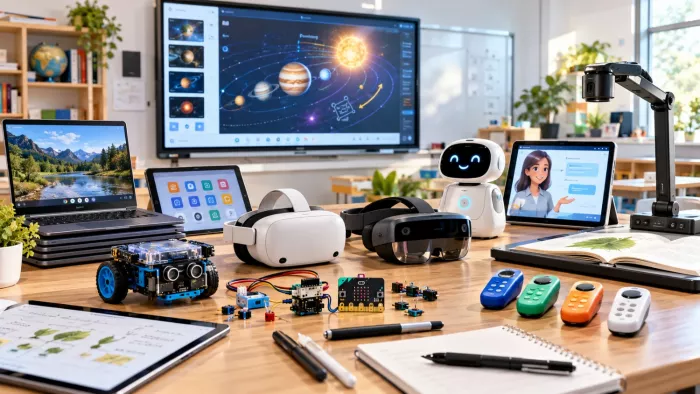
| Category | Gadget | What it does |
|---|---|---|
| Display | Interactive flat panels | Touch smart boards that run apps, cast from phones and annotate in real time. |
| Immersive | VR and MR headsets | Meta Quest 3/3S and ClassVR for field trips that never leave the room. |
| Making | Coding boards | BBC micro:bit and Raspberry Pi for hands-on computer science and electronics. |
| Core | Chromebooks and tablets | The 1:1 workhorses that carry reading, writing and assessment. |
| AI | AI tutors | Chat-based helpers such as Khanmigo that explain, quiz and mark on demand. |
| Support | Pens, cameras, responders | Digital note devices, visualisers and polling clickers that fill the gaps. |
Interactive flat panels: the new front of the room
The interactive flat panel has become the default replacement for the projector and whiteboard in new builds and refits. These are large touchscreens, usually 65 to 86 inches, that behave like a giant tablet bolted to the wall. A teacher writes on them with a stylus or a finger, drops in a video, splits the screen so two students can work at once, then saves the whole lesson to the cloud for anyone who was absent. Most run on infrared or capacitive touch, with the 55 to 65 inch range the long-running sweet spot for standard classrooms.

The names to know span BenQ, ViewSonic, Promethean, SMART and Newline, and the 2026 story is on-device intelligence. In June 2026, BenQ launched its Board Pro RP05 series in India with generative AI built into the panel itself, meaning a teacher can generate a diagram or summarise a passage without ever opening a laptop. ViewSonic expanded its ViewBoard line the same year around collaborative learning. The practical win is small but repeated across every period: fewer cables, fewer minutes lost to setup, and work that does not vanish when the bell rings.
The trajectory behind these panels is steep. SNS Insider puts the classroom display market on a compound annual growth rate near 18% through 2035, with North America holding the largest regional slice at about 35%. The real test of value is not the spec sheet, though. A panel used as a plain whiteboard wastes most of what it can do, which is why the training budget matters as much as the purchase order.
Interactive flat panels at a glance
| Spec | Detail |
|---|---|
| Typical size | 65 to 86 inches (55 to 65 inch classroom sweet spot) |
| Touch technology | Infrared or capacitive |
| 2026 standout | On-device generative AI, e.g. BenQ Board Pro RP05 |
| Leading brands | BenQ, ViewSonic, Promethean, SMART, Newline |
| Best used as | A shared, cloud-saving teaching surface, not a plain whiteboard |
88% of interactive display deployments now rely on touch interaction rather than a remote or pointer, a sign the board you walk up to and touch has quietly become the classroom norm. Source: Market Reports World, IFPD Market report 2026.
VR and mixed-reality headsets: field trips without a bus
Virtual reality in school has matured from gimmick to genuine tool, largely because the headsets got cheaper and lighter. The Meta Quest 3 and the lower-cost Quest 3S are the devices most schools reach for, while ClassVR offers a locked-down, teacher-managed alternative built for carts of twenty or more. The appeal is simple: a geology class can stand inside a volcano, a history class can walk a Roman street, and a trainee nurse can take apart a beating heart with their hands before ever touching a real patient.

The evidence is encouraging without being miraculous. A 2022 Morehouse College study, cited by Meta for Education, found students who learned in VR scored on average seven points higher on final tests than peers taught with traditional methods. Meta has since placed Quest headsets in 15 US universities and promotes classroom apps such as ENGAGE, Bodyswaps and Immerse. When the Inspired Education Group deployed VR to teach online and in-person students together, it reported clear gains in engagement, confidence and learning outcomes. A separate higher-education survey found 65% of students felt positively influenced by VR lessons.
VR in the classroom, by the numbers
| Measure | Figure | Source |
|---|---|---|
| Test-score lift, VR vs traditional | +7 points | Morehouse College, 2022 |
| Students positive on VR lessons | 65% | Higher-education survey |
| US universities given Meta Quest | 15 | Meta for Education |
| Typical age floor for headsets | 10 to 13 years | Manufacturer guidance |
Coding boards: computer science you can hold
Few gadgets have reached more children with less fuss than the BBC micro:bit, a programmable board smaller than a credit card. Since its 2015 launch, 10 million units have been distributed worldwide as of December 2024, used by an estimated 25 million students and teachers across more than 70 countries and 17 languages, according to the Micro:bit Educational Foundation and Lancaster University, whose team under Professor Joe Finney built its operating system alongside Microsoft, Arm, Samsung and the BBC.
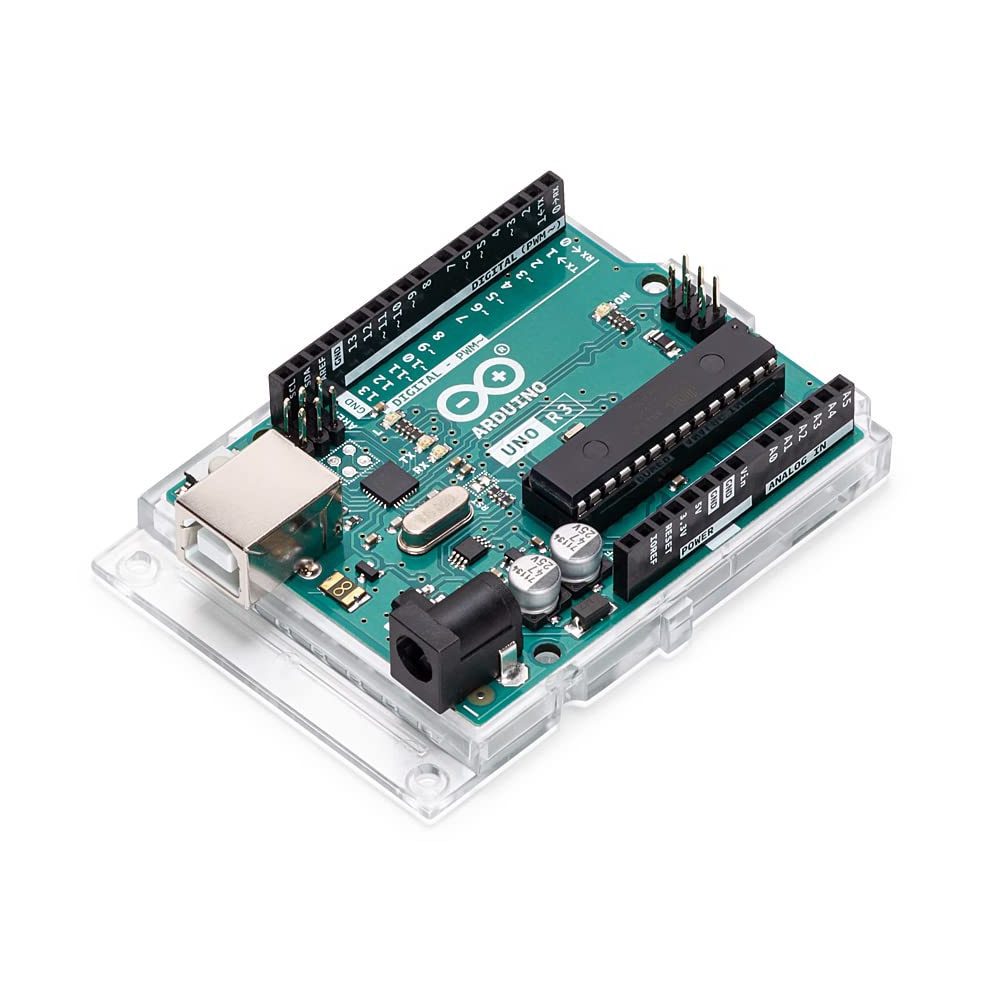
The reach keeps widening through partners rather than retail. Nominet funded nearly 700,000 micro:bits for UK primary schools, the British Council has carried the device into classrooms across the Western Balkans, Colombia, South Africa and Algeria, and a five-year project called EPICS, co-funded with Cambridge's Raspberry Pi Computing Education Research Centre, is studying how physical computing actually plays out in schools. Newer builds even add on-board AI features through micro:bit CreateAI.
What matters more than the headcount is who the device reaches. Foundation research found 86% of students said the micro:bit made computer science more interesting, 70% more girls said they would choose computing as a subject, and 85% of teachers said it made the subject more enjoyable to teach. A 2024 study reported that 80% of students taught with the board agreed computing was easier to understand than other subjects, against 52% who had never used one. The Raspberry Pi sits alongside it as the step up, a full tiny computer for older students building robots, retro consoles and weather stations.
micro:bit impact, by the numbers
| Measure | Figure |
|---|---|
| Countries and languages | 70+ countries, 17 languages |
| Students: computer science more interesting | 86% |
| More girls choosing computing | 70% |
| Teachers: more enjoyable to teach | 85% |
| Find computing easier, taught vs not | 80% vs 52% |
25 million students and teachers have used a BBC micro:bit, with 10 million boards distributed across 70+ countries and 17 languages since 2015. Source: Micro:bit Educational Foundation and Lancaster University.
Chromebooks and tablets: the unglamorous backbone
Ask any teacher which gadget actually runs the day and the answer is rarely the exciting one. Chromebooks and tablets carry the real load: reading, writing, research, submitting work and sitting exams. Chromebooks held roughly 60% of the global K-12 device market in 2025 per Mordor Intelligence, and Futuresource Consulting puts their share of US public school classroom devices near 72%. Google for Education reports more than 50 million active student and teacher accounts on ChromeOS, while Apple's iPad remains the leading tablet, holding about 52% of US school-issued tablets.
Cost is a big part of why. An education Chromebook typically lands around USD 220, roughly a third the price of a comparable Windows laptop, and Google now guarantees ten years of automatic security updates per model, which stretches a fleet across several cohorts instead of one. The US PIRG Education Fund estimated that extending Chromebook lifespans could save American schools around USD 1.8 billion. A 1:1 programme, where every student has a device, changes workflow more than any single flashy tool, because it turns the device into the notebook rather than an occasional treat.
The value here is boring on purpose: instant distribution of worksheets, automatic marking of quizzes, accessibility features such as read-aloud and dyslexia-friendly fonts, and a paper trail of progress a teacher can scan in seconds. The risk is equally plain. A tablet is also a doorway to distraction, and without clear rules it becomes a very expensive way to watch videos under the desk.
Chromebooks and tablets, by the numbers
| Measure | Figure | Source |
|---|---|---|
| Global K-12 device share | About 60% | Mordor Intelligence |
| US public school device share | About 72% | Futuresource Consulting |
| Active ChromeOS education accounts | 50 million+ | Google for Education |
| iPad share of US school-issued tablets | About 52% | Apple |
| Typical education Chromebook price | About USD 220 | Industry pricing |
| Security-update guarantee | 10 years per model |
AI tutors and smart study tools
The fastest-moving category is software that behaves like a patient tutor. Tools such as Khan Academy's Khanmigo and the study features baked into mainstream assistants will explain a concept three different ways, generate practice questions, and mark an essay against a rubric in seconds. For a student stuck at home with nobody to ask, that is genuinely new.
The catch is the obvious one. An AI tutor that hands over finished answers trains students to skip the hard middle part where learning actually happens. The smarter approach is to use these tools to prompt, check and stretch understanding rather than replace it, a balance covered well in this guide to studying with AI without skipping the actual learning. Used that way, the gadget becomes a sparring partner. Used lazily, it becomes a crutch that collapses the moment the exam hall bans the wifi.
The supporting cast
A few smaller gadgets rarely headline an article yet show up in thousands of classrooms because they each solve one problem well.
| Gadget | What it does |
|---|---|
| Digital note devices | Tablets like the reMarkable and Livescribe pens capture handwriting for students who think better on paper. |
| Document cameras | Visualisers that project a textbook page, a science experiment or a student's work to the whole room live. |
| Response systems | Polling clickers and phone-based quizzes that tell a teacher in seconds who understood the lesson. |
| E-readers | E-ink devices that carry a full reading list with adjustable text and no backlit screen fatigue. |
What a working rollout actually costs
The sticker price on a gadget is the smallest number in the whole project. Anyone who has signed off a classroom technology budget knows the hardware is often less than half of it. The rest hides in wifi that can carry thirty headsets at once, a device management system to lock down and update everything, repair cover for cracked screens, and the single most skipped line item, teacher training. A panel nobody was shown how to use becomes a whiteboard. A VR cart nobody has time to charge becomes a cupboard decoration.
Refresh cycles are the other trap. A headset or tablet bought this year ages out in three to five, so a smart purchase weighs longevity, not just launch-day specs. This is where boring wins. The ten-year update promise on Chromebooks and the sub-USD-30 price of a micro:bit buy years of use, whereas a premium headset with a short support window can turn into stranded spend. Pilot small, measure whether the gadget moved a real learning goal, and only then scale.
Equity deserves a line of its own. A gadget that only works with fast home broadband widens the gap it was meant to close. The strongest programmes plan for the student who has no quiet room and no reliable connection, through offline modes, take-home devices and on-site access, so the technology lifts the whole class rather than the lucky half.
How the main gadgets compare
Budgets are finite, so the real question is which device earns its shelf space. The table below is a rough working guide rather than a shopping list, since prices swing by region and bulk deal.
| Gadget | Best for | Rough per-unit cost | Main limitation |
|---|---|---|---|
| Interactive flat panel | Whole-class teaching, saving and sharing lessons | $1,500 to $4,500 | One per room, needs teacher training to use fully |
| VR / MR headset | Short immersive lessons, abstract or risky topics | $300 to $500 | Comfort, hygiene and heavy prep time |
| Coding board (micro:bit) | Intro computer science, electronics, girls' engagement | $15 to $30 | Limited beyond beginner projects |
| Chromebook / tablet | Daily work, reading, writing, assessment | $200 to $450 | Distraction risk without clear rules |
| AI tutor (software) | Personalised practice and instant feedback | Free to $15 / month | Easy to misuse as an answer machine |
The honest trade-offs
No gadget arrives without strings attached. Treating the hype and the headaches as equally real is the only way to spend a budget well.
| What these gadgets do well | Where they fall short |
|---|---|
| Turn abstract ideas into something students can see and touch, which lifts engagement and recall. | Upfront cost and refresh cycles strain budgets, and devices age out in a few years. |
| Give instant feedback, so a student knows where they went wrong before the mistake sets in. | Training is the hidden expense, since a panel used as a plain whiteboard wastes most of its value. |
| Reach learners who struggle with traditional formats, through audio, visuals and self-paced practice. | Screen time, distraction and comfort issues are real and need firm classroom rules. |
| Save teacher time once set up, from auto-marking to reusable, shareable lessons. | Patchy wifi or a flat battery can sink a lesson built entirely around a device. |
Where this is heading
The through-line across every gadget above is the same: hardware is becoming a delivery system for software that adapts to the student in front of it. A few shifts are already underway and will shape the next several years.
| Area | Where it sits now | Where it is heading |
|---|---|---|
| Front of the room | A touchscreen that saves and shares lessons | Panels that draft, translate and adjust a lesson on the spot, with AI running on the device (BenQ's 2026 Board Pro is an early sign) |
| Tutoring | A chatbot a student visits for help | An always-on tutor that tracks each learner and shows the teacher who is stuck in real time |
| Immersion | Occasional VR field trips | Mixed reality folded into ordinary lessons as headsets get lighter and cheaper |
| Making | micro:bit and Raspberry Pi for coding basics | On-device AI features such as micro:bit CreateAI, putting machine learning in a child's hands |
| The deciding factor | Device counts and spec sheets | Whether access reaches every student, not only the connected half |
The pattern worth watching is personalisation: tools that quietly adjust pace, feedback and difficulty for each learner, while the adult in the room decides when a screen helps and when it gets in the way. The schools that gain the most over the next decade will treat these gadgets as instruments the teacher plays, not as a replacement for teaching.
The final verdict
After enough hours spent charging headsets, resetting panels and watching an AI tutor talk a sleepy teenager through quadratic equations near midnight, the pattern is hard to miss. Smart gadgets do not change education on their own. The volcano lesson that lands is the one where the teacher already knew what question the VR trip was meant to answer. The micro:bit that sparks a future engineer is the one placed in a hand with a reason to use it.
The gadget that earns its keep is the one matched to a goal, backed by training, and switched off when a conversation or a book would do the job better. Bought that way, these tools genuinely widen who gets to learn and how. Bought for the brochure, they become expensive clutter gathering dust by spring term. The future of education is not more screens. It is better judgment about which screen, and when.
Comments