Quick answer Indown.io is a free, browser-based Instagram downloader that saves Reels, videos, photos, and Stories from public accounts in their original quality, with no app, no login, and no watermark. Paste a link, press download, and the file lands in your gallery in seconds. Below: exactly how it works, what it can and can’t do, how it stacks up against larger rivals, and how to stay on the right side of copyright. |
Instagram is built for watching, not keeping. Tapping the bookmark icon only saves a post inside the app; it doesn’t put a file on your device, and there’s no native way to save someone else’s Reel, video, or Story at all. That gap is why a whole category of Instagram downloaders exists, and why indown.io has quietly grown into one of the more widely used ones.
The category is bigger than most people realise. Together, the leading Instagram downloaders pull in well over a hundred million visits a month, which tells you the demand is enormous and that no single tool owns the space. So choosing one is less about brand names and more about fit. This guide assesses indown.io on the criteria that matter, namely speed, output quality, watermark policy, content range, device support, and real-world safety, using third-party usage data rather than marketing claims.
Review fact-check information
| Detail | Information |
|---|---|
| Last fact-checked | August 20, 2026 |
| InDown product information checked | August 2026 |
| Latest comparable traffic month available | June 2026 |
| Main factual sources | Instagram/Meta Help Center, InDown website and privacy policy, Semrush |
| Important distinction | InDown product claims are identified as claims unless independently verified |
| Traffic figures | Third-party estimates, not verified user counts |
Features of third-party downloaders can change when Instagram changes its website, media delivery systems or access rules. Traffic estimates also change monthly, so dated figures are more useful than presenting them as permanent numbers.
What is indown.io?
Indown.io is a free, web-based tool for downloading public Instagram content. It runs entirely in your browser, so there’s nothing to install and no account to create. You copy a post’s link, paste it in, and the tool returns a clean file, usually an MP4 for video or a JPG for images, without the username overlay that some in-app saves bake in.
Under the hood it’s simpler than it looks. When you submit a link, the tool reads the public post the way Instagram’s own web player does and hands you the media file directly. It never touches your account and only reads what’s already public, which is also why it can’t reach anything private. That no-login design is the single biggest trust signal for any tool in this category.
It’s worth being clear about what it isn’t. Indown.io is an independent service, not affiliated with or operated by Instagram or Meta, and it works only with public posts. Here’s who tends to reach for a tool like this:
• Creators and editors saving Reels for inspiration, mood boards, or reference clips.
• Social media managers archiving their own posts and Stories before they expire.
• Marketers and students collecting public examples for analysis or coursework.
• Everyday users who simply want a copy of their own memories saved offline.
Table 1 · Indown.io at a glance
| Feature | Details |
| Price | Free according to InDown |
| Installation | None required for the browser-based tool |
| Public-download login | InDown says no account or Instagram credentials are required |
| Watermark | InDown advertises watermark-free Reel downloads |
| Content advertised | Reels, videos, photos, profile pictures, Stories and Highlights |
| Quality | Highest version made available through the service; do not assume this is the creator's untouched original file |
| Download limit | InDown advertises unlimited downloading |
| Devices | Browser-based and advertised for phones, tablets and computers |
| Private accounts | A separate private downloader exists; it requires an existing logged-in Instagram browser session |
| Instagram affiliation | Third-party service; not an Instagram download feature |
What you can actually download
Most people arrive wanting one specific thing, usually a Reel, but indown.io covers all of Instagram’s main formats. Stories are an especially common reason to use a downloader, since they vanish after 24 hours and saving a public one is otherwise impossible.
Table 2 · Supported content types
| Content type | What you get | Format | Best for |
|---|---|---|---|
| Reels | Watermark-free vertical video with original audio | MP4 | Saving trends & inspiration |
| Feed videos | HD video as uploaded | MP4 | Offline viewing |
| Photos & carousels | Full-resolution images, each slide separately | JPG | References & your own posts |
| Stories | Photo or video Stories before they expire | MP4 / JPG | Catching the 24-hour window |
| Profile picture | Full-size avatar in HD | JPG | Viewing a small DP at full size |
| Long-form video | Extended / IGTV-style clips | MP4 | Saving longer content offline |
A couple of practical notes. The tool serves whatever quality the creator originally uploaded, so a Reel posted in 1080p downloads in 1080p, while older or compressed uploads come down smaller. Video keeps its original audio intact, and for carousels each slide is offered separately, so you can grab one image or the whole set without screenshotting.
Instagram's native download vs InDown.io
One important reason to compare InDown with Instagram itself is that Instagram now provides native downloading for eligible public Reels. Public-account creators can disable Reel downloads, so the feature is not available for every Reel.
Native Instagram downloads and third-party downloads are also not necessarily identical. Instagram's native Reel download normally includes Instagram and creator attribution, while InDown markets its Reel downloader as watermark-free. Licensed music creates another complication: Instagram's native downloaded version may omit licensed audio.
Instagram vs InDown
| Feature | InDown.io | |
| Download eligible public Reels | Yes, unless the creator disables it | Advertised |
| Native Reel attribution/watermark | Generally included | InDown advertises watermark-free Reels |
| Creator can disable native Reel downloads | Yes | InDown's ability to retrieve media depends on what remains accessible |
| Licensed Reel music | May be absent from a native downloaded file | Do not assume universal audio retention without testing |
| Download another user's photo as a normal file | No equivalent general download feature | Photo downloader advertised |
| Download another user's Story | No equivalent general download button | Story downloader advertised |
| Export your own account information/media | Yes, through Accounts Center | Possible post-by-post, but official export may be preferable |
| Archive your own Stories | Yes, through Stories Archive when enabled | Third-party tool usually unnecessary for this purpose |
| Instagram login | Required to use Instagram normally | Public InDown workflow says Instagram credentials are not required |
| Service provider | Meta/Instagram | Independent third-party website |
When should you use Instagram itself instead?
If you are primarily backing up your own Instagram account, start with Instagram's official tools. Accounts Center allows users to export copies of their Instagram information and choose the information, date range, format and media quality included in an export.
Instagram can also automatically retain Stories you create in Stories Archive when the feature is enabled. A third-party downloader is therefore more relevant when you need a specific accessible media file that Instagram does not provide through a normal download function.
How to download Instagram content with indown.io
The process is identical across devices and takes well under a minute. The only step that trips people up is copying the correct link; everything after that is automatic.
Step 1: Copy the Instagram link
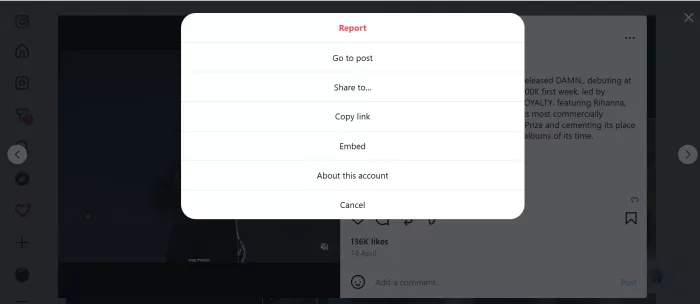
Open the Reel, video, photo, or Story in the app or on the web. Tap the three-dot menu (or the share icon) and choose Copy link. A copied link is far more reliable than typing the URL by hand or screenshotting it.
Step 2: Paste it into indown.io
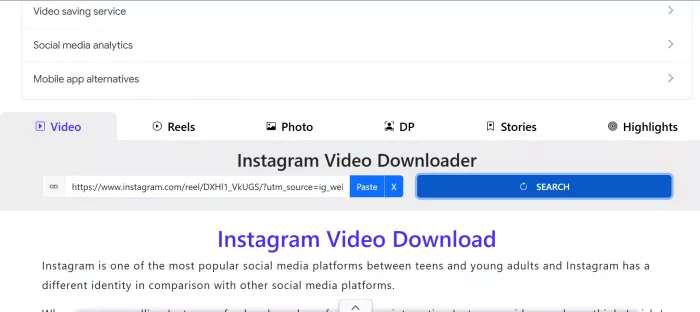
Open indown.io in any browser and paste the link into the input box. The tool fetches the post and prepares a download automatically, usually within a few seconds. There’s no need to pick a format or resolution; it defaults to the highest-quality source available.
Step 3: Download and save
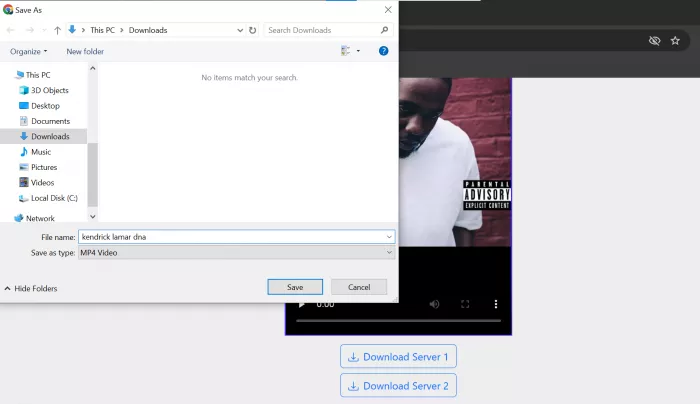
Press the Download button. On a computer the file saves to your Downloads folder; on Android it usually lands in your gallery or Downloads. On iPhone, Safari may open the video first, so tap Share, then Save to Files, then move it into Photos.
How indown.io compares to other Instagram downloaders
The Instagram-downloader space is crowded, and the fairest way to judge a single tool is to look at how much it’s genuinely used alongside how it lines up on features. The figures below are third-party estimates from SEO platforms (Ahrefs and Semrush, 2025). They’re approximate, differ between providers, and move month to month, so read them as a sense of scale rather than precise counts.

Table 3 · The competitive landscape
| Tool | Est. monthly visits* | Authority* | No login | Watermark-free |
|---|---|---|---|---|
| indown.io | ~13M | DR ~42 | Yes | Yes |
| fastdl.app | ~35M to 63M | DR ~72 | Yes | Yes |
| sssinstagram.com | ~44M | ~71 | Yes | Yes |
| snapinsta | ~28M | ~53 | Yes | Yes |
| igram.world | ~20M | DR ~68 | Yes | Yes |
*Approximate third-party estimates (Ahrefs / Semrush, 2025). “DR” is Ahrefs Domain Rating; other authority scores are from Semrush. Figures vary by source and update frequently.
Two things stand out. First, indown.io is smaller than category giants like fastdl.app and sssinstagram.com, which draw tens of millions of visits and carry higher authority, so it sits as a capable mid-tier option rather than the market leader. Its closest competitors are igram.world, sssinstagram.com, and fastdl.app.
Second, and more useful in the moment: the things that actually shape the experience are nearly identical across the leaders, including no login, no watermark, every major content type, and support for any device. A high authority score mostly reflects links and age, not whether the download is faster or cleaner for you. The sensible approach is to try one, judge it on speed and how intrusive the ads feel, and switch only if a particular post won’t process.
Is indown.io safe and legal?
This is the part worth slowing down for, because “safe” and “legal” are two different questions and most guides blur them. With safety, the biggest real-world risk isn’t the download itself; it’s the advertising around it. Tools in this category are ad-supported, and fake “Download” buttons that are actually ads are common across the whole niche. A few habits keep you clear:
• Stick to the official site and ignore any extra download or play buttons that don’t match the tool’s own interface.
• Never install a “codec,” browser extension, or app that a download page suddenly insists you need; legitimate downloads don’t require that.
• Remember the tool only reaches public posts. It can’t touch private accounts, DMs, or anything behind a login, and you should never enter your Instagram password anywhere but Instagram.
Legality is a separate question, and it depends entirely on what you do next. Saving a public Reel to watch offline, or keeping a copy of your own content, is generally low-risk personal use. Re-uploading someone else’s video, using it commercially, or passing it off as your own can infringe copyright and breaks Instagram’s terms of service.
A few specifics make the line clearer. Your own posts are always yours to download. Content from public figures and brands is still protected by copyright even though it’s freely visible. And “fair use” exceptions for commentary, criticism, or education vary by country and are narrower than most people assume. When in doubt, credit the creator, link back, and ask first.
Tips for the best results
A handful of small habits make downloads cleaner, faster, and less error-prone:
• Always grab the link with Share, then Copy link, rather than typing or screenshotting the URL.
• Confirm the post is public before you start; private content simply won’t load.
• For the highest quality, download from the original post rather than a re-share.
• On iPhone, save through the Files app if a video opens in the browser instead of downloading straight away.
When something does go wrong, it’s almost always one of a small set of issues, each with a quick fix:
Table 4 · Common problems & fixes
| Problem | Likely cause | Fix |
|---|---|---|
| “Video not found” | Wrong link, or a private account | Re-copy via Share, then Copy link; confirm the post is public |
| Download is slow | Weak network or peak traffic | Check your connection and retry in a moment |
| File won’t save on iPhone | Safari opens it instead of saving | Use Share, then Save to Files, then move it to Photos |
| Quality lower than expected | The original was uploaded in low resolution | None; a tool can’t add detail the source never had |
| Wrong carousel slide saved | Picked the wrong item in the results | Select the exact image or video you want from the list |
The verdict
Indown.io does one job and does it with very little friction: it turns a public Instagram link into a clean, watermark-free file in seconds, on any device, without an account. It isn’t the biggest name in the category, and power users who need batch downloads or guaranteed 4K may prefer a dedicated desktop app. But for the everyday task of saving a Reel, keeping a Story before it disappears, or archiving your own posts, it’s fast, free, and refreshingly simple.
If you want the lightest possible path (open a browser, paste, save), indown.io fits perfectly, and its no-login design keeps your account out of the equation. Use it for personal reference, stay alert to the ads that surround every free tool like it, and respect creators’ rights when you share.
Comments