There are two types of Instagram users. The ones who want to save content and the ones who want to watch without being seen. Instagram supports neither particularly well, which is exactly why tools like Indown.io and Mollygram exist.
On paper, both feel like shortcuts. Paste a link, type a username, click once, and get what you want. In practice, they solve completely different problems and fail in completely different ways. One behaves like a utility. The other behaves like a workaround.
This comparison is not about which tool is better. It is about which one actually works for what you are trying to do and where things quietly break.
What These Tools Actually Are
Before comparing features, it helps to understand what each tool is trying to be.
Indown.io is a browser-based downloader. It works through direct links. You bring the exact content you want and it attempts to convert that into a downloadable file. No browsing, no discovery, just execution.
Mollygram is a browser-based anonymous viewer. Instead of links, it works with usernames. You type a profile and it attempts to fetch publicly available content while keeping your activity invisible.
That difference defines everything that follows.
Core Positioning Snapshot
| Tool | Core Role | Input Method | Output Type | Control Level |
| Indown.io | Content downloader | Paste exact URL | Direct file download | High control |
| Mollygram | Anonymous viewer | Enter username | View + optional download | Medium control |
Indown is precise but limited. Mollygram is flexible but unpredictable.
From Input to Output: Where the Workflow Starts Breaking
The workflows look simple. The outcomes are not always.
With Indown.io, the process is linear. Copy a link from Instagram, paste it into the input field, and wait for processing. The interface is minimal, almost aggressively simple. No login, no setup, no friction at entry.
With Mollygram, the process is broader. Enter a username, load a profile, browse stories, highlights, and posts, then choose what to view or download. It feels closer to using Instagram itself, just without being visible.
The difference shows up immediately in consistency.
Workflow Comparison
| Step | Indown.io | Mollygram |
| Input | Exact content URL | Public username |
| Processing | Fetches one item | Fetches entire profile |
| Output | Single file | Multiple content streams |
| Predictability | High intent | Variable results |
Indown works like a vending machine. Mollygram works like a search engine that sometimes forgets what you asked for.
Testing Reality: What Actually Happens
This is where expectations need adjustment.
Testing Indown.io across reels, posts, stories, and highlights revealed something unexpected. Regardless of the input link, the output frequently defaulted to the profile picture instead of the actual content.
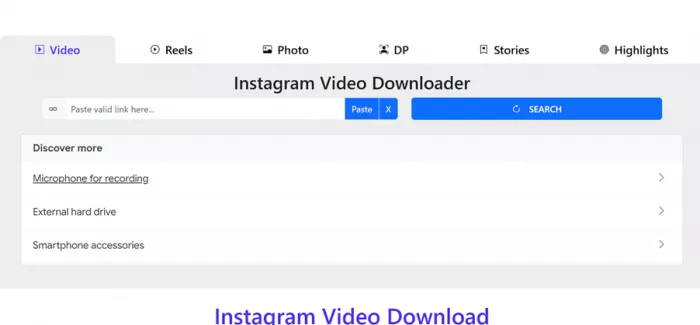
That means the tool technically works, but not always in the way users expect. The most consistent feature was not downloading reels or stories, but viewing and saving profile pictures.
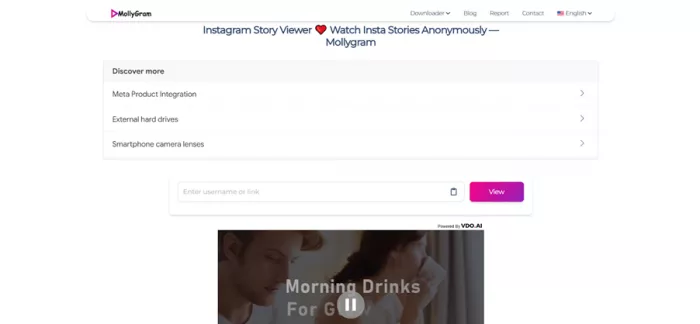
Mollygram, on the other hand, behaved differently. When it worked, it allowed anonymous browsing of stories and posts without login. But performance varied. Some profiles loaded quickly, others returned errors, and loading times fluctuated depending on conditions.
Real Testing Breakdown
| Scenario | Indown.io Result | Mollygram Result |
| Reel link | Often shows profile image | Loads if profile fetch works |
| Story access | Inconsistent | Medium reliability |
| Profile viewing | Not supported | Works when fetch succeeds |
| Consistency | Stable output type, wrong content | Correct intent, unstable delivery |
One tool gives the wrong thing consistently. The other gives the right thing inconsistently.
Output Quality vs Expectation
Both tools promise access. What they deliver depends on context.
Indown.io claims support for multiple content types including reels, posts, and highlights. The structure suggests versatility. In practice, its most reliable output is profile image retrieval in higher resolution.
Mollygram positions itself as a full viewer. It can display stories, highlights, and posts when conditions are favorable. However, it does not guarantee availability and does not support private accounts despite occasional confusing messaging.
Output Comparison
| Output Factor | Indown.io | Mollygram |
| Accuracy | Low for content, high for profile images | Medium, depends on fetch success |
| Coverage | Limited in practice | Broader but unstable |
| Format | Direct download | View + optional download |
| Reliability | Consistent behavior, inconsistent relevance | Inconsistent behavior, correct intent |
⭐ Star Rating Comparison
| Category | Indown.io | Mollygram |
| Ease of Use | ★★★★☆ | ★★★★☆ |
| Speed | ★★★★☆ | ★★★☆☆ |
| Reliability | ★★☆☆☆ | ★★☆☆☆ |
| Output Accuracy | ★★☆☆☆ | ★★★☆☆ |
| Feature Depth | ★★★☆☆ | ★★★☆☆ |
| Privacy / Safety | ★★★☆☆ | ★★☆☆☆ |
| Overall Score | 3.0 / 5 | 3.0 / 5 |
What this shows:
Indown is faster and more stable in behavior, but often fails in delivering correct content. Mollygram delivers the intended experience better, but struggles with consistency and uptime.
What Users Say vs What Actually Happens
Across both tools, user sentiment follows a pattern.
Indown.io is often described as simple and fast. It does not require login, works inside a browser, and reduces friction. However, the lack of accurate content retrieval reduces its usefulness beyond basic cases.
Mollygram receives mixed feedback. Users appreciate the anonymity and ease of use, but frustration appears around loading errors, delays, and occasional failures to fetch content.
The Core Problem Both Tools Reveal
This is not just about these two platforms. It reflects a broader issue with third-party Instagram tools.
- Fast tools often reduce control
- Flexible tools often reduce reliability
- Free tools often introduce uncertainty
- Anonymous tools often trade transparency
The contradiction is simple. These tools promise access without friction, but operate in an environment they do not control.
When everything aligns, they feel incredibly efficient. When something changes on Instagram’s side, they stop behaving as expected.
Where Each Tool Actually Fits
This is where the decision becomes practical.
Indown.io works best when the goal is narrow. Viewing or saving a profile image quickly without logging in is where it performs most consistently. Anything beyond that becomes unpredictable.
Mollygram works best when the goal is exploratory. Checking public profiles, viewing stories anonymously, or browsing without logging in are its strongest use cases. But it should not be relied on for consistent access.
Use Case Mapping
| Use Case | Better Tool | Reason |
| Save specific content | Indown.io | Direct input workflow |
| Anonymous browsing | Mollygram | Username-based access |
| Profile analysis | Mollygram | Broader visibility |
| Quick utility task | Indown.io | Faster execution |
Final Take
Indown.io and Mollygram do not compete in the traditional sense. They represent two different attempts to bypass Instagram’s limitations.
Indown.io compresses the path between a link and a file, but struggles to consistently deliver the intended content. Mollygram compresses the gap between curiosity and anonymity, but struggles with reliability and stability.
If the workflow requires precision, both tools fall short. If the workflow allows flexibility and occasional failure, they can still be useful in short bursts.
That is the real takeaway. These tools are not replacements for Instagram. They are temporary bridges that work until they do not.
Comments