Table of Contents
- Quick Overview
- How It Works : The Browsing Experience
- Filtering by Pricing : Useful but Reveals a Problem
- Filtering by Categories All 75 of Them
- What Each Tool Listing Actually Gives You
- Other Platform Features Worth Knowing
- The Anonymous Ownership Question
- The Footer That Changed My Whole Perspective
- Trust Scores and Traffic : The Numbers Don't Agree
- Where OpenFuture Helps
- Where It Falls Short
- How It Compares to Alternatives
- My Personal Rating
- Who Should Use It
- The Verdict
A few months back, I was juggling five browser tabs trying to find an AI tool for podcast editing. Every Google result was either a sponsored ad or a recycled listicle from 2024. A friend dropped a link to OpenFuture AI in our group chat "just use this, everything's in one place." I bookmarked it, started browsing that night, and honestly haven't stopped going back since.
But the more I used it, the more I noticed things, some impressive, some questionable, and one that genuinely made me pause. This is my full, honest experience.
Quick Overview
Before I get into the details, here's the snapshot:
| Detail | What You Get |
| Platform Type | AI tools directory and discovery engine (not an AI tool itself) |
| Total Tools Listed | 40,648+ |
| Categories | 75 filterable categories |
| Languages | 13 (English, Vietnamese, Chinese, French, German, Korean, Spanish, and more) |
| Pricing to Browse | Completely free |
| Login Required? | No (optional via Google or Discord for saving favorites) |
| Who Runs It | Unknown no founder, team, or company publicly identified |
| Best For | Discovering AI tools you didn't know existed |
| Not Great For | Making final purchasing decisions |
How It Works : The Browsing Experience
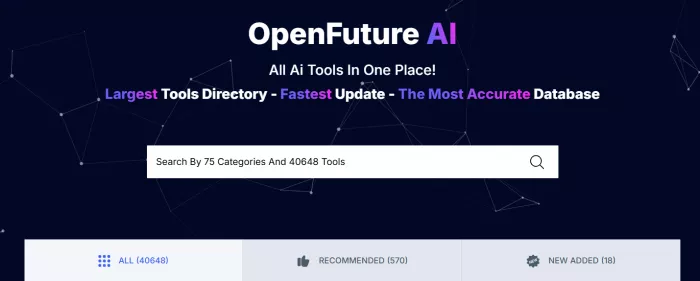
The first thing you see is a search bar with the tagline "Largest Tools Directory Fastest Update The Most Accurate Database." Bold claims. Below that, the entire interface revolves around three main tabs that organize how you browse:
All AI Tools (40,648) This is the unfiltered catalog. Every tool that's ever been submitted and published lives here. Scroll long enough and you'll be here all week.
Recommended (570) A curated subset. Out of 40,000+ listings, only 570 carry this label. I used this tab the most in the beginning because it felt like someone had already done the sorting for me. The problem? OpenFuture never explains how a tool earns the Recommended badge is it editorial picks, user votes, or paid placement? That question never got answered no matter how hard I looked.
New Added (18) The freshest listings. When I checked, only 18 tools sat here, which surprised me. For a platform that claims "fastest updates," I expected a faster churn.
The browsing flow is simple: you land on a card-style listing, read a short description, see category tags and a pricing label, and click "Visit Site" to leave OpenFuture and land on the actual tool's website. Everything funnels you outward. OpenFuture doesn't host tools, demo them, or let you try anything on-site. It's purely a launchpad.
Note: All these Data mentioned here about OpenFuture AI are verified in August 2026
Filtering by Pricing : Useful but Reveals a Problem
On the left sidebar, you can filter the entire catalog by pricing model. This is where I spent a lot of time when I was specifically hunting for free alternatives.
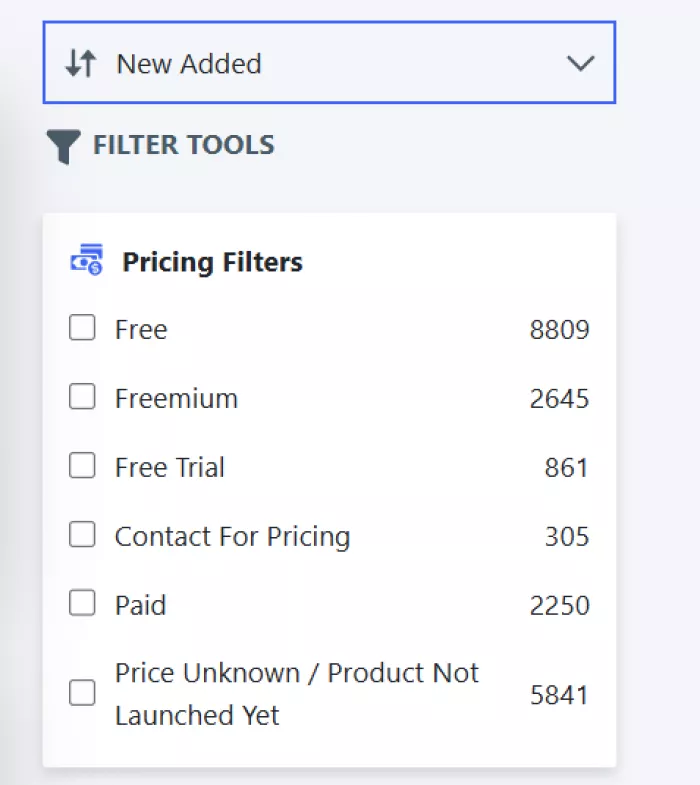
Six pricing filters are available, each showing a live count:
● Free (8,809 tools) : Genuinely free tools. This is the largest bucket, and it's where I found most of my useful discoveries.
● Freemium (2,645 tools) : Free tier with paid upgrades. Good for testing before committing.
● Free Trial (861 tools) : Paid tools that let you try before you buy.
● Contact for Pricing (305 tools) Enterprise or custom pricing with no public number listed.
● Paid (2,250 tools) : Strictly paid, no free option.
● Price Unknown / Product Not Launched Yet (5,841 tools) : This is the red flag category.
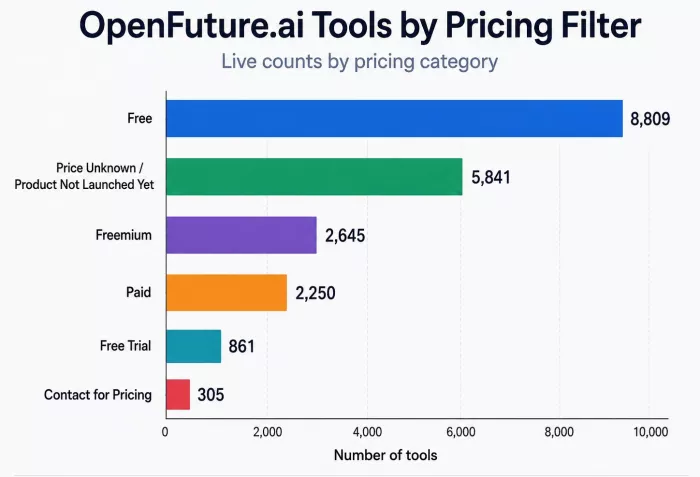
Here's the math that caught my attention. Those six filters add up to roughly 20,711 tools. The total catalog says 40,648. That means approximately 20,000 tools have no pricing tag whatsoever, not even "unknown." Half the database is floating around with zero pricing information.
It gets worse. I spot-checked a dozen tools tagged "Price Unknown / Product Not Launched Yet." Several of them have been live for months with clear pricing on their own websites. The data just hasn't been updated. So when OpenFuture calls itself "The Most Accurate Database," take that with a generous handful of salt.
Filtering by Categories All 75 of Them
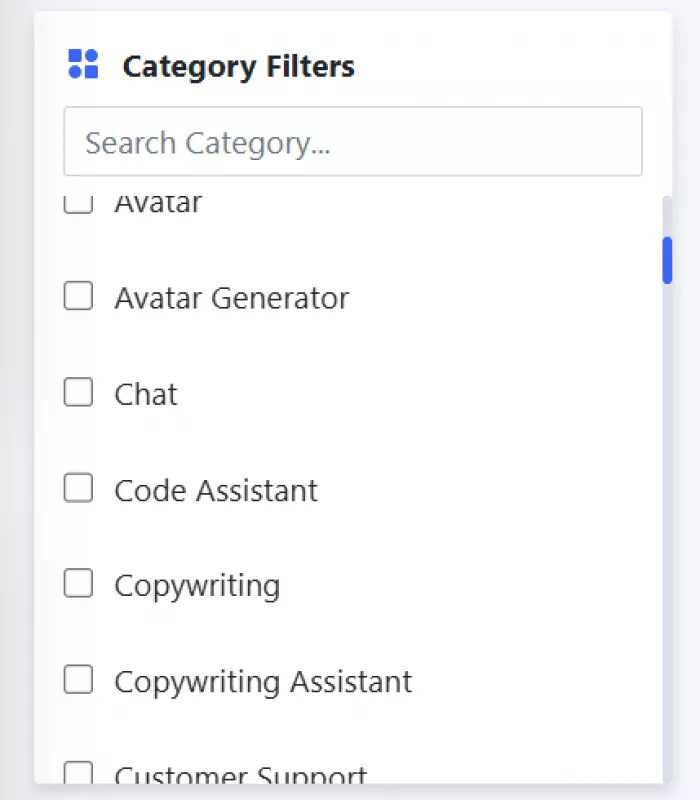
Below the pricing filters sits the real backbone of the platform 75 category filters that let you narrow tools by what they actually do. This is where OpenFuture's breadth genuinely shines. I've grouped them here by theme so they're easier to digest, because the site just lists them alphabetically with no organization at all.
Content Creation & Writing
Copywriting, Copywriting Assistant, Writing Assistant, Paraphraser, Storyteller, Summarizer, Prompt Guides, Prompts Assistant, Inspiration, Resources 10 categories covering everything from blog drafting to prompt engineering to creative fiction tools. This cluster had the densest listings when I browsed, which makes sense given how popular AI writing tools are.
Visual & Design
Art Generator, Generative Art, Image Generator, Image Editing, Image Improvement, Image Scanning, Design Assistant, Logo Generator, Avatar, Avatar Generator another 10 categories. Whether you need a Midjourney alternative, a background remover, or an AI logo maker, you'll find options here. I used the Image Editing filter specifically to find a free tool for batch-resizing product photos, and it delivered three solid options I hadn't heard of.
Video & Audio
Video Generator, Video Editing, Generative Video, Text to Video, Personalized Videos, Audio Editing, Music, Music Generator, Voice Modulation 9 categories reflecting the AI video explosion. The Podcasting category also sits nearby in the platform meta section. This is where I originally started my search for podcast editing tools, and the variety was solid even if the descriptions were thin.
Development & Technical
Code Assistant, Developer Tools, Generative Code, SQL Assistant, Spreadsheet Assistant 5 categories for builders, developers, and data people. The SQL Assistant and Spreadsheet Assistant categories are surprisingly niche for a general directory, which I appreciated.
Language & Communication
Chat, Speech to Text, Text to Speech, Transcriber, Translation 5 categories handling chatbots, voice tools, and language conversion. The Transcriber category is where I eventually found my go-to free transcription tool after my friend's recommendation.
Business & Marketing
Marketing, SEO Assistant, Sales Assistant, Social Media, Social Media Assistant, E-Commerce, Customer Support 7 categories covering the commercial side. If you're running a small business or managing clients, this cluster has the most practical, immediately useful tools.
Professional & Industry-Specific
Finance, Legal Assistant, Human Resources, Real Estate, Health, Fashion Assistant, Education Assistant 7 niche verticals. These categories tend to have fewer listings but more specialized tools. The Legal Assistant category surprised me with how many contract review and compliance tools are now AI-powered.
Productivity & Life
Productivity, Life Assistant, Email Assistant, Memory Assistant, Self Improvement, Startup Assistant 6 categories for personal and professional efficiency. The Startup Assistant category is a nice touch for founders looking for pitch deck generators, business plan tools, and similar utilities.
Research & Knowledge
Research, Research Assistant, Search Engine 3 categories for information-heavy work. Academic tools, literature review assistants, and AI-powered search engines live here.
Entertainment & Misc
Gaming, For Fun, Fun Tools, Gift Ideas, Experiments 5 categories for the lighter side. Gift Ideas is oddly specific; it lists AI tools that help you brainstorm gift suggestions. I tried one around a friend's birthday and actually ended up using its recommendation.
Platform & Meta
Aggregators, AI Detection, No Code, Podcasting 4 infrastructure-level categories. AI Detection is particularly relevant right now for educators and publishers checking for AI-generated content.
Special & Niche
Matt's Picks (curated by someone named Matt I'll come back to this mystery), Presentations, 3D Generator, Motion Capture 4 categories that don't fit neatly elsewhere. Motion Capture and 3D Generator have very few listings but represent genuinely hard-to-find niches.
The Category Overlap Issue
The 75 number is impressive on paper, but after weeks of browsing I started noticing duplicates. Copywriting and Copywriting Assistant list many of the same tools. Avatar and Avatar Generator overlap heavily. Social Media and Social Media Assistant are functionally identical. For Fun and Fun Tools are the same concept with different labels. Research and Research Assistant, Music and Music Generator, Prompt Guides and Prompts Assistant the pattern repeats.
Even in the visual/video space, Art Generator, Generative Art, and Image Generator all cover AI image creation with significant listing crossover. Same story with Video Generator, Generative Video, and Text to Video.
Once you strip away the genuine duplicates, the 75 compresses to around 50–55 functionally distinct categories. Still impressive, but not the headline number they advertise.
What Each Tool Listing Actually Gives You
Click on any tool and you get a detail card with a thumbnail screenshot, a description (usually one to four sentences), category tags, a pricing label, a heart/favorite button, and a "Visit Site" link that takes you to the tool's own website.
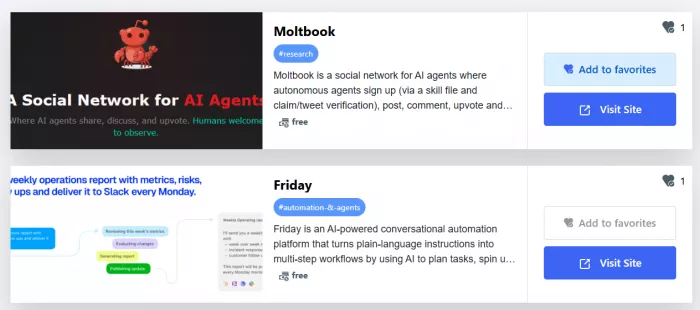
That's it. No user reviews. No comparison charts. No screenshots of the tool in action. No pros and cons. The community rating system exists on paper there's a heart counter but most listings I opened showed zero votes. In weeks of using the platform, I never saw a listing with more than a handful.
I also noticed that many tools get tagged with eight to ten categories at once. One music composition tool I looked at appeared under Music, Music Generator, AI Assistants, AI Chat assistants, AI Content creation, AI Developer tools, AI Data analysis, and AI Video generators. A music tool tagged as a video generator and data analysis tool? That's not categorization, that's keyword stuffing.
The descriptions vary wildly in quality. Some are specific enough to be useful; they tell you what the tool does, who it's for, and what formats it supports. Others are so vague they could describe literally any AI product. When I compared three similar writing assistants side by side, their descriptions were interchangeable.
Other Platform Features Worth Knowing
Login : You can log in with Google or Discord. No email signup, no Apple login. Discord as a login option for a tools directory is an unusual choice it suggests the platform targets a younger, community-oriented audience rather than enterprise users. Logging in unlocks a Favourited tab where you can save tools for later, which is handy if you're doing research across multiple sessions.
Tool Submission : Tool makers can submit their products through a dedicated page. You need to log in first, but there's no visible moderation criteria, review timeline, or quality gate published anywhere. This open-door approach likely explains both the massive catalog size and the inconsistent listing quality.
Ad Blocker Detection : The site pops up a message asking you to disable your ad blocker "for the website to function optimally." This confirms display advertising is part of the revenue model though as you'll see shortly, that's only one piece of a more complicated monetization picture.
Blog : There's a blog section accessible from the footer. The posts I read felt more like SEO-driven content than genuine editorial keyword-heavy, surface-level, and structured to capture search traffic rather than inform readers.
Privacy : The site has a Privacy Policy, but given the anonymous ownership, it's worth asking what data gets collected when you log in with Google or Discord. I couldn't find any independent audit or transparency report. If you browse, doing it without logging in is the safer bet.
The Anonymous Ownership Question
After using the platform for a while, I got curious about who actually runs it. I clicked the About Us page expecting the usual founder backstory.
Instead, I got a mission statement about helping people automate routine work and a vision to become the world's largest AI directory. Zero names. No team page. No company registration. No office address. No LinkedIn presence. No press coverage identifying anyone behind the project.
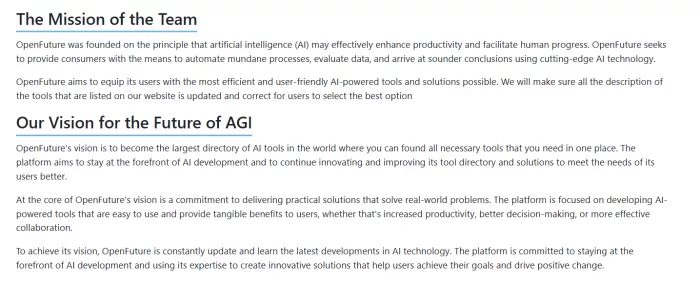
The only human trace anywhere on the platform is the "Matt's Picks" category. Someone named Matt apparently curates featured tools. Who Matt is, where he's based, whether Matt is even a real person or just a branding choice completely unknown.
For a personal blog, anonymity is harmless. For a platform that labels 570 tools as "Recommended" in front of over a hundred thousand monthly visitors, it raises a serious editorial trust question. Who decides what gets recommended? What's their incentive? You can't evaluate independence when you don't know the evaluator.
The Footer That Changed My Whole Perspective
I almost didn't write about this because I figured other reviewers had covered it. They haven't.
Scroll past the tool listings, past the categories, past the clean "Topics" footer (Productivity, Developer Tools, Health, E-Commerce, Fashion, Life Assistant, Finance, Real Estate). Keep scrolling. You'll hit a massive wall of outbound links pointing to Vietnamese-language online gambling, betting, and casino domains — "nhà cái 12bet," "hitclub," "go88," "sv388," "789club," and hundreds more. Easily 500+ gambling affiliate links embedded at the bottom of this "AI tools directory."
This reframes everything. It explains the Scam Detector score of 6.8/100. It fits the traffic data showing Vietnam as a top audience source. And it gives the anonymous ownership a clear motive.
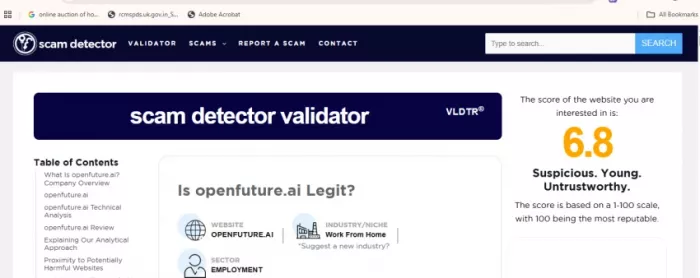
Browsing the directory is still functionally safe, tool listings are real, Visit Site links work, nothing asks for payment. But knowing the real monetization model runs on undisclosed gambling affiliates changes how much trust I place in the platform's editorial choices.
Trust Scores and Traffic : The Numbers Don't Agree
The platform has no Trustpilot, G2, or Capterra profile. External automated scanners contradict each other wildly:
| Source | Score / Ranking | Verdict |
| Scam Detector | 6.8 / 100 | Suspicious, untrustworthy |
| Gridinsoft | 78 / 100 | Generally safe |
| RankmyAI | #66 of 428 directories | Mid-table, details unknown |
| GeniusFirms | 6 / 10 | Good for discovery, weak on trust |
According to Similarweb estimates, OpenFuture AI’s traffic followed a highly volatile pattern. The site lost visitors throughout 2024 before surging to approximately 499,000 monthly visits in late 2025, possibly driven by increased attention across social media. The spike proved difficult to sustain. Traffic has declined steadily since January 2026, falling to around 143,000 monthly visits by mid-2026. Although that remains a sizeable audience, the sharp retreat from its peak raises questions about whether OpenFuture AI can convert short-term visibility into consistent, long-term growth.
Where OpenFuture Helps
The platform has remained useful for several reasons:
● It gives me a broader view of the market than searching only for familiar brand names.
● Its task categories are practical when I know the output I need but not the product.
● Pricing filters help remove obvious mismatches before I open external websites.
● Recommended and New Added offer two different ways to move beyond the complete catalogue.
● Favourites provide a simple place to keep a shortlist during longer research.
● Related listings make it easier to continue searching when the first tool is unsuitable.
Where It Falls Short
The directory also leaves important work unfinished:
● Similar category labels create duplication and make some searches longer than necessary.
● Recommended status lacks a clearly published selection method.
● Pricing labels can become outdated and rarely explain actual usage limits.
● Low voting activity makes public ratings weak on many profiles.
● Listing pages are too short for serious feature, privacy or procurement comparisons.
● The submission and editorial review process is not transparent before login.
● A directory entry does not establish that a health, legal or financial tool is safe or accurate.
How It Compares to Alternatives
OpenFuture isn't the only AI directory out there. Here's how it stacks up against the platforms I've also used:
| Feature | OpenFuture AI | Futurepedia | Toolify | TAAFT | FutureTools |
| Tools Listed | 40,648+ | ~5,700 | Tens of thousands | Thousands | Curated hundreds |
| Categories | 75 | Multiple, well-organized | 230+ | Broad categories | Curated tags |
| Listing Depth | 1–4 sentence descriptions | Detailed profiles with use cases | Stronger metadata per listing | Moderate descriptions | Curated with editorial notes |
| User Reviews/Ratings | Exists but mostly empty | Active community feedback | User ratings available | Limited | Limited |
| Editorial Content | Blog (SEO-focused) | Guides, tutorials, YouTube, newsletter | Blog and resources | Minimal | Newsletter and updates |
| Pricing Info | Incomplete (~50% untagged) | Generally accurate | More complete | Generally accurate | Generally accurate |
| Ownership Transparency | Anonymous | Publicly identified | Publicly identified | Publicly identified | Publicly identified |
| Free to Browse | Yes | Yes | Yes | Yes | Yes |
| Best Strength | Sheer catalog size and niche coverage | Educational depth and editorial quality | Scale with better categorization | Clean search experience | Curation and editorial voice |
| Biggest Weakness | Thin listings, gambling footer, anonymous | Smaller catalog | Can feel overwhelming | Less niche coverage | Small catalog |
OpenFuture wins on raw volume if you need something obscure like a motion capture tool or real estate assistant, the massive catalog surfaces options that curated directories miss. But for evaluating and comparing tools, the alternatives outperform it across the board.
My Personal Rating
| Area | Rating (out of 10) | Notes |
| Tool Variety & Catalog Size | 9 | One of the largest directories available genuine strength |
| Category Coverage | 8 | 75 categories hit both mainstream and niche, despite overlaps |
| Discovery Speed | 8 | Search bar and filters get you to relevant tools fast |
| Listing Depth & Quality | 4 | Descriptions are thin, pricing often outdated or missing |
| Community Ratings & Reviews | 2 | Rating system exists but is essentially dead mostly zero votes |
| Pricing Filter Accuracy | 5 | Useful structure, but half the catalog has no pricing data |
| Ownership Transparency | 2 | Fully anonymous no founder, team, or company identified |
| Trustworthiness | 3 | Gambling affiliate footer severely undermines credibility |
| Mobile Experience | 6 | Responsive but cramped; footer is painful to scroll past |
| Overall Usefulness | 6 | Solid discovery tool, poor decision-making tool |
Who Should Use It
If you just want to see what AI tools exist for a specific task and you're willing to verify everything independently, OpenFuture is a fast, free starting point with unmatched breadth.
If you're making purchasing decisions, evaluating tools for a team, or comparing enterprise software, you need deeper platforms like G2 or Capterra, plus vendor documentation and real user reviews. OpenFuture doesn't have the depth for that.
If you're an AI tool maker considering listing your product, weigh the Domain Rating 55 backlink against the gambling-link neighborhood and the declining traffic trend. That backlink comes with context you might not want associated with your brand.
The Verdict
OpenFuture AI does one thing well: it shows you just how vast the AI tools landscape has become. 40,648 tools across 75 categories, free to browse, no account required. For pure discovery, for answering "what's out there?", it works.
But discovery is the ceiling, not the floor. The listing descriptions are too shallow to compare tools meaningfully. The Recommended labels have no transparent criteria. The community rating system is a ghost town. Nobody knows who runs it. And the footer is a wall of gambling affiliate links that most promotional reviews conveniently forget to mention.
I still go back to OpenFuture when I'm looking for something niche. But I know it is a phone book for the AI era. Useful for finding names. Not reliable for making choices. And whatever you do, don't scroll to the footer on mobile.
Comments