Table of Contents
- The Upgrade Is About Practical Video Creation, Not Just New Features
- Seedance 2.0 vs Seedance 2.5: The Main Differences
- The 30-Second Jump Changes the Whole Workflow
- More References Mean More Control
- Better Continuity Makes Longer Videos More Useful
- Audio Timing Is Now Part of the Upgrade
- 4K-Ready Quality Helps With Ads, Products, and Cinematic Clips
- Where the Upgrade Shows Up in Real Use Cases
- Example Workflow: Creating a Product Video With Seedance 2.5
- A Simple 30-Second Video Structure Creators Can Follow
- The Upgrade Also Helps Non-Technical Creators
- 3D and Blender-Style Thinking Fits Into This Upgrade
- Best Formats for Different Video Needs
- A Quick Visual Breakdown of the Upgrade
- Availability Inside the Creative Workflow
- What to Check Before Publishing a Seedance 2.5 Video
- What This Upgrade Really Means
- Final Thoughts
- FAQ
When a new AI video model shows up, the headline is usually a bigger number. Longer clips, more references, higher resolution. But a bigger number alone does not make a video easier to use. An upgrade only counts when the output becomes more usable in real work.
That is the simplest way to look at Seedance 2.5. The real upgrade is not just longer videos, it is more room to shape the video before you publish. More time on screen, more reference control, steadier continuity, better audio timing, and sharper visuals all pull in the same direction.
So instead of listing features, let us look at what actually improved in Seedance 2.5, and why it matters when you want AI videos you can genuinely use.
The Upgrade Is About Practical Video Creation, Not Just New Features
Plenty of AI tools announce features. What creators care about is simpler: does the finished video get easier to use? Seedance 2.5 matters because it improves several parts of the process at once, including longer duration, more reference control, better visual consistency, improved audio timing, sharper output, and more use cases.
The at-once part is what counts. A 30-second video is only more useful if the product, scene, character, lighting, and camera movement stay stable across those seconds. Length without stability just gives you a longer clip that falls apart. Seedance 2.5 works on both.
Seedance 2.0 vs Seedance 2.5: The Main Differences
When people compare Seedance 2.0 vs Seedance 2.5, the gap is easiest to see in a table.
Seedance 2.0 vs Seedance 2.5: Main Upgrade Areas
| Feature | Seedance 2.0 | Seedance 2.5 | Why It Matters |
| Maximum video duration | Up to 15 seconds | Up to 30 seconds | More time to move from hook to CTA in one clip |
| Reference assets | Up to 12 mixed asset files | Up to 50 text, image, video, and audio files | More guidance means more control over the final look |
| Visual quality | Strong HD video generation | Sharper, 4K-ready visual quality | Cleaner detail on products, faces, and cinematic shots |
| Generation speed | Standard generation workflow | Faster generation and quicker previews | Less waiting while you test ideas |
| Scene continuity | Good multi-shot consistency | Stronger continuity across longer 30-second videos | Longer videos hold together instead of drifting |
| Image-to-video control | Basic image guidance | Stronger image-to-video control | Your reference photos shape the result more closely |
| Video reference control | Limited motion guidance | Guided motion, camera direction, and scene flow | Movement follows your intended direction |
| Audio reference and rhythm | Minimal audio guidance | Audio-aware timing and rhythm | Cuts and motion can line up with the sound |
| Lip-sync and dialogue | Basic dialogue handling | Improved dialogue flow and lip-sync where available | Avatars and talking shots feel more natural |
| Best use cases | Short clips and quick concepts | Ads, avatars, ecommerce, cinematic, tutorials | Fits more real production needs |
As you can see above, the Seedance 2.5 upgrade is not just one improvement. It improves duration, control, consistency, speed, and output quality together.
The 30-Second Jump Changes the Whole Workflow
Going from 15 to 30 seconds sounds minor, but it changes what fits into a single video. With 30-second AI video generation, you have room for a hook, the subject or product, movement, a benefit or story moment, a transition, and a closing CTA. At 15 seconds, you usually have to drop one of those.
A few examples. A skincare ad can move from a product close-up, to a lifestyle shot, to a final CTA. A tutorial can walk through a quick process without feeling cut off halfway.
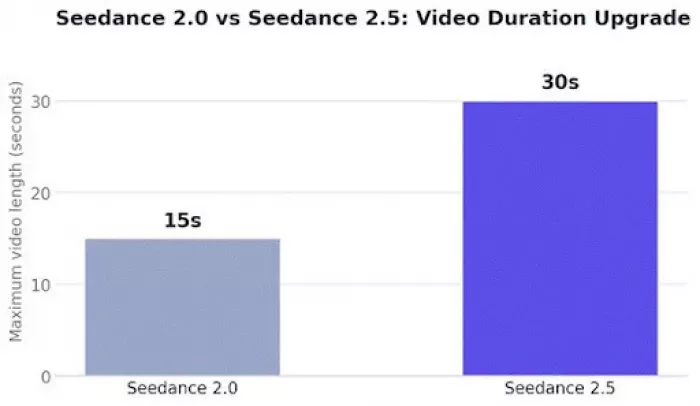
As you can see in the above chart, Seedance 2.5 doubles the available video duration compared with Seedance 2.0. That extra time can make a big difference when you are building ads, explainers, product videos, or social media clips.
More References Mean More Control
The other big change is how much you can hand the model. Seedance 2.5 supports up to 50 multimodal reference assets, and each type does a different job. A text prompt tells the model what you want, an image reference shows what something should look like, a video reference guides motion and camera direction, and an audio reference guides mood, rhythm, music, or dialogue timing.
This matters because real video work rarely fits one reference. A brand can keep packaging consistent, a fashion creator can guide outfit and movement, and a marketer can add music to guide pacing. That mix is what multimodal AI video generation is about.
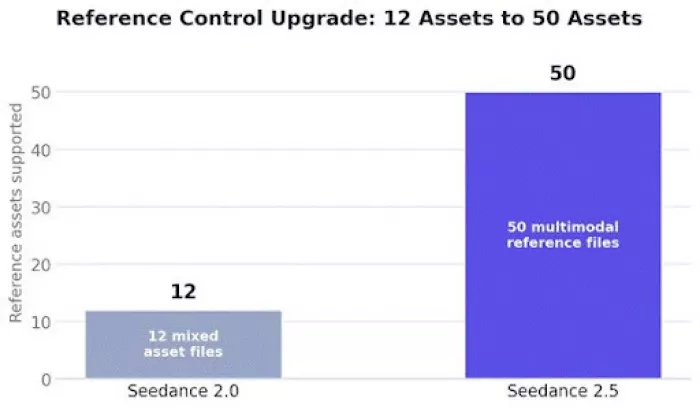
As you can see in the above chart, Seedance 2.5 gives creators much more reference space. This matters because real video work often needs more than one product image, one style reference, or one audio direction.
Better Continuity Makes Longer Videos More Useful
A longer AI video only helps if it holds together from start to finish, so continuity becomes the deciding factor. It covers character consistency, product consistency, lighting, camera movement, scene structure, multi-shot flow, and style continuity. When any one breaks, the video usually becomes unusable.
Picture the failures. If a bottle changes shape halfway through an ad, the ad is done. If an avatar face shifts between shots, the viewer stops trusting it. Seedance 2.5 improves continuity across longer 30-second videos, with stronger local edit consistency across characters, products, scenes, and styles. That helps storytelling, product demos, and multi-shot concepts, where AI video continuity is the whole game.
Audio Timing Is Now Part of the Upgrade
AI video is not only about what you see. A clip feels finished when motion, sound, music, dialogue, and pacing line up. That means sound effects, lip-sync where available, audio-aware motion, beat timing, and less post-fix cleanup afterward.
Some examples help. A product ad feels better when cuts land on the beats, and a dance clip needs body movement to match the rhythm. When the model handles more of this, you spend less time fixing timing later.
4K-Ready Quality Helps With Ads, Products, and Cinematic Clips
Sharper output is really about whether the video survives a close look. Seedance 2.5 is designed for sharper, 4K-ready visual quality, and that shows in fine details: product packaging, jewelry shine, device edges, fabric, makeup, cinematic lighting, and avatar face clarity. It will not be perfect every time, but the ceiling is higher.
This matters because brands need videos for landing pages, social ads, ecommerce pages, YouTube, Reels, Shorts, and campaigns, where a blurry clip stands out in the wrong way. Cleaner AI product videos hold up better where people actually see them.
Where the Upgrade Shows Up in Real Use Cases
The upgrade is easier to understand through the work it supports. Product ads benefit from the 30 seconds, reference control, and steadier consistency. AI UGC-style videos feel more natural with better motion and timing. AI avatar videos benefit from better dialogue flow and audio-aware timing. Ecommerce videos benefit from product references and sharper visuals.
Fashion and beauty videos benefit from stable style, lighting, and movement. Music and dance clips benefit from beat-matched motion. Cinematic videos benefit from longer continuity and camera direction. Tutorials benefit from more time and a clearer flow. Social hooks benefit from all of it at once, since each was held back by something Seedance 2.5 improves.
Example Workflow: Creating a Product Video With Seedance 2.5
Let us walk through a realistic example: a product video for a premium wireless earbud brand.
The process looks like this. Upload product images from different angles, add a style reference for a clean tech ad, and add an audio reference with modern electronic music. Write a prompt describing the flow. Choose 9:16 for Reels or TikTok, or 16:9 for YouTube. Generate, then review product shape, logo, lighting, motion, and CTA space, and refine if needed.
Here is a sample prompt you could start from:
Sample prompt Create a 30-second premium product video for wireless earbuds. Start with a close-up of the earbuds opening inside a sleek charging case, then show a smooth rotation shot, a lifestyle moment with a person using them during work, and a final clean product shot with space for a CTA. Keep the product shape consistent, lighting modern, motion smooth, and mood premium. Format: 9:16. |
This prompt works because it gives Seedance 2.5 the product, camera movement, scene order, style, duration, format, and ad purpose in one place. That is a lot of text to video guidance in a few lines.
For creators who want to test different prompts, product angles, and reference combinations, the current offer includes 30 days of Unlimited Seedance 2.5 Generation, which can make experimentation easier.
A Simple 30-Second Video Structure Creators Can Follow
If you are not sure how to fill 30 seconds, this simple structure is a good starting point.
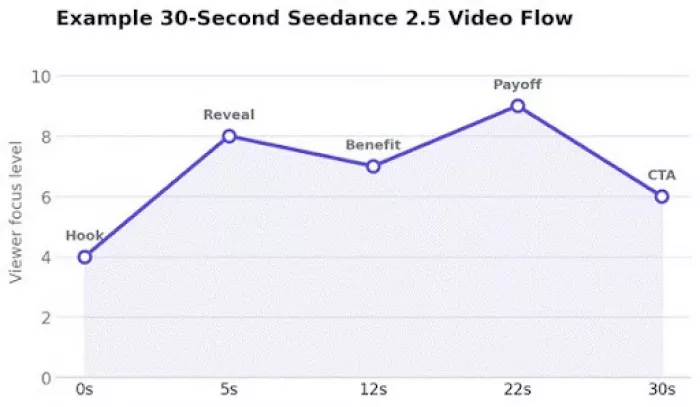
As you can see in the above chart, a 30-second Seedance 2.5 video can move from hook to product reveal, benefit, visual payoff, and CTA without feeling too rushed. This is only a planning example, not external performance data.
The first 0 to 5 seconds is your hook, where you earn attention. From 5 to 12 seconds you handle the product or subject reveal. From 12 to 22 seconds you cover the benefit, story, or main action. From 22 to 30 seconds you land the payoff or CTA. Shift these to fit your idea, but the shape holds up for image to video and text-led ads alike.
The Upgrade Also Helps Non-Technical Creators
You do not need to be a technical editor here. Seedance 2.5 lets you start from what you already have. Instead of writing one perfect long prompt, you can begin with existing images, product shots, video references, and audio files. Some users may prefer to upload assets and guide the model visually rather than build a complex prompt. Both paths can reach a usable result.
The 80% off Promotion can also help creators and small teams explore the Seedance 2.5 upgrade without treating every test as a major cost. That matters most for people still learning which prompts and references work for their style.
3D and Blender-Style Thinking Fits Into This Upgrade
If you think in 3D or Blender-style workflows, Seedance 2.5 fits that way of planning too. It can help visualize CG-style scenes, product reveals, cinematic camera movement, fantasy environments, and animated concepts, which supports concept testing before you commit to heavier 3D production. A product animator can test a rotating sneaker reveal before building a full 3D scene.
One honest caveat: Seedance 2.5 is not a Blender replacement. It is better explained as a tool for early visual planning, scene direction, and 3D-style concept exploration, not final CG rendering.
Best Formats for Different Video Needs
The same idea can be shaped for different platforms just by changing the frame. Seedance 2.5 supports 16:9, 9:16, 1:1, 4:3, 3:4, and 21:9.
Best Seedance 2.5 Formats by Use Case
| Use Case | Suggested Aspect Ratio | Why It Works | Example |
| TikTok, Reels, Shorts | 9:16 | Fills the vertical mobile screen | A 30-second product hook for Reels |
| YouTube video | 16:9 | Standard widescreen for longer viewing | A tech explainer on a channel |
| Website product video | 16:9 | Fits neatly into page layouts | A hero video on a product page |
| Paid social ad | 9:16 or 1:1 | Matches most feed and story placements | A scroll-stopping promo clip |
| AI avatar explainer | 9:16 | Keeps focus on a talking presenter | An avatar walking through one feature |
| Cinematic concept | 21:9 | Wide frame for a filmic look | A moody brand teaser |
| Square ecommerce creative | 1:1 | Works across feeds and catalogs | A clean loop of a product turning |
As you can see in the above table, the same Seedance 2.5 video idea can be shaped differently depending on where it will be published.
A Quick Visual Breakdown of the Upgrade
If you want the upgrade summed up in one picture, here is a simple breakdown.
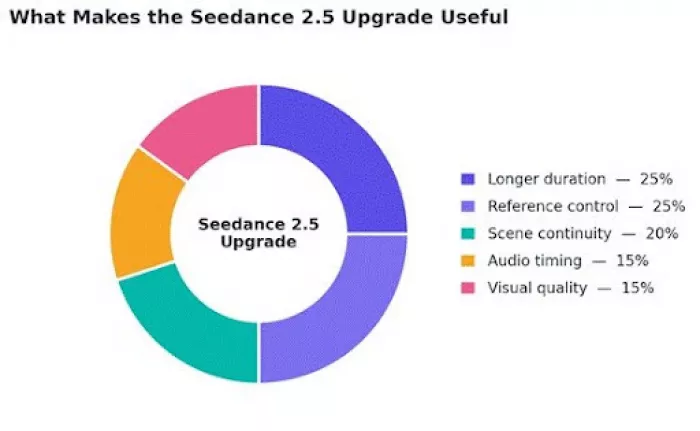
As you can see in the above chart, the Seedance 2.5 upgrade is not only about video length. The bigger value comes from the way duration, references, continuity, audio, and visual quality work together. This chart is a simple editorial breakdown, not external market data.
No single slice carries the whole thing. Longer duration and reference control matter most, but continuity, audio timing, and visual quality turn a longer clip into something you can actually publish.
Availability Inside the Creative Workflow
Seedance 2.5 on Topview helps creators use the model as part of a complete AI video workflow instead of as a standalone video generator.
This is more useful than it might seem. Creating videos often involves more than generation—you may need to test prompts, edit clips, create ads, work with AI avatars, and prepare videos for publishing. When these features are available in one workflow, you can go from an idea to a finished video without switching between multiple tools.
What to Check Before Publishing a Seedance 2.5 Video
Even with these upgrades, a human still needs to look before anything goes public. The model gets you most of the way, not all the way. Run through a quick checklist before you publish:
- Product shape consistency
- Logo clarity
- Text readability
- Face and hand quality
- Audio timing
- Scene transitions
- Lighting consistency
- CTA space
- Brand safety
- Copyright-safe references
- Platform format
- Commercial-use terms based on your plan
The upgrade makes AI video creation far more usable, but still review the final video before putting it into ads, product pages, or public campaigns. A two-minute check saves a lot of trouble later.
What This Upgrade Really Means
Bring it back to the title. Seedance 2.5 counts as an upgrade because it fixes the things that usually stop AI video from becoming useful: short duration, limited control, random changes, weak continuity, poor audio timing, and low product consistency. Any one of those can send a clip to the trash.
It answers them directly, with 30-second generation, up to 50 reference assets, better continuity, audio-aware motion, sharper 4K-ready quality, faster previews, and broader use cases. That is why the AI video upgrade behind it feels practical rather than just impressive. Topview Canvas and Topview Drama Studio will be supported by Seedance 2.5, giving creators more ways to use the model across different creative workflows.
Final Thoughts
The AI video upgrade behind Seedance 2.5 is not one standout feature. It is the combination: longer videos, more references, better continuity, stronger audio timing, sharper visuals, and more practical workflows working together. That changes the day-to-day experience, giving you more room to plan, more control as you shape the clip, and fewer surprises when you review it.
Seedance 2.5 feels important because it moves AI video closer to something creators can actually plan, guide, review, and publish.
FAQ
What is the main upgrade in Seedance 2.5?
It improves several things together: 30-second videos, up to 50 reference assets, better continuity, audio-aware timing, and sharper 4K-ready visuals. The value is a more usable result, not one feature.
How is Seedance 2.5 different from Seedance 2.0?
Seedance 2.0 allowed 15-second videos and 12 mixed assets. Seedance 2.5 doubles duration to 30 seconds, raises references to 50 multimodal assets, and adds sharper output, stronger continuity, and better audio timing.
Does Seedance 2.5 support audio references?
Yes. An audio reference can guide mood, rhythm, music, or dialogue timing, which helps motion and cuts line up with the sound.
Does Seedance 2.5 still need human editing?
Yes. Review product shape, faces, audio timing, and format before publishing, especially for ads and product pages.
Comments