Table of Contents
- The five levels of AI photo editing
- Three questions that tell you when an edit becomes a fake
- Same edit, different verdict: what is allowed where
- Five real cases where the line was crossed
- What your editing app writes into the file
- What the law says about AI-edited photos in 2026
- How to check whether a photo has been AI-edited
- Before you export your own edit
- Final verdict
1 Correct | 2 Retouch | 3 Remove | 4 Add | 5 Fabricate | |
| News photos and evidence | Accepted | Faking | Faking | Faking | Not a photo |
| Ads and property listings | Accepted | With a label | With a label | With a label | Not a photo |
| Personal photos | Accepted | Accepted | Accepted | If nobody is misled | Not a photo |
For the past few weeks I have been running the same batch of photos through four editors: Generative Fill in Photoshop, Magic Editor in Google Photos, Clean Up on an iPhone and Generative Edit on a Galaxy. Nothing exotic. Holiday pictures, a few portraits, some rooms I had photographed for a rental ad. The edit that stayed with me was a small one. I circled a stranger on a beach and he was gone in about three seconds. Better photo, and I felt fine about it. Then I selected the flat gray sky, typed "golden sunset" and got an evening that never happened over a beach I really stood on. Same app, same effort. Only the second one felt like lying, and it took me a while to explain why. That gap is what this guide is about. The tools no longer slow anyone down, so the judgment has to come from the person holding the phone. What follows is the framework I ended up with, checked against rules that already exist: news agency codes, contest entry rules, the labels each app writes into your file, and laws that took effect this year. | 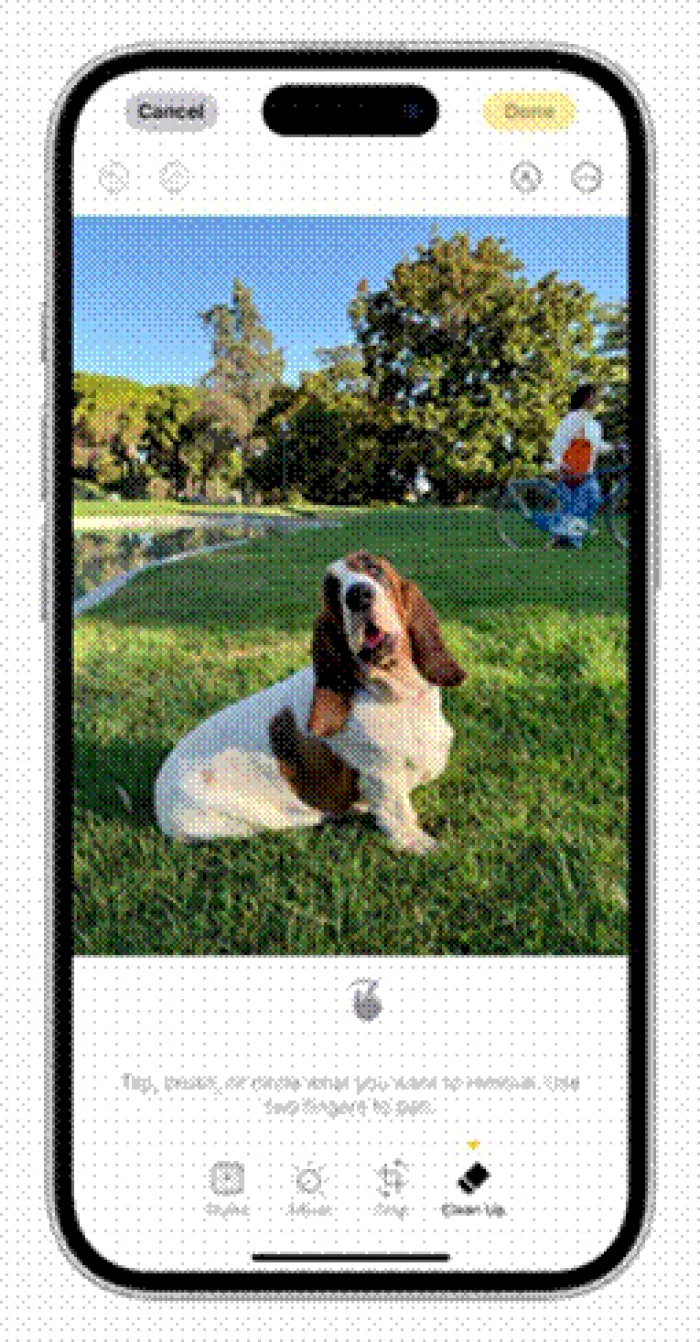 Level 3 in one gesture. Clean Up on an iPhone asks you to tap, brush or circle whatever you want gone. |
The short answer An AI edit becomes faking when three things are true at once: it changes what a viewer would believe happened, the viewer expects the photo to be a record, and nobody tells them. Fixing light and color almost never meets that test. Removing things depends on where the photo is headed. Adding things that were never there meets it the moment the image is offered as news, proof, a product or a property. |
The five levels of AI photo editing
Every tool I tried does some mix of these five jobs. The further down you go, the less the picture records a scene and the more it records what you wanted.
Level 1 Correct | Exposure, white balance, crop, straighten, noise reduction. The scene is untouched. You are repairing what the sensor got wrong. Auto and Enhance buttons, Lightroom Denoise | Accepted almost everywhere The AP and World Press Photo both allow it. |
Level 2 Retouch | Smoother skin, whiter teeth, a slimmer jaw or waist. The person was there, only not quite like that. Beauty modes, Facetune, Photoshop Neural Filters | Depends on the setting Routine in portraits. Needs a label in paid ads in Norway. Not allowed in passport photos. |
Level 3 Remove | Erasing a passer-by, a trash can, a power line. Nothing invented goes in, but something real comes out. Apple Clean Up, Google Magic Eraser, Photoshop Remove tool, Samsung Object Eraser | Depends on the setting Harmless in a family album. In a news photo it ends careers, and in a California property ad it has to be disclosed. |
Level 4 Add or replace | A new sky, furniture in an empty room, a bigger crowd, a person merged in from another frame. The photo now shows something the camera never saw. Photoshop Generative Fill, Magic Editor Reimagine, Samsung Generative Edit, Apple Extend | Faking unless labeled Most real-world fakes start here. AI upscalers belong here too, because they invent detail. |
Level 5 Fabricate | The whole frame is generated from a prompt, or so much of it that no original scene survives. Firefly, Midjourney and other text to image tools | An illustration, never a photo Nothing wrong with making one. The fake is the word "photograph" in the caption. |
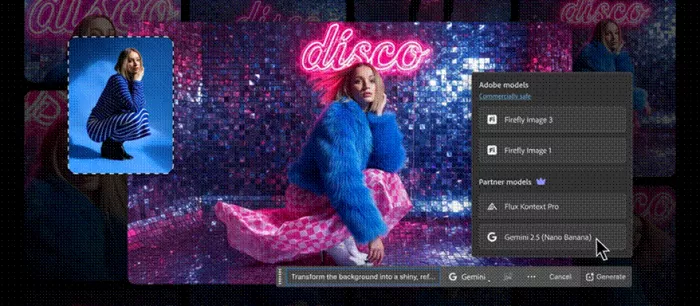
Level 4 in Photoshop. Generative Fill's task bar takes a prompt such as "Transform the background" and now offers Adobe Firefly or partner models, Gemini and Flux among them. Image: Adobe
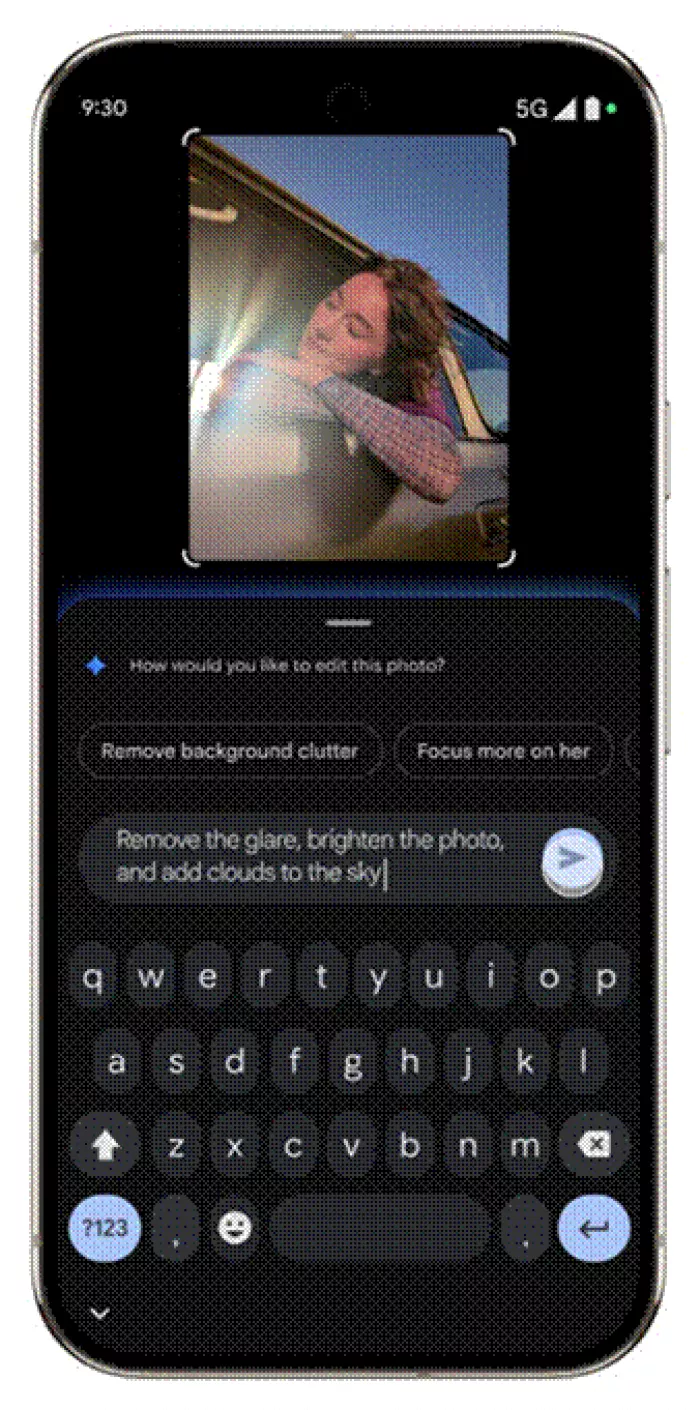 | One sentence, three requests This is the Help me edit box in Google Photos. The prompt on screen reads: remove the glare, brighten the photo, and add clouds to the sky. The first two are repairs. The third puts something in the frame that was never there, and nothing on screen marks the jump from level 1 to level 4. |
Three questions that tell you when an edit becomes a fake
Levels describe the edit. These questions describe the harm. I ask them in this order.
Does it change what happened? Light and color change how a moment looks. Adding, removing or moving things changes what the moment was. Apple's Craig Federighi made the same point to the Wall Street Journal in 2024 about Clean Up: "that water bottle was there when you took the photo." Two years on, iOS 27 added Extend and Reframe, which generate new pixels at the edges of a shot. Even the most cautious phone maker now invents some of the picture. |
Does the viewer expect a record? A birthday post and a damage claim can be the same JPEG. What differs is the promise attached. News, listings, product shots, ID photos, evidence and documentary contests all promise that a camera saw this. |
Would anyone decide differently if they knew? Think of a buyer, a voter, an insurer, a judge or a date. If the honest version would change their choice, the edit is doing the work of a lie. A quick self-test: would you be comfortable posting the original next to it? |
| Three yeses and no disclosure make a fake. Add a clear label and the same image becomes an illustration. |
Same edit, different verdict: what is allowed where
This is the table I wish I'd had at the start. The edit stays the same in every row. The verdict changes with where the file is headed.
| Where the photo is going | Accepted | Counts as faking | Who says so |
|---|---|---|---|
| News and documentary | Cropping, toning, color fixes, sensor dust removal | Adding or removing any element, even your own shadow | AP code of ethics. The agency dropped a freelancer in 2011 for cloning out his shadow |
| Documentary contests | Denoise, auto levels, local adjustments | Generative fill, plus AI upscalers such as Adobe Super Resolution and Topaz Photo AI | World Press Photo entry rules |
| Passport and ID photos | Nothing. Submit the original file | Any filter, retouch, background fix or AI tool | US State Department photo guidance |
| Property listings | Lighting, white balance, exposure, cropping | Virtual staging, greener lawns, deleted wires or new window views with no disclosure | California AB 723, in force since January 1, 2026 |
| Paid ads and influencer posts | Normal color work | Reshaped bodies or altered skin with no label | Norway's Marketing Act since July 2022. France has had a similar rule since 2017 |
| Insurance and legal evidence | The untouched file | Any edit to damage, dates or plates | Fraud law. Allianz UK logged a 300% jump in doctored claim images between 2021-22 and 2022-23 |
| Personal and social posts | Almost anything | Edits that mislead people about a real person or event | Platform policies. Meta apps may add an "AI info" tag |
Five real cases where the line was crossed
None of these needed a villain, only ordinary tools and a misjudged setting.
| March 2023 | Samsung's moon shots Reddit user ibreakphotos blurred a moon picture until no detail was left, then photographed the screen with a Galaxy S23 Ultra. The phone returned craters that were not in the source. Samsung replied that Scene Optimizer uses AI to enhance detail, applies no overlay and can be switched off. What it shows: a camera can reach level 4 before you open an editor. |
| April 2023 | The prize Boris Eldagsen turned down His image The Electrician won the creative open category at the Sony World Photography Awards. He then revealed it was AI generated and refused the award, saying AI images and photographs should not compete. What it shows: level 5 can get past expert judges. |
| March 2024 | The Princess of Wales family portrait Kensington Palace released a Mother's Day photo. Within hours AP, Reuters, AFP and Getty withdrew it. The Princess apologized the next day and said she sometimes experiments with editing. AFP's news director later said the palace was no longer a trusted source. What it shows: no AI and no malice required. A tidy-up went into a level 1 channel. |
| June 2024 | A real flamingo in an AI contest Miles Astray entered a genuine photograph in the AI category of the 1839 Awards. It took bronze and the People's Vote before he owned up and was disqualified. What it shows: mislabeling cuts both ways. The label is the promise. |
| July 2024 | Meta's "Made with AI" tag Photographers found real pictures tagged after minor Photoshop touch-ups that used generative tools. Meta renamed the tag "AI info". What it shows: labels cannot yet tell a removed dust spot from an invented scene. |
What your editing app writes into the file
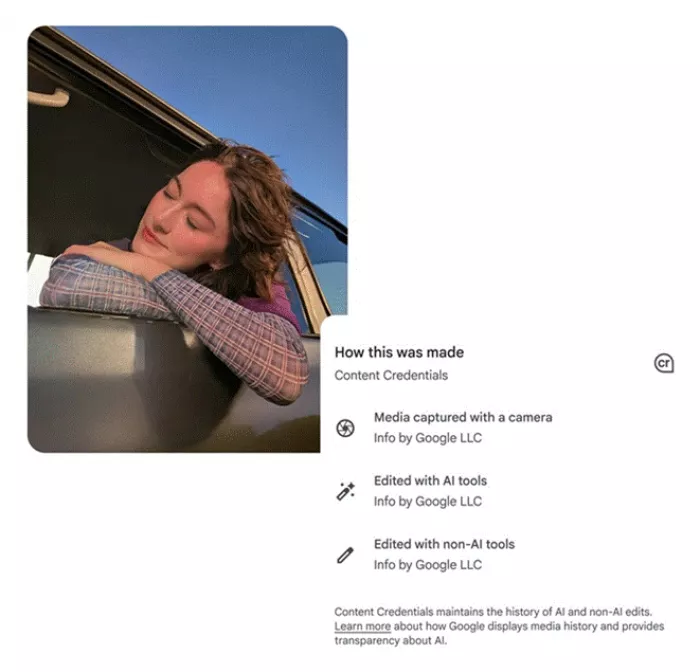
When the Pixel 9 launched in 2024, reporters at The Verge used its Reimagine tool to add car wrecks and drug paraphernalia to ordinary photos with a text prompt. That is level 4 on a phone, in seconds. The industry's answer has been provenance labels. Here is what each tool I used leaves behind.
| App | AI features | What gets marked | Where you can see it |
|---|---|---|---|
| Adobe Photoshop | Generative Fill, Generative Expand | Content Credentials, attached automatically when you export a JPG or PNG | Any Content Credentials reader |
| Google Photos | Magic Editor, Reimagine, Help me edit | IPTC metadata for AI edits, an invisible SynthID watermark on Reimagine edits, and C2PA credentials starting with Pixel 10 | The photo's details panel, plus credential readers |
| Apple Photos | Clean Up, plus Extend and Reframe in iOS 27 | A "Modified with Clean Up" note and a metadata flag. Apple says SynthID marking arrives in an update later in 2026 | The Photos info panel |
| Samsung Gallery | Generative Edit, Sketch to Image | A visible "AI-generated content" watermark in the bottom-left corner, plus C2PA metadata on Galaxy S25 and One UI 7 phones | On the image itself and in Gallery details |
None of this is tamper-proof. Android Authority removed the Content Credentials from a Pixel 10 photo with a single ExifTool command, leaving the other metadata intact. A screenshot does the same job, and a crop takes care of Samsung's corner watermark. Google also says SynthID can miss very small edits. The Pixel 10 goes furthest: it signs every photo and tags even untouched shots as computational capture. Read a credential as good evidence that a file is what it claims to be. A missing credential tells you nothing.
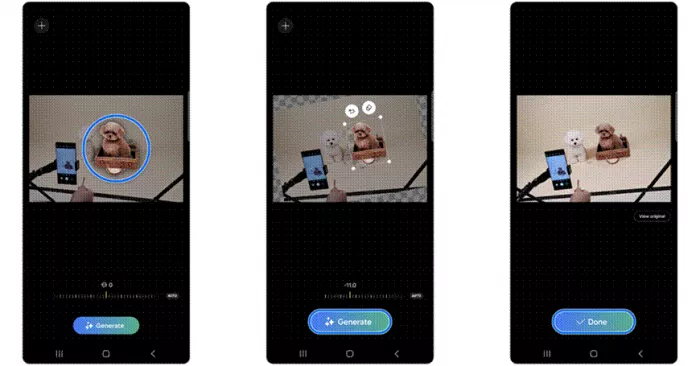
Samsung's Generative Edit in three taps. Circle the subject, drag or resize it, then Generate. The saved copy carries a watermark in the bottom-left corner.
What the law says about AI-edited photos in 2026
Most edits are a question of ethics. A few are now a question of law. This is orientation, not legal advice.
| Rule | Where | What it requires | In force |
|---|---|---|---|
| AI Act, Article 50 | EU, including anyone whose content reaches EU users | Deepfakes must be disclosed: AI-made or AI-altered images that resemble real people, places or events and would pass as authentic. AI tools must also mark output in machine-readable form. Fines reach €15 million or 3% of global turnover | August 2, 2026. Tools already on sale have until December 2, 2026 for marking |
| TAKE IT DOWN Act | United States | Publishing intimate images of a person without consent is a federal crime, AI-made ones included. Platforms must remove them within 48 hours of a valid request | Signed May 19, 2025. Platform duty since May 19, 2026 |
| AB 723 | California | Agents must flag digitally altered listing images and link to the unaltered originals | January 1, 2026 |
How to check whether a photo has been AI-edited
1 Look for Content Credentials. Drop the file into the Verify tool at contentcredentials.org, or open the details panel in Google Photos or Samsung Gallery. A signed credential lists the device and any AI tools used.
2 Read the platform label. "AI info" on Instagram or Facebook means the file carried an AI signal when it was uploaded. It says nothing about how much was changed.
3 Check the physics. Shadows that disagree, reflections that miss a new object, smeared texture where something used to be, edges that do not line up. A misaligned sleeve cuff is what gave away the palace photo.
4 Find the first appearance. A reverse image search often turns up an earlier, unedited version.
5 Ask for the original. For a listing, a claim or anything you are paying for, this is a fair request.
Before you export your own edit
Fine without a label • Exposure, color, crop and noise fixes • Removing sensor dust, or a stray passer-by from a personal photo • Light retouching that a portrait client asked for | Label it, or do not send it • Added skies, people, furniture or products • Listing photos where something was added or removed • Any altered photo going to a news desk, contest, insurer, court or government office |
Final verdict
After a few weeks of doing this every day, here is where I have landed. How much AI went into an edit turned out to be a poor test. Where the photo was headed told me far more. I made level 4 edits I would happily show anyone, because they were plainly playful or carried a label. I also kept coming back to the palace photo, where a little tidying, sent to the wrong place, was enough for four news agencies to pull a royal portrait within hours. Fix freely. Remove with some thought about where the file is going. Add only when you are willing to say so. That is the whole rule I work by now. If I would hesitate to put the original beside the edit, I label it or I undo it. What surprised me most was how little the built-in labels protect anyone. I keep Content Credentials switched on in Photoshop and I think you should too. But the metadata came off with a screenshot or one command, and the corner watermark came off with a crop. For now, honesty in an edited photo rests with whoever exports the file. I find that a little uncomfortable, and I also think it is accurate. |
Comments