Table of Contents
- Introduction: Because a Four-Year Degree Cannot Keep Up With a Four-Month Sprint in AI
- Market Overview: Numbers Worth Knowing Before You Sign Up Anywhere
- Platform Category Breakdown
- Pricing Architecture Across the Market
- Feature Evolution Timeline
- Coursera
- Udemy
- LinkedIn Learning
- Timtis
- Pluralsight
- Skillshare
- Platforms 7 through 10: Additional Strong Contenders
- edX
- Codecademy
- MasterClass
- Comprehensive Platform Comparison
- Critical Comparison: Strengths, Weaknesses, and Decision Matrix
- Decision Matrix
- Should You Switch? Recommendations by User Type
- Final Verdict: Who Should Use Which Platform
- The Clear Verdicts
- The Bottom Line
Introduction: Because a Four-Year Degree Cannot Keep Up With a Four-Month Sprint in AI
Here is a fun thing to do at a dinner party: ask everyone how they learned their most marketable skill. Statistically, fewer and fewer people will point to a university classroom. They will mention a YouTube rabbit hole at 2 a.m., a certification they finished on a train commute, a cohort program they joined because LinkedIn kept showing it to them. Online learning has quietly become the dominant mode of professional skill acquisition, and the market data makes the case loudly.
The global e-learning market was valued at approximately $399 billion in 2022 and is projected to reach $1 trillion by 2032, representing a compound annual growth rate (CAGR) of around 13.5%. That is not the growth of a niche product. That is the growth of an industry absorbing a fundamental behavioral shift.
The driver behind this shift is not laziness or screen addiction. It is the acceleration of skill obsolescence. The World Economic Forum estimated in its 2023 Future of Jobs report that 44% of workers' core skills will be disrupted within five years. The half-life of a technical skill in software engineering, data science, and digital marketing is now estimated at roughly 2.5 to 5 years. Companies cannot wait for universities to update their curricula, and neither can workers.
Simultaneously, the learner profile has changed. The modern professional learner is not a fresh graduate. They are a 34-year-old product manager trying to understand generative AI, a nurse who wants to transition into health informatics, a freelancer in Nairobi building a data analytics portfolio to pitch to global clients. These learners want flexibility, practicality, credentials that employers recognize, and ideally, a price point that does not feel like a second mortgage.
Online learning platforms have responded. What began as simple video-lecture repositories have evolved into sophisticated ecosystems featuring adaptive learning paths, AI-powered mentorship, peer cohort collaboration, verified credentials, employer marketplaces, and increasingly, hands-on project environments. The competition is fierce, the differentiation is real, and the stakes for learners choosing the right platform are higher than ever.
This article evaluates ten platforms that represent the current state of that market, from the category giants processing tens of millions of learners to newer entrants carving out genuinely differentiated positions. Every tool reviewed here was assessed across five dimensions: learning experience quality, content depth and currency, pricing value, credential credibility, and platform usability. The goal is not a press release. It is an honest map for someone deciding where to spend their time and money.
Market Overview: Numbers Worth Knowing Before You Sign Up Anywhere
Before diving into individual platforms, it helps to understand the structural realities of the online learning market. Platforms are not equivalent, and their positions reflect deliberate strategic choices about learner segments, revenue models, and content philosophies.
Market Size and Growth Trajectory
The table below captures the global e-learning market's growth trajectory based on aggregated industry data, positioning each year against the growing learner population and average revenue per user benchmarks.
Global E-Learning Market Growth (2020-2028E)
| Year | Market Size ($B) | Learners (M) | CAGR (%) | Avg ARPU ($) | Mobile Share (%) |
| 2020 | $243B | 850 | — | $112 | 42% |
| 2021 | $278B | 980 | +14.4% | $128 | 48% |
| 2022 | $399B | 1,150 | +13.5% | $147 | 54% |
| 2023 | $457B | 1,310 | +14.5% | $162 | 59% |
| 2024 | $521B | 1,490 | +14.0% | $179 | 63% |
| 2025E | $595B | 1,680 | +14.2% | $198 | 67% |
| 2028E | $869B | 2,200 | +13.5% | $248 | 74% |
Note: Market figures are aggregated estimates based on publicly reported data from industry research firms. ARPU = Average Revenue Per User.
Platform Category Breakdown
The market is not monolithic. Platforms occupy distinct strategic positions based on their content model, monetization strategy, and target learner. Understanding these buckets helps explain why comparing Coursera and Skillshare is a bit like comparing a law library to a pottery workshop. Both are valuable. Neither substitutes for the other.
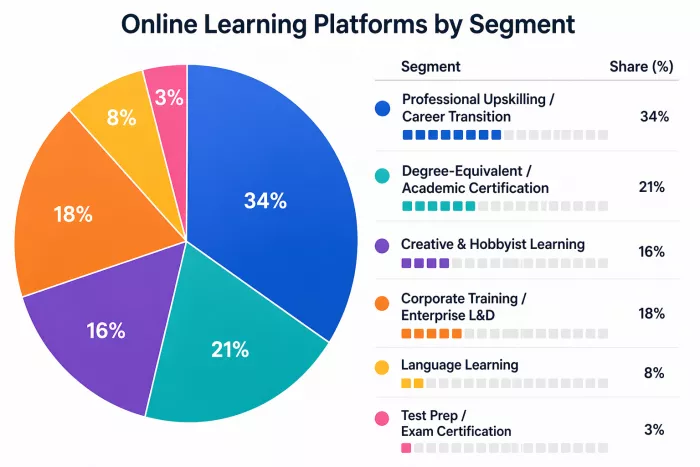
Online Learning Platform Market Segmentation by Learner Intent (2024)
| Segment | Share (%) | Visual |
| Professional Upskilling / Career Transition | 34% | ■■■■■■■□□□□□□□□□□□□□ |
| Degree-Equivalent / Academic Certification | 21% | ■■■■□□□□□□□□□□□□□□□□ |
| Creative & Hobbyist Learning | 16% | ■■■□□□□□□□□□□□□□□□□□ |
| Corporate Training / Enterprise L&D | 18% | ■■■■□□□□□□□□□□□□□□□□ |
| Language Learning | 8% | ■■□□□□□□□□□□□□□□□□□□ |
| Test Prep / Exam Certification | 3% | ■□□□□□□□□□□□□□□□□□□□ |
Pricing Architecture Across the Market
Pricing in the online learning space has evolved from simple pay-per-course models to complex subscription tiers, freemium funnels, and employer-sponsored access. The following table maps the typical pricing bands across platform types.
Pricing Model Benchmarks by Platform Type (2025)
| Platform Type | Free Tier | Entry Paid | Mid-Tier | Premium/Pro | Enterprise |
| Mega-MOOC (Coursera/edX) | Audit Only | $29–$49/mo | $59–$99/mo | $399+/yr | Custom |
| Video Library (Udemy style) | No | $9.99–$24/course | $15–$30/mo sub | $25–$50/mo | $360+/yr/seat |
| Project-Based / Bootcamp-Style | Limited | $19–$39/mo | $49–$99/mo | $149–$299/mo | Custom |
| Creative/Hobbyist | Limited | $10–$19/mo | $16–$25/mo | $32/mo | N/A |
| AI-Personalized / New Gen | Yes | $0–$12/mo | $19–$39/mo | $49–$79/mo | $200–$500/seat/yr |
Feature Evolution Timeline
Platform features have evolved significantly over five years. What counted as a premium differentiator in 2019 is now considered table stakes. This timeline matters because it helps identify which platforms are leading versus reacting.
Feature Adoption Timeline Across the Online Learning Market
| Feature | 2019–2020 | 2021–2022 | 2023–2024 | 2025+ |
| Video-on-Demand Courses | Emerging | Standard | Universal | Universal |
| Verified Certificates | Premium Only | Mainstream | Universal | Universal |
| Live Cohort / Bootcamp Mode | Rare | Growing | Mainstream | Standard |
| Mobile App with Offline Access | Limited | Mainstream | Universal | Universal |
| AI-Powered Recommendations | Experimental | Growing | Mainstream | Standard |
| Hands-On Project Environments | Rare | Emerging | Growing | Mainstream |
| AI Tutor / Chatbot Mentor | None | Experimental | Emerging | Growing |
| Employer Marketplace / Job Placement | None | Rare | Emerging | Growing |
| Skill Assessment / Gap Analysis | Basic | Moderate | Strong | Advanced |
Coursera
Overview
Coursera is, by almost any measure, the structural leader of the credentialed online learning market. Founded in 2012 by two Stanford professors, it has grown into a platform serving over 148 million registered learners as of 2024 across 7,000+ courses, 700+ Specializations, and 30+ degree programs offered in partnership with more than 325 universities and companies globally. Its model is fundamentally different from a content marketplace: Coursera does not let anyone upload a course. Institutional partnerships are the backbone, which means the content carries academic or corporate weight that freelance instructor platforms cannot match.
The platform sits at the intersection of two learner types: the individual professional seeking verifiable credentials for career advancement, and the enterprise or academic institution looking for a scalable upskilling solution. Coursera for Business serves over 8,900 businesses globally, and its Coursera for Campus product covers 3,000+ institutions. These numbers matter because they indicate where the real revenue growth is coming from, which in turn shapes product investment priorities.
Target Audience
Coursera's primary audience is the career-motivated professional or student who wants credentials that carry institutional weight. A secondary audience is enterprise learning and development managers who need compliant, trackable upskilling at scale. It is less well-suited for casual learners, pure hobbyists, or people looking for quick tactical tutorials. The platform's pacing and structure reflect its academic roots: structured modules, graded assignments, peer reviews, and deadlines create a learning environment that rewards commitment over convenience.
Real-World UI/UX Experience
The Coursera interface is clean and reasonably intuitive, though it carries the organizational complexity of a platform trying to serve individual consumers, enterprises, and academic institutions simultaneously. The homepage personalizes recommendations based on browsing history and stated goals, and the course player itself is well-designed: chapters are clearly structured, lecture videos support speed adjustment, transcripts are downloadable, and quizzes integrate naturally into the flow.
One consistent friction point reported by learners is navigating the free audit versus paid certificate tracks. The platform has progressively restricted audit access over the years, and the distinction between what is free and what requires payment is not always transparent upfront. A learner who starts a course expecting free completion often encounters a paywall at the graded assignment stage. This is a deliberate business decision, but it creates a trust friction that shows up consistently in user feedback.

UX Observation: The mobile app handles video consumption well but the assignment experience on mobile is noticeably worse than desktop. Complex coding assignments and peer-reviewed projects almost always require switching to a browser.
Feature Deep Dive
Coursera's most significant feature advantage is the depth and credibility of its credentialing ecosystem. Professional Certificates from Google, IBM, Meta, and Salesforce have become genuinely recognized by HR departments, partly because Coursera has invested in employer-facing data showing completion rates and learner outcomes. The Google Data Analytics Certificate, for example, has over 2 million enrolled learners and is explicitly listed in job postings as an accepted qualification by hundreds of employers.
The Specialization format, which bundles 4 to 7 related courses into a structured learning path culminating in a capstone project, represents the platform's sweet spot for professional upskilling. Unlike individual courses, Specializations create a portfolio-building arc rather than just isolated knowledge checkpoints. The capstone projects are evaluated by peers and sometimes by automated graders, but the quality of feedback is inconsistent and has been a point of ongoing criticism.
Coursera's Guided Projects are a underappreciated feature: short, two-to-three hour hands-on exercises conducted inside a cloud-based workspace that the learner does not have to set up. For tools like Tableau, Python notebooks, or SQL, this removes the setup friction that stops many learners from completing projects. The catalog of Guided Projects has grown to 1,500+, though the depth varies significantly between providers.
In 2024, Coursera launched Coursera Coach, an AI assistant embedded in the learning interface that answers course-specific questions, helps with assignments, and surfaces related learning content. Early reception has been positive for concept clarification but mixed for complex problem-solving support.
Performance Insights
Coursera's course completion rates sit at approximately 15 to 20% for individual courses, which sounds low but is actually competitive for the MOOC market and well above the industry average of 5 to 12%. Specializations show higher completion rates of 35 to 45% among paid learners, which makes sense given the financial commitment. Paid learners are self-selected for motivation, and the platform's reminder system and deadline structure actively support sustained engagement.
For employer-recognized credentials, the Google Career Certificates have been the clearest outcome success story. A 2023 survey by Coursera found that 75% of Google Certificate completers reported a positive career outcome (new job, promotion, or raise) within six months. The methodology of this survey is worth scrutinizing since it is self-reported and conducted by the platform itself, but the directional signal is real. Independent analysis from LinkedIn Learning Insights confirmed that Google IT Support Certificate holders see a measurable uptick in recruiter contact rates.
Pricing Analysis
| Plan | Price | What's Included | Best For |
| Audit (Free) | $0 | Videos + readings only; no grading | Exploration only |
| Individual Course Certificate | $49–$199 | Full access + verified certificate | One-off credentials |
| Coursera Plus (Monthly) | $59/month | 7,000+ courses + all certificates | Active learners |
| Coursera Plus (Annual) | $399/year ($33.25/mo) | Same as monthly + 14-day refund | Committed professionals |
| Coursera for Business | $399/seat/year | Admin dashboard + analytics + teams | L&D teams 5–500 |
| Degrees (Online) | $9,000–$25,000 total | Full accredited degrees | Academic credentials |
The value case for Coursera Plus Annual is compelling for anyone planning to complete more than two or three certificates per year. At $399, it pays for itself at roughly two to three certificate-level courses that would otherwise cost $150 to $199 each. However, the monthly plan at $59 becomes expensive quickly for intermittent learners, and the content restriction of Paid-only tracks on many flagship courses reduces the perceived value of the audit option considerably.
Pros and Cons
| What Works Well | Where It Falls Short |
| Employer-recognized credentials from Google, IBM, Meta genuinely move the needle in hiring | Audit restrictions have tightened significantly over the past two years, reducing free access |
| Degree programs from accredited universities at a fraction of campus cost | Peer review quality is inconsistent, especially in non-English language cohorts |
| Coursera for Business delivers strong analytics and compliance tracking for L&D teams | Customer support response times are slow; resolving billing issues often takes multiple days |
| Guided Projects remove setup friction for hands-on technical exercises | Course catalog quality varies widely across institutional partners |
| Coursera Coach AI assistant adds a useful layer of in-course support | The platform UX is starting to feel cluttered as the catalog has grown |
User Sentiment
| Source | Rating | Sample Size | Key Sentiment |
| Trustpilot | 3.8 / 5 | 6,200+ reviews | Praised for credentials; billing complaints common |
| G2 (Business) | 4.5 / 5 | 2,100+ reviews | Enterprise users rate admin tools highly |
| Reddit (r/learnprogramming) | Mixed | ~4,500 mentions/yr | Love Google certs; frustration with audit walls |
| App Store (iOS) | 4.6 / 5 | 450K+ ratings | Strong video player praise; assignment UX criticism |
Rating: ★★★★☆ 4.2/5
Udemy
Overview
Udemy is the largest open marketplace for online courses globally, with over 213,000 courses, 74,000+ instructors, and more than 62 million learners as of early 2025. It operates on a fundamentally different model from credential-focused platforms: almost anyone can become an instructor, which means the content range is extraordinary and the quality variance is equally extraordinary. Udemy's power is breadth and price; its challenge is curation and consistency.
The platform's business has two distinct revenue streams. The consumer side operates primarily through perpetual course sales, often at discounted prices that are so frequent they are essentially the standard price. Udemy Business, the enterprise product, has grown to serve over 15,500 companies globally and represents an increasingly important share of total revenue.
Target Audience
Udemy serves a remarkably broad audience, which is both its strength and its complicating factor. Its most active users fall into three groups: individual professionals seeking tactical, immediately applicable skills (web development, Excel, Python basics); hobbyist learners exploring everything from chess strategy to guitar; and enterprise L&D teams that need breadth of coverage at manageable cost. What Udemy is not well-suited for is deep, sequenced learning in a single domain with guided mentorship and outcome tracking.
Real-World UI/UX Experience
The Udemy course player is among the best in the industry for raw video consumption. Playback speed controls (0.5x to 2x), auto-generated captions in multiple languages, downloadable resources, bookmarking, and a Q&A section that frequently has active instructor participation all contribute to a smooth experience. The platform's mobile app is consistently rated highly for offline access and clean navigation.
The weaknesses show up at the discovery layer. With 213,000 courses, finding the right one is a real challenge. Search results surface a mix of sponsored placements, bestseller flags based on historical sales rather than current quality, and courses with inflated review counts. Learners frequently report spending more time vetting courses before purchase than actually completing them. Udemy's filtering tools (by rating, by number of reviews, by date updated) help but are not decisive.
UX Observation: The Q&A sections in top-rated Udemy courses are often genuinely rich knowledge repositories. Instructors and community members answer questions that are essentially free supplemental content. This organic community layer is undervalued.
Feature Deep Dive
Udemy's lifetime access model is its most distinctive feature. Buy a course once, own it forever, including all future instructor updates. This model works surprisingly well for evergreen technical content. A Python fundamentals course purchased in 2020 that has been updated every six months provides sustained value in a way that a subscription model does not for someone who learns intermittently.
The Udemy Business product adds several meaningful layers: a curated catalog of approximately 26,000 courses vetted from the full 213,000, centralized team learning with tracking and reporting, custom learning paths created by L&D administrators, and Salesforce and Workday integrations that many enterprise buyers require. The curation difference matters. The 26,000-course Business catalog removes a significant share of the quality noise from the full marketplace.
Udemy launched Practice Tests and Coding Exercises as embedded course features that have added meaningful interactivity to technical content. The exercises run in-browser sandboxes for Python, JavaScript, SQL, and several other languages. The depth of these exercises varies by instructor, but the best ones genuinely function as mini-bootcamp environments within a single course.
In 2024, Udemy introduced Udemy AI, an in-course AI assistant that answers questions based on course content and suggests related material from the broader catalog. Usage data from Udemy's own reporting showed a 23% increase in course completion rates among learners who used the AI assistant feature during the first three months of its rollout, a compelling early signal.
Performance Insights
Udemy's overall course completion rates are difficult to cite precisely because the platform does not publicly disclose this data broken down by course type. Community estimates based on user surveys and instructor-shared analytics place overall completion at 7 to 15%, lower than Coursera but consistent with the non-deadline, self-paced format. Among Business subscribers, completion rates are reported to be meaningfully higher, approximately 25 to 35%, likely because organizational L&D programs create accountability structures around the content.
Value-per-dollar is where Udemy genuinely outperforms. A comprehensive 40-hour web development course that would cost $49 on sale (and rarely stays at the nominal $199 list price) represents a cost of learning that most alternatives cannot match. For learners with strong self-discipline and a clear skill target, the ROI is difficult to beat.
Pricing Analysis
| Model | Typical Price | Key Features | Value Verdict |
| Individual Course Purchase | $9.99–$29 (sale) | Lifetime access, all updates, certificate | Excellent for targeted learning |
| Udemy Personal Plan | $16.58/month (annual) | Access to 12,000+ top-rated courses | Good for active multi-course learners |
| Udemy Business Starter | $360/seat/year | 26,000+ curated courses, basic analytics | Solid entry for SMBs |
| Udemy Business Enterprise | Custom (est. $420–$600/seat/yr) | Full catalog, SSO, Salesforce/Workday integrations, advanced analytics | Best for mid-large enterprise |
Udemy's perpetual sale model is a known quirk that veteran users adapt to: almost no one pays the list price, and waiting 24 to 48 hours after adding a course to your cart almost always surfaces a coupon. The platform's frequent promotional events (Black Friday, New Year, etc.) routinely drop courses to $9.99 to $14.99 regardless of listed price.
Pros and Cons
| What Works Well | Where It Falls Short |
| Lifetime access model is genuinely differentiated and valuable for evergreen content | Quality variance across 213,000 courses is dramatic; vetting takes significant time |
| Perpetual sale pricing makes professional skills accessible at very low cost | Certificates carry minimal employer recognition compared to institution-backed credentials |
| Course player and mobile experience are among the best in class | No structured learning paths in the consumer tier; entirely self-directed |
| Udemy Business curation and analytics solve the quality problem for enterprise | Instructor quality and update frequency varies enormously across catalog |
User Sentiment
| Source | Rating | Sample Size | Key Sentiment |
| Trustpilot | 3.5 / 5 | 8,900+ reviews | Value praised; quality inconsistency noted |
| G2 (Business) | 4.4 / 5 | 1,900+ reviews | Business users praise breadth; want deeper analytics |
| App Store (iOS) | 4.7 / 5 | 580K+ ratings | Best-in-class mobile player; search frustrations noted |
Rating: ★★★★☆ 4/5
LinkedIn Learning
https://www.linkedin.com/learning
Overview
LinkedIn Learning is less of a standalone product and more of a strategic extension of LinkedIn's professional network. Formerly Lynda.com (acquired by LinkedIn in 2015, and subsequently by Microsoft in 2016), it has a catalog of approximately 22,000 expert-led courses and a unique distribution advantage that no other platform can replicate: native integration with the world's largest professional network.
The platform's key insight is that learning and career visibility are intertwined. When a LinkedIn Learning course is completed, the certificate appears on your LinkedIn profile automatically, indexed and visible to recruiters and connections. This social proof mechanism is the platform's most distinctive feature, and for professionals actively managing their LinkedIn presence, it creates a compelling reason to choose it over alternatives with richer content.
Target Audience
LinkedIn Learning targets working professionals who are already active on LinkedIn and motivated by career visibility. It is particularly strong for business, management, leadership, and soft skills content. Its technical catalog has improved substantially but still trails platforms like Coursera or Pluralsight in depth for specialized topics like machine learning, cloud architecture, or full-stack development. The ideal LinkedIn Learning user is a business professional or manager seeking structured, credible professional development that signals actively to their network.
Real-World UI/UX Experience
The interface is clean and professional, consistent with Microsoft's design language. Learning Paths are well-structured, and the course player handles videos smoothly with built-in transcripts, note-taking, and speed controls. The integration with LinkedIn's Skills assessments feature is genuinely useful: completing a LinkedIn Skill Quiz in, say, project management and then having the recommended learning content appear instantly creates an efficient feedback loop.
Where the experience falters is in discovery breadth and depth. The catalog, while high-quality, is curated to the point of sometimes feeling narrow for technically advanced learners. And unlike Udemy's community-driven Q&A or Coursera's peer review structures, LinkedIn Learning courses feel somewhat one-directional; the community engagement layer is thin.

UX Observation: The seamless certificate-to-LinkedIn-profile integration is genuinely frictionless and is the platform's single biggest conversion driver. Recruiters can see completed courses directly in search results.
Feature Deep Dive
LinkedIn Learning's most underappreciated feature is its Skills Gap Analysis tool, accessible to Premium or Business subscribers. It compares your current listed skills on LinkedIn with the skills required by job postings you are interested in and automatically recommends courses to close those gaps. For job seekers, this creates a precisely targeted learning agenda rather than a general browse-and-hope experience.
The platform's AI-powered learning personalization has improved significantly since Microsoft's integration of Azure OpenAI capabilities. Course recommendations now factor in your job title, career trajectory, connection activity, and explicit skill goals. For business-focused content, the recommendation quality is noticeably better than most competitors.
LinkedIn Learning for Organizations adds team-level insights: which employees are learning what, completion rates by team, skills gap overlays at the organizational level, and integrations with HRIS systems. Microsoft customers, particularly those using Microsoft Viva, get deeper integration with productivity data that helps L&D managers correlate learning activity with performance metrics.
Pricing Analysis
| Plan | Price | Includes | Best Fit |
| Free (limited) | $0 | ~100 free courses; LinkedIn integration | Sampling only |
| LinkedIn Premium Career | $39.99/month | Full Learning catalog + Premium features | Job seekers |
| LinkedIn Premium Business | $59.99/month | Learning + InMail credits + insights | Sales + networking professionals |
| LinkedIn Learning for Teams | $379.88/seat/year | Team analytics + custom paths + HRIS integrations | L&D teams (5–200 seats) |
| LinkedIn Learning for Enterprise | Custom | Full enterprise integration, Viva, SSO | Large orgs (200+ seats) |
At $39.99 per month for LinkedIn Premium Career, the value proposition depends heavily on whether you are actively job hunting. For active job seekers, the Skills Gap tool, InMail access, who-viewed-your-profile data, and Learning access together arguably justify the price. For passive learners, it is expensive compared to Udemy's per-course pricing or Coursera Plus's annual plan.
Pros and Cons
| What Works Well | Where It Falls Short |
| Certificate-to-LinkedIn integration is frictionless and adds genuine visibility | Expensive relative to learning content alone; value depends on LinkedIn Premium utility |
| Skills Gap Analysis tool is practically valuable for targeted upskilling | Technical depth trails Coursera, Pluralsight, and project-based platforms |
| Business/leadership/soft skills catalog is among the strongest available | Community engagement features are weak; courses feel like one-directional broadcasts |
| Microsoft ecosystem integration (Teams, Viva) is genuinely powerful for enterprise | Catalog of 22,000 courses is curated to a point where niche technical topics are often absent |
User Sentiment
| Source | Rating | Sample Size | Key Sentiment |
| G2 | 4.4 / 5 | 3,200+ reviews | Network integration praised; price/value debated |
| Trustpilot | 3.2 / 5 | 1,800+ reviews | Cancellation friction mentioned frequently |
| App Store (iOS) | 4.5 / 5 | 210K+ ratings | Clean interface; limited offline content noted |
Rating: ★★★◑☆ 3.9/5
Timtis
Overview
Timtis (timtis.com) is a newer entrant in the online learning space that has built a platform around a fairly specific thesis: that most learners need less content and more structure. Where the market leaders compete on catalog breadth, Timtis has focused on curated, outcome-oriented learning paths delivered through a clean, low-friction interface. The platform covers professional skills, tech fundamentals, and productivity topics, with an emphasis on practical application over passive video consumption.
The platform is still building out its content library relative to the giants, but its positioning is deliberately focused rather than comprehensively broad. For the right learner profile, this is not a limitation; it is the feature. Too many options is its own form of paralysis, and Timtis appears to understand this.
Target Audience
Timtis targets independent professionals, early-career learners, and small teams looking for structured learning without the complexity overhead of enterprise platforms or the content overwhelm of large marketplaces. It is particularly well-suited for learners who have tried broader platforms, felt lost in the catalog, and want a more guided experience with clearer progression markers.
Real-World UI/UX Experience
The Timtis interface is noticeably cleaner than many larger platforms. Onboarding is goal-directed: new users are asked about their current role, skill level, and learning objective before being presented with a recommended starting path rather than a full catalog browse. This reduces decision fatigue and creates a more intentional first experience.
The learning environment itself prioritizes readability and focus. Course content is broken into digestible segments with clear progress indicators, and the platform's design choices consistently prioritize the learning task over the merchandising of additional courses. There is none of the upsell noise that clutters the experience on larger platforms.
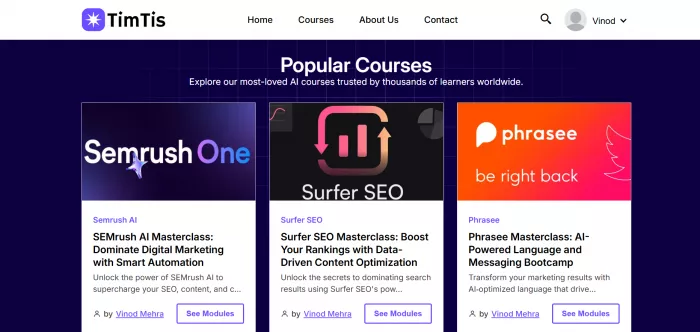
UX Observation: The onboarding flow at Timtis is one of the more thoughtfully designed in this category. Rather than overwhelming new users with a catalog, it asks four questions and delivers a concrete starting recommendation. Small detail, meaningful impact on completion intent.
Feature Deep Dive
Timtis places considerable emphasis on structured learning paths rather than individual courses as the primary unit. Paths have defined outcomes, estimated time commitments, and progress checkpoints that give learners a clearer sense of where they are in a journey. This structural clarity is genuinely useful for learners who struggle with the self-direction required on open marketplace platforms.
The platform includes practical exercises embedded within learning paths that push learners to apply concepts rather than just consume them. While the hands-on environments are not as technically sophisticated as Coursera's Guided Projects or DataCamp's in-browser coding environments, the exercise format is consistent and well-integrated into the content flow.
Timtis has also invested in a community layer that lets learners share progress, ask questions, and engage with instructors within the platform rather than being routed to external forums. For the learning community use case, this is a more integrated experience than most comparable platforms at a similar price point.
Performance Insights
As a newer platform, Timtis does not yet have the large-scale outcome data sets that established players publish. What is observable from user feedback patterns is that the structured path format drives higher stated completion intent at the point of enrollment, which correlates with actual completion. The curated approach also means that learners are less likely to be working through content that was last updated three years ago without realizing it.
For individual learners who are results-focused and benefit from structure, the platform performs strongly. For learners who want to browse broadly and self-assemble their curriculum, it will feel limiting.
Pricing Analysis
| Plan | Price | Includes | Best Fit |
| Free / Basic | $0 | Select course previews, limited path access | Platform exploration |
| Pro (Individual) | Competitive (check timtis.com) | Full path access, practical exercises, certificates | Individual professionals |
| Teams | Per-seat, contact for quote | Team tracking + shared paths + admin dashboard | Small teams (5–50) |
Timtis pricing is positioned accessibly relative to the large platform tiers, which aligns with its target of individual professionals and small teams. Exact pricing should be verified at timtis.com as the platform continues to iterate on its model. The value proposition is strongest for learners who prioritize structured guidance over catalog size.
Pros and Cons
| What Works Well | Where It Falls Short |
| Structured paths reduce decision fatigue and improve completion intent | Catalog breadth is smaller than established platforms; niche topics may not be covered |
| Clean, distraction-free UI prioritizes learning over upsell | Brand recognition is still building; certificates carry less employer name-recognition |
| Goal-directed onboarding creates a more intentional starting experience | Outcome data and completion statistics are limited compared to mature platforms |
| Integrated community layer is more cohesive than most platforms at similar price points | Advanced technical learners may find the hands-on environments less sophisticated |
User Sentiment
User feedback for Timtis reflects a platform that earns positive sentiment from its core audience of structured learners while generating less commentary from power users seeking deep technical certification pathways. Recurring themes in user feedback include appreciation for the cleaner interface, the structured path format, and the reduced overwhelm compared to larger platforms.
Rating: ★★★◑☆ 3.8/5
Pluralsight
Overview
Pluralsight is the dominant platform for technology skills training aimed at software developers, IT professionals, and data engineers. Founded in 2004, it has built a catalog of over 8,000 courses, with a strong emphasis on depth over breadth. Unlike Udemy's marketplace model or Coursera's academic partnerships, Pluralsight sources content from a carefully vetted pool of industry practitioners who are active professionals in their domains, and the quality consistency is noticeably higher as a result.
Pluralsight Skills, its flagship enterprise product, is structured around Skill Paths, Role IQs, and team analytics that give technology leaders a granular view of their team's capabilities and gaps. The platform holds a particularly strong position in DevOps, cloud computing (AWS, Azure, GCP), software development, and cybersecurity, and is frequently cited by engineering managers as the default upskilling platform for technical teams.
Target Audience
Pluralsight's audience is technology professionals: developers, DevOps engineers, cloud architects, data scientists, and IT security practitioners. It is not designed for business skill development, creative learning, or casual personal interest. The platform assumes a baseline technical literacy; its beginner content is strong but oriented toward career-track learners with genuine technical goals. Enterprise technology teams are the primary revenue driver, and the product investment reflects this prioritization.
Real-World UI/UX Experience
The Pluralsight interface is functional but not particularly elegant. The course player is solid with clear chapter navigation, code snippet rendering, and exercise file downloads. Skill Assessments, called Skill IQ tests, are genuinely useful: a 20-minute adaptive quiz that places you on a percentile curve against other learners in the same skill area and recommends a specific starting point in the learning path.
Role IQ takes Skill IQ further by combining assessments across multiple related skills to give a composite capability score for a specific role (e.g., AWS Solutions Architect, Python Developer). For engineering managers, this creates a meaningful team dashboard that goes beyond simple course completion tracking.
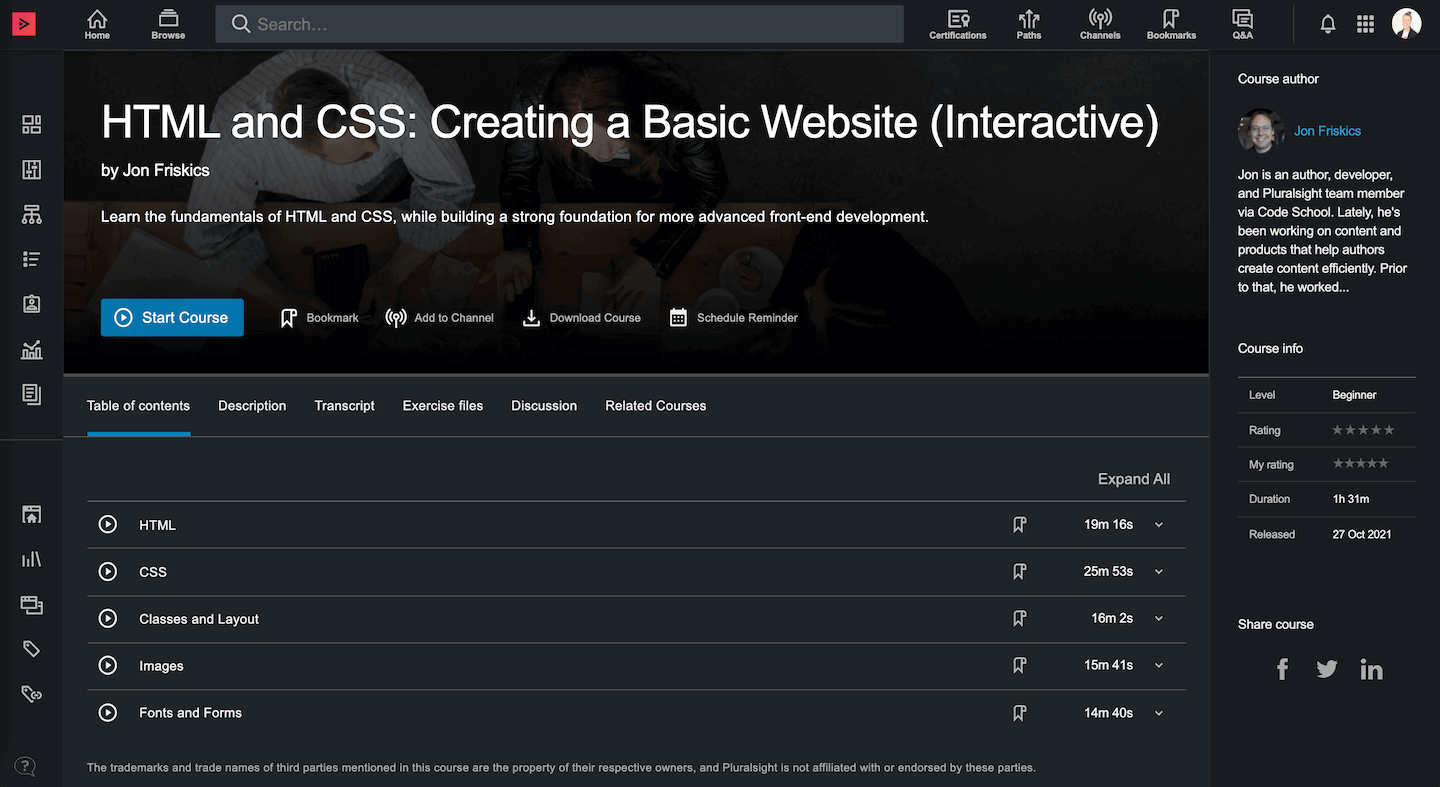
UX Observation: The Skill IQ and Role IQ features are genuinely the most sophisticated skill measurement tools in the online learning market. The adaptive question methodology and percentile benchmarking are meaningfully informative, not just marketing. Engineers who take these seriously get a real map of where they sit.
Feature Deep Dive
Pluralsight Channels is a collaboration feature that lets team members and managers curate custom learning playlists and share them within an organization. Combined with the platform's strong search functionality and path system, this allows L&D managers to build role-specific learning programs without needing to build content from scratch. The flexibility is significantly greater than Coursera for Business's path customization and comparable to Udemy Business's learning path builder.
Pluralsight's Hands-On Labs are cloud-based lab environments where learners practice real-world tasks without needing to set up local environments. Labs cover AWS, Azure, GCP, Kubernetes, Docker, Terraform, and dozens of other technical tools. The lab quality is generally higher than Coursera's Guided Projects for advanced technical topics, though the breadth is narrower since the catalog is technology-focused.
In 2024, Pluralsight integrated AI-powered course assistance called Iris that helps learners navigate content, explains concepts in alternative ways, and answers technology-specific questions. For complex DevOps or cloud architecture topics, Iris performs better than generic AI assistants because its training context is specifically anchored to Pluralsight's technical curriculum.
Performance Insights
Pluralsight's outcome data is strongest in enterprise contexts. Its 2024 Technology Learning Report found that organizations using Pluralsight Skills saw a 20% reduction in time-to-productivity for new technical hires and a 33% improvement in developer confidence scores (measured by pre/post Skill IQ assessments). These numbers come from Pluralsight's own survey methodology, so the directional reliability is reasonable even if the magnitude should be contextualized.
For individual learners, the Skill IQ and Role IQ tools create a measurable sense of progress that text-based certificates do not. Engineers who spend six months on a Pluralsight cloud path and see their AWS Skill IQ score move from 150 (Novice) to 210 (Proficient) have a concrete, benchmarked result to discuss in job interviews.
Pricing Analysis
| Plan | Price | Key Features | Best Fit |
| Starter | $199/year | Core courses + Skill IQ; limited lab access | Individual tech learners |
| Professional | $299/year | All courses + labs + Role IQ + downloads | Active developers |
| Skills Starter (Teams) | ~$579/seat/year | Team dashboards + analytics + paths | Tech teams 5–50 |
| Skills Professional (Teams) | ~$779/seat/year | Advanced analytics + Channels + integrations | Larger engineering orgs |
For individual technical professionals, Pluralsight's Professional plan at $299 per year is genuinely competitive given the depth of technical content, lab environments, and Skill IQ assessments. The comparison point is that a single Coursera specialization with certification could cost $200 to $399 without ongoing access. Pluralsight's annual model provides considerably more content for comparable investment.
Pros and Cons
| What Works Well | Where It Falls Short |
| Skill IQ and Role IQ are the most sophisticated assessment tools in the market | Non-technical learners have virtually nothing useful here; entirely a tech platform |
| Hands-on Labs for cloud and DevOps are production-quality and genuinely instructive | UI design is dated; the interface feels utilitarian compared to competitors |
| Instructor vetting produces more consistent content quality than open marketplaces | Pricing is meaningfully higher than broad-market alternatives like Udemy |
| Enterprise analytics and team Skill IQ dashboards are uniquely powerful for engineering managers | Content updates can lag for very new technologies; some cutting-edge topics have a 6-12 month gap |
User Sentiment
| Source | Rating | Sample Size | Key Sentiment |
| G2 | 4.5 / 5 | 1,100+ reviews | Praised for assessment depth; UI complaints common |
| Gartner Peer Insights | 4.4 / 5 | 620+ reviews | Enterprise buyers highlight team dashboards |
| Reddit (r/devops, r/sysadmin) | Generally positive | ~2,800 mentions/yr | Skill IQ widely discussed as genuinely useful |
Rating: ★★★★☆ 4.3/5
Skillshare
Overview
Skillshare occupies a deliberately different position from the credential-focused and enterprise-serving platforms above. It is a creative learning platform with approximately 35,000 classes, serving around 13 million members globally. Its content is instructor-created and leans heavily toward design, illustration, photography, creative writing, filmmaking, and related creative disciplines, with a growing section of business and marketing content.
The platform does not issue accredited certificates. Classes typically range from one to three hours. The model is subscription-based with no per-class payment, and the learner relationship with the platform is more like a Netflix for creative skills than a structured education program. This positioning is intentional and has earned Skillshare a loyal base among working creatives who want practical skill inspiration rather than formal qualification.
Target Audience
Skillshare's core users are creative professionals: graphic designers, illustrators, photographers, content creators, writers, and marketers. It also serves a meaningful segment of hobbyists who want to develop creative skills without needing formal certification. The business and entrepreneurship content has grown into a usable second pillar, though it does not match the depth of purpose-built professional development platforms. Skillshare is definitively not for engineers, data scientists, or anyone seeking technical credentials.
Real-World UI/UX Experience
The Skillshare interface is visually polished and optimized for discovery. Class previews load instantly, the player is smooth, and the Projects feature, where learners share their work for community feedback, creates genuine engagement loops. The platform's mobile app is well-designed and handles creative content (which often involves visual reference) effectively.
The absence of formal structure is both a feature and a friction point depending on the learner. For creative exploration, the open-ended format works. For learners who want progression metrics, completion certificates, or a sense of structured advancement, Skillshare feels underbuilt.
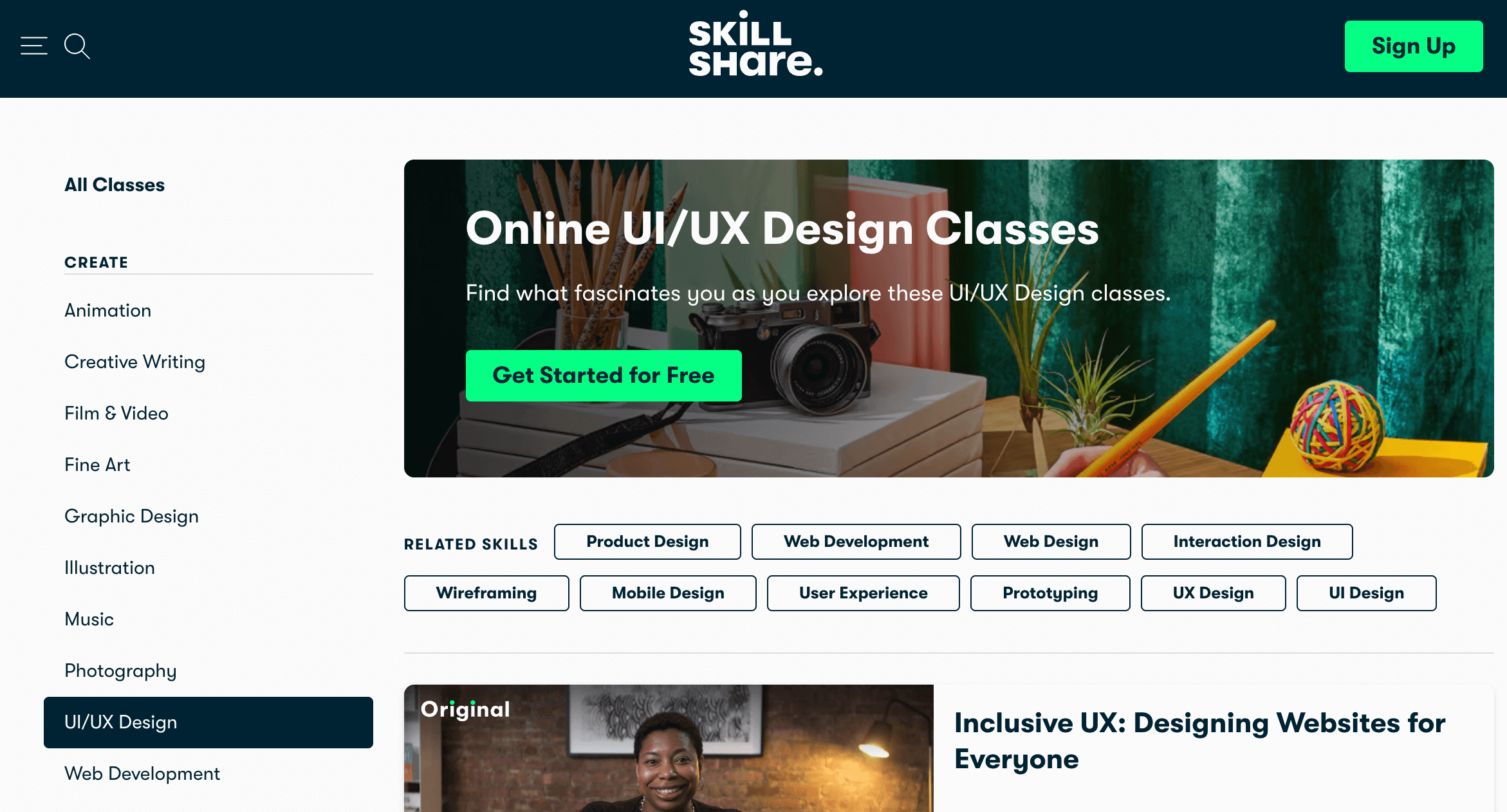
UX Observation: The class Projects section is Skillshare's best feature. Seeing what other learners produced with the same instruction creates both inspiration and a quality benchmark. Instructors who actively comment on submitted projects generate noticeably higher engagement and completion rates.
Pricing Analysis
| Plan | Price | Includes | Best Fit |
| Free Trial | 1 month free | Full access during trial | Evaluation |
| Individual (Monthly) | $32/month | Full catalog access, offline downloads | Casual creative learners |
| Individual (Annual) | $168/year ($14/mo) | Full catalog + all instructor content | Active creative professionals |
| Teams | $159/seat/year | All features + team management | Creative agencies, marketing teams |
At $168 per year for the annual plan, Skillshare is competitively priced for creative learners who will engage with multiple classes per month. The monthly plan at $32 is expensive for occasional use. Given the non-certification model, the value is entirely dependent on whether the learner's goals are skill development and inspiration rather than credentialing.
Pros and Cons
| What Works Well | Where It Falls Short |
| Best creative skills catalog available; strong instructor base in design and illustration | No formal certificates; does not satisfy employer credentialing requirements |
| Projects feature creates community engagement and quality benchmarking | Content quality varies significantly; instructor vetting is relatively light |
| Annual pricing is accessible for creative professionals | No structured learning paths; entirely self-directed |
| Visually polished interface optimized for creative content consumption | Technical and business content is thin compared to specialist platforms |
Rating: ★★★◑☆ 3.7/5
Platforms 7 through 10: Additional Strong Contenders
The following four platforms each occupy distinct and valuable positions in the online learning market. They receive slightly more condensed reviews than the six above not because of lesser quality but because their differentiation is more focused, making the key evaluation points easier to state efficiently.
edX
edX was founded by MIT and Harvard in 2012 and acquired by 2U in 2021. It operates a hybrid model combining free course audits with paid certificates and MicroMasters programs, and its flagship advantage is institutional provenance. Courses from MIT, Harvard, Berkeley, and comparable institutions carry genuine academic weight.

The platform has approximately 4,000 courses and 1,200+ programs. Its MicroMasters and Professional Certificate programs are the most academically rigorous offerings in the MOOC space, and several MicroMasters programs offer direct admission credit at full degree programs. For learners for whom institutional reputation is the primary credential metric, edX competes directly with Coursera at the top.
Pricing ranges from free audit access to $199 to $299 per course certificate to $1,000 to $4,000 for MicroMasters programs to $10,000 to $25,000 for online degrees. The Business product (edX for Business) starts at $399 per seat annually.
Primary limitation: the 2U acquisition has introduced organizational instability and some learners have reported delays in support response. Content update frequency also varies significantly across institutional partners.
Rating: ★★★★☆ 4.1/5
DataCamp
DataCamp is the most focused platform on this list, built exclusively around data skills: Python, R, SQL, machine learning, data engineering, and data visualization. With approximately 490 courses, 100+ career tracks, and a proprietary in-browser coding environment, it is the best single platform for someone building a data career from scratch or deepening technical data skills.

The DataCamp coding environment is notably well-implemented: exercises are embedded directly in the course interface, feedback is immediate, and the progression from syntax fundamentals to applied projects feels well-calibrated. The Workspace feature, a Jupyter-like environment for personal projects, adds a useful portfolio-building layer.
Pricing: Free tier with limited access, Individual at $12.42 per month (annual) or $33.25 per month (monthly), Teams at $25 per user per month annually. The annual individual plan at approximately $149 per year is exceptionally good value given the depth of technical content.
Limitation: the platform is entirely data-focused. If you need business communication, project management, leadership, or creative skills, DataCamp has nothing for you. It is a specialist tool, not a general career development platform.
Rating: ★★★★☆ 4.4/5
Codecademy
Codecademy has been teaching coding to beginners since 2011 and has introduced approximately 50 million learners to their first programming experience. Its course catalog covers Python, JavaScript, HTML/CSS, SQL, Java, Ruby, and several other languages, with a focus on interactive, in-browser exercises that provide immediate feedback.
The platform's strength is onboarding: no environment setup, no intimidating reading-heavy content, just immediate do-and-see feedback that works remarkably well for beginner learners. The Career Paths feature bundles relevant courses into structured programs with outcome framing (Full-Stack Engineer, Data Scientist, Front-End Engineer), which adds useful direction for learners who are not sure where to start.
Pricing: Free tier with limited course access; Pro at $17.49 per month (annual, approximately $209 per year) or $39.99 per month. The Pro plan is primarily valuable for learners who want career paths, projects, and quizzes rather than just introductory course content.
Limitation: Codecademy's depth has real ceilings. It is genuinely excellent for getting started but transitions learners to other platforms once they reach intermediate or advanced topics. It is a starting line, not a finishing school.
Rating: ★★★★☆ 4/5
MasterClass
MasterClass is the most cinematically produced learning platform ever built and probably also the most debated in terms of whether it is a learning platform at all. It features 200+ classes taught by cultural icons: Gordon Ramsay on cooking, Neil Gaiman on writing, Serena Williams on tennis, Malcolm Gladwell on writing, Barack Obama on leadership.
The production quality is extraordinary, genuinely cinematic. The learning experience is inspirational and often deeply engaging. The practical applicability is... variable. A class with Gordon Ramsay will absolutely improve how you think about cooking, but it will not teach you the mechanics of running a commercial kitchen. Malcolm Gladwell discussing storytelling is fascinating but operates at a conceptual rather than technical level.
Pricing: All-Access Pass at $120 per year (individual, one device) or $180 per year (duo) or $240 per year (family, six devices). For what is essentially premium documentary content about mastery, the pricing is reasonable.
MasterClass belongs on this list because it genuinely occupies a unique position: aspirational learning delivered by the best practitioners in their fields. For creative inspiration, mindset development, and exposure to mastery-level thinking, it is without equal. For skill development in measurable, certifiable, employer-presentable terms, it is the wrong tool.
Rating: ★★★◑☆ 3.8/5
Comprehensive Platform Comparison
Feature and Specification Matrix
The following table compares all ten platforms across standardized dimensions. Ratings are on a scale of 1 to 5. Pricing reflects standard individual annual plan pricing where applicable.
| Dimension | Coursera | Udemy | Timtis | Pluralsight | Skillshare | edX | DataCamp | Codecademy | MasterClass | |
| Content Breadth | 5/5 | 5/5 | 4/5 | 3/5 | 3/5 | 3/5 | 4/5 | 2/5 | 2/5 | 2/5 |
| Content Quality | 4/5 | 3/5 | 4/5 | 4/5 | 5/5 | 3/5 | 4/5 | 5/5 | 4/5 | 5/5 |
| Credential Value | 5/5 | 2/5 | 4/5 | 3/5 | 4/5 | 1/5 | 5/5 | 3/5 | 3/5 | 1/5 |
| Hands-On Practice | 4/5 | 3/5 | 2/5 | 3/5 | 5/5 | 2/5 | 3/5 | 5/5 | 5/5 | 1/5 |
| UI / UX | 4/5 | 4/5 | 4/5 | 4/5 | 3/5 | 5/5 | 3/5 | 4/5 | 4/5 | 5/5 |
| Value for Money | 3/5 | 5/5 | 3/5 | 4/5 | 4/5 | 4/5 | 3/5 | 5/5 | 4/5 | 3/5 |
| Enterprise Features | 5/5 | 4/5 | 5/5 | 3/5 | 5/5 | 3/5 | 4/5 | 4/5 | 3/5 | 2/5 |
| Beginner Friendliness | 4/5 | 4/5 | 4/5 | 5/5 | 3/5 | 4/5 | 4/5 | 3/5 | 5/5 | 4/5 |
| Mobile Experience | 4/5 | 5/5 | 4/5 | 4/5 | 3/5 | 4/5 | 3/5 | 3/5 | 4/5 | 5/5 |
| OVERALL SCORE | 4.2 | 4.0 | 3.9 | 3.8 | 4.3 | 3.7 | 4.1 | 4.4 | 4.0 | 3.8 |
Annual Cost Comparison (Individual Plans)
The following chart compares the effective annual cost of the individual plan for each platform, using the most commonly adopted paid tier as the reference point.
Annual Individual Plan Cost Comparison (USD, 2025)
| Platform | Cost Bar (per $20 = 1 block, max $400) | Annual Cost |
| DataCamp | ███████░░░░░░░░░░░░░ | 149% |
| Skillshare | ████████░░░░░░░░░░░░ | 168% |
| Codecademy | ██████████░░░░░░░░░░ | 209% |
| Timtis | ~Est.% | |
| Pluralsight | ███████████████░░░░░ | 299% |
| MasterClass | ██████░░░░░░░░░░░░░░ | 120% |
| LinkedIn Learn. | ███████████████████░ | 480% |
| Udemy Plus | ██████████░░░░░░░░░░ | 199% |
| Coursera Plus | ████████████████████ | 399% |
| edX (per cert) | ██████████░░░░░░░░░░ | 199% |
Note: LinkedIn Learning shown at the annual cost of Premium Career ($39.99/mo x 12). Timtis pricing is subject to current rates at timtis.com.
User Satisfaction Score Comparison
The following data represents aggregated user satisfaction ratings weighted across Trustpilot, G2, and app store ratings where available, normalized to a 5-point scale.
Weighted User Satisfaction Scores (Aggregated, 2024-2025)
| Platform | Satisfaction Score (Out of 5.0) | Score |
| DataCamp | ██████████████████░░ | 88% |
| Pluralsight | █████████████████░░░ | 87% |
| Coursera | █████████████████░░░ | 84% |
| MasterClass | █████████████████░░░ | 83% |
| LinkedIn Learn. | ████████████████░░░░ | 82% |
| Timtis | ████████████████░░░░ | 81% |
| Skillshare | ████████████████░░░░ | 79% |
| Codecademy | ████████████████░░░░ | 78% |
| edX | ███████████████░░░░░ | 77% |
| Udemy | ███████████████░░░░░ | 75% |
Scale: Each block = 5 percentage points of normalized satisfaction score. Scores reflect aggregated weighted ratings
Critical Comparison: Strengths, Weaknesses, and Decision Matrix
Where Each Platform Wins and Where It Loses
No platform on this list is objectively the best. Each represents a different set of trade-offs, and the correct choice depends almost entirely on the specific learner's goals, constraints, and existing skill baseline. The following analysis maps those trade-offs explicitly.
Credentialing Hierarchy
For employer-recognized credentials, the ranking is clear: edX and Coursera at the top (institutional university and major corporation partnerships), followed by LinkedIn Learning (network visibility rather than formal accreditation), then Pluralsight (recognized within technology hiring specifically), then DataCamp and Codecademy (functional reputation within data and developer communities). Udemy, Skillshare, and MasterClass certificates have minimal employer currency. Timtis is building its credential recognition and currently occupies a middle position that will develop with the platform's growth.
Practical Skill Development Depth
For actually developing practical, applicable skills (as opposed to passing credential checkboxes), the ranking shifts significantly. DataCamp leads for data skills. Pluralsight leads for technology team skills. Codecademy leads for coding basics. Coursera's Guided Projects and Specializations perform well for applied professional skills. Udemy's best courses by experienced instructors are underestimated in this dimension. Skillshare leads for creative application. Timtis performs well for structured professional upskilling within its content coverage areas.
Cost Efficiency at Scale
For individual learners on a budget covering multiple skill areas over a year, Udemy (perpetual sale pricing), DataCamp (best-value specialist platform), and Skillshare (annual creative plan) offer the best cost efficiency. Coursera Plus is justified for credential-seekers completing two or more certificates annually. LinkedIn Learning's pricing is only defensible when combined with active LinkedIn Premium usage for networking or job search. Pluralsight is priced appropriately for the depth it delivers but represents a significant investment relative to free-tier alternatives for basic technology learning.
Decision Matrix
| If Your Goal Is... | First Choice | Strong Alternative | Avoid |
| Employer-recognized credentials | Coursera / edX | LinkedIn Learning | Skillshare, MasterClass |
| Data science / ML career | DataCamp | Coursera (Andrew Ng tracks) | MasterClass, Skillshare |
| Software engineering skills | Pluralsight | Udemy (top-rated courses) | LinkedIn Learning |
| Creative / design skills | Skillshare | MasterClass (inspiration layer) | Pluralsight, DataCamp |
| Budget under $200/year | DataCamp / Udemy | Codecademy / MasterClass | LinkedIn, Pluralsight Enterprise |
| Structured, guided learning path | Timtis / Coursera | Pluralsight / DataCamp | Udemy, Skillshare |
| Enterprise team upskilling (tech) | Pluralsight | Udemy Business | MasterClass, Skillshare |
| Enterprise team upskilling (general) | Coursera for Business | LinkedIn Learning for Orgs | MasterClass |
| Career pivoting into tech | Codecademy then Pluralsight | Coursera (Google Certs) | MasterClass, Skillshare |
| Learning coding from absolute zero | Codecademy | Udemy (top-rated intro courses) | Pluralsight, edX |
Should You Switch? Recommendations by User Type
The 'should I switch' question is usually the wrong question. The better question is: 'Am I currently on the right platform for what I am actually trying to accomplish?' Here is how that breaks down by user profile.
For Beginners: Entry-Level Learners with No Prior Professional Learning Experience
If you have never paid for an online course before, the temptation is to go big immediately and sign up for Coursera Plus or Pluralsight. Resist this. The best entry point depends on what you are trying to learn.
For coding and technology, start with Codecademy's free tier to confirm you enjoy the activity before committing money. Once you are past the 'am I actually interested in this' phase, the Pro plan at $17.49 per month is reasonable, or move to Udemy where a $12 course on Python basics with high ratings will take you further faster.
For data skills, DataCamp's structured beginner tracks are exceptionally well-designed for learners starting from zero. The in-browser coding environment removes setup friction that stops many beginners before they start. Start with the free tier and upgrade within a month if you are engaged.
For professional skills without a technical focus, Timtis is worth exploring for structured path guidance, particularly for learners who have tried broader platforms and felt overwhelmed by choice. The onboarding flow is designed for beginners who benefit from direction rather than a full catalog.
For creative skills, Skillshare's one-month free trial is genuinely generous and sufficient to determine if the platform suits your learning style.
For Professionals: Working Adults Upskilling Within an Existing Career
Working professionals have different constraints than beginners: limited time, specific skill gaps, and a need for credentials that colleagues and managers recognize. For this group, platform choice should be driven first by credential goal, then by content quality.
If you are in a technical role (engineering, data, DevOps, cloud), Pluralsight's Skill IQ tools are worth the price for the benchmarking value alone. The team dashboard features are even more useful if you can get organizational sponsorship. DataCamp is the correct second tool if your technical work touches data.
If you are in a business, management, or people-facing role, LinkedIn Learning's combination of course access and professional network visibility creates a uniquely compounding value proposition. The Skills Gap Analysis tool, when used systematically, creates a targeted development agenda. The pricing requires LinkedIn Premium, which is only defensible if you are also using Premium features actively for other professional purposes.
If credentials from recognized institutions are your primary goal, Coursera Plus at $399 per year is the best value. Budget for the annual plan from the start. The monthly plan at $59 becomes expensive quickly for anyone who does not maintain a very active completion pace.
For Teams: L&D Managers and Organization Leaders
The enterprise selection calculus is different from the individual one. The key variables are: What is the dominant job family in your organization? How sophisticated do you need the analytics to be? What are your existing technology integrations?
For technology-dominant organizations (engineering, product, DevOps), Pluralsight Skills is the strongest dedicated platform. The Skill IQ and team dashboard features deliver insights that justify the higher per-seat cost versus generalist alternatives.
For mixed-skill organizations, Coursera for Business and Udemy Business are the two strongest general-purpose platforms, and the right choice depends on credential priority (higher at Coursera) versus breadth and cost flexibility (better at Udemy). LinkedIn Learning for Organizations is the right call for organizations where LinkedIn is already central to how employees manage their professional identities.
For small teams (under 20 people) with limited L&D budget, Timtis represents a worth-evaluating option for structured group learning with team tracking. The lower complexity overhead compared to enterprise platforms matters when there is no dedicated L&D staff to manage the tool.
For Budget-Conscious Users: Getting Maximum Value at Minimum Spend
Here is the honest budget optimization strategy. For pure cost-effectiveness, the ordering is: DataCamp individual annual ($149) for data skills, Skillshare annual ($168) for creative skills, MasterClass All-Access ($120) for inspirational learning, Udemy sale pricing ($10 to $15 per course as needed) for everything else. Codecademy Pro ($209) is justified for learners actively building a programming foundation. The Coursera audit track, while increasingly restricted, still provides free video access to substantial content.
The biggest value trap for budget learners is paying for a premium platform subscription and then not using it consistently. A $59 monthly Coursera Plus subscription with three hours of learning in a month is significantly worse value than a $12 Udemy course completed in full. Completion rate and usage frequency are the actual value drivers, not subscription tier.
Final Verdict: Who Should Use Which Platform
This is the part where most roundup articles say 'it depends!' and then leave you exactly where you started. Let's be more specific.
Recommended Platform Distribution by Learner Type
| Segment | Share (%) | Visual |
| Technical / Engineering Professionals | 28% | ■■■■■■□□□□□□□□□□□□□□ |
| Data / Analytics Careers | 18% | ■■■■□□□□□□□□□□□□□□□□ |
| Business / Management Professionals | 20% | ■■■■□□□□□□□□□□□□□□□□ |
| Creative Professionals | 14% | ■■■□□□□□□□□□□□□□□□□□ |
| Students / Early Career (Credentialing) | 12% | ■■□□□□□□□□□□□□□□□□□□ |
| Beginner / Exploratory Learners | 8% | ■■□□□□□□□□□□□□□□□□□□ |
The Clear Verdicts
Use DataCamp if you are building or advancing a data science, analytics, or machine learning career. Nothing competes with it for the combination of depth, hands-on environment quality, and cost at the specialist level.
Use Pluralsight if you are a software engineer, DevOps practitioner, or cloud architect wanting benchmarked skill assessment alongside high-quality technical content. The Skill IQ system is genuinely the best measurement tool in the market.
Use Coursera if your goal is institutional credentials. Google Career Certificates, university-backed Specializations, and degree programs are the platform's clear differentiators, and at $399 per year on the Plus plan, the value is defensible for active credential-seekers.
Use Udemy for flexible, self-directed upskilling across a wide range of topics where you know what you want and are motivated enough to complete without external structure. The perpetual sale pricing makes it uniquely cost-efficient.
Use LinkedIn Learning if you are actively job-hunting or managing your professional brand on LinkedIn, particularly for business, management, or soft skills development. The network integration is the only truly unique value it delivers over alternatives.
Use Skillshare exclusively for creative skill development. For anything else, it is the wrong tool.
Use Codecademy as a starting line for absolute beginners in programming. It is not a finishing school, and it is not meant to be.
Use edX when institutional provenance is the explicit credential requirement. MicroMasters programs are the strongest academically rigorous option in the MOOC market.
Use MasterClass for inspiration, mindset, and exposure to mastery-level practitioners. Do not use it as your sole learning tool for skill development.
Use Timtis if you benefit from structured guidance, find catalog overwhelm a real barrier, and want a learning environment that prioritizes focus and progression clarity over breadth. The platform's structured path approach and goal-directed onboarding genuinely serve learners who have struggled with self-direction on larger platforms. It is worth keeping an eye on as it continues to develop its content library and credential recognition.
The Bottom Line
The online learning market in 2025 is more capable and more differentiated than at any prior point. The question is no longer whether you can learn a career-critical skill online. You can. The question is whether you are choosing the right environment for your specific goals, working style, and constraints.
The learners who get the most from these platforms are not the ones who subscribe to the most premium plan. They are the ones who are honest about how they actually learn, realistic about how much time they will genuinely commit, and strategic about which credentials and skills their next career move actually requires.
Pick the tool that fits the goal. Finish what you start. The certificate means nothing; the skill is everything.
Comments