Table of Contents
- Start With the Right Mental Model
- Choose a Project That Exposes Its Logic
- Turn the Idea Into Testable Behaviour
- Build Vertical Slices, Not Large Layers
- Read Code Through Change Maps
- Debug With Evidence, Not Rewrites
- Test the Seams Between Features
- Four AI Coding Tools Worth Considering
- Protect the Project From the Agent
- Learn Without Becoming Dependent
- From Generated Code to Real Skill
AI can help a beginner produce working software before mastering a language or framework. It can also hide the hardest part of programming: turning an unclear idea into precise behaviour and proving the result is trustworthy.
The most productive beginner does not treat AI as a machine that converts one sentence into an application. They use it to shorten specific parts of the work while keeping the project understandable. The aim is not to write every line manually. It is to remain capable of explaining the system, testing its behaviour and changing it without starting again.
This guide uses a small browser-based expense tracker as a running example. The project is simple enough to inspect, yet rich enough to teach planning, data handling, debugging, testing and safe use of AI coding tools.
Start With the Right Mental Model
AI lets beginners encounter programming concepts inside a real project rather than memorising them first. An array is easier to understand when it contains the expenses on the screen, and an event listener becomes meaningful when it is the reason a form responds. Fundamentals remain necessary, but the project gives them context.
The danger appears when AI performs every decision at once. A generated application may contain a framework, database, authentication layer and several packages the beginner never selected. It can run during the first demonstration while remaining impossible to repair later.
Use AI in four separate roles instead:
| Role | Useful task | Beginner responsibility |
| Planner | Turn an idea into milestones and acceptance criteria | Remove unnecessary scope |
| Tutor | Explain code inside the current project | Restate the explanation independently |
| Implementer | Make one contained change | Review the affected files and test it |
| Reviewer | Suggest bugs, edge cases and improvements | Decide which findings are real and relevant |
Separating these roles prevents a weak explanation from quietly becoming code and gives every request a clear purpose.
Choose a Project That Exposes Its Logic
A good first AI-assisted project should have visible inputs, visible outputs and a small number of states. The expense tracker qualifies because a user enters a name and amount, the program stores an expense, the interface displays it and the total changes.
Its minimum version needs only four behaviours:
1. Accept an expense name and positive amount.
2. Display every valid expense in a list.
3. Calculate the total from the stored expenses.
4. Delete an expense and recalculate the total.
Browser storage can be added after those behaviours work. Categories, charts, accounts, cloud synchronisation and receipt scanning should wait. Each attractive extra feature introduces new data rules and failure points.
This is where many beginners misuse AI. They describe the product they ultimately imagine rather than the smallest system they can understand. The assistant then fills every gap with its own assumptions. Those assumptions become code, and the learner does not notice that important decisions were never made consciously.
Define a first version by what it deliberately excludes. For the expense tracker, the boundary might say: no framework, no backend, no login, no external database and no financial recommendations. Clear exclusions are often more useful than a long feature wishlist.
A quiz, reading log, habit checklist, unit converter or file-renaming script works for the same reason. Avoid payments, sensitive data, multi-user permissions and real-time collaboration at first because they introduce security and architecture decisions that generated code can easily conceal.
Turn the Idea Into Testable Behaviour
A prompt is not a specification. “Build an expense tracker” describes a category, not a working agreement. Before asking for code, convert the idea into observable behaviour.
A stronger project brief would read:
Build a browser-based expense tracker with plain HTML, CSS and JavaScript. A user can enter an expense name and an amount greater than zero. Valid expenses appear in a list with a delete button. The total must always equal the sum of the current list. Keep HTML, CSS and JavaScript in separate files. Do not use a framework, backend or external library. Do not write code until the implementation plan is approved.
Then define acceptance criteria. These are not technical instructions. They describe evidence that the feature works:
● Submitting “Lunch” and “12.50” adds one row and changes the total to 12.50.
● Blank names, blank amounts, zero, negative values and non-numeric amounts are rejected without changing the list.
● Deleting an entry removes only that entry and immediately updates the total.
● Refreshing the page may clear data in the first version because persistence has not been added yet.
Acceptance criteria limit the model’s freedom and provide a concrete test plan. They also expose contradictions early. If the brief says zero is invalid but the interface accepts it, the failure is a broken requirement rather than a vague sense that something is wrong.
Ask AI to produce an implementation plan containing the files affected, the data structure, the order of work and a test after each stage. Reject plans that introduce technology without a clear reason. For a small browser tool, an array of expense objects and a render function may be enough. A state-management library would add terminology without solving a real problem.
Keep the approved brief in a file such as PROJECT.md. Long chats mix old instructions with new decisions, while a short project document gives the learner and assistant one stable reference.
Build Vertical Slices, Not Large Layers
A common development plan creates all HTML, then all styling, then all logic. That can leave the project looking complete before any behaviour has been proven. A beginner benefits more from vertical slices, where each stage delivers one small behaviour from input to visible result.
For the expense tracker, the first slice can be a labelled form that submits one expense and displays it as plain text. Styling can remain basic. The important question is whether the data travels correctly from the input fields to the list.
The second slice adds validation. The third stores expenses in an array and renders the list from that array. The fourth calculates the total. The fifth adds deletion. Browser storage becomes a separate slice only after the in-memory version is stable.
Use the same control loop for every slice:
1. Ask for a plan of the change without code.
2. Confirm which files and functions will be touched.
3. Request only that change.
4. Review the difference before accepting it.
5. Run the feature using the stated acceptance criteria.
6. Retest earlier behaviour.
7. Save a stable checkpoint.
For implementation, prefer a full diff over isolated snippets because fragments can hide surrounding assumptions. In chat, request the complete modified function with enough context to place it correctly.
Do not continue while a slice is broken. Agents build from the current repository, so adding storage to an inconsistent expense list only preserves the bug and makes it harder to isolate.
A practical prompt for the deletion slice might be:
Add deletion to the current expense tracker. Use a stable ID for each expense. Do not change the form, visual design or storage approach. Before editing, identify the functions that will change and explain how deletion will keep the array, list and total consistent. After editing, provide five manual tests, including deleting the first, middle, last and only item.
This is stronger than “add a delete button” because it defines the system behaviour behind the button and protects working areas.
Read Code Through Change Maps
Beginners often ask AI to explain every line. The result can be technically correct yet exhausting, with so much detail that the structure disappears. A better method is to create a change map.
For each feature, identify five things:
| Question | Expense tracker example |
| What triggers the feature? | The form submission event |
| What data enters? | Expense name and amount strings |
| Where is data transformed? | Validation and number conversion |
| What state changes? | A new object enters the expenses array |
| What becomes visible? | The list and total are rendered again |
Trace one real value through the program. If the user enters 12.50, determine where it begins as text, where it becomes a number, where it is stored and where it contributes to the total. This reveals common errors such as string concatenation, stale interface state and duplicate calculations.
Ask focused questions:
Which variable is the source of truth for the list?
What could make the displayed total disagree with the array?
Which function has side effects, and what does it change?
If I remove this function call, what visible behaviour stops working?
Then close the explanation and describe the flow in your own words. The target is operational understanding: where a feature begins, which state it changes, what output it controls and how to test it.
Debug With Evidence, Not Rewrites
AI is most useful in debugging when it receives evidence. “The app is broken” encourages speculation. A useful bug report includes the exact action, expected result, actual result, full error and most recent relevant change.
For example:
After renaming the form ID from expense-form to entry-form, clicking Add no longer works. The console shows Cannot read properties of null (reading 'addEventListener') on line 8. The form is visible. Find the smallest likely cause, explain why the error mentions null and propose one targeted fix. Do not rewrite the file.
This prompt points toward a mismatch between the HTML ID and the JavaScript selector. More importantly, it asks for the cause, not merely replacement code.
When no error appears, instrument the data flow. Add temporary logs at the points where input is read, converted, stored and rendered. If 12.50 becomes "12.50", then a later total may concatenate strings instead of adding numbers. If the array is correct but the page is not, the fault is likely in rendering rather than validation.
Debug one hypothesis at a time. Large AI-generated rewrites destroy evidence because they change several possible causes together. Even when the application starts working, the learner may not know which change mattered or what new weakness was introduced.
A dependable debugging cycle is to reproduce the failure, reduce it to one action, collect console or terminal output, inspect the latest relevant diff, form one hypothesis, apply one fix and rerun both the failed test and earlier tests. Record the cause in a short bug log. Patterns such as mismatched selectors, incorrect paths, missing imports and numbers stored as strings become recognisable after they are described in your own words.
Test the Seams Between Features
AI-generated code often succeeds on the example included in the prompt. Real failures appear at the seams, where one feature changes data that another feature depends on.
After adding deletion, do not test only whether the row disappears. Confirm that the total changes, the empty state returns after the final item is removed and deleted entries do not return after a refresh once storage exists.
Use three types of testing:
● Normal-flow tests prove that expected input produces expected output.
● Boundary tests examine empty values, zero, negative numbers, decimals, long names and repeated actions.
● Regression tests repeat earlier checks after every new feature.
Ask AI to generate tests from the acceptance criteria rather than from the code. Tests based only on the implementation may repeat the same wrong assumption embedded in that implementation.
For a small project, a manual testing checklist is usually enough:
| Test action | Expected result | What the test verifies |
| Add an expense named “Lunch” with an amount of 12.50 | One expense appears and the total changes to 12.50 | Valid input is converted, stored and displayed correctly |
| Submit the form without an expense name | No item is added and a clear validation message appears | Incomplete entries cannot enter the expense array |
| Delete the first item from a list of three expenses | Only the selected item disappears and the total is recalculated | Deletion uses the correct item identifier rather than its visible position |
| Refresh the page after storage has been added | Previously saved expenses and the correct total return | Stored data is loaded and rendered consistently |
| Delete the final remaining expense | The list returns to its empty state and the total becomes zero | The interface handles an empty data set without leaving stale information |
A passing automated test proves only that a checked condition passed in that environment. It does not prove the requirement was complete or the experience was sensible.
Four AI Coding Tools Worth Considering
The right tool depends on whether you need an all-in-one browser workspace, an AI editor, a conventional GitHub workflow or a terminal agent.
| Tool | Best beginner use | Main caution |
| Replit Agent | Moving from an idea to a hosted first app in one workspace | It can hide infrastructure decisions if allowed to build too broadly |
| Cursor | Learning and editing inside a visible codebase | Agent mode can modify several files and run commands |
| GitHub Copilot | Building conventional editor, Git and pull-request habits | Its many surfaces can feel fragmented at first |
| Claude Code | Investigating and changing an existing project from the terminal | Better after basic terminal and Git skills are comfortable |
1. Replit Agent
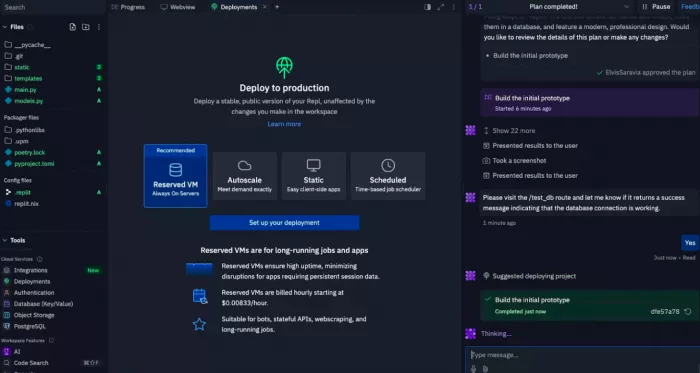
Replit Agent suits beginners who do not want to configure a local environment. It can cover planning, building, previewing, testing and publishing in the browser. Replit’s current documentation also separates Plan Mode from Build Mode, supports automatic project checkpoints and offers browser-based App Testing in supported modes.
Its speed is also its weakness: a beginner can receive a working app before understanding its stack. Use Plan Mode first, keep the build small and inspect the files rather than judging only the preview.
2. Cursor
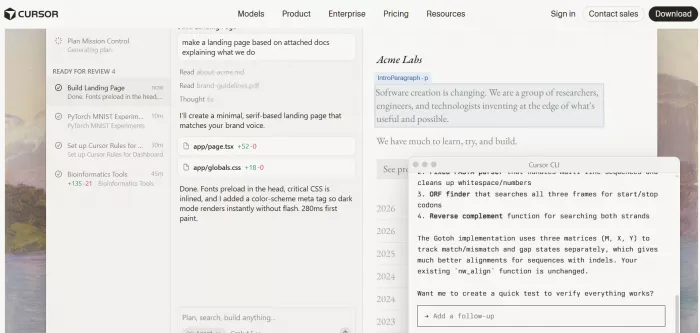
Cursor suits beginners who want to learn inside a familiar desktop code editor. Its Ask mode can explore a codebase without changing files, while Agent can search, edit multiple files and run terminal commands. Cursor also provides a diff review interface and local checkpoints for agent-made changes, although its documentation makes clear that checkpoints are not a replacement for Git.
Use Ask mode for understanding, tightly scoped edits for implementation and Agent only after the task and tests are clear. Its review screen helps beginners learn from changes rather than accepting regenerated files.
3. GitHub Copilot
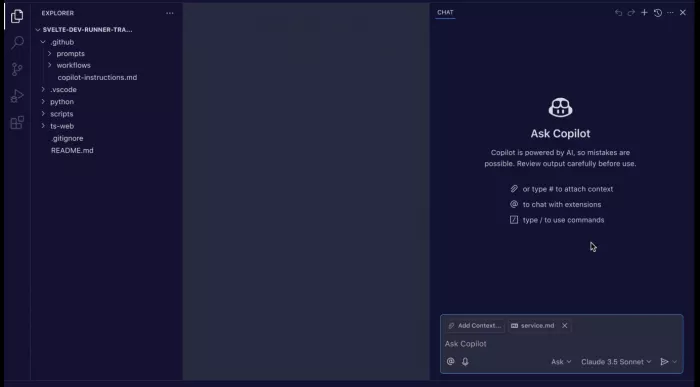
GitHub Copilot is a strong choice for learning the workflow used around real repositories. It provides assistance in editors, agent mode, command-line workflows, code review and a cloud agent that can plan repository work and make changes on a branch for review.
Its advantage is that AI sits beside commits, branches, diffs and pull requests. Start with explanations and small editor tasks before assigning full issues to an autonomous agent.
4. Bolt.new
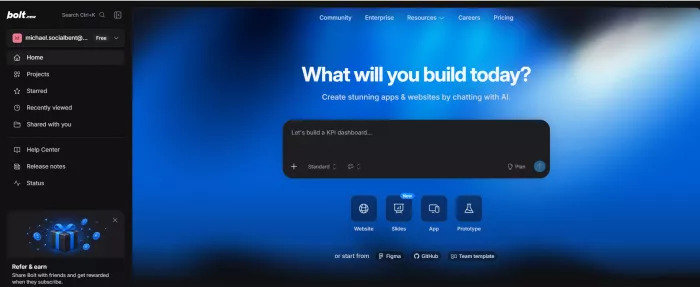
Bolt.new is a browser-based AI coding tool that lets beginners create, preview and modify web applications without configuring a local development environment. Users can describe an idea in plain language, inspect the generated files and test the application in the same workspace.
Its fast workflow is useful for prototypes and simple beginner projects, but it can generate several files and dependencies before the learner understands the structure. Keep prompts narrowly focused, review each important change and use version history when an edit produces an unwanted result.
Protect the Project From the Agent
AI tools can edit faster than a beginner can review, so the workflow needs guardrails. Save a stable version before any multi-file change. Use Git commits for durable history and tool checkpoints only as an additional recovery layer.
Do not paste passwords, API keys, private client code or real customer data into a general coding assistant. Keep secrets outside source files and check every package before installation. A confident recommendation may still refer to an outdated interface, unnecessary dependency or incorrect package name.
Security-sensitive features deserve a higher standard. Authentication, payments, file uploads, database permissions and personal data handling should not be shipped solely because an agent generated them and a demonstration worked. A beginner project can use mock data until the underlying security model is understood or reviewed by someone qualified.
Create a simple agent contract at the top of the project instructions:
Do not add dependencies, change frameworks, delete files, alter the data model or run destructive commands without explaining the reason and receiving approval. Prefer the smallest change that satisfies the acceptance criteria. After each change, list affected files, tests run and remaining uncertainty.
This makes unexpected decisions easier to detect.
Learn Without Becoming Dependent
Dependence begins when every obstacle produces the same response: ask AI for a replacement. Learning begins when the obstacle becomes a question about the system.
Before prompting, predict which file or function probably needs to change. After receiving a plan, compare it with your prediction. Before applying code, state how you will test it. After it works, explain why. These small acts keep the learner involved in the reasoning.
After finishing the tracker, rebuild one feature without copying it. The parts you cannot reproduce reveal what to study next.
A useful first month might progress like this: learn the editor, browser console and basic JavaScript during week one; build the minimum tracker during week two; add storage, validation and regression tests during week three; then rebuild one feature and add a modest extension during week four.
The finished application matters less than the repeatable method behind it. Define behaviour, limit scope, plan before editing, build one complete slice, trace data, debug from evidence, test feature seams and preserve a stable version.
From Generated Code to Real Skill
Coding with AI is not a shortcut around programming. It is a different way to practise it. The assistant can supply syntax, propose structures and inspect errors, but the learner still owns the requirements, trade-offs and proof that the software works.
Progress should be measured by control rather than code volume. Can you explain where the project stores its data? Can you identify the function behind a feature? Can you describe a bug precisely, test the smallest fix and recover the last working version?
When those answers become yes, AI is no longer carrying the project. It is supporting a developer who can think clearly about what the code is supposed to do.
Comments