AUTODRAFT AI Create from scratch Text turns into 2D characters, backgrounds, voiceovers and animated scenes. | 2SHORT AI Repurpose what exists Long-form footage gets mined for its best moments and cut into Shorts. |
Two tools, two completely different bets on how short-form video gets made. Spend a few days moving between AutoDraft AI and 2Short AI and the contrast stops feeling subtle. One builds something out of nothing. The other treats footage that already exists as raw ore and carves the best moments out of it.
That single distinction shapes everything downstream: the learning curve, the pricing, the kind of creator each one quietly rewards. A storyteller sketching a cartoon series has almost nothing in common with a podcaster sitting on forty hours of recorded conversation, yet both keep landing on these two names while hunting for the same thing, namely more output in less time.
What follows skips the marketing gloss. It is grounded in real time spent inside both editors, cross-checked against current pricing and the features each company actually ships as of 2026. The aim is to make the decision obvious well before the final section, and to do it without the usual filler.
What AutoDraft AI does
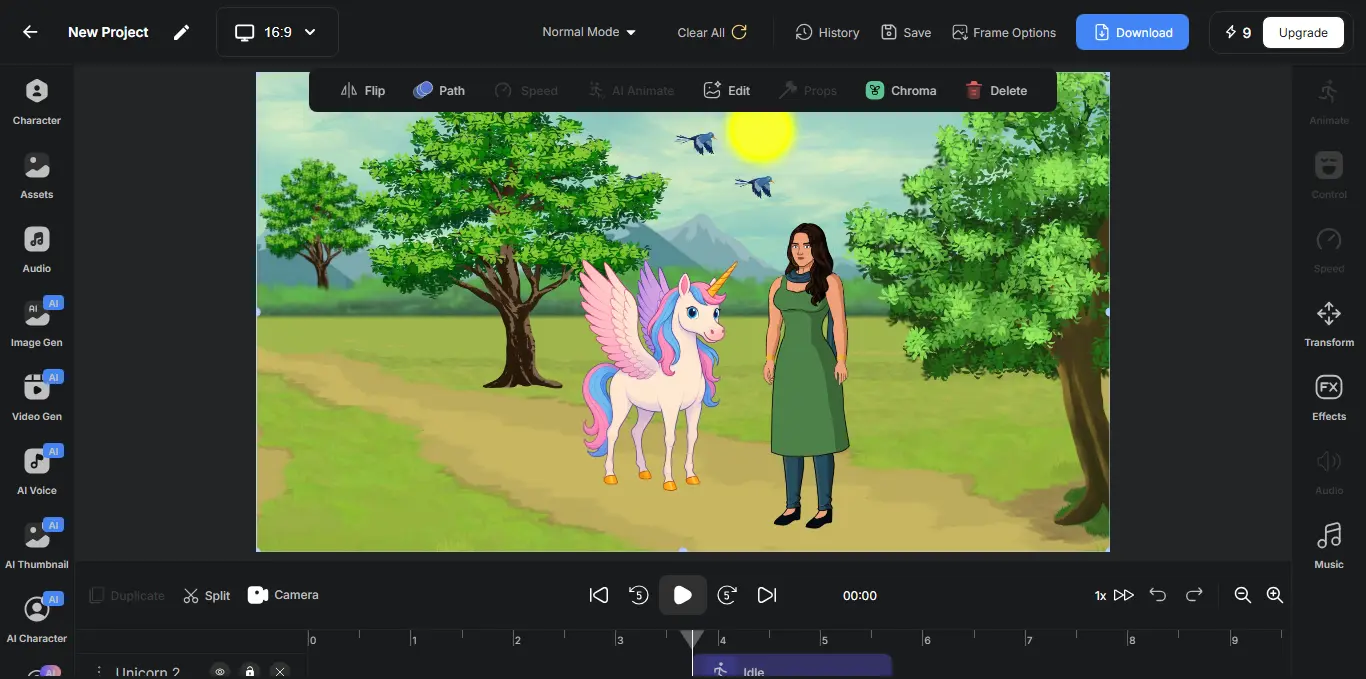
AutoDraft AI is a cloud-based animation studio with a blunt, appealing pitch: describe a character in plain language, pick from more than a hundred style templates spanning anime, webtoon, horror and storybook looks, and a ready-to-animate figure appears. The parts that usually scare beginners away, namely expressions, lip-sync, props and layered motion, are handled under the hood.
The headline feature is custom model training. Once a character exists, the model learns to hold that exact face, outfit and proportions across dozens of scenes, the one thing general-purpose image generators still fumble.
What ships in the box
• 100+ style presets for a consistent look across a project.
• Background generation from prompts, sketches or flat color.
• AI voiceover in 40+ languages, including Hindi and Tamil.
• Scene assembly into short animated videos.
• 4K export as MP4 or transparent PNG sequences.
• Browser-based with no install or heavy hardware.
What 2Short AI does
2Short AI starts from the opposite end. It assumes the filming is already done, then mines footage the creator already owns. Because nothing is generated from scratch, every clip is rights-clean and safe for paid ads, a quiet advantage over fully synthetic video. The workflow is deliberately short.
1. Import. A long video by link, public URL or Google Drive.
2. Scan. The AI flags the moments most likely to travel.
3. Polish. One-click animated captions and speaker tracking.
4. Export. Vertical, square or horizontal clips at 1080p, no watermark.
The trade-off is narrow focus. 2Short is built for spoken-word content and leans on captions to find highlights, so a silent demo or a music-led montage gives it far less to work with than a podcast, an interview or a lecture. Server-side rendering keeps the wait short.
How the two approaches differ
Laid side by side, these are not really competitors so much as opposites that happen to share a search results page. AutoDraft manufactures footage. 2Short refines it. The decision rarely comes down to which is better in the abstract, and almost always to which raw material a creator is starting with: an idea, or an archive.
A nursery-rhyme channel, an explainer series or a fictional webtoon needs assets that do not exist yet, which is squarely AutoDraft territory. A coach, a marketer or a podcaster drowning in long recordings needs distribution, not creation, which is exactly what 2Short was built to deliver. Confusing the two is the most common and costly mistake, since the right answer is fixed the moment the starting material is named. The clearest way to see the split is feature by feature.
Feature comparison
Side by side, the division of labor is obvious.
Table 1 · Core capabilities at a glance
| Capability | AutoDraft AI | 2Short AI |
|---|---|---|
| Primary job | Generate animation and art | Repurpose existing video |
| Starting material | A text prompt or sketch | A finished long-form video |
| Character creation | Yes, 100+ style templates | No |
| Style consistency | Yes, custom model training | Not applicable |
| Highlight detection | No | Yes, AI moment-finding |
| Auto subtitles | Via voiceover | Yes, one-click animated |
| Speaker face tracking | No | Yes, auto-centering |
| AI voiceover | Yes, 40+ languages | No |
| Vertical / Reels output | Yes | Yes |
| Max export quality | 4K (MP4 / PNG sequence) | 1080p, no watermark |
| Best-fit content | Cartoons, explainers, webtoons | Podcasts, interviews, talks |
The pattern is hard to miss. Almost nowhere do both columns line up, because each tool deliberately ignores the other’s territory. That focus is a feature, not an oversight.
Where each tool pulls ahead
Strengths only mean something in context, so here is where each platform genuinely earns its keep once the novelty wears off and real projects pile up.
AutoDraft AI is stronger at
• Character consistency. Trained models hold the same face across an entire series, the single thing most image generators still get wrong.
• End-to-end creation. Characters, backgrounds, voice, sound effects and assembly live in one place, removing the usual app-juggling.
• Regional reach. Voiceovers across 40-plus languages open doors for creators outside English-first markets.
• A near-free entry point. Roughly nine in ten features are usable at no cost, with unlimited downloads and no card required.
• Zero drawing skill needed. The barrier to making animation drops to writing a sentence.
2Short AI is stronger at
• Speed to publish. A long video becomes several ready-to-post clips in minutes, not hours of manual editing.
• Finding the gold. The highlight model reliably surfaces moments worth clipping from spoken-word footage.
• Retention polish. Animated captions and speaker tracking are proven to lift watch time and accessibility.
• Clean rights. Output comes from owned footage, so clips are safe for ads without licensing worry.
• Predictable quality. Watermark-free 1080p exports look consistent across every clip.
The market context
Neither tool exists in a vacuum. Both ride the same wave: an audience that now treats short vertical video as the default way to discover anything. The scale of that shift explains why a generation tool and a repurposing tool can both thrive at the same time without stepping on each other.
The clearest signal sits in the AI-powered video generator market itself, the category AutoDraft competes in directly and the engine room behind much of what 2Short automates. It was valued at roughly 0.91 billion dollars in 2025 and is projected to climb toward 7.5 billion by 2035, a compound annual growth rate of 23.5 percent, with North America holding about a third of the total.
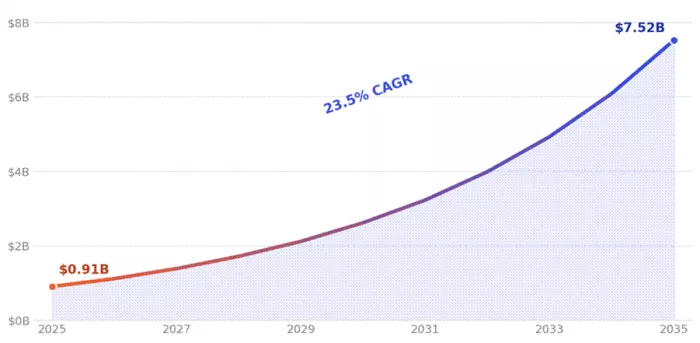
AI-powered video generator market, 2025 to 2035. Source: Market.us (2025); yearly path follows the report’s stated 23.5% CAGR. Projections, not guarantees.
~25M videos uploaded to TikTok every single day, against roughly 3M on YouTube. | 17 hrs average weekly time a viewer now spends watching online video. | 42% share of the AI video market held by text-to-video, AutoDraft’s core lane. |
Read together, the numbers say something simple. Demand for video is effectively bottomless, and human hands cannot keep pace. That pressure is precisely why a tool that creates and a tool that recycles both find willing buyers, because the shortage is of time and volume, not appetite.
Pricing compared
The two tools price themselves around their philosophies. 2Short charges for processing time, a clean ladder of monthly tiers tied to how many hours of video the AI analyzes. AutoDraft runs a generous free base with credit-metered paid plans for heavier output, and because it is an India-based product, listed prices shift a little across regions.
Table 2 · Pricing, verified at time of writing
| Tier | AutoDraft AI | 2Short AI |
|---|---|---|
| Free | ~90% of features free, unlimited 4K downloads, no card needed | Starter: 30 min of AI analysis per month, full features |
| Entry paid | From around $10 / month, credit-based (reported as Base, ~1,000 credits) | Lite: $9.90 / month, 5 hrs analysis, 60 min fast exports, no ads |
| Mid / Pro | Pro tier reported near $40 to 45 / month (~4,000 credits) | Pro: $19.90 / month, ~15 hrs analysis, unlimited fast exports |
| Top tier | Custom style training on enterprise plans | Premium: $49.90 / month, ~100 hrs analysis |
| Billing logic | Credits consumed per generation | Monthly hours of video analyzed |
For occasional use, AutoDraft is the cheaper door to walk through, since a real project can be finished without paying anything. For steady, high-volume clipping, 2Short’s flat tiers are easier to budget, because the cost does not move with output the way credits can. One honest caveat: AutoDraft’s exact credit counts and regional prices drift, so confirming current figures on the site before committing is wise.
Ease of use
Both tools work hard to lower the barrier, and both mostly succeed, though from different starting heights.
AUTODRAFT AI · FIRST RESULT ~1 hour A novice can reach a watchable animated clip, though advanced motion and lip-sync controls carry a learning curve, and peak-hour generation can lag. | 2SHORT AI · FIRST RESULT ~Minutes Paste a link, pick a ratio, toggle captions and tracking, then export. Very little to learn, with friction only at plan caps and caption quality. |
The split is intuitive. AutoDraft trades a steeper curve for far greater range, while 2Short trades range for near-instant simplicity, and neither choice is wrong on its own terms.
What users are saying
Public sentiment tracks the hands-on impression closely, though the two tools sit at different points in their review life cycle. 2Short has accumulated a meaningful body of third-party coverage, while AutoDraft is newer and still thin on aggregate ratings, a gap worth weighing on its own.
User sentiment, summarized
| AutoDraft AI | 2Short AI | |
|---|---|---|
| Score | Editorial read | 8 / 10 (Appscribed) |
| Recurring praise | The character-consistency training and the breadth of a free tier draw the warmest reactions, especially from solo creators and regional-language channels. | Speed, the subtitle workflow and creator-friendly exports earn consistent marks, with reviewers crediting it for faster repurposing. |
| Common gripe | Slow generation during peak hours and email-only support surface often, alongside a learning curve on the advanced animation controls. | Plan caps on analysis hours and a hard focus on spoken-word video are the most cited limits. |
| Caveat | Aggregate public review volume is still light, so the picture is forming rather than settled. | Quality of highlights depends on caption quality in the original footage. |
The throughline across reviews is satisfaction within scope. Creators who matched the tool to the job came away pleased; the disappointment almost always traced back to expecting one tool to do the other’s work.
Head-to-head scorecard
Scoring opposites is imperfect, so the marks below reflect how fully each tool delivers on what it sets out to do, not a contest of identical features.
Table 3 · Editorial scorecard, out of 10
| Criterion | AutoDraft AI | 2Short AI | Edge |
|---|---|---|---|
| Ease of use | 8.0 | 9.2 | 2Short |
| Speed to result | 7.5 | 9.4 | 2Short |
| Creative range | 9.3 | 5.5 | AutoDraft |
| Output flexibility | 8.8 | 7.5 | AutoDraft |
| Value for money | 9.0 | 8.2 | AutoDraft |
| Polish of finish | 7.8 | 8.6 | 2Short |
| Overall | 8.4 | 8.1 | Tie, by intent |
The near-tie is the honest result. Each wins decisively inside its own lane, and the overall figures land close precisely because neither is trying to win the other’s game.
The verdict
After enough hours in both, the cleanest takeaway is also the least dramatic: the right tool announces itself the moment the starting material is named. There is no universal winner here, and pretending otherwise would do a disservice to anyone actually trying to decide.
PICK AUTODRAFT AI IF The footage does not exist yet Building a cartoon channel, an explainer library, a webtoon or any animated story with recurring characters, especially on a tight budget or in a non-English language. Creation is the whole job. | PICK 2SHORT AI IF The footage is already piling up Sitting on long podcasts, interviews, webinars or talks and needing a steady stream of vertical clips fast, with clean rights and reliable captions. Distribution is the whole job. |
For a smaller group, the two are not rivals at all but a pair. A creator who animates an original character in AutoDraft, records long-form videos featuring it, then clips those down in 2Short is using each exactly as intended, generation feeding repurposing. That workflow extracts more from both than either delivers alone.
The mistake to avoid is buying the wrong philosophy. AutoDraft will frustrate anyone who simply wants to chop a webinar into Reels, and 2Short will disappoint anyone hoping to conjure a character from a sentence. Match the tool to the raw material, and both turn out to be quietly excellent at the narrow thing they were built for.
BOTTOM LINE An idea with no footage points to AutoDraft AI. An archive with no time points to 2Short AI. The only real wrong answer is forcing one to do the other’s job. |
Comments