It is 9:47 on a Tuesday. You have answered fourteen emails, copy-pasted the same client update into three platforms, manually exported a spreadsheet for the second time this week, and your coffee has gone cold. The futurists of the early 2000s promised that by now the robots would be doing all of this. Instead, most of us are still doing the work of robots, and the robots are off raising Series C rounds at 2.5 billion dollar valuations.
That is not a punchline. n8n, one of the five tools in this article, raised 180 million dollars at a 2.5 billion dollar valuation in October 2025, with backing from Accel, NVIDIA's venture arm, and Sequoia. ChatGPT crossed 900 million weekly active users in February 2026 according to OpenAI's own announcement. Notion is now valued at 11 billion dollars after its December 2025 employee tender, with 100 million users across companies including OpenAI, Figma, Ramp, and Nvidia. The no-code AI category is the part of software that won the AI cycle, and most knowledge workers have not yet figured out what that means for their day-to-day work.
This guide closes that gap. Five tools, each genuinely usable without writing code, each with verified user numbers and real product capabilities, and each with a specific job in a modern stack. The data points throughout this article come from McKinsey Global Institute, Gartner, OpenAI's own published research, Forbes, TechCrunch, PitchBook, and the platforms' official disclosures. Nothing has been rounded up to sound impressive.
On the 80% figure. McKinsey Global Institute's November 2025 report "Agents, Robots, and Us" measured that 57% of US work hours are technically automatable with currently demonstrated technology. The 80% in this title refers to the share of repetitive, rules-based work inside a typical knowledge worker's day, not the day itself. The point is to remove busywork, not to remove your job.
Why 2026 Is the Year No-Code AI Stopped Being Optional
The McKinsey number that changed the conversation
On November 25, 2025, McKinsey Global Institute released a report titled "Agents, Robots, and Us: Skill Partnerships in the Age of AI." The headline finding measured that 57% of US work hours are technically automatable with currently demonstrated AI agents and robotics. McKinsey's own 2023 report had estimated 30% automation potential by 2030. The 2025 measurement nearly doubled that figure and moved the timeline from "future possibility" to "current reality."
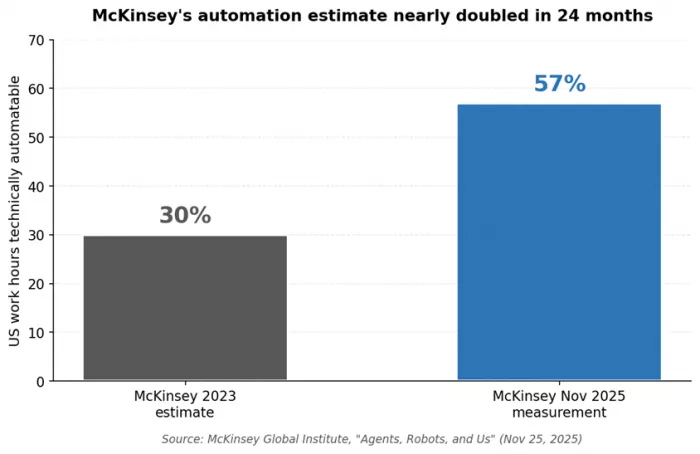
McKinsey is not predicting that half of US jobs will disappear. The report explicitly frames the 57% as technical potential at the task level, not the inevitable loss of jobs. The point is that the toolkit is finally capable. What you do with it is now a choice rather than a limitation.
The Gartner forecast that justifies the spend
Gartner's low-code development technologies forecast projects the global market will reach 44.5 billion dollars by 2026 and 58.2 billion dollars by 2029, growing at a 19% CAGR. The same forecast holds that 75% of new enterprise applications will be built on low-code platforms by 2026, up from less than 25% in 2020, and that 80% of low-code users will sit outside formal IT departments by 2026.
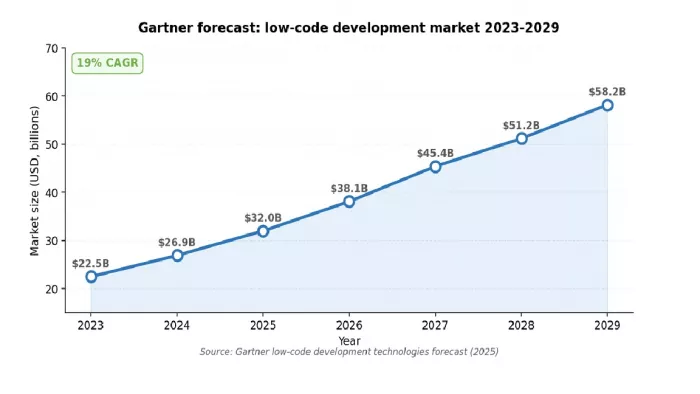
Figure 2. Gartner low-code development technologies forecast (2025).
The State of AI numbers from McKinsey's 2025 survey
McKinsey's 2025 State of AI survey, published November 2025 with 1,993 respondents across 105 nations, reported that 88% of organizations now use AI in at least one business function, up from 78% the year before. 72% reported using generative AI specifically, up from 33% in 2024. The same survey measured that only 39% of organizations report any EBIT impact from AI at the enterprise level, and roughly two-thirds have not yet begun scaling AI across the enterprise. Adoption is universal. Real value is still rare. That gap is the opportunity.
What is actually different about 2026
| Shift | What it means | Evidence |
|---|---|---|
| AI agents are inside the tools | The platforms now reason, not just route data between apps | Zapier Agents (2025); Notion Custom Agents (Sep 2025); n8n's Series C funding round was explicitly an AI orchestration play |
| Natural-language workflow generation | You describe what you want; the platform drafts the workflow | Zapier AI Copilot, Make's Maia, n8n's AI Agent Builder all shipped in 2025-2026 |
| Pricing is individual-friendly | Free tiers are genuinely useful for personal workflows | Zapier Free: 100 tasks/mo; Make Free: 1,000 ops/mo; n8n self-hosted: free; ChatGPT Plus: $20/mo |
| Enterprise governance shipped | Compliance and security are no longer roadmap items | All five tools ship SOC 2 Type II, RBAC, and AI training opt-out on enterprise tiers |
What "80% Automation" Actually Means for Your Day
The 80% figure is not marketing. It refers to the share of repetitive, rules-based, low-judgment work inside a typical knowledge worker's day. To make the math concrete, McKinsey's November 2025 report estimates that capturing AI's full potential could deliver roughly 2.9 trillion dollars in economic value to the United States alone. At the individual level, OpenAI's January 2026 workplace adoption study (covering ChatGPT users with professional email domains) found that 28% of US workers report using ChatGPT for work, with 45% of postgraduate-degree holders using it. A six-month randomized field experiment cited in the same OpenAI report found that AI access cut weekly email time by 31% across thousands of knowledge workers.
The three-bucket model of knowledge work
| Bucket | Share of typical day | Realistic automation lift |
|---|---|---|
Repetitive & rules-based (data entry, routing, status updates, scheduling) | 50-60% | 80-95% removable |
Judgment-required (escalations, exceptions, customer-facing decisions) | 25-35% | 30-50% accelerated |
Creative & relational (strategy, original work, building trust) | 10-20% | Augmented, not replaced |
Twenty hours per week in the repetitive bucket, automated 80 percent away, gives you back 16 hours. Even at a more conservative 50 percent rate, that is 10 hours. The pattern is consistent. The variable is whether you deploy the tools.
"The honest framing. You will not automate 80% of your job. You will automate 80% of the work in the part of your job that should not have been yours to do in the first place."
The 5 No-Code AI Tools That Form the Modern Stack
Each of the five tools below earned its place by passing four filters. It must be usable without writing code. It must have AI features built into the product, not bolted on. It must integrate with the rest of your stack. And it must have published, verifiable usage numbers from the company itself or from credible secondary sources. Together they form a layered stack: ChatGPT for thinking, Notion AI for knowledge, Zapier for cross-app plumbing, Make for visual orchestration, and n8n for AI-heavy or self-hosted workflows.
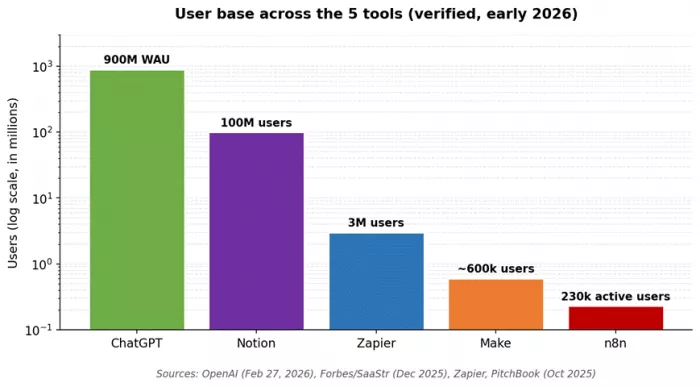
Figure 3. Verified user counts across the five tools (early 2026).
Quick comparison
| Tool | Users (verified) | Starting price (2026) | AI capability |
|---|---|---|---|
| ChatGPT | 900M weekly (OpenAI, Feb 2026) | Free; Plus $20/mo; Team $25/user/mo | GPT-5, Custom GPTs, Tasks, Actions |
| Notion AI | 100M total users (Forbes, 2025) | Bundled with Business ($24/user/mo) | Notion Agent, Custom Agents |
| Zapier | 3M+ users; 100k+ paying (Zapier) | Free; Professional from $19.99/mo | AI Copilot, Zapier Agents |
| Make | Acquired by Celonis 2025; 600k+ users | Free; Core from $9/mo | Maia AI, Make AI Agents |
| n8n | 230k active; 3,000+ enterprise (PitchBook) | Free self-hosted; Cloud Pro $20/mo | 70+ AI nodes, LangChain native |
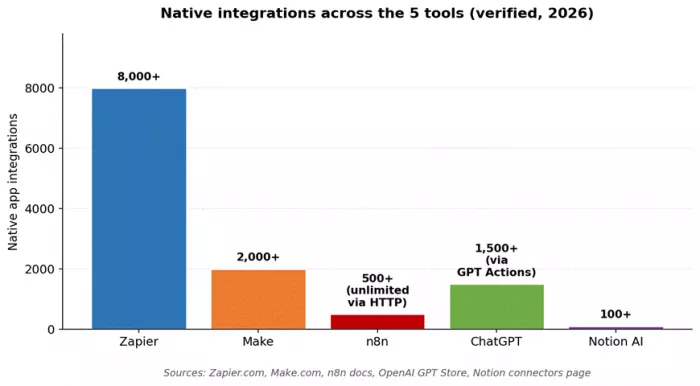
Figure 4. Native integrations across the five tools (sourced from each platform's official pages, 2026).
Zapier: 8,000+ Integrations and the Lowest Learning Curve
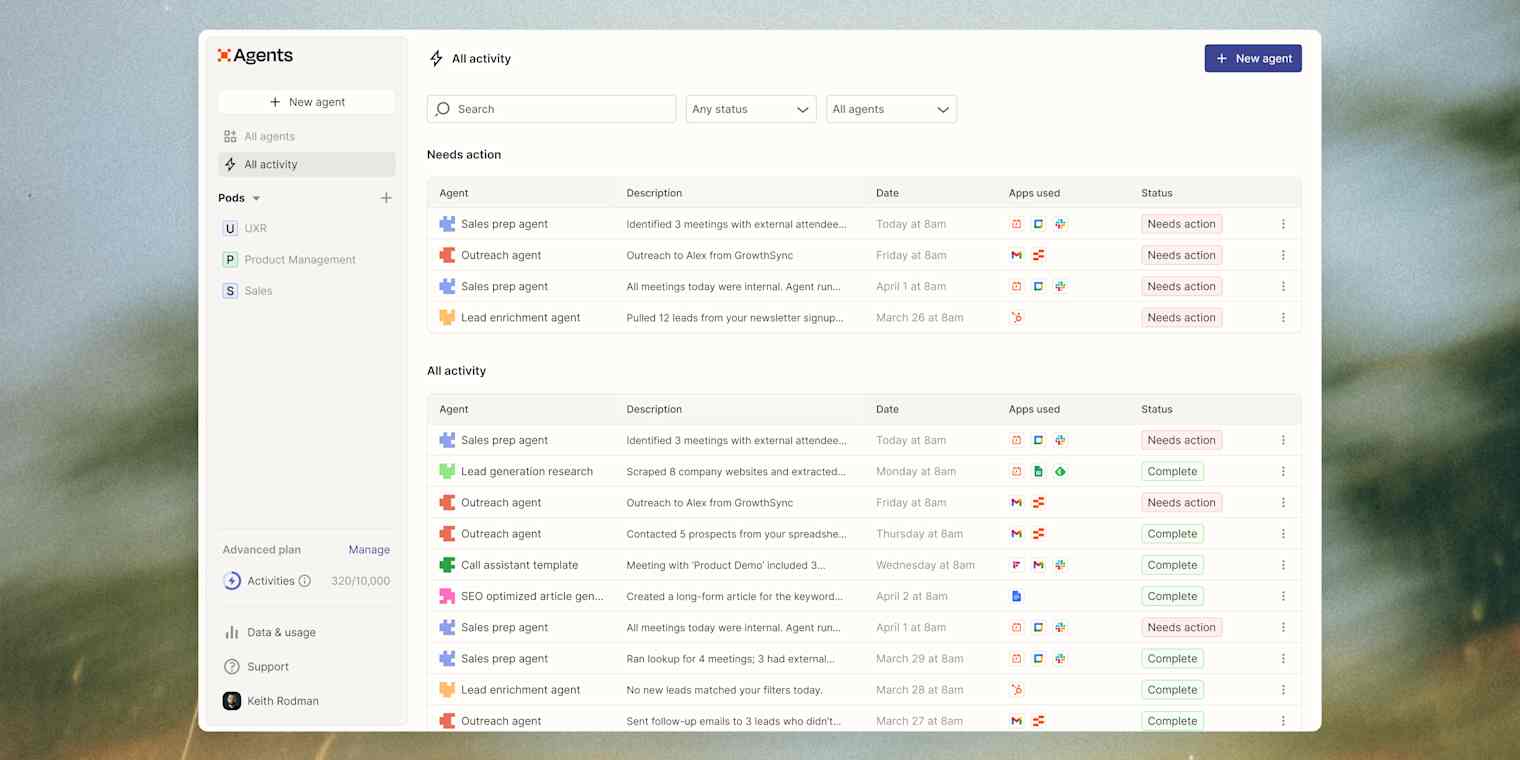
Founded in 2011 in San Francisco, Zapier remains the platform most people meet first when they decide to stop copy-pasting between tools. It supports more than 8,000 app integrations as of 2026 according to Zapier's own apps directory, the largest library in the category. The company reported approximately 400 million dollars in projected 2025 revenue, more than 3 million users, and over 100,000 paying customers across roughly 40 countries, with a 5 billion dollar valuation reached largely without venture capital.
What Zapier ships in 2026
| Feature | What it does |
|---|---|
| Zaps (the core) | Trigger-action workflows across 8,000+ connected apps with multi-step paths, filters, formatters, and conditional logic |
| Zapier AI Copilot | Builds a working Zap from a natural-language description. Type what you want and the Copilot drafts the workflow with field mappings |
| Zapier Agents | Goal-driven AI workers introduced in 2025 that operate across all connected apps without rigid trigger-action structures |
| Tables and Interfaces | Built-in lightweight database (Tables) and no-code form/UI builder (Interfaces). Unlimited at no extra cost since 2025 |
| Enterprise governance | SOC 2 Type II, HIPAA-eligible plans, role-based access controls, automatic AI training opt-out on enterprise tiers |
Pricing reality
Zapier's Free plan covers 100 tasks per month with two-step Zaps. Professional starts at 19.99 dollars per month for 750 tasks. Each action step counts as a task, so a 5-step Zap running 1,000 times consumes 5,000 tasks. Hackceleration's November 2025 hands-on review found that Zapier's Team plan ($103.50/mo for 2,000 tasks) is hit within weeks on real client projects, and 5,000 tasks per month escalates to 300 dollars or more. This is the single most common reason mid-market teams migrate the highest-volume workflows to Make or n8n.
Real adoption signal
According to public Zapier data referenced in industry reporting, approximately 69% of Fortune 1000 companies use Zapier somewhere in their stack. Marketing and advertising professionals are the largest user base by industry (18% of reviewers per GetApp's verified data on 3,047 users), and the most-used integrations are Google Sheets, Slack, and Gmail. By customer profile, small businesses make up 40% of users, individuals 35%, mid-sized teams 20%, and enterprises 5%.
Pros and cons
| Pros | Cons |
|---|---|
| Lowest learning curve in the category. Most users build their first working Zap in under 15 minutes | Per-task pricing scales poorly at high volume. Roughly 6-10x more expensive than Make at 5,000 leads/month |
| 8,000+ native integrations, the largest library in any no-code automation tool | Linear workflow structure with limited support for complex parallel processing |
| AI Copilot and Agents bring AI reasoning into workflows without prompt engineering | Cloud-only with no self-hosted option, ruling out strict data residency requirements |
| Mature enterprise governance: SOC 2 Type II, HIPAA, audit logs, RBAC | Free tier (100 tasks/month) is too thin for any real production use |
| Trusted by ~69% of Fortune 1000 companies, with proven reliability at scale | Premium-tier integrations (NetSuite, Salesforce advanced) require paid plans even at small volumes |
Best fit
Zapier is the right starting point for solo founders, marketing teams, sales operations leads, and any small business where the people building automations are not full-time technical staff. It is also strong for individual contributors at larger companies who want to automate their own corner without going through IT.
Make: Visual Branching Logic and Operations-Based Pricing

Make, formerly Integromat, is what you reach for when Zapier starts feeling like it is fighting you. Where Zapier walks you down a single linear path, Make gives you a canvas with branches, loops, error handlers, and parallel processing all visible at once. Make was acquired by Celonis in 2024 (terms undisclosed) and continues to operate as a standalone product. It supports more than 2,000 native app integrations and uses an operations-based pricing model that is materially cheaper than Zapier at high volume.
What Make ships in 2026
| Feature | What it does |
|---|---|
| Visual scenario builder | Drag-and-drop modules connected on a canvas with real-time data inspection during testing, making complex workflows debuggable in a way Zapier cannot match |
| Maia AI assistant | Generates working scenarios from natural-language prompts. Released for general availability in 2025 |
| Make AI Agents | Autonomous agents that handle multi-step decisions inside a workflow with full audit trails |
| Operations-based pricing | Each module execution counts as one operation. Core plan: $9/month for 10,000 operations, materially cheaper than Zapier |
| Advanced error handling | Built-in retry, fallback paths, and dedicated error-handling routes |
| Make Grid (Enterprise) | Workspace-wide governance, version control, and team collaboration for organizations running hundreds of automations |
Pricing reality
Make Free covers 1,000 operations per month with two active scenarios. Core at 9 dollars per month covers 10,000 operations. The same 5-step lead-routing workflow at 5,000 leads per month costs roughly 30 to 50 dollars on Make versus 300 dollars on Zapier (DEV Community benchmark, March 2026). The trade-off is a steeper initial learning curve. Most users need a few days of light experimentation before building anything important.
Pros and cons
| Pros | Cons |
|---|---|
| Cost-efficient at volume. Operations-based pricing is roughly 6-10x cheaper than Zapier for high-volume workflows | Smaller integration library than Zapier (~2,000 vs 8,000+), with thinner coverage of niche apps |
| Genuine multi-branch visual logic with routers, iterators, and aggregators | Steeper initial learning curve. Plan a few days of experimentation before production use |
| Real-time data inspection makes complex workflows debuggable | Cloud-only, like Zapier. No self-hosted option for regulated industries |
| Maia AI and Make AI Agents bring it close to Zapier on AI usability | Enterprise features (Make Grid, advanced governance) require higher-tier plans |
| Strong error handling: retry logic, fallback paths, dedicated error routes | Smaller community than Zapier or n8n means fewer pre-built templates and tutorials |
Best fit
Operations teams, growth marketers, e-commerce ops, and technically curious power users who have outgrown Zapier's linear model. Particularly strong in mid-market companies where one or two operations leads run dozens of workflows across the business. Make sits in the sweet spot of the visual category in 2026.
Notion AI: 100M Users and Autonomous Agents Inside Your Workspace
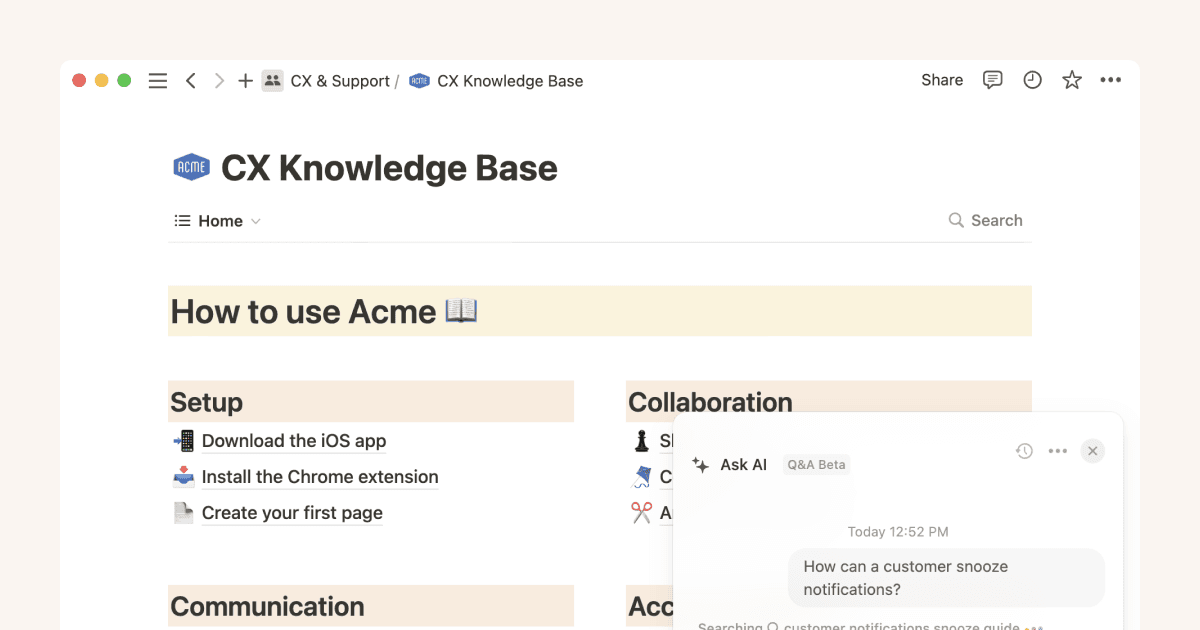
Notion is now a 100 million user platform valued at 11 billion dollars after its December 2025 employee tender (Forbes). Customers include OpenAI, Figma, Ramp, Anysphere, and Vercel. Roughly 80% of users sit outside the United States. The company's 2024 revenue was approximately 400 million dollars, growing to more than 600 million dollars in ARR by late 2025 according to SaaStr's December 2025 analysis. The relevant question for this guide is what changed in the product between September 2025 and early 2026, because that is when Notion graduated from a writing assistant into a workspace automation layer.
What Notion AI ships in 2026
| Feature | What it does |
|---|---|
Notion Agent (Sep 2025) | Autonomous multi-step execution for up to 20 minutes per session. Reads and writes across hundreds of pages in a single run |
| Custom Agents | Scheduled or triggered automations that handle recurring work. Free trial through May 3, 2026, then $10 per 1,000 credits on Business/Enterprise |
Notion 3.2 (Jan 2026) | Brought Custom Agents to mobile, added auto-selection across GPT-5, Claude Opus 4.5, and Gemini 3, shipped Skills and AI Autofill in databases |
Enterprise Search and Connectors | Searches Notion, Slack, Google Drive, GitHub, and the open web with cited sources. Returns answers in under 300ms |
| AI Meeting Notes | Records, transcribes, and summarizes calls automatically. The 2026 update added API access for downstream automation |
n8n MCP integration (early 2026) | Custom Agents can invoke n8n workflows directly, blurring the line between knowledge tool and automation engine |
Pricing reality
As of the May 2025 pricing change, full Notion AI is bundled with the Business plan (24 dollars per user per month) rather than offered as a separate add-on. Custom Agents are free to try through May 3, 2026, then move to a credit model at 10 dollars per 1,000 credits on Business and Enterprise. For teams not yet on Business, the price step is meaningful. For teams already on Business, the AI is now included rather than an extra line item.
Pros and cons
| Pros | Cons |
|---|---|
| Context-native: full access to your workspace's pages, databases, and connected apps | AI Autofill on databases with 500+ pages can take 30-60 seconds to recalculate |
| Notion Agent runs autonomously for up to 20 minutes across hundreds of pages | Native automation depth is single-database. Cross-database workflows still need Zapier, Make, or n8n |
| Auto-selection across GPT-5, Claude Opus 4.5, and Gemini 3 in a single product | Business plan ($24/user/mo) required for full AI access; the May 2025 pricing change removed cheaper add-ons |
| AI subprocessors contractually prohibited from training on customer data | Notion-centric value: drops sharply if your team's source of truth is in Google Docs or Confluence |
| Used by 100M people including OpenAI, Figma, Ramp, Vercel, and ~50% of Fortune 500 | Custom Agent quality depends heavily on workspace data hygiene; messy databases produce messy results |
Best fit
Teams where Notion is already the source of truth for knowledge, projects, or both. Particularly powerful for product, engineering, marketing, and operations teams that produce a steady volume of docs, specs, meeting notes, and recurring reports. The B2C2B adoption pattern Notion has run since 2019 means it most often enters organizations via individual users before spreading to teams.
ChatGPT: 900M Weekly Users and the Universal AI Co-Worker

On February 27, 2026, OpenAI announced that ChatGPT had reached 900 million weekly active users, more than double the 400 million reported in February 2025. The same announcement disclosed 50 million paying subscribers across all tiers, and OpenAI's annualized revenue crossed 25 billion dollars by end of February 2026 according to Reuters. ChatGPT now ranks #10 globally on Cloudflare Radar by traffic, ahead of Amazon, Instagram, and YouTube, and has held the #1 position among generative AI services for 27 consecutive weeks.
Workplace adoption (verified by OpenAI's own research)
OpenAI's published workplace adoption study, January 2026, mapped ChatGPT users with professional email addresses to industries. The findings:
| Metric | Value |
|---|---|
| US workers using ChatGPT for work | 28% |
| Workers with postgraduate degrees using it | 45% |
| Workplace AI users engaging 4+ days a week | More than half |
| Year-over-year change in daily usage | Doubled |
| Likelihood of use, ages 18-29 vs 50+ | More than 2x higher |
| Industries leading adoption | IT and finance |
| Reduction in weekly email time (6-month RCT) | 31% |
What ChatGPT ships in 2026
| Feature | What it does |
|---|---|
| GPT-5 reasoning | OpenAI's frontier model handles multi-step reasoning, long-context analysis, and structured output at a level that substitutes for many entry-level analytical tasks |
| Custom GPTs and GPT Store | Build a specialized assistant with system instructions, attached files, and tool access. Share across your team for consistent outputs |
| ChatGPT Tasks | Schedule recurring AI work without a separate automation tool. Daily news briefings, weekly competitor checks, reminders run on cron-like triggers |
| GPT Actions | Connect a Custom GPT to external services through OpenAPI specs. Roughly 1,500 verified GPT Actions exist in the GPT Store |
| Code interpreter, file analysis, voice mode | Upload a CSV, PDF, image, or slide deck and ask questions. Voice mode is particularly useful during commutes |
| ChatGPT for Work | Enterprise workplace seats exceeded 7 million by end of February 2026, up roughly 9x year over year |
Pricing reality
Free plan with rate limits, Plus at 20 dollars per month, Team at 25 dollars per user per month (with stronger data controls), and Pro at 200 dollars per month for power users. OpenAI CEO Sam Altman has publicly stated that ChatGPT Pro subscriptions are unprofitable due to high usage, suggesting the 20 dollar Plus tier may eventually become more limited.
Pros and cons
| Pros | Cons |
|---|---|
| Universal applicability: writing, analysis, research, coding, brainstorming, translation | Less integrated than purpose-built automation tools for high-volume cross-app workflows |
| Lowest barrier to value. Free account plus a clear question often delivers results in seconds | Hallucination risk on factual claims. GPT-5 still occasionally invents plausible-sounding facts |
| Frontier GPT-5 model included in $20 Plus tier without API contracts or commitments | Free and Plus conversations may be used to improve services unless settings are adjusted |
| Custom GPTs + Actions turn the chat into a real workflow surface for repeatable tasks | Context windows still impose limits; very long documents require chunking or external retrieval |
| Deep workplace adoption: 7M+ enterprise seats, 9x YoY growth, used in IT and finance most heavily | Sam Altman has publicly stated Pro tier is unprofitable, suggesting future tier restrictions are likely |
Best fit
Honestly, almost everyone. ChatGPT is the universal first stop for cognitive tasks. Use it for drafting, summarizing, brainstorming, learning, and prototyping, then push the recurring versions of those workflows into Zapier, Make, n8n, or Notion AI.
n8n: 230k Users, $2.5B Valuation, and the Deepest AI Integration
n8n (pronounced n-eight-n) is the Berlin-based, fair-code-licensed automation platform that quietly graduated from developer favorite to serious enterprise option between 2024 and 2026. In October 2025 the company raised 180 million dollars in a Series C round led by Accel, with participation from NVIDIA's NVentures, Sequoia, Visionaries Club, and others, bringing total funding to 254 million dollars and a 2.5 billion dollar valuation (PitchBook, October 9, 2025). PitchBook's data confirmed more than 230,000 active users and over 40 million dollars in ARR as of mid-2025. According to TechCrunch's coverage, roughly 75% of n8n's customers are using its AI features, and revenue grew 10x year over year through 2025.
What n8n ships in 2026
| Feature | What it does |
|---|---|
Native LangChain integration | 70+ AI nodes including AI Agent Tool Node, persistent agent memory, vector database connectors (Pinecone, Qdrant, Supabase pgvector), sandboxed code execution, multi-agent orchestration |
Self-hosting and local LLM support | Run the platform on your own infrastructure with optional Ollama integration for fully local language models. Sensitive data never leaves your network |
Per-execution pricing | Charges per workflow run, not per step. A 5-step workflow processing 5,000 leads counts as 5,000 executions, not 25,000 tasks |
MCP client/server nodes | Expose your workflows as tools to external agents, including Notion's Custom Agents |
| Code nodes | JavaScript and Python with full package install on self-hosted instances. Bypass the visual editor when needed without leaving the platform |
Time Saved node (Dec 2025) | Quantifies workflow-level efficiency. Aggregated savings surface in the Insights dashboard |
Pricing reality
Self-hosted is free under the Sustainable Use License (free for internal use; paid licenses for commercial hosting or embedding). Cloud Pro starts at 20 dollars per month. The same 5-step lead-routing workflow at 5,000 leads per month that costs roughly 300 dollars on Zapier costs the price of a small Hetzner VPS (around 6 to 10 dollars) on self-hosted n8n. That ratio is the single biggest reason mid-market companies migrate to n8n.
Enterprise customers (verified)
PitchBook and TechCrunch confirm n8n's enterprise customer base includes Vodafone, Delivery Hero, Microsoft, Volkswagen, Decathlon, Twitch, and KPMG, with more than 3,000 enterprise customers in total. Average revenue per enterprise customer is approximately 13,300 dollars annually according to Sacra's 2025 analysis.
Pros and cons
| Pros | Cons |
|---|---|
| Cost efficiency at scale. Self-hosted runs on a VPS for ~$6-10/month at volumes that would cost $300+/mo on Zapier | Steeper learning curve. Exposes JSON, expression syntax, and credential management |
| Deepest AI integration in the no-code category: native LangChain, 70+ AI nodes, multi-agent orchestration | Self-hosting overhead: you own infrastructure, backups, monitoring, and SSL renewal |
| Self-hosting and local LLM support keep sensitive data on your own network | Smaller native integration library than Zapier (~500 native nodes vs 8,000+) |
| JavaScript and Python code nodes for full flexibility when visual blocks fall short | Less polished AI-builder UX than Zapier Copilot or Make Maia at the natural-language layer |
| Trusted by Vodafone, Microsoft, Volkswagen, Delivery Hero, Twitch, KPMG; 3,000+ enterprise customers | Non-technical users typically need help to get started; not the right first tool for solo marketers |
Best fit
Technical teams that need automation power and control beyond cloud-only platforms. Engineering-led startups, mid-market companies with at least one operations engineer or DevOps person, and any organization with strong data-residency or compliance requirements. Most teams that adopt n8n keep one of the cloud-hosted tools alongside it for the long tail of light integrations, while their highest-traffic and most AI-heavy workflows live on n8n.
How the 5 Tools Layer Together
The mistake most people make is to pick one tool and try to do everything in it. The five tools in this guide overlap, but they are not competitors. They each have a specific job. The most productive workdays use them together.
The five-layer stack
| Layer | Job | Tool |
|---|---|---|
| Thinking and drafting | First-pass writing, analysis, research, brainstorming | ChatGPT (used dozens of times a day) |
| Knowledge and meetings | Documents, project tracking, meeting capture, internal Q&A | Notion AI (Custom Agents + Meeting Notes) |
| App-to-app plumbing | Routine cross-app workflows, light AI steps | Zapier (low volume, high variety) |
| Visual orchestration | Multi-branch logic, e-commerce ops, content fanout | Make (medium volume, branching) |
| Heavy AI and high volume | RAG pipelines, multi-agent systems, sensitive data | n8n (high volume, AI-heavy, regulated) |
A 30-day implementation plan
| Phase | What to do | Outcome |
|---|---|---|
| Days 1-3 | Pick one painful, repetitive task you do every week. Write down each step | A single concrete workflow to automate first |
| Days 4-7 | Sign up for ChatGPT Plus and Zapier. Build your first Zap using AI Copilot | First production automation running |
| Days 8-14 | Add Notion AI if your team uses Notion. Set up AI Meeting Notes for 3+ recurring meetings. Build one Custom Agent | Knowledge layer in place; meetings auto-summarized |
| Days 15-21 | Identify any Zap that needs branching, parallel processing, or routing. Rebuild in Make | Visible cost savings; deeper logic enabled |
| Days 22-30 | Audit. Kill fragile automations. Document the rest. Evaluate n8n if volume is climbing | Stable stack; clear roadmap for scale |
The single most important rule. Automate one thing well before you automate three things badly. Most failures come from over-ambition in week one, not from picking the wrong tool.
Five Pitfalls to Avoid in the First Six Months
1. Over-automation
There is a moment around three weeks in when every workflow looks like a candidate for automation. This is the most expensive moment. Automating low-frequency, high-judgment tasks rarely pays back the build and maintenance cost. The rule that holds up in the field: only automate tasks you do at least weekly that follow a stable pattern. Anything quarterly is faster done by hand.
2. Tool sprawl
The five tools in this guide do not all need to run simultaneously. Most individuals and small teams should start with two or three. Add the fourth and fifth when volume, complexity, or specific use cases demand it.
3. Trust before verification
AI agents are remarkably good but not perfect. McKinsey's 2025 State of AI survey reported that 51% of organizations using gen AI experienced at least one negative consequence, with inaccuracy the most common (30% experienced). The fix is human-in-the-loop checkpoints for any AI step that touches external communication, financial decisions, or customer-facing content. Every platform in this guide ships approval steps. Use them.
4. Ignoring privacy and security defaults
Each tool you connect is another set of credentials in another vendor's database. Use SSO where offered. Audit what each tool can access. Use enterprise plans for any workflow touching sensitive data. Notion contractually prohibits its AI subprocessors from training on customer data. Zapier auto-opts-out enterprise users from AI training. ChatGPT Team and Enterprise tiers do not use conversations for training. n8n self-hosted keeps everything on your network. Each platform's privacy story is mature, but only if you actively configure it.
5. No documentation
A workflow no one understands is a workflow no one can fix. As your stack grows, write down what each automation does, what it depends on, and who owns it. The most resilient teams keep a single internal page (often in Notion) listing every active workflow, its purpose, and its owner. One hour per quarter, days saved when something breaks.
Pitfall summary
| Pitfall | How to spot it | Fix |
|---|---|---|
| Over-automation | You are building automations for tasks you do quarterly or less | Only automate weekly+ tasks with a stable pattern |
| Tool sprawl | Three or more subscriptions in week one without proven need | Start with two tools; add more only when volume demands it |
| Trust before verification | AI agents running unsupervised on external comms or money | Add human-in-the-loop checkpoints; every platform ships them |
| Privacy and security blind spots | Default settings; no SSO; AI training opt-out not configured | Use enterprise plans for sensitive data; audit access regularly |
| No documentation | Nobody can explain what a workflow does or who owns it | Maintain one page listing every active workflow and its owner |
The Bottom Line
Three numbers from this guide are worth holding onto. McKinsey measures 57% of US work hours as technically automatable today. Gartner projects 75% of new enterprise applications on low-code by 2026. OpenAI's own data shows AI access cuts knowledge worker email time by 31%. The toolkit is ready. The market has moved. The gap between people who use these tools well and people who do not is widening every month, a shift increasingly visible across modern AI ecosystems such as Timtis.
You do not need to build the perfect stack on your first weekend. You need to identify one task that drains your week, automate it this month, and let the time it gives you back fund the next automation. A worker who saves three hours in month one and reinvests one of those hours in building the next automation is saving twelve hours a week by month six. That is the actual mechanism behind the people who suddenly seem to be running circles around their peers. They are not working harder. They are running quietly, in the background, on a stack that does the work for them.
Your action plan, in one paragraph
Start with ChatGPT Plus this week and use it dozens of times a day for any cognitive task that takes you more than ninety seconds. Add Zapier next and automate one cross-app workflow you currently do by hand. If you live in Notion, turn on Notion AI and build one Custom Agent for a recurring report. Once those three are humming, evaluate Make for any workflow with branching logic and n8n if your team is technical and volume is climbing. Build one, watch it run, refine it, and then build the next.
Comments