Standing in front of the bathroom mirror with clippers in hand is the wrong moment to learn that a bold new haircut was a mistake. For years the only way to know how a sharp fade or a fresh colour would land was to commit and hope. That is the gap two AI tools set out to close. BarberGPT keeps things lean, a browser-based virtual barber built almost entirely around men’s cuts. YouCam Makeup AI goes the opposite way, packing hair, colour, makeup and far more into one polished app from Perfect Corp. Both can place a brand-new hairstyle onto a real selfie in seconds, yet each was clearly designed for a very different person. This comparison weighs the two on realism, range, price and privacy, so the smarter choice is obvious before any risk reaches the mirror.
The short answer
| For a known short men’s cut, whether a fade, a buzz, a crop or a textured crew, BarberGPT is the sharper instrument and delivers a more believable preview to carry into the shop. For anyone exploring widely, including long styles, bold colours, women’s looks, beards or full makeup, or for anyone who wants everything inside one phone app, YouCam Makeup AI is the more complete choice. The sections below show exactly where that line falls. |
BarberGPT vs YouCam Makeup AI at a glance
The fastest way to read the matchup is feature by feature. The table below lines up both hairstyle simulators on the points that matter most before a real-world hair decision.
| Feature | BarberGPT | YouCam Makeup AI |
|---|---|---|
| Core focus | Men’s haircut previews only | Full beauty suite: hair, colour, makeup, body, fashion |
| Platforms | Browser only (no native app) | iOS, Android, plus a web editor |
| Hairstyle library | Classic short men’s cuts (fades, buzz, crops, short curls) | 60+ styles for men and women, plus a hair-colour changer |
| Hair colour change | Not the focus | Built-in colour changer, natural to bold shades |
| Beard / facial hair | Not supported | Beard styles included |
| How a look is applied | Brush over the hair area by hand, then generate | Auto-detection, text prompts, reference photos, AI Beauty Agent |
| Typical speed | Roughly 20 to 60 seconds per preview | Varies; slower and prone to freezing on the free tier |
| Output sweet spot | Photoreal results on short cuts | Realistic across many styles, though quality varies |
| Account required | None for the first three previews | Free download; account and subscription for full access |
| Privacy signals | HTTPS, user-owned images, manual deletion | Analytics and ad data collection disclosed; files removed after a set period |
| Scale & reception | Niche, men-focused audience | 300M+ app users; 4.7 on the App Store, 4.1 on Google Play |
What BarberGPT does well
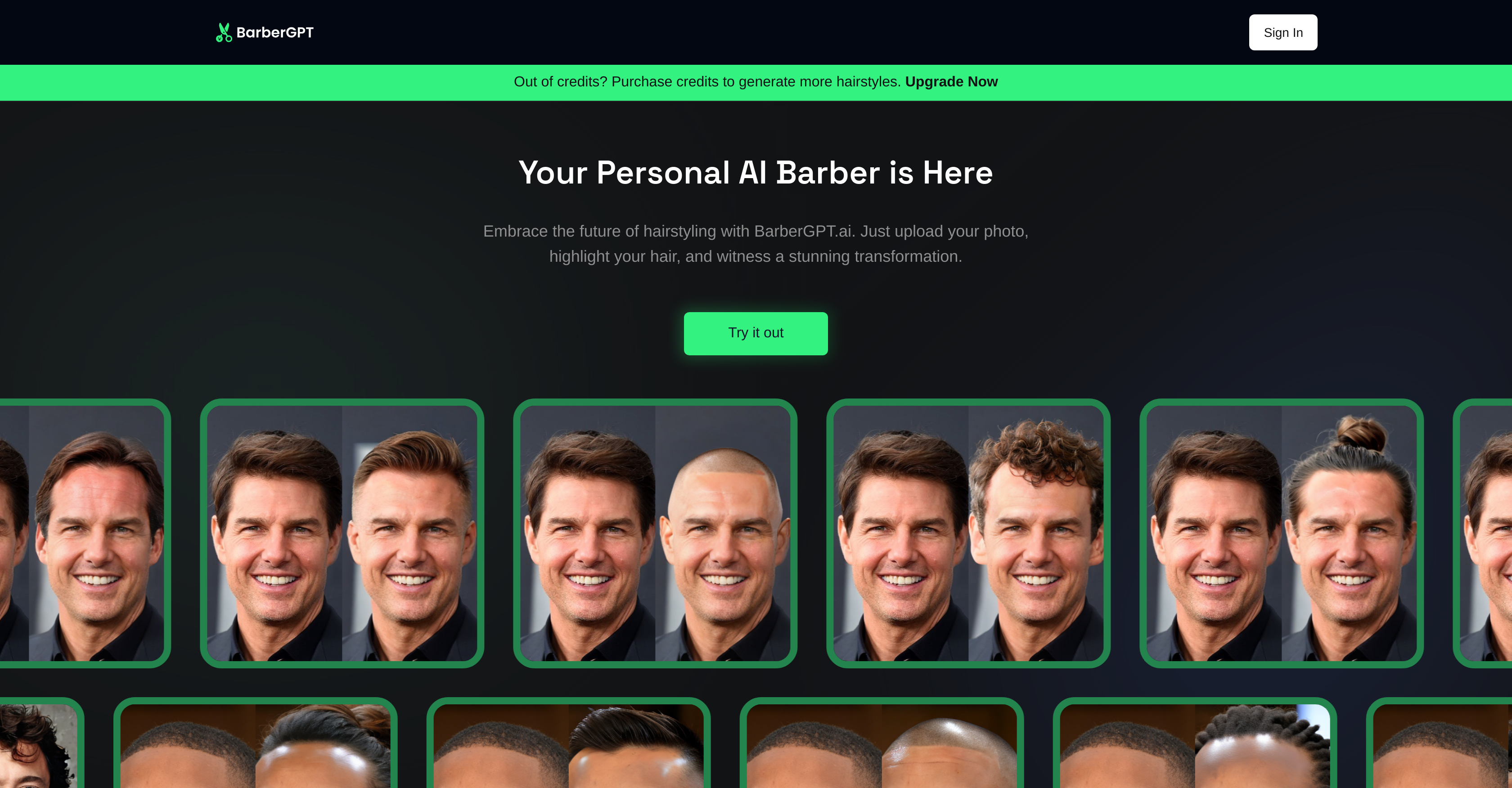
• Photorealism on classic cuts: on a well-lit, front-facing photo, fades, buzz cuts, tapers and short textured crops come out looking like an actual post-barber selfie rather than a 2017-era filter.
• Manual control over the hair area: instead of auto-detecting (and sometimes botching) a hairline, the brush tool hands that decision to whoever is marking the photo, which stays deliberate rather than tedious once learned.
• No install, no friction: the whole thing runs in a browser, with the first three previews available without creating an account.
• Genuinely fast: previews land in about 20 to 60 seconds, quicker than several paid competitors.
• Privacy-aware by default: HTTPS, image-ownership claims in the uploader’s favour, and manual deletion controls lower the risk of sharing a face.
What YouCam Makeup AI brings to the table

• A much wider library: 60+ hairstyles for men and women, built on generative AI and diffusion models for hyper-realistic cuts, colours and textures.
• Real colour experiments: a dedicated hair-colour changer covers everything from natural shades to bold fantasy tones before a salon visit.
• Far beyond hair: makeup try-on, face and body retouching, outfit swaps, and AI photo and video generation all live in the same app.
• Conversational styling: an AI Beauty Agent suggests looks by face shape or occasion and applies edits from plain-language prompts.
• Everywhere at once: native iOS and Android apps plus a browser editor, backed by a 4.7-star App Store rating and a user base north of 300 million.
Realism, range, and the 2026 scorecard
Raw realism and sheer variety pull in different directions here, and the scorecard below captures that tension. BarberGPT climbs highest exactly where it specialises, on short-cut realism and speed, while YouCam Makeup AI leads on range, colour and cross-device reach. The pattern holds across independent reviews: the closer a feature sits to BarberGPT’s narrow promise, the stronger it scores; the wider the request, the more YouCam pulls ahead.
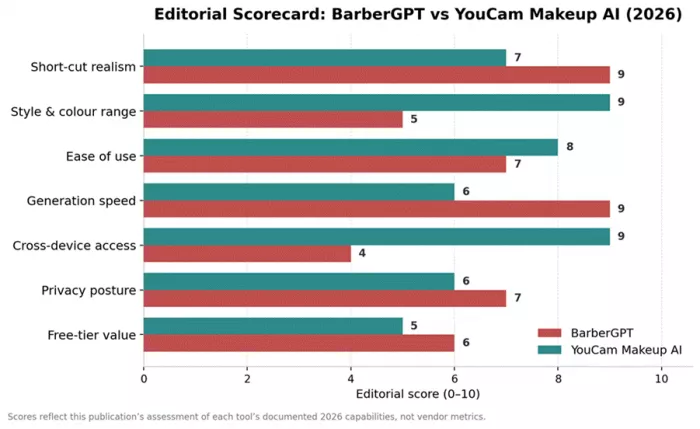
Both hairstyle simulators rated across seven 2026 criteria.
The chart shows the shape of the matchup; the ratings table calls each round and names the overall edge. Stars are out of five, and the figure in brackets is the matching score out of ten.
| Criterion | BarberGPT | YouCam Makeup AI | Edge |
|---|---|---|---|
| Short-cut realism | ★★★★½ (9) | ★★★½ (7) | BarberGPT |
| Style & colour range | ★★½ (5) | ★★★★½ (9) | YouCam |
| Ease of use | ★★★½ (7) | ★★★★ (8) | YouCam |
| Generation speed | ★★★★½ (9) | ★★★ (6) | BarberGPT |
| Cross-device access | ★★ (4) | ★★★★½ (9) | YouCam |
| Privacy posture | ★★★½ (7) | ★★★ (6) | BarberGPT |
| Free-tier value | ★★★ (6) | ★★½ (5) | BarberGPT |
| Overall | ★★★½ (6.7) | ★★★½ (7.1) | YouCam (narrow) |
In short: BarberGPT takes more individual rounds, yet YouCam Makeup AI edges the overall score on the strength of its wider wins. Depth carries a single classic cut; breadth carries the bigger contest.
Pricing and access compared
Neither tool is purely free, and the way each one charges says a lot about who it serves.
| Aspect | BarberGPT | YouCam Makeup AI |
|---|---|---|
| Entry cost | Free for the first three generations, no account | Free to download with a limited set of free features |
| Pricing model | Pay-as-you-go credits after the free previews | Freemium with a Premium subscription, plus credits for some AI tools |
| Sample paid rates | Credit packs vary; shown on the upgrade page | Web editor about $9.99/mo or $39.99/yr (100 credits/mo); Pro around $69.99/yr |
| Watermarks | Not generally reported | Free-tier AI outputs may carry watermarks |
| Free hairstyle access | A handful of free credits to start | Roughly three short styles free; longer or premium styles need a subscription |
| Common complaint | Credits discourage heavy experimentation | Reports of paywalled styles and unexpected subscription charges |
Pricing shifts often and varies by region and promotion; the figures above reflect rates published in 2026 and are worth confirming on each official page before purchase.
Best AI hairstyle simulator by scenario
Use case settles the debate faster than any single feature. The scenarios below map common goals to the better-suited simulator and the reason behind each call.
| Scenario | Better pick | Why |
|---|---|---|
| Planning one specific men’s cut (fade, buzz, crop) | BarberGPT | Most photoreal short-cut preview to hand a barber |
| Trying many looks, colours and makeup in one place | YouCam Makeup AI | Far larger library plus a colour changer |
| Women’s or long hairstyles | YouCam Makeup AI | BarberGPT skews male and short |
| Previewing a beard or facial hair | YouCam Makeup AI | BarberGPT offers none |
| A quick, no-install, privacy-minded try | BarberGPT | Browser-only, no-account trial, deletion controls |
| All-in-one beauty editing on a phone | YouCam Makeup AI | Native apps and a broad toolset |
| A stylist showing a client a realistic short cut | BarberGPT | Reliable realism on classic cuts |
| Creators wanting AI photo, video and styling | YouCam Makeup AI | Full generative suite and AI agent |
Strengths and trade-offs
BarberGPT: where it wins and where it doesn’t
• Wins on: short-cut realism, speed, simplicity, a no-account trial, and a privacy-aware design.
• Held back by: a men-only, short-style library, no beard or colour tools, no mobile app, a manual masking step, and weaker results on curly or long hair.
YouCam Makeup AI: where it wins and where it doesn’t
• Wins on: breadth across hair, colour, makeup, body and fashion, 60+ styles for all genders, native apps, and an AI styling agent.
• Held back by: aggressive paywalls on the best styles, occasional freezing and slow loads, watermarks on free AI output, and subscription-billing frustration in user reviews.
Final verdict
Crowning a single winner misses the point, because these two tools are barely competing. They sit at opposite ends of the same shelf. BarberGPT is the specialist: narrow, quick, and genuinely convincing on the short men’s cuts it was built for. Arriving at a barbershop with one of its previews feels closer to handing over a photograph than describing a hope. YouCam Makeup AI is the generalist: a wide-open beauty studio where hair is just one room, rich with styles and colours but quick to ask for a subscription once the looks turn interesting.
That makes the recommendation an easy one to split. A man set on the perfect fade, weighing a buzz cut, or simply done with haircut roulette will find more honesty in BarberGPT and can ignore everything else. Anyone who treats hair as play, chasing new colours, longer styles, beards, makeup, or the odd viral edit, will outgrow BarberGPT within minutes and feel right at home in YouCam Makeup AI. Best of all, settling it costs almost nothing: BarberGPT hands over three free previews, and YouCam Makeup AI is free to download. A few minutes inside each tells the real story, and spares the mirror from telling it the hard way.
Comments