A quick refresher on Jungle AI
Jungle AI's core promise is speed. You upload material, and within moments you have a study set you can drill. It supports many formats, works through the browser and dedicated iOS and Android apps with synced progress, generates several question types including case questions, and has a document chat so you can ask follow-ups about your own material. It also leans on gamification, with a little tree that grows as you study, and it can turn diagrams into image-occlusion cards for visual subjects like anatomy.
Where Jungle AI is strong
● Fast conversion of slides, PDFs, and videos into flashcards and quizzes.
● Several question formats: multiple choice, free response, and case questions.
● A clear focus on question quality, including believable wrong-answer choices, which is where many auto-generated quizzes fall short.
● Image occlusion for diagrams, which visual and medical learners like.
● Works across web, iOS, and Android with progress that syncs.
Where it can frustrate
● Question quality is usually good but not flawless. Some users report occasional unclear or incorrect answers, so you still need to review.
● Advanced customization of cards and question types is limited compared with power-user tools.
● The free plan is capped: roughly three generations a month, 30 pages per document, 30 minutes per video, and case or diagram questions only once a month.
● Unlimited generations, unlimited document and video length, AI explanations on every question, and Anki export require the paid Super Learner plan, with yearly billing discounted.
If any of those trade-offs bother you, the alternatives below are worth trying.
The five alternatives at a glance
| Tool | Best for | Free tier | Starting paid (approx.) | Platforms | Standout |
|---|---|---|---|---|---|
| Jungle AI (reference) | Fast flashcards and case questions from your files | Yes (capped) | Free; paid Super Learner | Web, iOS, Android | Image occlusion + case questions |
| Quizlet | Huge library and classroom use | Yes (limited) | ~$7.99/mo | Web, iOS, Android | 700M+ study sets, Quizlet Live |
| Knowt | Generous free study and Quizlet import | Yes (generous) | Free core; paid Ultra | Web, iOS, Android, extension | Free unlimited Learn mode |
| Gizmo AI | Gamified daily studying | Yes (throttled) | Weekly or yearly | Web, iOS, Android | XP, leaderboards, live quizzes |
| StudyFetch | All-in-one uploads plus AI tutor | Yes (vague) | ~$8/mo annual | Web, iOS, Android | Spark.E tutor on your material |
| Anki | Long-term retention | Free (desktop, Android) | ~$24.99 iOS one time | Desktop, Android, iOS, web | Best spaced repetition (FSRS) |
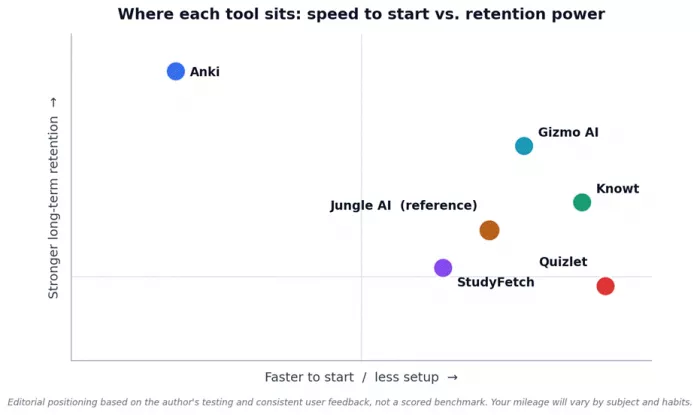
How the tools compare on two axes that matter most: how quickly you can start, and how strong the retention system is.
Quizlet: the household name, now with AI

Quizlet is the tool most students have already used at some point, and in 2026 it is far more than digital flashcards. Its library is enormous, with hundreds of millions of user-made study sets, and it has stacked AI features on top. Q-Chat is an OpenAI-powered tutor that quizzes you conversationally, while Magic Notes turns your notes or a PDF into flashcards, study guides, and practice tests.
Where it shines
● The biggest ready-made library anywhere, so many topics already have sets you can study right away.
● Clean, beginner-friendly interface with several study modes: Flashcards, Learn, Test, and Match.
● Quizlet Live is excellent for classrooms and group review.
● Q-Chat and Magic Notes add solid AI help for mainstream subjects.
Watch-outs
● The free tier keeps shrinking. Learn mode now hits daily caps, and ads are frequent.
● The best AI features and offline access require Quizlet Plus.
● Content is user-generated, so quality varies and some sets contain errors. Always sanity-check a shared set.
● Spaced repetition is lighter than Anki's, so heavy long-term memorization is not its strongest suit.
| Detail | Summary |
|---|---|
| Best for | Fast access to a huge library and classroom study. |
| Free tier | Yes, but increasingly limited. |
| Paid (approx.) | Quizlet Plus around $7.99 per month or $35.99 per year. |
| Platforms | Web, iOS, Android. |
| Standout | 700M-plus study sets and Quizlet Live. |
| Main watch-out | Free limits and variable content quality. |
Practical tip: Before building a set from scratch, search the library. For common courses you can often find a strong set in seconds, then use Learn mode to drill it.
Knowt: the free alternative students keep switching to
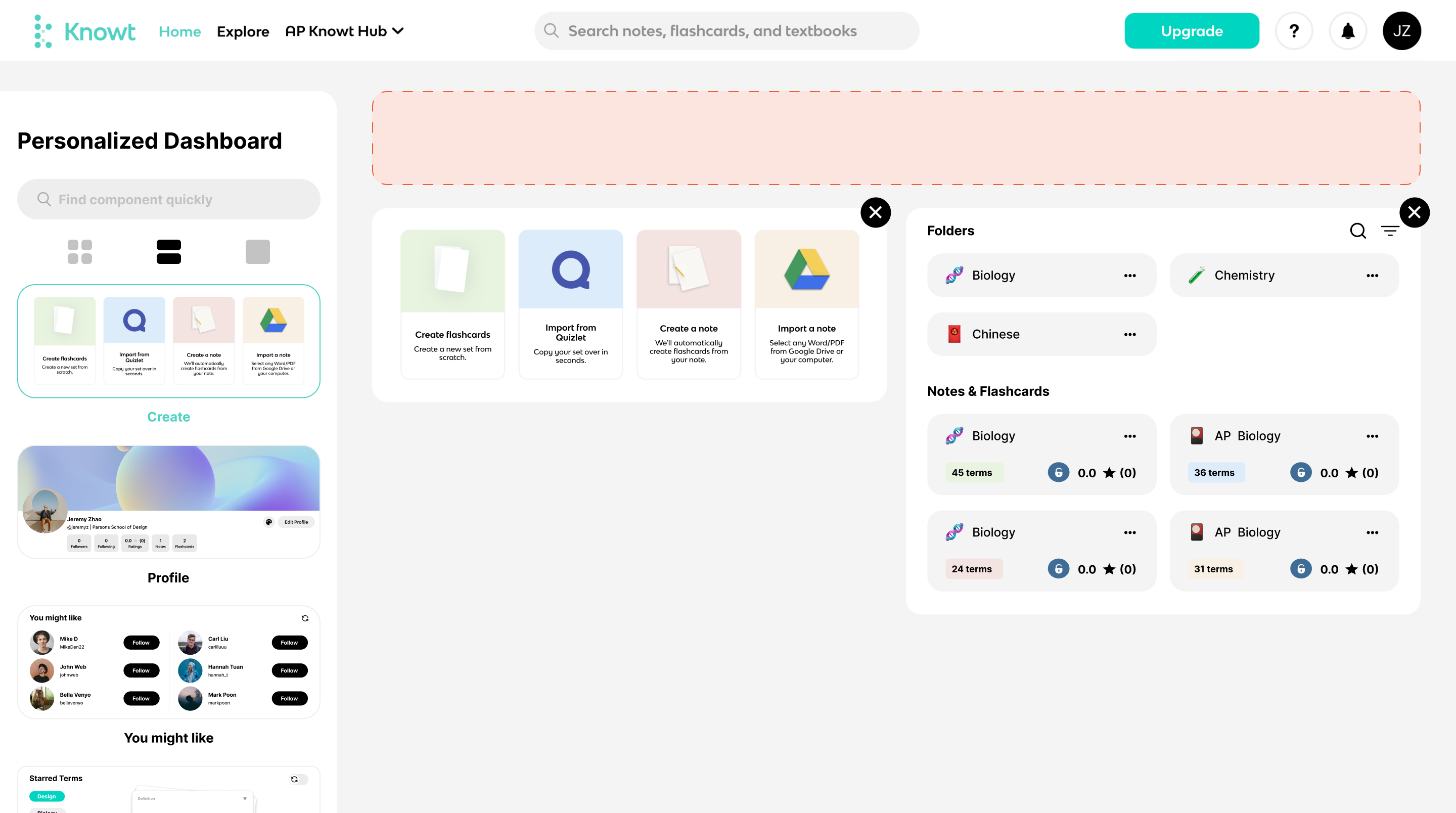
Knowt was built for exactly the moment when Quizlet's free tier started feeling tight. Its headline feature is a genuinely free, unlimited Learn mode, plus practice tests, spaced repetition, and a matching game at no cost. You can import your existing Quizlet sets with one click using its Chrome extension, then keep studying them for free.
Where it shines
● Free unlimited Learn mode, practice tests, and spaced repetition, which is rare.
● One-click Quizlet import through the browser extension, so you do not lose your old sets.
● AI can build flashcards and summaries from your notes, PDFs, lecture videos, and slides.
● Can record a live lecture and turn it into notes and flashcards.
● Millions of shared student resources to pull from.
Watch-outs
● The Kai AI chatbot and some advanced features sit on the paid Ultra plan.
● The free experience carries ads, and some users find them intrusive.
● Quizlet import needs the extension open on the Quizlet page. There is no import-by-URL.
● AI summaries are best on structured lectures and can wander on casual videos.
| Detail | Summary |
|---|---|
| Best for | Students who want strong free features and an easy exit from Quizlet. |
| Free tier | Yes, and unusually generous. |
| Paid (approx.) | Free core; the Ultra plan unlocks Kai and extras. |
| Platforms | Web, iOS, Android, Chrome extension. |
| Standout | Free unlimited Learn mode plus one-click Quizlet import. |
| Main watch-out | Ads on free; the best AI chat is paid. |
Practical tip: If you already have Quizlet sets, install the extension, bring them into Knowt, and run them through the free Learn mode before your next test. It is one of the fastest zero-cost upgrades available.
Gizmo AI: study that feels like a game

Gizmo, also known by its old name Save All, leans hard into making studying feel addictive. It turns your material into AI flashcards and quizzes, then wraps them in spaced repetition, active recall, XP, leaderboards, and a live quiz mode. You can import from Quizlet, Anki, YouTube, PDFs, notes, and PowerPoint, or scan handwritten notes with your camera.
Where it shines
● Gamified quizzing with XP and leaderboards that keeps a lot of people coming back daily.
● Magic Import from many sources, including scanning handwritten notes.
● Over a million public decks to browse.
● Spaced repetition and active recall built in, plus an Explain feature that answers your questions from the uploaded material.
Watch-outs
● The free tier uses a lives or hearts system that can lock you out mid-session, which stings during a cram.
● Some users find the spaced repetition repeats familiar cards on very large decks.
● AI cards sometimes lack depth for applied subjects, so medical and technical learners often edit them.
● Premium is billed weekly or yearly, and the weekly price adds up fast if you forget to switch to annual.
| Detail | Summary |
|---|---|
| Best for | Learners who need motivation and enjoy streaks and games. |
| Free tier | Yes, but throttled by a lives system. |
| Paid (approx.) | Weekly or yearly; annual is cheaper per week. Student discount available. |
| Platforms | Web, iOS, Android. |
| Standout | Gamified quizzing and broad import options. |
| Main watch-out | Free lockouts and weekly billing. |
Practical tip: If you like Gizmo, do not pay weekly out of habit. If you will study daily for a full term, the yearly plan is far better value. If you only need it for one exam week, a single week can be enough.
StudyFetch: an all-in-one workspace with an AI tutor
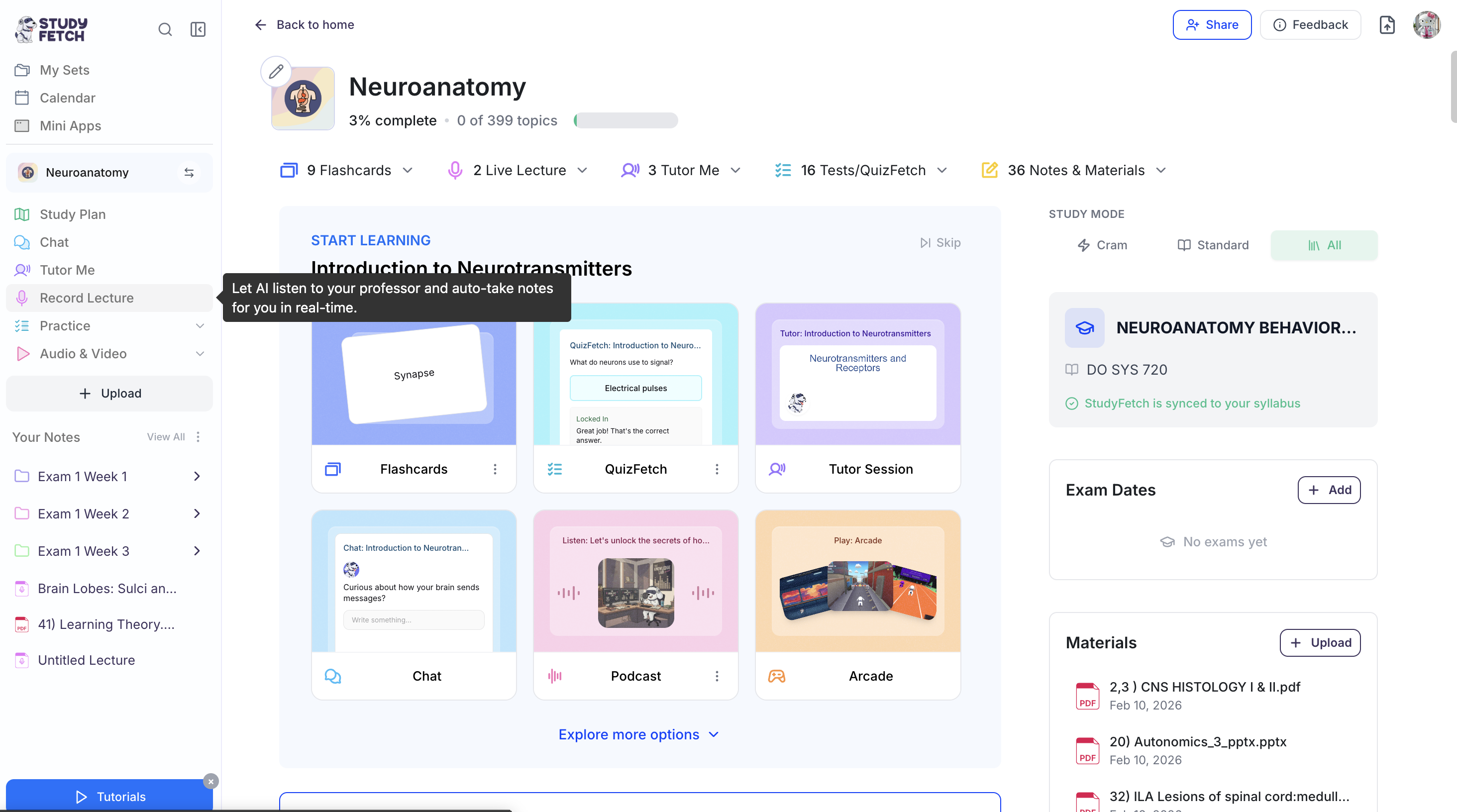
StudyFetch takes the "upload everything, study anything" idea further than most. You feed it PDFs, slides, YouTube videos, or recordings, and it generates notes, flashcards, quizzes, and practice tests. Its centerpiece is Spark.E, an AI tutor grounded in your uploaded content, so its answers come from your professor's material rather than the open internet. There is even a voice tutoring mode, live lecture notes, and an essay grader.
Where it shines
● One upload produces notes, flashcards, quizzes, and a tutor, all in one place.
● Spark.E answers from your own material, which makes its help feel course-specific.
● Handles many formats, including audio and video, and can summarize as text or audio.
● Extra tools like the study scheduler and essay feedback round out the workflow.
Watch-outs
● The AI makes meaningful errors on equations, chemistry notation, and complex diagrams, so verify every card in technical subjects.
● The Android app is reported as buggier than iOS.
● Free limits are vague, and by far the most common complaint across review sites is difficulty with auto-renewal and cancellation. Set a reminder the moment you subscribe.
| Detail | Summary |
|---|---|
| Best for | Students who want notes, quizzes, and a tutor from their own uploads. |
| Free tier | Yes, with unclear limits. |
| Paid (approx.) | Premium around $8 per month billed annually, higher month to month. |
| Platforms | Web, iOS, Android. |
| Standout | Spark.E, a tutor grounded in your materials. |
| Main watch-out | STEM accuracy and cancellation friction. |
Practical tip: Treat StudyFetch output as a strong first draft, not a finished product. Upload your reading and slides, generate a practice test before office hours, and let the wrong answers show you what you only half understand.
Anki: the gold standard for long-term retention

Anki is the tool serious memorizers reach for, and it is free and open source. It is not pretty and it does not hold your hand, but its spaced repetition is best in class, especially now that it uses the modern FSRS scheduler. Medical students in particular rely on huge community decks like AnKing. The trade-off is effort: you either build cards yourself, download a shared deck, or use add-ons, and there is a real learning curve.
Where it shines
● The strongest spaced repetition available, tuned to show a card just before you would forget it.
● Completely free on desktop and Android, with free cloud sync across devices.
● Deep customization: card templates, add-ons, images, audio, LaTeX, cloze deletions, and image occlusion.
● A massive ecosystem of community decks, ideal for medicine and languages.
Watch-outs
● A steep learning curve and a dated interface.
● No built-in AI card generation. You make cards manually or lean on third-party tools.
● The iOS app costs a one-time fee of roughly $24.99, which funds development. Desktop and Android are free.
● Beware copycat apps that use the Anki name. They are not official and often charge subscriptions for less.
| Detail | Summary |
|---|---|
| Best for | Long-term retention in demanding subjects like med school and languages. |
| Free tier | Free on desktop and Android; the iOS app is paid. |
| Paid (approx.) | iOS app around $24.99, one time. |
| Platforms | Windows, macOS, Linux, Android, iOS, and web sync. |
| Standout | Best-in-class spaced repetition (FSRS) and community decks. |
| Main watch-out | Steep setup and manual card creation. |
Practical tip: If you are in a memory-heavy program, the payoff is worth the setup. Start with a respected community deck for your field rather than building everything yourself, and turn on FSRS for smarter scheduling.
Which tool fits your situation?
Different students need different things. Here is a quick way to match your situation to a pick.
| If you are... | Best pick | Why |
|---|---|---|
| On a tight budget and want unlimited free study | Knowt (or Anki) | Free Learn mode and Quizlet import, or Anki's free power on desktop and Android. |
| Memorizing huge volumes for med school, law, or languages | Anki | The strongest spaced repetition and mature community decks. |
| Wanting notes, quizzes, and a tutor from your own uploads | StudyFetch | Spark.E answers from your material and generates a full toolkit. |
| Motivated by streaks, XP, and quick daily reps | Gizmo AI | Gamified quizzing that keeps you consistent. |
| After the biggest ready-made library or classroom games | Quizlet | Hundreds of millions of sets plus Quizlet Live. |
| Cramming last minute from a slide deck or PDF | Jungle AI, StudyFetch, or Knowt | All three convert files into a study set fast. |
| A teacher building class materials | Quizlet or Knowt | Easy set creation, sharing, and progress tracking. |
Cross-platform availability and how users rate them
Where you study matters. This table shows where each tool runs and the general sentiment from user reviews. Ratings are approximate, differ by app store and region, and shift over time, so treat them as directional rather than exact.
| Tool | Web | iOS | Android | Extension | Offline | Typical rating |
|---|---|---|---|---|---|---|
| Jungle AI | Yes | Yes | Yes | No | No | Generally positive |
| Quizlet | Yes | Yes | Yes | No | Plus only | High (about 4.7 to 4.8) |
| Knowt | Yes | Yes | Yes | Yes | Partial | High (about 4.8) |
| Gizmo AI | Yes | Yes | Yes | No | Limited | High (about 4.7) |
| StudyFetch | Yes | Yes | Yes* | No | No | Mixed (iOS stronger) |
| Anki | Yes | Yes* | Yes | No | Yes | High (about 4.6 to 4.8) |
*StudyFetch: the Android app is reported as buggier than iOS. *Anki: the iOS app is paid. Offline support and extensions can change with updates. Anki is the clear winner if you need to study without internet.
How to actually choose
If you want the simplest path, start here.
● Choose Knowt if you want the most for free and an easy way to keep your old Quizlet sets.
● Choose Anki if retention is everything and you are willing to invest a weekend in setup.
● Choose StudyFetch if you want one place to upload, get quizzes, and ask a tutor about your own notes.
● Choose Gizmo AI if streaks and games are what keep you studying.
● Choose Quizlet if you value the huge library and clean study modes and do not mind paying for the AI extras.
● Stick with Jungle AI if its speed, case questions, and image occlusion already fit how you study.
Whatever you choose, the tool matters less than the habit. Short, frequent, active recall sessions beat long passive re-reading, and every app here supports that if you use it consistently.
A word on studying honestly and safely
Two quick reminders. First, AI-generated flashcards are a starting point, not gospel. All of these tools can produce confident but wrong answers, and errors are most common in math, chemistry, and medical content. Review your cards, and cross-check anything important against your textbook or professor.
Second, use these tools to learn, not to shortcut your integrity. Turning your own materials into flashcards and quizzes is exactly what they are built for. Using an app to pull live answers during a graded quiz or exam can violate your school's academic honesty policy, and it skips the part where you actually learn. The goal is to understand the material, not just to see a correct answer once.
The short version
There is no single best replacement, only the best fit for you.
● Best free all-rounder: Knowt.
● Best for serious retention: Anki.
● Best all-in-one with a tutor: StudyFetch.
● Best for motivation and games: Gizmo AI.
● Best library and classroom tool: Quizlet.
If Jungle AI already works for you, there is no urgent reason to leave. But if price, retention depth, or a specific feature is holding you back, one of these five will very likely serve you better.
Comments