READ THIS FIRST CrossMarket AI is widely reported as a high-risk crypto scheme with blocked withdrawals, not a normal tool. The five products below are not clones of it. They are real, transparent tools where you keep control of your money. None promises guaranteed returns. This is not financial advice. |
Why These, and Not Clones of CrossMarket AI
CrossMarket AI is marketed as an AI that trades crypto for you and pays steady daily profit. Independent reviews and regulators describe it very differently, as a high-risk scheme with blocked withdrawals and no verifiable trading behind it. Listing other platforms that work the same way would just point you toward the same kind of loss.
So here are five tools that do the legitimate parts of that promise: they analyze markets, surface data and signals, and leave the decision and the money with you. Each entry has an at-a-glance table, a pricing breakdown, real use cases, and honest pros and cons.
One principle before the list. Every tool here gives you information or analysis and never guarantees a return, because that guarantee is the tell of a scam. Prices change and vary by country, so treat the figures as a June 2026 snapshot and confirm on each official site.
Quick Comparison and Pricing
| Tool | Best for | Markets covered | Free option | Starting paid |
|---|---|---|---|---|
| TradingView | Charting and community | Crypto, stocks, forex, futures | Yes | ~$14.95/mo |
| TrendSpider | Automated analysis and backtesting | Stocks, ETFs, forex, crypto, futures | No (paid trial) | ~$40-60/mo |
| Koyfin | Fundamentals and macro research | Equities, ETFs, FX, bonds (crypto price only) | Yes | ~$39/mo |
| Trade Ideas | Real-time AI scanning | US stocks only | Yes (delayed) | ~$89/mo |
| Bloomberg Terminal | Institutional all-in-one | All asset classes | No | ~$2,665/mo |
Approximate lowest paid tier, monthly. Annual billing and promos lower these. Free tiers exist for TradingView, Koyfin, and Trade Ideas. Bloomberg is institutional and off this scale.
The 5 Tools, Reviewed
TradingView
Best all-round charting across every market
TradingView is the charting and analysis platform most active traders open first. It covers crypto, stocks, forex, and futures in one place, with a deep library of indicators and one of the largest communities sharing ideas. It does not trade for you. It gives you the charts, alerts, and screeners to make your own calls, which is the honest version of what CrossMarket AI pretended to offer.
Key features
• Advanced charting with hundreds of indicators and drawing tools
• Multi-asset coverage: crypto, equities, forex, and futures
• Custom alerts, screeners, and watchlists
• Large community publishing analysis and Pine Script tools
| At a glance | |
| Best for | Charting and community |
| Markets | Crypto, stocks, forex, futures |
| Free option | Yes (Basic plan) |
| Starting paid | ~$14.95/mo (Essential) |
| Standout | Charting depth plus a huge community |
| Not ideal for | Deep fundamentals research |
| Plan | Price | What you get |
|---|---|---|
| Pricing | ||
| Free (Basic) | $0 | Basic charting, limited indicators and alerts |
| Essential | $14.95/mo | Ad-free, 2 charts per tab, 5 indicators |
| Plus | $34.95/mo | 4 charts per tab, more indicators and alerts |
| Premium | $69.95/mo | 8 charts per tab, non-expiring alerts, deep history |
| Ultimate | $239.95/mo | Maximum charts, indicators, and alerts |
Monthly list prices; annual billing is cheaper and a 30-day trial is offered on lower tiers. Real-time exchange data may cost extra. Verify on TradingView.
| If you want to... | How TradingView helps |
|---|---|
| Use cases | |
| Chart any market fast | All assets in one place with a deep indicator library |
| Get alerted on a price or pattern | Custom, multi-condition alerts |
| Find ideas from other traders | Large community and shared Pine Script scripts |
| Pros | Cons |
|---|---|
| Pros and cons | |
| Generous free tier to start | Real-time data add-ons raise the real cost |
| Best-in-class charting and community | Higher tiers needed for serious multi-chart work |
| Works across all major markets | Not a fundamentals or research tool |
Best for. Anyone who wants strong charting and idea-sharing across crypto, stocks, and forex without paying much to begin.
TrendSpider

Best for automated technical analysis and backtesting
TrendSpider automates the grunt work of technical analysis. It draws trendlines, support and resistance, and Fibonacci levels for you, scans thousands of assets, and lets you backtest strategies without code. Its Sidekick assistant runs on mainstream AI models and shows its reasoning, which matters when you decide whether to trust an output. It covers stocks, ETFs, forex, crypto, and futures.
Key features
• Automated trendline, support/resistance, and Fibonacci detection
• Multi-timeframe analysis and a powerful market scanner
• No-code backtesting with a point-and-click strategy tester
• Sidekick AI assistant (Claude, Gemini, and ChatGPT) with reasoning shown
| At a glance | |
| Best for | Automated analysis and backtesting |
| Markets | Stocks, ETFs, forex, crypto, futures |
| Free option | No (14-day paid trial) |
| Starting paid | ~$40-60/mo (annual) |
| Standout | Auto trendlines and no-code backtesting |
| Not ideal for | Beginners on a tight budget |
| Plan | Price | What you get |
|---|---|---|
| Pricing | ||
| Paid trial (14 days) | $19-$49 | Lower-cost trial of a chosen tier |
| Standard | ~$39-54/mo | Auto analysis, end-of-day data, basic charting |
| Premium / Elite | ~$65-91/mo | Real-time data, scanners, backtesting, broker links |
| Advanced | $122/mo+ | AI Strategy Lab, bots, advanced data |
Tier names and prices shift with promotions; annual billing is cheaper than monthly. Verify current tiers on TrendSpider.
| If you want to... | How TrendSpider helps |
|---|---|
| Use cases | |
| Stop drawing trendlines by hand | Automated trendline and support/resistance detection |
| Test a strategy before risking money | No-code backtesting on years of data |
| Scan thousands of assets for setups | Multi-factor scanner plus Sidekick AI |
| Pros | Cons |
|---|---|
| Pros and cons | |
| Genuinely useful automation, not just a label | No permanently free tier |
| Strong scanner and no-code backtesting | Steeper learning curve |
| Multi-asset coverage including crypto | Pricier than basic charting tools |
Best for. Technical traders who want analysis and backtesting automated across multiple markets.
Koyfin
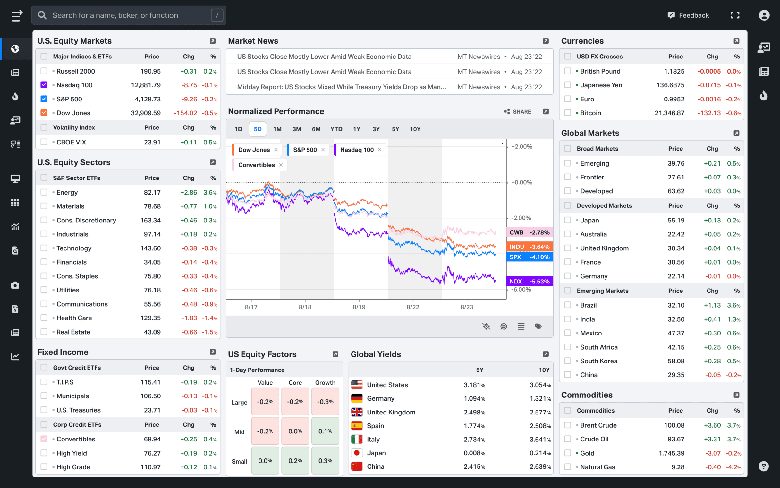
Best for fundamentals, macro, and a Bloomberg-lite feel
Koyfin is often called Bloomberg Lite. It is built for research rather than chart-drawing, with deep financial data, customizable dashboards, screeners, and macro views across global equities, ETFs, commodities, and bonds. It tracks major crypto prices too, though it is not a deep crypto tool. If your version of cross-market intelligence means understanding companies and the macro picture, this is the one.
Key features
• Customizable dashboards and watchlists
• Deep financials, estimates, and global equity and ETF data
• Macro and economic dashboards
• Powerful screeners and side-by-side comparisons
| At a glance | |
| Best for | Fundamentals and macro research |
| Markets | Equities, ETFs, FX, bonds, macro (crypto price only) |
| Free option | Yes |
| Starting paid | ~$39/mo (Plus) |
| Standout | Bloomberg-lite research at low cost |
| Not ideal for | Deep crypto or live technical trading |
| Plan | Price | What you get |
|---|---|---|
| Pricing | ||
| Free | $0 | Dashboards, screeners, 2 years of financials |
| Plus | $39/mo | Unlimited watchlists and screeners, 10y financials, premium news |
| Premium | $79/mo | Mutual fund data, unlimited formulas, model portfolios |
| Advisor Core / Pro | $209-299/mo | Client reporting and custodian integrations |
Annual billing; monthly is higher. Koyfin reworked its plan lineup in 2026, so confirm on Koyfin's pricing page.
| If you want to... | How Koyfin helps |
|---|---|
| Use cases | |
| Research a company's fundamentals | Deep financials, estimates, and filings |
| Track the macro picture | Macro and economic dashboards |
| Compare assets side by side | Custom dashboards and screeners |
| Pros | Cons |
|---|---|
| Pros and cons | |
| Solid permanent free tier | Crypto is price-tracking only, no on-chain data |
| Excellent value versus institutional terminals | Less focused on live technical trading |
| Clean, fast research workflow | Some international data updates end-of-day |
Best for. Fundamental and macro investors who want professional-grade research without a five-figure bill.
Trade Ideas
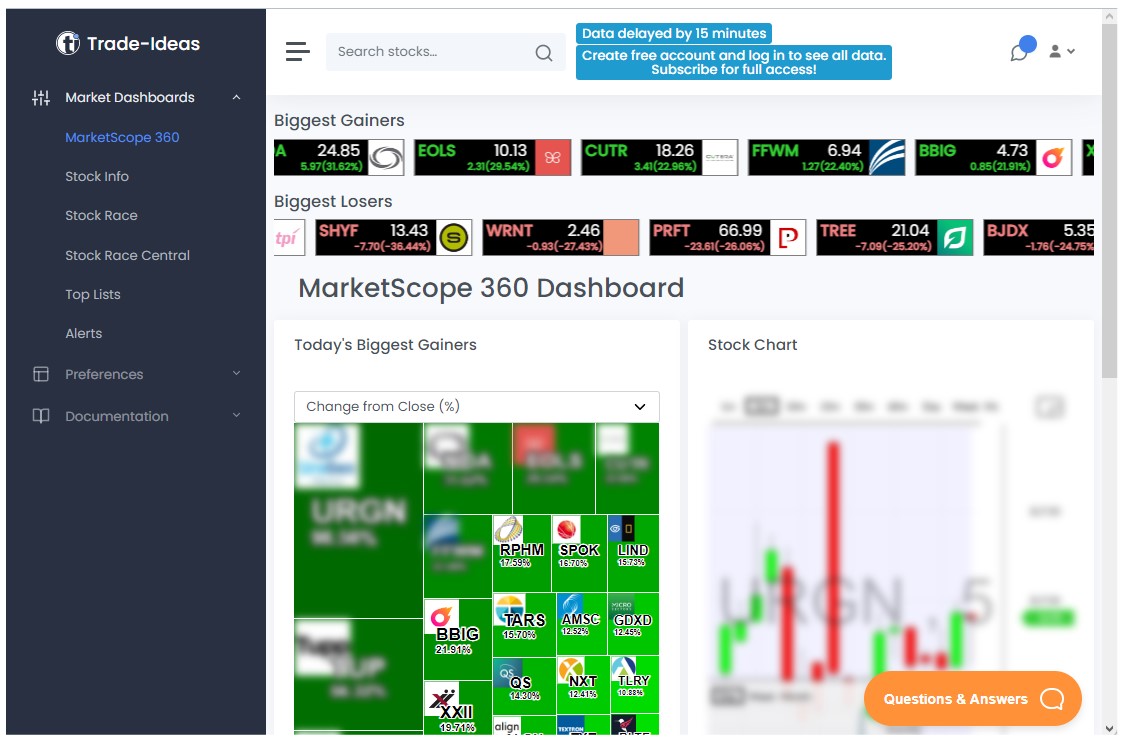
Best for real-time AI scanning (US stocks)
Trade Ideas is the honest version of let an AI find opportunities. Its HOLLY engine scans thousands of US stocks in real time and surfaces setups from hundreds of strategies, which you then evaluate and trade yourself. Reviewers are clear that it amplifies an existing edge rather than creating one, and it does not replace skill. That framing, the opposite of guaranteed daily profit, is what separates a real tool from a scam.
Key features
• HOLLY AI real-time scanning across 8,000+ US stocks
• Hundreds of pre-built, tested strategies
• Backtesting and broker integration on higher tiers
• Stock-racing visualizations and customizable alerts
| At a glance | |
| Best for | Real-time AI scanning |
| Markets | US stocks only |
| Free option | Yes (delayed data) |
| Starting paid | ~$89/mo (Standard, annual) |
| Standout | HOLLY AI real-time scanner |
| Not ideal for | Crypto, forex, or casual traders |
| Plan | Price | What you get |
|---|---|---|
| Pricing | ||
| Par (free) | $0 | Delayed data, visualizations, predefined alerts |
| Standard | $127/mo ($89 annual) | Real-time data, charts, scanning, broker integration |
| Premium | $254/mo ($178 annual) | HOLLY AI signals, backtesting, automated execution |
Annual billing lowers the cost and promo codes sometimes apply. Verify on Trade Ideas.
| If you want to... | How Trade Ideas helps |
|---|---|
| Use cases | |
| Find intraday movers in real time | HOLLY AI scanning 8,000+ stocks |
| Validate a setup historically | OddsMaker backtesting |
| Automate execution with a broker | Brokerage Plus on the Premium plan |
| Pros | Cons |
|---|---|
| Pros and cons | |
| Fast, genuinely useful real-time scanning | Expensive for casual traders |
| Transparent about amplifying, not replacing, skill | US equities only, no crypto or forex |
| Free tier to explore (delayed data) | Best value only if you trade actively |
Best for. Active US-stock day traders who want setups surfaced in real time.
Bloomberg Terminal
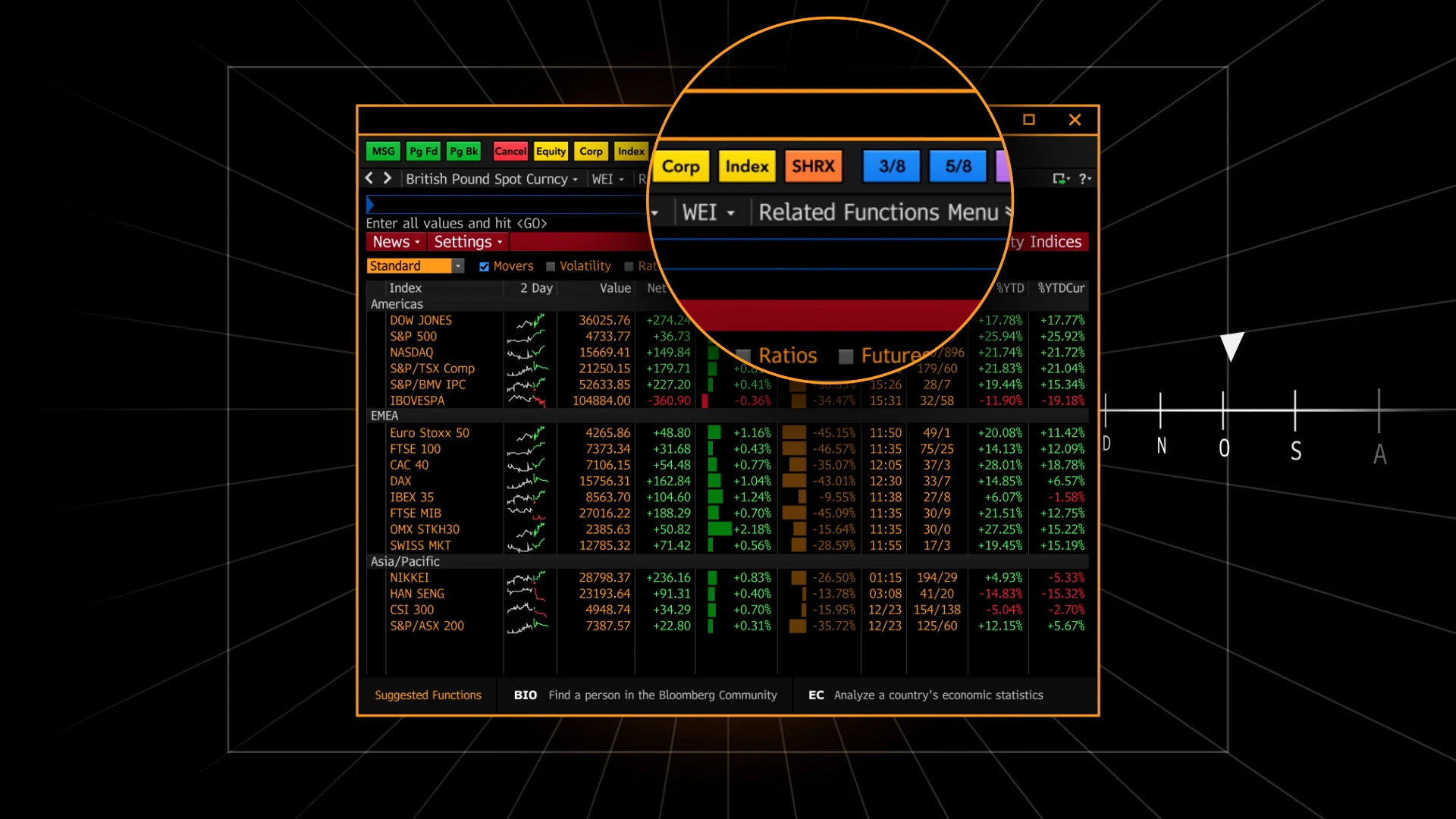
The institutional benchmark, included for context
Bloomberg Terminal is the professional standard for true cross-market intelligence, covering equities, fixed income, FX, commodities, crypto, news, and messaging in one system used by hundreds of thousands of finance professionals. I include it so you can see what the real top of this market looks like, and how far it sits from a consumer passive-income pitch. For almost any individual it is overkill and unaffordable, but it sets the honest ceiling.
Key features
• Comprehensive real-time data across every asset class
• Deep analytics, research, and the Bloomberg messaging network
• Trading and workflow tools used across institutions
• Bundled data with no per-exchange add-on fees
| At a glance | |
| Best for | Institutional all-in-one |
| Markets | All asset classes |
| Free option | No |
| Starting paid | ~$2,665/mo (~$32k/yr) |
| Standout | The professional cross-market standard |
| Not ideal for | Individuals or tight budgets |
| Plan | Price | What you get |
|---|---|---|
| Pricing | ||
| Single terminal | ~$31,980/yr (~$2,665/mo) | Full platform, every asset class |
| Multi-seat (2+) | ~$28,320/yr per seat | Volume pricing for teams |
| Contract | 2-year minimum | No free trial |
Institutional pricing with periodic increases; contact Bloomberg for exact terms.
| If you want to... | How Bloomberg Terminal helps |
|---|---|
| Use cases | |
| Access any asset class instantly | Comprehensive real-time data in one system |
| Communicate across the market | The Bloomberg messaging network |
| Run institutional analytics | Deep built-in analytics and research |
| Pros | Cons |
|---|---|
| Pros and cons | |
| The most complete cross-market platform there is | Five-figure annual cost |
| Trusted institutional data and network | Two-year commitment, no trial |
| Everything bundled, no surprise data fees | Far beyond what individuals need |
Best for. Institutions and professionals who need everything in one trusted system.
Final Verdict: Best Tool for Each Goal
There is no single winner here, because these tools do different jobs. The right pick depends on what you actually want to do. Here is how I would match each goal to a tool.
| Your goal | Best pick | Why |
|---|---|---|
| Best pick for each goal | ||
| Start cheap and chart everything | TradingView | Free tier plus every major market |
| Automate analysis and backtest | TrendSpider | Auto trendlines and no-code backtesting |
| Research companies and macro | Koyfin | Deep data, Bloomberg-lite, low cost |
| Scan US stocks in real time | Trade Ideas | HOLLY AI surfaces setups fast |
| Institutional all-in-one | Bloomberg Terminal | Complete cross-market data and network |
| Focus on crypto research | TradingView + Glassnode or Messari | Charting plus transparent on-chain data |
MY TOP PICK TO START If you want one place to begin, start with TradingView on its free tier, then add a specialist tool, TrendSpider, Koyfin, or Trade Ideas, once you know what you actually need. |
Whatever you choose, the rule that keeps you safe is simple. Real tools hand you information and control. The moment something guarantees daily profit and asks you to recruit friends, you are not looking at an alternative to CrossMarket AI. You are looking at another version of it.
THE RULE THAT KEEPS YOU SAFE Legitimate tools give you data and control and never promise guaranteed returns. If a platform guarantees daily profit and pushes you to recruit others, treat it as a scam, not an alternative. |
Comments