Table of Contents
Picture the scene. It's late, the worksheet is due in the morning, and one problem on the page simply refuses to make sense. That's the exact moment Goth AI is built for: point a phone at the question and a step-by-step answer lands in seconds. Useful? No doubt. The best tool for the job? Not always, and often not even close.
One myth to clear up first, because it sends people down the wrong path: Goth AI was never banned. The app that vanished from U.S. stores was Gauth, a separate homework app caught in the 2025 TikTok-era crackdown. The names rhyme, the apps look alike, and the internet did the rest.
What follows is a straight look at eight alternatives worth a spot on your phone or laptop: three from the same crowded homework-app niche, five stronger picks from the wider field. Each gets a table, the honest upsides, the watch-outs, and who it actually suits. There's no single winner to crown. The point is matching the right tool to the subject, the budget on hand, and one blunt question: learn this, or just get the answer?
In this guide • The 30-second recap of what Goth AI is (and isn't) • The 8 alternatives at a glance • Deep dives with tables and pointers • A scorecard, plus pricing and positioning charts • How to choose • Using these tools honestly |
First, a 30-second recap: what Goth AI actually does
Strip away the branding and Goth AI is a photo-to-answer study app. Snap a picture of a problem, its text recognition reads the equation, an AI model works it out, and back comes a solution, usually with the steps laid out and a chat window for follow-up questions. It stretches beyond pure math into other subjects, though math is clearly where it's most confident. It's often described as a parallel or rebranded cousin of Gauth, sharing much of the same workflow.
It does the job. But three things are worth knowing before leaning on it, and they happen to be the same three things that push people toward alternatives:
• Accuracy isn't guaranteed. Underneath, it leans on the same kind of AI models that power chatbots, and those can be confidently wrong, especially on word problems, messy handwriting, or anything ambiguous. No independent, methodologically transparent accuracy test exists for it.
• The billing surprises people. The loudest complaint in reviews isn't wrong answers, it's being charged again. The subscription auto-renews, and the only way to stop it runs through the phone's App Store settings rather than a button inside the app.
• It can make copying faster than learning. A photo-to-answer loop is a shortcut by design. Used well, it's a tutor; used lazily, it just finishes the worksheet without anything sticking.
Bottom line on Goth AI Handy for a quick, structured explanation in a pinch, but unremarkable. Every tool below beats it on at least one thing that matters: a stronger math engine, a genuinely free tier, broader subjects, better privacy, or a teaching style that helps the material stick. Pick based on which of those counts most for you. |
The 8 best Goth AI alternatives at a glance
Here's the whole field on one screen. Skim it, then jump to the deep dive for anything that catches your eye. ("Free tier" means a version that's genuinely usable without paying, not a one-scan teaser.)
| Tool | Best for | Free tier | Premium* | Platforms |
|---|---|---|---|---|
| Gauth | Multi-subject help plus optional live human tutors | Yes (ad-free, daily cap) | ~$12/mo | iOS, Android, Web, Ext. |
| Photomath | Math, done right, learning the steps | Yes (unlimited basic steps) | $9.99/mo · $69.99/yr | iOS, Android |
| Microsoft Math Solver | Free math, zero friction, no ads | Yes (fully free) | Free | iOS, Android, Web, Edge |
| Socratic by Google | Free help across science and humanities | Yes (fully free) | Free | iOS, Android |
| Mathway | Fast answers across many math topics | Answers free; steps paid | $9.99/mo · $39.99/yr | iOS, Android, Web |
| Symbolab | Advanced and college math, plus practice | Yes (some steps free) | ~$6 to $10/mo | iOS, Android, Web |
| Wolfram|Alpha | Computational power across STEM | Answers free; steps paid | ~$5 to $7/mo | iOS, Android, Web |
| Khanmigo | Actually learning (guided, won't just answer) | Core platform free | $4/mo · $44/yr | Web (Khan Academy) |
*Approximate, as of 2026. Free and paid features and prices shift with promotions, so confirm current pricing in-app before subscribing.
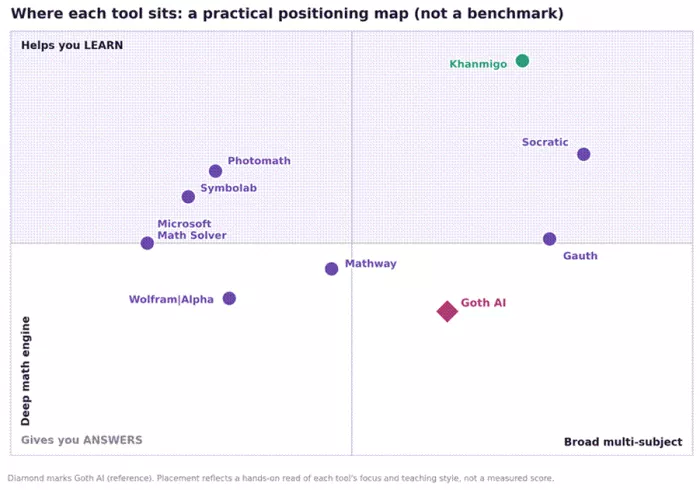
How each tool lands by focus (math depth vs. breadth) and teaching style (answers vs. learning). This is an editorial read, not a measured benchmark.
The deep dives
Same structure for each one: a quick read on what it is, an at-a-glance table, then the honest pros, the things to watch for, and who it's for. Where two tools are close cousins, that gets flagged.
Gauth: the closest sibling, with a human-tutor safety net

If Goth AI feels familiar, that's because Gauth is the app it most resembles. Gauth is a photo-based, multi-subject homework helper that pairs its AI with a network of human experts you can escalate to when the AI's explanation doesn't land. That live-tutor option is the real differentiator, the closest thing on this list to having a person check your work at midnight.
One honest wrinkle worth knowing: Gauth was developed by ByteDance (TikTok's parent) and was pulled from U.S. app stores in early 2025 under a foreign-app law. It has since returned, now listed under a Singapore entity, GauthTech, but the underlying data-and-ownership debate is the same one that follows TikTok, and some U.S. school districts block it on their networks. If that exposure is a concern, Photomath (Google) or Microsoft Math Solver are the cleanest swaps.
| Best for | Students who want broad subject coverage and the option to ask a real tutor |
| Subjects | Math, physics, chemistry, biology, plus writing and more |
| Pricing | Free tier is ad-free with a (shifting) daily solve cap; Gauth Plus from about $12/month |
| Platforms | iOS, Android, Web, browser extension |
| Standout | AI plus 24/7 human experts, animated step-by-step solutions, and a question bank that doubles as flashcards |
| Watch-out | ByteDance-ownership privacy debate; some schools block it; no offline mode |
Where it shines • Genuinely multi-subject, not a math tool wearing a coat • Free tier is ad-free, which is rare for an education app • Escalate to a human when the AI explanation is fuzzy |
Watch-outs • The privacy question is inherited from ByteDance, so weigh it like you weigh TikTok • The free daily cap isn't publicly fixed and can tighten when demand is high |
Photomath: math, done right (and Google-backed)
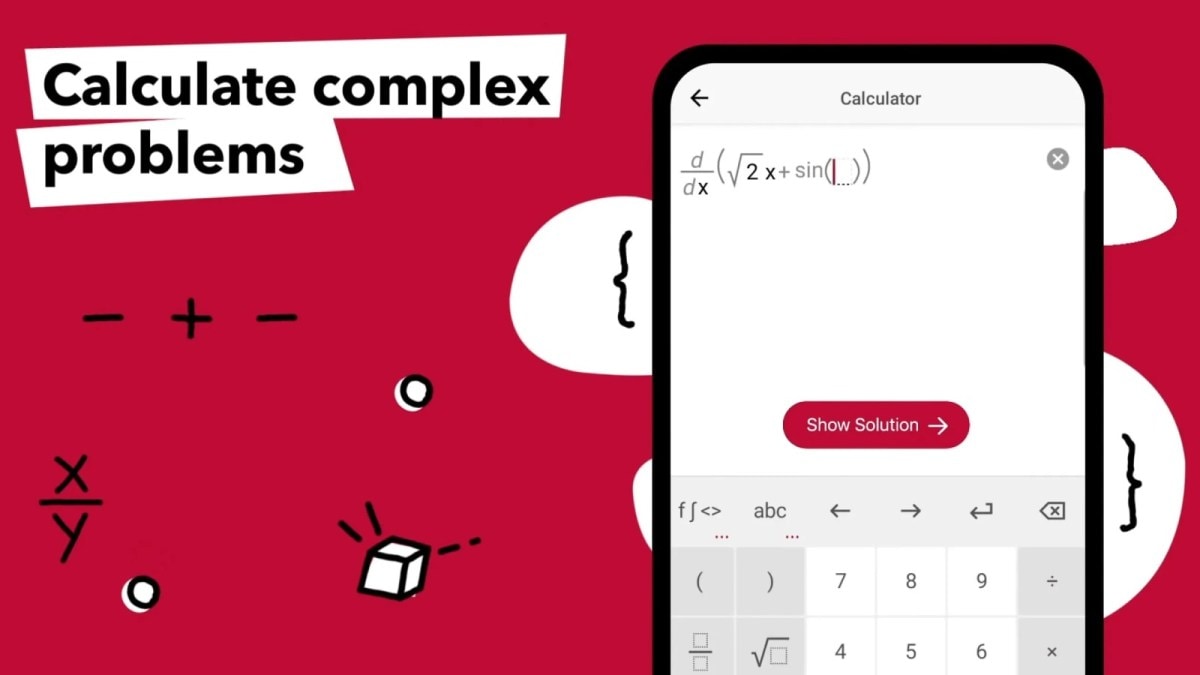
If the problem is specifically math, Photomath is the first one to reach for. It's the app that popularized the point-your-camera-at-a-problem idea back in 2014, Google acquired it in 2023, and it has well over 100 million downloads. The camera reads printed or handwritten equations and shows the solution broken into steps, and crucially, the core step-by-step solver is free and unlimited, which is unusual in this category.
The paid tier, Photomath Plus, is about deeper learning rather than more answers: animated tutorials that walk through each step, textbook-specific solutions, and contextual hints. That's the upsell that's actually worth it when you're prepping for an exam and want to understand the method, not just the result.
| Best for | K-12 through early-college math, especially when you want to learn the steps |
| Scope | Arithmetic, algebra, geometry, trig, calculus, statistics. Math only. |
| Pricing | Free for unlimited basic step-by-step; Plus $9.99/mo or $69.99/yr |
| Platforms | iOS, Android (mobile-first; no full desktop site) |
| Standout | Free unlimited solver, multiple solution methods, and animated tutorials on Plus |
| Watch-out | Math only, so a second app is needed for other subjects; OCR struggles with messy handwriting |
• Why it's a strong upgrade from Goth AI: the symbolic math engine is more reliable, the free tier is more generous, and it's backed by Google rather than a company under privacy scrutiny.
• Real-world fit: a high-schooler checking algebra or trig homework, or a parent who wants to verify their own approach and see a second method.
• Where it ends: no conversational tutor that asks questions, no curriculum, and no help with history, English, or chemistry concepts.
Microsoft Math Solver: the best free option, full stop
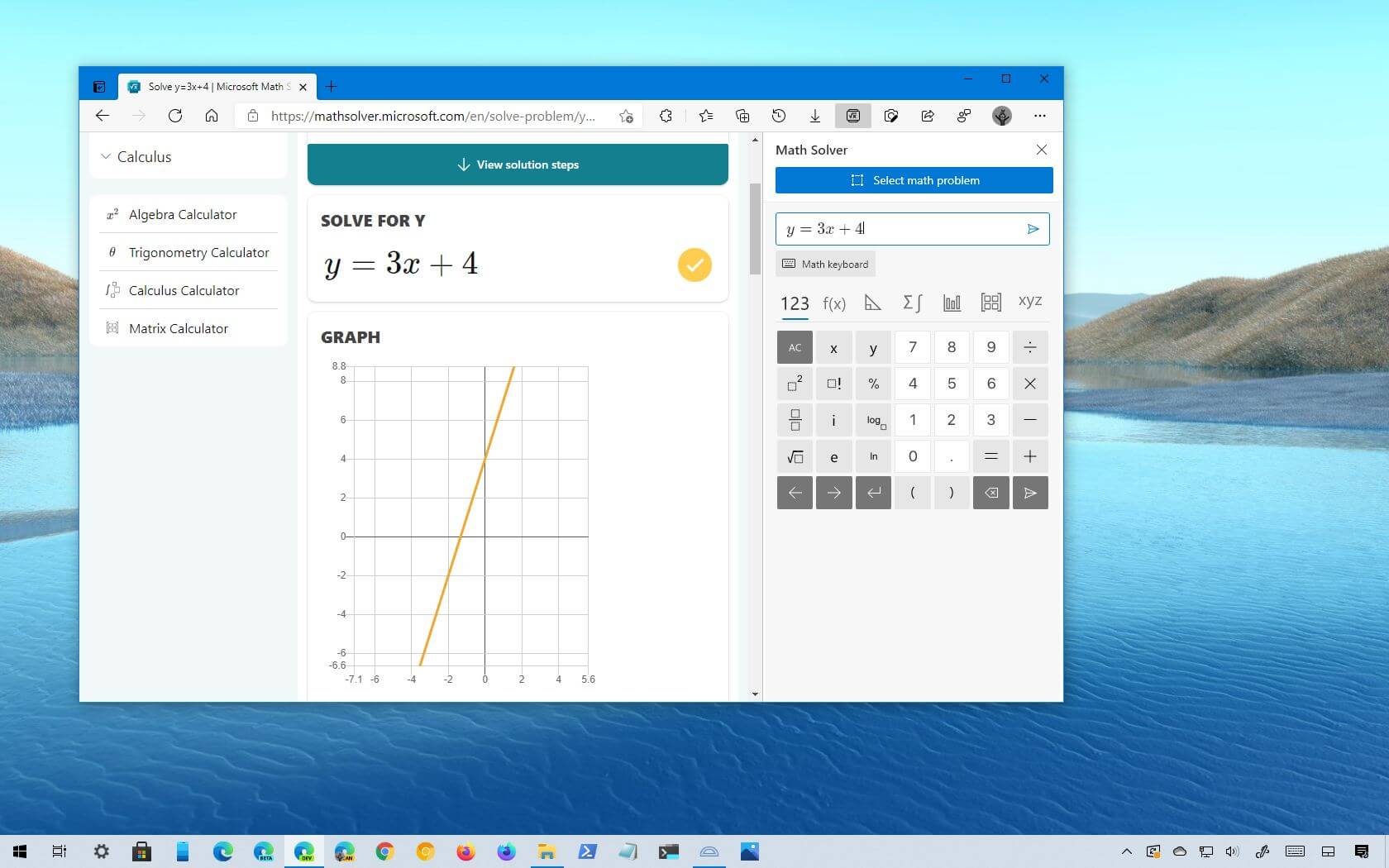
Here's the one nobody markets to you, and it quietly beats most paid apps on value. Microsoft Math Solver is completely free, with no ads and no sign-up wall. Scan a problem, type it, or even draw it on screen, and out come step-by-step solutions, interactive graphs, and links to similar problems and video lessons. It also lives inside the Edge browser, so it's right there when you're working on a laptop.
| Best for | Anyone who wants reliable math help without paying or watching ads |
| Scope | Arithmetic through calculus, plus some basic physics support |
| Pricing | Free, no ads, no account required, no premium tier |
| Platforms | iOS, Android, Web, Microsoft Edge integration |
| Standout | Draw-to-solve input, instant graphing, multi-language support, and genuinely $0 |
| Watch-out | Math-focused, and the interface is more utilitarian than the slick consumer apps |
The honest take If price is the main constraint, start here before installing anything that asks for a card. It handles the vast majority of what students need for math homework, costs nothing, and won't push an upsell mid-problem. The trade-off is breadth and polish: it's a calculator with explanations, not a tutoring experience. |
Socratic by Google: free help beyond math
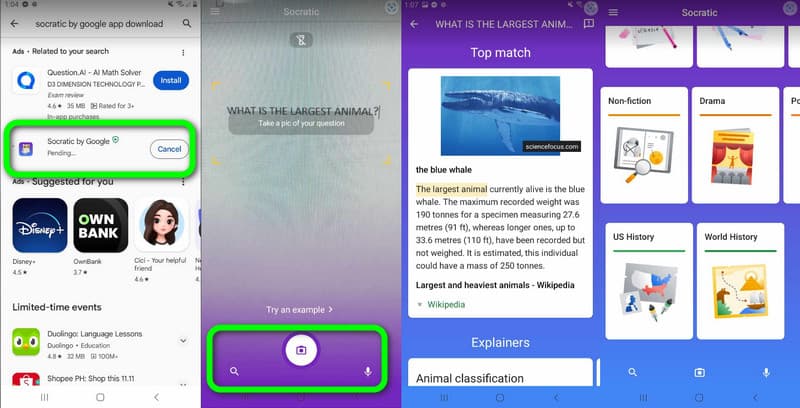
Most apps on this list live and die by math. Socratic is the one that comfortably handles science and the humanities too. Snap a photo or ask by voice, and Google's AI identifies the underlying concept, then pulls curated explanations, diagrams, and relevant YouTube videos. It's built for the moment when even the question is confusing: it explains the idea, not just the answer. And it's completely free.
| Best for | Multi-subject homework: math, physics, chemistry, biology, history, literature |
| Scope | Broad: STEM plus humanities and social studies |
| Pricing | Free, no paid tier |
| Platforms | iOS, Android (also surfaces inside Google Lens homework mode) |
| Standout | Concept-first explanations, curated videos and visuals, great for visual learners |
| Watch-out | Lighter on heavy step-by-step computation, and less precise than dedicated math engines |
Where it shines • The widest subject range of any free tool here • Explains the why with visuals and short videos, not just a final number • Pairs perfectly with a math specialist like Photomath or Microsoft Math Solver |
Mathway: fast answers across a wide math spread

Mathway (now owned by Chegg) is the speed pick. Type a problem or snap a photo and an answer comes back almost instantly across an unusually wide range: basic math, algebra, trig, precalc, calculus, statistics, linear algebra, even some chemistry and physics. The catch is the business model. Answers are free, but the step-by-step working sits behind the subscription, so out of the box it's an answer machine, and turning it into a learning tool costs money.
| Best for | Quick answers across many math (and some science) topics |
| Scope | Pre-algebra to calculus, statistics, linear algebra, plus some chemistry and physics |
| Pricing | Free for answers; Mathway+ $9.99/mo or $39.99/yr for steps |
| Platforms | iOS, Android, Web |
| Standout | Breadth of topics and fast typed input, with a clean interface |
| Watch-out | Free tier shows the answer but not the steps, and the auto-renewal is easy to forget |
• Mathway vs. Symbolab: very similar price and scope. The tiebreaker is that Symbolab shows some steps for free, while Mathway hides all of them behind Plus. If learning the method matters and there's no budget for paying, Symbolab edges it.
• Real-world fit: a student who already understands the method and just needs to check answers quickly across mixed topics.
Symbolab: built for college-level math
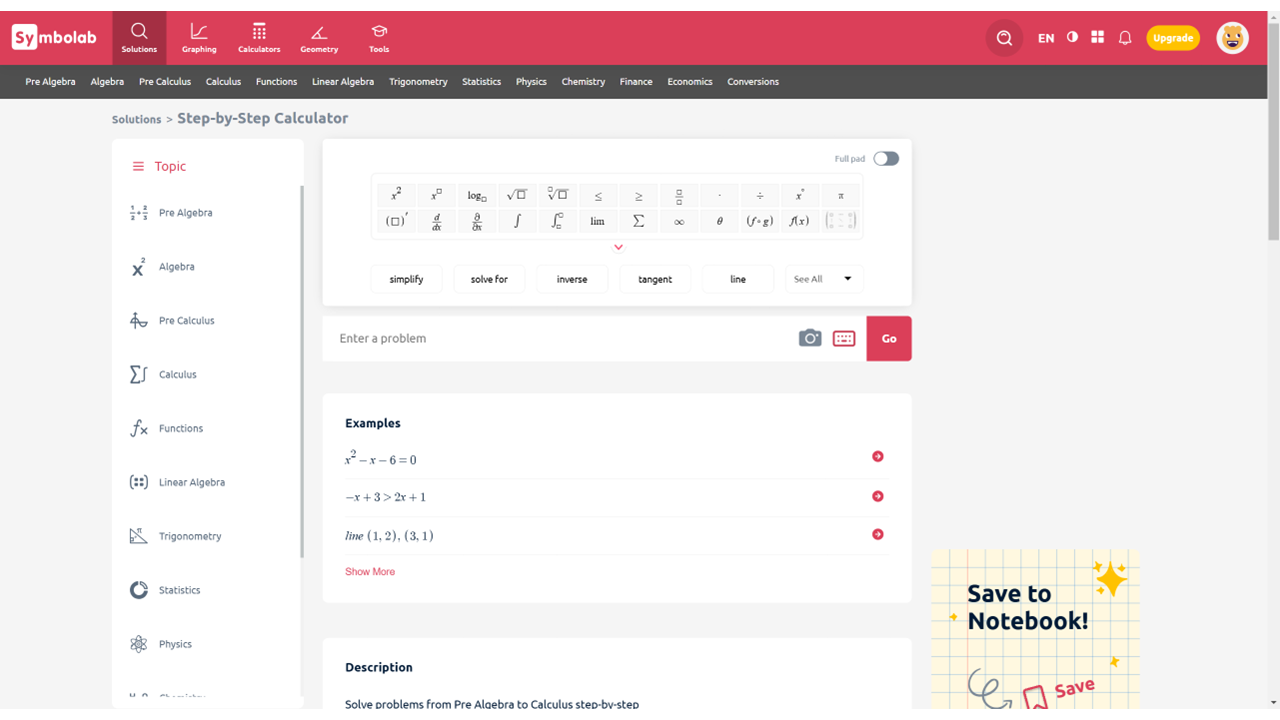
Once calculus, matrices, and the kind of problems that make general apps shrug enter the picture, Symbolab is the specialist. It's used by a huge student base, it covers advanced topics other apps avoid, and importantly, its free tier reveals at least some of the solution steps, so there's learning value without paying. The web experience is its strongest form; the mobile app is a little less polished.
| Best for | Advanced and college math: calculus, integrals, derivatives, matrices, limits |
| Scope | Algebra through advanced calculus, trig identities, geometry, statistics |
| Pricing | Free with partial steps; Pro roughly $6 to $10/mo (promos vary) |
| Platforms | iOS, Android, Web (web is best) |
| Standout | Depth on hard problems, practice problems and progress tracking, and free partial steps |
| Watch-out | Mobile app refreshes and resets more than ideal; some billing-surprise reports, so check the renewal terms |
The honest take For a STEM undergrad, this is often the most trustworthy engine on the list for the genuinely hard stuff. The free tier alone, answer plus some steps, outperforms several paid apps for studying. Just go in with eyes open on the subscription, since a few users report being charged more than expected, so read the fine print before upgrading. |
Wolfram|Alpha: the computational heavyweight
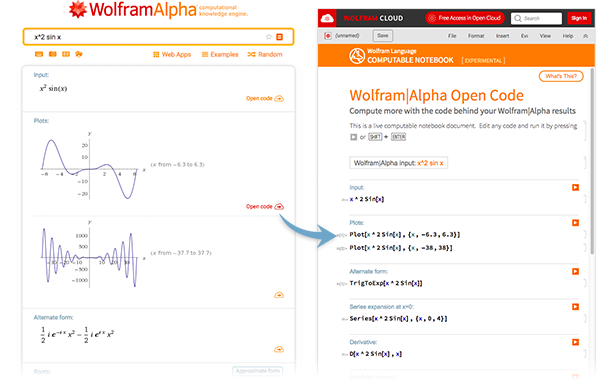
Wolfram|Alpha isn't really a homework app. It's a computational knowledge engine that happens to be brilliant at math and science. Instead of guessing like a chatbot, it computes answers from curated data and algorithms, which makes it the most precise option here for engineering-grade problems, unit conversions, data, and "compute this exactly" questions. Researchers and professionals lean on it for a reason.
| Best for | Precise computation across math, science, engineering, finance, and data |
| Scope | Very broad and very deep on anything computational |
| Pricing | Free for answers; Pro from about $5 to $7/mo for step-by-step |
| Platforms | iOS, Android, Web |
| Standout | Accuracy and breadth; handles questions other tools can't even parse |
| Watch-out | Steeper learning curve; queries sometimes need precise phrasing; steps are paid |
• Pair it like a pro: use Symbolab or Photomath to learn the method, and Wolfram|Alpha when the answer has to be exactly right.
• Where it ends: it isn't a patient tutor and won't coach through concepts conversationally. It answers, it doesn't teach.
Khanmigo: the one that actually teaches

Save this one for when the real goal is understanding, not just finishing. Khanmigo is the AI tutor from the nonprofit Khan Academy, and it's built on a deliberately different philosophy. Unlike a photo-to-answer app, it refuses to just hand over the solution. With "limitless patience" it asks guiding questions and walks you toward the answer yourself, Socratic-style, wired into Khan Academy's full library across math, science, coding, and humanities.
It's also the value standout. Khan Academy's core platform is free forever; Khanmigo costs $4/month or $44/year for learners and parents, and it's free for eligible teachers through a Microsoft partnership. It uses GPT-4 under the hood and includes parental monitoring, so parents can view chats and get alerts. For families, that combination of price, safety, and a learn-don't-cheat design is hard to beat.
| Best for | Students (and parents) who want to genuinely learn, not just get answers |
| Scope | Math, science, coding, humanities, writing, test prep, tied to Khan Academy content |
| Pricing | Khan Academy core free; Khanmigo $4/mo or $44/yr; free for eligible teachers |
| Platforms | Web (Khan Academy account; U.S. billing for learner/parent plans) |
| Standout | Guides instead of answering; parental controls; one subscription covers up to 10 kids |
| Watch-out | Won't just give the answer (by design); learner plan is U.S.-centric and needs a parent account for under-18s |
Why it's the anti-Goth-AI Every other tool here, Goth AI included, is fundamentally answer-first. Khanmigo is the opposite, engineered so the worksheet can't be speed-run. If a parent or teacher worries that homework apps are quietly turning into copying machines, this is the antidote, and at $4/month it's cheaper than most of the apps that just give answers. |
A few honorable mentions
Not every good tool needs a full breakdown. These are worth a look depending on the situation:
• Question.AI: a multi-subject AI homework chat in the same lane as Goth AI. Fine as a free-with-limits second opinion, but it carries the same "verify the answer" caveat as any chatbot-based solver.
• Julius AI: not a homework app, but excellent when the "math" is really data analysis and statistics; it reasons over spreadsheets and datasets and shows its work.
• Quizlet: the study-habits pick. It doesn't solve problems for you; it helps you remember them with flashcards, practice tests, and spaced repetition. Great paired with any solver above.
• Cymath and Mathos: lightweight, free-leaning math solvers worth trying if the bigger names don't click.
What you'll actually pay
Cost is often the deciding factor, so here's the premium pricing side by side. The headline: three of the strongest options (Microsoft Math Solver, Socratic, and Khan Academy's core platform) are free, and the best learn-don't-cheat tool, Khanmigo, is also one of the cheapest at $4/month.
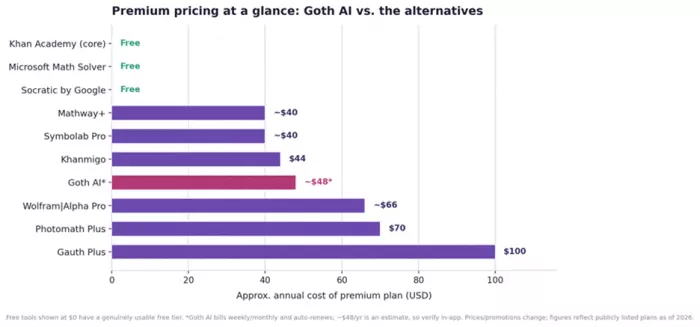
Approximate annual cost of each premium plan, as of 2026. Free tools shown at $0 have a genuinely usable free tier. Goth AI's figure is an estimate, since it bills weekly or monthly and auto-renews, so verify in-app.
A money-saving habit Most of these subscriptions auto-renew through the app store, and "forgot to cancel" is the single most common complaint across the whole category. For a one-exam crunch, set a calendar reminder and cancel the moment it's done. That's how a one-week need quietly becomes a year-long charge. |
The scorecard
All eight alternatives, ranked by overall verdict, with Goth AI added at the bottom as a baseline. The verdict score weighs value, accuracy, learning support, and trustworthiness, so a tool can carry a glowing app-store rating and still land mid-table if it nudges users toward copying or hides the useful parts behind a paywall.
| Tool | Best for | User rating* | Verdict (out of 5) |
|---|---|---|---|
| Photomath | Math, with steps that teach | ≈ 4.5 ★ | 4.7 |
| Microsoft Math Solver | Free math, no ads, no sign-up | ≈ 4.6 ★ | 4.6 |
| Khanmigo | Learning, not just answers | 4.0 ★ (Common Sense) | 4.6 |
| Socratic by Google | Free help across many subjects | ≈ 4.5 ★ | 4.4 |
| Symbolab | Advanced and college math | ≈ 4.4 ★ | 4.3 |
| Wolfram|Alpha | Exact computation, STEM | ≈ 4.6 ★ | 4.3 |
| Gauth | Multi-subject plus live tutors | ≈ 4.8 ★ | 4.1 |
| Mathway | Fast answers, many topics | ≈ 4.6 ★ | 4.0 |
| Goth AI (baseline) | Quick photo answers | ≈ 4.6 ★ | 3.3 |
*User ratings are approximate App Store and Google Play averages and move over time. Verdict scores reflect an editorial assessment of all-round value, not raw popularity.
How to choose: match the tool to the moment
Skip the "it depends" non-answer. Here's a straight mapping from what you need to what to open:
| If you want… | Open this |
|---|---|
| Free math help, no ads, no sign-up | Microsoft Math Solver |
| Free help across science and humanities too | Socratic by Google |
| Math, done right, with steps you'll learn from | Photomath (free tier is plenty for most) |
| To actually learn and avoid just copying | Khanmigo, or Photomath Plus |
| College calculus, matrices, hard STEM | Symbolab or Wolfram|Alpha |
| Multi-subject help plus a human tutor backup | Gauth |
| Fast answers across many topics (you know the method) | Mathway |
| To remember it for the test, not just solve it | Quizlet (alongside a solver) |
The short version: for a student on a budget, the combination of Microsoft Math Solver (math) plus Socratic (everything else) plus Khanmigo ($4/mo, for the times learning is the actual goal) covers almost everything Goth AI does, for little or no money, with better accuracy and no ByteDance question.
Using these tools honestly (the part most articles skip)
Worth saying plainly, because this is where these apps either help or quietly hurt: a solver is only as good as the way it's used. The same app can be a brilliant tutor or a copying machine, and the difference sits entirely on your side of the screen.
• Solve it, then check it, not the reverse. Try the problem first, then use the app to verify and to spot where things went wrong. That's learning. Photographing every question and copying the output is just outsourcing the thinking.
• Always sanity-check the answer. Every chatbot-based solver, Goth AI included, can be confidently wrong. Treat outputs as a strong hint, not gospel, especially on word problems and anything with messy handwriting.
• Know that schools increasingly detect this. Submitting AI output verbatim is risky and, more to the point, defeats the purpose of the homework. Use these tools to understand the method so it can be reproduced on a test.
• Mind your data. These apps upload photos of your work, sometimes with a name attached. When privacy matters, lean toward tools from companies with a stronger track record (Google's Photomath and Socratic, Microsoft's solver, the nonprofit Khan Academy).
• Watch the subscription. Auto-renewal is the genre's favorite trap. Cancel deliberately once the need has passed.
The healthiest setup Use a free solver to check the work, a guided tutor (Khanmigo) when a concept needs to truly click, and a study tool (Quizlet) to lock it in before the exam. That trio costs at most $4/month and turns "AI homework help" from a shortcut into an actual learning system. |
The bottom line
Goth AI works, but it's a generalist with a couple of real flaws: unverified accuracy, a billing model people resent, and a design that makes copying as easy as learning. Every alternative here beats it on something that matters.
AI homework helpers work best alongside real teaching, so for younger students who need structured support in math or reading, live online lessons with a platform like Brighterly can fill the gaps that AI tools leave behind.
If only one thing sticks, make it this: go free with Microsoft Math Solver and Socratic, reach for Photomath when math gets serious, lean on Symbolab or Wolfram|Alpha for advanced STEM, keep Gauth in mind for the times a human tutor on standby would help, and use Khanmigo when the goal is to truly understand the material. Match the tool to the moment, double-check the answers, and cancel the subscriptions that stop earning their keep.
Comments