Classroom 15x usually turns up the same way for most students, as the result of a quick hunt for something to play during a gap between classes. What makes it worth a second look is not one standout game. It is how little the site asks for before letting anyone play. No account, no download, no spinning loader that never finishes. On a locked-down school Chromebook, a single click on a title loads the game right inside the browser. That sounds basic, but a surprising number of game sites trip over exactly that, which is enough to earn Classroom 15x a closer inspection.
A full week of hands-on testing went into this review, spread across a school-issued machine and a personal laptop. That covered clicking through most of the alphabetical directory, loading games on both networks, scrolling the comment threads under each title, and watching how the pages react when a game stalls or a tab goes to sleep. What follows is the honest version: what works, what gets in the way, and whether the site deserves a bookmark.
| Classroom 15x at a glance | |
| What it is | A browser-based hub that links out to free unblocked games for Chromebooks and school networks |
| Cost | Free, no account required |
| Install needed | None, everything runs in the browser tab |
| Best for | Quick single-session play on a school or work laptop |
| Standout features | Alphabetical game directory, Quick Game of the Day, fullscreen play, per-game comment threads |
| Main drawback | Unmoderated comment sections and no real learning tools despite the classroom framing |
What Classroom 15x actually is
Strip away the branding and Classroom 15x is a curated launcher. It gathers a long list of lightweight browser games into one tidy page and gives each one its own screen with a play window, a controls guide, a fullscreen button, and a discussion box. The games themselves are the familiar web titles that show up across the wider internet, and the site is upfront about this. Each game page ends with an "Originally at" line that links back to the game's real source. So the site is not pretending to have built these games. It is organising them.
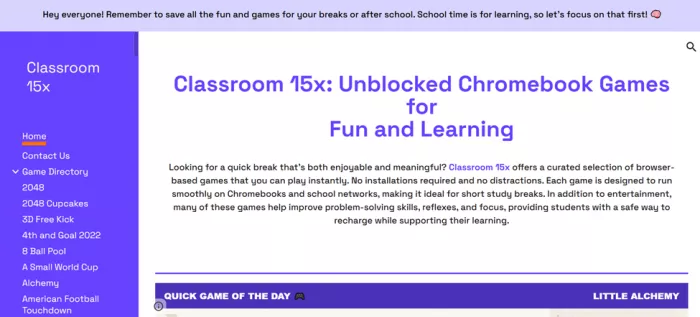
The homepage sets the tone with a pinned banner reminding visitors to keep the fun for breaks and after school, with a line that school time is for learning first. It is a small touch, but it signals that the site knows exactly who its audience is and roughly how it expects to be used.
Getting started: how it works
There is no onboarding and no friction, which is the whole point. Here is the full flow from landing on the page to playing.
| 1 | Open the site in any browser 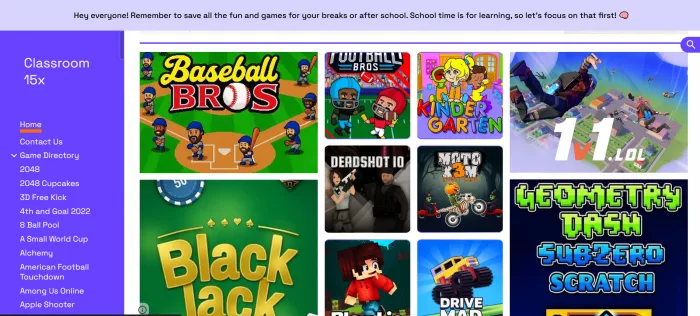 |
| 2 | Pick a game from the sidebar directory  |
| 3 | Read the control box, then play 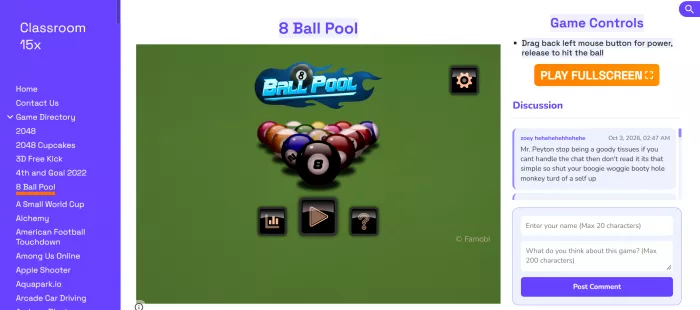 |
| 4 | Go fullscreen when needed  |
The game library
The directory runs long and leans heavily toward the quick, pick-up-and-play category rather than anything that needs a weekend to finish. Testing bounced between sports titles, io shooters, physics driving games, and the classic puzzle staples. Here is a representative slice of what is on offer and the kind of break each one fits.
| Game | Type | Good for |
| Baseball Bros | Arcade sports | Fast two-minute rounds |
| Football Bros | Arcade sports | Head-to-head bursts |
| 1v1.lol | Build and shoot | Reflex and aim practice |
| Deadshot.io | Online shooter | Matchmaking play |
| Bloxd.io | Sandbox multiplayer | Longer sessions |
| Moto X3M | Physics stunt racing | Level-by-level runs |
| Drive Mad | Physics driving | Trial-and-error puzzling |
| Geometry Dash Subzero | Rhythm platformer | Short, punishing retries |
| Blackjack | Card game | Low-key solo play |
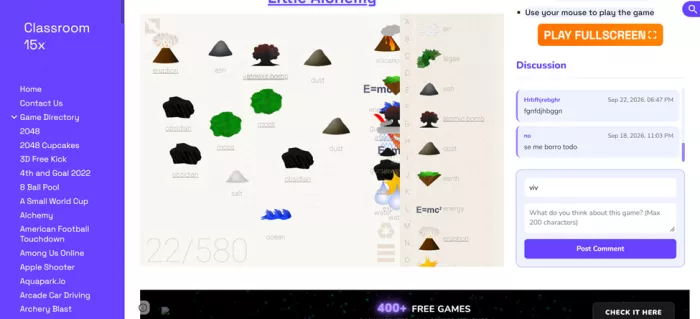
| Little Alchemy | Combination puzzle | Slow, relaxed thinking |
| 2048 and 2048 Cupcakes | Number puzzle | Casual focus breaks |
| Apple Shooter, Archery Blast | Aim mini-games | One-screen challenges |
The spread is wide, but it helps to be clear-eyed about it. These are entertainment games first. The homepage pitches some of them as helping with problem-solving, reflexes, and focus, and a few genuinely do nudge those skills. Little Alchemy rewards patient experimentation, 2048 is pure spatial planning, and physics racers like Drive Mad teach a player to read momentum. Most of the sports and shooter titles, though, are there to be fun and nothing more. This is not a learning library. It is a well-sorted arcade.
Features that stood out
A launcher lives or dies on the little things around the games. These are the parts of Classroom 15x that actually changed how it gets used.
Discovery Quick Game of the Day The homepage spotlights one rotating pick. During testing it surfaced Little Alchemy, a smart choice for killing time without needing fast reflexes. | Navigation Alphabetical directory Everything sits in one scrollable sidebar in A to Z order. It is old-fashioned and it works. The full catalogue is never more than a scroll away. |
Play comfort Fullscreen button One orange button hides the page and gives the game the whole screen. On a small Chromebook display that matters more than it sounds. | Clarity Printed controls Each page lists the exact keys before play starts. No guessing which key crouches or slides, which removes the usual first-round fumble. |
Community Per-game discussion Every game has its own comment box where visitors drop short notes and dates. It gives the pages a lived-in feel, with the caveats below. | Honesty Source attribution Each page credits where the game originally came from and links out to it, so the official version is always easy to find. |
Performance on a Chromebook and a school network
This is the test that really matters for a site like this, so it was run on purpose. On a school-issued Chromebook over the building network, the pages loaded cleanly and the lighter games started almost instantly. The puzzle and card titles, Blackjack, 2048, Little Alchemy, were the smoothest and the least likely to hit a snag. The heavier online titles such as Deadshot.io and Bloxd.io took longer to connect and are the ones most likely to depend on whether a network blocks their traffic, since they phone home to their own servers for matchmaking.
On a home laptop everything was quicker and steadier across the board, which is expected. The honest takeaway is that lightweight single-player games are the sweet spot here. On an aggressive filter, the multiplayer io games are the first to struggle, not because of the launcher but because of what those games need to run.
| A fair warning. The site itself reminds visitors to keep games for breaks and after school. That is good advice, not just a disclaimer. Many schools and workplaces block sites like this on purpose, and using one during class can run against a school's device policy. Treat it as a break-time tool, not a lesson-time one. |
The honest pros and cons
After a week of use, here is where the verdict landed. This list sticks to things that actually came up in testing rather than a generic checklist.
What works
| What holds it back
|
Is it safe to use?
In practical terms, the launcher itself is a plain web page and the games are the same ones hosted across the wider web, with their sources credited. The part that needs a sensible eye is the discussion box under each game. These comment sections accept open, unfiltered posts from anyone, and a quick scroll turns up the usual mix of random chatter, off-topic lines, and the occasional comment a child should not be reading. There is no sign of active moderation. For a younger student, that is the piece to watch, and the simple fix is to ignore the comments and just play.
The bigger safety question is not technical, it is about rules. A tool built to slip past school filters exists in a gray area by design. Nothing in the library is harmful, but the whole category runs against the controls schools put in place. The site's own banner nudges toward break-time use, and that is the line worth respecting.
Who it is really for
Great fit The short-break player A two-minute reset between tasks on a laptop that blocks the app stores is exactly the use case the site is built for. | Decent fit The casual puzzler Fans of 2048, Little Alchemy, and card games get the most reliable experience, since the light titles perform best. | Poor fit The serious gamer Anyone after depth, saved progress, or demanding graphics should look elsewhere. This is a quick-hit collection, nothing more. |
Tips for getting the most out of it
A few small habits make the site noticeably better to use day to day.
- Lean on the search icon rather than scrolling the whole sidebar when a specific game is already in mind.
- Favour the single-player puzzle and card games on a strict school network, since they almost always load.
- Hit fullscreen before starting anything fast-paced, which keeps the ad banners and sidebar out of the play area.
- Check the Originally at link if a game misbehaves, because the source version sometimes runs more smoothly.
- Keep sessions short and save them for free periods so the site stays a break-time habit rather than a classroom distraction.
Final verdictAfter a week of real use, Classroom 15x earns a modest but genuine thumbs up as exactly what it is, a clean, no-nonsense launcher for quick browser games. The parts worth praising are the small ones. Controls are spelled out before a game starts, the fullscreen button clears the clutter, the daily pick occasionally surfaces a title worth trying, and crediting every game's source is an honest touch. On a locked-down Chromebook, the light puzzle and card games loaded fast and ran without complaint, which is more than a lot of sites in this space manage. It is not flawless. The unmoderated comment threads are the weakest link, the learning angle is more marketing than reality, and the heavier online games are at the mercy of the network. But taken at face value, as a free, instant, break-time arcade that admits school comes first, it does that job well. It is worth a bookmark for the short breaks, with the games kept where the site itself suggests, on personal time rather than class time. Rating: 7.5 / 10 |
Comments