The state of AI note-taking in 2026
Meeting notes used to be a personal problem. Cryptic bullet points, half-finished action items, and that one sentence from Tuesday's call that read like a riddle by Thursday. AI note-taking tools have spent the last two years closing exactly that gap, and most of them now actually deliver.
After testing the most talked-about tools across real meetings, research sessions, and client calls, eight earned their place. A few popular names did not. What follows is the honest version: real pricing as of May 2026, real strengths, and real friction points worth knowing before any subscription.
What's new in 2026
The category has matured fast. Transcription accuracy on clean single-speaker audio now sits between 95 and 98 percent across the leading tools, dropping closer to 85–92 percent on noisy multi-speaker calls with accents or technical vocabulary. Speaker identification, once the weakest link, handles similar-sounding voices reliably enough to trust for most workflows.
Two structural shifts matter more than feature lists. First, bot-free recording moved from niche to mainstream. Granola, Jamie, and tl;dv all now capture meeting audio directly from the device, with no visible participant joining the call. Second, native search and chat over the entire meeting archive is becoming the new baseline. Asking a tool a plain-English question like “what did the client say about pricing last quarter?” is no longer impressive. It is expected.
How AI note-takers work
Despite the marketing variety, almost every tool in this category follows the same five-stage pipeline. Audio is captured, either by a bot in the meeting or silently from the device. A speech-to-text engine produces the raw transcript. A diarization model separates speakers. A large language model then turns that raw text into a clean summary, action items, and topic tags. Finally, the structured output is pushed wherever it is needed: a Slack channel, a CRM, a Notion page, or a personal inbox.
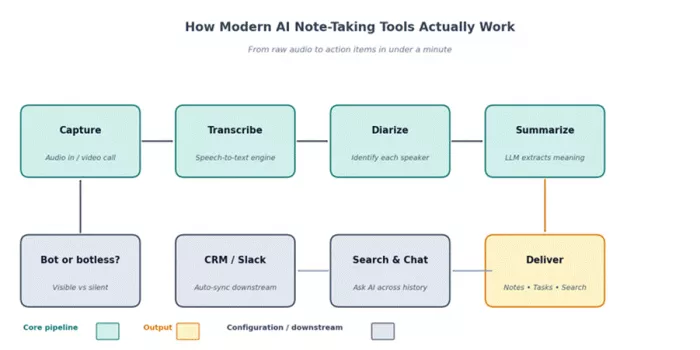
Figure 1: The shared pipeline behind nearly every AI note-taking tool in 2026.
Where tools genuinely differ is not in the steps themselves but in how each stage is implemented. Some have proprietary speech models tuned for industry vocabulary. Others rely on Gemini or Whisper variants. The quality gap shows up most clearly in messy real-world conditions: heavy accents, overlapping speech, and acronym-rich technical jargon.
The 8 best AI note-taking tools
Out of more than twenty tools tested, eight kept earning their place on real work. The picks cover three workflows: live meetings, source-grounded research, and personal or team knowledge bases. Each entry includes the standout strength, the honest weakness, and the user it fits best.
Otter.ai
Otter remains the long-standing reference point in this space, and for good reason. The real-time transcription experience is still industry-leading: words appear on screen as people speak, slides are auto-captured during screen shares, and the searchable archive holds up well over months of meetings.
The 2026 catch is the Pro plan minute cut. Otter quietly trimmed Pro from 6,000 to 1,200 monthly minutes without dropping the price, which means anyone running five or more daily calls now burns through the allowance in roughly two weeks. Language coverage also remains narrow, limited to English, French, and Spanish, so multilingual teams will quickly need a second tool.
| Best for | Real-time captions, lecture and interview transcripts, English-first teams |
| Free plan | 300 min/month, 30 min per session, 3 lifetime imports |
| Paid plan | Pro $8.33/mo (annual) • Business $19.99/user/mo (annual) |
| Watch out | Sharp minute caps; English/French/Spanish only; visible bot joins meetings |
G2 ★ 4.3 / 5 (verified reviews)
Trustpilot ★ 3.8 / 5 (user feedback)
Fireflies.ai
Fireflies is the natural pick when meeting notes need to land somewhere downstream. CRM sync with Salesforce and HubSpot is mature, the AI Apps marketplace handles everything from sales coaching scorecards to automated follow-up drafts, and conversation intelligence features like talk-time analysis quietly add value over a quarter.
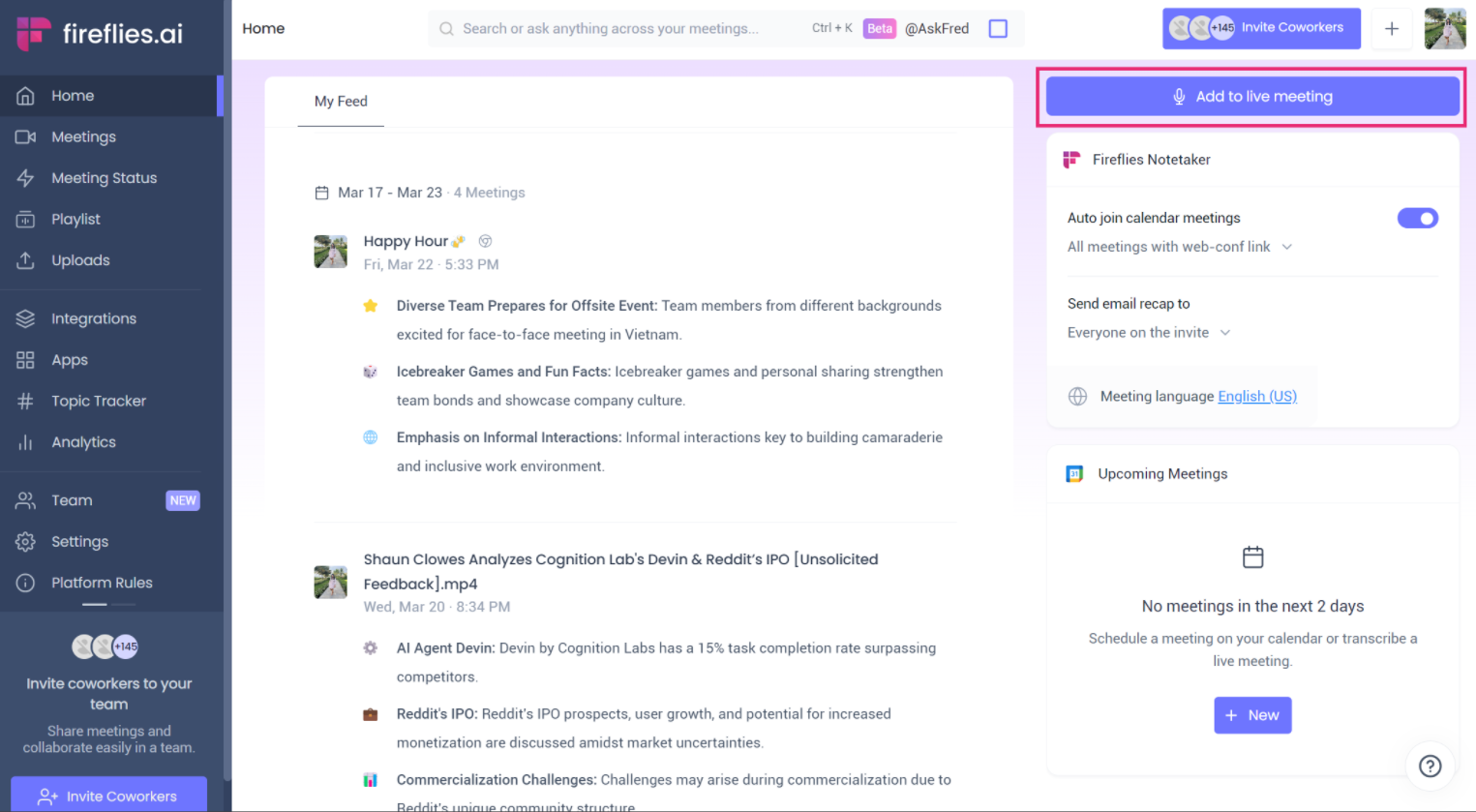
Free transcription is generous on the Pro tier (8,000 minutes annual billed), but the AI credit system is the friction point: even paid users can run out of advanced AI runs in a heavy week. For sales teams who need analytics and integrations more than they need bot-free elegance, Fireflies still represents the best value in this price band.
| Best for | Sales teams, CRM-heavy workflows, multi-platform meeting capture |
| Free plan | 800 min/mo transcription, limited storage |
| Paid plan | Pro $10/user/mo (annual) • Business $29/user/mo |
| Watch out | AI credit system can cap heavy users; visible bot joins meetings |
G2 ★ 4.7 / 5 (verified reviews)
Capterra ★ 4.5 / 5 (buyer reviews)
Fathom
Fathom carries the most generous free plan in the category and, partly as a result, the highest G2 rating , a 5.0 out of 5, across thousands of reviews. Unlimited recording, unlimited storage, and AI summaries with no time limit on the free tier set a bar few competitors match.

Summaries land within roughly 30 seconds of a call ending, which feels nearly instant in practice. Searchable history is thinner than Otter's after a few hundred meetings, and a visible bot does join the call, which can introduce friction in sensitive client conversations. For individual contributors and small teams running Zoom-first workflows, the free tier alone covers most needs.
| Best for | Individuals and small teams wanting unlimited free recording |
| Free plan | Unlimited recordings, unlimited storage, AI summaries |
| Paid plan | Premium $19/mo • Team Edition $29/user/mo • Business $34/user/mo |
| Watch out | Search across many meetings less powerful than Otter; visible bot |
G2 ★ 5 / 5 (6,000+ reviews)
Capterra ★ 5 / 5 (buyer reviews)
Granola
Granola became the favorite of venture capital and founder Twitter for one specific reason: no bot in the meeting. Audio is captured directly from the device, so prospects, clients, and teammates never see a recording notification. The hybrid workflow then pairs the user's own rough notes with the AI transcript, producing summaries that feel hand-edited rather than auto-generated.

After the 2026 pricing restructure, the free Basic tier shrank to 25 lifetime meetings, not monthly, ever. The Business plan at $14 per user per month undercuts most competitors while keeping the bot-free design intact. Mac is the polished experience; the Windows app is still catching up; no mobile app exists yet.
| Best for | Founders, VCs, consultants, and anyone doing sensitive Mac-based calls |
| Free plan | 25 lifetime meetings, 14-day history, no integrations |
| Paid plan | Business $14/user/mo • Enterprise $35/user/mo |
| Watch out | Mac-first; no mobile; no audio playback; restrictive free tier |
G2 ★ 4.7 / 5 (verified reviews)
tl;dv
tl;dv punches above its weight on two specific fronts: multilingual transcription across more than 30 languages, and EU-grade privacy posture. It is GDPR-compliant, SOC 2 certified, offers EU data residency, and does not train its AI on customer data. For teams in regulated industries or anyone outside the English-only orbit, this matters.
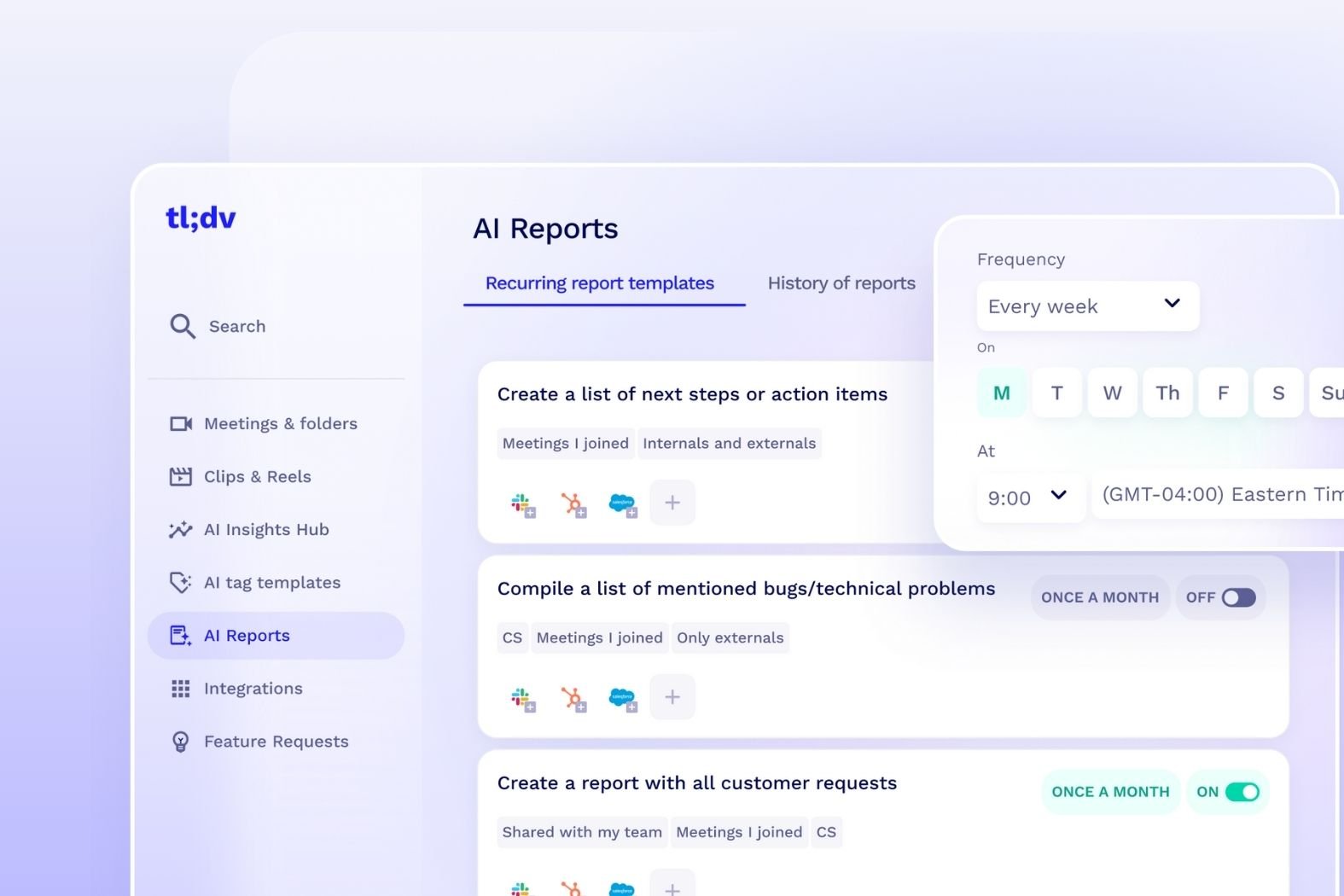
Free recordings are unlimited on Zoom, with AI Moments and clips included. Google Meet users will want the native desktop app: after Google's March 2026 update flagged third-party note-taker bots as a security risk, the desktop capture path is the smoother option. Paid plans start at $18 per user per month.
| Best for | Multilingual teams, EU-based organizations, privacy-sensitive workflows |
| Free plan | Unlimited recordings on Zoom; AI Moments and clips included |
| Paid plan | Pro from $18/user/mo • Business from $29/user/mo |
| Watch out | Best experience requires the desktop app on Google Meet |
G2 ★ 4.7 / 5 (verified reviews)
Google NotebookLM
NotebookLM is the outlier on this list. It does not transcribe meetings. What it does is treat any collection of sources (PDFs, Google Docs, web pages, YouTube videos, audio files) as a private research base that an AI can answer questions against, with citations back to the source. The Audio Overview feature, which turns a stack of documents into a podcast-style conversation, remains genuinely novel.

The free Standard tier covers most personal use, with up to 100 notebooks, 50 sources each, and 50 daily chats. Paid tiers arrive via Google AI subscriptions: Plus at $7.99 per month, Pro at $19.99, and Ultra at $249.99. Limits aside, NotebookLM is the right tool when the work is reading and synthesizing rather than capturing meetings.
| Best for | Students, researchers, analysts working through long documents |
| Free plan | 100 notebooks, 50 sources each, Audio Overviews, Deep Research |
| Paid plan | Plus $7.99/mo • Pro $19.99/mo • Ultra $249.99/mo |
| Watch out | Not a meeting tool; Google ecosystem only; no offline mode |
Notion AI
Notion's value sits entirely in the workspace effect. When meeting notes already live in Notion pages, project trackers already sit in Notion databases, and team docs already follow Notion templates, adding AI to that environment removes friction in a way standalone tools cannot. Ask Notion, the workspace-wide chat, can pull answers across the entire team's knowledge in seconds.
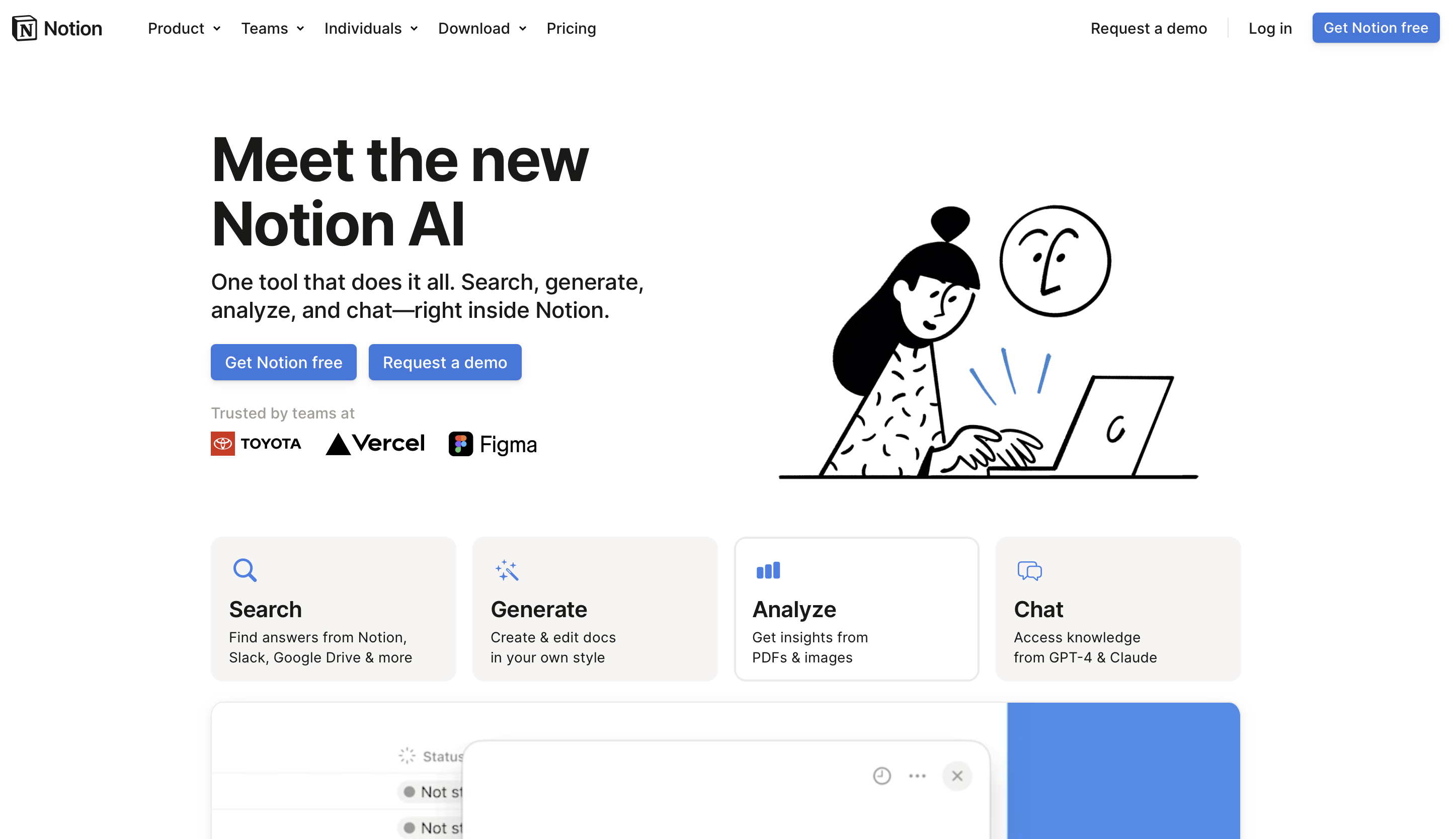
In 2026, Notion folded AI into the Business plan at $15 per user per month annual and removed the $10 standalone add-on. For non-Notion users, that pricing is not competitive against tools like Fathom. For teams already invested in Notion as their operating system, the math swings the other way.
| Best for | Teams already running on Notion who want workspace-native AI |
| Free plan | Limited AI trial on Free and Plus tiers |
| Paid plan | AI is now bundled into Business at $15/user/mo (annual) |
| Watch out | Forced upgrade to Business for full AI; not optimized for live meetings |
Jamie
Jamie is the European answer to the bot-free trend. Built in Germany, GDPR-compliant by design, and able to capture meetings without joining as a participant. The free plan covers all core features including transcripts, summaries, action items, speaker identification, and 100-plus languages, refreshingly transparent in a category fond of fine print.
MCP integrations now connect Jamie's meeting notes directly into ChatGPT, Claude, Cursor, and Windsurf, which is genuinely useful for anyone who already lives in those AI tools. Pricing is in euros and scales with meeting volume rather than per-seat counts, an unusual model that works well for solo professionals and small teams.
| Best for | Privacy-first professionals, EU-based teams, AI-tool power users |
| Free plan | All core features; meeting volume capped |
| Paid plan | Standard, Pro, and Executive tiers (priced in euros, volume-based) |
| Watch out | Smaller integration ecosystem than Otter or Fireflies |
Side-by-side comparison
The honest way to read this table: no single tool wins every column. The right pick depends entirely on how the four columns weight against each other in a given workflow.
| Tool | Best for | Free plan | Starting paid | Standout |
|---|---|---|---|---|
| Otter.ai | Live captions, archives | 300 min/mo | $8.33/mo | Real-time on-screen |
| Fireflies | Sales + CRM | 800 min/mo | $10/user/mo | AI Apps marketplace |
| Fathom | Solo + small teams | Unlimited | $19/mo | Free plan unmatched |
| Granola | Bot-free Mac | 25 lifetime | $14/user/mo | Silent capture |
| tl;dv | Multilingual / EU | Unlimited (Zoom) | $18/user/mo | 30+ languages |
| NotebookLM | Document research | 100 notebooks | $7.99/mo | Audio Overviews |
| Notion AI | Workspace teams | Limited trial | $15/user/mo (Bus.) | Workspace-wide chat |
| Jamie | Privacy-first | Core features | Volume-based | Bot-free, GDPR-built |
Table 1: Pricing reflects annual billing rates published as of May 2026.
Pricing at a glance
Cost only tells half the story without context, but the spread is wider than most people expect. The free options at the top genuinely deliver, while the higher tiers earn their place through specialized features rather than raw capability.
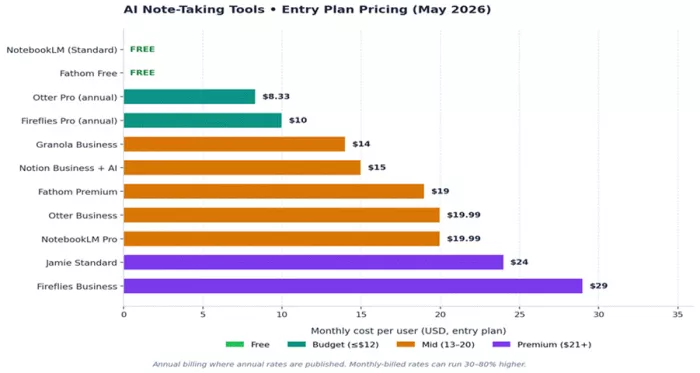
Figure 2: Entry-level paid pricing across the eight tools. Source: each provider's public pricing page, May 2026.
How to pick the right tool
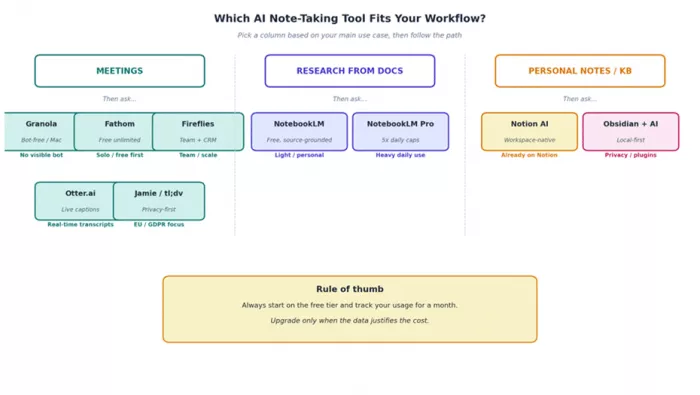
Most buying mistakes in this category come from picking by feature list instead of by workflow. A simple framework helps: identify the primary use case first, then layer on the constraints that actually matter day to day.
Trade-offs worth knowing
Marketing pages tend to skip the friction. A few patterns showed up consistently across testing and deserve a clear mention before any purchase decision.
•Visible meeting bots change behavior. When a participant labeled "Otter Notetaker" or "Fathom" pops into a call, sensitive conversations get quieter. Bot-free tools matter more than they look on paper.
•Minute caps are the new dark pattern. Otter's Pro plan cut from 6,000 to 1,200 monthly minutes without a price drop. Always check the actual ceiling, not just the headline number.
•Accuracy claims are best-case scenarios. The 95-percent transcription numbers come from clean single-speaker audio. Real meetings with accents, jargon, and overlapping speech typically land at 85 to 92 percent. Plan around the lower bound.
•Search quality matters more over time. A tool that nails one summary may struggle to answer questions across hundreds of past meetings. Otter and Fireflies handle this best; Granola and Fathom lag a bit behind.
•AI credits are not transcription minutes. Several tools now meter advanced AI actions separately from raw transcription, which means a paid plan can still hit a wall mid-month.
A note on privacy Workspace plans on tools like Notion AI and tl;dv typically include enterprise-grade data protection, meaning prompts and uploads are not used to train AI models. Consumer plans on the same tools may not carry the same guarantee. For regulated industries, this distinction is worth a careful read of the data processing agreement. |
The verdict
After weeks of running the same workflows through different tools, three picks stood out.
Fathom is the strongest starting point for most people. The free tier alone covers what individuals and small teams actually need, summaries land in under a minute, and the 5.0 G2 rating across thousands of reviews holds up in practice.
For sensitive conversations where a visible recording bot kills the dynamic, Granola wins on experience. Jamie sits in the same territory with a stronger European privacy posture.
For document-heavy research, NotebookLM remains the only tool on this list that turns a stack of sources into a queryable knowledge base with proper citations.
The honest answer is rarely one tool. Most professionals now run two, typically a meeting tool plus a research tool, because no single platform handles both well. Pick the free tier closest to the actual workflow, run it for thirty days, and let the usage data make the upgrade decision.
Comments