Table of Contents
- Key Takeaways
- Four Layers Where Integrations Quietly Break
- Five Connection Patterns, and the Point Where Each One Runs Out
- What Changed With MCP, and Why the 2026 Spec Matters
- A Worked Example: Connecting Four Tools Into One Loop
- Identity Is the Layer That Will Bite You
- Designing for the Day It Breaks
- The Security Problem That Only Appears After You Connect Things
- Observability: You Can't Improve What You Can't See
- A Realistic 30-Day Rollout
- Conclusion: Connect the Work, Not Just the Tools
Most teams don't have an AI problem. They have a plumbing problem.
The usual setup: a chat assistant for drafting, a transcription tool for meetings, a CRM with "AI insights" bolted on, a vector database somebody spun up in a hackathon, and three browser extensions nobody can account for. Each one works. None of them know the others exist. So a human becomes the integration layer, pasting the meeting summary into the CRM and re-explaining account history to the assistant, exporting a CSV so the analytics tool can see what the support tool already knew.
That human-as-middleware pattern costs more than the license fees. Every manual handoff adds latency and drops context. It also creates a version of the truth that exists only in one person's clipboard.
Connecting AI tools properly means something more specific than "they're both integrated with Slack." It means a system where context, identity, and state move between tools without a person in the loop, and where failures are visible instead of silent.
This guide covers the five connection patterns worth knowing, when each is the right call, how the Model Context Protocol changed the economics of integration, and the security failures that appear once your tools can reach each other.
Key Takeaways
- "Integrated" and "connected" are different things. Two tools sharing a Slack channel are not exchanging state.
- Four layers have to line up: transport, identity, schema, and state. Break any one and the integration looks fine until it doesn't.
- MCP has become a common choice for tool-to-model connections. The current spec (2026-07-28) went stateless, which made servers easier to deploy behind ordinary load balancers.
- A2A solves a different problem than MCP. It handles agent-to-agent task delegation, not agent-to-data access. Adoption is real but narrower than the press releases suggest.
- Least-privilege scoping is not optional once an agent can read your email and write to your CRM in the same session.
- Start with one workflow, not one platform. The teams that succeed here connect a single high-friction handoff first and expand from evidence.
Four Layers Where Integrations Quietly Break
Before choosing a tool, know what "talking to each other" requires. There are four distinct layers. Most failed integrations die at layer three or four while everyone debugs layer one.
1. Transport. Can they reach each other at all? HTTP, webhooks, message queues, stdio for local processes. This is the easy layer and the one everyone tests. If transport is broken, you get an obvious error.
2. Identity. Does Tool A have permission to act as you inside Tool B? OAuth tokens, service accounts, API keys, scopes. This layer fails loudly at setup and then silently three months later when a token expires or a scope gets tightened.
3. Schema. Do they mean the same thing by the same words? Your CRM's "account" is a company. Your billing tool's "account" is a subscription. Your support tool's "account" is a login. Pass an ID between them without translation and you get confidently wrong output rather than an error. This is where most AI integrations produce garbage that looks plausible.
4. State. Does the second tool know what already happened? If a workflow retries, does it create a duplicate invoice? If an agent is halfway through a five-step task and the connection drops, can it resume? Statelessness is fine; unmanaged state is not.
A useful diagnostic: when an integration misbehaves, ask which of these four layers you can observe. If the answer is "only transport," you've found the real problem.
Five Connection Patterns, and the Point Where Each One Runs Out
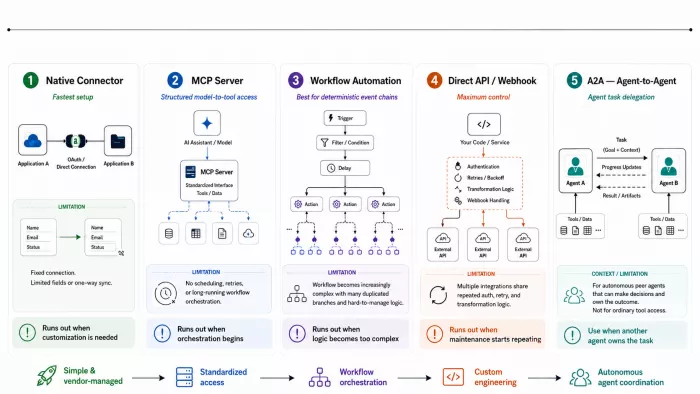
Every integration you build will fall into roughly one of these five shapes. The useful question isn't which is "best." It's which one you've already outgrown. Each entry below ends with the specific symptom that means it's time to move up.
1. The vendor built it for you
Click Connect, approve an OAuth consent screen, done. Your notetaker writes to your docs; your assistant reads your calendar. Somebody at the vendor decided which fields sync, in which direction, on what trigger, and you inherit all of those decisions.
This is the right answer more often than engineers like to admit. If the default path covers your workflow, building a custom version is a hobby, not a project. What you can't do is change its shape. Connectors sync the fields the vendor exposed, typically the obvious ones, and the field you need is frequently a custom property somebody added to your CRM three years ago. There's no negotiating the sync interval either, and one-directional connectors stay one-directional.
You've outgrown it when: you find yourself doing manual cleanup after the sync runs. That cleanup is the gap between the vendor's model of your workflow and the actual one, and it doesn't close on its own.
2. MCP servers
An open protocol that standardises how an AI application reaches external tools and data through one uniform interface, so a single integration works across any compliant client.
The economics are the point. Connecting M models to N tools the old way meant roughly M × N custom bridges, a new one every time you switched assistants or added a system. MCP collapses that to M + N: build one server for your ticketing system and every compliant client can use it, including clients that don't exist yet.
What you're building is a typed contract. The server declares what operations exist, what arguments they take, and what comes back, so the model discovers capabilities rather than guessing at them.
You also get a natural place to enforce permission boundaries. That matters more than it sounds. The server is where you decide the assistant can read tickets but only write comments, and that boundary holds regardless of what anyone types into the chat.
The limit is scope. MCP governs how a model reaches a system. It has nothing to say about running something every Tuesday at 9am, retrying a failed batch job, or moving ten million rows into a warehouse.
You've outgrown it when: you're writing scheduling and retry logic into your server. That's an orchestration layer trying to be born. Give it its own home.
3. Workflow automation platforms
Zapier, Make, n8n, Workato, Power Automate. A visual canvas, hundreds of pre-built connections, and branching, filters, delays, and scheduled triggers on top. Someone in operations can build a working automation in an afternoon without opening a terminal, which is an underrated capability.
These platforms excel at deterministic event chains: a deal moves to closed-won, so generate the summary, post it to the channel, create the onboarding checklist, notify the account manager.
Three things go wrong as you scale. Pricing is usually per-task, so a workflow that was trivially cheap at 200 runs a month becomes a line item somebody asks about at 200,000. Debugging deep chains is painful. When step nine fails, reconstructing what step four passed it means clicking through run history one node at a time. And conditional logic that would be six readable lines of code becomes a canvas nobody wants to inherit.
You've outgrown it when: you start building the same branching subtree in multiple workflows. Copy-paste on a visual canvas has no equivalent of a function.
4. Direct API and webhook integration
You write the code, so you own every decision: payload shape, retry policy, backoff, error taxonomy, transformation logic. Nothing is hidden and nothing is assumed on your behalf.
This is the answer when constraints rule out everything else: unusual auth no platform supports, throughput where per-task pricing stops making sense, compliance rules forbidding data through a third-party processor, or transformation logic too specific for a visual builder.
The cost is permanent. You own this integration through every upstream version change, deprecated endpoint, and rate limit adjustment announced in a changelog nobody reads. Teams consistently underestimate this half; the build is a sprint and the maintenance is a subscription you pay in engineering attention.
You've outgrown it when: you've written the third one and notice they share 80% of the same retry and auth-refresh code. Extract a shared client rather than write a fourth.
5. Agent-to-agent protocols
Google announced A2A in April 2025 and donated it to the Linux Foundation that June. It defines how independent AI agents, potentially built by different vendors on different frameworks, discover each other and coordinate work. Agents advertise capabilities through Agent Cards, and work is modelled as a task with a full lifecycle rather than a single request-response call.
That lifecycle is the substantive difference from everything above. A tool call returns or fails. An A2A task can be accepted, run for an hour, stream progress, and produce artifacts along the way. That's the right shape when the peer system has its own judgement rather than being a passive data source.
Be honest about whether you're in that situation. Adoption on paper is strong: the Linux Foundation reported more than 150 supporting organisations and integration across the major cloud platforms at the one-year mark. But supporter counts and production deployments are different numbers, and critical analyses have pointed to implementation burden and a shortage of use cases that need it. Most teams describing an "agent-to-agent architecture" have one agent and several tools, which is an MCP problem wearing a more interesting name.
You've outgrown the alternatives when: you need to hand work to a system you don't control, that runs longer than a request timeout, and that will make its own decisions about how to complete it. Short of all three, you don't need this yet.
Reading the table
| Pattern | Time to first working version | Where the cost lands | Real ceiling |
| Native connector | Minutes | Vendor's roadmap | Whatever they exposed |
| MCP server | Hours to days | Shared with the ecosystem | High, within model-to-tool scope |
| Workflow platform | Hours | Per-task billing, canvas sprawl | Medium; degrades with logic depth |
| Direct API | Days to weeks | Permanent maintenance | Highest |
| A2A | Weeks | Permanent, plus protocol churn | High, narrow applicability |
Read the second column first. Setup time is what teams estimate; where the cost lands is what determines whether the thing survives a year.
Most functioning stacks run three of these at once: a native connector for calendar, an MCP server for the internal system nobody else integrates with, plus a workflow platform gluing the deterministic parts together. That's a healthy architecture, not an unfinished migration.
What Changed With MCP, and Why the 2026 Spec Matters
Anthropic introduced the protocol in late 2024. It has changed substantially since, including one revision this year significant enough to affect how you deploy.
A server exposes three primitive types: tools (actions the model can invoke), resources (data it can read), and prompts (reusable templates the server offers the client). Build one well for your ticketing system and it works in your IDE assistant, your chat client, and your custom agent without three separate integrations.
The stateless rewrite
The specification is versioned by date, marking the last date backwards-incompatible changes were made. The current version, 2026-07-28, was described by its lead maintainers as the largest revision since launch.
Earlier versions were session-oriented: a client opened a connection, performed an initialisation handshake, and the server held state for that session. Fine on a laptop. At scale it means sticky routing and shared session stores, which is real friction for anyone serving many users.
The 2026-07-28 release moved the core to a stateless architecture. Sessions are gone, the handshake is replaced by a per-request protocol version and a discovery RPC, and any server instance can handle any request. In deployment terms: an MCP server can now sit behind a plain round-robin load balancer. It also brought header-based routing, cacheable list results, Multi Round-Trip Requests to preserve interactive flows without a persistent connection, authorization hardening, and a formal extensions framework with a deprecation policy.
One scale signal from the same announcement: Tier 1 SDKs were seeing close to half a billion downloads a month, with the TypeScript and Python SDKs each past a billion total.
What this means for you: check which spec version a server targets before you commit engineering time. Servers built against 2025-11-25 may need updating depending on which features they use, and the changelog is the document to read.
A Worked Example: Connecting Four Tools Into One Loop
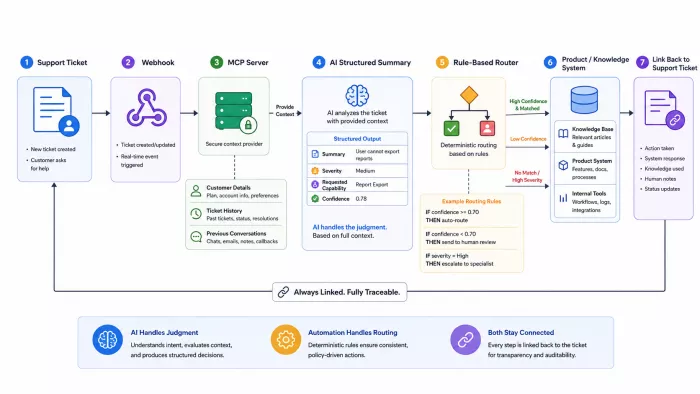
Abstract advice is easy to nod along to and impossible to act on. Here's a concrete workflow, a customer feedback loop, with the decisions made explicit.
The goal: every support conversation mentioning a product gap ends up summarised and routed to the right product owner, with a link back to the original thread.
Step 1. Pick the trigger, not the platform. The event is "a ticket is closed with tag feature-request." That's a webhook. Your trigger determines everything downstream.
Step 2. Give the model read access via MCP, not via paste. The assistant needs the thread, the customer's plan tier, and previous tickets. An MCP server exposes these as resources. The critical choice: read on tickets, write on comments only, never blanket account access. Scope narrowly at the server, because scoping in the prompt is not a security control.
Step 3. Normalise the entity before crossing the boundary. The support tool identifies customers by email; the knowledge base uses account IDs. Do the lookup explicitly and pass both. Never let the model infer the mapping. It will guess, confidently.
Step 4. Constrain the output shape. Ask for fixed fields: summary, requested_capability, severity, existing_ticket_id_or_null, confidence. Free text means the next step has to parse prose, and prose parsing is where reliability goes to die.
Step 5. Route with deterministic logic, not with the model. "If severity is high and confidence clears threshold, post to the product channel and create a linked item. Otherwise queue for review." The model does judgement; your automation does routing. Mixing these is the most common architectural mistake in AI workflows.
Step 6. Write the link back. Knowledge base item links to the ticket; the ticket comment links back. Bidirectional references make the system auditable six months later when someone asks where a requirement came from.
Three patterns in one loop: webhook, MCP server, workflow platform. That's typical.
Identity Is the Layer That Will Bite You
Once tools can act on each other, "who is doing this?" becomes the hardest question in your architecture.
Delegated vs. service identity. OAuth delegation means the agent acts as a specific user, inheriting that user's permissions, with actions attributable to them. A service account gives the agent its own identity and its own permission set.
Neither is strictly safer. They fail differently.
Delegation is right when access must follow the user, when different people should see different data and your existing permissions model is what enforces that. A shared service account in that situation flattens per-user access into whatever the account can reach, usually more than any individual should get. Service identity fits background jobs with no human requester, workflows that must keep running after an employee leaves, and cases where you want one narrow, independently revocable permission set rather than inherited breadth.
The failure mode to avoid is using a broad service account as a shortcut around per-user permissions. Go that route and you have to reimplement authorization at the application layer, which is harder to get right than delegating to the system that already knows the answer.
The confused deputy problem. An agent with legitimate broad access can be manipulated into using that access for someone who shouldn't have it. If your agent can read any document in the company drive and any employee can ask it questions, you have effectively deleted your document permissions model. The fix is per-user permission propagation, not a system prompt asking the model to be careful.
Scope creep in token grants. Vendors default to broad scopes because it reduces support tickets. Read the consent screen. If a calendar integration wants full mailbox access, that deserves a conversation before you click approve.
Token lifecycle. Tokens expire, rotate, and get revoked when employees leave. Build alerting for expired credentials before you need it. The failure mode is a workflow that silently stops while everyone assumes it's fine.
Designing for the Day It Breaks
Every connected system fails. The difference between a good and bad architecture is whether failure is loud.
Idempotency keys. Every write should carry a unique key so a retry doesn't create a duplicate. Without this, a transient network error becomes two invoices.
Dead letter queues. When a step fails after retries, the payload goes somewhere a human can inspect it. Silently dropped events are how teams lose three weeks of data and hear about it from a customer.
Circuit breakers. If an upstream API starts erroring, stop hammering it. Automated retries against a degraded service turn a small outage into a large one and get your key throttled.
Human checkpoints on irreversible actions. External emails, refunds, deletions, publishing. The rule of thumb: if undoing it requires an apology, it needs a confirmation step.
Timeouts everywhere. An agent waiting on a hung request holds a worker slot forever.
The Security Problem That Only Appears After You Connect Things
An isolated AI tool has limited blast radius. A connected one doesn't.
Indirect prompt injection. Your agent reads a support ticket. The ticket body contains text instructing it to forward all recent tickets to an external address. The agent cannot reliably distinguish "data I'm reading" from "instructions I should follow." Both arrive as text in the same context window.
The dangerous combination is specific: untrusted input + access to private data + the ability to communicate externally. Any two are usually manageable; all three together is exploitable. Audit for that combination explicitly. Most teams have at least one and haven't noticed.
Mitigations that hold up:
- Strip or clearly delimit untrusted content before it enters context, and label its provenance
- Remove external-send capability from any agent that reads untrusted input
- Require human approval for outbound communication and irreversible writes
- Log every tool invocation with its arguments, not just the final output
- Prefer allowlists over blocklists for outbound destinations
Server provenance. Because MCP servers are easy to publish, an unvetted server from a random repository is running code with whatever access you granted it. Treat installing one exactly as you'd treat adding a dependency to production. Check the maintainer and pin the version.
Observability: You Can't Improve What You Can't See
Connected AI systems are distributed systems and need the same instrumentation. Log at minimum: which tool was called, with what arguments, by which identity, how long it took, what it returned, and what it cost in tokens. Attribute cost per workflow rather than per API key. Otherwise you get one enormous bill and no idea which automation caused it.
Track a few metrics that predict problems: tool call error rate, p95 latency per integration, retry rate, and percentage of workflows completing without human escalation.
That last one deserves close watching, and the trend matters more than any particular number. What counts as acceptable depends on the stakes. A high intervention rate is fine on irreversible actions you deliberately gated, and a warning sign on a routine workflow you expected to run unattended. If intervention stays flat or climbs while volume grows, you haven't automated the work so much as relocated it.
A Realistic 30-Day Rollout
Days 1–5: Map the handoffs. Write down every point where a person moves information between two tools. Note frequency and error rate. You'll find eight to fifteen. Most are not worth automating.
Days 6–10: Pick exactly one. Choose the handoff that's high-frequency and reversible. Not the most valuable one. The most forgiving one. You're learning your own failure modes here.
Days 11–20: Build it with a human checkpoint. Ship the integration with mandatory human approval before any write. Run it for a week and read every single output. You will discover schema mismatches you didn't anticipate.
Days 21–25: Measure, then remove the checkpoint selectively. If accuracy is above your threshold on low-severity items, auto-approve those and keep the checkpoint for the rest. Confidence thresholds beat all-or-nothing.
Days 26–30: Document and instrument. Write down which credentials it uses, what happens when it fails, and who owns it. An undocumented integration is a future outage with a mystery attached.
Then, and only then, do the second one.
Conclusion: Connect the Work, Not Just the Tools
The real goal of connecting AI tools isn’t to build the most impressive architecture. It’s to remove the manual handoffs that slow teams down, lose context, and make people act as the integration layer. That starts with understanding where integrations actually fail: transport, identity, schema, and state. From there, the right connection pattern depends on the job. Native connectors are ideal when the default workflow is enough. MCP gives models structured access to tools and data. Workflow platforms handle deterministic automation. Direct APIs offer maximum control. A2A becomes useful when independent agents need to delegate and manage longer-running work.
But the technology is only part of the system. Permissions need to stay narrow, outputs should be structured, retries and failures must be visible, and irreversible actions should keep a human checkpoint until the workflow has earned trust. The best place to begin is rarely the most ambitious integration. Start with the repetitive, low-risk handoff someone is already doing manually every week. Connect it, observe it, measure it, and learn from it.
A good AI integration should feel less like adding another tool and more like removing unnecessary work. Once one workflow becomes reliable, traceable, and genuinely useful, build the next one.
Comments